

Build an Image Survey With Pictures as the Answers
Build an image survey where people tap a picture to answer, and every pick lands in a database you own.
Build an image survey that shows my 300 customers three new candle labels and saves each pick in a database.
Trusted by Builders Worldwide
Active Builders Worldwide
Apps Successfully Created
Countries Globally Reached



What Emergent Builds Around Each Picture
Emergent builds the picture grid and a table that counts every pick, and a follow-up prompt changes either one.
Pictures as the answer options
Describe the question and the options, then add a photo for each one. Emergent builds a grid that people answer by tapping a picture, with a short label under every image.
Pick one, pick two, or rank them
Set how people choose: a single favorite, a fixed number such as two of six, or a drag-to-rank order. A follow-up prompt switches the type without rebuilding the survey.
A new image order for each person
The app can show the pictures in a fresh order to every respondent, so the top-left spot goes to a different design each time. Turn it off for any question that needs it.
Every pick saved as a row you own
Each answer is a row in a database you own, with the image picked and any tag you add, like the store each one came from. Count the picks per image without exporting a file.
One question per screen on a phone
Respondents see one question per screen, with the image grid fitted to a phone, and move on with a tap. Emergent puts no cap on responses, so it can go to your whole customer list.
Your domain and an exportable codebase
Publish the survey on your own domain, which is included in Emergent and uses credits. On paid plans, export the full code to your GitHub repository and reuse it for the next test.
How Four Teams Let the Picture Decide
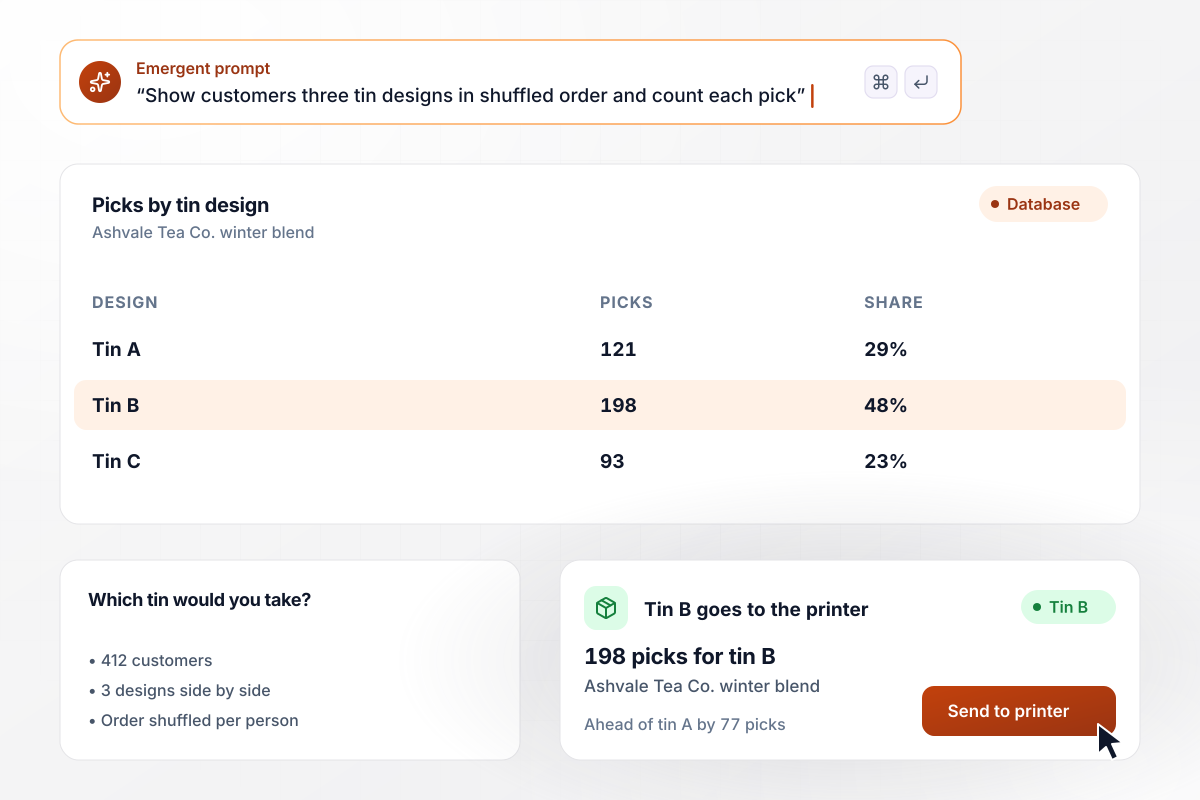
Tin B made it to print with 198 picks
Ashvale Tea Co. needed one tin design for its winter blend and had three. It showed 412 customers the three designs side by side, shuffled for each person, and asked which tin they would take off the shelf. Tin B drew 198 picks, tin A 121 and tin C 93. Tin B went to the printer.
window.awbMockup = { packagingTest: "Show our customers three winter tin designs side by side, shuffled for each person, and ask which tin they would take off the shelf. Save every pick with the date, and show me the count and share for each design as the picks come in.", logoRanking: "Send our 210 rowing club members four logo drafts and let them drag the drafts into order from favorite to least. Count how many members put each draft first, and show the totals to the board once voting closes.", menuVote: "Show our customers photos of six candidate cakes for the holiday menu and let each person pick exactly two. Count the picks per cake, rank the cakes, and mark the top two so I know which ones go on the December menu.", photoQuiz: "Build a 12-photo quiz for our new hires where each question shows a fastener and asks them to name it. The pass mark is 10. Send the store manager the results in Slack and list anyone who scored under 10 for a retake." };
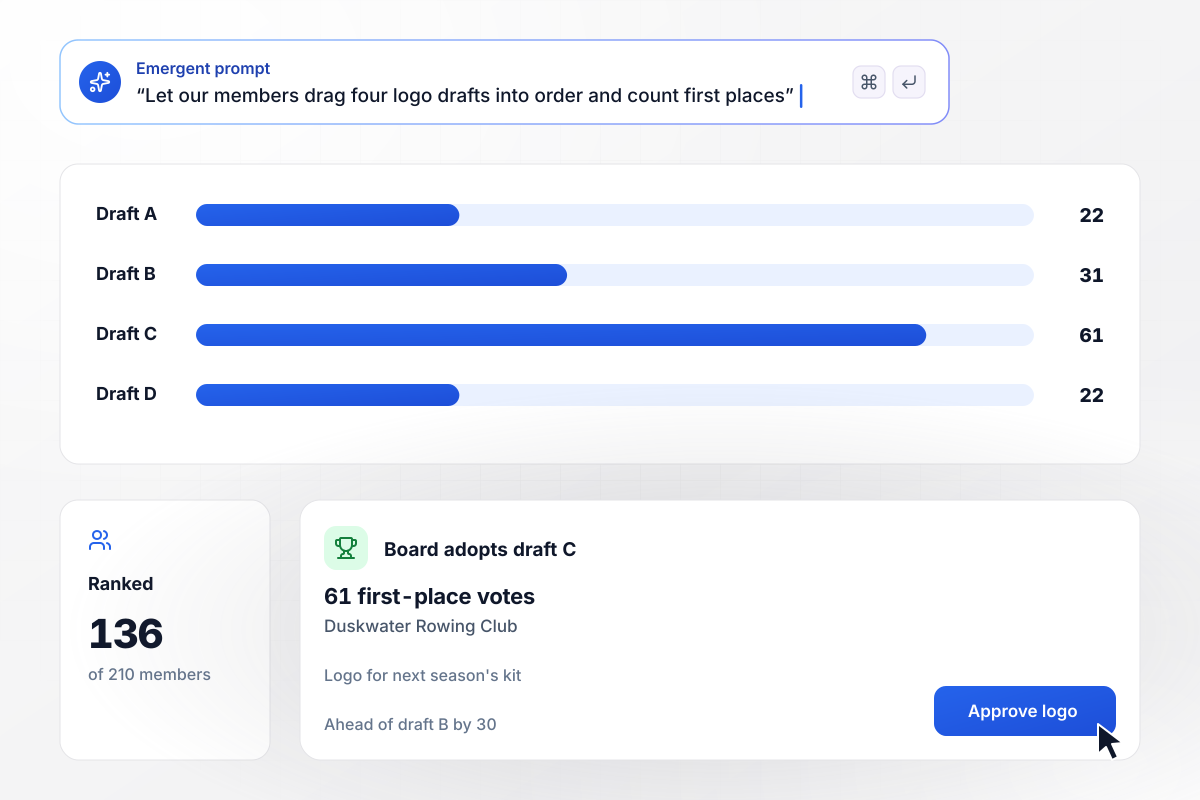
With 61 first-place votes, draft C won
Four logo drafts went to the 210 members of Duskwater Rowing Club, who dragged them into order from favorite to least. Of the 136 members who ranked them, 61 put draft C first and 31 put draft B first. The other two drafts got 22 each. The club board adopted draft C for next season's kit.
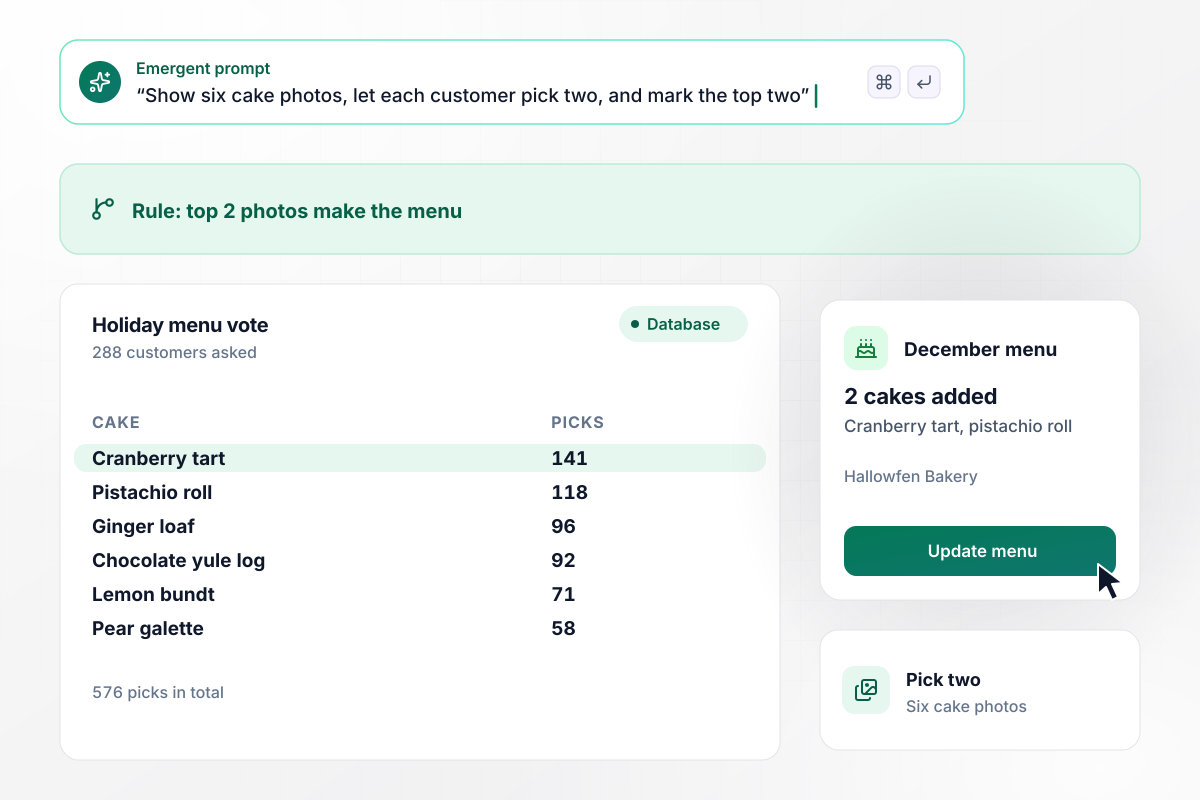
Each customer picked two cakes from six
Hallowfen Bakery had room for two new cakes on its holiday menu and six candidates. It showed 288 customers a photo of each and asked them to pick two. The cranberry tart drew 141 picks and the pistachio roll 118, the top two of 576 picks. Both went on the December menu.
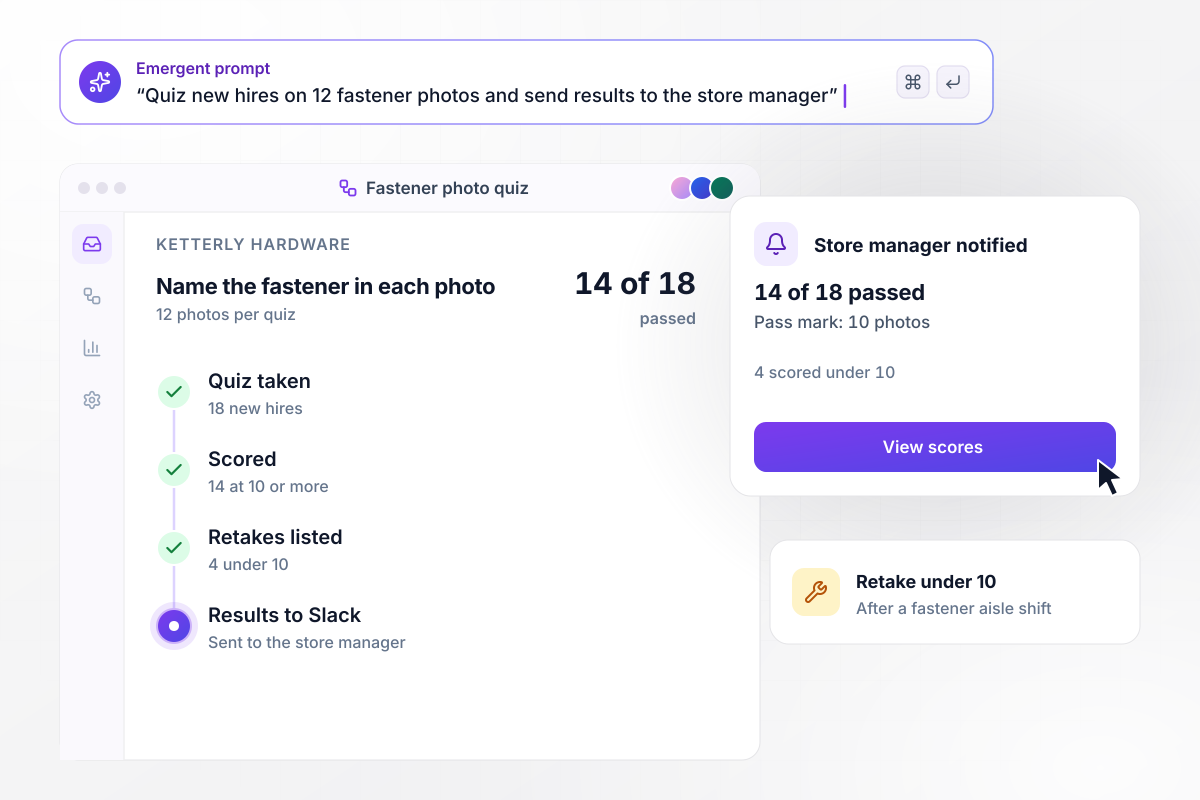
Any hire under 10 correct photos retakes the quiz
Every new hire at Ketterly Hardware takes a 12-photo quiz: name the fastener in each picture. The pass mark is 10. This quarter, 14 of 18 new hires passed, and the store manager got the results in Slack. The 4 who scored under 10 retake it after a shift in the fastener aisle.






How to Run an Image Survey
Seven steps to an image survey whose picks settle one decision, then build it with Emergent.
Name the one choice the picks will settle, such as which tin goes to the printer. Every image in the survey should be a real option for that choice. Put the decision in your prompt, and Emergent drafts the question around it.
Shoot each option at the same angle, against the same background and in the same light, then crop every photo to the same shape. If one photo is brighter or larger, you cannot tell whether people chose the design or the photo.
Under each picture, add two to four words that name it, like Tin B or Cranberry tart. The label names the option in your results table, and it lets people refer to a design when they explain their pick.
Pew Research Center notes that in self-administered surveys, people tend to choose items at the top of the list. Rotate the images so each one leads for some respondents, and keep a fixed order only where it means something, like small to large.
Ask for one pick when only one option can win, like a tin. Ask for two or three when several can, like menu spots. Use a ranking when you need the full order, and keep it to five images or fewer so the list fits one phone screen.
After the picture question, add one short open question: what made you pick it? The counts tell you which design won, and the comments tell you what to keep when you print it or redesign the others.
Take the survey on your own phone before launch and check that every image loads sharp and every label fits. After launch, read each count against the number of people asked, not only against the other images.
Why Build Your Image Survey on Emergent?
A picture vote settles a choice once the picks are counted. Emergent builds the survey and a table you own that keeps every pick.

|
SurveyMonkey | Microsoft Forms | SurveyHero | |
|---|---|---|---|---|
| What you get | Survey, logic, and response database, as code you own | Survey builder with templates, including employee engagement | Surveys, quizzes, and polls with response summaries | Survey builder with templates, including employee satisfaction |
| Pricing model | Credits, no response caps or per-response fees | Per-user team plans with a seat minimum, billed annually | Free with a Microsoft account; included in Microsoft work and school subscriptions | Free plan, then per-account plans with unlimited responses |
| Where responses live | A database table you own, plus any integration | SurveyMonkey account | Microsoft Forms, with export to Excel | SurveyHero account, EU data centers |
| Code ownership | Full code export to GitHub on paid plans | None | None | None |


Pick the Pricing Plan That Works for You
Choose the plan that fits your building ambitions. From weekend projects to enterprise applications, we've got you covered.




Find the right survey, quiz, or poll
for your team
Frequently Asked Questions
Your Questions, Answered
Don't change this element unless you know what you are doing
More things you can build
with Emergent









on Emergent today


