

Build Airline Survey Questions for Each Stage of a Flight
Build airline survey questions that rate every stage of the trip and ask delay questions only when the flight landed late.
Build airline survey questions my regional airline sends after each flight lands, with one rating per stage and every answer saved by flight number.
Trusted by Builders Worldwide
Active Builders Worldwide
Apps Successfully Created
Countries Globally Reached



What Emergent Builds Into an Airline Survey
One prompt builds the questions and the table every answer lands in. A follow-up prompt changes either one.
A rating for each stage of the trip
List the stages to score, such as booking, check-in, boarding, the cabin, and arrival. Emergent drafts a 1 to 5 rating and a comment box for each, and a prompt rewords any of them.
Questions that depend on what happened
The app reads each flight's arrival time and bag reports from your operations system through its API. A passenger who landed on time never sees a question about a delay.
Flight number and route on every answer
Each response is a row in a database you own, stamped with the flight number, route, date, and seat. Filter boarding scores by airport or compare one route month over month.
Low scores sent to the person who can act
Pick a score that needs a reply and who gets it. The app sends a Slack message or an email to that person, such as a station manager, with the flight and the comment attached.
One question per screen on a phone
Passengers answer one question per screen on a phone, at the baggage carousel or in a taxi. Emergent puts no cap on responses, so every passenger on a full flight can answer.
Your domain, with the code on GitHub
Host the survey on your own domain, included in Emergent and billed in credits. On paid plans, export the full code to your GitHub repository and keep each version of the questions.
How Four Airlines Use Their Survey Answers
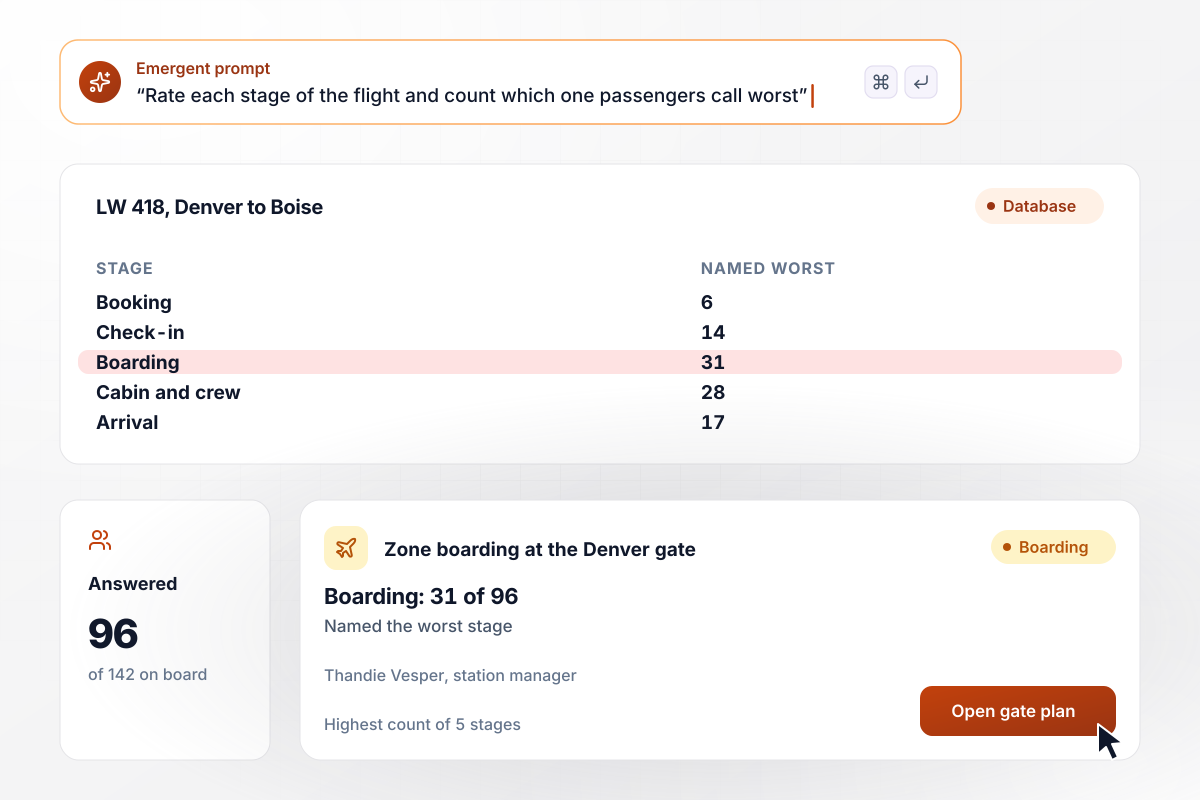
Boarding came last for LW 418, with 31 of 96 votes
Larchwick Air sends one survey per flight after landing, rating each stage from booking to arrival and asking which was worst. On flight LW 418 from Denver to Boise, 96 of 142 passengers answered, and 31 of the 96 named boarding. Station manager Thandie Vesper moved the Denver gate to zone boarding.
window.awbMockup = { postFlightSurvey: "Build a post-flight survey for my regional airline that goes out once each flight lands. Ask for a 1 to 5 rating on booking, check-in, boarding, the cabin and crew, and arrival, then ask which stage was worst. Save every answer with the flight number and route, and show me a count of worst-stage votes per flight.", delayedFlights: "Build airline survey questions that change when a flight is late. Read arrival times from my operations system, and when a flight lands 15 minutes or more past schedule, add 3 delay questions, including where the passenger first heard about the delay. Show the answers per flight so my ops lead can see which delays went badly.", delayedBags: "Build a short survey for passengers whose bag arrived late, sent once the bag is delivered. Ask them to rate the delivery from 1 to 5 and leave a comment. When someone scores 1 or 2, send a Slack message to my baggage lead with the passenger's file number and comment.", routeResearch: "Build a route research survey for my airline's loyalty members in Tucson. Ask which of 4 new nonstop routes they would book, one choice per member, checked against the member list. Give my network planner a live tally of votes per route and save every answer to my database." };
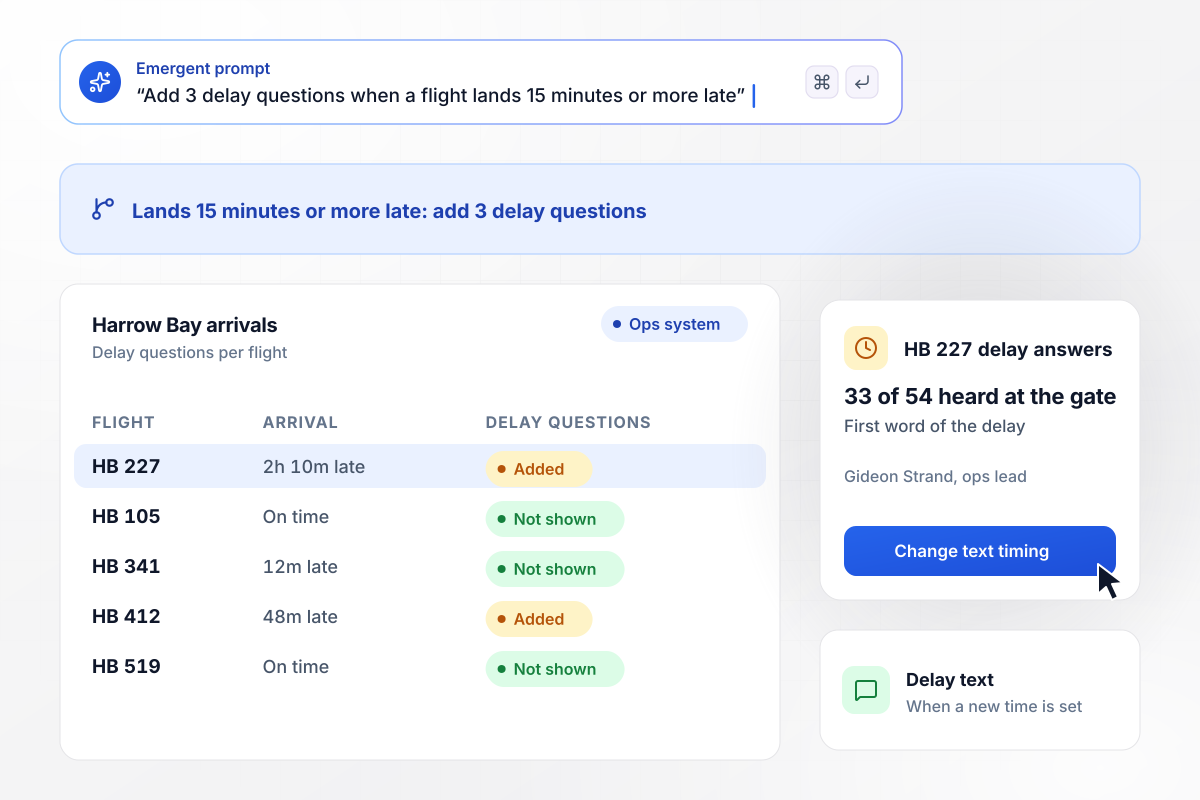
After a late landing, 3 delay questions appear
Harrow Bay Airlines adds 3 delay questions when a flight lands 15 minutes or more past schedule. Flight HB 227 landed 2 hours 10 minutes late, and 33 of the 54 passengers who answered first heard about the delay at the gate. Ops lead Gideon Strand now sends the delay text when a new time is set.
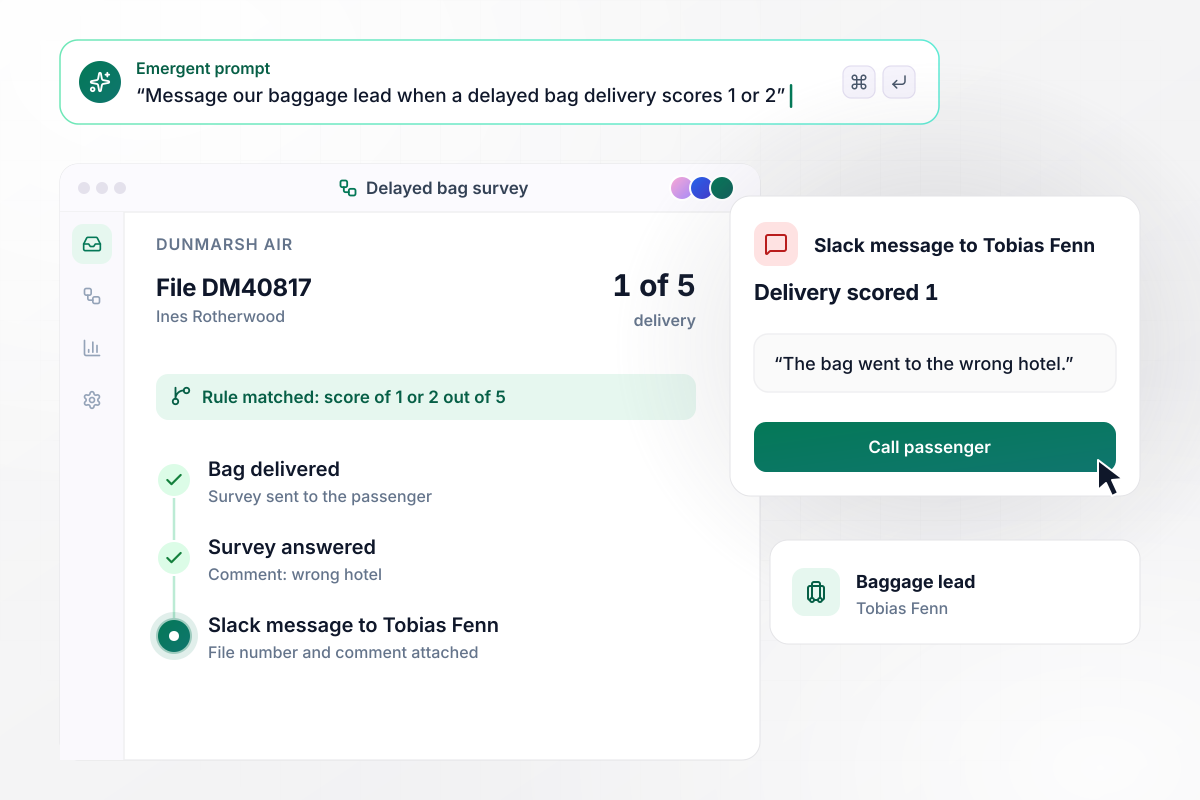
Bag scores of 1 or 2 go to the baggage lead
Dunmarsh Air surveys each passenger whose bag arrived late, once the bag is delivered. A delivery score of 1 or 2 out of 5 sends baggage lead Tobias Fenn a Slack message. Ines Rotherwood scored hers 1 because the bag went to the wrong hotel, and Tobias called her with the file in front of him.
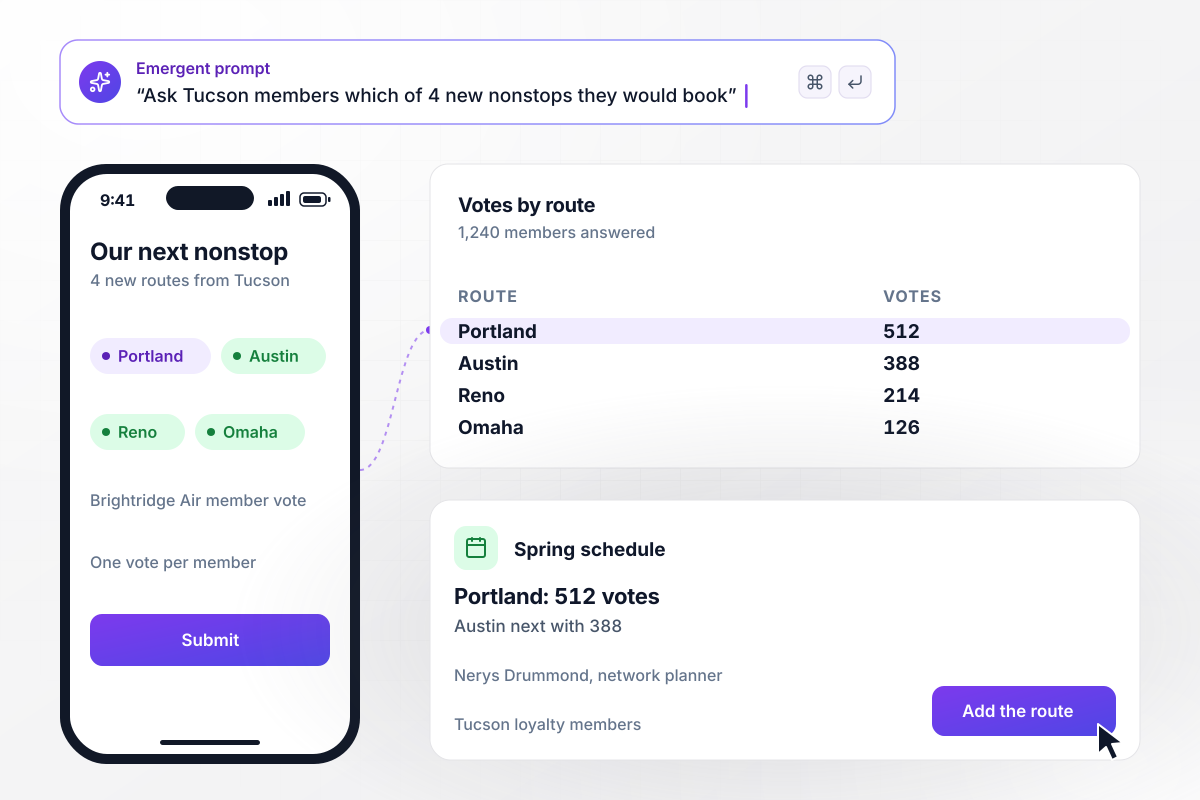
Portland got 512 votes before a seat was sold
Brightridge Air asks loyalty members in Tucson which of 4 new nonstop routes they would book, before it sells a ticket. Of the 1,240 members who answered, 512 chose Portland and 388 chose Austin. Network planner Nerys Drummond put Portland on the spring schedule.






How to Write Airline Survey Questions
Seven steps to write airline survey questions that rate each stage, branch for delays and bags, and tag answers by flight.
Start from the trip, not a template. List the stages a passenger moves through on your airline, from the booking page to the arrival gate. Put that list in your prompt, and Emergent drafts one rating question for each stage.
Use the same 1 to 5 scale for every stage. Then boarding and the cabin compare on one flight and across months. After the ratings, ask one open question: which stage was worst, and why? That answer shows where to look first.
The Bureau of Transportation Statistics counts a flight as late when it arrives or departs 15 minutes or more after the scheduled time. Use the same line for your delay questions, and show bag questions only to passengers who reported a late bag.
Keep the core survey near 10 questions. A passenger should be able to finish it at the baggage carousel. Ask about the flight they just took. Save questions about travel habits and future routes for a separate survey to loyalty members.
Decide which flight details each answer carries before launch. With the flight and seat attached, comments become a query: every boarding score from one gate, or every cabin comment from one aircraft type in a month.
Pick the score that needs a reply, such as anything under 3 out of 5, and name one person for each kind of problem. A baggage complaint goes to the baggage lead, and a boarding complaint goes to the station manager for that airport.
Run the survey on one route for a week before adding the rest. Read the answers as they come in, reword any question passengers skip or misread, and then turn on the delay and bag branches for every flight.
Why Build Your Airline Survey With Emergent?
Answers stay in your own database beside the flight number. Compare cabin scores on late flights with on-time ones, no export needed.

|
SurveyMonkey | Microsoft Forms | SurveyHero | |
|---|---|---|---|---|
| What you get | Survey, logic, and response database, as code you own | Survey builder with templates, including employee engagement | Surveys, quizzes, and polls with response summaries | Survey builder with templates, including employee satisfaction |
| Pricing model | Credits, no response caps or per-response fees | Per-user team plans with a seat minimum, billed annually | Free with a Microsoft account; included in Microsoft work and school subscriptions | Free plan, then per-account plans with unlimited responses |
| Where responses live | A database table you own, plus any integration | SurveyMonkey account | Microsoft Forms, with export to Excel | SurveyHero account, EU data centers |
| Code ownership | Full code export to GitHub on paid plans | None | None | None |




Pick the Pricing Plan That Works for You
Choose the plan that fits your building ambitions. From weekend projects to enterprise applications, we've got you covered.




Find the right survey, quiz, or poll
for your team





Frequently Asked Questions
Your Questions, Answered
Don't change this element unless you know what you are doing
More things you can build
with Emergent









on Emergent today


