

Build a Conjoint Survey That Shows What People Trade Off
Build a conjoint survey that shows people product profiles side by side and counts which features win their choices.
Build a conjoint survey that shows my coffee subscribers 3 plans per task and counts which price and perks win.
Trusted by Builders Worldwide
Active Builders Worldwide
Apps Successfully Created
Countries Globally Reached



What Emergent Builds Into Each Choice Task
Describe the product and the parts that can vary. Emergent builds the tasks, a table of every pick, and a dashboard of choice rates.
Choice tasks built from your attributes
Name each attribute and its levels, like price at $16, $20, or $24. Emergent builds choice tasks that show a few product profiles per screen and ask which one the person would pick.
A fresh mix of profiles for each person
Each respondent sees fresh profiles mixed from your levels, every level shown about as often as the rest. Tell Emergent which levels may never meet, like the top price with no perks.
A none option when walking away is real
Offer a none of these choice where a buyer could keep their current plan or buy nothing. Each none pick is saved like any other answer and shows how often no profile was good enough.
Choice rates per level on a dashboard
The dashboard shows how often each level was chosen out of the times it was shown. A follow-up prompt adds a split, such as new subscribers against those of two years or more.
One task per screen, no cap on responses
People answer one choice task per screen and tap a profile to move on, which fits a phone. Emergent puts no cap on responses, and the study can go to every customer on your list.
Every pick in a database you own
Each choice is a row in a database you own, with the profiles shown and the one picked. On paid plans, export the full code to your GitHub repository and run the study next year.
Four Decisions Made From Choice Tasks
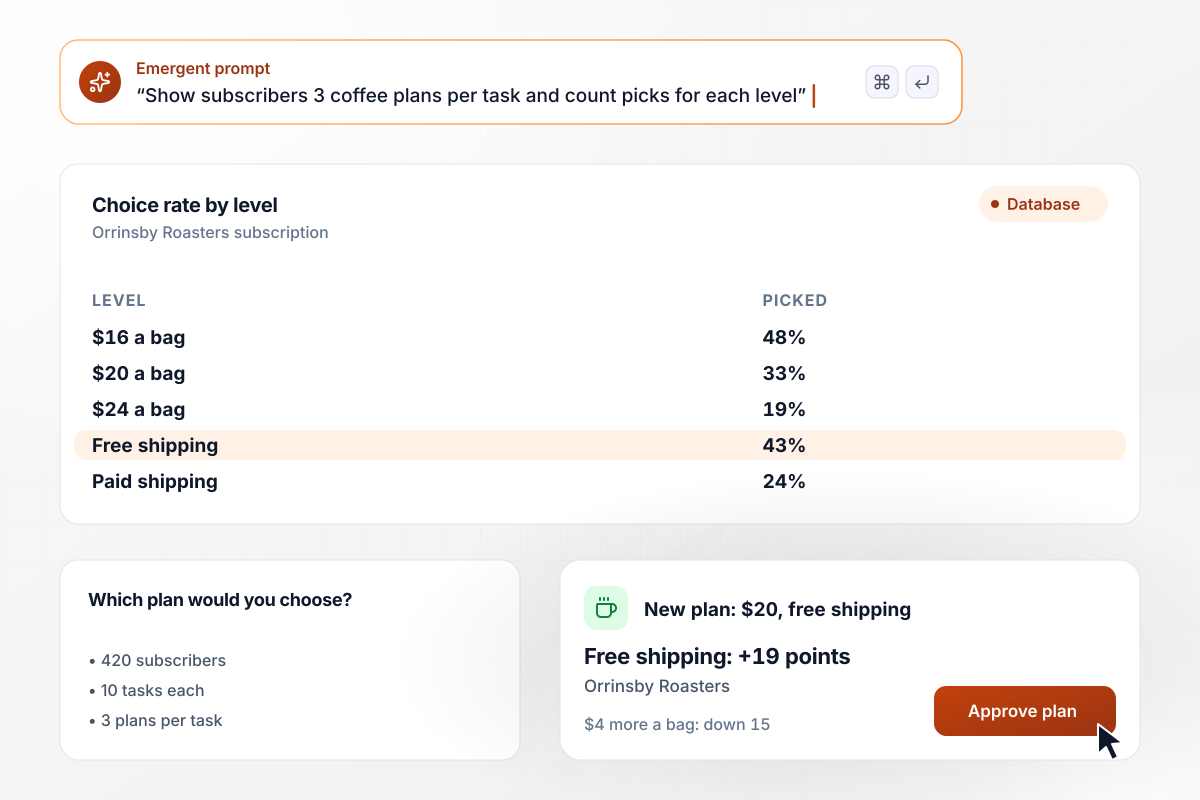
Free shipping outweighed $4 more for each bag
Orrinsby Roasters was weighing a price rise for its coffee subscription. It asked 420 subscribers 10 choice tasks, each showing 3 plans that mixed price, bag size, and shipping. Free shipping raised a plan's choice rate by 19 points, and $4 more a bag cut it by 15. The roaster moved to $20 a bag with free shipping.
window.awbMockup = { priceTest: "Build a conjoint survey for our coffee subscribers. Each of 10 tasks shows 3 plans that mix price per bag ($16, $20, or $24), bag size, and shipping (free or $5), and asks which plan they would choose. Count how often each level is picked out of the times it is shown, and put the rates on a dashboard.", planPackaging: "Send our help desk account admins 8 choice tasks, each with 3 versions of the Pro plan that mix price, seats, reply drafts, and phone support. Show the choice rate for each feature with it and without it. When the study closes, post the result to our product team in Slack.", benefitsPackage: "Build a benefits study for our 640 employees that runs on a phone. Each of 12 tasks shows a pair of packages mixing remote days a week, paid time off, and the 401(k) match, and asks which one they would take. Email the HR director a summary of the win rate for each level when it closes.", busService: "Ask our riders 9 choice tasks about Route 7. Each task shows 3 versions of the route that mix how often the bus comes, the walk to the stop, and the fare. For each attribute, show the gap in choice rate between its best and worst level, so the board can see which change riders value most." };
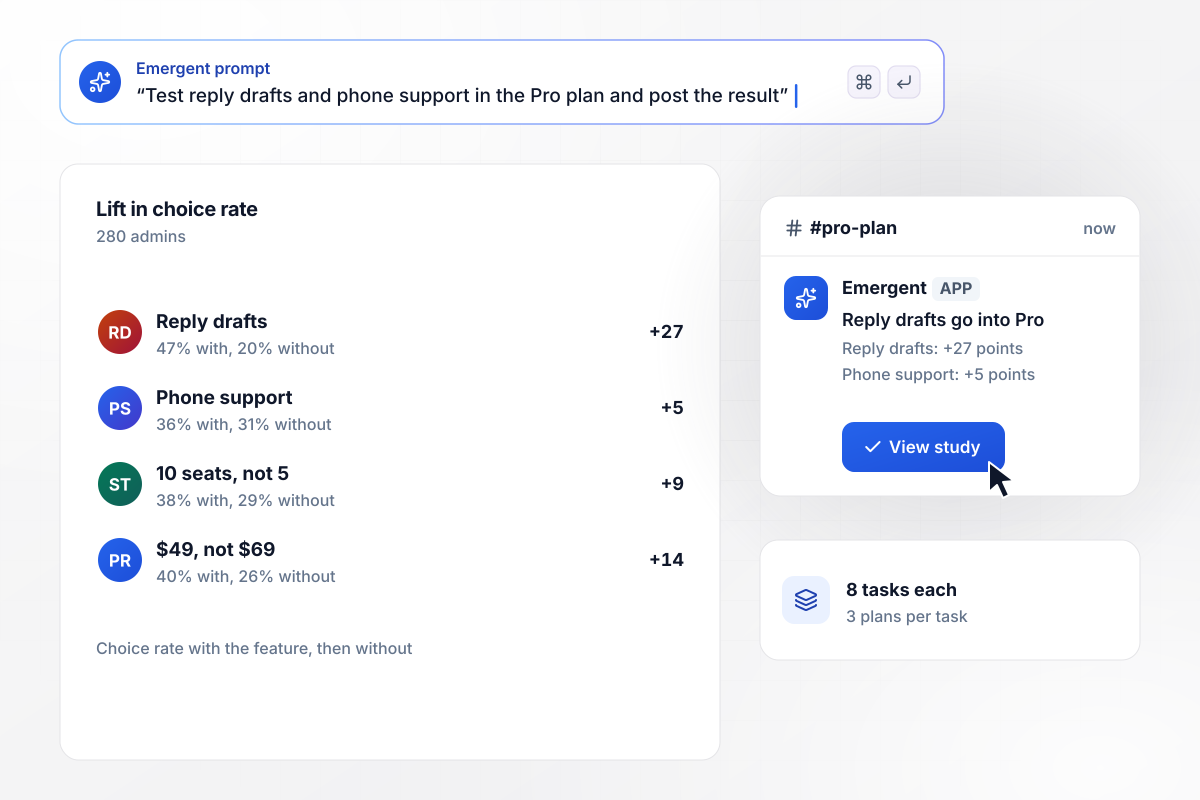
With reply drafts in it, a plan won more picks
Velbrook's product team had room for one more feature in the Pro plan of its help desk software. Each of 280 account admins picked between 3 plan versions in 8 tasks. Plans with reply drafts were chosen 27 points more often, and phone support added 5. The team posted the result in Slack and put reply drafts in Pro.
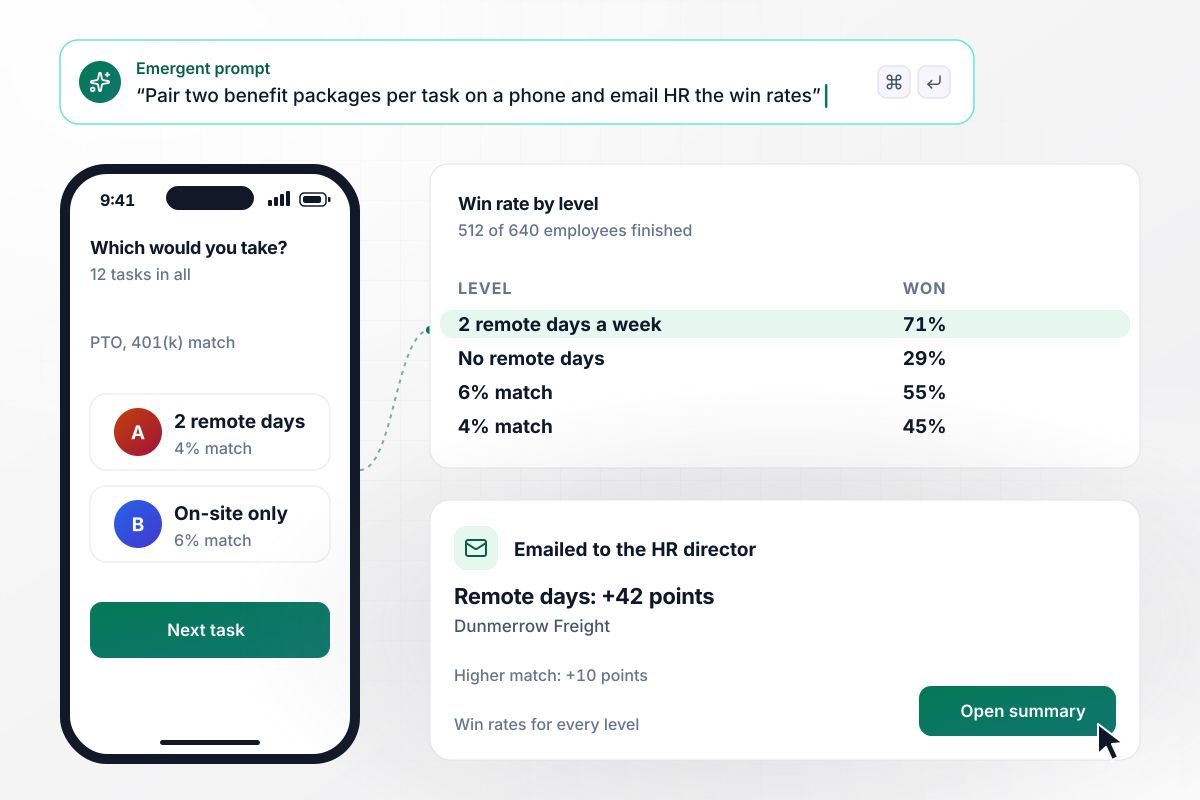
Two remote days each week beat a bigger match
Dunmerrow Freight put the study on employees' phones: 12 tasks, each a pair of packages mixing remote days, paid time off, and the 401(k) match. Of 640 employees, 512 finished. Packages with 2 remote days a week won 42 points more often, and the higher match added 10. The HR director got the summary by email.
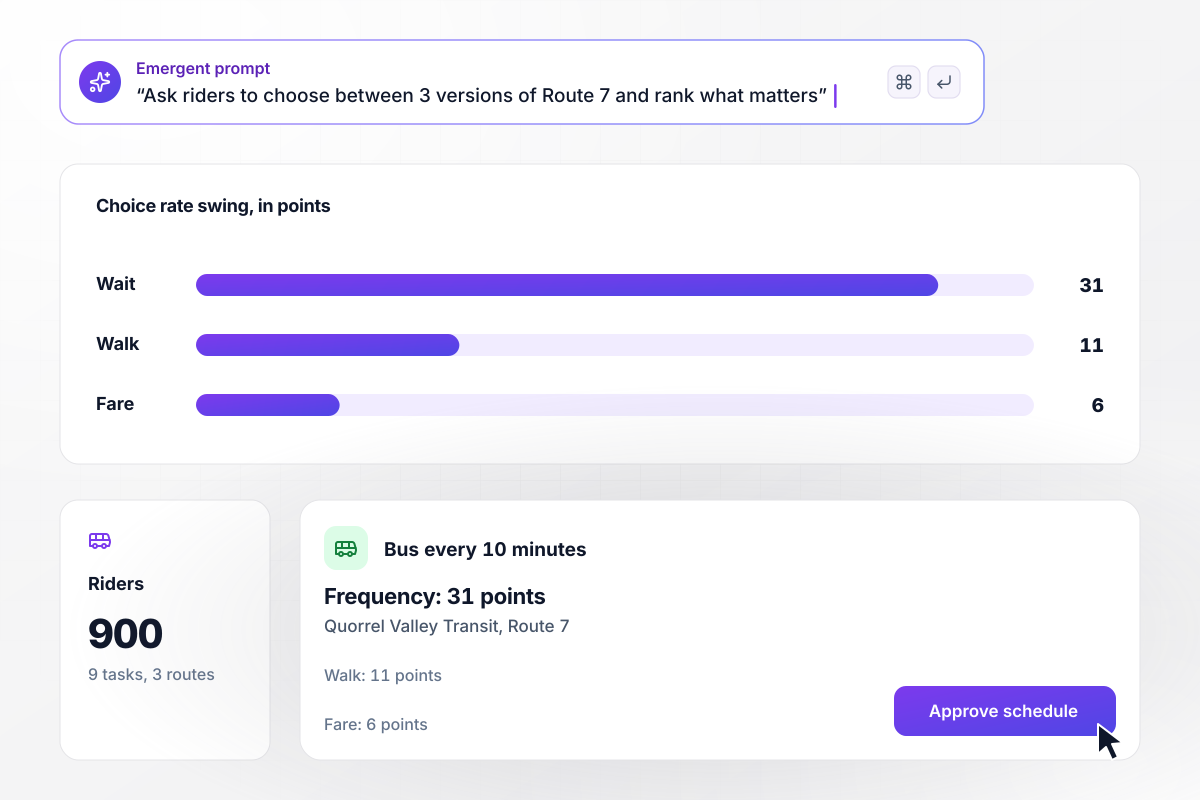
To riders, waiting cost more than a higher fare
Quorrel Valley Transit could afford one change on Route 7. It asked 900 riders 9 choice tasks, each comparing 3 versions of the route by frequency, walk to the stop, and fare. Frequency moved the choice rate by 31 points from best level to worst, the walk by 11, and the fare by 6. The board chose a bus every 10 minutes.






How to Run a Conjoint Survey
Seven steps that turn a pricing or feature question into a conjoint survey people can finish on a phone.
Name the one call the study will settle, such as the price of a new plan or which feature goes into Pro. Every attribute should bear on that call. Put the decision in your prompt, and Emergent drafts the attributes around it.
List the parts of the offer that can change, like contract length and support hours. Sawtooth Software describes this as breaking the product into its components. Six or fewer keeps every profile readable on one phone screen.
Write levels a buyer could face, like $16, $20, and $24 a bag, not $5 and $50. Use the same unit across levels, and keep each attribute to 2 to 4 of them. Every extra level needs more respondents to count.
Sawtooth Software puts the usual count between 8 and 20 choice tasks per respondent. Start near 10, with 3 profiles in each, and time yourself on a phone. If it runs long, cut tasks before you cut attributes.
If staying with what they have now is a real option for buyers, offer none of these in every task. Without it, the study tells you which profile wins against the others, not whether anyone would buy any of them.
Sawtooth Software calls 300 respondents a good rule of thumb for sample size, and its formula aims for at least 500 appearances per level. Count your levels and tasks first, since a study with many levels needs more people.
Compare each level with the other levels of its own attribute, then compare the swing between attributes. For part-worth utilities, pull the raw choices from your database into a statistics tool. Split by group only where each group is large.
Why Build Your Conjoint Survey on Emergent?
Conjoint results come from counting picks against what each person saw. Emergent builds the tasks and keeps both in tables you own.

|
SurveyMonkey | Microsoft Forms | SurveyHero | |
|---|---|---|---|---|
| What you get | Survey, logic, and response database, as code you own | Survey builder with templates, including employee engagement | Surveys, quizzes, and polls with response summaries | Survey builder with templates, including employee satisfaction |
| Pricing model | Credits, no response caps or per-response fees | Per-user team plans with a seat minimum, billed annually | Free with a Microsoft account; included in Microsoft work and school subscriptions | Free plan, then per-account plans with unlimited responses |
| Where responses live | A database table you own, plus any integration | SurveyMonkey account | Microsoft Forms, with export to Excel | SurveyHero account, EU data centers |
| Code ownership | Full code export to GitHub on paid plans | None | None | None |


Pick the Pricing Plan That Works for You
Choose the plan that fits your building ambitions. From weekend projects to enterprise applications, we've got you covered.




Find the right survey, quiz, or poll
for your team
Frequently Asked Questions
Your Questions, Answered
Don't change this element unless you know what you are doing
More things you can build
with Emergent









on Emergent today


