

Build a Product Recommendation Quiz for Your Store
Take the backpack quiz below, or build a product recommendation quiz that matches each shopper to a product you stock.
Build a product recommendation quiz for my bike shop that asks about terrain, ride length, and budget, then matches each rider to a bike type.
Trusted by Builders Worldwide
Active Builders Worldwide
Apps Successfully Created
Countries Globally Reached



Inside Your Product Recommendation Quiz
Emergent builds the quiz, its matching rules, and the table behind them from one prompt. Describe a change to edit any part.
Questions that point to your products
List the products or product types you want to recommend. Emergent builds the questions with every option tied to one of them, and changes any question you flag in a later prompt.
Matches pulled from your live catalog
Connect your store or inventory tool through its API, and the result screen lists the products tagged for that match, with stock counts, instead of a fixed list typed into the quiz.
One row for each completed quiz
The app stores each completed quiz in a database you own, with the product it matched, every answer, and an email when given. Sort by product to see which items the quiz sells most.
Big-ticket matches sent to a person
Set a rule, such as a budget over $2,500, and the app sends a Slack or email alert to the staff member who handles that sale, with every answer the shopper gave on the quiz.
A count of where shoppers quit
Ask for a dashboard beside the quiz, and it counts how many people start, how many finish, and which question each person quit on. Move or cut the question that loses the most.
Your domain, your code in GitHub
Run the quiz on your own domain or a subdomain of your store, included with Emergent and paid in credits. On paid plans, export the full code to your GitHub repository and keep it.
Four Shops Matching Customers to Products
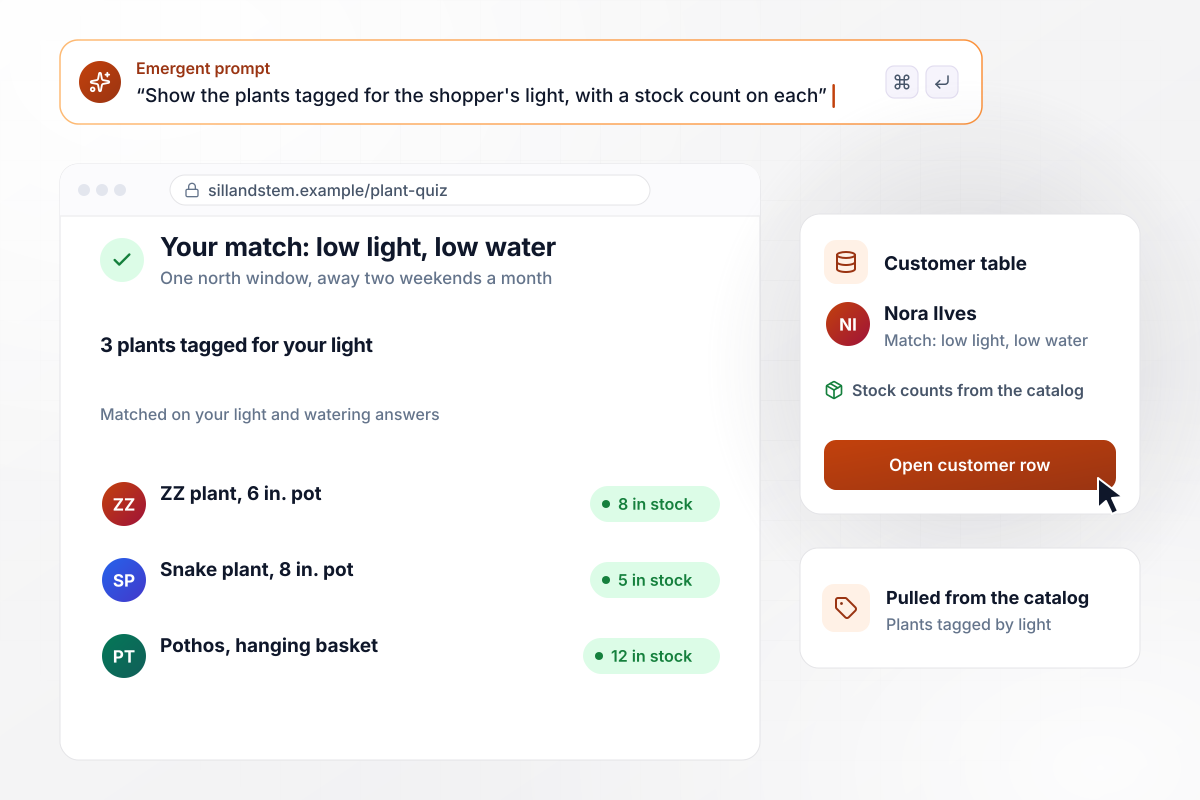
One north window, three plants in stock
Nora Ilves tells Sill and Stem's plant quiz that her apartment has one north window and that she is away two weekends a month. The result screen shows the 3 plants the shop tagged for low light and low water, pulled from its catalog with a stock count beside each. Her match is saved to the shop's customer table.
window.awbMockup = { plantShop: "Build a product recommendation quiz for my plant shop that asks about the light in each room and how often the shopper is away. Match answers to the light and watering tags on my products, and show the 3 matching plants from my catalog with a stock count beside each. Save each match to my customer table.", bikeShop: "Build a bike quiz for my shop that asks about terrain, ride length, and budget. When a rider's budget is over $2,500, email my fitter every answer and offer a fitting with the match. Riders under $2,500 see in-stock bikes from my catalog and a cart link. Save every match to my database.", cookwareStore: "Build a pan quiz for my cookware store and a dashboard beside it. Count how many shoppers start and finish each month, and how many quit at each question. Show the email ask on the result screen, below the recommended pan, as an optional field.", toyStoreGiftFinder: "Build a gift finder quiz for my toy store that shoppers open from a QR code at the register. Ask 5 questions, including the child's age, what they like, and the budget. Show 3 toys at or under the budget and the aisle each sits in. Save all 5 answers without a name." };
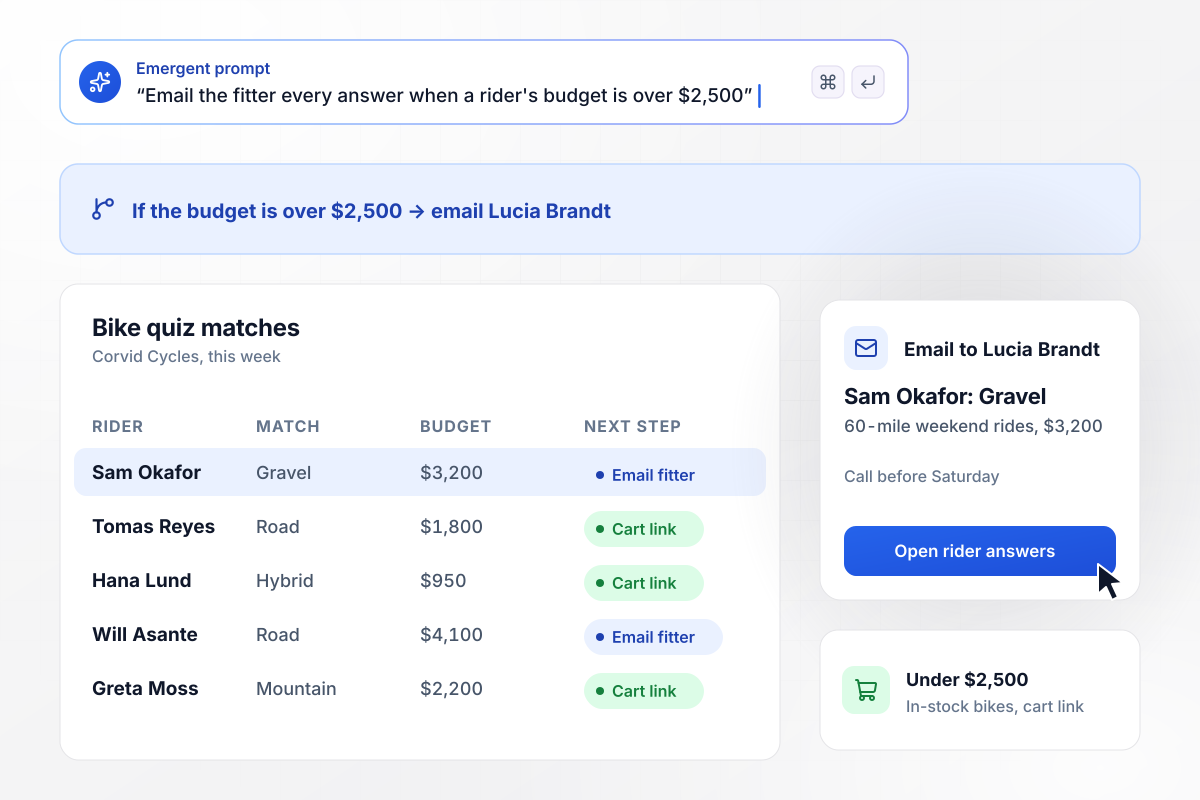
A $3,200 gravel budget reaches the fitter
Riders who name a budget over $2,500 on Corvid Cycles' bike quiz get a fitting offer with their match. Sam Okafor picks gravel, 60-mile weekend rides, and $3,200. The fitter, Lucia Brandt, gets an email with every answer. She calls him before Saturday. Riders under $2,500 see in-stock bikes and a cart link.
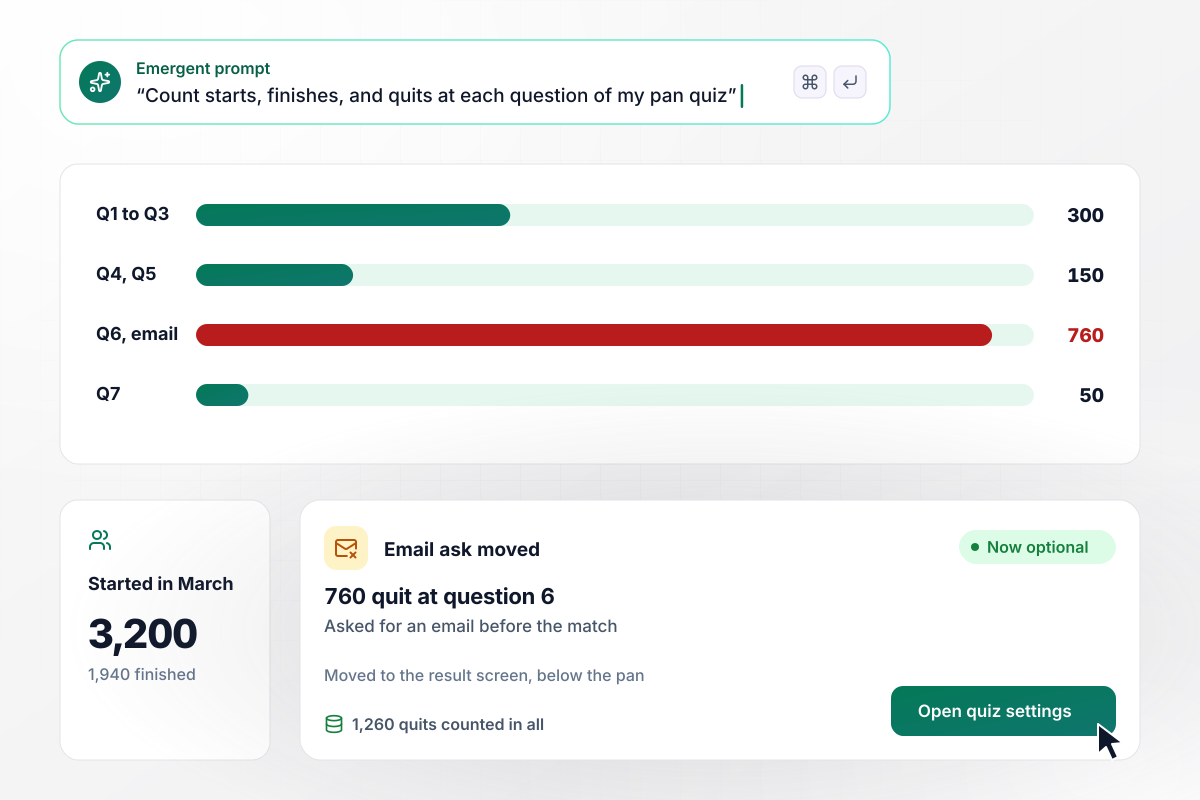
760 shoppers quit when asked for an email
In March, 3,200 shoppers started Ashgrove Kitchen Supply's pan quiz and 1,940 finished. The drop-off count put 760 of the quits at question 6, which asked for an email before showing the match. The shop moved the email ask to the result screen, below the pan, and made it optional.
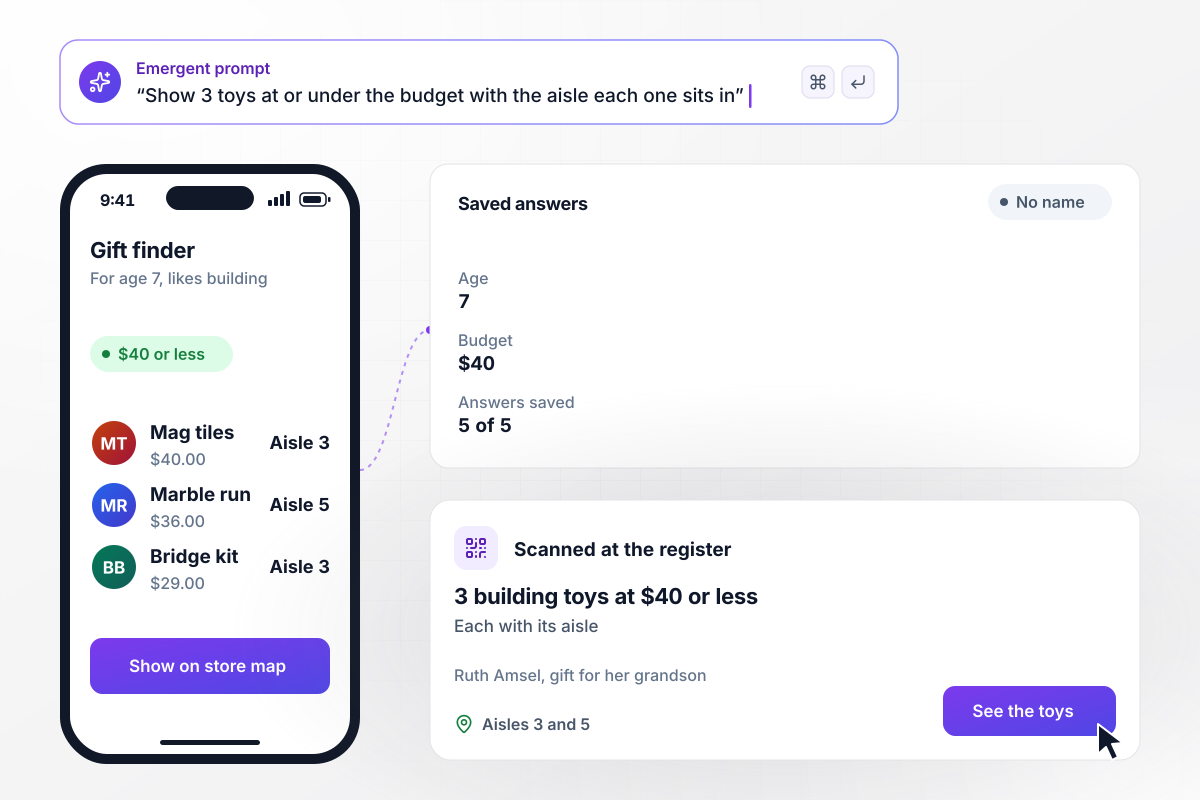
Which aisle holds a $40 building toy
Pinwheel Toys prints a QR code on a card by the register. Ruth Amsel scans it and answers 5 questions about her grandson, including his age, 7, what he likes, building, and her budget, $40. Her phone shows 3 building toys at $40 or less and the aisle each sits in. The quiz saves all 5 answers, with no name.






Plan a Product Recommendation Quiz
Seven steps to plan a product recommendation quiz that ends on an in-stock product, then build it with Emergent.
List the products or product groups the quiz can recommend, between three and six of them, and check each one is in stock. Questions come quickly once you know the destinations, since every option has to point at one of them.
Ask about the shopper's life, not your spec sheet: the light in the room, the roads they ride, the pans they burn. A shopper can answer those in a second, while a question about frame geometry or wattage invites a guess.
Give each option one product it scores for, and let every product win in at least two questions. Keep the options alike in length and tone, so no answer looks like the joke choice that people skip.
Treat budget, size, and age as filters, not points. A shopper with $40 to spend should never see a $90 match, however well it scored, so let the filter remove it before the result screen loads.
Under the product name, write one line that ties it to the answers: low light, away on weekends. Add a second choice for shoppers who want options, and link both straight to the product page or cart.
Pick the follow-up for each result: a cart link, an email to staff for a big-ticket match, or a saved row for the next newsletter. Put it in your prompt, and Emergent builds the routing along with the quiz.
Before the link goes live, take the quiz once per product, choosing the options that point to it, and confirm that product wins. Then open the saved row and any staff email to check the answers arrived intact.
Why Build Your Product Quiz on Emergent?
Your quiz reads the live catalog through its API and saves every answer to a database you own.

|
Interact (quiz specialist) | Typeform | ProProfs | |
|---|---|---|---|---|
| How you build | Prompt for the survey, quiz, or poll and the app around it | Templates and AI quiz maker | Templates and editor, AI assist | Templates, question library, and AI quiz builder |
| Pricing model | Credits, no response caps or per-response fees | Free plan capped by monthly responses, then paid plans | Plans by monthly response limit; discount for annual billing | Free plan, then billed per active quiz taker |
| Where responses live | A database table you own, plus any integration | Interact account | Typeform account | ProProfs account; reports export to Excel, CSV, or PDF |
| Code ownership | Full code export to GitHub on paid plans | None | None | None |




Pick the Pricing Plan That Works for You
Choose the plan that fits your building ambitions. From weekend projects to enterprise applications, we've got you covered.




Find the right survey, quiz, or poll
for your team















Frequently Asked Questions
Your Questions, Answered
Don't change this element unless you know what you are doing
More things you can build
with Emergent









on Emergent today


