

Build a Product Market Fit Survey and Find Your Must-Have Users
Build a product market fit survey that counts who would be very disappointed and splits that score by role and by quarter.
Build a product market fit survey that collects every answer in a database I own.
Trusted by Builders Worldwide
Active Builders Worldwide
Apps Successfully Created
Countries Globally Reached



What Emergent Builds Into the Survey
A product market fit survey asks users how they would feel without the product. Emergent builds it, and the app scores every reply.
The must-have question, word for word
Emergent builds the question with its three answers in a fixed order: very, somewhat, and not disappointed. Describe the follow-ups you want, and a later prompt changes them.
A score with the count behind it
The dashboard puts the very disappointed share beside the number of people who gave that answer. A score built on 64 replies should never read like one built on 600 replies.
Who gets asked, and only once
The app checks each email against past respondents before it sends a link. Nobody answers twice, and a sender list filtered to recent users keeps first-week signups out.
The score split by any answer
Add a role or plan question, and the dashboard shows the very disappointed share for each group. The segment that already loves the product stands out from the rest at a glance.
An alert when the score moves
Set the line your team aims for. When a cohort closes above or below it, the app posts the new score to a Slack channel or emails the product lead, with the reply count.
Code you keep on paid plans
On paid plans, export the full code to your GitHub repository. Every past cohort stays in the database you own, even when you fork the survey for a second product line.
Four Teams, Four Readings of the Score
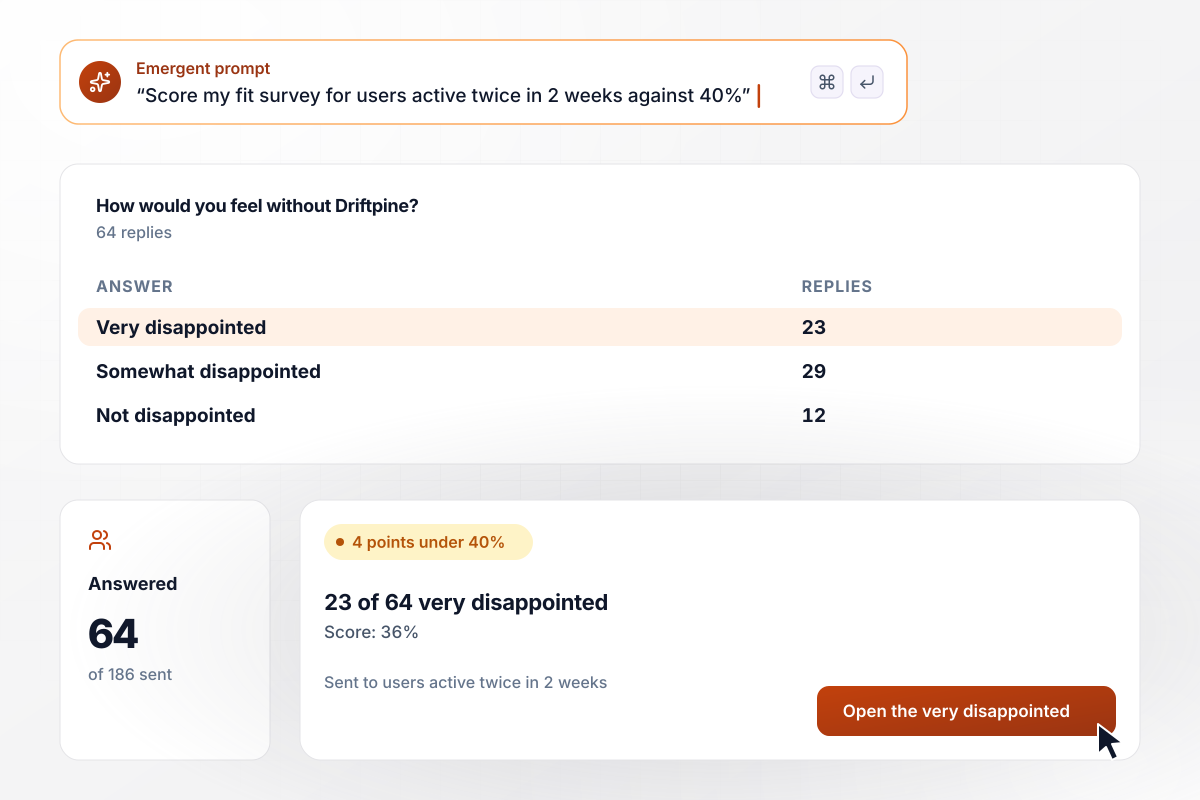
A 4-point gap keeps Driftpine under 40%
Driftpine, a shift-scheduling app, sends its survey only to the 186 users who opened the app at least twice in the last 2 weeks. Of the 64 who answered, 23 picked very disappointed, 29 somewhat disappointed, and 12 not disappointed. That share sits 4 points under the team's 40% threshold.
window.awbMockup = { earlyStageSaas: "Build a product market fit survey for my shift-scheduling app. Send it only to users who opened the app at least twice in the last 2 weeks. Ask how they would feel if they could no longer use it, with very disappointed, somewhat disappointed, and not disappointed as the answers. Show the share of very disappointed answers against a 40% line, with the reply count beside it.", roleSegments: "Create a product market fit survey for my proposal-design tool. Ask each person for their role first: agency owner, freelancer, or in-house designer. Then ask the must-have question with its three answers. Show the overall very disappointed share and the share for each role, with the number of replies behind each one, so I can see which role needs the product most.", scoreOverTime: "Build a product market fit survey for my route-planning app that goes to each quarter's new users once and never to the same person twice. Chart the very disappointed share by quarter next to the number of replies. When a quarter closes above 40%, post the score to our #product channel in Slack.", mobileApps: "Make a phone survey for my habit-tracking app with one question per screen. Start with the must-have question and its three answers. Then ask for the main benefit from a short list: streak reminders, weekly charts, or shared goals. Count the main benefit answers from the users who picked very disappointed." };
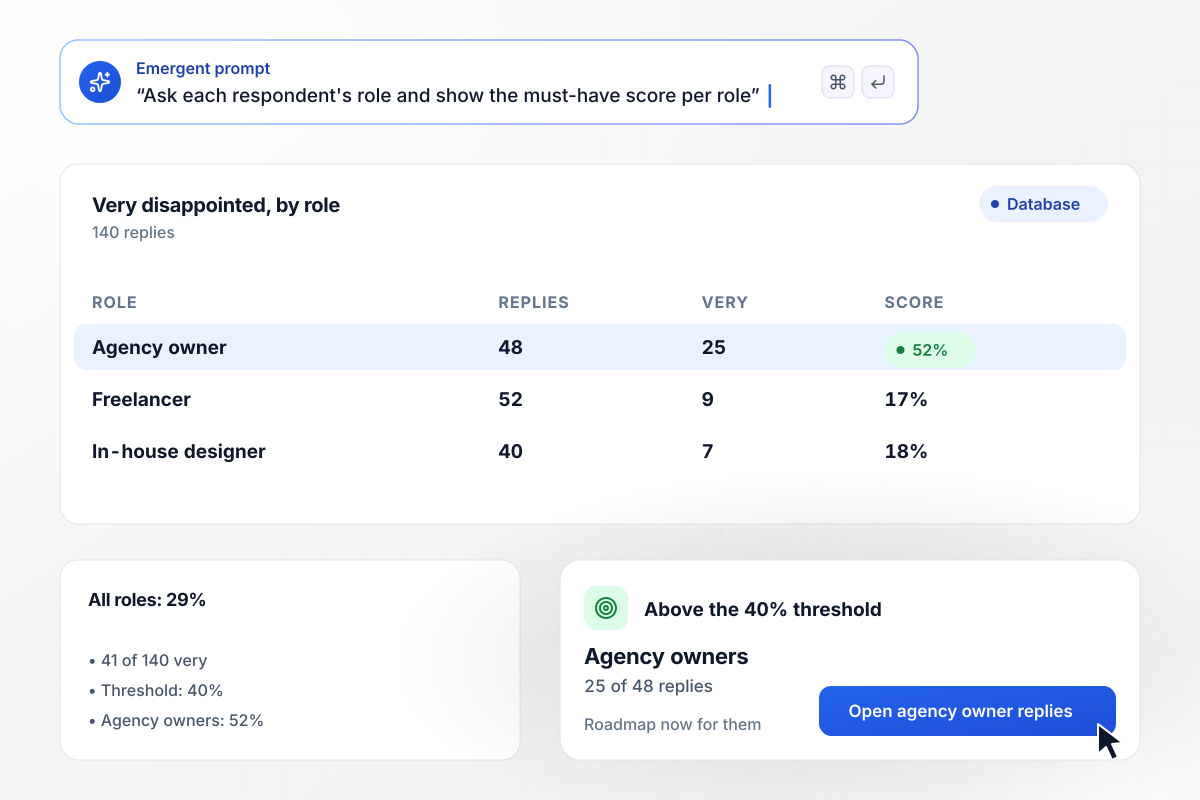
With 25 of 48, agency owners top the 40% threshold
Brightloom, a proposal-design tool, asks each respondent for their role before the must-have question. Across 140 replies, 41 picked very disappointed. Split by role, 25 of 48 agency owners picked it. Only 9 of 52 freelancers did, and 7 of 40 in-house designers. The team now writes its roadmap for agency owners.
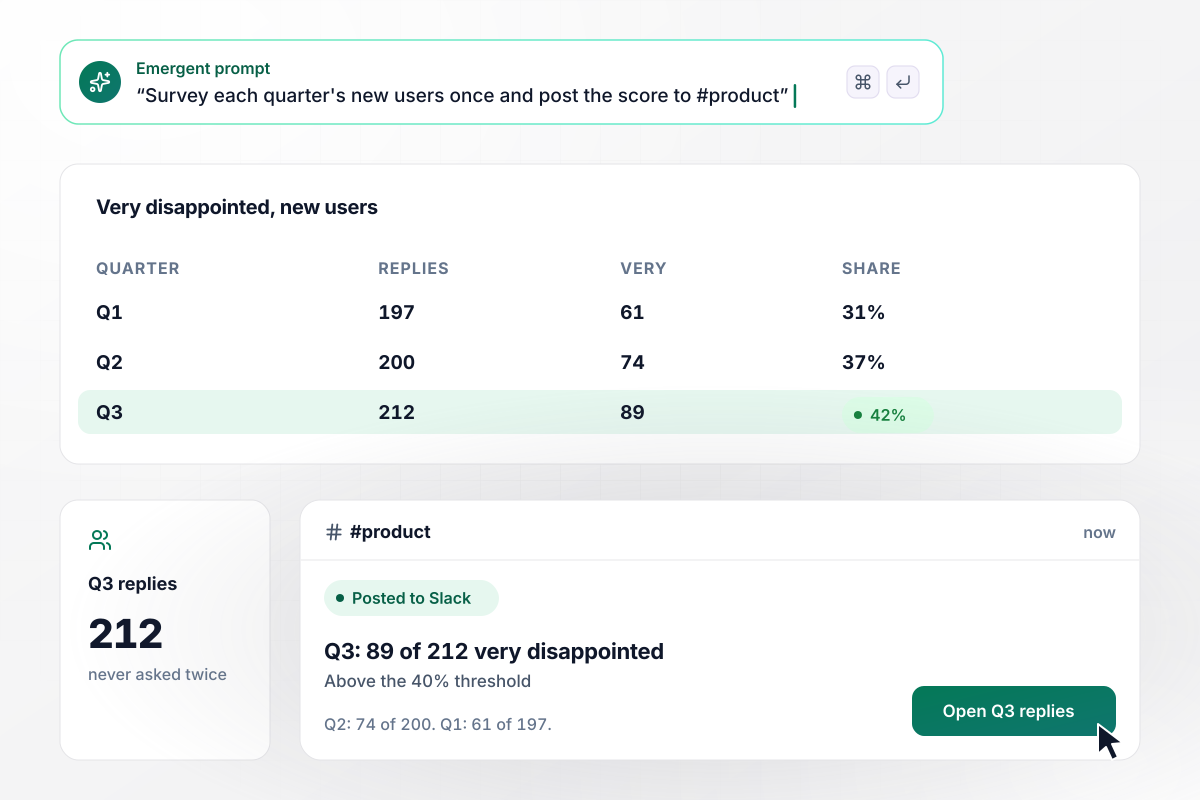
In Q3, 89 of 212 new users pick very disappointed
Sablecrest Routes, a route-planning app for couriers, surveys each quarter's new users and never asks anyone twice. In Q1, 61 of 197 picked very disappointed, and in Q2, 74 of 200. In Q3, 89 of 212 did, the first quarter above the 40% threshold, and the app posted the result to the #product channel in Slack.
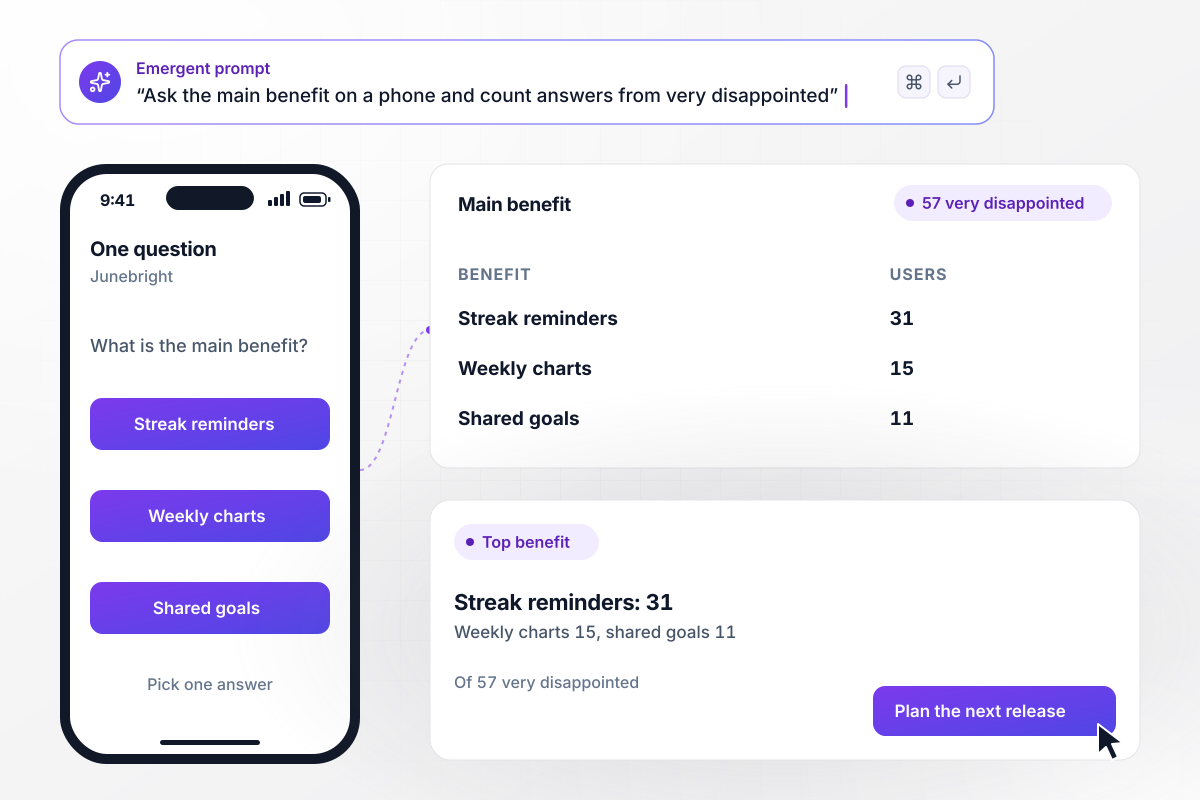
Of 57 fans, 31 came for streak reminders
Junebright, a habit-tracking app, opens its survey on the phone with one question per screen. After the must-have question, users pick their main benefit from a short list. Of the 57 who picked very disappointed, 31 chose streak reminders, 15 weekly charts, and 11 shared goals. Streak reminders lead the next release.






How to Create a Product Market Fit Survey
Seven steps to create a product market fit survey that scores your must-have users and shows which segment to build for.
Pull the users who have used the core of the product more than once this month, and leave out anyone who signed up days ago. Describe that group in your prompt, and Emergent builds the survey and the sender list around it.
Open with the must-have question in its standard wording. Offer three answers in this order: very disappointed, somewhat disappointed, and not disappointed. Keep the wording fixed between rounds, or this quarter's score stops lining up with the last one.
Ask what type of person would benefit most, the main benefit they get, and how the product could improve. Turn the main benefit question into a short list rather than open text, because a list can be counted by group.
Add a single question that splits the replies: role or plan, for example. Ask it before the must-have question. One segment question is enough for a first round, and you can add another with a follow-up prompt later.
Decide which line counts as a pass for your team, such as above 40%, and where the result should go. Name the Slack channel or the person whose inbox should get each closed cohort's result.
Send the link by email, or show it to users inside the product. Hold off on reading the score until at least 40 people have answered. With fewer replies, one person changing their answer moves the share by several points.
Open the replies from very disappointed users and read their roles and main benefits before anything else. Build for what they value, then survey the next quarter's new users and compare the scores side by side.
Why Build Your Fit Survey With Emergent?
Every reply lands in a database you own, with the user's role and signup quarter. No response cap means every new user gets asked.

|
SurveyMonkey | Microsoft Forms | SurveyHero | |
|---|---|---|---|---|
| What you get | Survey, logic, and response database, as code you own | Survey builder with templates, including employee engagement | Surveys, quizzes, and polls with response summaries | Survey builder with templates, including employee satisfaction |
| Pricing model | Credits, no response caps or per-response fees | Per-user team plans with a seat minimum, billed annually | Free with a Microsoft account; included in Microsoft work and school subscriptions | Free plan, then per-account plans with unlimited responses |
| Where responses live | A database table you own, plus any integration | SurveyMonkey account | Microsoft Forms, with export to Excel | SurveyHero account, EU data centers |
| Code ownership | Full code export to GitHub on paid plans | None | None | None |

Pick the Pricing Plan That Works for You
Choose the plan that fits your building ambitions. From weekend projects to enterprise applications, we've got you covered.




Find the right survey, quiz, or poll
for your team















Frequently Asked Questions
Your Questions, Answered
Don't change this element unless you know what you are doing
More things you can build
with Emergent









on Emergent today


