

Build an Event Planning Form That Turns Answers Into a Plan
Build an event planning form that picks the right approvers and counts every task deadline back from the event date.
Build an event planning form that collects each request's date, headcount, and costs in one place.
Trusted by Builders Worldwide
Active Builders Worldwide
Apps Successfully Created
Countries Globally Reached



Answers That Start the Planning Work
A worksheet records what the organizer wants. Emergent's version reads each answer and starts the work it calls for.
Questions that change with the event
Shows catering questions only when food is served and asks about security only above a headcount you set. A board lunch gets a short form; a 300-person gala gets every section.
Sign-offs chosen by the answers
Routes each request to the approvers its answers call for, such as facilities for a room or an advisor for a club. Approvers get a Slack or email message with the request.
Budget lines totaled as they are typed
Multiplies per-head costs by the guest count and adds each line against the organizer's budget. A category that passes the share you allow is flagged before a quote goes out.
Dates tested against your calendar
Checks the requested date against bookings in your calendar or venue system through its API. A clash goes back to the organizer with the nearest open dates instead of a rejection.
Task deadlines counted from the event
Turns the event date into a task list where each item is due a set number of days before it. Every task gets an owner, and anything past its due date turns red on the list.
Your code, in your repository
Exports the whole app to your GitHub on paid plans, approval rules and database included. Engineers can add a CRM or accounting sync later, or ask Emergent to build that sync.
Event Requests Across Four Teams
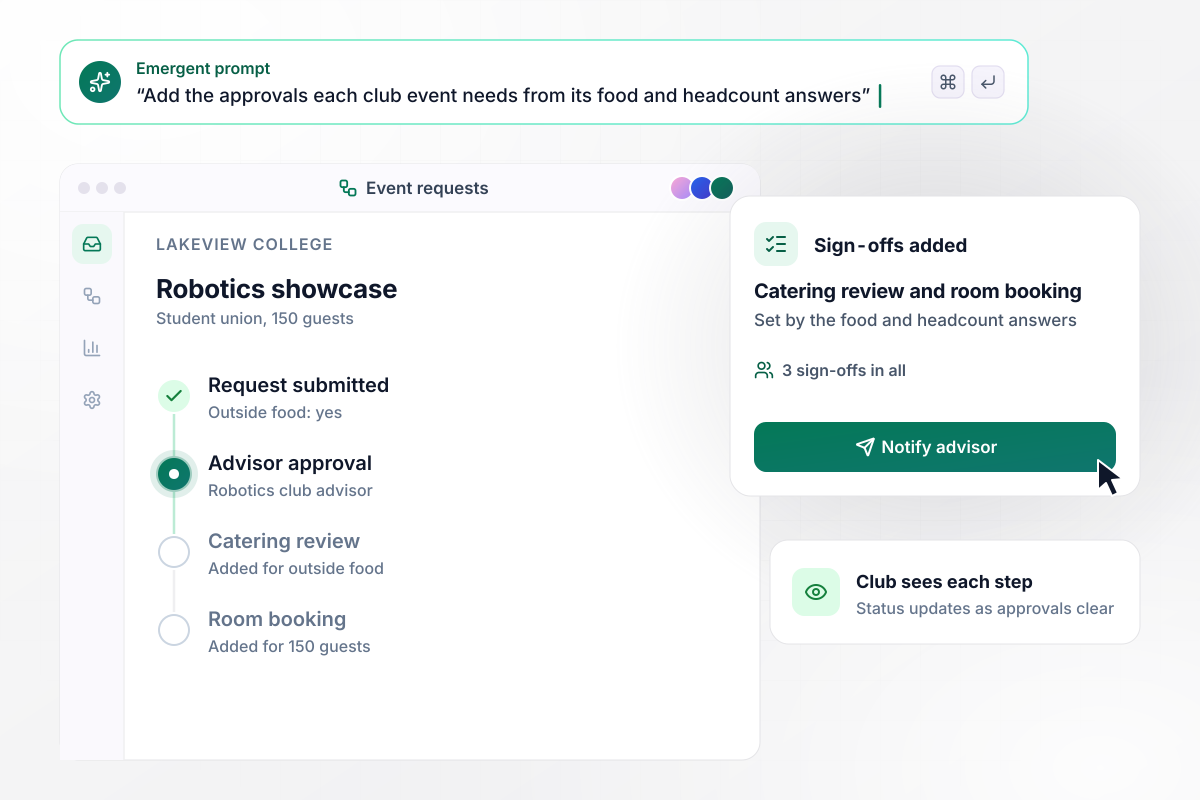
Food and headcount answers pick every sign-off
Campus offices want to know about food and crowds early. The Lakeview College robotics club plans a showcase for 150 guests in the student union and checks yes for outside food. Those answers add a catering review and a room booking behind the advisor's approval, three sign-offs in all.
window.awbMockup = { studentClubs: "Build an event request form for student clubs at my college. Ask for the event name, date, room, expected guests, and whether outside food will be served. Every request needs the club advisor's approval. If outside food is served, add a catering review, and if more than 100 guests are expected, add a room booking with facilities. Show the club where each approval stands.", plannerIntake: "Build a client intake form for my event planning business. Ask for the event type, date, guest count and total budget, then the per-head catering quote. Work out each budget line and its share of the total. If catering goes above 50% of the budget, flag it for me before I send the client a proposal.", companyOffsites: "Build an offsite request form for our company. Teams enter the purpose, dates, number of people, and estimated cost. Check the cost against what the department has left in its event budget. If the request goes over, send our finance lead a Slack message with the gap and Approve and Send back buttons, and hold any booking until she decides.", nonprofitGalas: "Build an event planning form for our nonprofit's gala. When a form is submitted, create a task list counted back from the event date: venue booking due 60 days out, invitations at 30 days, final count to the caterer at 7 days. Give each task an owner and mark any task whose due date has already passed as late." };
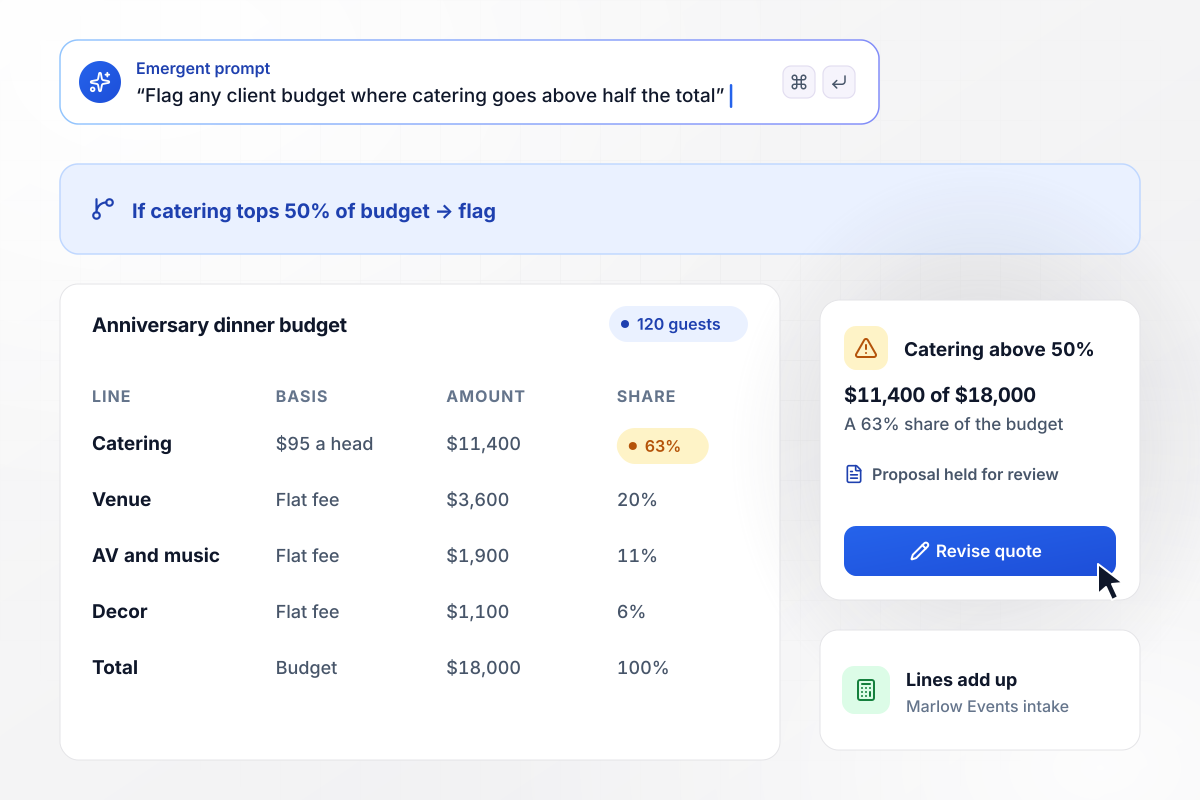
$11,400 of an $18,000 dinner is food
Planners price a dinner by the plate. A Marlow Events client asks for a 120-guest anniversary dinner on an $18,000 budget, and the caterer quotes $95 a head. Catering alone comes to $11,400. Marlow keeps catering under 50%, and the app flags the line before the proposal goes out.
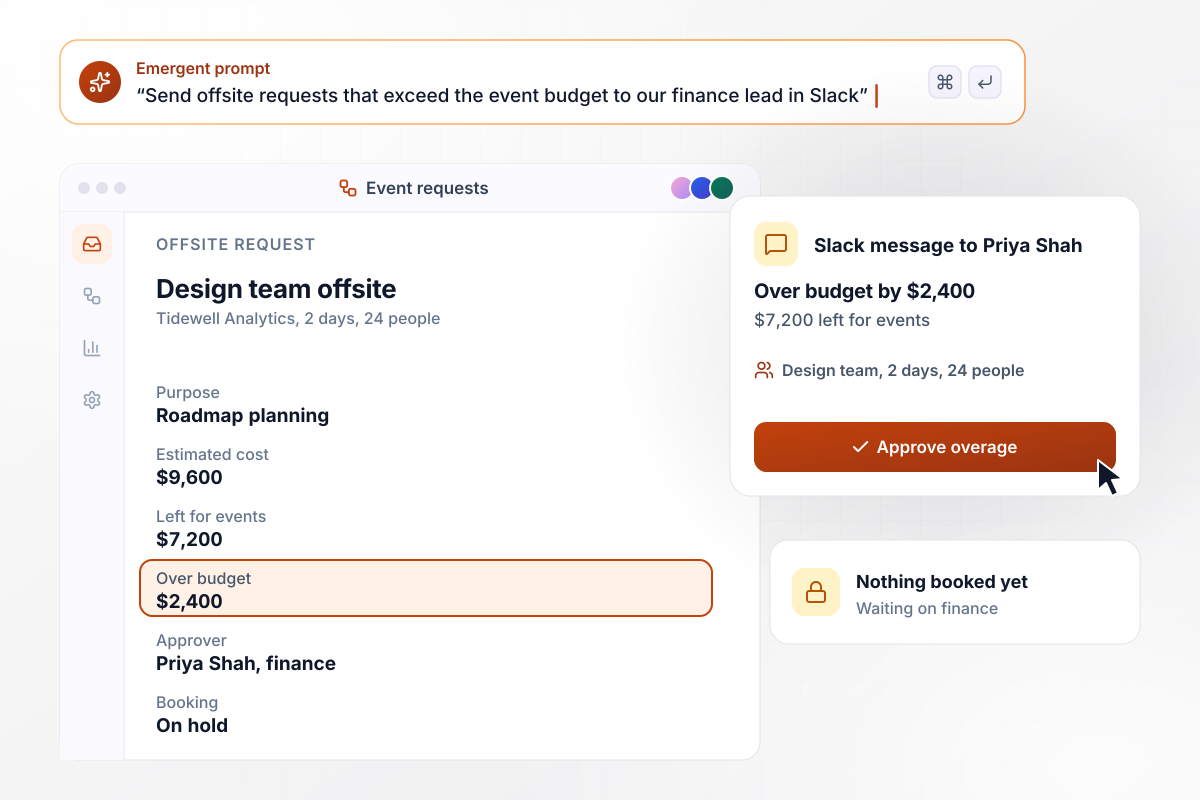
Over the event budget by $2,400
An offsite starts as a line in a department budget. Tidewell Analytics's design team requests a 2-day offsite for 24 people at $9,600, and the department has $7,200 left for events. Priya Shah, the finance lead, gets a Slack message showing the $2,400 gap, and nothing is booked until she approves.
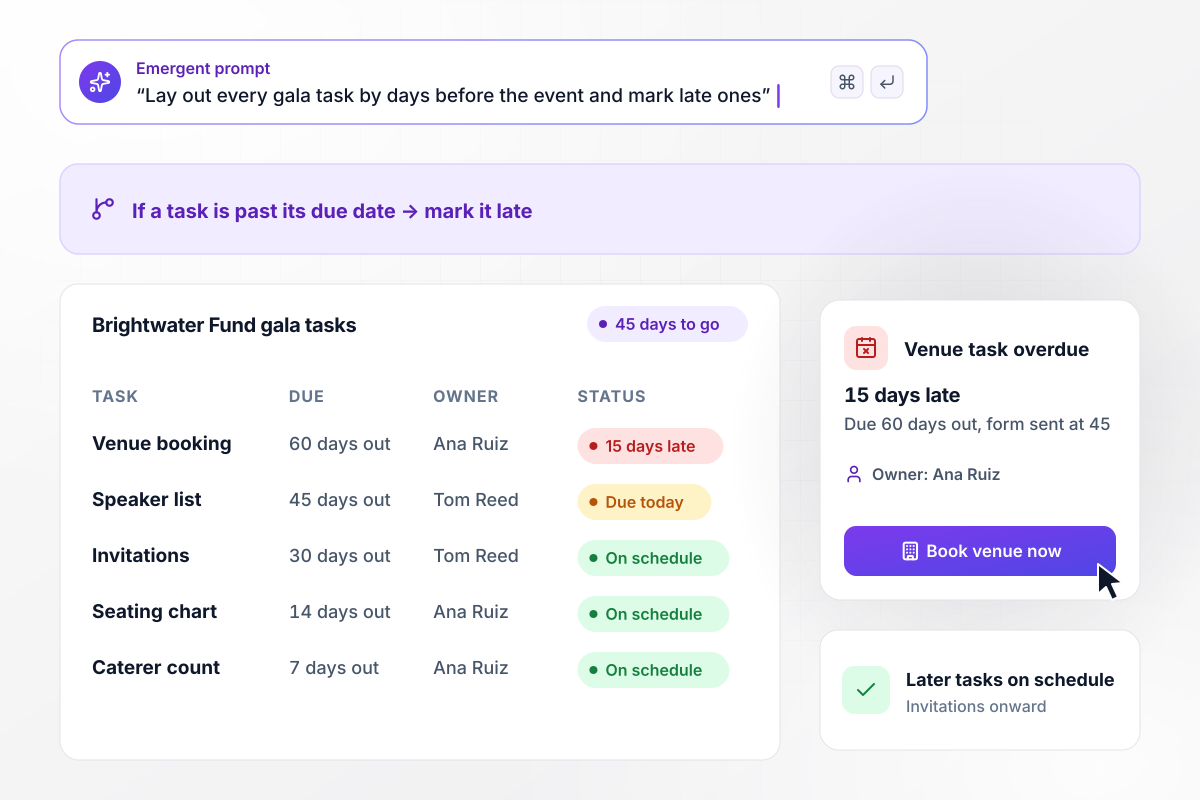
The venue task is already 15 days late
Every planning timeline counts backward from the event. Brightwater Fund submits its gala form 45 days before the date, and the app marks any task past its due date as late. Venue booking was due at 60 days out and is 15 days late. Invitations at 30 days are still on schedule.






How to Make an Event Planning Form
Seven steps to an event planning form that asks only what each approval or quote needs and checks its estimates after the event.
Decide what happens after someone submits, whether that is an approval or a quote. A campus office approving club events needs different questions than a planner pricing a wedding. Each field should earn its place by feeding that next step.
Ask for the event date and hours first, with a backup date beside them. The room check and every vendor deadline hang on that date. Set the field as required, because a request without a date cannot be reviewed at all.
Use a number field for expected guests instead of a range like 50 to 100. Catering and room size both multiply off this figure, as does any per-head cost. A range leaves every one of those estimates guessing at the real total.
Ask for a total budget, then the main lines such as venue, food and AV. Lines that add up to the total show where the money goes. They also show which line to cut when a quote comes back higher than planned.
Add follow-up questions only when an answer changes the work. Serving food opens catering and allergy questions. Alcohol opens a license and bartender section, and an outdoor venue asks for a rain plan. Everyone else skips those pages.
Set the numbers that decide who signs off: a headcount above which security joins, a cost above which finance approves. Agree on them before launch. A rule that lives in one person's head gets applied differently every time.
After the event, ask the organizer for final attendance and actual spend. Set beside the original answers, those figures show which estimates missed, and the next request starts from numbers that match how your events run.
Why Run Event Requests Through Emergent?
Every request sits in one app with its approvals, on a database you own.

|
Jotform | Google Forms | Typeform | |
|---|---|---|---|---|
| How you build | Describe it in plain English | Templates, editor, AI generator | Editor, with Gemini drafting on some Workspace plans | Templates, editor, AI assist |
| Response limits | No response caps | Monthly submission caps by plan; the form stops at the cap | No limit | Monthly response caps by plan; the form closes at the cap |
| Where responses live | A database table you own, plus any integration | Jotform account | Google Sheets | Typeform account |
| Code ownership | Full code export to GitHub on paid plans | None | None | None |




Pick the Pricing Plan That Works for You
Choose the plan that fits your building ambitions. From weekend projects to enterprise applications, we've got you covered.




Find the right form
for whatever you're collecting















Frequently Asked Questions
Your Questions, Answered
Don't change this element unless you know what you are doing
More things you can build
with Emergent









on Emergent today


