

Build a Payroll Deduction Authorization Form Template Staff Sign
Build a payroll deduction authorization form template that lists every paycheck deduction before the employee signs.
Build a payroll deduction authorization form template where staff pick the deduction type, the amount per paycheck and sign.
Trusted by Builders Worldwide
Active Builders Worldwide
Apps Successfully Created
Countries Globally Reached



What Payroll Needs Before the First Deduction
A signed sheet in a drawer leaves payroll guessing. Build a form that records the schedule and who signed it.
Questions that follow the deduction type
The employee picks the deduction, such as a pay advance or parking, and the form asks only what that type needs. An advance asks for the total; parking asks for a start date.
Every paycheck listed before signing
Enter the total and the amount per paycheck, and the form lists each deduction with its pay date. The employee reads the full schedule on the same screen where they sign.
A signature from any phone
Employees sign with a finger on a phone or with a mouse at a desk. The app saves the signature next to the authorization text they saw. Payroll can pull up both of them later.
Alerts that say a form is in, nothing more
Payroll gets an email or a Slack message that an authorization or a stop request has arrived, with a link. Amounts and names stay in the app instead of sitting in an inbox.
Balances that count down each payday
Every active authorization shows what it takes each payday and the balance owed. When one paycheck's worth remains, the app marks the deduction final so payroll can end it.
Code you can take to GitHub
On paid plans, export the full code to your GitHub repository and run the form beside your payroll system. Every signed authorization stays in a database that you own.
One Form for Every Deduction Staff Agree To
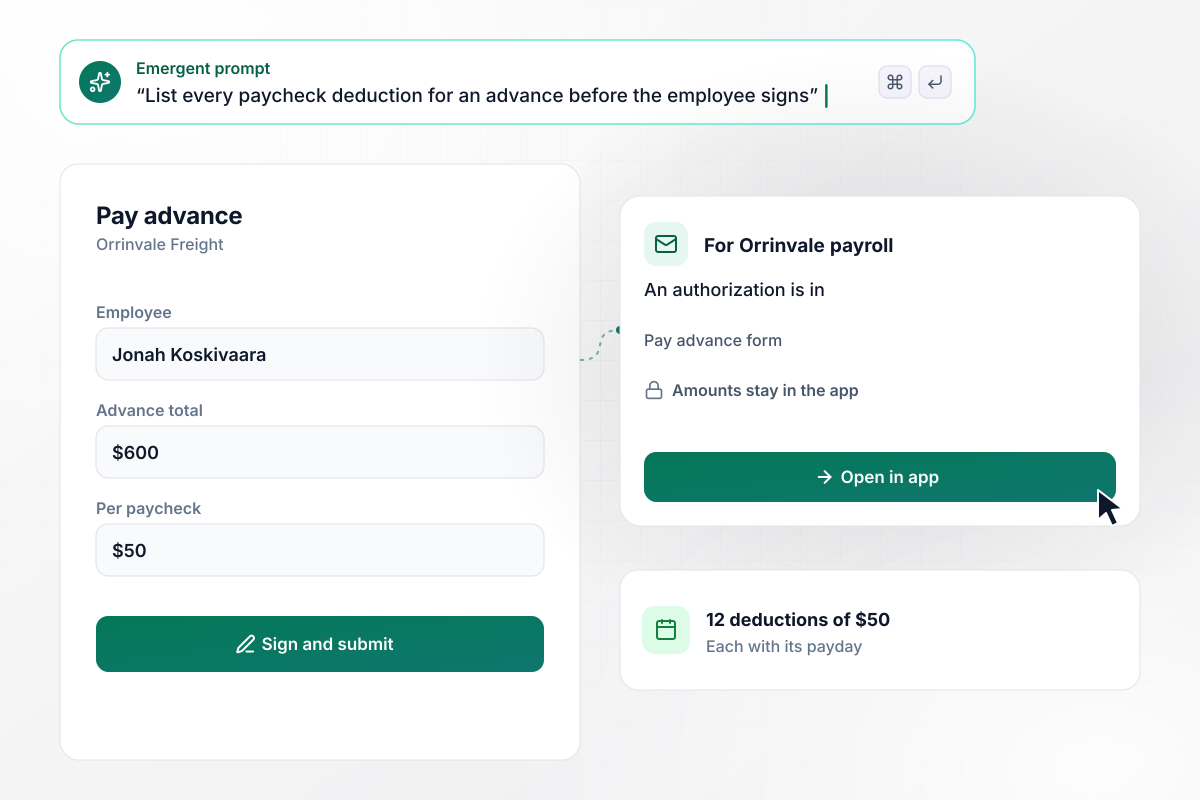
Every $50 deduction listed before he signs
Jonah Koskivaara needed a $600 pay advance from Orrinvale Freight. He picks the advance on the form, and it lays out 12 deductions of $50, each with its payday. He reads the list, then signs. Payroll gets an email that says an authorization is in, with a link and no amounts.
window.awbMockup = { payAdvances: "I run payroll for a freight company. Build a payroll deduction authorization form for pay advances where the employee enters the advance total and the amount per paycheck, and the form lists every deduction with its payday before they sign. Email payroll that an authorization is in, with a link and no amounts.", uniformsAndTools: "Our technicians buy tool kits and uniforms through the company. Build a deduction form they can fill out on a phone: pick the item, the total, and how many paychecks to split it over. Keep the submit button locked until they sign, and save the signature with the wording they agreed to.", stopRequests: "My grocery store takes parking and other deductions from paychecks. Build a form where an employee asks to stop a deduction, and requests in by Wednesday noon come off that Friday's paycheck. Post a Slack message to our payroll channel that a stop request is in, and keep the details in the app.", activeBalances: "I manage a dental office with a few payroll deductions running at once. Build a screen that lists every active deduction with the employee, the amount per paycheck, and the balance left. When the balance equals one paycheck's amount, mark the deduction final so I know to end it after this payday." };
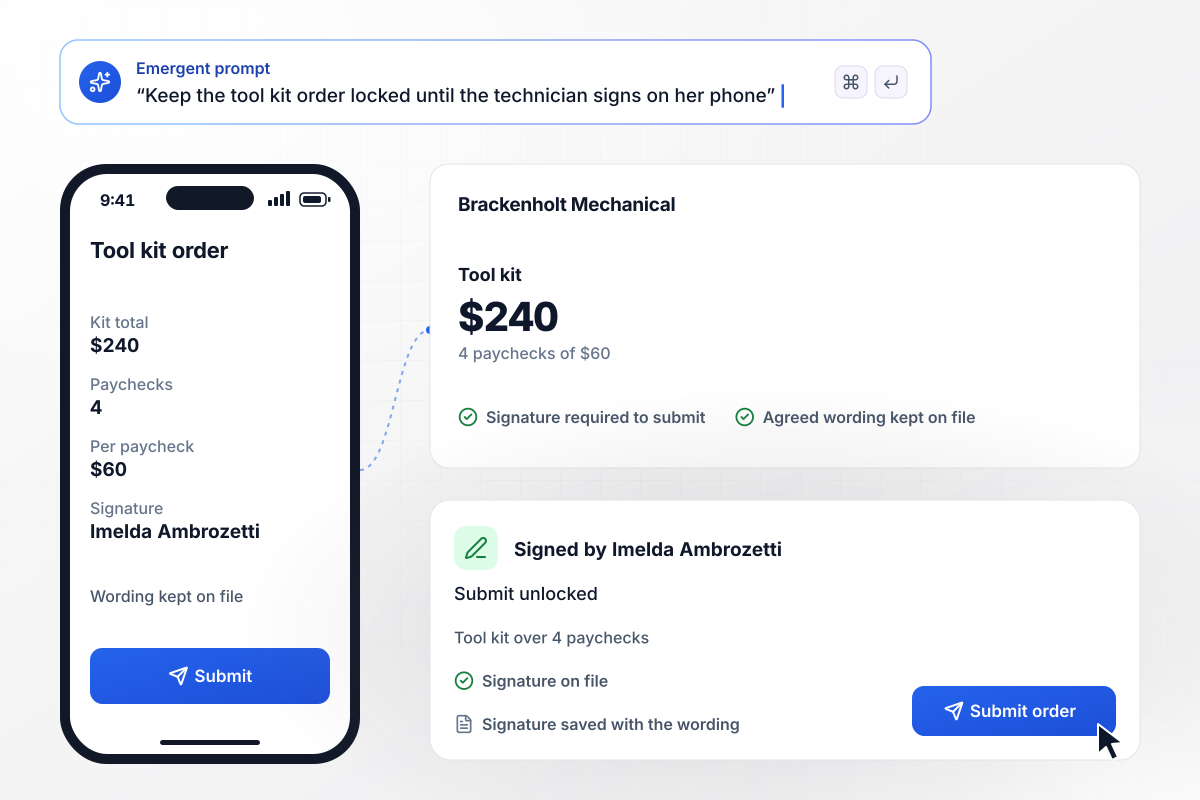
Her signature goes in before the kit order does
Imelda Ambrozetti orders a $240 tool kit through Brackenholt Mechanical's form on her phone, between two service calls. She picks 4 paychecks of $60. The submit button stays locked until she signs with her finger, and her signature is saved next to the exact wording she agreed to.
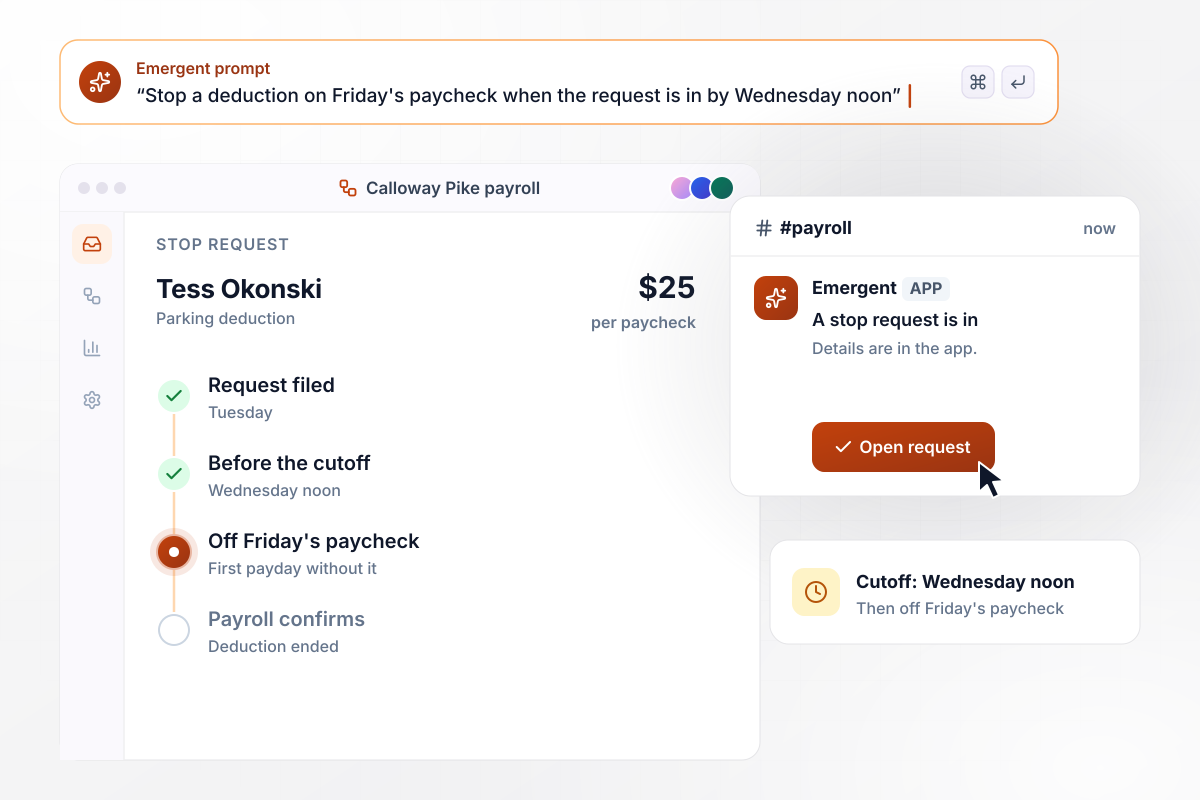
In by Wednesday noon, off Friday's paycheck
Tess Okonski pays $25 a paycheck to park at Calloway Pike Grocers. After a move across town, she files a stop request on Tuesday. Any request in by Wednesday noon comes off that Friday's paycheck, and Friday is the first payday without her deduction. Payroll gets a Slack message that a stop request is in.
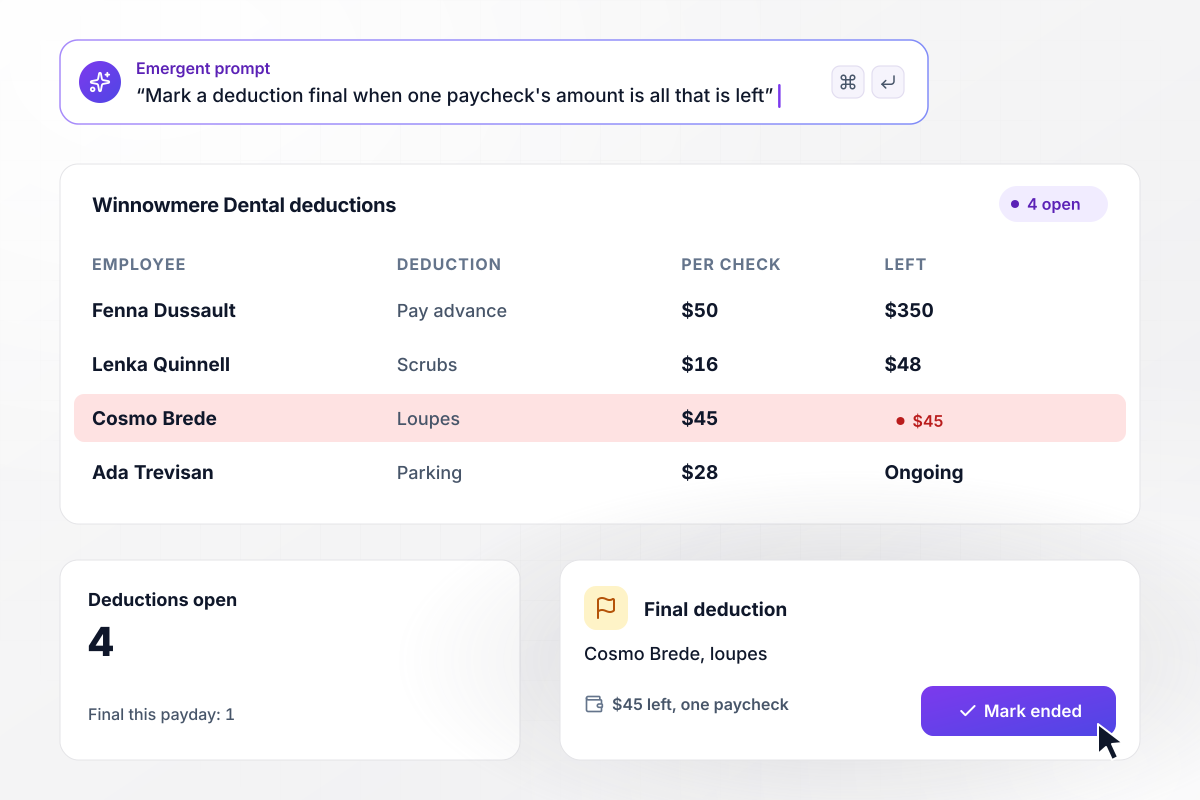
With $45 left, this payday ends it
Winnowmere Dental's office manager keeps four deductions open on one screen, each with its amount per paycheck and the balance left. Cosmo Brede bought dental loupes at $45 a paycheck, and $45 is all that remains. The app marks his deduction final. This payday is his last one.






How to Create a Payroll Deduction Form
Seven steps to build a payroll deduction authorization form template that shows the schedule before signing and tracks each balance.
List every deduction you take today that needs the employee's consent, such as pay advances, uniforms, tools, and parking. Each one becomes a choice at the top of the form. A trucking yard and a dental office end up with different lists.
Write the authorization text in plain sentences: what is deducted, how much per paycheck, for how long, and how the employee can ask to stop it. Have your payroll provider or employment counsel review the wording before anyone signs it.
Decide how each type is paid back. An advance needs a total and an amount per paycheck, while parking runs until the employee stops it. The form uses these answers to list every paycheck deduction on the signing screen.
Describe the form in a prompt, naming each deduction type with its questions and saying where the signature step goes. Emergent builds it with the database table behind it, and you change any part of it by prompting again.
Choose who is told when a signed form or a stop request comes in, by email or in Slack. Keep amounts and names out of the message. A link back to the app is all payroll needs to open the record.
Test it with a made-up advance, a tool kit order, and a stop request filed just before the cutoff. Check that each schedule adds up to its total and that each alert carries only the link. Delete the test records before launch.
Publish the form on its own link or on a custom domain (built into Emergent, uses credits). Employees fill it out on a phone or at a desk, and every signed authorization lands in a database you own, ready for payroll on the next pay run.
Why Build Deduction Forms With Emergent?
A downloaded template ends at the signature. Describe your deductions, and Emergent builds the form, the schedule, and the records.

|
Jotform | Google Forms | Typeform | |
|---|---|---|---|---|
| How you build | Describe it in plain English | Templates, editor, AI generator | Editor, with Gemini drafting on some Workspace plans | Templates, editor, AI assist |
| Where responses live | A database table you own, plus any integration | Jotform account | Google Sheets | Typeform account |
| Response limits | No response caps | Monthly submission caps by plan; the form stops at the cap | No limit | Monthly response caps by plan; the form closes at the cap |
| Code ownership | Full code export to GitHub on paid plans | None | None | None |


Pick the Pricing Plan That Works for You
Choose the plan that fits your building ambitions. From weekend projects to enterprise applications, we've got you covered.




Find the right form
for whatever you're collecting















Frequently Asked Questions
Your Questions, Answered
Don't change this element unless you know what you are doing
More things you can build
with Emergent









on Emergent today


