

Build a Chiropractic Landing Page That Takes Bookings
Get a chiropractic landing page that books first visits by clinic and day, with each request saved to a database you own.
Build a chiropractic landing page for my two clinics where new patients request a first visit.
Trusted by Builders Worldwide
Active Builders Worldwide
Apps Successfully Created
Countries Globally Reached



What a Clinic Page Needs to Book a First Visit
Six parts carry a visitor from the first screen to a booking request, and Emergent changes any of them by prompt.
Four fields and a send button
The form asks for a name, a phone number, the clinic, and the day that suits the visitor. Emergent builds it from your prompt, and adding a field takes one more message.
A call button sized for a thumb
Put the clinic's number in a button on the first screen, where a visitor on a phone can dial without scrolling. Repeat that same number in the footer, area code included.
Every request kept as a row
Each booking request becomes a row in a database you own, with the clinic, the preferred day, and the time it arrived. Staff call back in the order the rows came in.
An email the moment a request lands
Choose who hears about a new request: an email to the front desk, a Slack message to the office manager, or both. The app sends it with the visitor's name and number.
Hours and parking next to the form
Show the clinic's hours and street address beside the booking form, with a line on where to park. A visitor choosing between two days can check both without leaving the page.
A web address patients recognize
Publish the page on a domain the clinic already owns, such as a booking subdomain of the main site patients know. Custom domains are included in Emergent and use credits.
Chiropractic Landing Page Examples
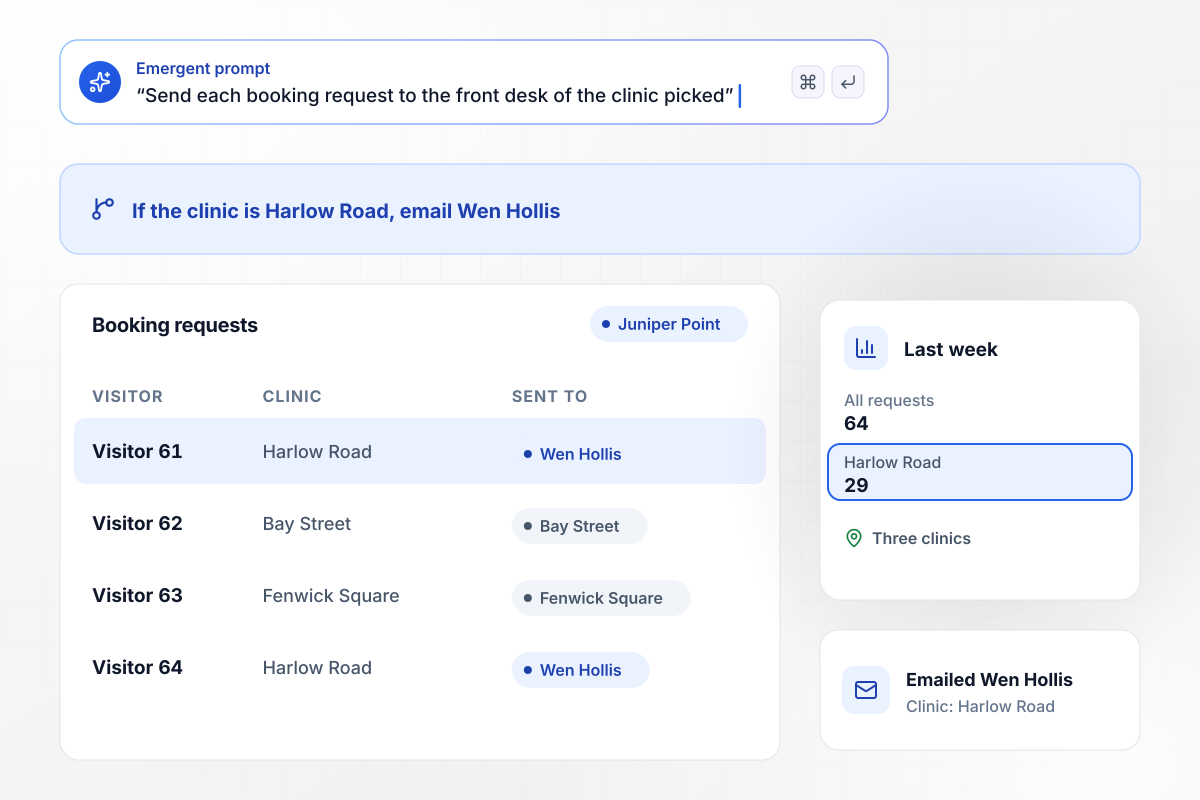
A Harlow Road request goes to Wen
Juniper Point Chiropractic runs clinics on Harlow Road, Bay Street, and Fenwick Square, and its page asks the visitor to pick one first. A request for Harlow Road emails Wen Hollis at that front desk, and the other two clinics get their own. Last week 64 requests came in, and 29 of them picked Harlow Road.
window.awbMockup = { clinicLocations: "Build a landing page for Juniper Point Chiropractic, my practice with three clinics: Harlow Road, Bay Street, and Fenwick Square. Ask the visitor to pick a clinic first, then take a name, a phone number, and a preferred day. Email each request to that clinic's front desk, and send Harlow Road requests to Wen Hollis.", saturdaySlots: "Make a first-visit page for Saltmarsh Chiropractic. We open Saturdays from 8 am to noon with 12 slots. Show how many Saturday slots are left on the form, and once 12 requests are in, take Saturday off the list of days so visitors pick a weekday.", spanishVersion: "Create a booking page for Alder Vista Chiropractic in English and in Spanish, with a switch at the top. Save the version each request came from on its row, and put every Spanish request on Lucia Paredes's call-back list.", visitReminders: "Build a booking page for Hollin Creek Chiropractic. When my front desk marks a request Booked and adds the visit time, email the patient at 6 pm the evening before with the time, our street address, and the parking note." };
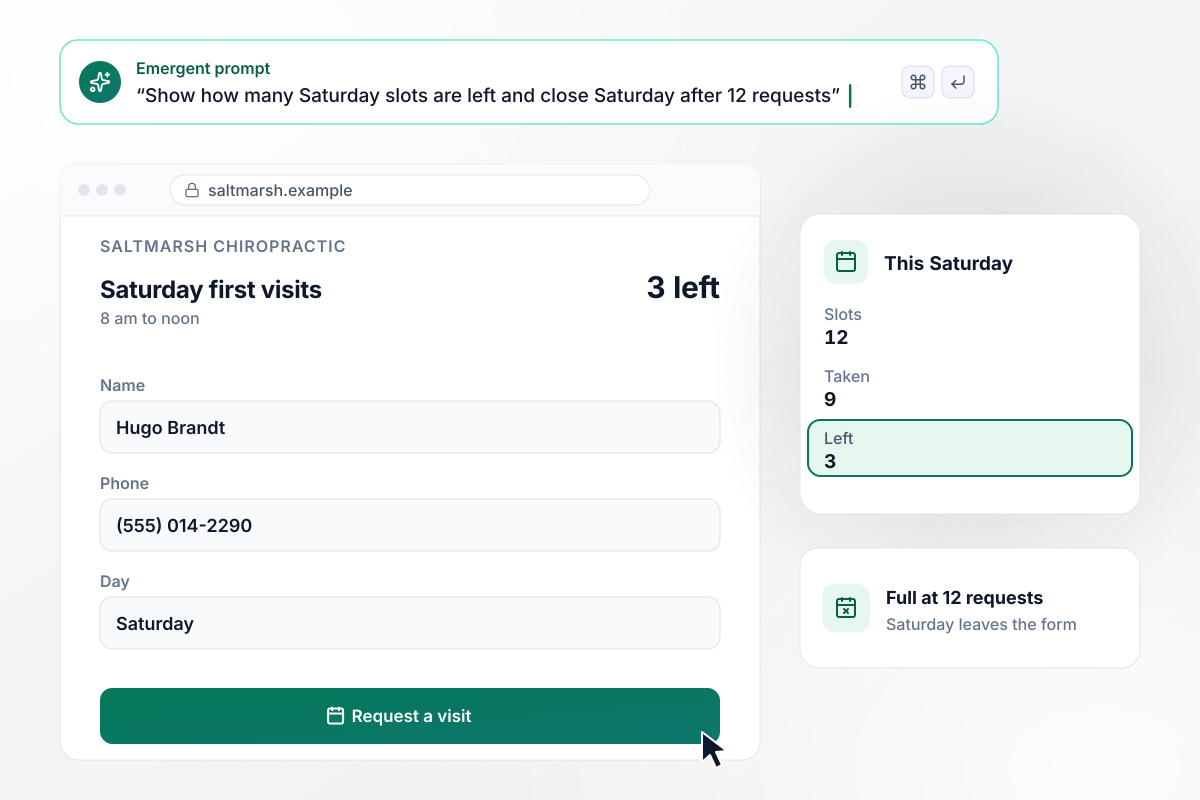
Saturday closes after 12 requests
Saltmarsh Chiropractic opens from 8 am to noon on Saturdays and offers 12 first-visit slots. The form shows how many are left, and a visitor who sees Saturday running low can pick a weekday. This week 9 slots are taken and 3 remain. Once the twelfth request arrives, Saturday drops off the list of days on the form.
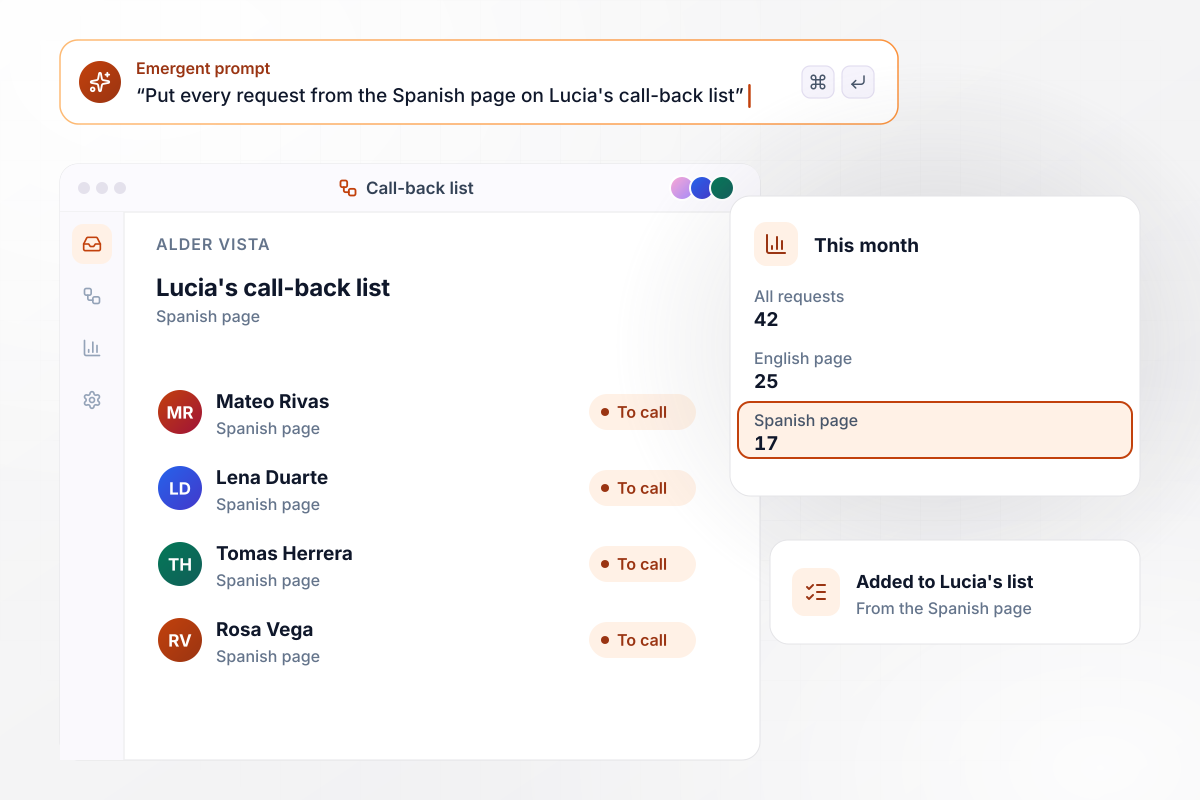
17 of 42 requests came in Spanish
Alder Vista Chiropractic runs the same page in English and in Spanish, and each request records the version it came from. This month 25 requests came from the English page and 17 from the Spanish one. Every Spanish row lands on Lucia Paredes's call-back list, and she returns those calls in Spanish.
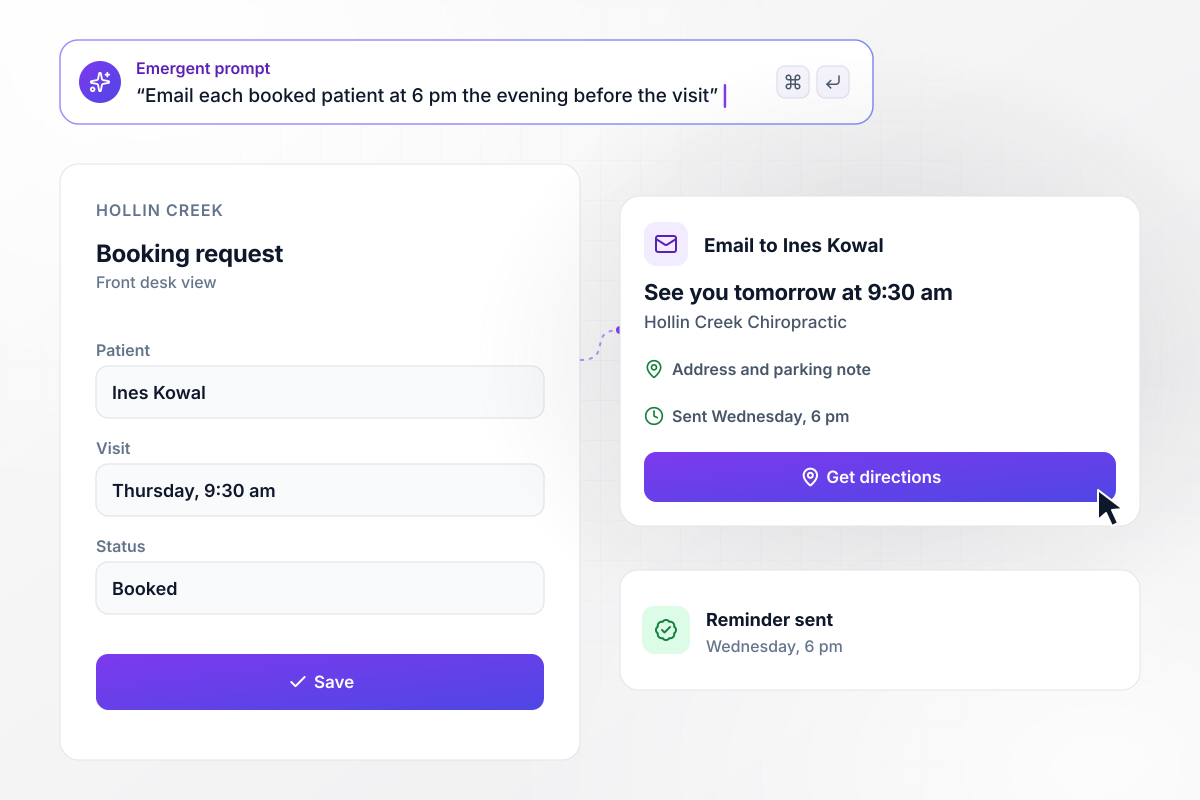
A 6 pm email reaches each booked patient
The front desk at Hollin Creek Chiropractic marks a request Booked and adds the visit time. At 6 pm the evening before, the app emails the patient the time, the street address, and the parking note. Ines Kowal is booked for Thursday at 9:30 am, and her reminder went out Wednesday at 6 pm.






How to Create a Chiropractic Landing Page
Seven steps to a chiropractic landing page that books first visits at every clinic and leaves health questions to intake.
Write the page for a new patient booking a first visit, and send returning patients to the clinic's main site. Someone who clicked an ad for a first visit should find that visit and its form, with no menu of other services.
Say how long the first visit lasts and what it costs, if the clinic charges one set price for it. Put both next to the form, where a visitor reads them before choosing a day, and keep the wording the same in your ads.
Size the call button for a thumb. Chrome's Lighthouse docs say tap targets that are 48 px by 48 px never fail the audit. In the page's markup, Google asks you to include the country code and area code in the phone number.
Ask only what the front desk needs to call back and set a time. Leave health history and the reason for the visit to the intake paperwork the clinic sends after booking, where staff already handle it.
List each location with its own street address and hours. Google's local business guidance says to define each local business location as a LocalBusiness type. Mark up each clinic as a separate entry.
Give each field a visible label, such as Preferred day, instead of gray text inside the box. WCAG 2.1 success criterion 3.3.2 reads: labels or instructions are provided when content requires user input.
Describe the clinics and who hears about each request, and Emergent builds it from that description. Send one test request per clinic from a phone, then check the row in your database and the email at the front desk.
Why Chiropractors Build With Emergent
Name the clinics and who calls back, and Emergent builds the page. Requests sit in a table you own, and paid plans export the code.

|
Unbounce | Landingi | Wix | |
|---|---|---|---|---|
| How you build | Prompt for a campaign page | Templates and drag-and-drop, AI copy assist | Templates and drag-and-drop, AI assist | Prompt for a full site |
| Where submissions go | A database table you own, plus integrations | Unbounce lead storage and integrations | Vendor lead storage and integrations | Wix dashboard submissions and Contacts |
| Visitor limits | No per-visitor pricing | Monthly visitor caps by plan | Tiered by traffic on most plans | Site plan bandwidth |
| A/B testing | Generate variants by prompt | A/B testing on higher-tier plans only | Higher plans | Limited or add-on |
| Code ownership | Full code export to GitHub on paid plans | Hosted only | Hosted only | Hosted only |


Pick the Pricing Plan That Works for You
Choose the plan that fits your building ambitions. From weekend projects to enterprise applications, we've got you covered.




Find the right landing page for you















Frequently Asked Questions
Your Questions, Answered
Don't change this element unless you know what you are doing
More things you can build
with Emergent









on Emergent today


