

Build a Dentist Landing Page That Books the Visit
Build a dentist landing page with a call button, a short booking request form, and every request saved to a database you own.
Build a dentist landing page for my family practice where patients request a cleaning or checkup.
Trusted by Builders Worldwide
Active Builders Worldwide
Apps Successfully Created
Countries Globally Reached



What a Practice Page Needs to Fill the Schedule
A dentist landing page has one job: turn a visitor into a booking request. Six parts do that work, and each can change by prompt.
A request form that stays short
Ask for a name and a phone number, then the day that suits the visitor and why they are coming in. Emergent builds the form from your prompt, and you add or drop fields by prompting.
A call button at the top of the page
Ask for the office number in a button above the fold, where a visitor on a phone taps once to dial. The page repeats that number in the footer, next to the address and hours.
Requests saved as rows you own
Each request lands as a row in a database you own, with the visit type and preferred time, stamped with the date it arrived. The front desk calls back in the order rows came in.
An email when a request cannot wait
Name the requests that need a fast call back, such as anyone who picks Pain now on the form. The person you choose gets an email naming who to call and the number, nothing more.
The practice's own web address
Publish the page on a domain the practice already owns, such as a booking subdomain of the main site patients know. Custom domains are included in Emergent and use credits.
Code you can take with you
Export the page and its request table to your GitHub repository on paid plans. Or keep it hosted on Emergent and change the hours or the offer whenever you need to by prompting.
Dentist Landing Page Examples by Visit Type
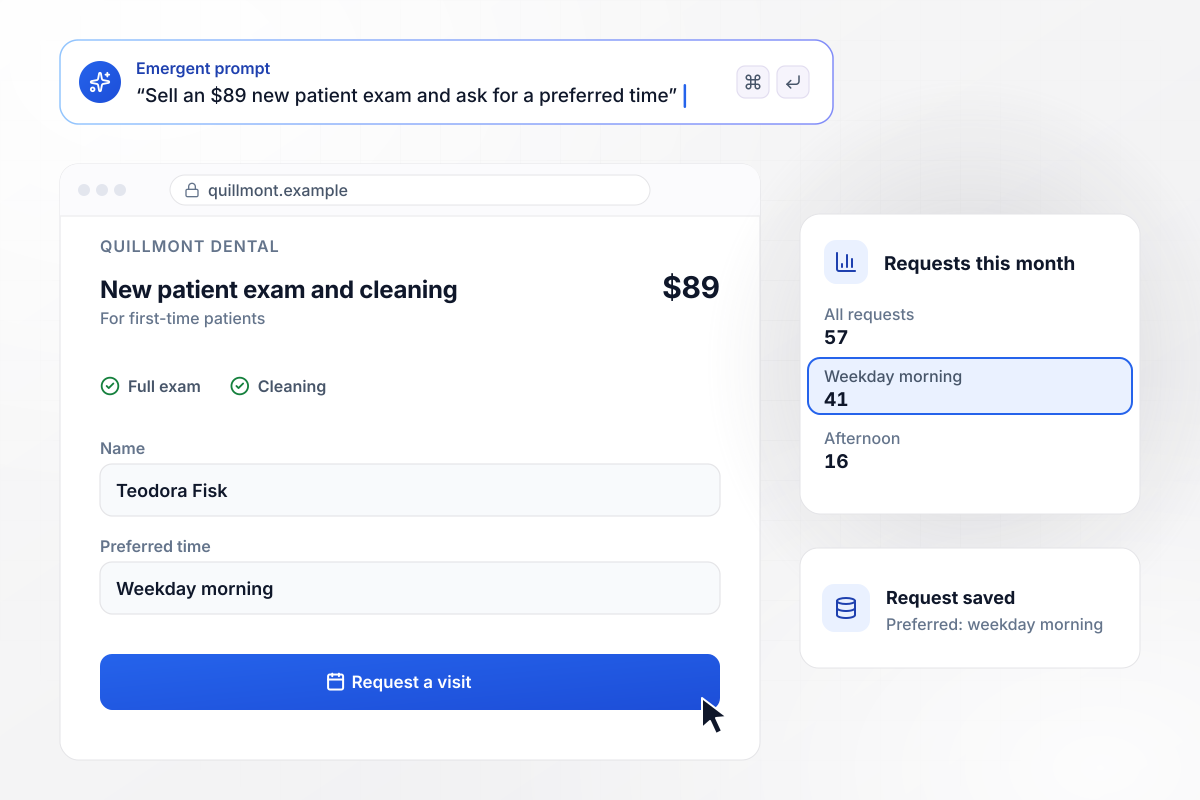
41 of 57 new patients asked for a morning
Quillmont Dental sells one visit on this page: a new patient exam with a cleaning for $89. The form ends on one question, the time of day that suits the visitor. This month 57 requests came in. 41 of them asked for a weekday morning and 16 asked for an afternoon, and each one is a row the front desk calls back from.
window.awbMockup = { newPatientExam: "Build a landing page for Quillmont Dental, my practice, that sells one visit: a new patient exam with a cleaning for $89. Keep the form short and end it on the time of day that suits the visitor, weekday morning or afternoon. Save every request as a row my front desk can call back from.", emergencyVisit: "Make an emergency page for Fernreach Dental with a call button above the fold. Under it, add a form for a name, a phone number, and one choice: Pain now or This week. When someone picks Pain now, email Rosalind Teague at my front desk a new call back request with their name and number, and keep the Pain now choice in the app.", kidsFirstVisit: "Build a first visit page for Little Molars Pediatric Dentistry where one parent can book up to 3 children in a single request. Ask for the parent's name and phone number once, then each child's name and age. Save every child as a separate row so my front desk can book them back to back.", insuranceChoice: "Create a page for Selby Row Dental that asks visitors how they will pay before anything else. People who pick dental insurance should see the plan types my office accepts. People who pick no insurance should see my membership plan at $29 a month. Count the answers each week." };
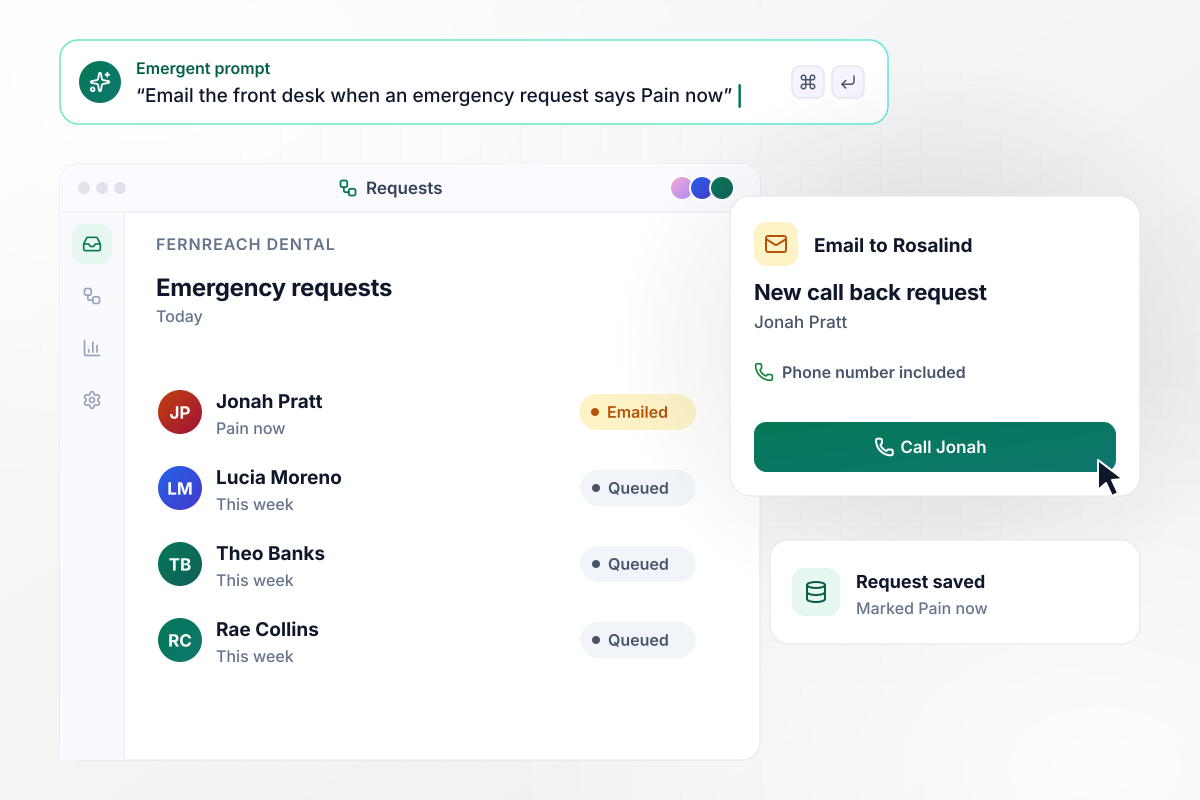
Every Pain now request emails Rosalind
Fernreach Dental's emergency page opens on a call button above the fold. Under it, the form takes a name, a phone number, and one choice: Pain now or This week. Any request marked Pain now emails Rosalind Teague at the front desk a name and number to call back, and the reason stays in the app.
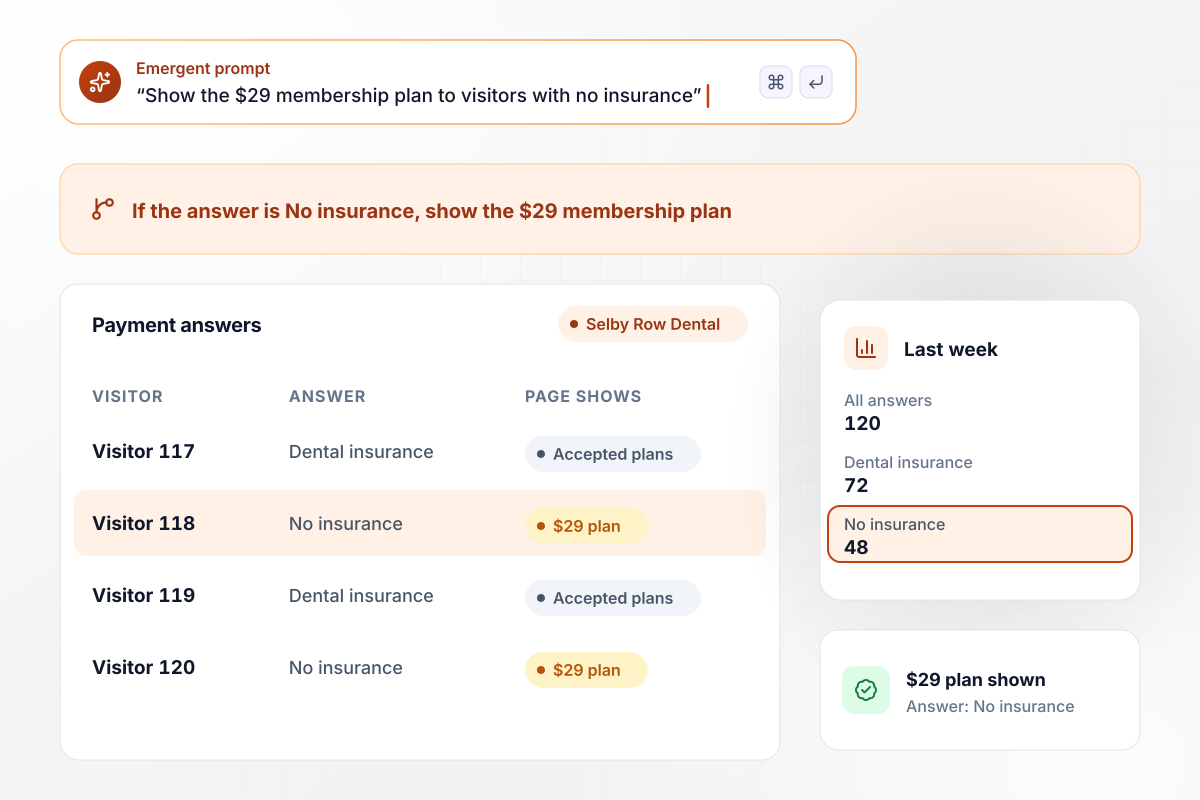
Visitors who pick no insurance see a $29 plan
Selby Row Dental asks one question first: "How will you pay for your visit?" Visitors who pick dental insurance see the plan types the office accepts. Visitors who pick no insurance see the office's membership plan at $29 a month instead. Of 120 answers last week, 72 picked insurance and 48 picked no insurance.
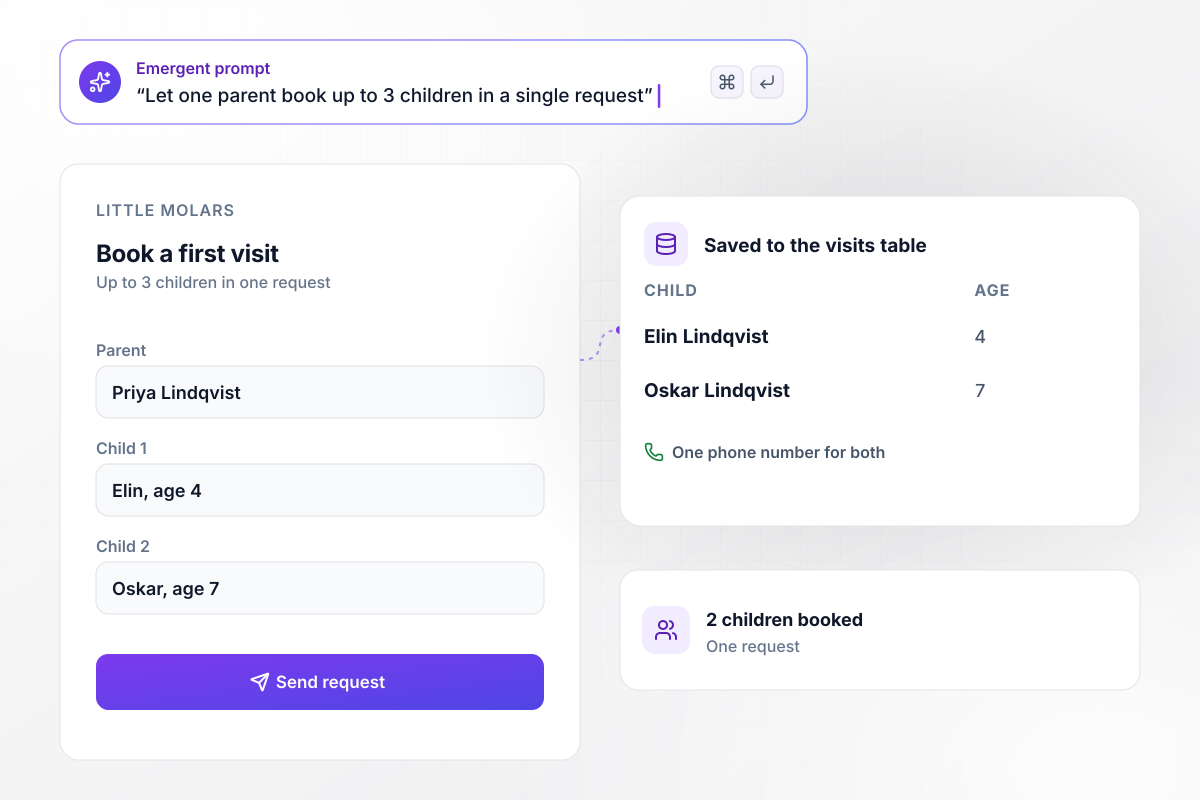
Two children booked in one request
Little Molars Pediatric Dentistry lets one parent book up to 3 children in a single request on its first visit page. Priya Lindqvist booked 2 children this morning, ages 4 and 7, under one phone number. Each child landed as a separate row with a name and an age, and the front desk booked them back to back.






How to Create a Dentist Landing Page
Seven steps to a dentist landing page that sells one visit, answers the insurance question first, and turns visitors into requests.
Choose a single visit, such as a new patient exam or an emergency appointment, and write the whole page around it. A visitor who clicked an ad for a cleaning should land on the cleaning, not on a list of every service the office offers.
List the kinds of insurance the practice takes, in the words patients use, and say what happens when a plan is missing from the list. If the office runs a membership plan for patients without insurance, print its monthly price on the page.
Place a call button near the top of the page and repeat the number in the footer. Google's local business markup guidance asks for the country code and area code in the phone number, so write it the same way on the page.
Keep the request form to what the front desk needs for a call back, with nothing about health or medications. Collect medical history later, through the intake forms the office already sends to new patients before their first appointment.
Put the office hours and street address beside the form, with a line on parking. Google's structured data guidance says to use the most specific LocalBusiness sub-type possible. For a practice, that is the Dentist type listed on schema.org.
Use photos of the actual treatment rooms and the front desk instead of stock smiles. Put each dentist's name and title under their photo, and add a short line on what they treat, such as children or implants.
Describe the visit and who gets urgent requests, and Emergent builds the page. Open it on a phone, send a test request, and check that the row lands in your database and the email reaches the front desk.
Why Build a Dentist Landing Page With Emergent?
Describe the visit and the form, and Emergent builds the page. Requests land in a table you own, and paid plans export the code.

|
Landingi | ConvertFlow | Wix | |
|---|---|---|---|---|
| How you build | Prompt for a campaign page | Templates and drag-and-drop, AI assist | Templates and drag-and-drop, AI remix | Prompt for a full site |
| Where submissions go | A database table you own, plus integrations | Vendor lead storage and integrations | ConvertFlow contact profiles, synced to your CRM | Wix dashboard submissions and Contacts |
| Visitor limits | No per-visitor pricing | Tiered by traffic on most plans | Monthly view caps by plan | Site plan bandwidth |
| A/B testing | Generate variants by prompt | Higher plans | A/B testing on paid plans only | Limited or add-on |
| Code ownership | Full code export to GitHub on paid plans | Hosted only | Hosted by ConvertFlow or embedded on your site | Hosted only |



Pick the Pricing Plan That Works for You
Choose the plan that fits your building ambitions. From weekend projects to enterprise applications, we've got you covered.




Find the right landing page for you















Frequently Asked Questions
Your Questions, Answered
Don't change this element unless you know what you are doing
More things you can build
with Emergent









on Emergent today


