

Build a Compensation Survey and Own the Pay Data
Build a compensation survey that matches jobs by description, checks each salary entered, and saves it to a database you own.
Build a compensation survey for the 40 member firms of my regional HR group to report pay for 22 benchmark jobs.
Trusted by Builders Worldwide
Active Builders Worldwide
Apps Successfully Created
Countries Globally Reached



What the Survey Handles Before the Report
What Emergent builds behind a compensation survey, and what stays yours once the survey closes.
Questions drafted from your job list
List the jobs you want to compare and the pay you need for each. Emergent drafts the survey, one section per job, and you change any question by typing a follow-up prompt.
Each job matched by its description
Participants read a short description beside each benchmark job and pick the role in their firm that does that work. Their own job title never has to match the one on your list.
Pay data in a database you own
Each entry lands as a row in a database you own: firm, job, headcount, base pay, bonus, and effective date. Filter by region or firm size before any figure leaves the table.
Reminders until every participant submits
Participants that miss the deadline get an email reminder, and your team gets a Slack alert naming each one still out. Anyone who has already submitted gets no further emails.
No cap on responses
Emergent puts no cap on survey responses. A council with 400 member firms collects every submission, and a staff survey at a 3,000-person company reaches every employee.
Your domain, and the code behind it
Run the survey at an address on your own domain, which Emergent includes and bills in credits. On paid plans, export the full code to your GitHub repository and reuse it next cycle.
How Four Teams Run Their Pay Surveys
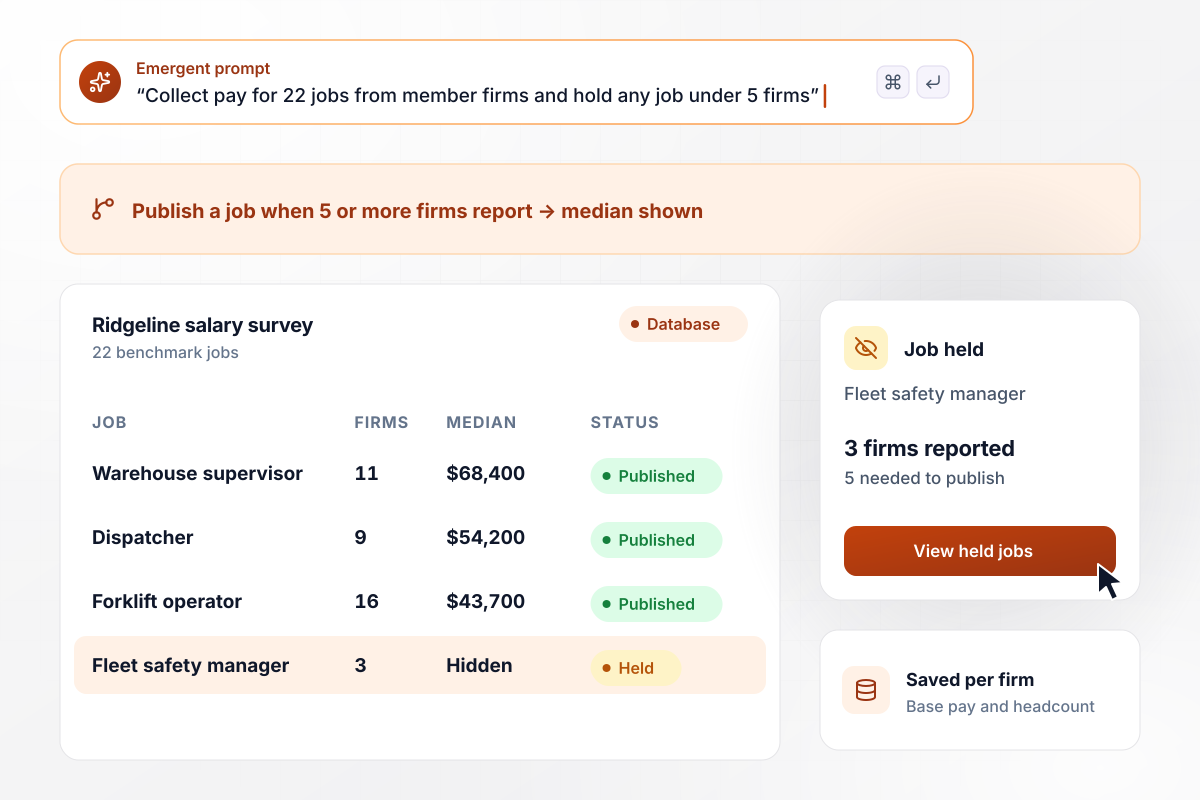
No job published with fewer than 5 firms
Ridgeline Logistics Council runs one salary survey a year. Member firms enter base pay and headcount for 22 benchmark jobs, and a job publishes only when 5 or more firms report it. Warehouse supervisor drew 11 firms and published at a median of $68,400. Fleet safety manager drew 3 and stays held.
window.awbMockup = { memberSalarySurvey: "Build a salary survey for my trade council. Each member firm enters base pay and headcount for our 22 benchmark jobs, matched by a short description of each job. Save every entry with the firm and its region. Calculate the median for each job, but publish a job only when 5 or more firms report it, and mark the rest as held.", salaryEntryCheck: "Add a check to my salary survey. When a firm enters a base salary under $30,000 for a full-time job, send the entry back to the payroll contact at that firm with the figure and the rule, and let them correct it. Keep only the corrected entry in the results.", countyPeerSurvey: "My county needs a pay survey it can send to 8 neighboring counties. Ask each one for the top-step annual pay of our 12 job classes. Build a report that shows our pay, the peer median, and the gap as a percentage for each class, and let me add any line to the board packet.", staffPayClarity: "Create an anonymous pay survey for my company. Ask every employee whether they understand how their pay is set and whether they know their pay range, on a 5-point agree scale. Group the answers by team, chart the share who agree, and flag the lowest team for HR." };
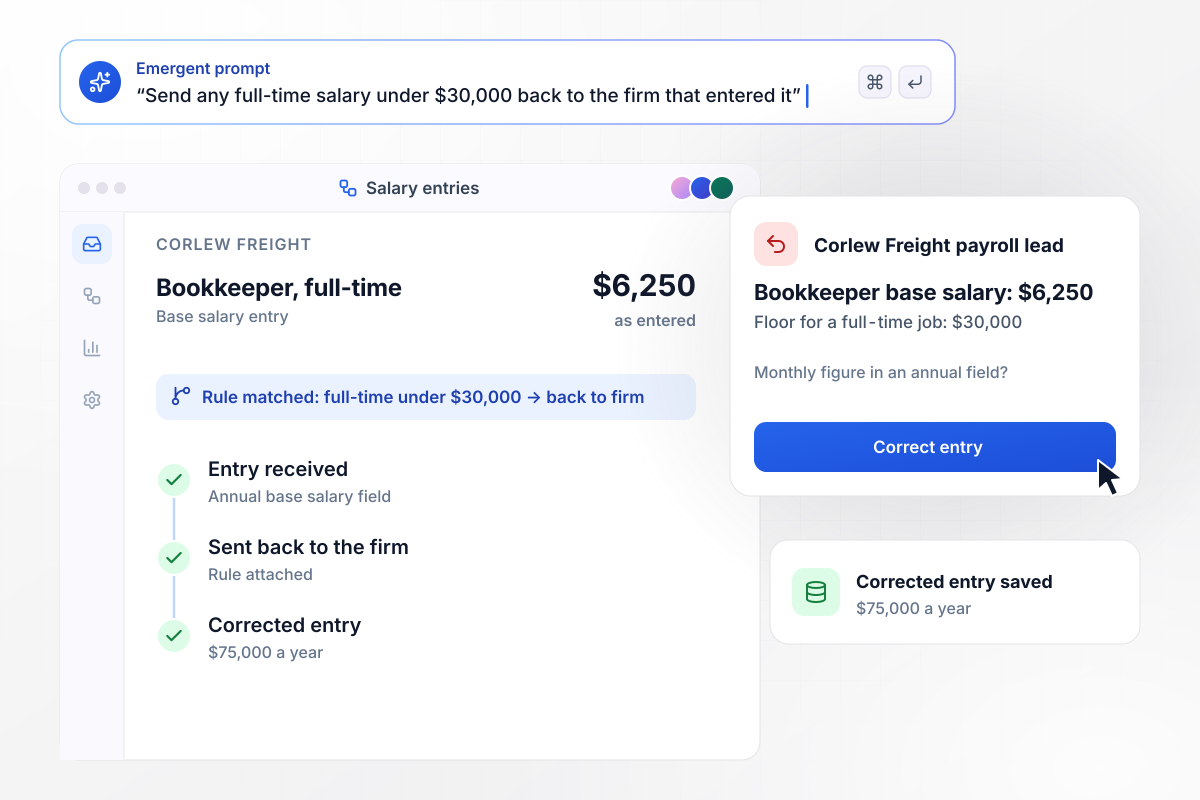
A monthly salary sent back to the firm
Corlew Freight typed $6,250 as base salary for its full-time bookkeeper. The council sets a $30,000 floor for any full-time job, and anything lower goes back to the firm with the rule attached. The payroll lead saw a monthly number in an annual field and resubmitted $75,000 a year.
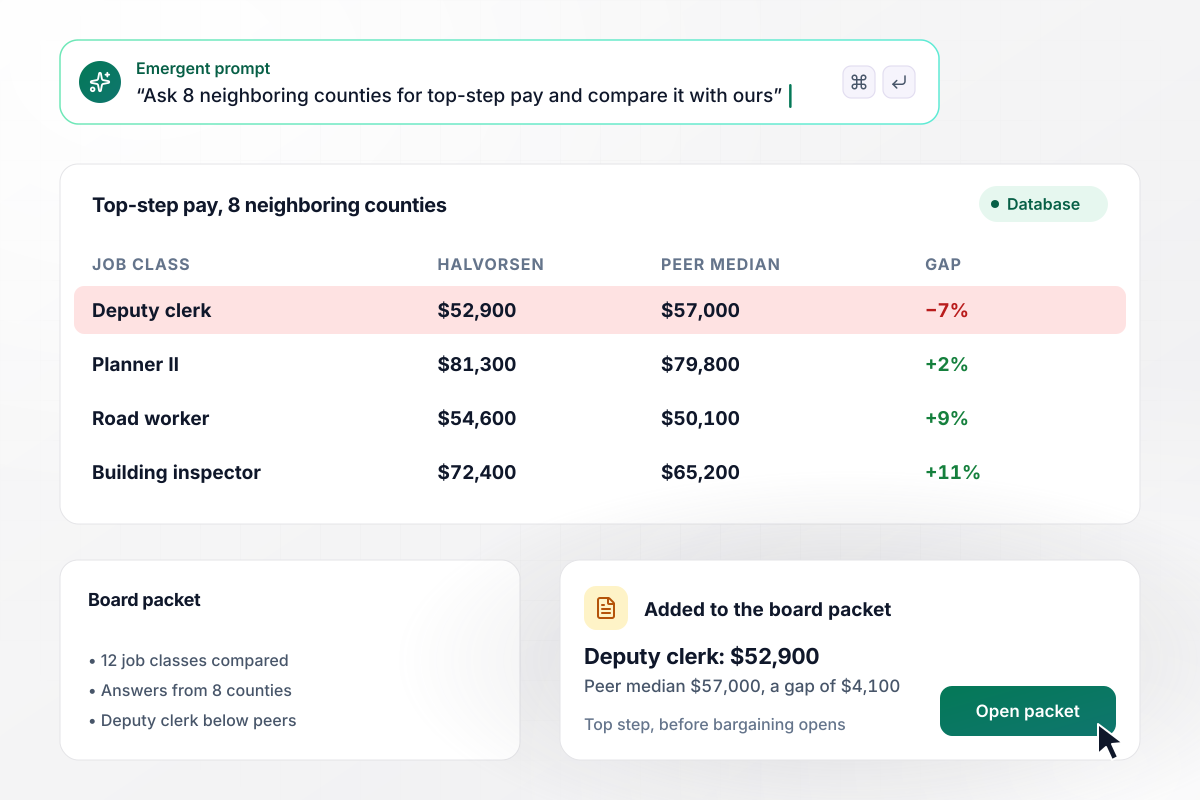
Pay for 12 job classes, checked against 8 counties
Halvorsen County wants a peer comparison before bargaining opens. Its survey asks 8 neighboring counties for the top-step pay of 12 job classes. Deputy clerk tops out at $52,900 in Halvorsen, against a peer median of $57,000, a gap of $4,100. That line goes into the board packet.
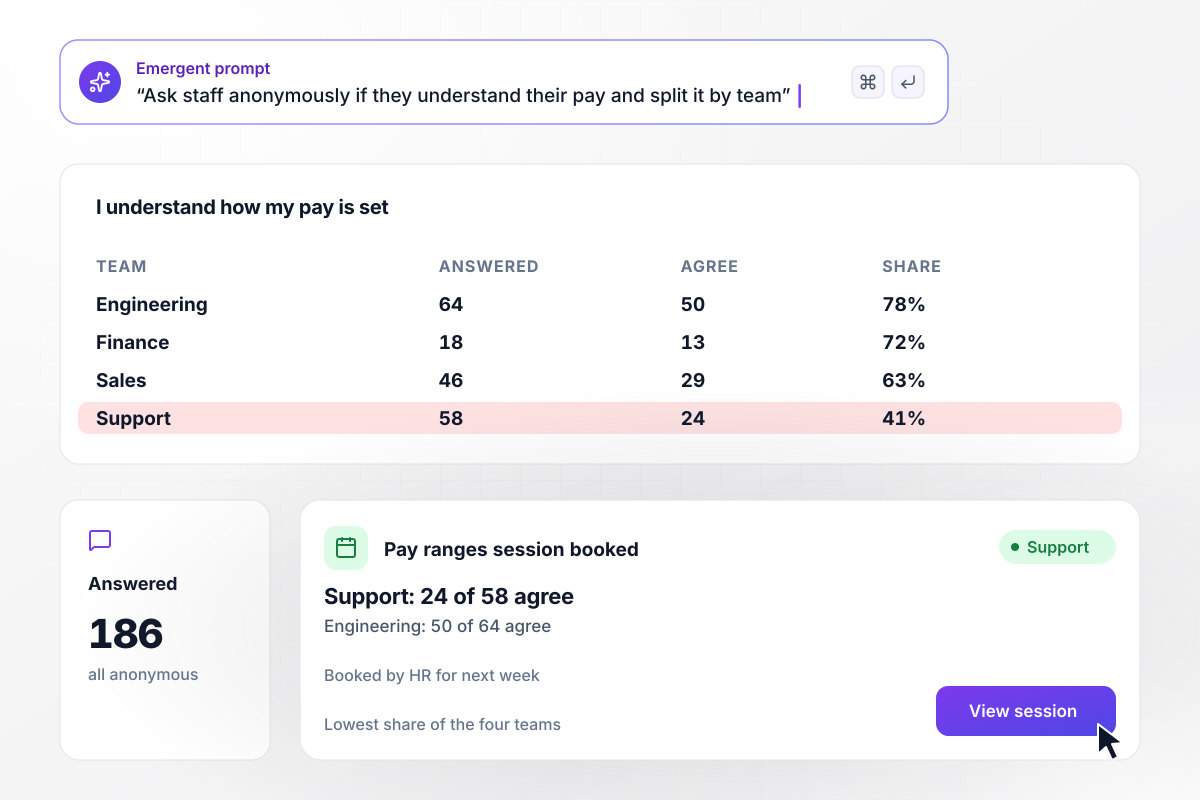
Who understands how their pay is set
Penbrook Software asked every employee about pay, and 186 answered anonymously, grouped by team. Asked whether they understand how their pay is set, 24 of 58 people in support agreed, against 50 of 64 in engineering. HR booked a session on pay ranges for the support team the next week.






How to Run a Compensation Survey
Seven steps to run a compensation survey that collects comparable pay and publishes figures you can defend.
Choose jobs that most participants employ and whose duties rarely change, such as warehouse supervisor or bookkeeper. Leave out one-of-a-kind roles, since too few firms will report them to publish. List the jobs in your prompt, and Emergent drafts a section for each.
Write what each job does, who it reports to, and how many people it manages. The ERC guide to compensation surveys says to match positions by job description rather than title. One firm's coordinator can do the work another firm calls manager.
Ask for base salary, target bonus, headcount, and the date the pay took effect for each job. Skip anything a participant would have to work out by hand, like total cash for the year. Every extra calculation is a reason to abandon the survey halfway.
Give each pay field a floor and a ceiling, such as $30,000 and $400,000 for a full-time base salary. An entry outside the range returns to the participant for a fix before it can move a median. Review the ranges once the first answers come in.
Before the invite goes out, ask one firm to submit real figures for three jobs. Check that each row lands in the table under the right job, then enter a monthly salary on purpose and confirm the floor catches it.
Promise every participant a report on each job that clears your publishing rule, and send it only to firms that submitted. Mercer makes the same offer: participants in its US compensation planning survey receive the results for free when they publish.
Report the 25th and 75th percentile beside the median for every published job, so a participant can choose where it wants to pay. Keep each firm out of view: members see the aggregates, never another firm's row.
Why Run Your Pay Survey on Emergent?
Every salary sits next to the firm and job it came from, in tables you control. Change any question or rule with a prompt.

|
SurveyMonkey | Microsoft Forms | SurveyHero | |
|---|---|---|---|---|
| What you get | Survey, logic, and response database, as code you own | Survey builder with templates, including employee engagement | Surveys, quizzes, and polls with response summaries | Survey builder with templates, including employee satisfaction |
| Pricing model | Credits, no response caps or per-response fees | Per-user team plans with a seat minimum, billed annually | Free with a Microsoft account; included in Microsoft work and school subscriptions | Free plan, then per-account plans with unlimited responses |
| Where responses live | A database table you own, plus any integration | SurveyMonkey account | Microsoft Forms, with export to Excel | SurveyHero account, EU data centers |
| Code ownership | Full code export to GitHub on paid plans | None | None | None |

Pick the Pricing Plan That Works for You
Choose the plan that fits your building ambitions. From weekend projects to enterprise applications, we've got you covered.




Find the right survey, quiz, or poll
for your team















Frequently Asked Questions
Your Questions, Answered
Don't change this element unless you know what you are doing
More things you can build
with Emergent









on Emergent today


