

Build an Employee Satisfaction Survey Scored by Topic
Create an employee satisfaction survey from a short brief and get every topic scored per site and shift, in a database you own.
Build an employee satisfaction survey that scores pay and workload by site and shift.
Trusted by Builders Worldwide
Active Builders Worldwide
Apps Successfully Created
Countries Globally Reached



What a Satisfaction Survey Needs
One prompt that names your topics and sites gives your employee satisfaction survey every piece below.
One statement per part of the job
Emergent writes a satisfaction item for each topic you name, such as pay, benefits, or your schedule. Add a topic later and it gets an item in the survey and a row in the results.
Percent satisfied for every topic
Each topic is scored as the share of people who chose 4 or 5 on a 1-5 scale. The average sits underneath it, since a split team and a lukewarm team can end up with the same average.
Response rates by site while it runs
The dashboard counts answers by site and shift from the day the survey opens. When one night shift is lagging halfway through, its manager still has time to ask people to fill it in.
Results split by site and shift
Upload a roster with each person's site and shift, or sync it from your HRIS by API. The survey never asks where or when anyone works. Each answer is matched to the roster.
A follow-up only after a low score
When someone answers 1 or 2 on a topic, one open question asks what would change their rating. Each comment is tagged to its topic and listed beside that topic's score in results.
Your survey as code in GitHub
Export the survey, its response tables, and its dashboards to your GitHub on paid plans. Run it on your own servers, edit the code by hand, or keep prompting Emergent for changes.
Four Satisfaction Surveys Teams Run
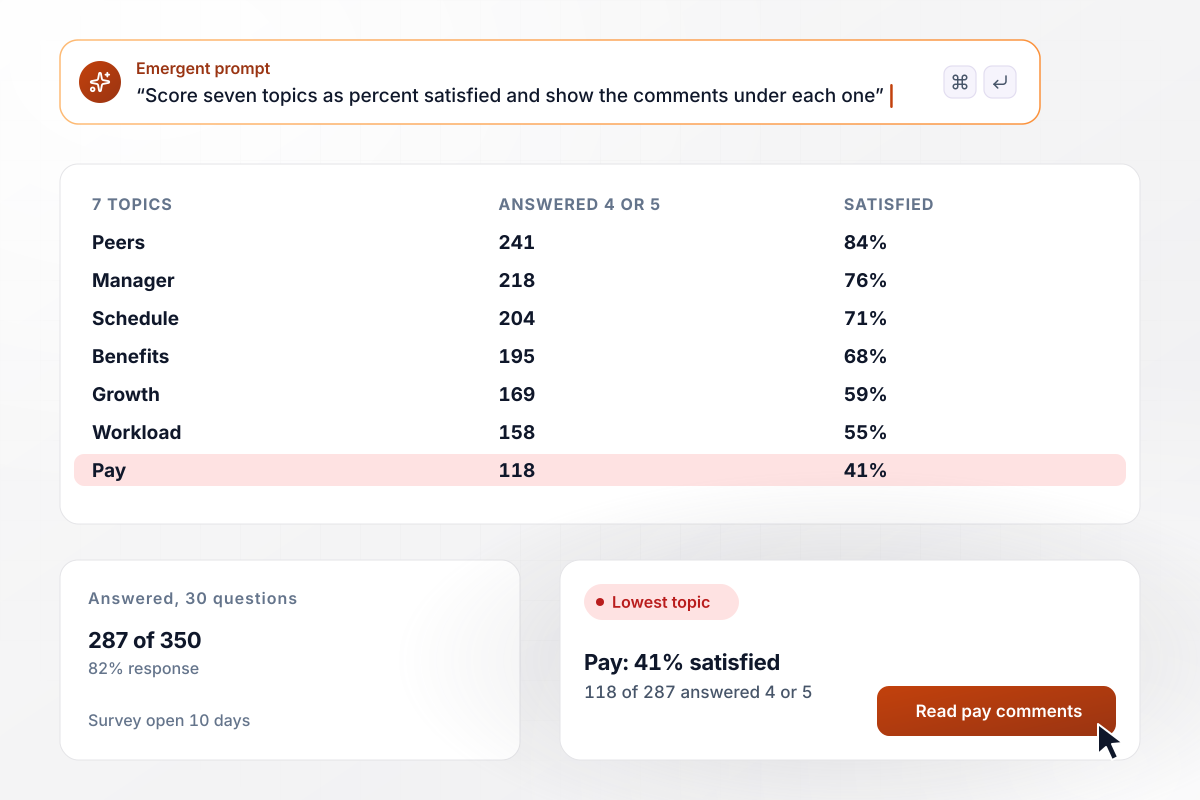
Pay finishes last of seven topics
A 30-question survey on seven topics goes to all 350 employees and stays open for 10 days. Pay comes in last, and the comments under it repeat one complaint: annual raises trail what new hires are offered.
window.awbMockup = { wholeCompany: "Build an employee satisfaction survey for my company of 350 people. Use 30 questions on seven topics, including pay, benefits, my managers, workload, and schedules, on a 1-5 scale from very dissatisfied to very satisfied. Keep it open 10 days and remind only people who have not answered. Show each topic's percent satisfied with its comments beside it.", nursingUnits: "Build a satisfaction survey for the nurses in my hospital. Ask 18 questions on staffing, scheduling, and patient load. Tag every response with the unit and with day or night shift from our roster. If fewer than half of a shift on any unit are satisfied with staffing, email that unit's nurse manager the counts and the comments.", schoolDistrict: "Build a staff satisfaction survey for the teachers and support staff at the nine schools in my district. Use one link and tag each response to its school. Each principal should see only their own school's results, and the district office should see all nine. Hide results for any school with fewer than five answers, and rank the items district-wide.", remoteVsOffice: "Build a workplace satisfaction survey for my remote and office staff with 12 questions on workspace, equipment, software, and focus time. Show both groups in adjacent columns on one dashboard. Turn the remote staff's equipment comments into a list of requests for our IT lead, counted and sorted by how often each one comes up." };
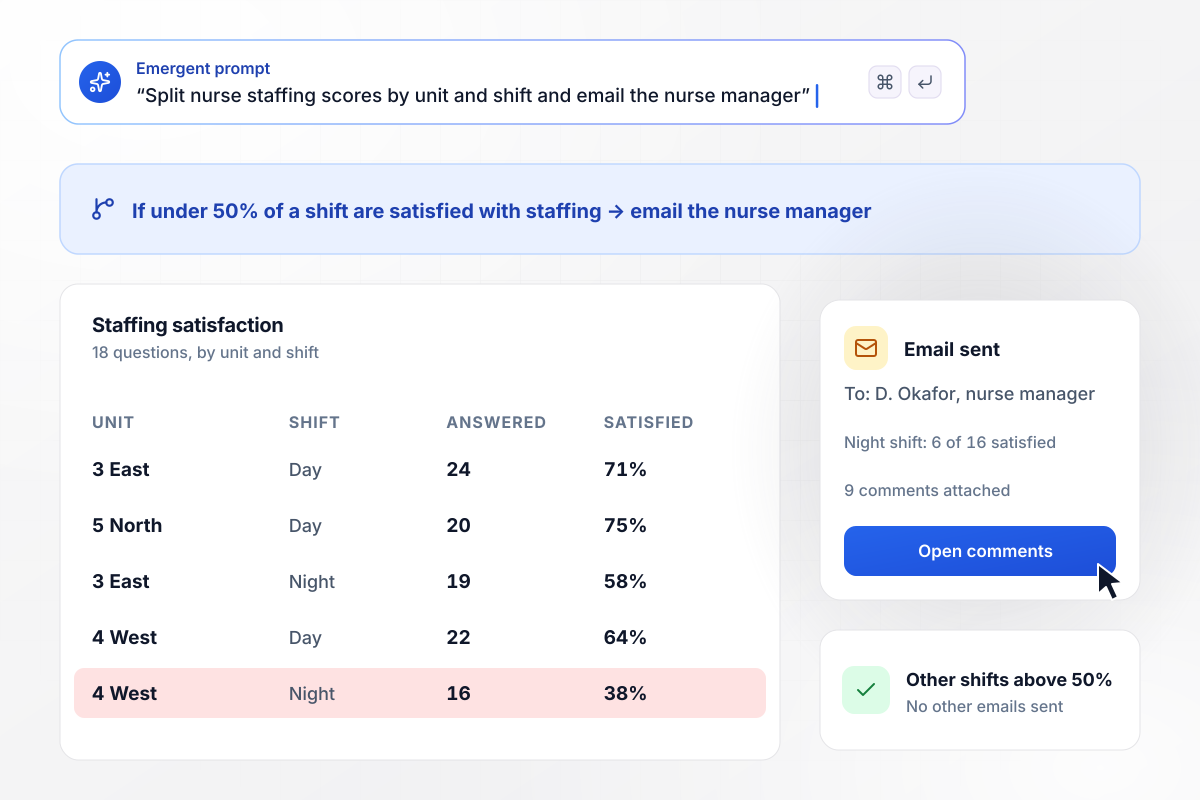
Night shift gets its own staffing score
Nurses on every unit answer a nurse satisfaction survey of 18 questions on staffing, scheduling, and patient load. Results split by unit and by day or night shift. When fewer than half of one shift on a unit are satisfied with staffing, the unit's nurse manager gets an email with the counts and comments.
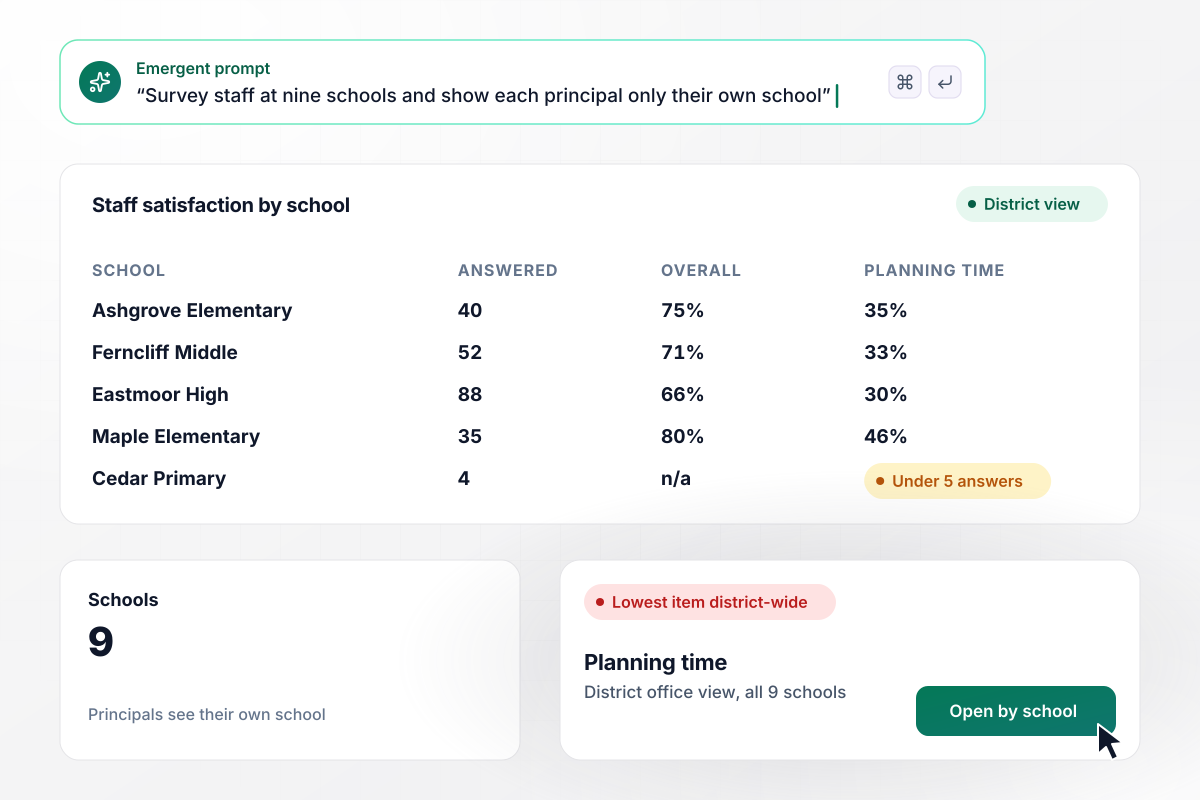
Each principal reads only their own school
One teacher satisfaction survey link goes to teachers and support staff at nine schools in the district. Each principal sees their own school's results and nothing else, while the district office sees all nine. A school with fewer than five answers shows no results. Planning time scores lowest across the district.
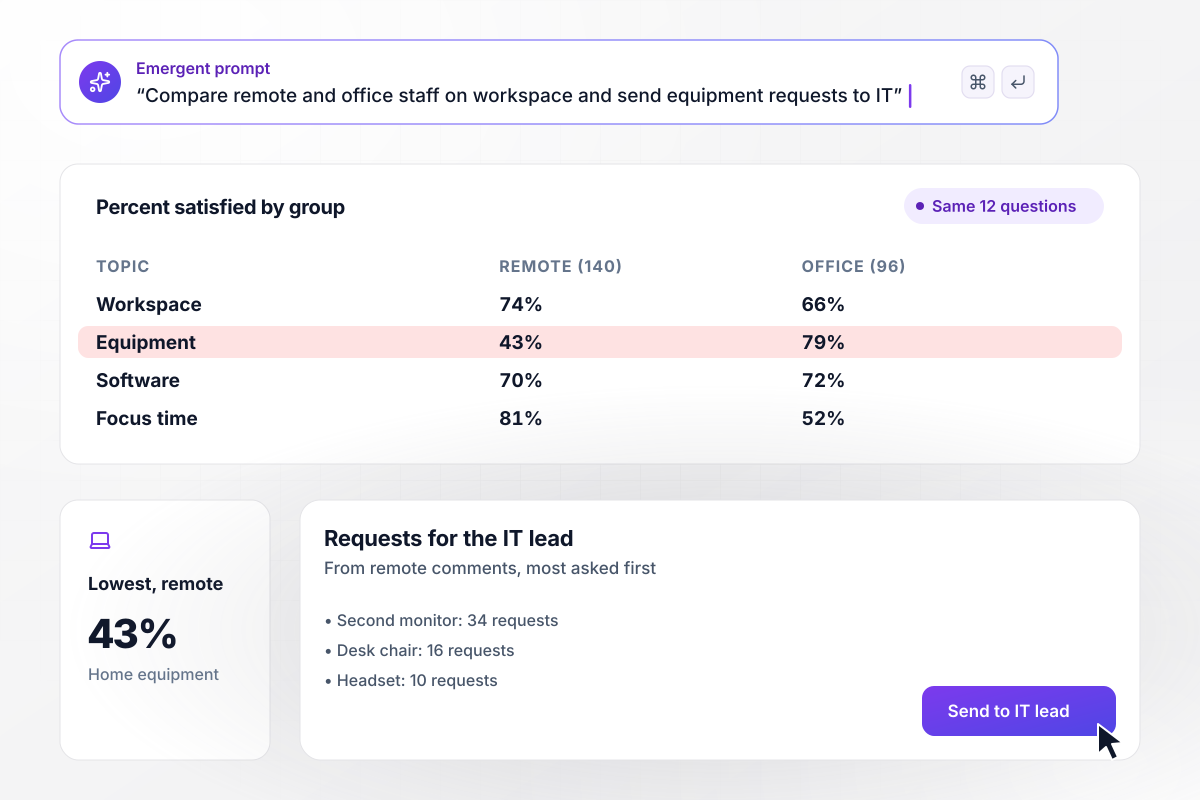
Remote and office staff, side by side
Remote and office staff answer the same 12 work satisfaction survey questions about their workspace and equipment. The dashboard puts the two groups in adjacent columns. Remote staff rate home equipment lowest, and their comments become a request list for the IT lead, most asked first.






How to Run a Satisfaction Survey
Follow these seven steps to launch an employee satisfaction survey people trust and turn its lowest scores into named changes.
Write down the parts of the job leadership can act on this year: pay bands, benefits, schedules, tools, manager training. Leave out what you cannot touch. Asking about something you will not change tells people their answers go nowhere.
Use statements such as "I am satisfied with my pay for the work I do" on a five-point scale that runs from dissatisfied to satisfied. Add one overall item on the job as a whole, and keep open questions to two at most.
Confidential means the system can link answers to people for reminders and team splits. Anonymous means it stores no identity, and every reminder goes to everyone. Say which one it is on the first screen.
Say who gets the survey, which topics it covers, and how long it stays open. Include the privacy rule. Emergent builds the survey with its response table and dashboards from that description.
Send the draft to a team of 10 or 15 people first and note how long it takes them. Read their comments for questions people misread or skipped, and fix that wording before the company-wide launch.
Sort topics by percent satisfied and begin at the bottom. Open the comments under each low topic, then compare groups. A score that is low on one shift or at one site usually needs a local fix, not a new policy.
Publish company results within a few weeks of closing. For the two lowest topics, name one change each and give it an owner. Next year, run the same items with the same wording to see whether those scores moved.
Why Emergent for Satisfaction Surveys?
These tools charge by seat or by plan and keep responses on their platform. Emergent builds your survey as an app you own.

|
SurveyMonkey | Microsoft Forms | SurveyHero | |
|---|---|---|---|---|
| Pricing model | Credits, no response caps or per-response fees | Per-user team plans with a seat minimum, billed annually | Free with a Microsoft account; included in Microsoft work and school subscriptions | Free plan, then per-account plans with unlimited responses |
| What you get | Pulse and annual surveys, confidential reporting, and manager dashboards, as code you own | Survey builder with templates, including employee engagement | Surveys, quizzes, and polls with response summaries | Survey builder with templates, including employee satisfaction |
| Where responses live | A database table you own, plus any integration | SurveyMonkey account | Microsoft Forms, with export to Excel | SurveyHero account, EU data centers |
| Code ownership | Full code export to GitHub on paid plans | None | None | None |

Pick the Pricing Plan That Works for You
Choose the plan that fits your building ambitions. From weekend projects to enterprise applications, we've got you covered.




Find the right survey, quiz, or poll
for your team
Frequently Asked Questions
Your Questions, Answered
Don't change this element unless you know what you are doing
More things you can build
with Emergent









on Emergent today


