

Build an Employee Benefits Survey Before Your Next Renewal
Build an employee benefits survey that ranks what staff value, rates each plan, and saves answers to a database you own.
Build an employee benefits survey that collects every answer in a database I own.
Trusted by Builders Worldwide
Active Builders Worldwide
Apps Successfully Created
Countries Globally Reached



What Goes Into the Survey
What Emergent builds behind an employee benefits survey, from the first question to the results HR brings to renewal.
Drafted from the benefits you offer
List the plans and perks you pay for today and the ones under review. Emergent drafts use, rating, and priority questions for each, and a follow-up prompt changes any of them.
One question per screen on a phone
Staff without a desk answer on their phones from a link you post in the break room. The survey shows one question per screen, and a 12-question survey reads like a short chat.
Each answer filed with role, site, and shift
Every response is saved in a database you own, next to the role, site, and shift the employee picked. Compare hourly with salaried staff on any single benefit you offer.
An alert when a benefit scores low
Set the line yourself, such as 20 or more people saying they never use a plan. The app emails your HR lead or posts in a Slack channel once the answers cross that line.
No cap on how many people answer
Survey a 40-person office or a 4,000-person workforce on the same build. Emergent puts no cap on responses, and every employee who opens the link can finish the survey.
Your code, exported on paid plans
Export the full code to your GitHub repository on paid plans, then run next year's survey from the same build, with this year's answers still sitting in your tables.
Four Benefits Surveys, Four Decisions
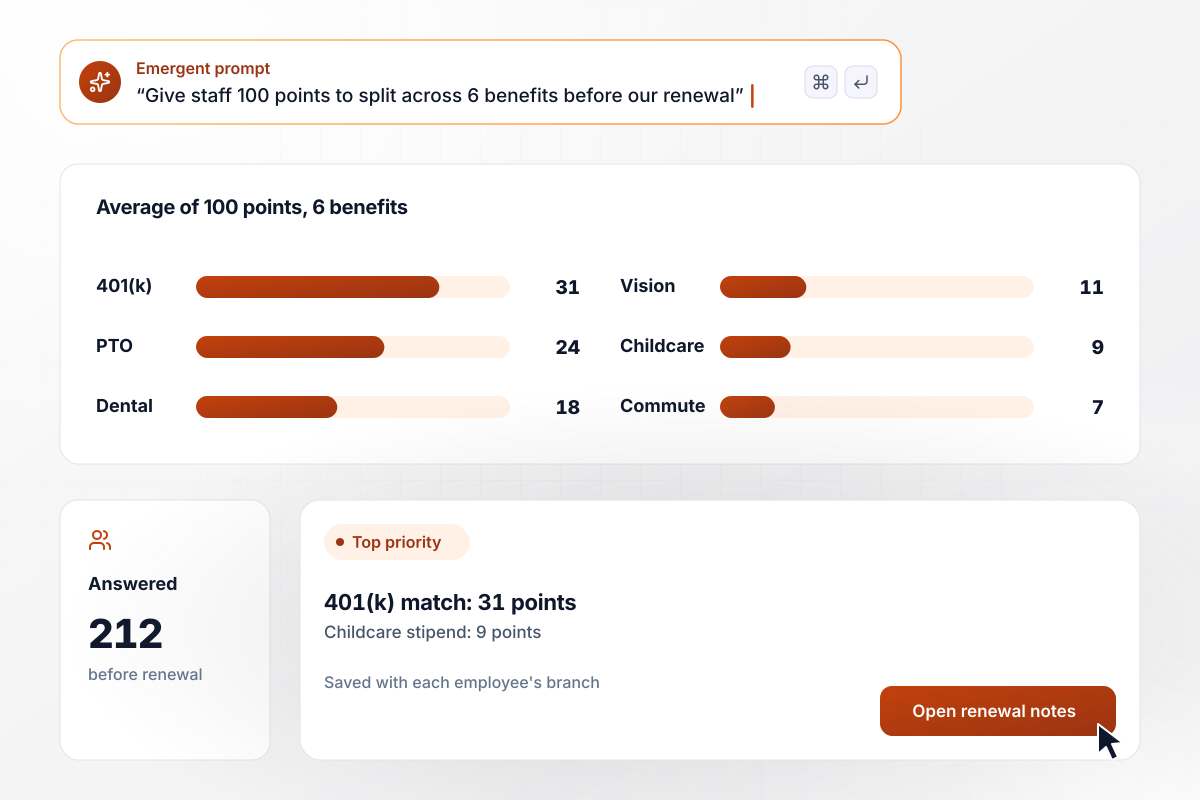
The 401(k) match takes 31 of 100 points
Marrow Lane Credit Union gives each employee 100 points to split across 6 benefits it could fund next year. Before the renewal meeting, 212 people answered. The 401(k) match averaged 31 points and extra PTO 24, while the childcare stipend averaged 9. Each split is saved with the employee's branch.
window.awbMockup = { renewalPriorities: "Build a benefits survey for my credit union before our renewal meeting. Give each employee 100 points to split across 6 benefits we could fund next year: 401(k) match, extra PTO, a dental upgrade, a vision upgrade, a childcare stipend, and commuter help. Save each split with the employee's branch and tenure band, and chart the average points per benefit.", currentPlanScores: "Create a survey that asks my 148 employees to rate each benefit we offer today from 1 to 5: medical, dental, vision, and the 401(k). Send any benefit that averages under 3.0 to our renewal review, and email the result to our HR director with the number of ratings behind it.", benefitAwareness: "Ask my 150 employees one yes-or-no question per benefit: did you know this was offered? Cover the employee assistance program, pet insurance, tuition reimbursement, and the 401(k) match. Show the share who said yes for each benefit, and post any benefit fewer than half knew about to our #benefits channel in Slack.", hourlyShiftStaff: "My warehouse has 210 hourly staff and no desks. Build a phone survey with one question per screen, from a link I can post at the time clock. Ask one trade-off: $40 a month toward the health premium, or 2 more paid days off. Ask which shift each person works and split the answers by shift." };
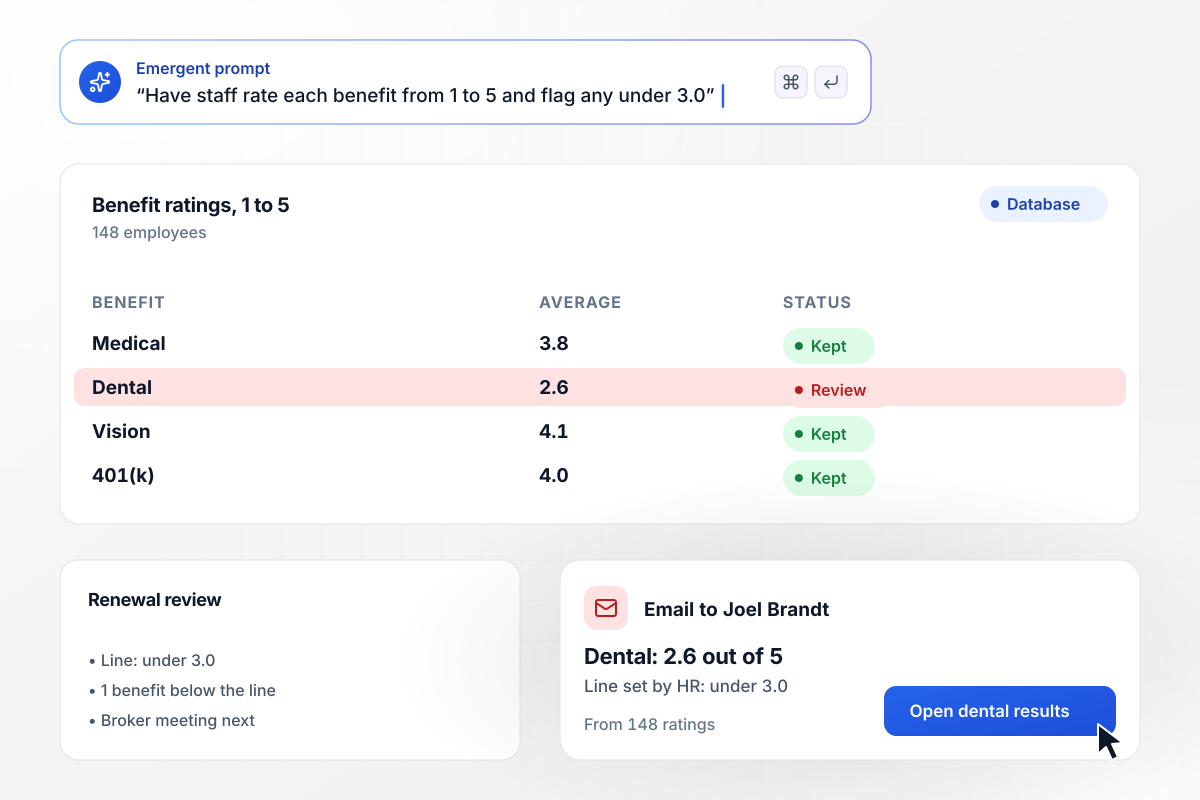
HR gets an email when dental scores 2.6
Pellham Machine Works asked 148 employees to rate each current benefit from 1 to 5. HR set one line: any benefit averaging under 3.0 goes to the renewal review. Dental came in at 2.6 out of 5, while vision scored 4.1. The app emailed HR director Joel Brandt the dental result and its 148 ratings before the broker meeting.
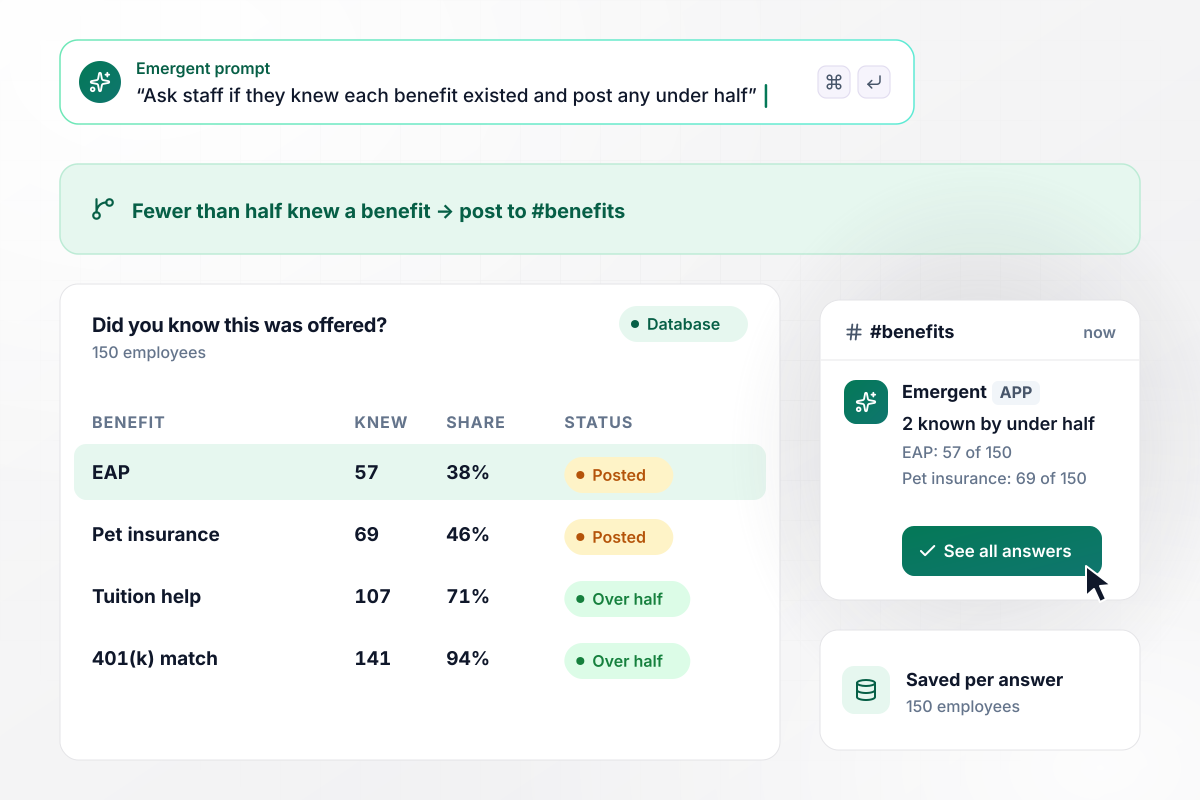
Two benefits that fewer than half knew about
Oakhaven Software asked 150 employees one yes-or-no question per benefit: did you know this was offered? Any benefit that fewer than half knew about goes to the #benefits channel in Slack. Only 57 of 150 knew the employee assistance program (EAP), and 69 of 150 knew pet insurance.
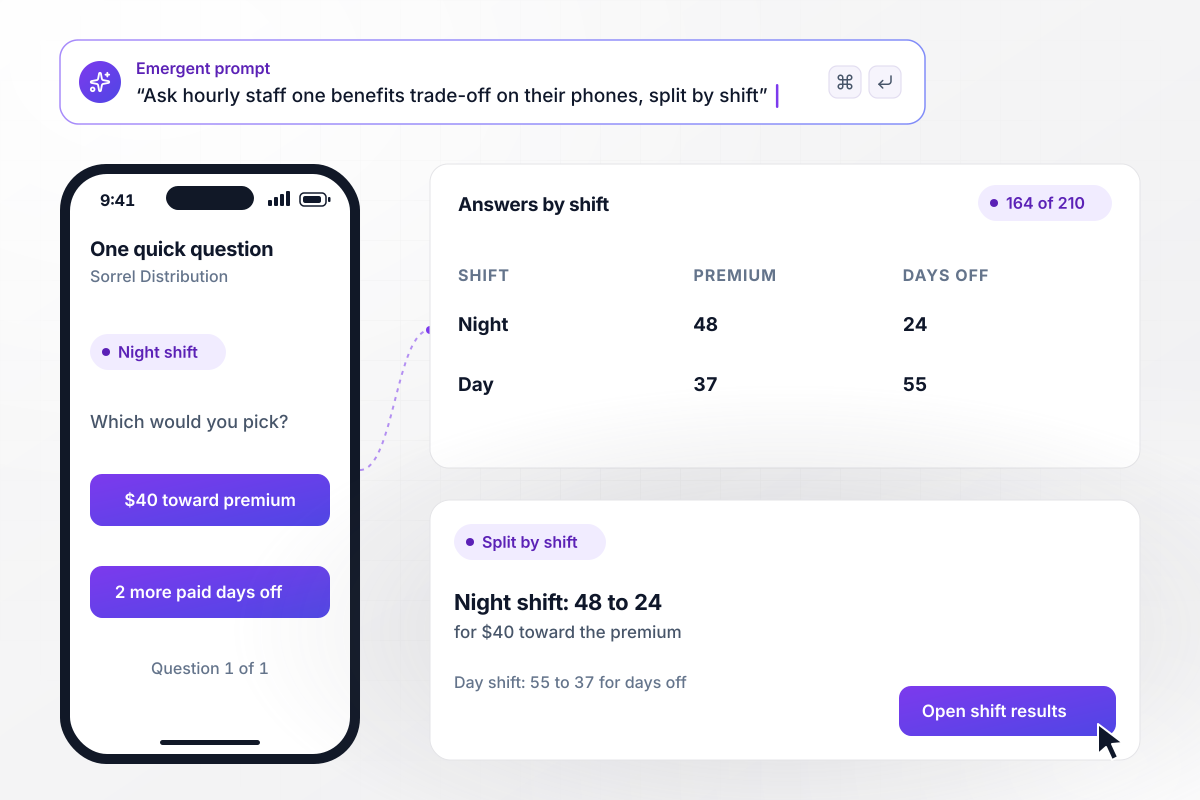
Shifts split on $40 a month or 2 days off
Sorrel Distribution posts the survey link at the time clock for its 210 hourly staff, and it opens on a phone. Of those 210, 164 answered one trade-off: $40 a month toward the health premium, or 2 more paid days off. Night shift picked the premium help 48 to 24. Day shift picked the days off 55 to 37.






How to Create an Employee Benefits Survey
Seven steps to create an employee benefits survey whose answers show which benefits to keep and which to change at renewal.
Write down every benefit you pay for today, from the medical plan to the commuter subsidy. Then add the 2 or 3 options you could fund next year. Put the full list in your prompt, and Emergent drafts a section for each benefit.
Decide which groups matter before you write a question: site, full-time or part-time, tenure band, or whether someone covers dependents. Ask for the group instead of a name, and keep each group large enough that no single person stands out.
Open each benefit by asking whether the person knew about it and used it in the past year. Show the rating only to people who used it. A 1 from someone who never filed a dental claim then stays out of the dental average.
A rating grid lets people mark every benefit as important. Add one question with a fixed budget, such as 100 points to split or a choice between two options, and the answers will show what employees would give up to get something else.
Send the draft to 5 employees, one from each site or shift you plan to compare. Ask where they hesitated and which question they read twice. Reword those questions with a follow-up prompt before the survey goes to everyone.
Keep the survey open for 2 weeks so every shift sees it. On day 5, have the app post a reminder with the closing date in a company Slack channel, or email it to everyone on the list.
Sort the benefits by average rating and by points, then read the comments next to the lowest score. Bring that view and the group splits to the meeting with your broker, and decide which plan to change first.
Why Build Your Benefits Survey With Emergent?
Every answer sits in a database you own, beside the employee's role and site. Change a question between rounds with one prompt.

|
SurveyMonkey | Microsoft Forms | SurveyHero | |
|---|---|---|---|---|
| What you get | Survey, logic, and response database, as code you own | Survey builder with templates, including employee engagement | Surveys, quizzes, and polls with response summaries | Survey builder with templates, including employee satisfaction |
| Pricing model | Credits, no response caps or per-response fees | Per-user team plans with a seat minimum, billed annually | Free with a Microsoft account; included in Microsoft work and school subscriptions | Free plan, then per-account plans with unlimited responses |
| Where responses live | A database table you own, plus any integration | SurveyMonkey account | Microsoft Forms, with export to Excel | SurveyHero account, EU data centers |
| Code ownership | Full code export to GitHub on paid plans | None | None | None |

Pick the Pricing Plan That Works for You
Choose the plan that fits your building ambitions. From weekend projects to enterprise applications, we've got you covered.




Find the right survey, quiz, or poll
for your team















Frequently Asked Questions
Your Questions, Answered
Don't change this element unless you know what you are doing
More things you can build
with Emergent









on Emergent today


