

Build a Membership Survey That Shows Why Members Renew
Build a membership survey that ties each answer to the member's tier and renewal date, with every response in your own database.
Build a membership survey that collects every answer in a database I own.
Trusted by Builders Worldwide
Active Builders Worldwide
Apps Successfully Created
Countries Globally Reached



What Emergent Builds Into the Survey
Name your member types and benefits in one prompt. Emergent builds each part below, and a second prompt changes any of it.
Questions that follow the member type
Emergent writes questions for each member type you name and adds the logic between them. A retired member skips the career questions, and a student sees the ones on student dues.
Every answer tied to a member record
Upload your member list or connect your membership software by API. Every response carries the member's tier, join year, and renewal date. Any chart can split on those three.
Benefits ranked by use and by value
The dashboard lists every benefit with how many members used it last year and how many rated it worth the dues. The board sees which benefits get used before it sets the next budget.
Alerts when an answer needs a person
Set a rule on any question, such as a low renewal score or a billing complaint. The app emails the staff member who looks after that member, or posts in Slack, with the comment.
One question per screen on a phone
Members open the link from an email and answer one question at a time on their phone. A 12-question membership survey reads as 12 short screens instead of one long scrolling form.
The survey's full code in your GitHub
On paid plans, Emergent exports the survey's full code, dashboard included, to your GitHub repository. Any developer can then review and extend it like any other code project.
Four Membership Surveys at Work
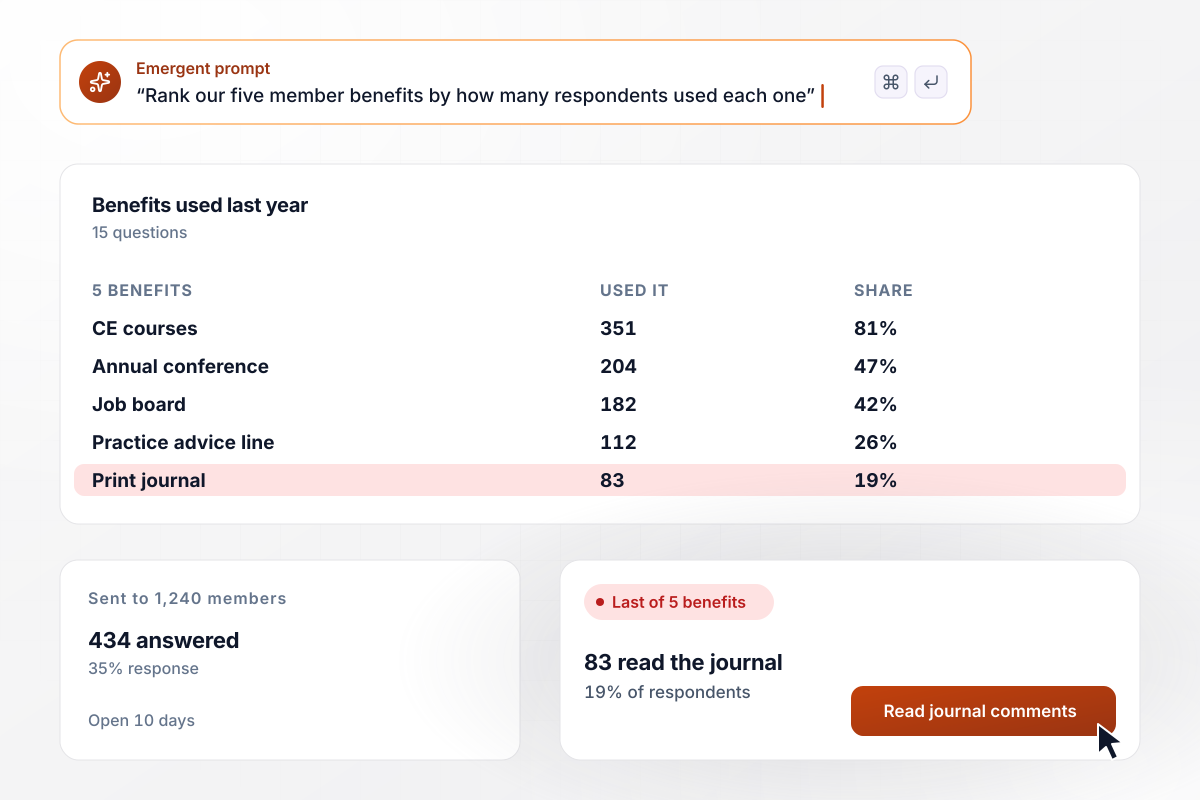
The print journal finishes last of five benefits
The Tamsworth Dental Hygienists' Association sends its 1,240 members a 15-question survey and keeps it open 10 days. Of the 434 who answer, 351 took a CE course last year and 83 read the print journal.
window.awbMockup = { association: "Build a member survey for my dental hygienists' association of 1,240 members. Use 15 questions and keep it open 10 days. Ask which benefits each member used last year: CE courses, the annual conference, the job board, the practice advice line, and the print journal. Rank the five benefits by how many respondents used each one.", gymRenewals: "Send each member of my gym a renewal survey 30 days before their renewal date, with one question: how likely are you to renew, scored out of 10, plus a comment box. If a member answers 6 or lower, email the club manager their name, plan, score, and comment. Send nothing further to members who answer 7 or higher.", lapsedMembers: "Create a survey for lapsed members of my makerspace. Email it 14 days after a membership lapses, with 5 questions on why they left, including the cost of dues and how often they used the shop. Count how many name each reason and send my membership lead the comments sorted by reason.", museumTiers: "I need an 8-question member survey for my science museum that members answer on their phones, one question per screen. Tag each answer with the member's tier: Individual, Family, or Patron. Show how many in each tier are satisfied with weekend visits, and let me read each tier's comments." };
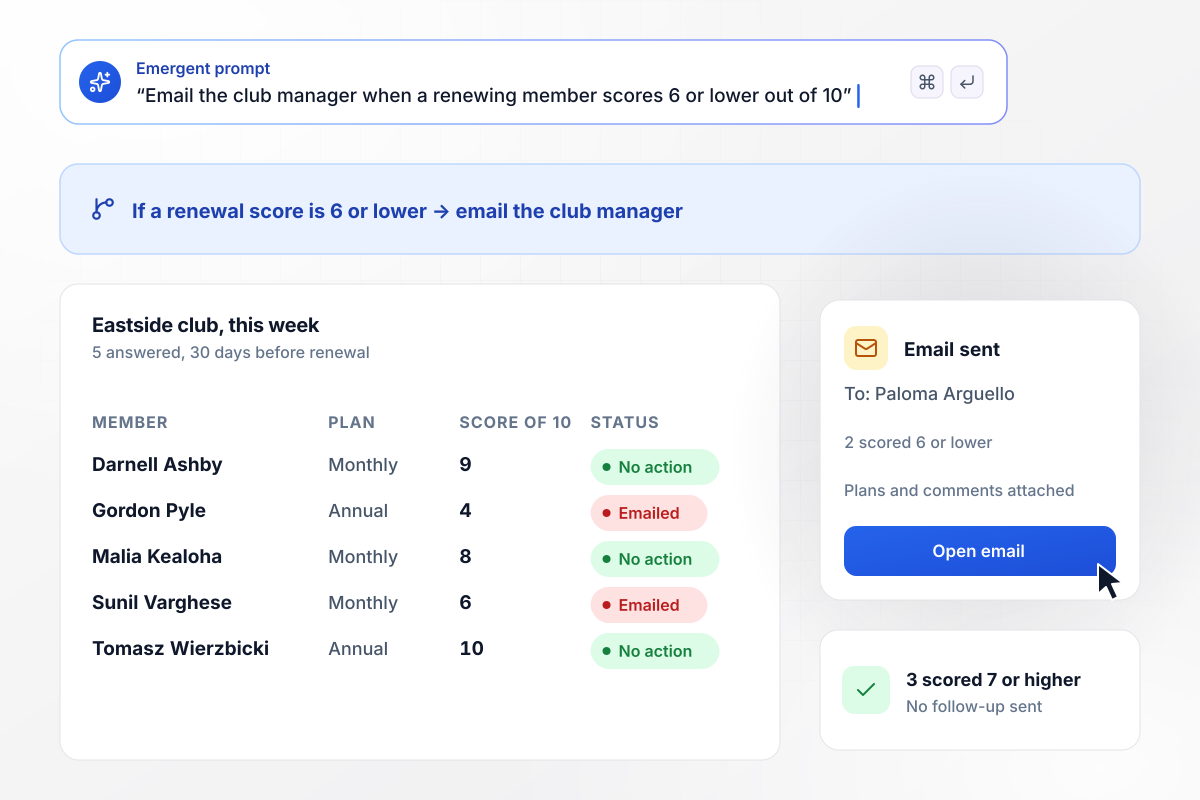
A renewal score of 6 or lower goes to the club manager
Fernvault Fitness asks each member 30 days before renewal: how likely are you to renew, scored out of 10. At the Eastside club, 5 members answer this week and 2 score 6 or lower. Their plans and comments go by email to Paloma Arguello, the club manager. The other 3 score 7 or higher and get no follow-up.
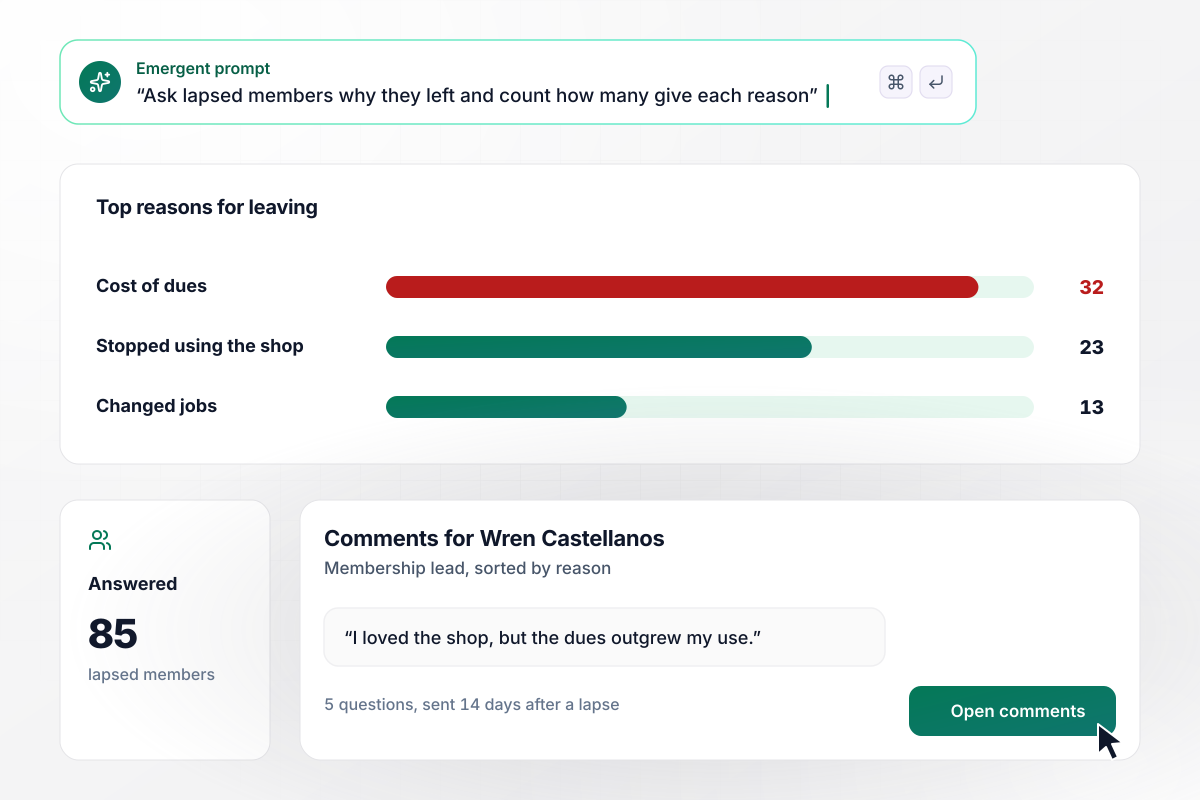
Cost of dues tops the reasons lapsed members give
Stoneflax Makerspace emails a 5-question survey to each member 14 days after their membership lapses. Of the 85 lapsed members who answer, 32 name the cost of dues and 23 say they stopped using the shop. Their comments go to Wren Castellanos, the membership lead, sorted by reason.
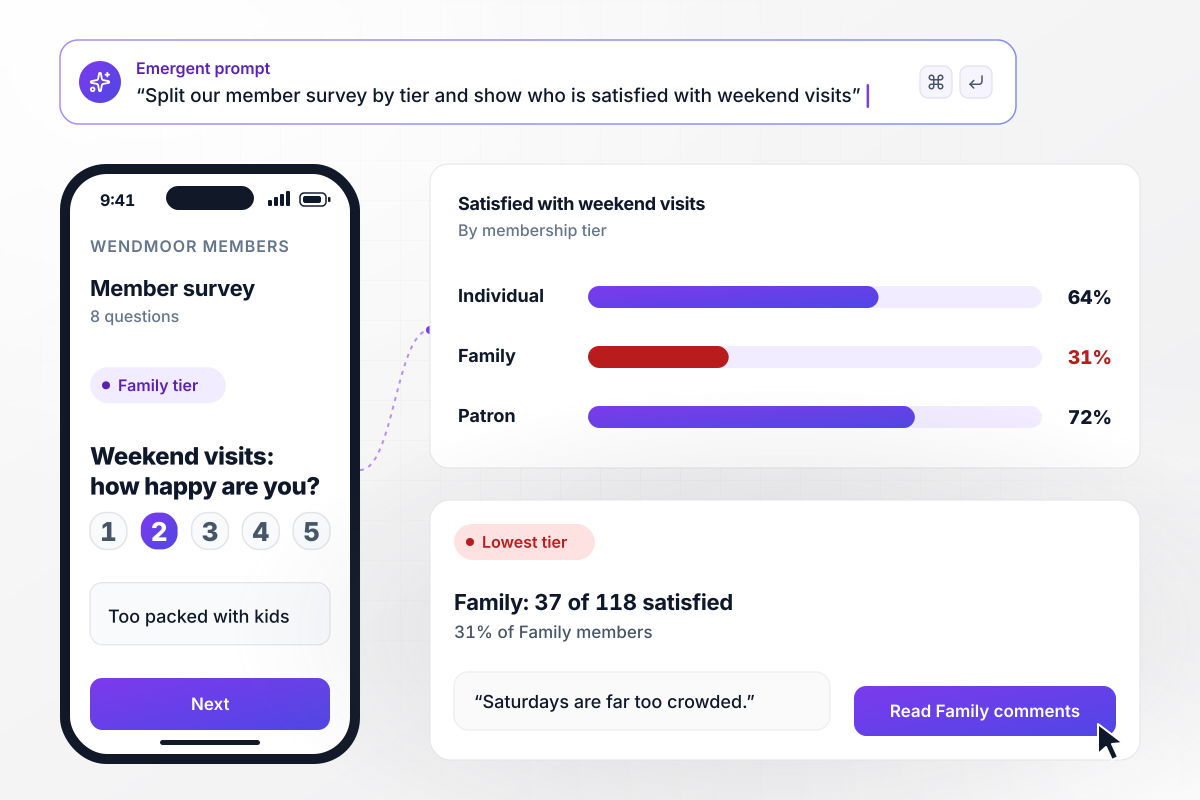
Weekend visits split the Family tier from the rest
Wendmoor Science Museum members answer an 8-question survey on their phones, and each answer carries the member's tier. Only 37 of 118 Family members are satisfied with weekend visits, the lowest of any tier. Their comments point to crowded Saturdays.






How to Create a Membership Survey
Seven steps to create a membership survey members finish, then act on its answers before renewals come due.
List the decisions this survey feeds: next year's dues, which benefits to keep, the event calendar. Cut any question that cannot change one of them. A survey built around three decisions stays short enough for members to finish.
Export name, email, tier, join date, and renewal date from your membership records, then clean the list. Merge duplicate records, fix emails that bounced, and leave lapsed members out of this send. A messy list skews the response rate before anyone answers.
Ask one thing per question and use the same 1-5 scale for every rating. Put the questions every member answers first and the tier-specific ones after. Keep the survey to 15 questions or fewer, and time yourself taking it.
Paste the questions into a prompt with your tiers and any rule you want, such as who hears about a low renewal score. Emergent builds the survey, its database, and a results dashboard from that prompt, ready for a test run.
Open the survey as a student, a full member, and a retired member. Check that each sees the right questions, that answers land on the right member record, and that a low renewal score sends the alert you set.
Email the link with one line on what the board will decide with the answers. A week later, send one reminder to members who have not answered yet. Close the survey on the date you announced in the first email.
Within a month of closing, send members the top three findings and the change each one brings. Name one change already made, and link the full results for any member who wants the detail behind them.
Why Build a Membership Survey With Emergent?
Emergent builds your membership survey as an app you keep, storing every response in a database you own, with no response caps.

|
SurveyMonkey | Microsoft Forms | SurveyHero | |
|---|---|---|---|---|
| What you get | Survey, logic, and response database, as code you own | Survey builder with templates, including employee engagement | Surveys, quizzes, and polls with response summaries | Survey builder with templates, including employee satisfaction |
| Pricing model | Credits, no response caps or per-response fees | Per-user team plans with a seat minimum, billed annually | Free with a Microsoft account; included in Microsoft work and school subscriptions | Free plan, then per-account plans with unlimited responses |
| Where responses live | A database table you own, plus any integration | SurveyMonkey account | Microsoft Forms, with export to Excel | SurveyHero account, EU data centers |
| Code ownership | Full code export to GitHub on paid plans | None | None | None |




Pick the Pricing Plan That Works for You
Choose the plan that fits your building ambitions. From weekend projects to enterprise applications, we've got you covered.




Find the right survey, quiz, or poll
for your team















Frequently Asked Questions
Your Questions, Answered
Don't change this element unless you know what you are doing
More things you can build
with Emergent









on Emergent today


