

Build a Parent Survey for Your School or PTO
Build a parent survey families can answer in English or Spanish, with results by school or grade in a database you own.
Build a parent survey for my K-8 school that asks families about communication, safety, and homework each spring.
Trusted by Builders Worldwide
Active Builders Worldwide
Apps Successfully Created
Countries Globally Reached



What a School Needs From a Parent Survey
Families answer in the language they read best, and each result reaches the staff member who can act on it.
English and Spanish from one survey
Let each family pick a language on the first screen. Both versions write to the same table. A Spanish answer and an English answer to question 4 land in one column and one chart.
No names, and small groups held back
Leave name and email off the survey and say so before the first question. Set a minimum, such as 5 answers, and any grade or classroom below it stays out of the results view.
Results by school, grade, or program
Ask for the child's grade or school in question 1, and every chart can split on it. A principal sees one building, and the district office sees every school next to its goal.
Sent when the meeting or term ends
Send the survey after an event the school tracks, like an annual IEP meeting or the last week of a term. Each family gets one link per child, and a reminder follows a week later.
A low result reaches the right person
Post to a Slack channel or email one staff member when a result crosses a line you set. A school under its goal or a grade over its homework guideline reaches the person who owns it.
Your answers, your database, your code
Keep every answer as a row in a database you own, with no cap on responses. On paid plans, export the full survey app to your GitHub repository and change it as the school needs.
Four Parent Surveys and Who Reads Them
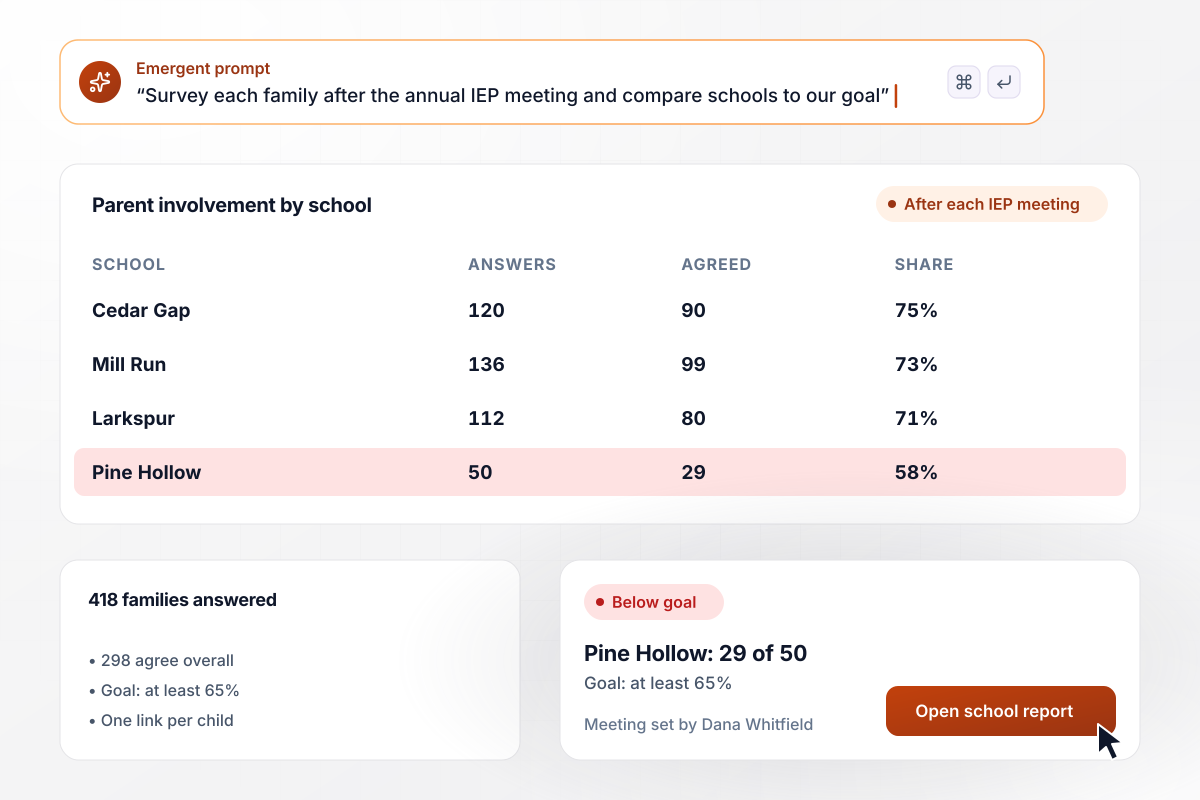
Pine Hollow falls below 65%
Harlow Creek School District surveys each family after its child's annual IEP meeting. By May, 418 families had answered, and 298 agreed the school helped them take part in planning. At Pine Hollow Elementary, only 29 of 50 agreed, below the goal of at least 65%. Director Dana Whitfield set up a family meeting there.
window.awbMockup = { specialEducation: "Build a parent involvement survey for my school district that goes to each family after their child's annual IEP meeting, one link per child. Ask whether the school helped them take part in planning their child's services, on an agree scale. Show how many agree at each school next to our goal of at least 65%, and flag any school below it.", homeworkLoad: "Create a one-week parent survey for my middle school that asks how many minutes of homework a child does on a typical school night and which grade the child is in. Show the average minutes for grades 6, 7, and 8 against our 60-minute guideline, and send the result to the team of any grade over it.", preschoolFamilies: "Set up an end-of-year family survey for my preschool in English and Spanish, with families choosing a language before the first question. Save both versions to one table. Count replies by language against our 78 enrolled families, rank the requests families make, and send the list to our director.", ptoFundraising: "Build a vote for my school's PTO that asks each family to pick one project for our spring fundraiser money: shade sails over the playground, new library books, or a music cart. Keep it open for 10 days, allow one vote per family, and post the final tally to our PTO board's Slack channel." };
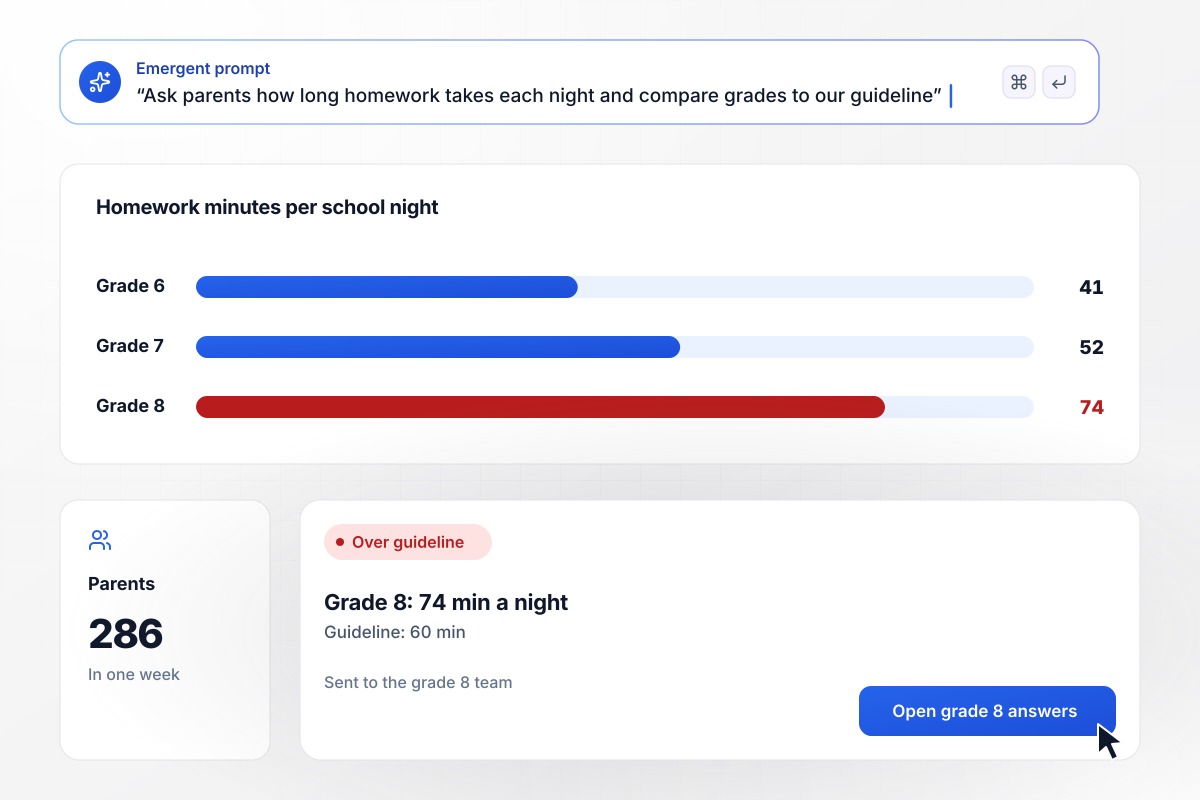
Grade 8 homework runs 74 minutes a night
Bellmont Middle School asked parents how many minutes of homework their child does on a school night. In one week, 286 parents answered. Grades 6 and 7 averaged 41 and 52 minutes. Grade 8 reached 74, over the school's 60-minute guideline, and the grade 8 team moved its weekly project into class time.
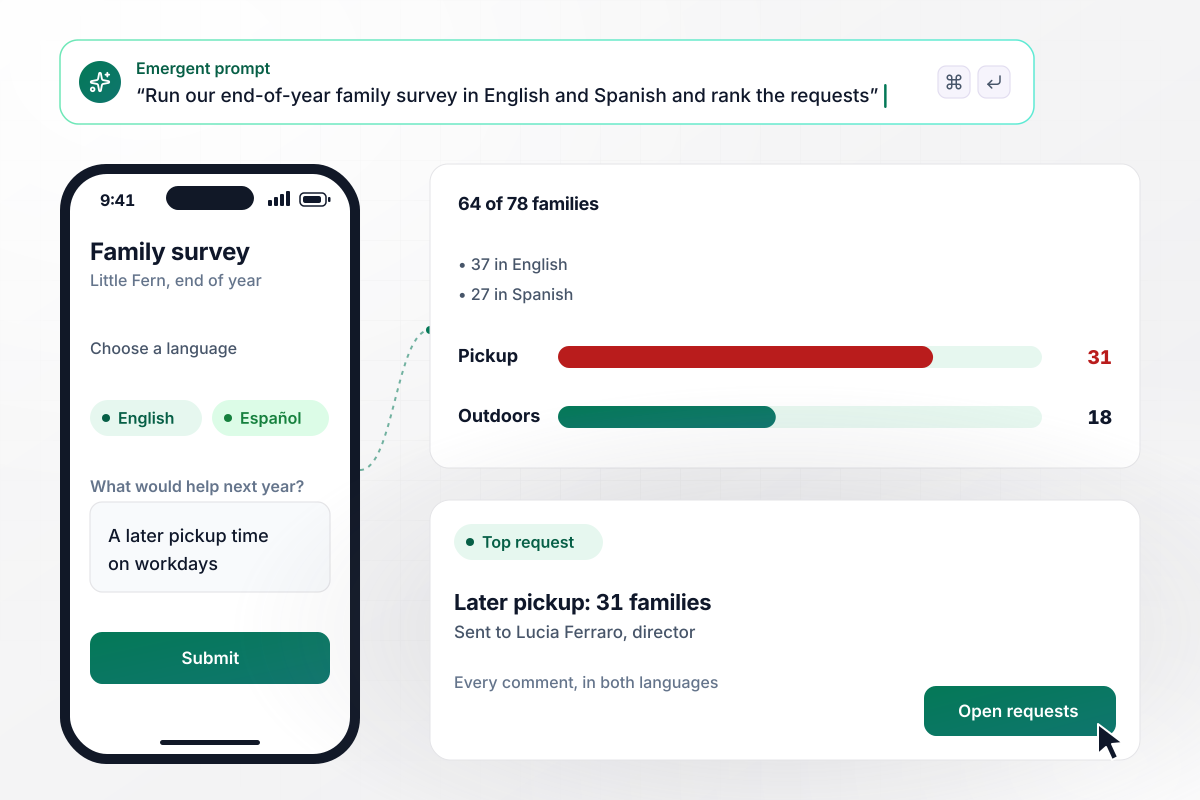
27 of 64 replies came in Spanish
Little Fern Early Learning Center closes each school year with a family survey in English and Spanish, and families pick a language before the first question. This June, 64 of its 78 families answered, and 27 chose Spanish. A later pickup time led the requests with 31 families, and the list went to director Lucia Ferraro.
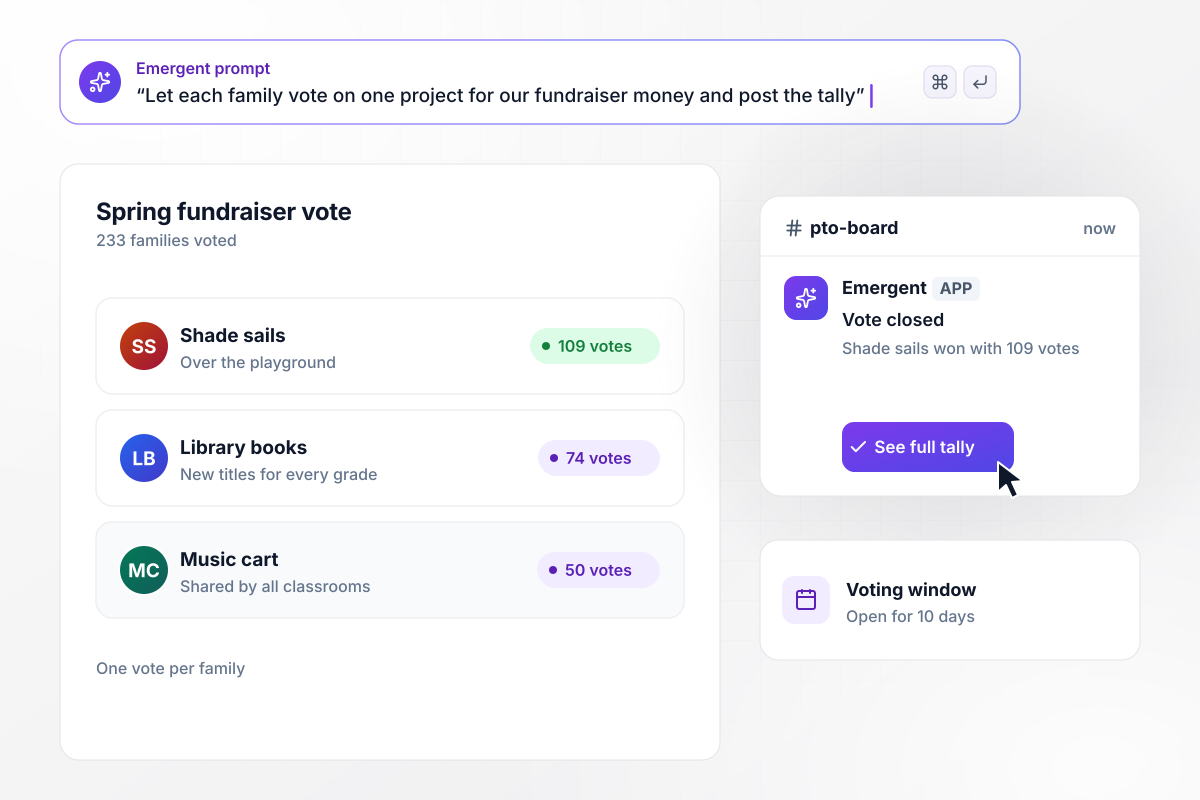
Shade sails win the vote with 109
The Juniper Road PTO had spring fundraiser money and three projects to choose from: shade sails over the playground, new library books, or a music cart. In 10 days, 233 families voted. Shade sails won with 109 votes to 74 for library books and 50 for the music cart. The tally posted to the PTO board's Slack channel.






How to Create a Parent Survey
Seven steps to write a parent survey families will answer in their own language, then share back what it changed.
Name the decision the answers will feed before you write a question: a homework guideline, a pickup time, or what the PTO funds. If no decision is waiting on the results, families give up their time and see nothing change.
Ask about what a parent sees firsthand: homework at the kitchen table, the messages that come home, and how staff treat their child. Leave classroom teaching to a student survey, since parents only hear about lessons through their child.
Aim for about 10 questions a parent can answer on a phone while waiting at pickup. Time it with two parents before launch, and drop any question whose answer would not change what the school does next.
Check enrollment records for the languages families speak at home, and have a fluent staff member read every translated version before it goes out. Keep the question order identical in each language, and compare results line by line.
Tell parents on the first screen who will read their answers and whether names are kept. If staff need to follow up with anyone, ask for contact details in an optional last question and keep everything before it anonymous.
Post the link in the school app, print a QR code on the take-home folder, and set out a laptop at conferences. Families who never open school email still pass the front office or wait in the pickup line.
Within a month, send families a short summary with how many answered, the findings that matter, and what the school will change. Open next year's survey by naming one change that came from this one.
Why Build Your Parent Survey With Emergent?
Hear from every family with no response cap, keep the answers in a database the school owns, and take the code on a paid plan.

|
SurveyMonkey | Microsoft Forms | SurveyHero | |
|---|---|---|---|---|
| What you get | Survey, logic, and response database, as code you own | Survey builder with templates, including employee engagement | Surveys, quizzes, and polls with response summaries | Survey builder with templates, including employee satisfaction |
| Pricing model | Credits, no response caps or per-response fees | Per-user team plans with a seat minimum, billed annually | Free with a Microsoft account; included in Microsoft work and school subscriptions | Free plan, then per-account plans with unlimited responses |
| Where responses live | A database table you own, plus any integration | SurveyMonkey account | Microsoft Forms, with export to Excel | SurveyHero account, EU data centers |
| Code ownership | Full code export to GitHub on paid plans | None | None | None |




Pick the Pricing Plan That Works for You
Choose the plan that fits your building ambitions. From weekend projects to enterprise applications, we've got you covered.




Find the right survey, quiz, or poll
for your team















Frequently Asked Questions
Your Questions, Answered
Don't change this element unless you know what you are doing
More things you can build
with Emergent









on Emergent today


