

Build a Post-Webinar Survey That Shapes Your Next Session
Build a post-webinar survey attendees open as the session ends, with demo requests sent to your CRM and every answer saved.
Build a post-webinar survey for my monthly product webinar that emails attendees when the live session ends.
Trusted by Builders Worldwide
Active Builders Worldwide
Apps Successfully Created
Countries Globally Reached



What Attendees Answer and What You Get Back
Attendees meet the first two as the webinar ends. The other four do their work after the session, up to the exported code.
Questions written for the session you ran
Name the topic and the speakers, then say what the results should change. Emergent writes the rating and next-step questions, and you reword any of them with one more sentence.
One link any webinar tool can open
Publish the survey once and put one link everywhere attendees look: on the closing slide, in the follow-up email, or in the redirect field of a webinar tool that offers one.
Demo requests that land in your CRM
An attendee who ticks Book a demo becomes a contact in HubSpot or any CRM with an API, with the webinar name and their rating attached. A Slack alert names each one for sales.
Ratings compared across a series
Each response carries the session it came from. The dashboard averages the 1-5 rating per session and per speaker, and a weak session stands out next to the others in one chart.
No cap on how many attendees answer
Every answer becomes a row in a database you own, and no response cap applies when 4,000 people attend instead of 40. Filter by session or speaker, or join it to the registrant list.
Code export to your own GitHub
On paid plans, Emergent exports the survey app, its dashboard, and its CRM connection to your GitHub repository. A developer on your team can review the code or keep building on it.
Four Webinars and What Their Surveys Found
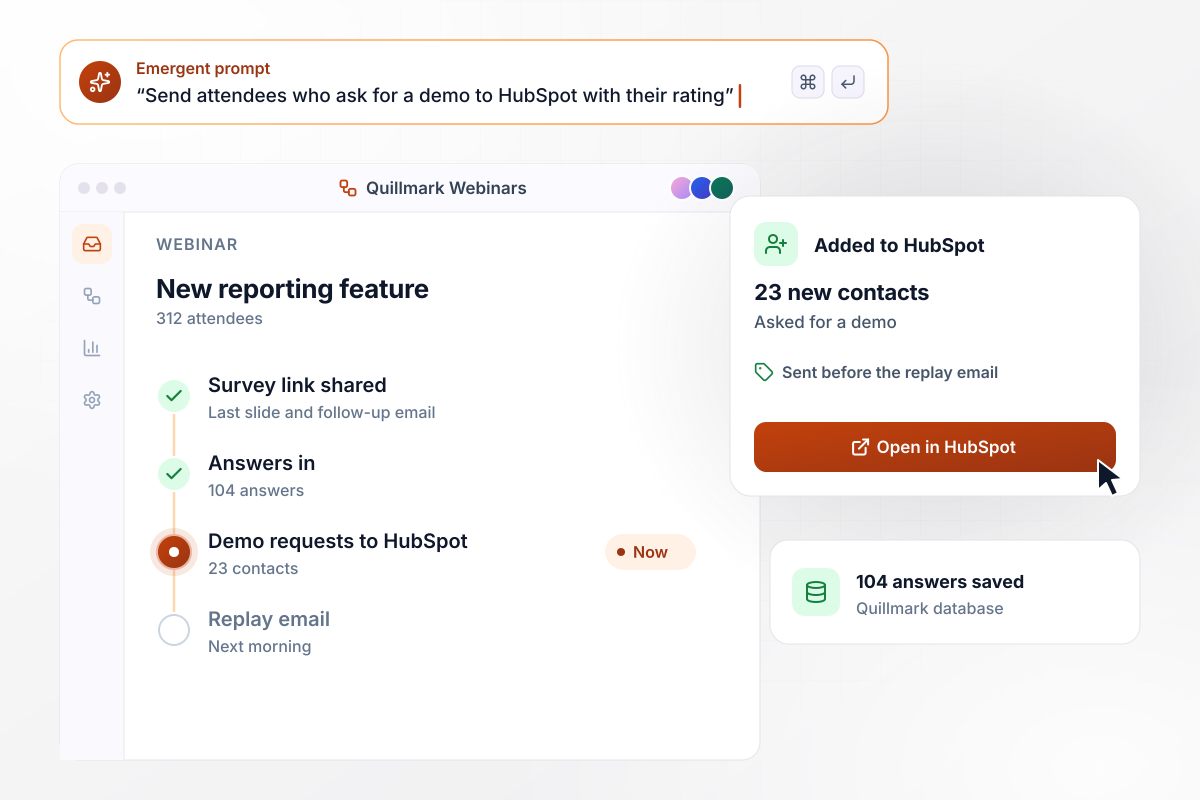
23 demo requests reach HubSpot before the replay goes out
Quillmark's product team ends its reporting webinar with a survey link on the last slide and in the follow-up email. Of 312 attendees, 104 answer. Of those, 23 tick Book a demo, and the app adds each one to HubSpot as a contact before the replay email goes out the next morning.
window.awbMockup = { productWebinars: "Build a survey for the end of my product webinar. Ask attendees to rate the session from 1 to 5, say what was most useful, and tick a box if they want a demo. Send everyone who asks for a demo to HubSpot as a new contact, with the webinar name and their rating. Show me the answer count and the demo requests on a dashboard.", webinarSeries: "My training company runs a 4-session webinar series on spreadsheet skills. After each session, ask the same 1-5 rating question and one open comment box, and tag every answer with its session. Build a dashboard that shows the average rating for each session side by side, with the comments for any session below 4.", nonprofitTalks: "My nonprofit hosts a public webinar on creek health and ends with a QR code. Build a short survey that opens on a phone and shows one question per screen. The last question asks if they will join our April creek cleanup. Add everyone who says yes to a sign-up list with their name and email.", internalTraining: "Our HR team trains drivers and dispatchers on a new expense policy by webinar. Build a survey that asks which part of the policy is still unclear: mileage claims, meal limits, receipt uploads, or none. Show how many people picked each option and the total number who answered." };
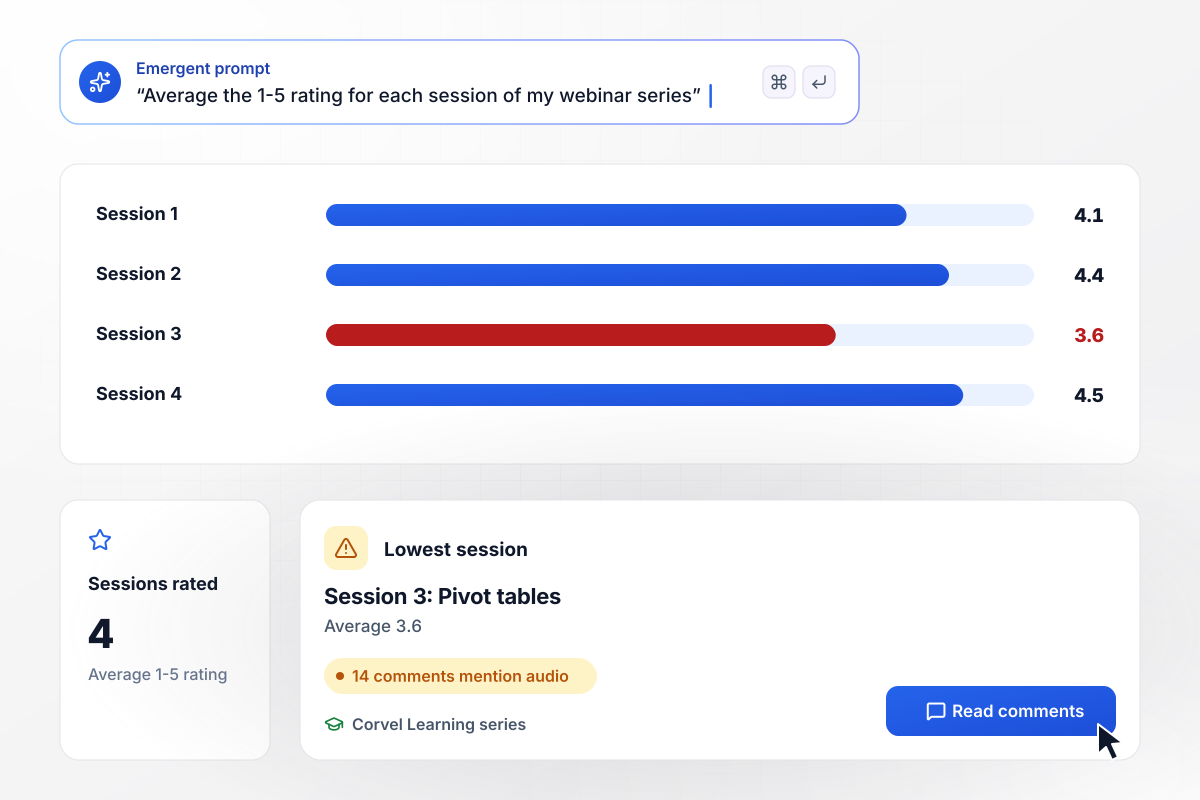
Session 3 scores 3.6, below every other session
Corvel Learning asks the same 1-5 rating after each of the 4 sessions in its spreadsheet skills series. The dashboard lines up the averages: 4.1, 4.4, 3.6, and 4.5. Session 3, on pivot tables, is the outlier, and 14 of its comments mention the audio cutting out.
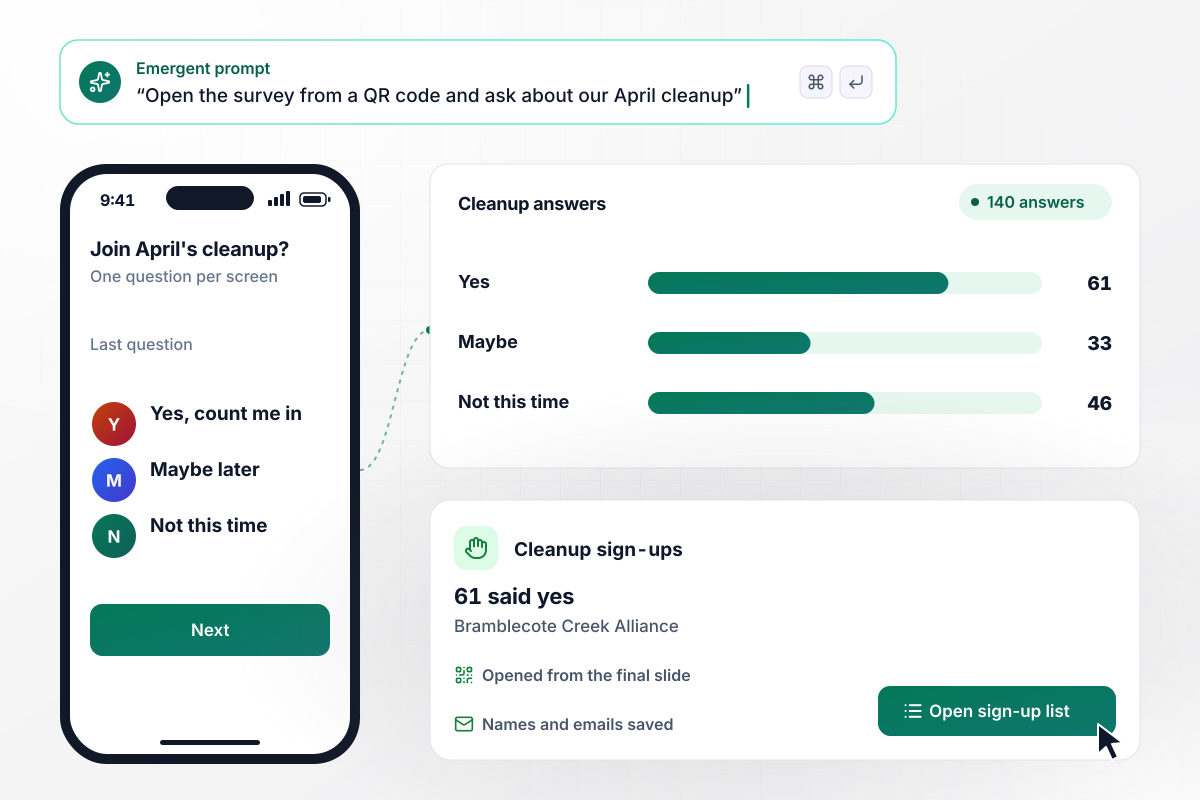
61 viewers raise a hand for April's creek cleanup
Bramblecote Creek Alliance puts a QR code on the final slide of its public webinar on stream health. The survey opens on viewers' phones, one question per screen. Of 140 who answer, 61 say yes to the April creek cleanup, and the app adds them to the cleanup sign-up list.
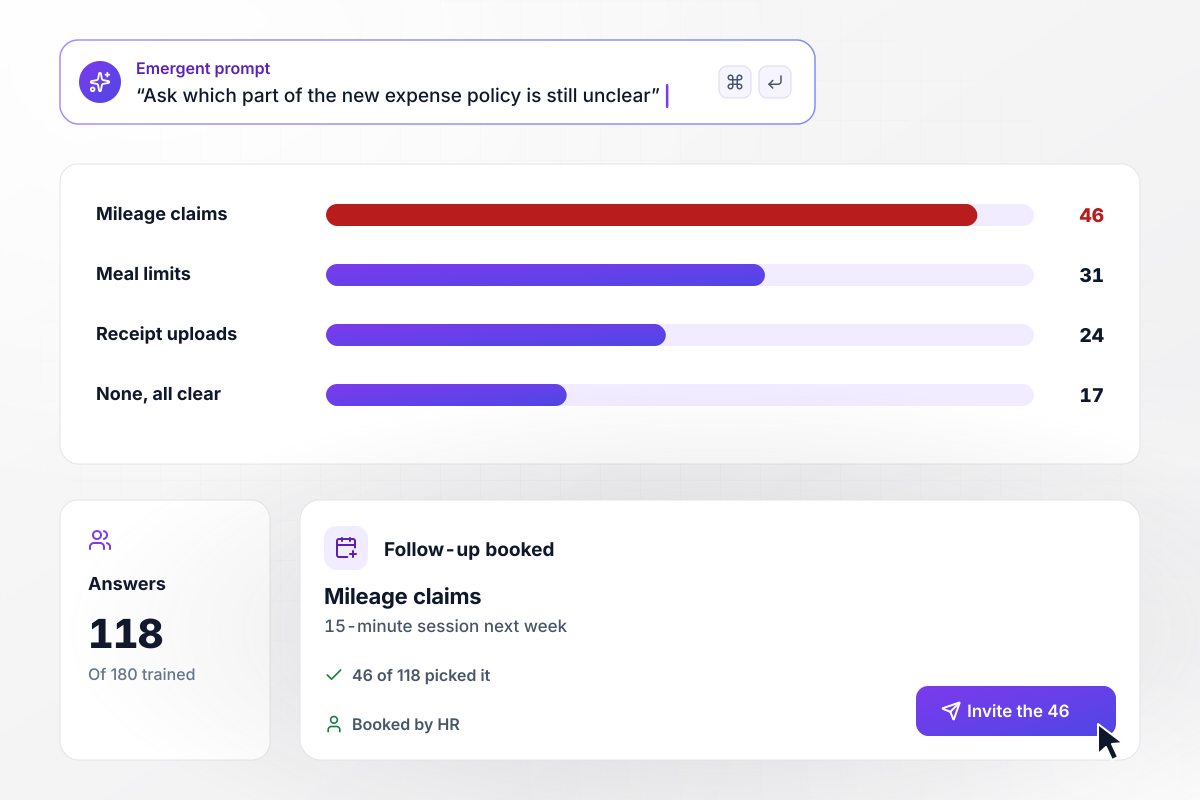
Mileage is the unclear part for 46 employees
Tinderbay Freight's HR team trains 180 drivers and dispatchers on its new expense policy by webinar. The survey asks which part of the policy is still unclear. Of 118 who answer, 46 pick mileage claims. HR books a 15-minute session on mileage alone for the following week.






How to Create a Post-Webinar Survey
Seven steps to plan a post-webinar survey, build it with Emergent, and act on what attendees tell you.
Name the one or two decisions the survey feeds: whether to repeat the topic, which speaker to book again, or who sales calls first. Cut any question that informs none of them. Write those decisions down before you draft a single question.
Tell Emergent who attended, what the webinar covered, and what the results page should show. Emergent builds the survey, its database, and the dashboard from that description. To change a question later, ask for the change in a sentence.
Open with a 1-5 rating of the session, then ask what was most useful and what was still unclear. Add a rating per speaker when more than one person presented. Save the open comment box for last, where a skipped answer costs nothing.
Close with the action the webinar was for: a Book a demo checkbox, a seat at the next session, or a topic request. Word the demo question so that ticking it gives permission to call, and sales only contacts people who asked.
Send the link to 3 colleagues who skipped the webinar and ask them to answer on a phone. Watch for a question they read two ways or a scale that runs off the screen, and fix it before the live session.
Put the link on the closing slide as a QR code and mention it in the last 2 minutes. If your webinar tool can open a survey link when the session ends, paste it there too, and repeat it in the replay email.
Read the first answers within the hour and call the demo requests while the session is fresh. When the survey closes, compare the rating with your last webinar and tell attendees one thing you will change next time.
Why Build Your Webinar Survey With Emergent?
The survey is an app you own instead of a setting inside one webinar tool. One link and one database cover every session you run.

|
SurveyMonkey | Microsoft Forms | SurveyHero | |
|---|---|---|---|---|
| What you get | Survey, logic, and response database, as code you own | Survey builder with templates, including employee engagement | Surveys, quizzes, and polls with response summaries | Survey builder with templates, including employee satisfaction |
| Pricing model | Credits, no response caps or per-response fees | Per-user team plans with a seat minimum, billed annually | Free with a Microsoft account; included in Microsoft work and school subscriptions | Free plan, then per-account plans with unlimited responses |
| Where responses live | A database table you own, plus any integration | SurveyMonkey account | Microsoft Forms, with export to Excel | SurveyHero account, EU data centers |
| Code ownership | Full code export to GitHub on paid plans | None | None | None |

Pick the Pricing Plan That Works for You
Choose the plan that fits your building ambitions. From weekend projects to enterprise applications, we've got you covered.




Find the right survey, quiz, or poll
for your team















Frequently Asked Questions
Your Questions, Answered
Don't change this element unless you know what you are doing
More things you can build
with Emergent









on Emergent today


