

Build a Team Quiz With a Leaderboard That Updates Live
Take the team quiz below, or build one with a live leaderboard and every answer saved to a database you own.
Build a team quiz for my sales team's Friday trivia, with 3 rounds of 10 questions and 30 players split into 5 teams.
Trusted by Builders Worldwide
Active Builders Worldwide
Apps Successfully Created
Countries Globally Reached



What Runs Behind Your Team Quiz
Emergent builds the questions, the scoring, and the table that holds each answer from one prompt. Another prompt changes any part.
Questions and answer keys from a prompt
Name the topic, the number of rounds, and how hard it should be. Emergent writes each question with the right answer marked and changes any question you flag before game day.
Standings that move after each question
Team standings change after every question instead of at the end. The app shows the live leaderboard on a shared screen during a video call, and the final ranking is saved.
Points that count for the team
Players pick a team when they open the link, and each correct answer adds a point to that team. Put bonus points for a hard round or a tiebreaker question in the same prompt.
Every answer in a database you own
Each answer is a row in a database you own, tagged with the player, the team, and the round. Sort by question to find the one nearly every player missed, then rewrite it.
Played on phones, with no player cap
Players answer one question per screen on a phone, at a desk or on a call. Emergent puts no cap on responses, and a company-wide all-hands runs on the same build as a team of 6.
Your own domain and your own code
Host the quiz on your own domain, included with Emergent and paid in credits. On paid plans, export the full code to your GitHub repository and reuse it for next season.
How Four Workplaces Play Their Team Quiz
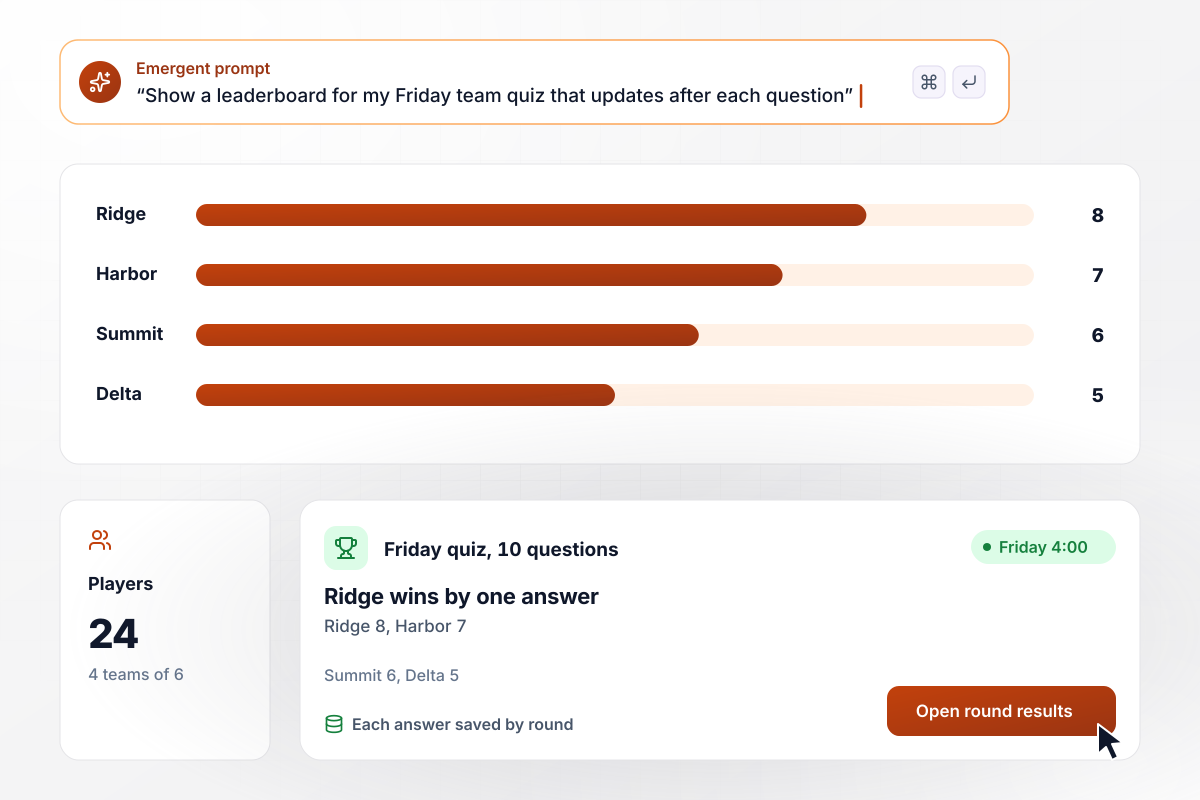
Team Ridge beats Harbor by one answer
Every Friday at 4:00, Larch Point Analytics splits its 24 analysts into 4 teams of 6 for a 10-question team quiz on a video call. The leaderboard updates after every question. Teams answer together, so Ridge finished on 8 correct, one ahead of Harbor at 7, with Summit on 6 and Delta on 5. Each answer is saved by round.
window.awbMockup = { fridayTrivia: "Build a team quiz for my 24 analysts to play every Friday at 4:00 on a video call. Each round has 10 questions, and players join one of 4 teams of 6: Ridge, Harbor, Summit, and Delta. Show a leaderboard that updates after every question, and save each answer with the player, team, and round.", newHireQuiz: "Build an 8-question quiz for new hires on my operations team to take in their first week. Ask about refund approvals, the carrier booking tool, the on-call handover, and how the team works. Score each new hire, save the result, and email their manager the score and the questions they missed.", offsiteRoleQuiz: "Build a team role quiz for the 14 designers at my studio to take before the offsite. Sort answers into 5 results: Planner, Spark, Helper, Closer, and Checker. Save each person's result, and show me a chart with the count for each result so I can plan the offsite agenda around the gaps.", allHandsQuiz: "Build a 12-question quiz on my company's history for the quarterly all-hands. Everyone answers on their phone and picks their department at the start. Roll the scores up by department, show the average correct answers for each department on a leaderboard, and save every answer to my database." };
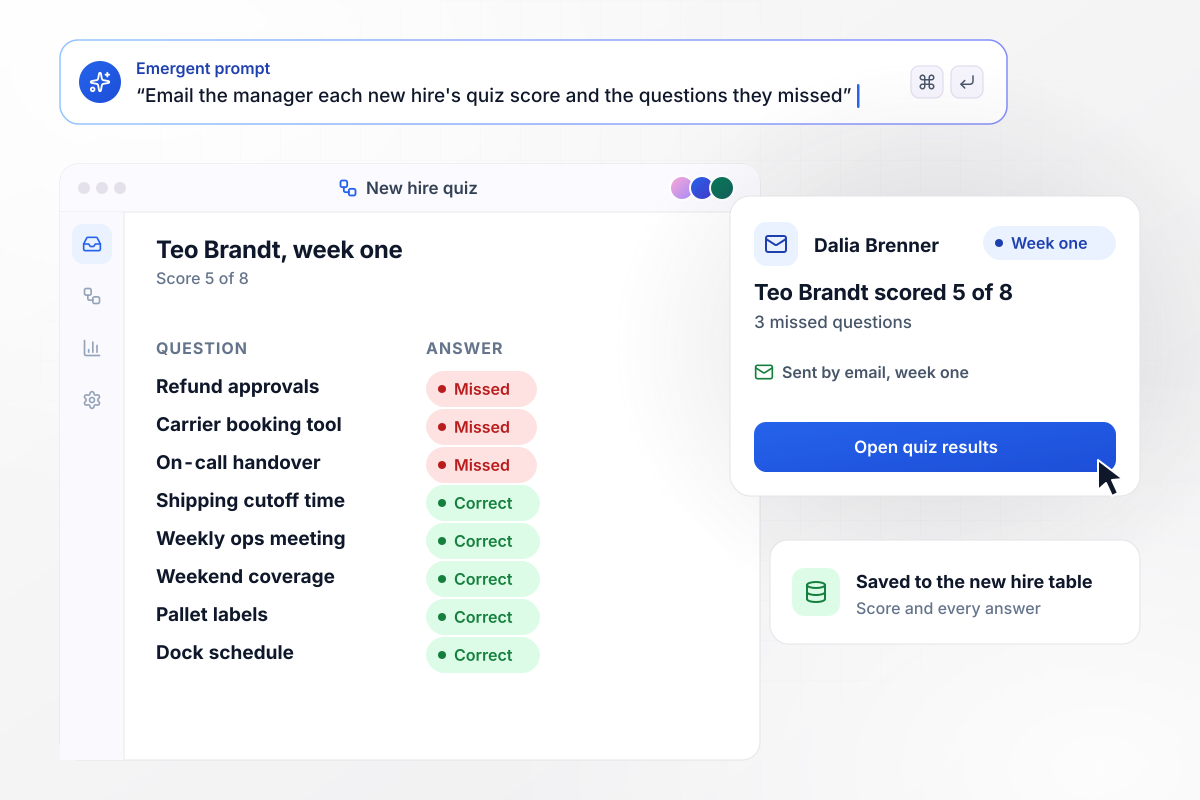
The 3 answers a new hire missed, sent to his manager
In week one, each new hire at Ardent Freight takes an 8-question quiz about how the team works. Teo Brandt scored 5 of 8. His manager, Dalia Brenner, got an email naming the 3 he missed: refund approvals, the carrier booking tool, and the on-call handover. They went through those at Friday's check-in.
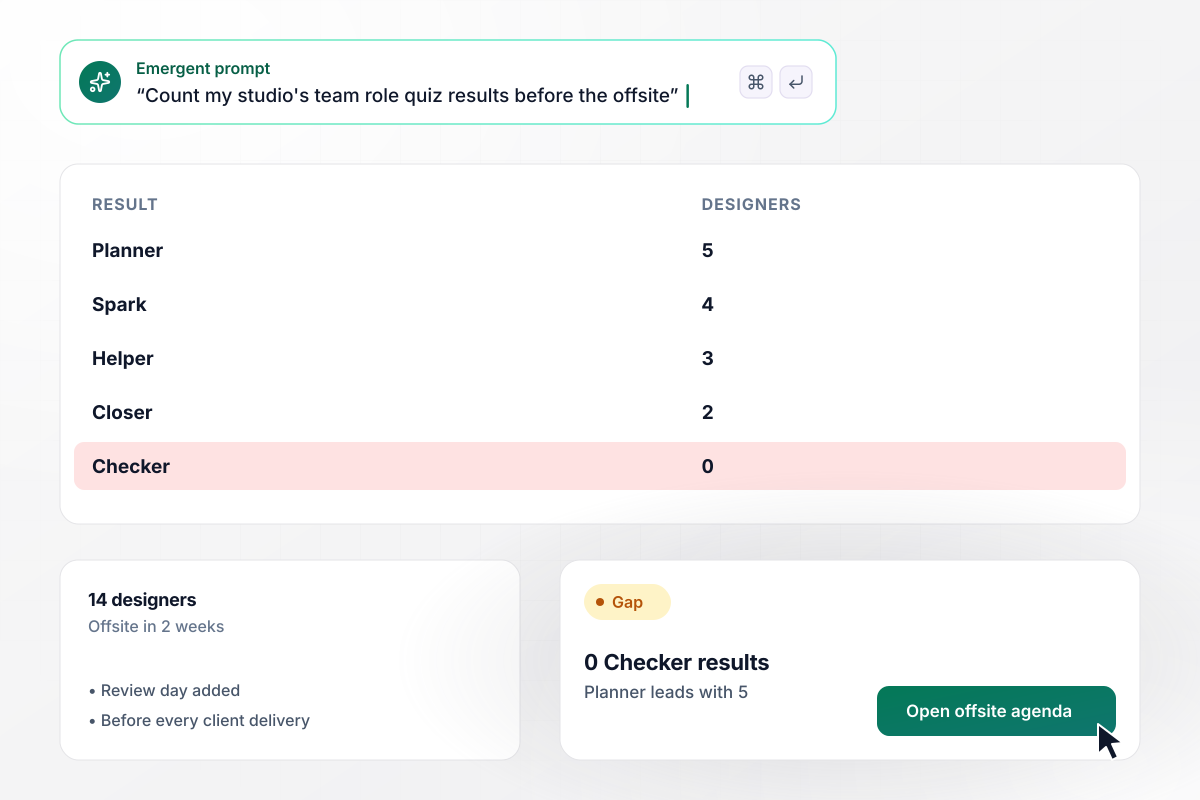
Zero Checkers in a studio of 14
Two weeks before its offsite, Tallow Lane Studio sends the team role quiz to its 14 designers. The results came back 5 Planner, 4 Spark, 3 Helper, 2 Closer, and 0 Checker. With no one leaning toward checking details, the studio now books a review day before every client delivery.

Warehouse wins the all-hands at 9.1 correct
At the quarterly all-hands, Maren Hollow Foods runs a 12-question quiz on its own history, and 186 people answer on their phones. Scores roll up by department. The warehouse team led with an average of 9.1 correct, ahead of finance at 8.4 and sales at 7.6, and chose the charity for next quarter's food drive.






How to Run a Team Quiz
Seven steps to run a team quiz that gives every team a fair shot and ends on time, then build it with Emergent.
Settle the purpose before you write a question. Friday trivia wants quick, light rounds, while a quiz for new hires checks how the team works. A role quiz opens an offsite conversation. Put that purpose in your prompt, and Emergent drafts the quiz around it.
Mix general trivia anyone can try with questions about the company and a few about teammates, collected beforehand with their permission. Leave out anything that rewards one job title, or the same team wins every week.
Make teams of 4 to 6 people and spread each department across them, so the people who sit together are not all on one side. Name the teams before the call, and let players pick theirs when they open the link.
Hold each round to 10 questions and the whole quiz near 30 minutes. Allow 20 to 30 seconds per question on a call. Put the hardest questions in the middle round, once people have warmed up and before attention drops.
Write one tiebreaker in advance: a number question where the closest guess wins, such as the year the company opened its first office. Decide too whether the last round scores double, and put both rules in the prompt.
Play the full quiz with two colleagues who will not play on the day itself. Check every answer key, confirm the leaderboard adds points to the right team, and read each question on a phone screen before the link goes out.
After the game, sort the answers by question. Drop the ones every team got right, rewrite the ones nobody got, and keep the rest for next quarter. A follow-up prompt adds new rounds to the same build.
Why Build Your Team Quiz With Emergent?
A team quiz built on Emergent is code and data you keep. Next season's quiz starts from this season's questions and every score.

|
ProProfs | Slido | Mentimeter | |
|---|---|---|---|---|
| How you build | Prompt for the survey, quiz, or poll and the app around it | Templates, question library, and AI quiz builder | Live quizzes and polls run during meetings and events | Quiz as a question type in a live presentation |
| Pricing model | Credits, no response caps or per-response fees | Free plan, then billed per active quiz taker | One-time event plans or annual plans | Free plan, then per-presenter plans billed yearly |
| Where responses live | A database table you own, plus any integration | ProProfs account; reports export to Excel, CSV, or PDF | Slido account; exports on paid plans | Mentimeter workspace, with Excel export |
| Code ownership | Full code export to GitHub on paid plans | None | None | None |




Pick the Pricing Plan That Works for You
Choose the plan that fits your building ambitions. From weekend projects to enterprise applications, we've got you covered.




Find the right survey, quiz, or poll
for your team















Frequently Asked Questions
Your Questions, Answered
Don't change this element unless you know what you are doing
More things you can build
with Emergent









on Emergent today


