

Build a Team Survey That Shows How Your Team Works
Build a team survey that rates how your team works together and saves every answer to a database you own.
Build a team survey that collects every answer in a database I own.
Trusted by Builders Worldwide
Active Builders Worldwide
Apps Successfully Created
Countries Globally Reached



What Emergent Builds Into a Team Survey
Emergent builds the survey and the table behind it from your prompt, and a later prompt changes either one before the next round.
Questions drafted for your team
Name the areas you want rated, such as goal clarity or how decisions get made. Emergent drafts a rating and a comment question for each, and a follow-up prompt rewrites any of them.
No score shown under five answers
Set a minimum group size, such as 5 people. The dashboard holds back any team or area score until that many have answered, and no one can work out a single teammate's rating.
Every answer in a database you own
Each response is a row in a database you own, tagged with the team and the survey round. Put this quarter's role clarity score beside last quarter's before the team meets again.
An alert when a score crosses your line
Pick the line yourself, such as any area averaging under 3.0. The app posts that area and its score to a Slack channel, or emails the team lead, once the survey has closed.
One question per screen on a phone
Teammates away from a desk answer one question per screen on a phone. Emergent puts no cap on responses, and a 6-person squad or a 600-person department runs on one build.
Code you can take with you
On paid plans, export the full code to your GitHub repository. Next quarter's team survey runs from the same build, with every earlier round still sitting in your tables.
Four Team Surveys, Four Changes
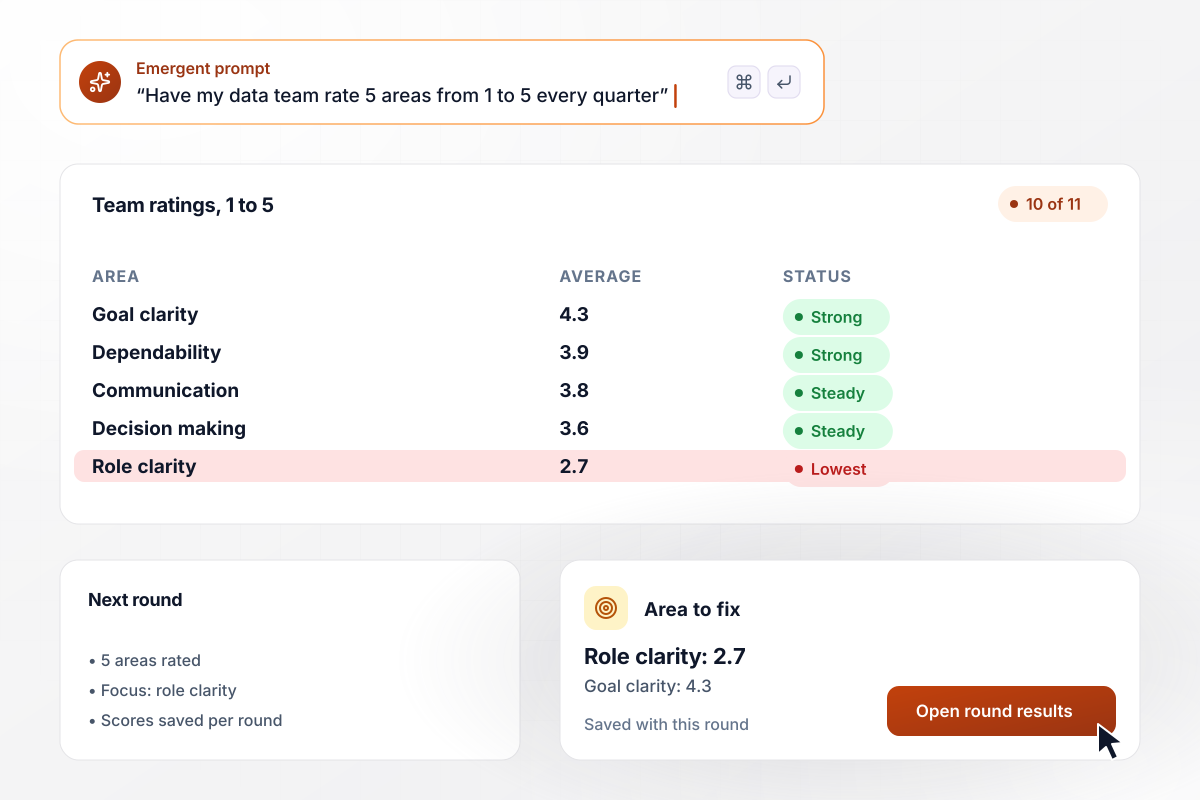
The team rates role clarity lowest, at 2.7
Halvard Logistics surveys its data team each quarter. The 11 people on the team rate 5 areas from 1 to 5, and 10 of 11 answered this round. Goal clarity averaged 4.3, while role clarity came last at 2.7. The team chose role clarity as the area to fix before the next round, and each score is saved with the round it came from.
window.awbMockup = { teamEffectiveness: "Build a quarterly survey for my 11-person data team. Ask everyone to rate 5 areas from 1 to 5: goal clarity, role clarity, decision making, communication, and dependability. Add a comment box under each area. Show the average per area once at least 5 people have answered, and save every score with the survey round.", teamHandoffs: "My support team of 16 agents hands tickets to engineering, billing, product, and sales. Build a survey that asks each agent to rate the handoffs from each team from 1 to 5, with a comment box. Post any team that averages under 3.0 to our #support-leads channel in Slack.", meetingLoad: "Build a short survey for my 12 designers about meetings. Ask how many hours they spent in meetings last week, with 3 bands: under 5, 5 to 10, and over 10. Ask which recurring meeting they would drop first. Chart the bands and list the meetings named most.", launchRetro: "Build a 3-question launch retro for my 14-person firmware team that opens on a phone, one question per screen. Ask what slowed the launch most, with options for late spec changes, short test hardware, and an unclear owner. Then ask what to keep and what to change, and count the votes per option." };
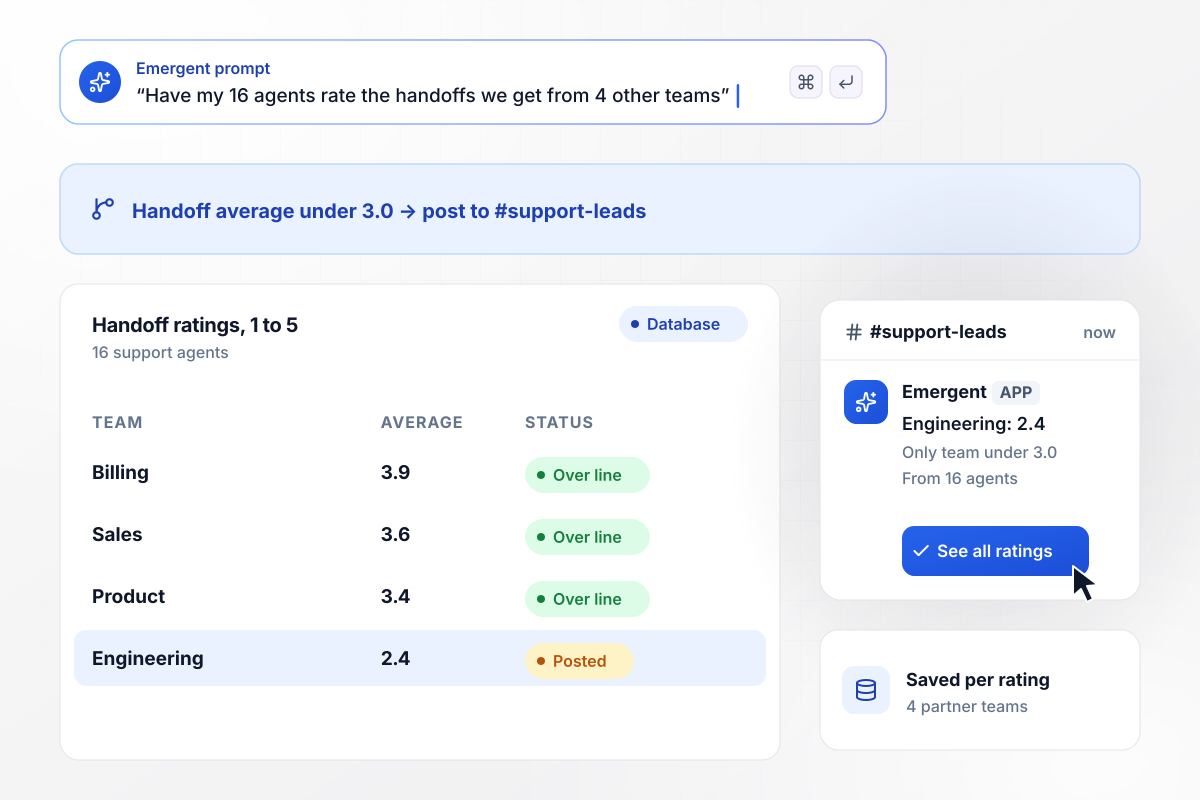
A 2.4 handoff score goes to #support-leads
Brightwater Health's support team hands tickets to 4 other teams and gets them back. Its 16 agents rate each handoff from 1 to 5, and any team averaging under 3.0 goes to the #support-leads channel in Slack. Engineering averaged 2.4, the only team under the line, while billing scored 3.9.
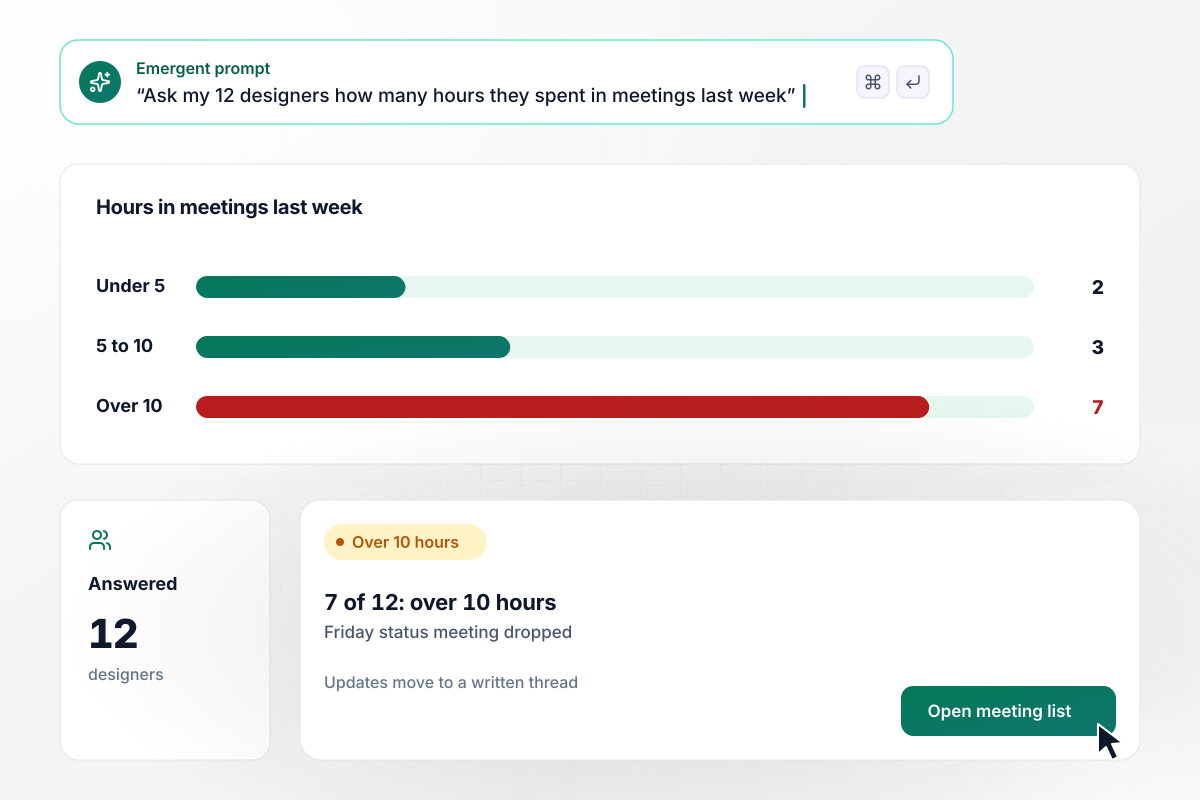
Over 10 hours of meetings for 7 of 12 designers
Corvel Studio counted meeting hours before planning its next quarter. Each of its 12 designers picked a band for last week's time in meetings. Of the 12, 7 chose over 10 hours, 3 chose 5 to 10 hours, and 2 chose under 5. The team dropped its Friday status meeting and moved those updates to a written thread.
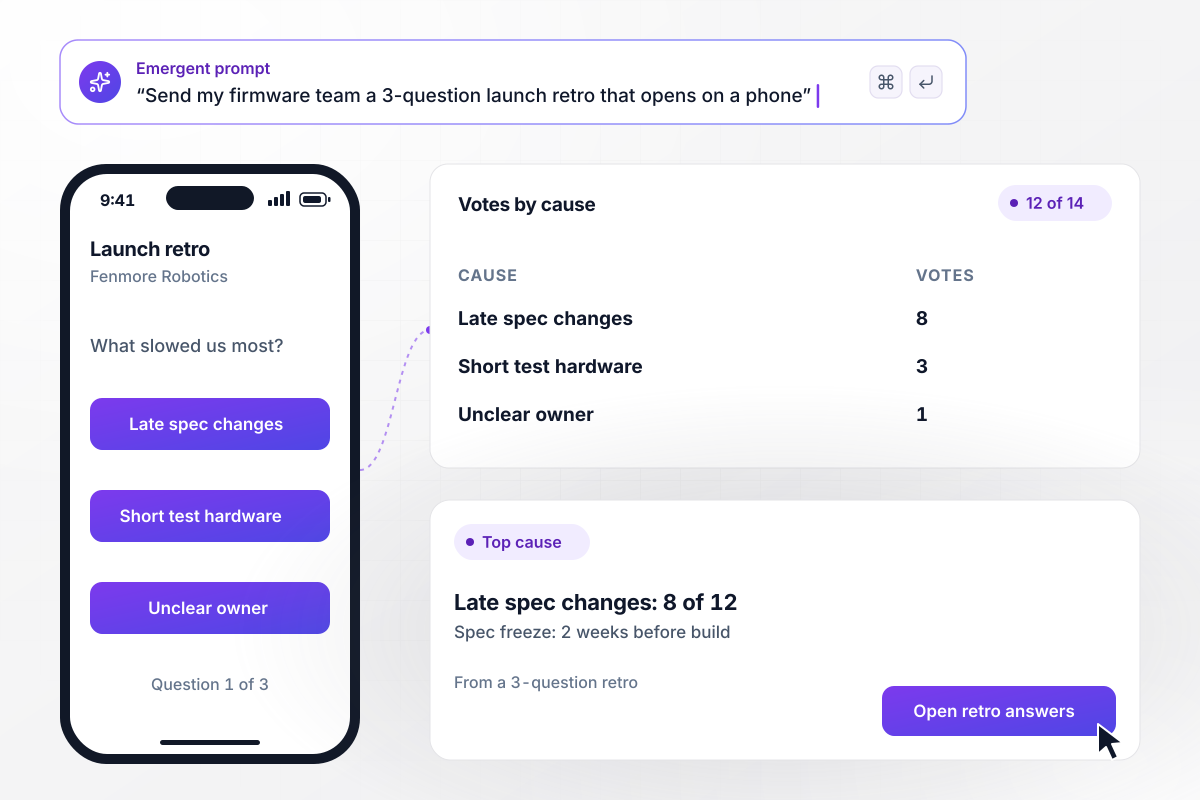
After launch, 8 of 12 name late spec changes
Fenmore Robotics sent its 14-person firmware team a 3-question retro after launch, and it opened on their phones. Of the 14, 12 answered. Asked what slowed the launch most, 8 of 12 picked late spec changes and 3 picked short test hardware. The team now freezes the spec 2 weeks before each build.






How to Run a Team Survey
Seven steps to run a team survey that people answer honestly and that ends in one change the whole team agrees to try.
Settle the purpose before you write a single question. A quarterly check on how the team works, a handoff review, and a project retro need different surveys. Put that purpose in your prompt, and Emergent drafts the survey around it.
Rate things the team can change itself, like goal clarity, role clarity, handoffs, and how decisions get made. Leave out pay and company policy. Give each area three or four statements, and keep the whole survey near 20 statements.
Score every statement on the same 1-to-5 agree scale. One scale lets you compare areas inside a round and line up this quarter's scores with last quarter's. Label both ends in plain words, such as strongly disagree and strongly agree.
Under each area, ask one open question, such as what would raise this score. A rating shows where the team is weak. The comments explain why, and they point to the change worth trying first.
Tell the team who sees raw comments and who sees only totals, in one sentence at the top of the survey. On a team under 10 people, report areas rather than single questions, and hold back any score with fewer than 5 answers.
Leave the survey open for one working week, with a reminder two days before it closes. Send it midweek, away from a deadline or a release. Track the response count each day, and chase only the whole team, never one person.
Share the scores and a summary of comments within two weeks of closing. Ask the team to pick the lowest area and agree on one change to try before the next round. Run the same survey again later and compare that area's score.
Why Build Your Team Survey With Emergent?
Each answer lands in a database you own, next to the team and the round. Rewrite a question between rounds with one prompt.

|
SurveyMonkey | Microsoft Forms | SurveyHero | |
|---|---|---|---|---|
| What you get | Survey, logic, and response database, as code you own | Survey builder with templates, including employee engagement | Surveys, quizzes, and polls with response summaries | Survey builder with templates, including employee satisfaction |
| Pricing model | Credits, no response caps or per-response fees | Per-user team plans with a seat minimum, billed annually | Free with a Microsoft account; included in Microsoft work and school subscriptions | Free plan, then per-account plans with unlimited responses |
| Where responses live | A database table you own, plus any integration | SurveyMonkey account | Microsoft Forms, with export to Excel | SurveyHero account, EU data centers |
| Code ownership | Full code export to GitHub on paid plans | None | None | None |

Pick the Pricing Plan That Works for You
Choose the plan that fits your building ambitions. From weekend projects to enterprise applications, we've got you covered.




Find the right survey, quiz, or poll
for your team















Frequently Asked Questions
Your Questions, Answered
Don't change this element unless you know what you are doing
More things you can build
with Emergent









on Emergent today


