

Build a Wellness Survey That Shows Which Group Needs What
Build a wellness survey that scores each area of wellbeing by team or site and saves every answer to a database you own.
Build a wellness survey that scores each area of wellbeing by group and flags the lowest one.
Trusted by Builders Worldwide
Active Builders Worldwide
Apps Successfully Created
Countries Globally Reached



What Makes Wellness Answers Worth Acting On
A wellness survey measures how people are faring at work and outside it, and shows an organization which group needs support first.
Questions grouped by area
Sorts every question under one area, such as physical, emotional, financial, or social wellbeing. Each area then gets its own average on a 1 to 5 scale for each team and site.
Small groups stay out of view
Withholds results for any group below the answer count you choose, five for example. Those answers still feed the overall score, and no group report connects a rating to a name.
An opt-in follow-up question
Closes the survey with an optional question asking whether the person wants someone to reach out. A yes adds them to a private list for the team you name, answers attached.
Interest checks before you spend
Asks people to pick the offerings they would use, such as a gym stipend or flexible hours. Picks are tallied by team, which sizes next year's wellness budget to real demand.
Delivery that reaches every shift
Sends the survey by email or Slack, then reminds only those who have not answered. Drivers and floor staff with no work inbox scan a printed QR code, and replies join one table.
The whole app, in your GitHub
Exports the survey app to your GitHub repository on paid plans, with its questions, scoring, dashboards, and response database. Host it yourself or keep editing in Emergent.
Wellness Surveys in Four Settings
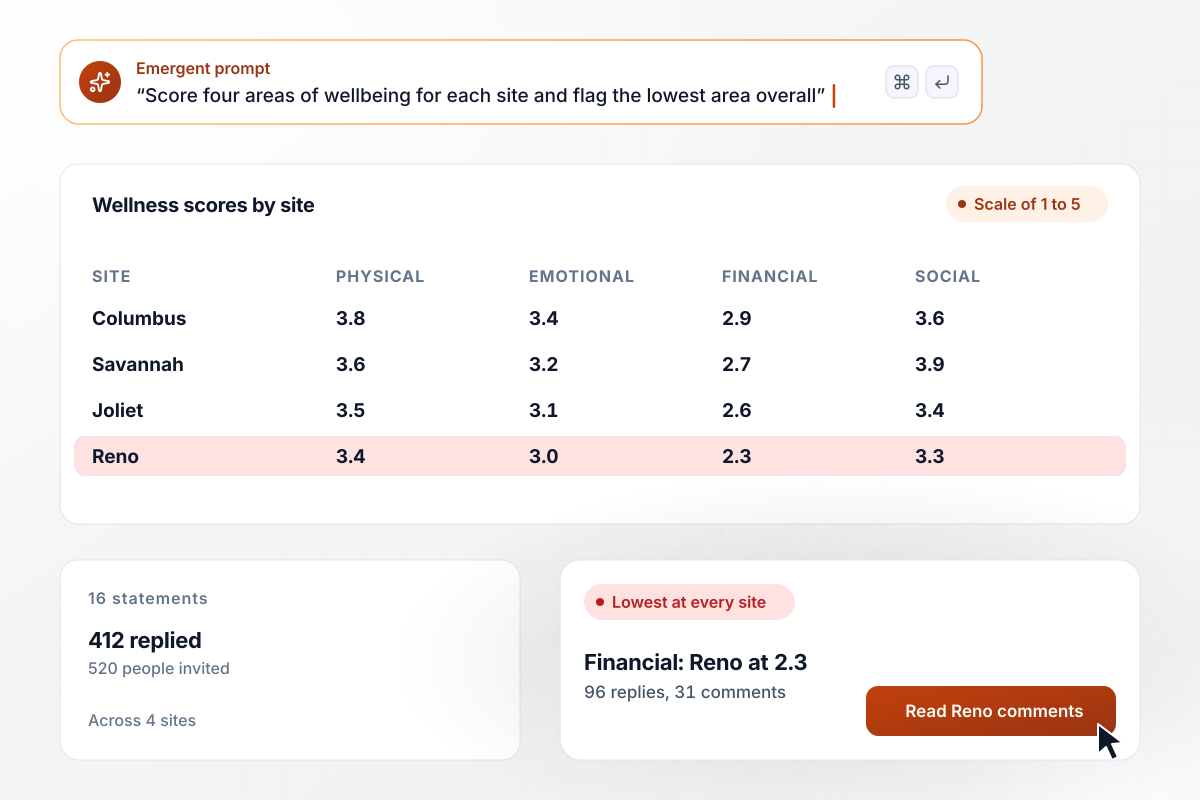
Four sites, and where money worries run highest
Once a year, 520 people at a freight company rate 16 statements from 1 to 5, covering physical, emotional, financial, and social health. This year 412 replied. Financial health came in lowest at every site. Reno's 2.3 was the floor, and the HR lead read its comments before any other site's.
window.awbMockup = { annualSurvey: "Build an annual wellness survey for my 520 staff across four sites. Ask 16 questions on a 1 to 5 scale, grouped into physical, emotional, financial, and social wellbeing, with one comment box per area. Show average scores by site and area in one table, hide any site under five answers, and flag the area that scores lowest company-wide.", wellnessBudgetPoll: "Make a short poll for my 96-person firm before we set next year's wellness budget. List six offerings, including flexible start times and a gym stipend, and let each person pick two. Save each pick with the person's studio team, chart the totals as bars, and send the partners a summary when the poll closes on Friday.", studentCheckIn: "Create a 10-question wellness check for our 1,240 first-year students that works on a phone. Cover sleep, stress, belonging, and money. Make the last question optional: would they like someone from advising to get in touch? Put every yes on a private list only the advising team can open, with that student's answers attached.", gymCheckIn: "Set up a day-30 check-in for new members of my fitness studio. Email four questions: classes attended, schedule fit, coaching, and progress toward the goal they set at signup, rated 1 to 5. If progress is 2 or lower, add the member to their coach's call list for the week with their goal and comment." };
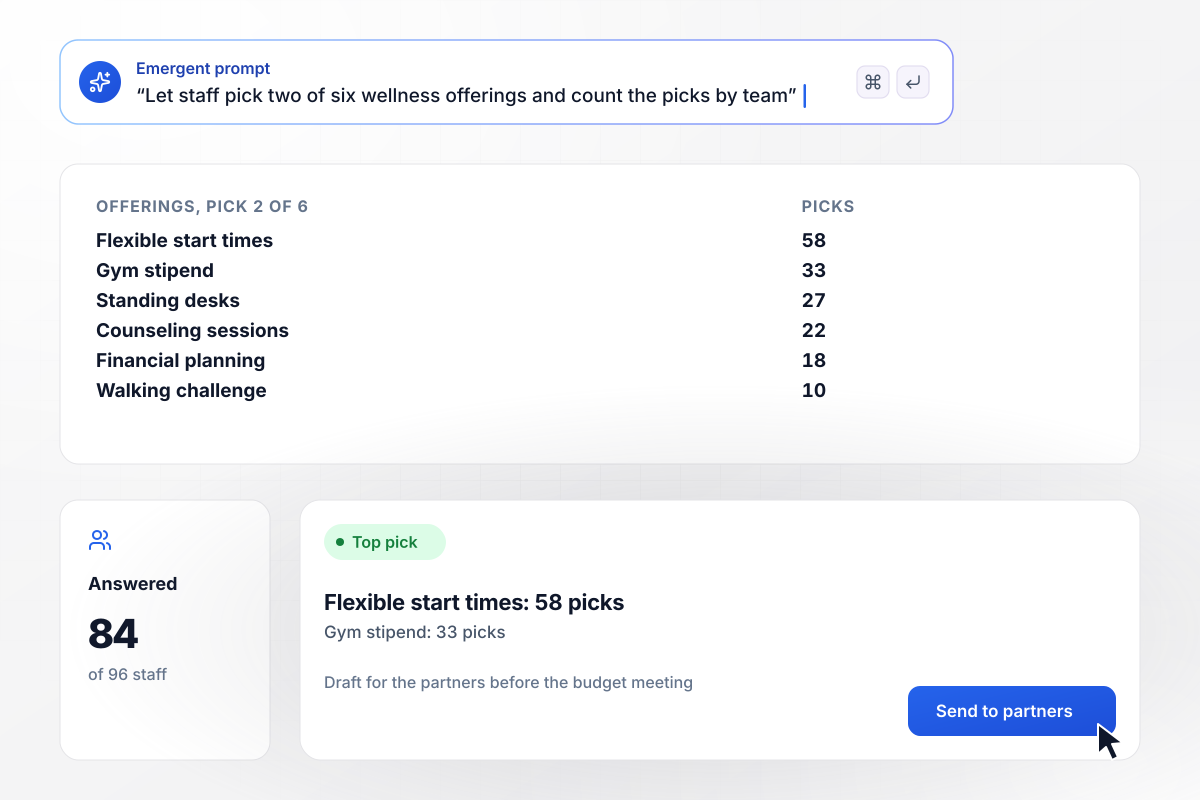
Two picks each, counted before the budget
Before setting next year's wellness budget, an architecture practice asks all 96 staff to pick two of six offerings they would use. By Friday, 84 had answered. Flexible start times lead with 58 picks, while the gym stipend the partners expected to win drew 33. Each pick is saved with its studio team.
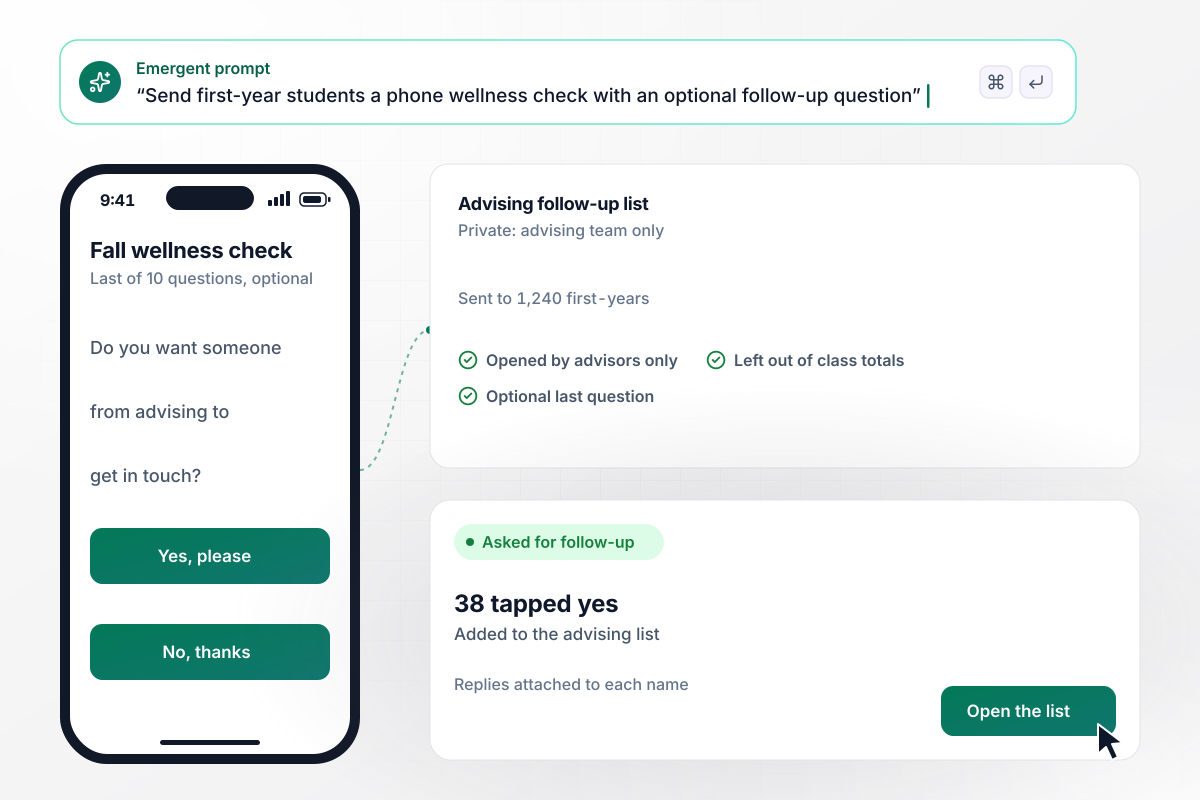
For students who want someone to reach out
Midway through the fall term, a college emails its 1,240 first-year students a 10-question wellness check built for phones. The last, optional question asks whether they want someone from advising to get in touch. The 38 who tapped yes go on a private list for the advising team, with their replies attached.
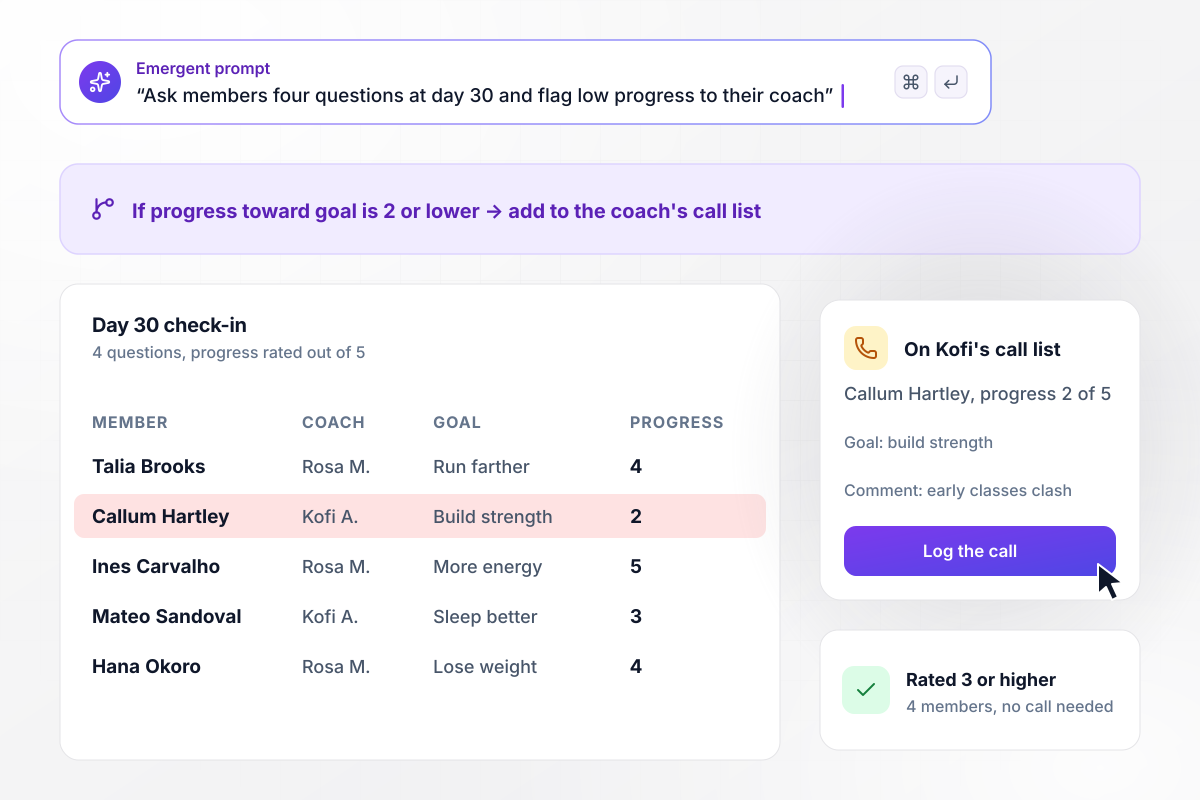
When a member rates progress 2 or lower
Thirty days after joining, each member of a fitness studio answers four questions by email, ending with progress toward the goal they set at signup. A progress rating of 2 or lower out of 5 puts the member on their coach's call list for the week. Members who rate 3 or higher stay off the list.






How to Run a Wellness Survey
Seven steps to run a wellness survey that people answer honestly and that leads to a change they can see.
Write down what the results will change before drafting a single question: next year's wellness budget, a new benefit, or support for one struggling site. A survey with no decision behind it collects answers nobody reads, and people notice when nothing happens.
Choose four or five areas instead of all eight dimensions SAMHSA lists. Body, mood, money, and relationships cover most workplaces. A campus survey often adds a section on sleep. Give each area three or four questions on one shared rating scale.
Ask about recent, concrete experience, such as how often work stress cut into sleep in the past month, instead of how someone feels in general. Keep the full survey under 20 questions, about five minutes, with one open comment box per section.
Set the smallest group whose results can be shown, such as five answers, and decide who opens each report. Site leads might see their own site while HR sees all of them. State both rules on the survey's first screen so people know before they answer.
Tell Emergent who takes part, which questions to ask, the minimum group size, and what a yes on the follow-up question should trigger. It builds the survey with its own response table and dashboards. A later change takes one more message.
Read a site against its own score from last year before ranking it against other sites. A warehouse and an office face different strains, and a raw ranking hides that. An area that scores lowest everywhere usually points to a company-wide fix.
Share the top findings and the one or two changes coming because of them, ideally within four weeks of closing. Run the same questions next year. People keep answering honestly when they can see that last year's answers moved something.
Why Build Your Wellness Survey With Emergent?
Survey platforms bill per employee or per seat and keep your results. Emergent builds the survey as an app, responses in your database.

|
Culture Amp | Qualtrics EmployeeXM | SurveyMonkey | |
|---|---|---|---|---|
| What you get | Pulse and annual surveys, confidential reporting, and manager dashboards, as code you own | Engagement, pulse, onboarding, and exit surveys with analytics | Employee listening inside the Qualtrics XM platform | Survey builder with templates, including employee engagement |
| Pricing model | Credits, no response caps or per-response fees | Quote-based, per employee by module, billed annually | Quote-based, priced by employee count | Per-user team plans with a seat minimum, billed annually |
| Where responses live | A database table you own, plus any integration | Culture Amp platform | Qualtrics platform | SurveyMonkey account |
| Code ownership | Full code export to GitHub on paid plans | None | None | None |

Pick the Pricing Plan That Works for You
Choose the plan that fits your building ambitions. From weekend projects to enterprise applications, we've got you covered.




Find the right survey, quiz, or poll
for your team















Frequently Asked Questions
Your Questions, Answered
Don't change this element unless you know what you are doing
More things you can build
with Emergent









on Emergent today


