

Build Real Estate Workflow Automation for Every Listing
Build real estate workflow automation that routes each buyer lead, tracks contract dates, and checks the closing file.
Build real estate workflow automation for my 12-agent brokerage that runs each buyer deal through showings, contract, and closing.
Trusted by Builders Worldwide
Active Builders Worldwide
Apps Successfully Created
Countries Globally Reached



What Emergent Builds Into a Brokerage App
Real estate workflow automation hands the timed, repeat steps of a deal to software and keeps pricing calls with the agent.
Write the brokerage's rules as sentences
Describe each rule the way you would tell a new agent, such as who gets a lead that arrives after 6 p.m. Emergent builds the app, its database, and its logic from that prompt.
A response clock on every buyer lead
Set how many minutes an agent has to mark a new lead Contacted. The app sends the lead by Slack or email, and when the clock runs out it moves to the next agent in line.
AI reads the dates in a signed contract
An AI step reads the inspection, financing, and closing dates from the signed agreement into the deal record. A date it is unsure of goes to your coordinator to confirm.
Connects to the CRM your agents use
The app connects to any tool with an API. A new website lead lands in HubSpot, and a signed deal moves that contact to the Under Contract stage, with data synced both ways.
One live board for every open deal
The dashboard lists every deal under contract with its next date and owner, updated live. All of it sits in a database you own, so you can pull last year's deals any time.
The deal app's code, in your GitHub
Export the full code of the app to your GitHub repository on paid plans. Your broker or IT lead can read every routing rule and date rule before agents rely on them.
Four Stops on the Way to Closing
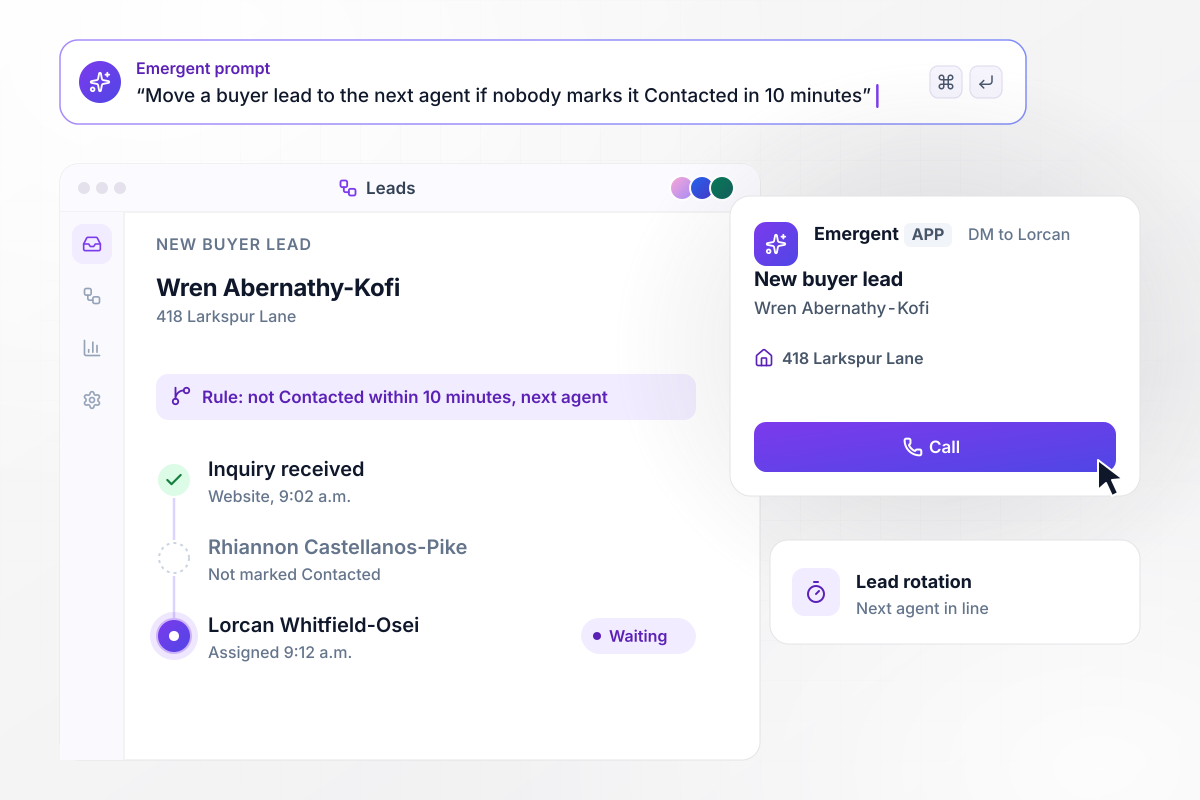
A 10-minute clock moves Wren to a second agent
Wren Abernathy-Kofi asks about 418 Larkspur Lane on the Fenwick Harbor Realty website at 9:02 a.m. The app assigns him to Rhiannon Castellanos-Pike, next on the rotation. Nobody marks the lead Contacted within 10 minutes, and at 9:12 a.m. Lorcan Whitfield-Osei gets it in a Slack direct message with a Call button.
window.awbMockup = { leadRouting: "When a buyer lead comes in from my brokerage website, assign it to the next agent on the rotation and send them a Slack direct message with a Call button. If the agent does not mark the lead Contacted within 10 minutes, move it to the next agent in line and log both assignments on the lead.", showingFeedback: "One hour after each showing on my listings, email the showing agent a short feedback form about price, condition, and interest. Save every answer on the listing record. At the end of the day, email the listing agent a summary with how many forms came back and how many say the price feels high.", contractDates: "When a purchase agreement is signed, read the inspection, financing, and closing dates from it into the deal record and set a reminder before each one. If any date is read with low confidence, send it to my transaction coordinator to confirm before the reminder for that date is set.", closingFileCheck: "Five days before each closing, check the transaction file against my brokerage's document checklist. If any document is missing, mark the file Incomplete, email the listing agent the name of each missing document, and show the file on the open deals board until every document is in." };
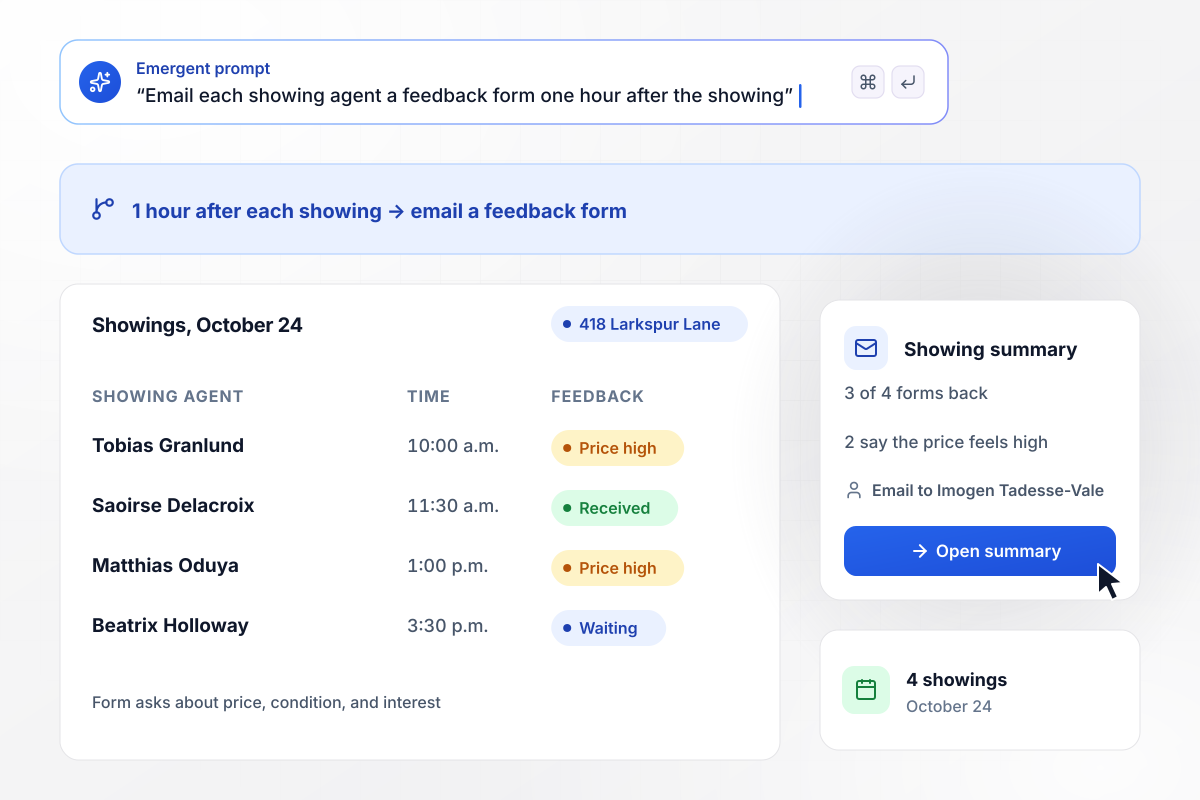
Feedback forms go out one hour after each showing
Four buyers tour 418 Larkspur Lane on October 24. The app emails each showing agent a short feedback form 1 hour after the showing. Three of the 4 forms come back, and 2 say the price feels high. Imogen Tadesse-Vale, the listing agent, gets the summary by email before she calls the seller.
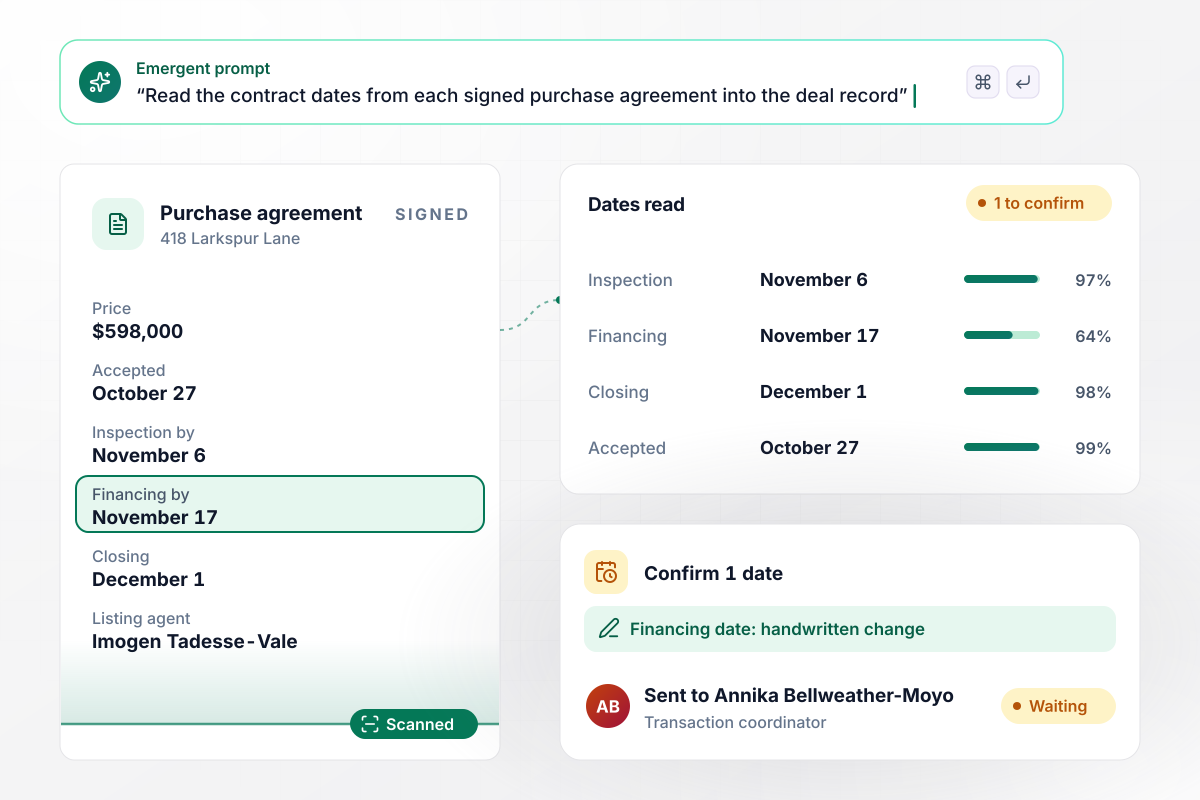
The financing date waits for the coordinator
The seller accepts a $598,000 offer on October 27. The app reads the signed purchase agreement into the deal record: inspection by November 6, financing by November 17, closing on December 1. A handwritten change on the financing date sends it to Annika Bellweather-Moyo, the transaction coordinator, to confirm.
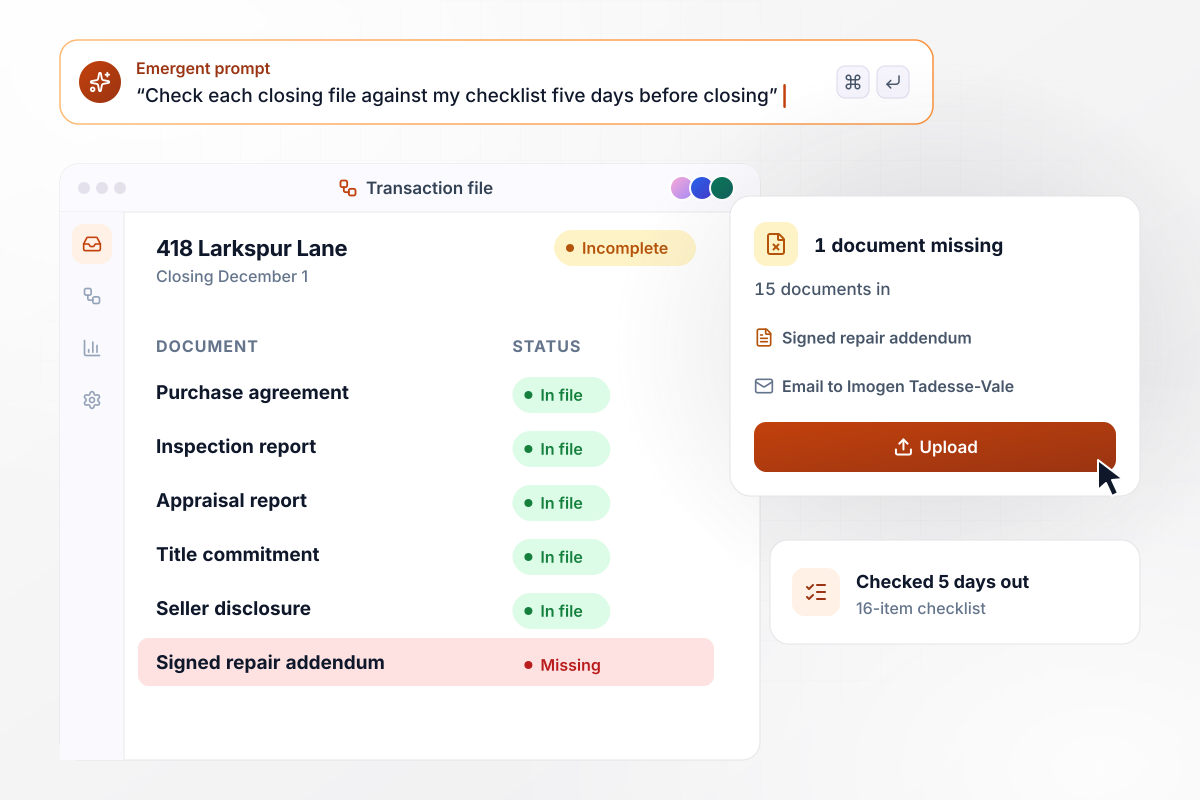
Closing file check finds no signed repair addendum
The app checks the 418 Larkspur Lane file 5 days before the December 1 closing, against the brokerage's 16-item checklist. The file holds 15 documents, and the signed repair addendum is missing. The app marks the file Incomplete and emails Imogen Tadesse-Vale the name of the missing document.






How to Build Real Estate Workflow Automation
Seven steps that take real estate workflow automation from one closed deal to four flows your agents run on each listing.
Pick a deal that closed recently and write down every step someone did by hand: the first reply to the buyer, the showing follow-ups, the dates copied off the contract, and the chase for missing paperwork. Start with the steps that follow a fixed rule.
Note where each record lives today, such as contacts in the CRM, signed contracts in the e-signature tool, and documents in shared storage. Connect each one through its API, and have the app read every record from the system that owns it.
List the agents who take new buyer leads and the order they take them in. Pick the number of minutes a lead can wait before it moves on, and decide who gets leads that arrive after hours or on weekends.
Open three recent purchase agreements and mark the dates your team tracks on each one, such as inspection, financing, and closing. Decide how many days ahead each reminder goes out, and whether it goes to the agent or the coordinator.
Ask your broker for the documents a transaction file must hold before closing, and write them as one list. Mark the ones that apply only to some deals, such as a repair addendum, so the check does not flag a file that never needed one.
Write the rules from the last four steps as plain sentences, with the real minute counts and document names. Emergent builds the app from that prompt, down to the checklist and the dashboard.
Replay a week of leads and two open deals through the app before agents depend on it. Check that each lead reached the right agent, each reminder landed on the right day, and the file check named the right documents.
Why Brokerages Build With Emergent
Emergent builds the lead rotation and the deal tracker as one app, with no task cap on how often they run.

|
Zapier | Make (Integromat) | n8n | |
|---|---|---|---|---|
| How you build | Prompt for the workflow and the app around it | Templates and editor, AI copilot | Visual canvas | Visual canvas, self-hosted or cloud |
| What you get | Workflow + trigger form + database + dashboard, as code you own | Zaps, plus Tables and Interfaces inside Zapier | Scenarios inside Make | Workflows inside n8n |
| Behavior at cap | Keeps running, no task cap | Overage billed at up to 1.25× the base rate | Runs pause | Cloud workflows stop until the reset or an upgrade |
| AI and agent steps | Native, share the same credit pool | Priced by model tier, drawn from the task pool | AI modules cost variable credits | Bring your own model API key, billed by the provider |
| Code ownership | Full code export to GitHub on paid plans | None | None | Yes on Community Edition |


Pick the Pricing Plan That Works for You
Choose the plan that fits your building ambitions. From weekend projects to enterprise applications, we've got you covered.




Find the right workflow automation
for you and your business
Frequently Asked Questions
Your Questions, Answered
Don't change this element unless you know what you are doing
More things you can build
with Emergent









on Emergent today


