

Build a Conference Registration Form Around Your Agenda
Create a conference registration form that hides sold-out breakouts and bills each company on a single invoice.
Build a conference registration form that saves each sign-up to a database.
Trusted by Builders Worldwide
Active Builders Worldwide
Apps Successfully Created
Countries Globally Reached



What a Conference Registration Has to Carry
A conference sells several passes across several days. These six parts keep the attendee list and the invoices in agreement.
Different sections per attendee type
Ask speakers for a bio and a headshot, exhibitors for booth size and power, and attendees for neither. Emergent builds one form that branches on the registration type picked first.
Badge names checked before printing
Collect each name and company exactly as they should print, with a length limit that fits the badge. Export the badge list as a CSV for the printer in the week before doors open.
Fees taken as part of registering
Connect Stripe or any processor with an API and take the pass price at submit. A registration stays pending until payment clears, and a refund marks that attendee as canceled.
Agenda emails after every change
Send each attendee a confirmation listing the sessions they picked, with a link to swap them. Schedule a reminder two days before the opening keynote with venue and check-in details.
Every attendee as a row you own
Keep each attendee's pass and session picks in a database you own, beside their payment status. Filter by track for a headcount per room, or sync every attendee into HubSpot.
Code that leaves with you
Put the form on the conference's own domain, included and paid in credits, or embed it on a page you run. On paid plans, export the full code to GitHub for a developer to extend.
Four Rules a Conference Form Runs On
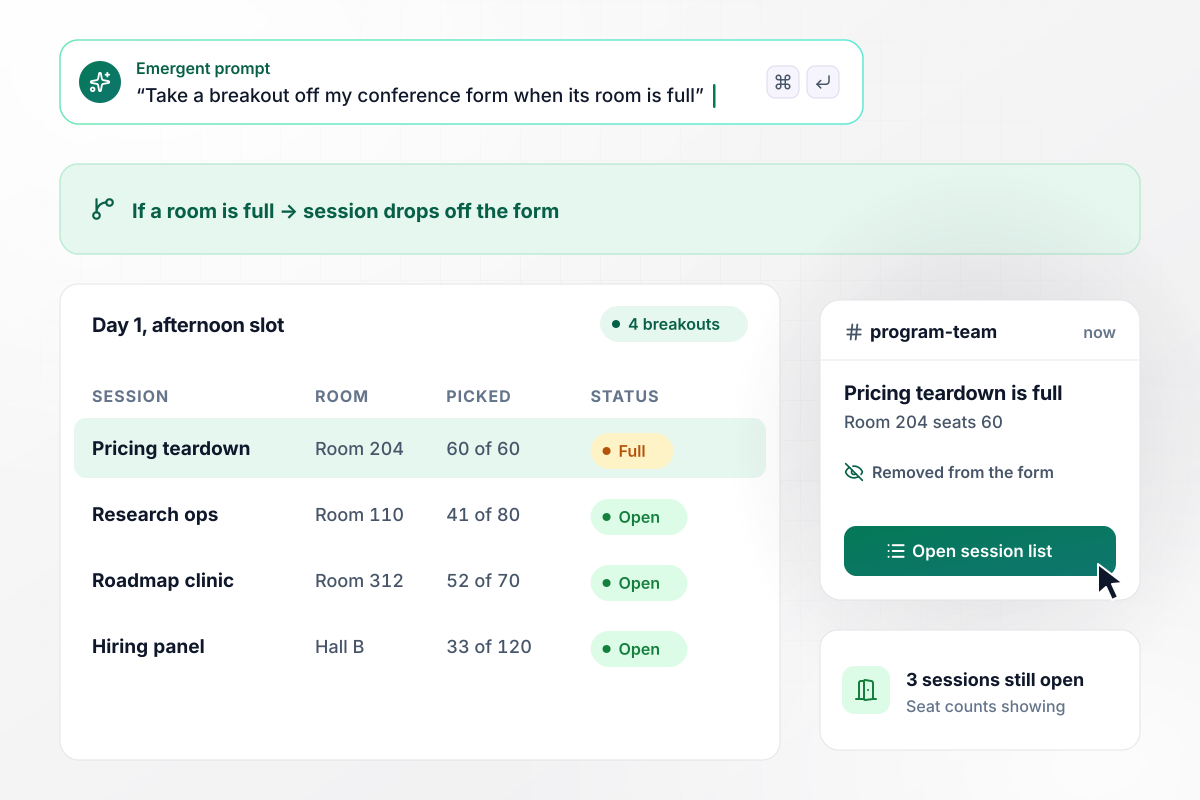
A full room takes its breakout off the form
Afternoons at the Fieldwork Summit split into four breakouts, and each attendee picks one. Room 204 seats 60. When the 60th attendee chooses the pricing teardown, that session drops off the form and the program team gets a Slack message. The other three sessions stay open with their seat counts showing.
window.awbMockup = { breakoutSessions: "I run the Fieldwork Summit. Each afternoon slot has four breakouts, and every attendee picks one per slot. Room 204 seats 60 for the pricing teardown. When a room fills, take its session off the form and send my program team a Slack message. Keep showing seat counts for the sessions that are still open.", passPricing: "Build registration for the Coastal Ecology Society annual meeting. Passes are $450 early bird, $600 standard and $175 for students. Students must upload a student ID. Read the expiration date from the ID, and hold any registration whose ID expires before the meeting opens on June 14. Email the student asking for a current ID.", groupRegistration: "Build group registration for Mesa DevOps Days. A manager can register several people in one submission, with the attendee section repeated per person. Groups of five or more pay $380 a pass instead of $450. Send one Stripe invoice to the company's billing contact, and email each attendee a confirmation with their badge name.", visaLetters: "Add a visa letter option to my conference registration. Attendees from abroad tick a box, then enter their name as it appears on the passport, their nationality and the passport number. Once the fee is paid, draft a letter of invitation with those details and the conference dates, and send it to Ines Varga to approve before it is emailed." };
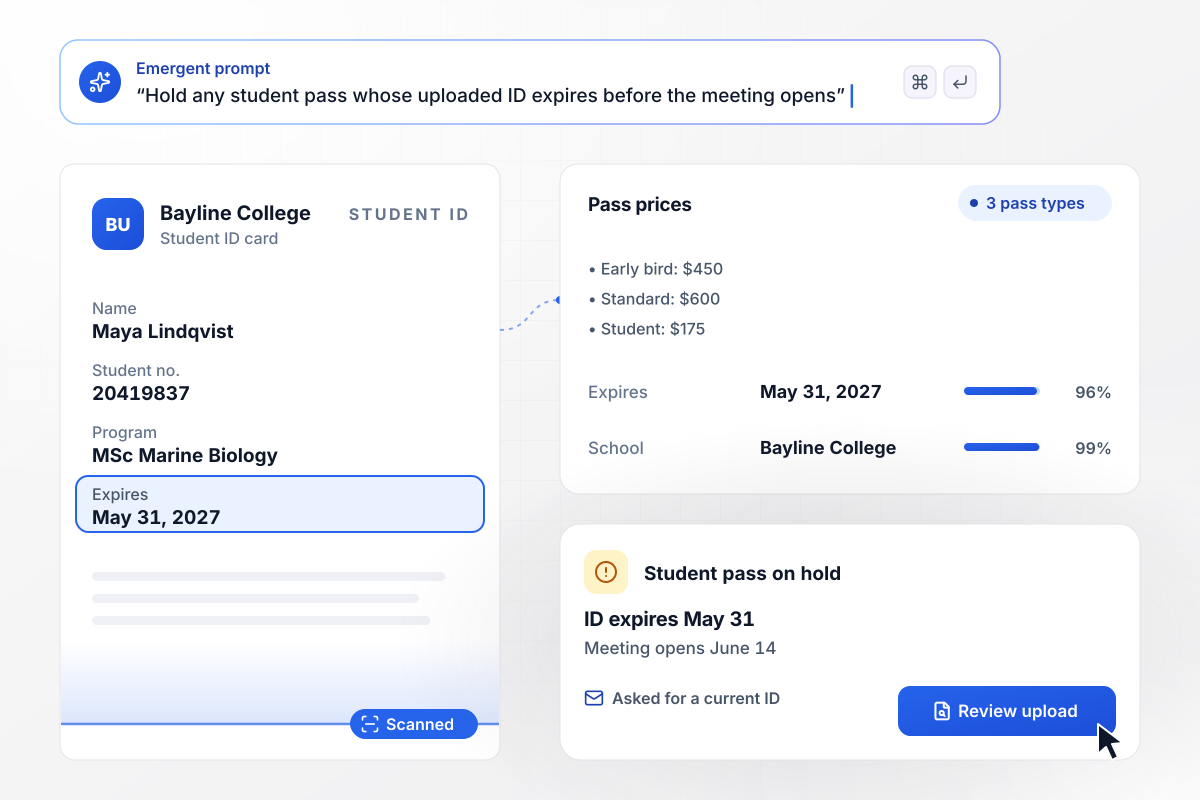
Student pricing that waits on a valid ID
The Coastal Ecology Society prices its pass three ways: $450 early bird, $600 standard and $175 for students. Students upload an ID, and the form reads its expiration date. An ID that expires before the meeting opens on June 14 puts the pass on hold, and the student is asked for a current one.
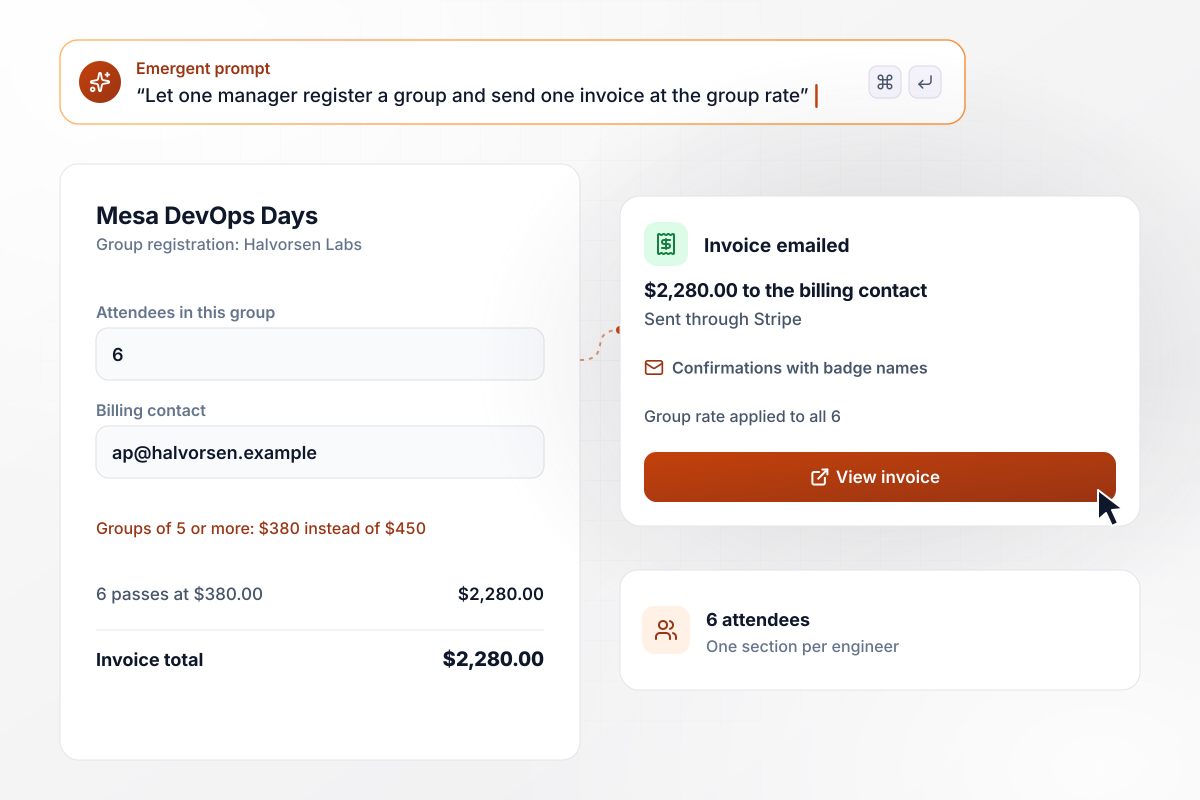
One invoice covers six engineers at the group rate
Halvorsen Labs registers six engineers for Mesa DevOps Days in one submission, with an attendee section per person. Groups of five or more pay $380 a pass instead of $450. Stripe emails one $2,280 invoice to the billing contact, and each engineer gets a confirmation with their badge name.
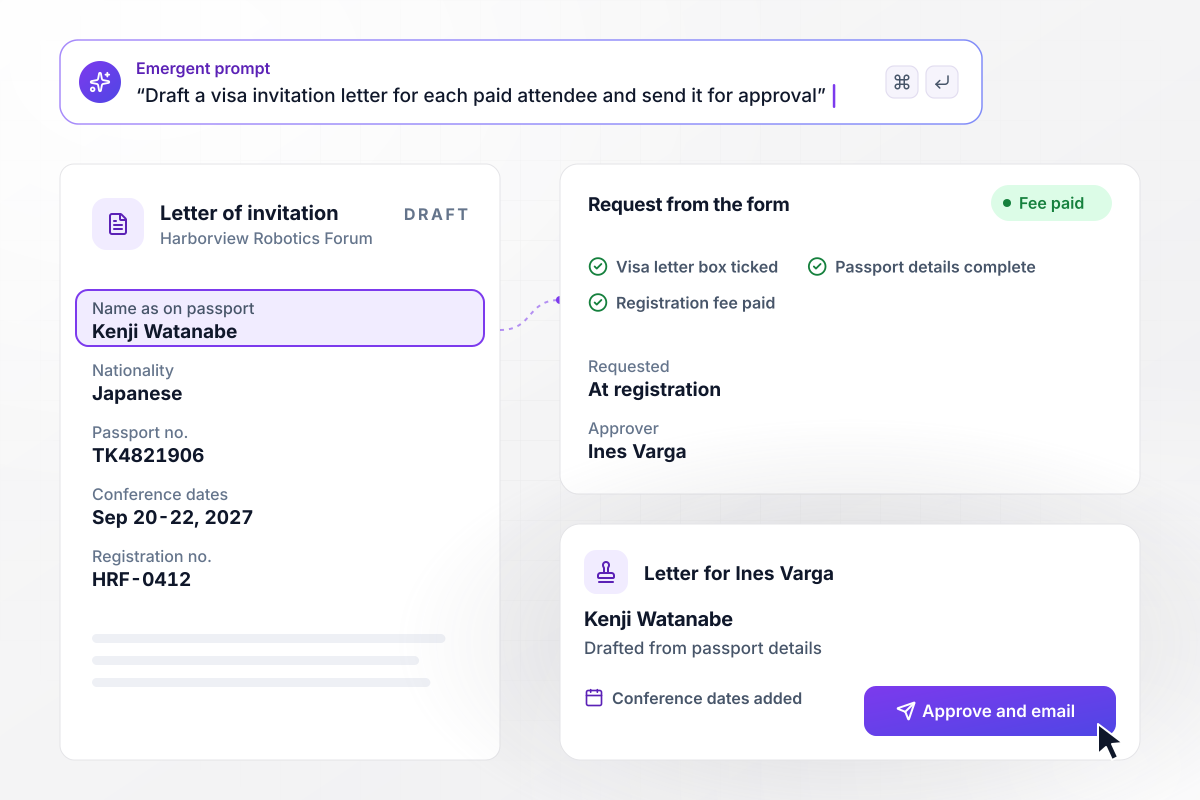
Visa letters drafted, then approved by one coordinator
Attendees from abroad tick a box when they need a letter of invitation for a visa, then add their passport name and number. Once the fee is paid, the app drafts the letter with the conference dates. Ines Varga, the program coordinator, approves each letter before it is emailed.






How to Make a Conference Registration Form
These seven steps turn your agenda and pass prices into a conference registration form that is ready to share.
Lay out each day as time slots, then place every parallel session in its slot with the room's seat count. Attendees choose against this grid. A session missing from it cannot be picked, and a room without a count can be overbooked.
Write down each pass with its price and its deadline: early bird, standard, member, student, one-day. Note which passes need proof, such as a student ID or a membership number, and what happens when that proof is missing.
Some attendees sign up alone; others arrive in a batch from a manager. Settle the group size that earns a discount, who receives the invoice and whether each person in a group gets a separate confirmation.
Ask for the badge name and the session picks. Add meal needs or accessibility requests when a caterer or the venue will act on them. Speakers and exhibitors answer in their own sections instead of adding questions for everyone.
Paste your notes from the first four steps into the prompt: the agenda grid, the pass prices, the group rule. Emergent builds the form with the attendee table and confirmation emails behind it. Ask for changes the same way, such as a later early-bird deadline.
Register under a made-up name with a Stripe test card and read the confirmation on a phone. Then try the cases that break forms: a student with an old ID, a group of four, a room with one seat left. Fix whatever surprises you.
Link the form from the conference site and the call for speakers, where attendees already look. A daily Slack count of new registrations by pass type shows which prices are selling and when to close the early-bird rate.
Why Build Conference Forms With Emergent?
Template galleries stop at the fields. Emergent also builds the room limits and pass prices a conference runs on.

|
Jotform | Google Forms | Typeform | |
|---|---|---|---|---|
| How you build | Describe it in plain English | Templates, editor, AI generator | Editor, with Gemini drafting on some Workspace plans | Templates, editor, AI assist |
| Response limits | No response caps | Monthly submission caps by plan; the form stops at the cap | No limit | Monthly response caps by plan; the form closes at the cap |
| Where responses live | A database table you own, plus any integration | Jotform account | Google Sheets | Typeform account |
| Payments in the form | Through your own Stripe account | Included, metered per plan | No | Paid plans |
| Code ownership | Full code export to GitHub on paid plans | None | None | None |




Pick the Pricing Plan That Works for You
Choose the plan that fits your building ambitions. From weekend projects to enterprise applications, we've got you covered.




Find the right form
for whatever you're collecting















Frequently Asked Questions
Your Questions, Answered
Don't change this element unless you know what you are doing
More things you can build
with Emergent









on Emergent today


