

Build a Direct Deposit Form That Checks Bank Details
Create a direct deposit form that verifies routing numbers, reads voided checks, and holds bank changes until employees confirm.
Build a direct deposit form for my payroll team that checks routing numbers.
Trusted by Builders Worldwide
Active Builders Worldwide
Apps Successfully Created
Countries Globally Reached



What a Direct Deposit Form Should Catch
A direct deposit form PDF records the numbers. Emergent's version checks them before the first payday.
Routing numbers checked on entry
Runs the check-digit math on each nine-digit routing number the moment it is entered. A transposed digit gets caught on the form, long before it turns into a returned deposit.
Voided checks read into the form
Reads the routing and account numbers off an uploaded voided check or bank letter, then compares them with what the employee typed. Any digit that differs goes back to them.
Pay split across several accounts
Lets employees route part of each paycheck to a second or third account by dollar amount or percentage. The form refuses to submit until one account is set to take the remainder.
Bank changes held until confirmed
Keeps every request to switch a deposit account on hold until the employee approves it from contact details HR already had. Nothing reaches the payroll export while it waits.
Account numbers shown as the last four
Shows only the last four digits of each account number on the dashboard and in alerts. The full number stays in a database you own, open to the payroll admins you name.
A payroll sync whenever you want one
Exports the full code to your GitHub on paid plans. An engineer can add a nightly push to your payroll provider's API, or you can describe the change and let Emergent write it.
Direct Deposit Forms for Every Payee
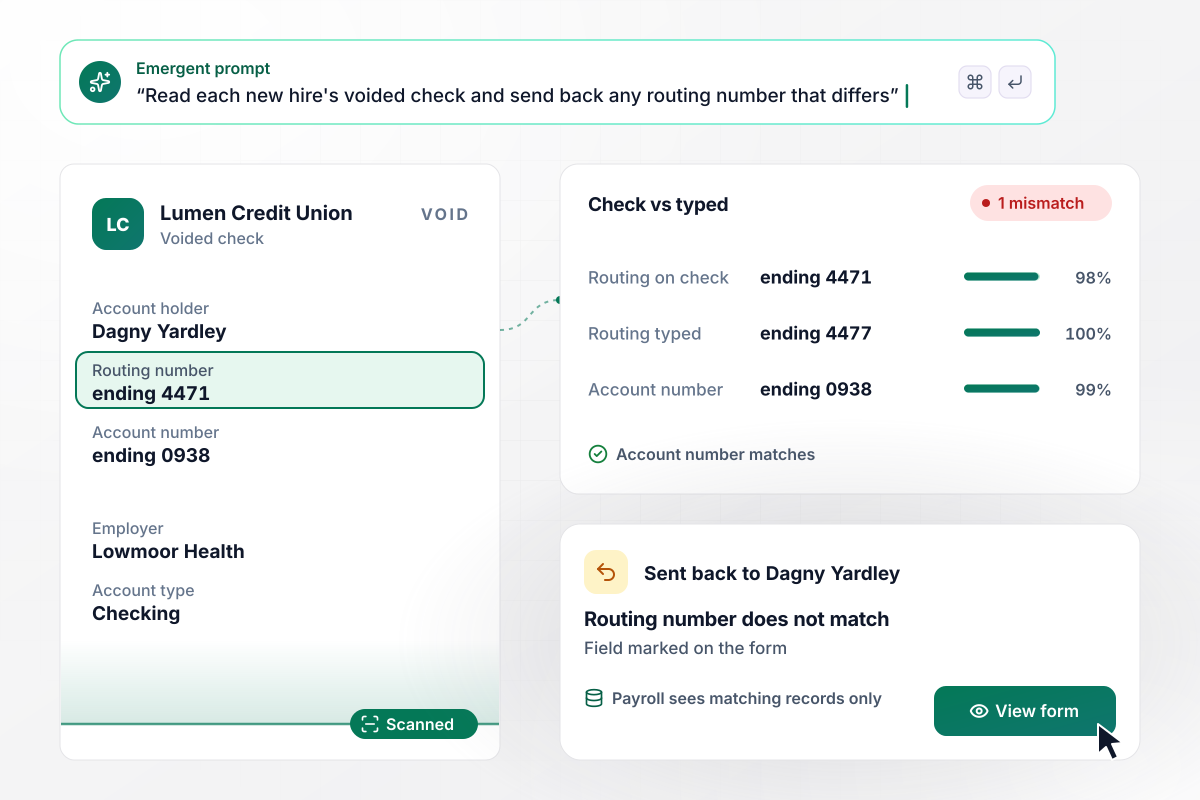
The wrong digit caught before payday
New hires type the routing and account numbers, then upload a voided check. The form reads the check and compares its numbers with the typed ones. If the routing number does not match, the form goes back to the new hire with that field marked. Payroll only receives records that agree.
window.awbMockup = { newHires: "Build a direct deposit form for new hires at my company. Ask for the account holder's name, bank name, routing number, account number and account type, plus an upload of a voided check. Read the check and compare its routing and account numbers with what the employee typed. If anything differs, send the form back with that field marked. Only pass matching records to payroll.", splitDeposits: "Let my employees split each paycheck across up to three accounts. For each extra account they choose a fixed amount or a percentage, and exactly one account must take the remainder. Before they sign, show the split on a sample net pay of $2,140, for example $150 to savings and $1,990 to checking. Save each split as a row payroll can export.", bankChanges: "Build a page where employees change the bank account their pay goes to. Hold every change request and email a confirmation link to the personal address already in our HR record, not the one in the request. When the employee confirms, send our payroll manager Tobiah Ulloa a Slack direct message with the employee's name and the last four digits of the new account.", contractorPayouts: "Make a payout setup form for the contractors my company pays by ACH. Collect their bank details and a W-9 in the same submission. Compare the name on the bank account with the name on the W-9. If they match, add the contractor to the next payout run. If not, hold them for accounts payable to review and show the reason." };
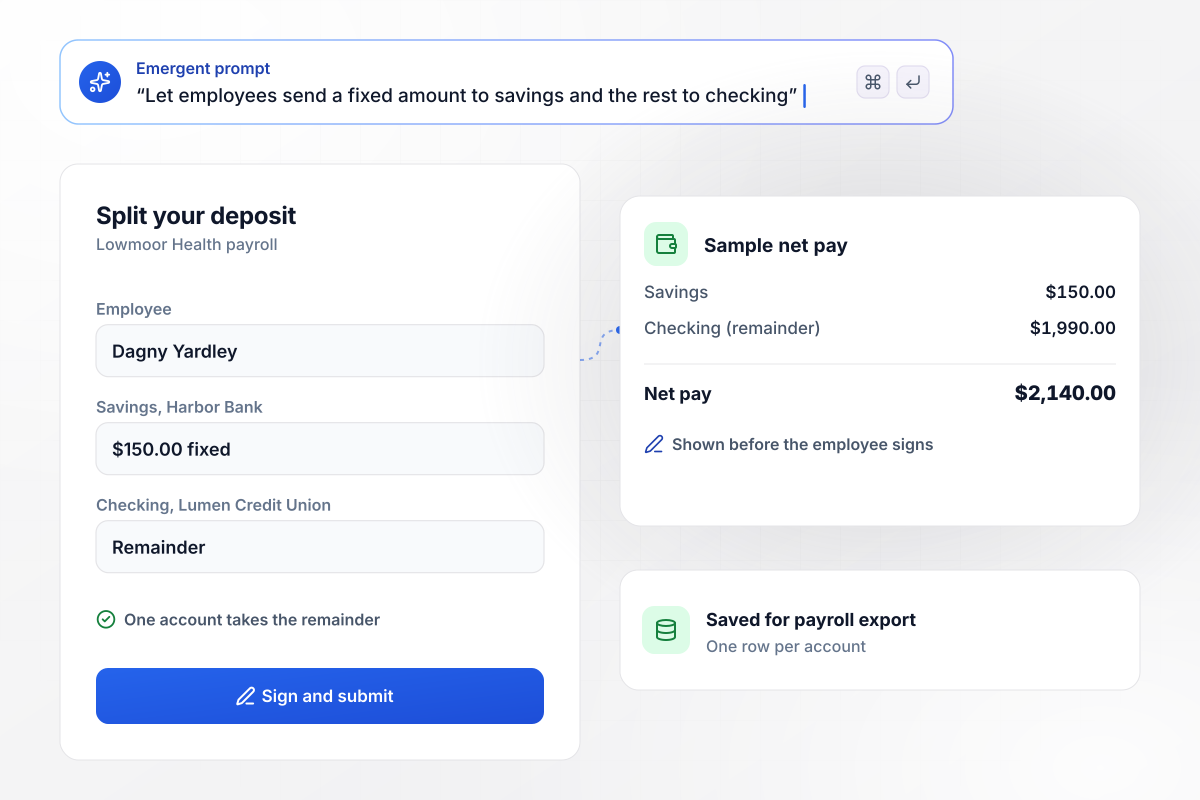
A fixed $150 to savings, the rest to checking
Plenty of employees keep a savings goal that comes out of every paycheck. Each extra account takes a fixed amount or a percentage, and one account is marked for the remainder. On a sample net pay of $2,140, the employee sees $150 land in savings and $1,990 in checking.
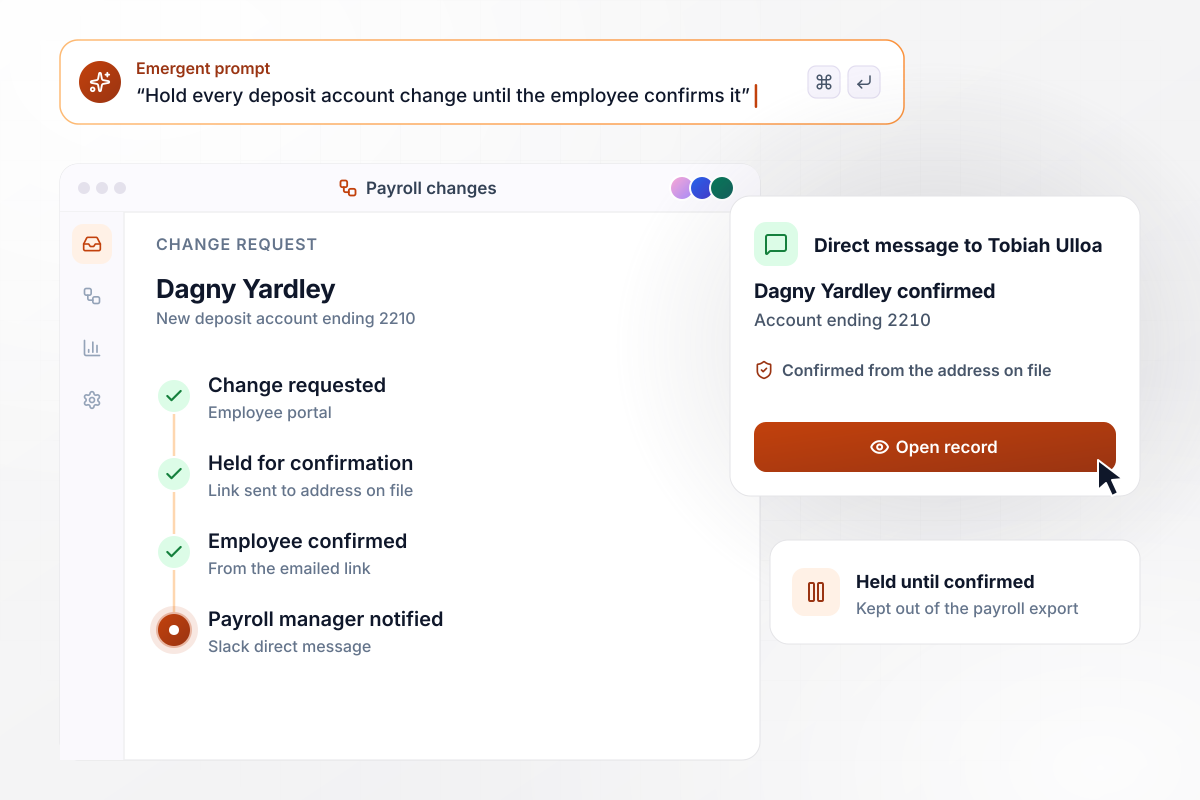
No new account until the employee confirms
A redirected paycheck starts outside payroll: a stolen login or a spoofed email asks to switch the deposit account. The app holds the change and emails a confirmation link to the address on file. Once the employee confirms, the payroll manager gets a Slack direct message naming the employee.
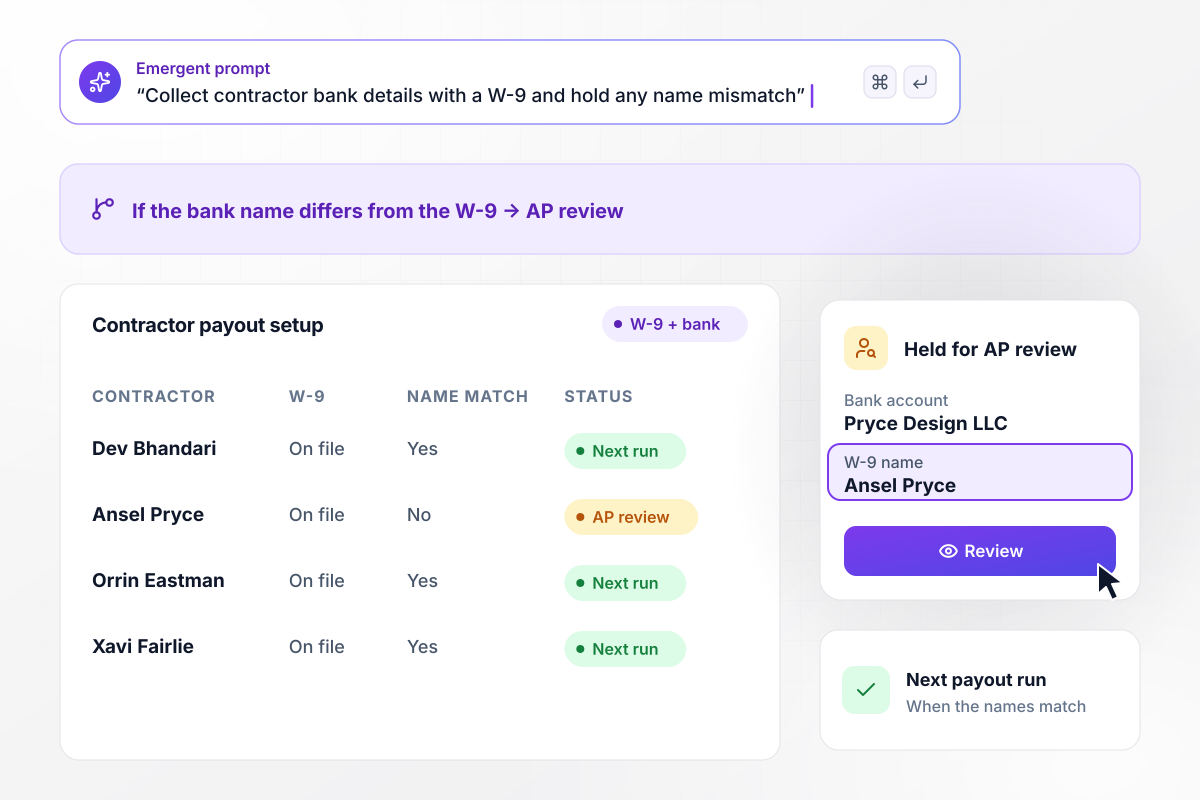
Bank details and a W-9 in one submission
Contractors get paid by ACH too, and accounts payable needs a taxpayer ID first. The form collects bank details and the W-9 together, then compares the account holder's name with the W-9 name. When they differ, the contractor waits for accounts payable review before joining the next payout run.






How to Create a Direct Deposit Form
Seven steps to set up a direct deposit form that collects the right bank details and confirms every account change with the employee.
Pick the payees first: employees on payroll, contractors paid by ACH, or both. The groups need different paperwork. Employees sign a deposit authorization, while a contractor also owes you a W-9 before the first payment goes out.
Every version needs the account holder's name, the bank name, the routing number, the account number, and the account type. Show where to find them: the nine-digit routing number sits bottom left on a check, with the account number to its right.
Ask for a voided check or a letter from the bank showing both numbers. Savings accounts rarely come with checks. For those, accept the bank letter or a pre-filled form printed from online banking.
Let employees add up to two more accounts, each with its own dollar amount or percentage. Require exactly one account to take whatever is left, and show the split on a sample paycheck before they sign.
Under Regulation E, an employer can require direct deposit only when the employee picks the bank that receives it. Never tie the form to one bank, and file each signed authorization with the employee's payroll record.
Treat a request to switch accounts as unverified until the employee confirms it. Send that confirmation to contact details already on file, never to the email address or phone number written in the request itself.
Ask each new hire to confirm the first deposit reached the right account. Keep a paper check ready for that payday in case it did not, and close the setup only after the employee says the money arrived.
Why Build Direct Deposit Forms With Emergent?
Bank details, voided checks and change requests run through one app, backed by a database you own.

|
ADP | Docusign | Eddy | |
|---|---|---|---|---|
| How you build | Describe it in plain English | Employee self-service or admin entry in RUN | Upload a document, place fields, reuse templates | Onboarding task or employee profile in Eddy |
| File uploads | Files saved to storage you own, no sign-in | Bank details entered as fields | Signer attachments on higher plans, no sign-in | File upload tasks, employee sign-in needed |
| Where responses live | A database table you own, plus any integration | Employee record in RUN payroll | Docusign account, downloadable as PDF | Employee profile in Eddy |
| Code ownership | Full code export to GitHub on paid plans | None | None | None |
| Response limits | No response caps | Quoted by payroll frequency and headcount | Envelope allowance per plan, then pay per envelope or upgrade | Priced per person plus a monthly base fee |




Pick the Pricing Plan That Works for You
Choose the plan that fits your building ambitions. From weekend projects to enterprise applications, we've got you covered.




Find the right form
for whatever you're collecting














Frequently Asked Questions
Your Questions, Answered
Don't change this element unless you know what you are doing
More things you can build
with Emergent









on Emergent today


