

Build an Insurance Verification Form Patients Finish Before the Visit
Build an insurance verification form that collects each patient's plan and card photos, then logs what the office confirms.
Build an insurance verification form that saves every response to a database I own.
Trusted by Builders Worldwide
Active Builders Worldwide
Apps Successfully Created
Countries Globally Reached



Two Sections, One Record per Patient
An insurance verification form has two halves: what the patient tells you and what the plan confirms. Both save to one record.
A patient section sent at booking
The patient enters the plan name, member ID, group number, and the phone number on the back of the card. The link goes out at booking, so answers arrive before check-in.
Both sides of the card, photographed
Two upload fields take a photo of the front and back of the insurance card. Staff check the photo against the typed member ID instead of asking the patient at the desk.
Policyholder fields only when needed
One question asks whether the patient is the policyholder. A no opens fields for that person's name, date of birth, employer, and relationship to the patient. A yes skips them all.
A staff section for the benefits call
After calling the plan, staff record the copay, deductible left, visit limit, prior authorization status, and the call reference number. Patients never see this part of the form.
Alerts before a gap reaches the visit
Pick the conditions that need a person, such as a scan with no authorization number or a plan near its visit limit. The app sends that record to the right person by email or Slack.
Records in a database you own
Answers and staff notes save to a database you own, and the full code exports to your GitHub repository on paid plans. A returning patient's next check starts from this record.
How Four Practices Verify Insurance
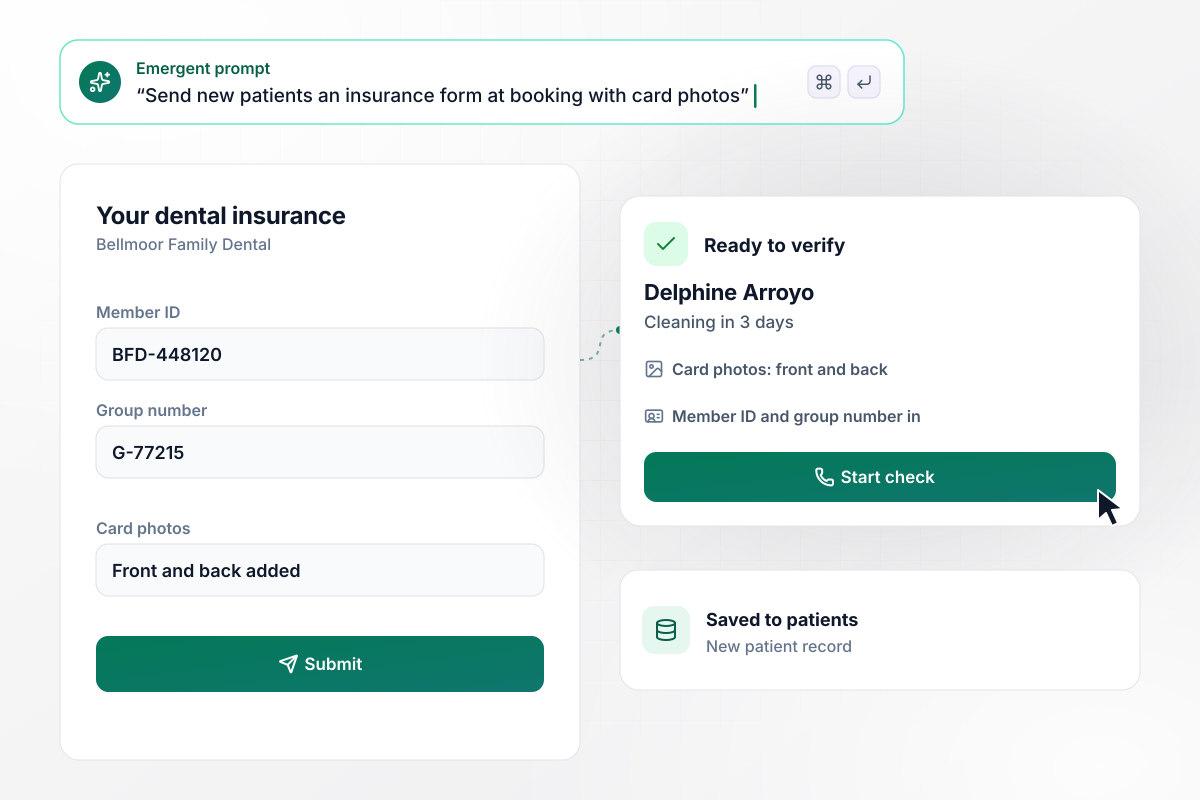
Card photos and plan details arrive before the cleaning
New patients at Bellmoor Family Dental get the form by email when they book. Delphine Arroyo filled hers in 3 days before her cleaning and attached photos of both sides of her card. Her record lands on the front desk's list marked ready to verify. Nobody retypes a member ID from a photocopy at check-in.
window.awbMockup = { dentalOffices: "My dental office sends every new patient an insurance form when they book. Ask for the plan name, member ID, group number, and the policyholder's name, plus photos of the front and back of the card. Save each patient's answers to a record and list it for the front desk as ready to verify.", physicalTherapy: "Our physical therapy clinic calls each patient's plan before the first visit. Give the front desk a staff section for the copay, deductible left, visits allowed this year, visits used, and the call reference number. When a patient has 3 visits left, email their therapist.", counseling: "Our counseling practice sees teens covered on a parent's plan. Ask whether the patient is the policyholder, and if the answer is no, open a section for the policyholder's name, date of birth, employer, and relationship to the client. End with a typed signature confirming the details.", imagingCenters: "I run scheduling at an imaging center. Track tomorrow's scans with a verified or open status, plus prior authorization status and number for each one. At 3 p.m. every day, post any scan that is still open to our #scheduling Slack channel, with what is missing." };
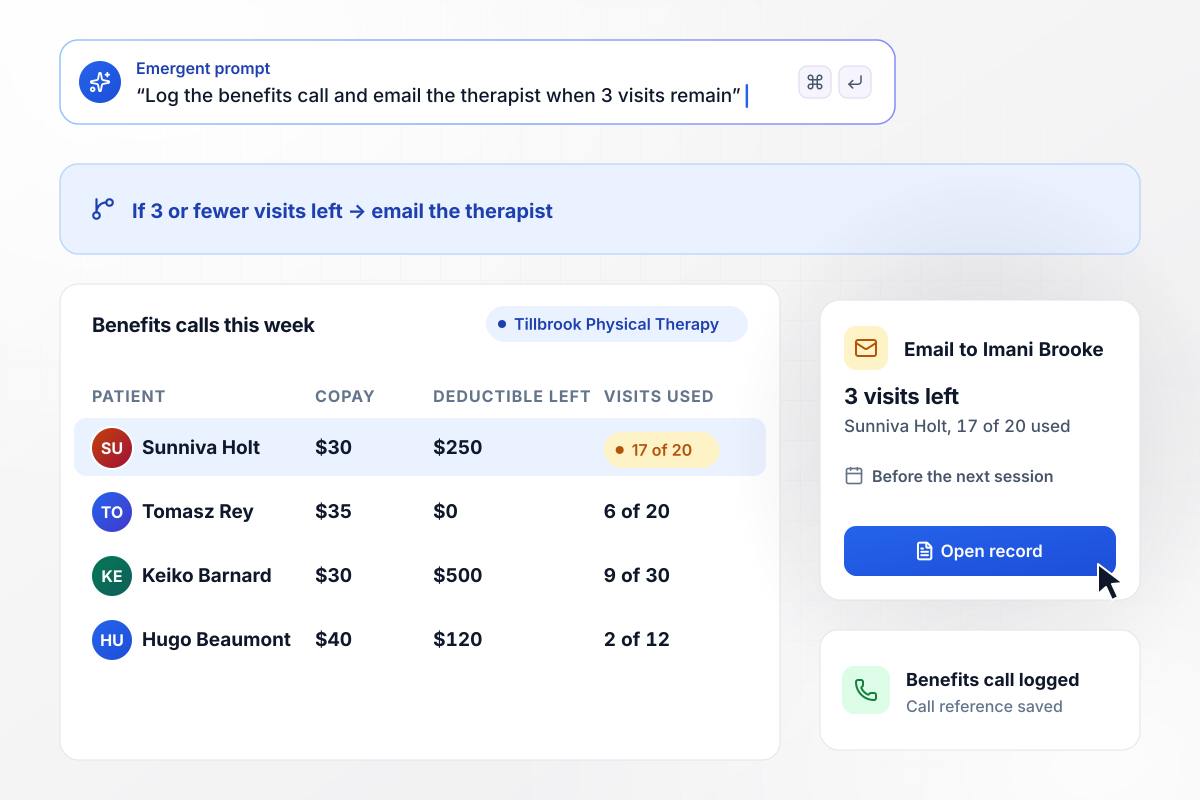
Visits left drop to 3, and her therapist gets an email
Once the call to the plan ends, the Tillbrook Physical Therapy front desk fills in the staff section for Sunniva Holt. She has a $30 copay, $250 of deductible left, and 17 of 20 visits used this year. With 3 visits left, the app emails her therapist, Imani Brooke, before another session goes on the calendar.
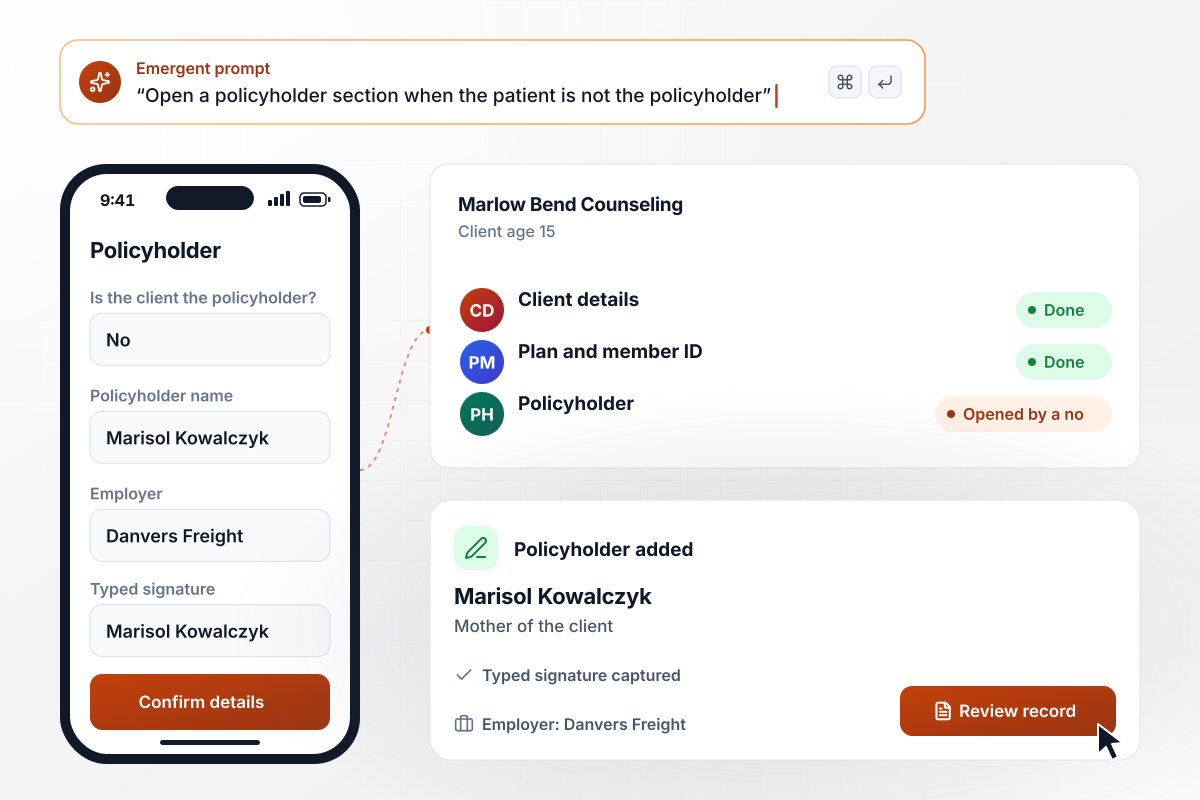
Answering no opens the parent's own section
Marisol Kowalczyk fills in the form for her 15-year-old son, a client at Marlow Bend Counseling who is covered on her plan. Her no to the policyholder question opens a new section, where she enters her name and employer. She then types her signature to confirm the details are correct.
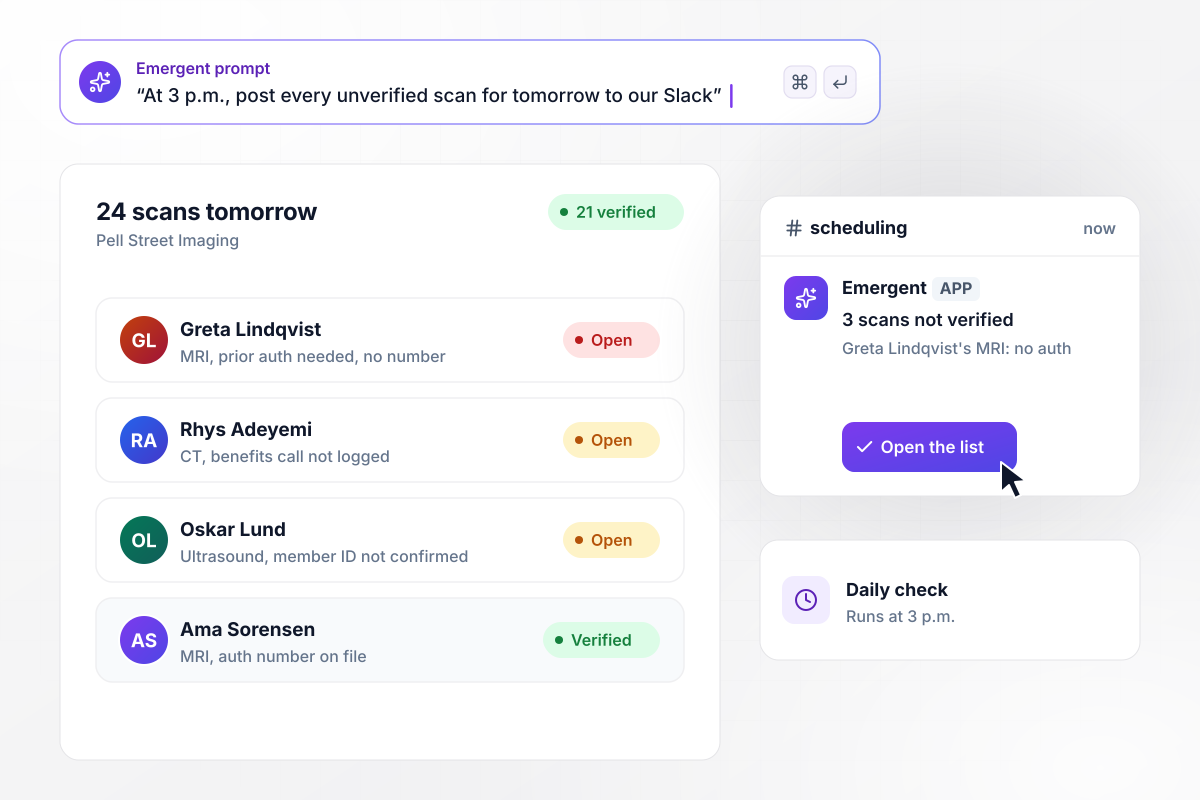
At 3 p.m., Slack gets every unverified scan
Tomorrow's schedule at Pell Street Imaging has 24 scans, and 21 are verified. At 3 p.m. the app posts the other 3 to the #scheduling Slack channel. One is an MRI marked as needing prior authorization, with no authorization number on file yet, and a scheduler picks it up before the end of the day.






How to Build an Insurance Verification Form
Follow 7 steps to build an insurance verification form that collects plan details early and records what the plan confirms.
Give the form a patient part and a staff part. Patients see only theirs, which keeps the link short enough to finish on a phone. Staff open the full record after calling the plan and add what it confirmed.
Label each field the way the card prints it, word for word. A patient holding the card can then match every box to a line on it. Mark each field required, because a call to the plan stalls on the first missing number.
Add two upload fields, one for each side of the card, and require both for new patients. With a clear photo on file, staff can read a smudged member ID for themselves and correct a typo before they dial.
Put the policyholder question near the top. When the answer is no, ask for the policyholder's details and a typed signature from whoever fills in the form, such as a parent filling it in for a child.
Write down what the front desk asks on every benefits call, in the order it asks, and give each answer its own field. End with the call reference number, the caller's initials, and the call date. Anyone reading the record later can see who checked and when.
Decide which records need a person before the visit, such as a missing authorization number or a plan close to its visit limit. Name the person or Slack channel for each one, and the time of day the check runs.
Fill in the patient link on your own phone, then complete the staff section as if the call to the plan had ended a minute ago. Check that both parts land in one record and that each alert reaches the person you named.
Why Use Emergent for Insurance Verification?
A printed sheet waits for someone to retype it. A form Emergent builds files the patient's answers and the staff's call notes in one record.

|
Jotform | Google Forms | Typeform | |
|---|---|---|---|---|
| How you build | Describe it in plain English | Templates, editor, AI generator | Editor, with Gemini drafting on some Workspace plans | Templates, editor, AI assist |
| Where responses live | A database table you own, plus any integration | Jotform account | Google Sheets | Typeform account |
| Response limits | No response caps | Monthly submission caps by plan; the form stops at the cap | No limit | Monthly response caps by plan; the form closes at the cap |
| Code ownership | Full code export to GitHub on paid plans | None | None | None |




Pick the Pricing Plan That Works for You
Choose the plan that fits your building ambitions. From weekend projects to enterprise applications, we've got you covered.




Find the right form
for whatever you're collecting














Frequently Asked Questions
Your Questions, Answered
Don't change this element unless you know what you are doing
More things you can build
with Emergent









on Emergent today


