

Build a Sign Out Form That Shows Who Is Away
Build a sign out form that releases each child only to a listed adult and flags staff who run late getting back.
Build a sign out form that logs each person's name, where they went, and the times they leave and come back.
Trusted by Builders Worldwide
Active Builders Worldwide
Apps Successfully Created
Countries Globally Reached



What a Paper Sign-Out Sheet Leaves Out
Nobody reads the clipboard by the door until something goes wrong. These features put a check on every exit as it happens.
Fields for leaving mid-day
Asks who is leaving, who they leave with, the reason, and when they expect to return. The form stamps the time out, and names fill in from a class roster you upload once.
A pickup list at the front desk
Checks the adult's name against the approved pickup list for that student. A name missing from the list holds the sign-out, and the office sees why before the child is called.
A timer on every open pass
Starts a timer when someone signs out. Set a limit for each destination, such as 10 minutes for the restroom, and any entry that runs past it turns red on the teacher's screen.
Overdue alerts by name
Sends a Slack direct message or an email when someone misses the return time they gave. The alert names the person, where they went and the minute they first signed out.
Every exit and return in one row
Saves each sign-out with both times in a database you own. Pull a semester of early dismissals for one student, or every late return this month, without paging through binders.
Your code, in your GitHub
Exports the whole sign-out app to your GitHub on paid plans. A developer can connect it to another system through that system's API, or you can keep changing it with a plain prompt.
Four Exits a Sign Out Form Tracks
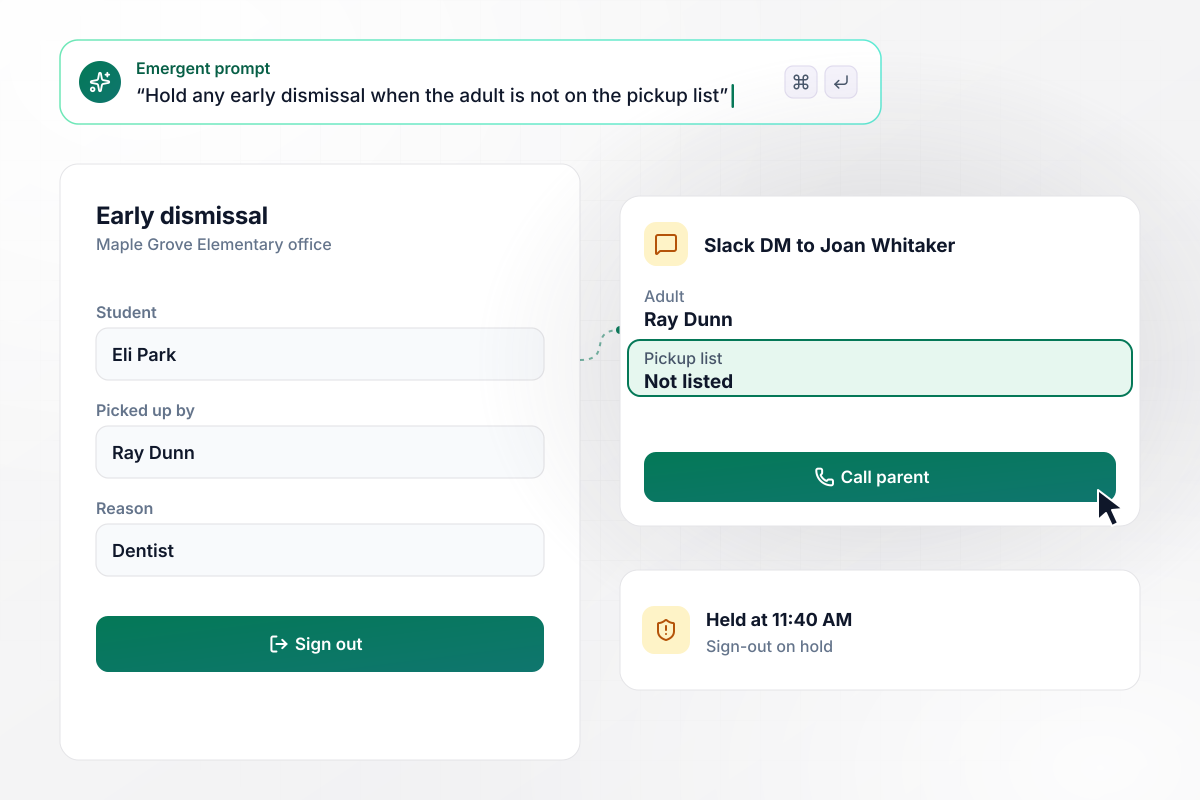
A child goes home only with a listed adult
Front office staff at Maple Grove Elementary sign students out on a desk tablet. At 11:40 AM, Ray Dunn asks to take his nephew Eli Park to the dentist. His name is missing from Eli's pickup list. The form holds the sign-out and messages assistant principal Joan Whitaker in Slack, and she calls Eli's mother first.
window.awbMockup = { earlyDismissal: "Build a sign out form for our elementary school front office on a desk tablet. Ask for the student, the adult picking them up, and the reason. Check the adult against that student's approved pickup list. If the name is missing, hold the sign-out and send our assistant principal a Slack message with both names and the time.", hallPasses: "I teach science and want a hall pass sign out on a tablet by my classroom door. Students pick the restroom, the nurse, the library, or the counselor and tap out. Start a timer on each pass and turn the row red on my laptop when a pass stays open longer than 10 minutes.", fieldTechnicians: "Our HVAC technicians need to sign out from the shop on their phones with the job address and the time they expect to be back. If someone is 30 minutes past that time and has not signed back in, send our office manager a Slack message with the technician's name and the job address.", weekendLeave: "We run a boarding school and want students to sign out for weekend leave on Friday with where they are going, the adult hosting them, and their return time. Sunday check-in closes at 8:00 PM. At that time, show our house parent everyone still away, with the host's name next to each student." };
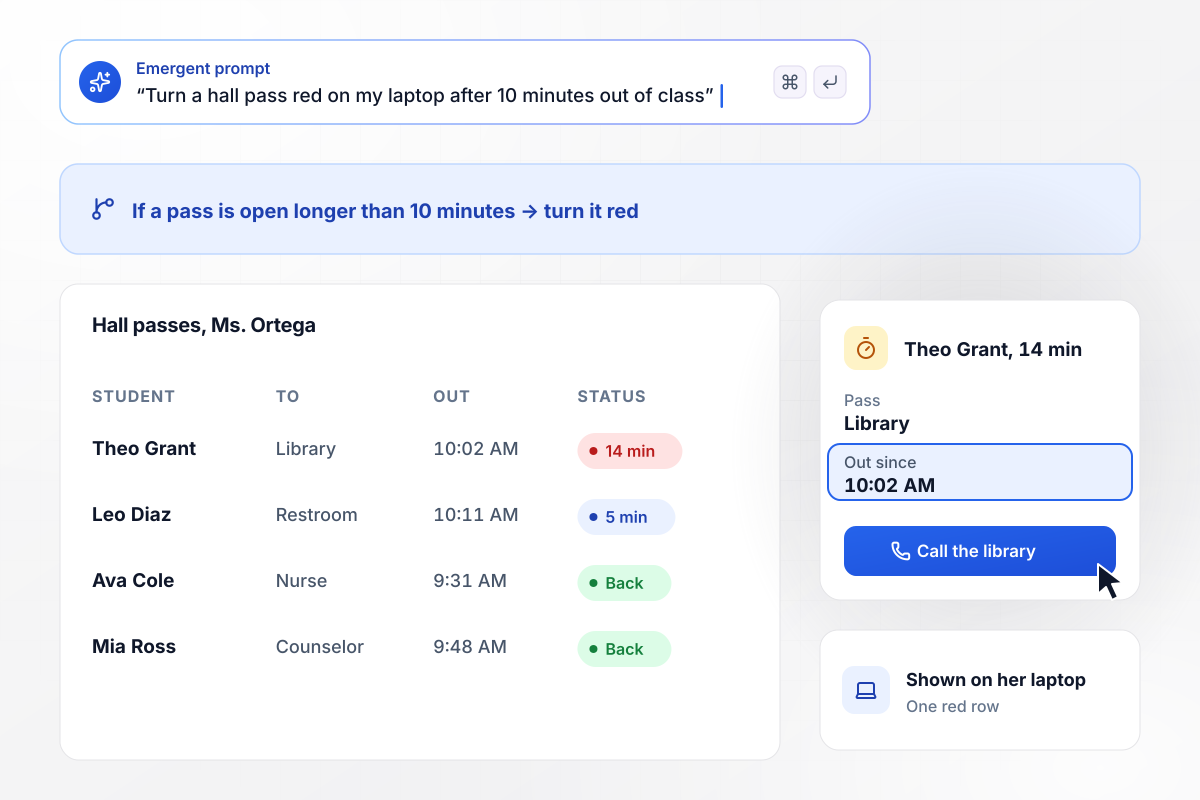
The pass that has been out for 14 minutes
Ms. Ortega's science class signs out on a tablet by the door, picking the restroom, the nurse, the library, or the counselor. Each pass starts a timer, and one open longer than 10 minutes turns red on her laptop. Theo Grant left for the library at 10:02 AM and is the only red row.
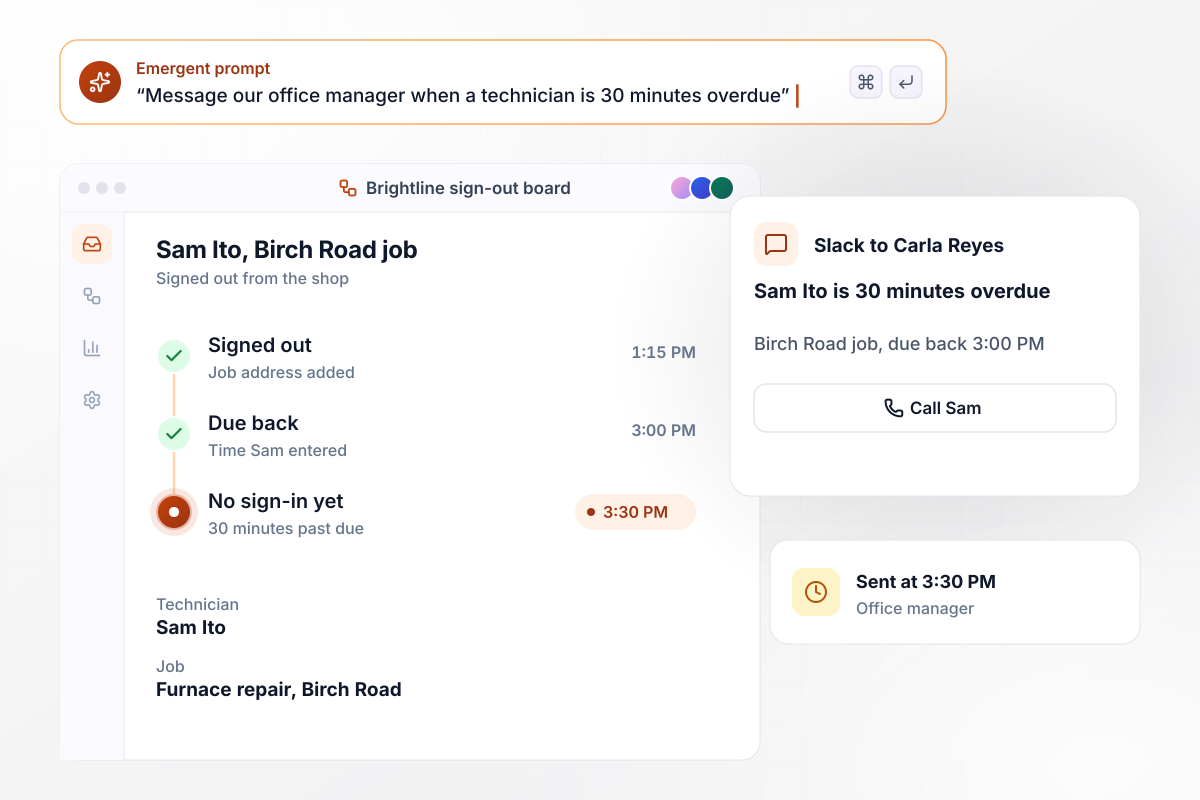
A message goes out when a technician runs 30 minutes over
Technicians at Brightline HVAC sign out from the shop with the job address and the time they expect to be back. Thirty minutes past that time with no sign-in, the app sends office manager Carla Reyes a Slack message. Sam Ito was due back from Birch Road at 3:00 PM, and Carla heard about it at 3:30 PM.
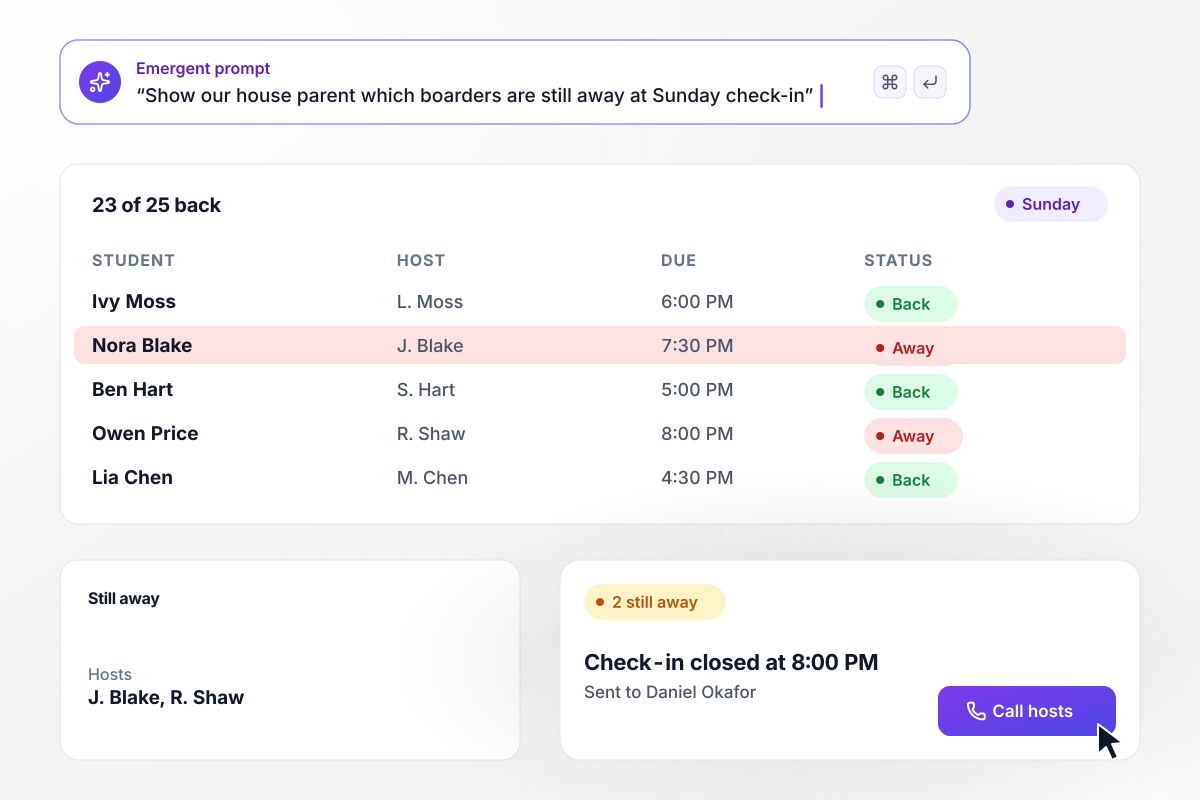
Who is still away when Sunday check-in closes
Weekend leave at Hillcrest Academy starts with a Friday sign-out that names the host and a return time. Check-in closes at 8:00 PM on Sunday. Tonight 23 of the 25 boarders who left are back, and house parent Daniel Okafor sees the two still away beside their hosts.






How to Make a Sign Out Form
These seven steps plan a sign out form around who leaves and what must be true before they go, then build it.
List the exits you need a record of, such as a parent collecting a child at noon or a technician driving to a job. Each exit has its own check, and that check decides which fields the form asks for.
At a school office, the adult must be on the pickup list. On a service crew, the technician must give a return time. Write each condition as one plain sentence, because that sentence becomes the rule the form applies.
A restroom pass might allow 10 minutes and a library visit 20, while a site visit runs to whatever time the technician enters. Pick who hears about an entry that runs over, and whether that arrives in Slack or by email.
Tell Emergent who signs out, which fields you need and which rules apply. It builds the form, the checks, and a table holding every exit and return. Adding a grandparent to a pickup list later takes one more prompt.
A tablet on the front desk suits a school office, and a classroom can mount one by the door. Technicians who leave from the field open the link on their phones. Test it once outdoors, in daylight, before the crew depends on it.
A sign-out with no return leaves a record that says someone is still away. Put the sign-in step on the same screen as the exit, and ask whoever closes the building to clear any open entry before they lock up.
Scan the week's exits for patterns, like a student who leaves at the same hour every day or a crew that keeps running late. Each pattern points to a conversation or a new rule, and a new rule is one prompt.
Why Build Sign Out Forms With Emergent?
A printed sheet stops at the handwriting. Emergent builds the form with the pickup check and the late-return message attached.

|
Google Forms | Jotform | Typeform | |
|---|---|---|---|---|
| How you build | Describe it in plain English | Editor, with Gemini drafting on some Workspace plans | Templates, editor, AI generator | Templates, editor, AI assist |
| Where responses live | A database table you own, plus any integration | Google Sheets | Jotform account | Typeform account |
| Response limits | No response caps | No limit | Monthly submission caps by plan; the form stops at the cap | Monthly response caps by plan; the form closes at the cap |
| Code ownership | Full code export to GitHub on paid plans | None | None | None |




Pick the Pricing Plan That Works for You
Choose the plan that fits your building ambitions. From weekend projects to enterprise applications, we've got you covered.




Find the right form
for whatever you're collecting















Frequently Asked Questions
Your Questions, Answered
Don't change this element unless you know what you are doing
More things you can build
with Emergent









on Emergent today


