

Build a Campaign Landing Page That Tracks Every Channel
Build a campaign landing page that saves each signup with the channel that sent it, in a database you own.
Build a campaign landing page for my next email or ad, with a form that saves every response.
Trusted by Builders Worldwide
Active Builders Worldwide
Apps Successfully Created
Countries Globally Reached



What a Campaign Page Does With Each Click
The email or the ad pays for the visit. The page decides what happens after it, and records where every visitor came from.
One page for each campaign
Each campaign gets a page written around its offer, with no site menu to wander off through. Describe the email or ad behind it, and the page headline repeats its promise.
Channel saved with every signup
UTM tags on the link travel with the visitor to the page. The form stores each tag in a column of its own, and every signup row names the email, ad, or post that sent it there.
A closed state for ended offers
When the offer closes, the form gives way to a short note and a waitlist field. Readers who open an old email a week later see what happened instead of a form that goes nowhere.
Headline variants on request
Ask for a second headline and Emergent builds the variant, splits visitors between them and counts signups for each. Remove the weaker one by prompt once the numbers settle.
Contacts sent to your email tool
Signups reach Mailchimp or HubSpot through their APIs, with tags and fields set from the form. The next send in the campaign can target the readers who signed up, or skip them.
Campaign code in your repository
Export the page and its database tables to your GitHub repository on paid plans. Or keep it hosted on Emergent under a custom domain, which is included and uses credits.
What Four Campaign Pages Record
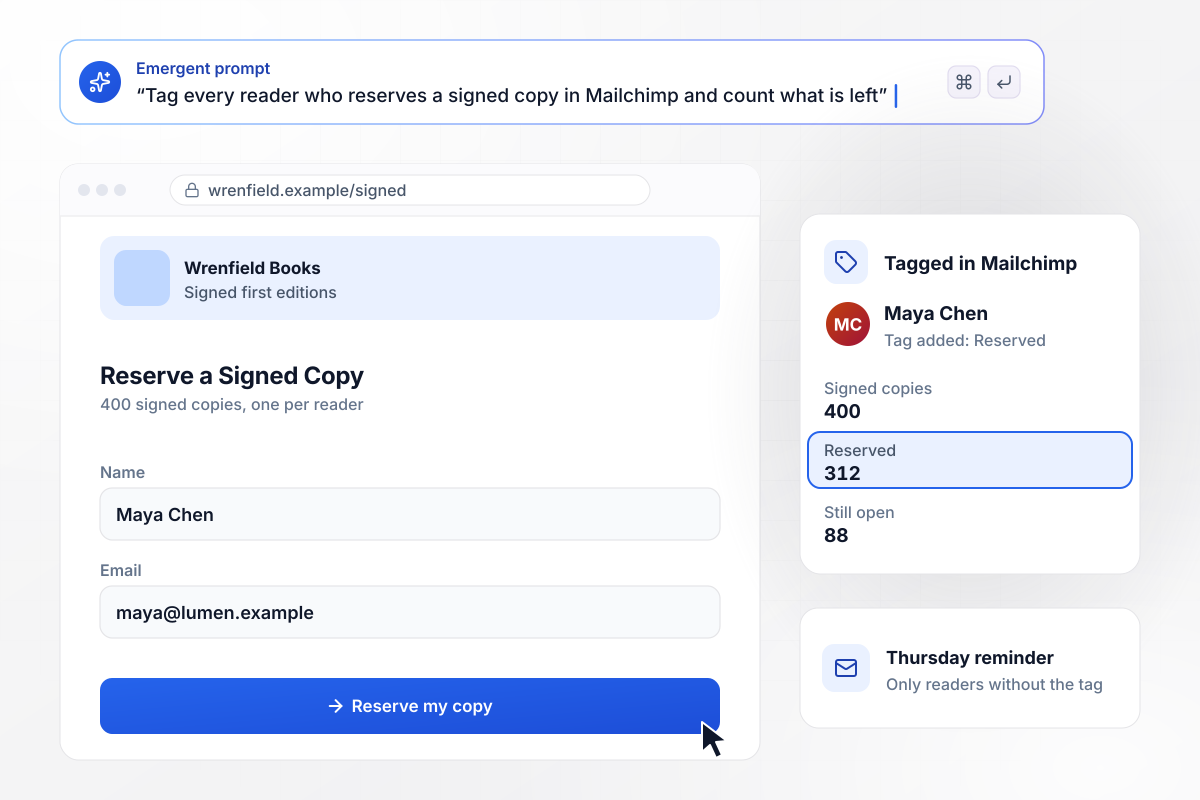
Reminder emails skip readers who already reserved
Wrenfield Books has 400 signed copies of a new novel and one email to sell them with. The link opens a reservation page, and each reservation adds the tag Reserved to that reader in Mailchimp. Thursday's reminder goes only to the segment without the tag. So far, 312 copies are reserved.
window.awbMockup = { emailCampaign: "My bookshop has 400 signed copies of a new novel, and I am announcing them in one email to our list. Build a reservation page with a name and an email field. When someone reserves, add the tag Reserved to them in Mailchimp. Show how many of the 400 copies are taken, and switch the form to a waitlist when none are left.", productLaunch: "Build one free trial page for our fall launch. The links come from our newsletter, LinkedIn Ads and Google Ads, each with UTM tags. Save utm_source, utm_medium, and utm_campaign with every signup. Give me a dashboard with total trial signups and a bar for each source, and show the newest signup with its source.", postcardMailer: "My heating company is mailing 1,000 postcards to each of four neighborhoods with an $89 furnace tune-up offer. Each neighborhood gets its own QR code that opens the same booking page with a neighborhood tag. Build the page and a table of bookings by neighborhood, and flag any neighborhood under 10 bookings so we drop it from the next mailing.", referralDrive: "Give every member of my climbing gym a personal referral link to our day-pass page. Count each day pass bought through a member's link. When three friends have bought one, email that member a free month of membership and mark the reward as sent. Show me a table of members, passes bought through their links and reward status." };
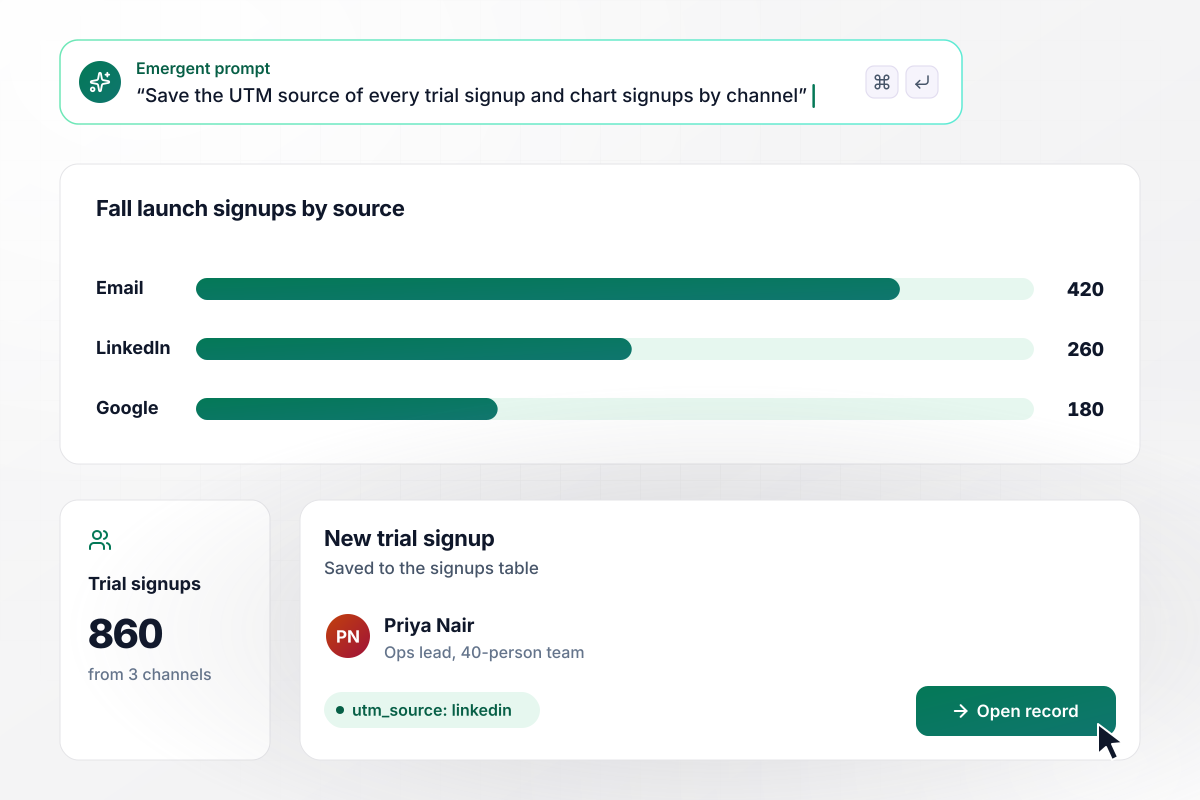
860 trial signups, each tagged with its channel
For its fall launch, Sablewood Software points one trial page at three channels: its newsletter, LinkedIn Ads, and Google Ads. Every link carries UTM tags, and each signup saves its utm_source. Of 860 signups, 420 came by email, 260 from LinkedIn, and 180 from Google.
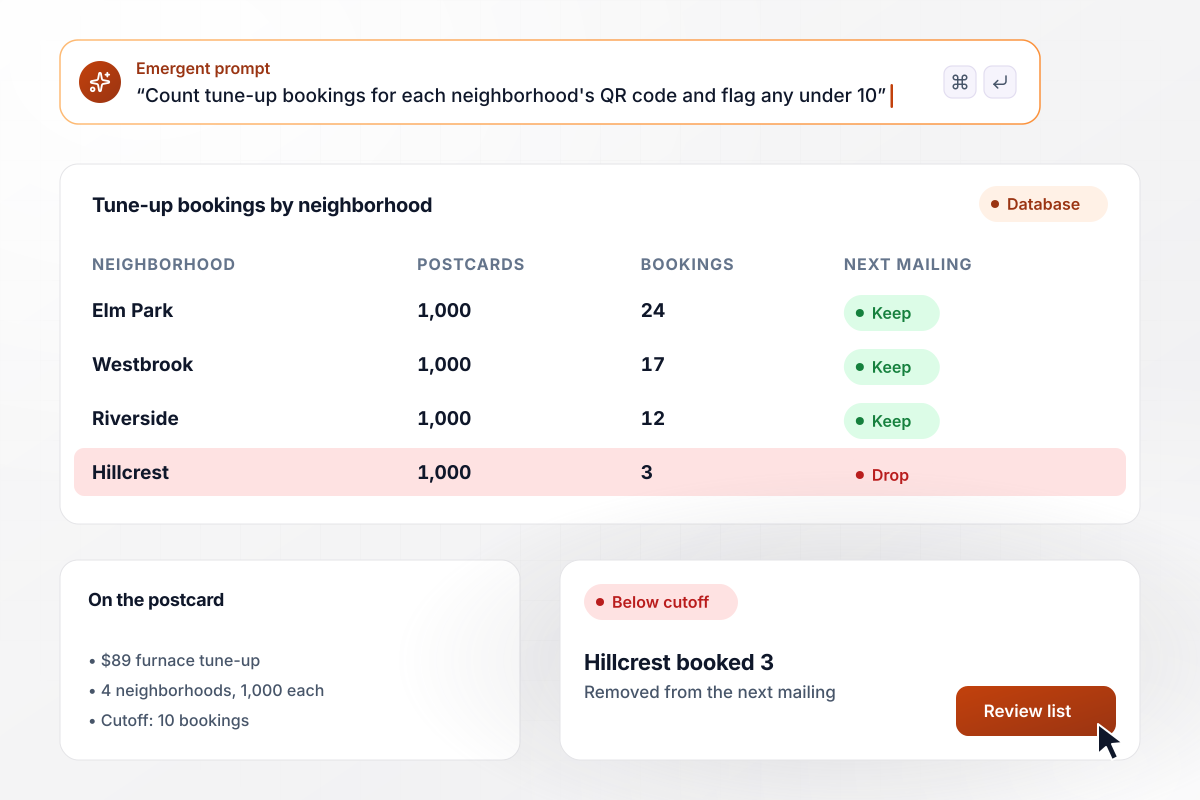
Hillcrest booked 3 tune-ups from 1,000 postcards
Four neighborhoods got 1,000 postcards each from Alderbrook Heating, all offering an $89 furnace tune-up. Each QR code opens the same page with its own tag, and the bookings table counts them by area. Hillcrest booked 3, under the owner's cutoff of 10 bookings, and comes off the next mailing.
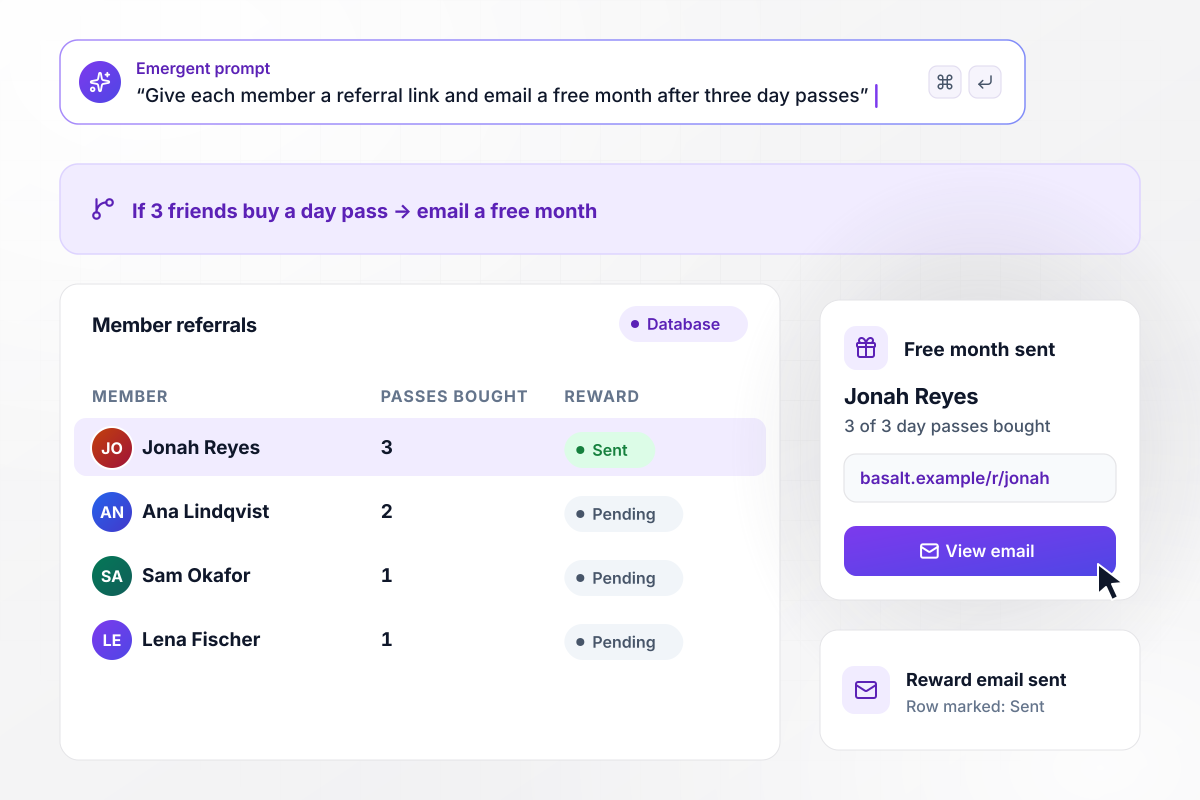
A free month after three friends buy day passes
Members of Basalt Climbing each get a personal referral link to the gym's day-pass page. Every pass bought through that link counts toward the member who shared it. Once three friends have bought one, the member gets an email with a free month of membership, and the row marks the reward as sent.






How to Build a Campaign Landing Page
Seven steps to build a campaign landing page that turns the clicks a campaign paid for into signups you can trace.
Sending an email or an ad to your homepage makes visitors hunt for the offer. A campaign page carries one offer and one action. Drop the main site menu, because every link off the page is a way to leave before reaching the form.
The headline should restate what the visitor clicked, in nearly the same words. Google Ads judges landing page experience as one part of Quality Score, next to expected clickthrough rate and ad relevance. A mismatch costs you on search ads.
Add utm_source, utm_medium and utm_campaign to each link, with one campaign name such as fall-launch on all of them. Google Analytics reads these tags to credit visits to the campaign. Save them on the form too, and each signup carries its channel into your own table.
An email address and a first name are enough for a newsletter offer. A demo request might add company size. Every extra field gives a visitor one more reason to leave. Add one only when someone will act on the answer.
Open the page on a phone before launch. The headline and the button should both fit the first screen without scrolling. Set the email field to open the email keyboard and the phone field to open the number pad.
Campaign links get clicked for weeks after an offer closes, from forwarded emails and saved posts. Keep the page live with a note that the offer ended. When the next campaign starts, link the closed page to it, and late clicks still land somewhere useful.
Divide each channel's spend by the signups its UTM source brought in. A channel with cheap clicks and few signups costs more per signup than its click price suggests. Move the next budget toward the channel with the lowest cost per signup.
Why Build Campaign Pages With Emergent?
Template builders start from a layout. Emergent writes the page and its signup table from one prompt.

|
Unbounce | Landingi | Wix | |
|---|---|---|---|---|
| How you build | Prompt for a campaign page | Templates and drag-and-drop, AI copy assist | Templates and drag-and-drop, AI assist | Prompt for a full site |
| Where submissions go | A database table you own, plus integrations | Unbounce lead storage and integrations | Vendor lead storage and integrations | Wix dashboard submissions and Contacts |
| Visitor limits | No per-visitor pricing | Monthly visitor caps by plan | Tiered by traffic on most plans | Site plan bandwidth |
| A/B testing | Generate variants by prompt | A/B testing on higher-tier plans only | Higher plans | Limited or add-on |
| Code ownership | Full code export to GitHub on paid plans | Hosted only | Hosted only | Hosted only |




Pick the Pricing Plan That Works for You
Choose the plan that fits your building ambitions. From weekend projects to enterprise applications, we've got you covered.




Find the right landing page for you






Frequently Asked Questions
Your Questions, Answered
Don't change this element unless you know what you are doing
More things you can build
with Emergent









on Emergent today


