

Build a LinkedIn Landing Page for Every Ad, Profile, and Post
Build a LinkedIn landing page that tags each lead with the ad or post it came from, in a database you own.
Build a LinkedIn landing page for my sponsored ads that offers a freight rate report for a work email.
Trusted by Builders Worldwide
Active Builders Worldwide
Apps Successfully Created
Countries Globally Reached



Where a LinkedIn Click Lands and What It Saves
A LinkedIn landing page is the page a click on an ad, a profile link, or a post opens. Emergent builds it and the table behind it.
A page for each ad, from one prompt
Describe the offer and the people the ad targets, and Emergent builds the page with its form and the table behind it. A second ad that needs a new headline takes one more prompt.
The ad's tag stays with each lead
The app reads the UTM values in the link that opened the page and saves them on the lead's row. Count leads by ad or by campaign straight from that table, with no spreadsheet merge.
Answers decide who follows up
Set a rule on any answer, such as company size or job title, and the app emails the person who owns that kind of lead. A Slack alert to a shared channel works the same way.
New leads reach the CRM you already use
The app connects to HubSpot or any other tool with an API and sends each new lead there with its answers and its tag. Sales sees the lead without waiting on a weekly export.
Every lead lives in a database you own
Each submission is a row in a database that belongs to you rather than a rented form inbox. Filter it by campaign, or point a dashboard at it when the quarterly review comes up.
The code goes to GitHub on paid plans
Export the page and its database code to your GitHub repository on paid plans. A developer can host it on your own stack or extend it later, without rebuilding the page from zero.
Four Places a LinkedIn Click Starts
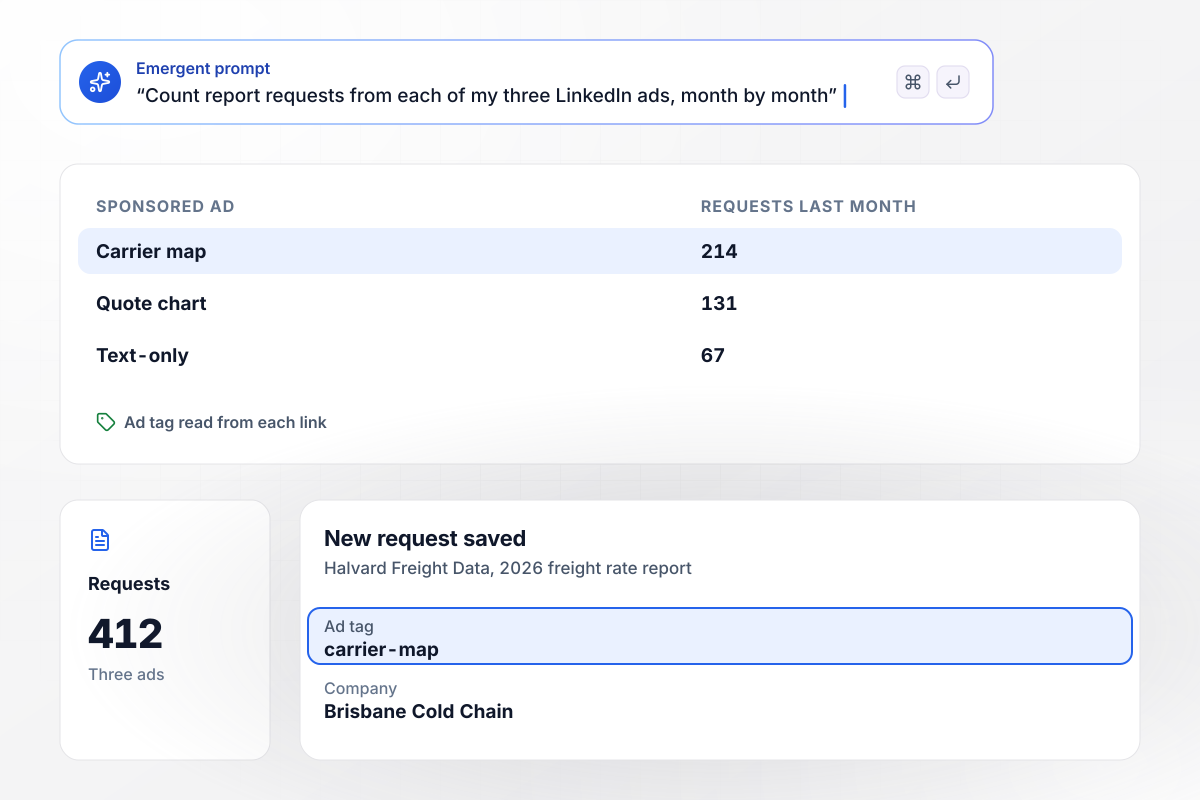
Three ads, one page, and 412 requests sorted by ad
Halvard Freight Data runs three Sponsored Content ads that all point to one page offering its 2026 freight rate report. Each request is saved with the ad's tag from the link. Of last month's 412 requests, the carrier map ad brought 214, the quote chart ad 131, and the text-only ad 67.
window.awbMockup = { sponsoredAdClicks: "I run three LinkedIn ads for Halvard Freight Data that all promote our 2026 freight rate report. Build one report request page they can all point to. Save every request with the ad tag from the link, and show me a monthly count of requests for each ad so I can see which creative works.", profileFeaturedLink: "I am a fractional CFO. Build a call request page for the Featured section of my LinkedIn profile. Ask for the company name, annual revenue, and email. Offer a 45-minute call when revenue is $5M or more and a 20-minute intro when it is lower, and save every request to a calls table.", pageButton: "Build a demo request page for the custom button on my company's LinkedIn Page, Corvane Fleet. Ask for the company, the fleet size, and a work email. Email any request with 50 trucks or more to our account executive, Joel Amari, and send smaller fleets a link to the recorded walkthrough.", postCalculator: "I want to link a LinkedIn post to a payroll savings calculator for my company, Pellridge Payroll. Visitors enter their number of hourly staff and the page multiplies it by 6 minutes saved per pay run. Offer to email the full breakdown, and save each email with the staff count they entered." };
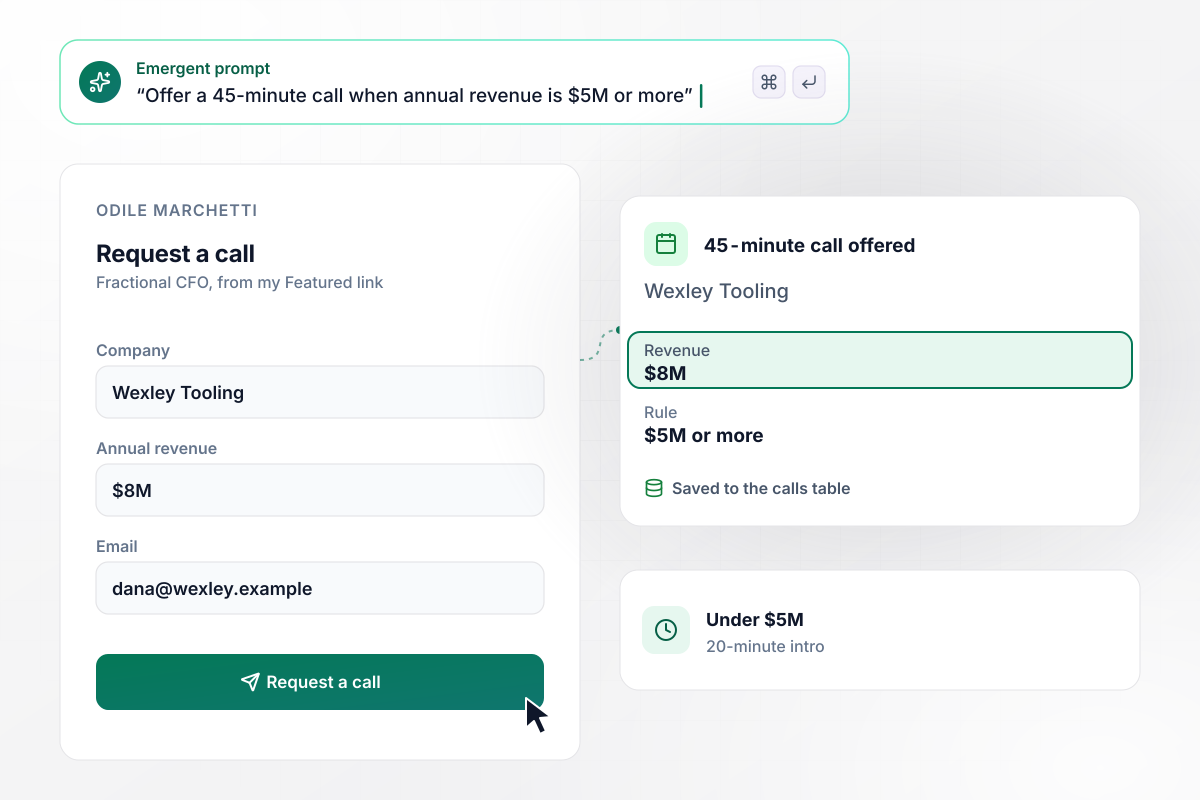
Companies at $5M or more get the longer call
Odile Marchetti, a fractional CFO, keeps one link in her profile's Featured section: a call request page that asks for annual revenue. A company at $5M or more is offered a 45-minute call, and a smaller one gets a 20-minute intro. Every request is saved to her calls table.
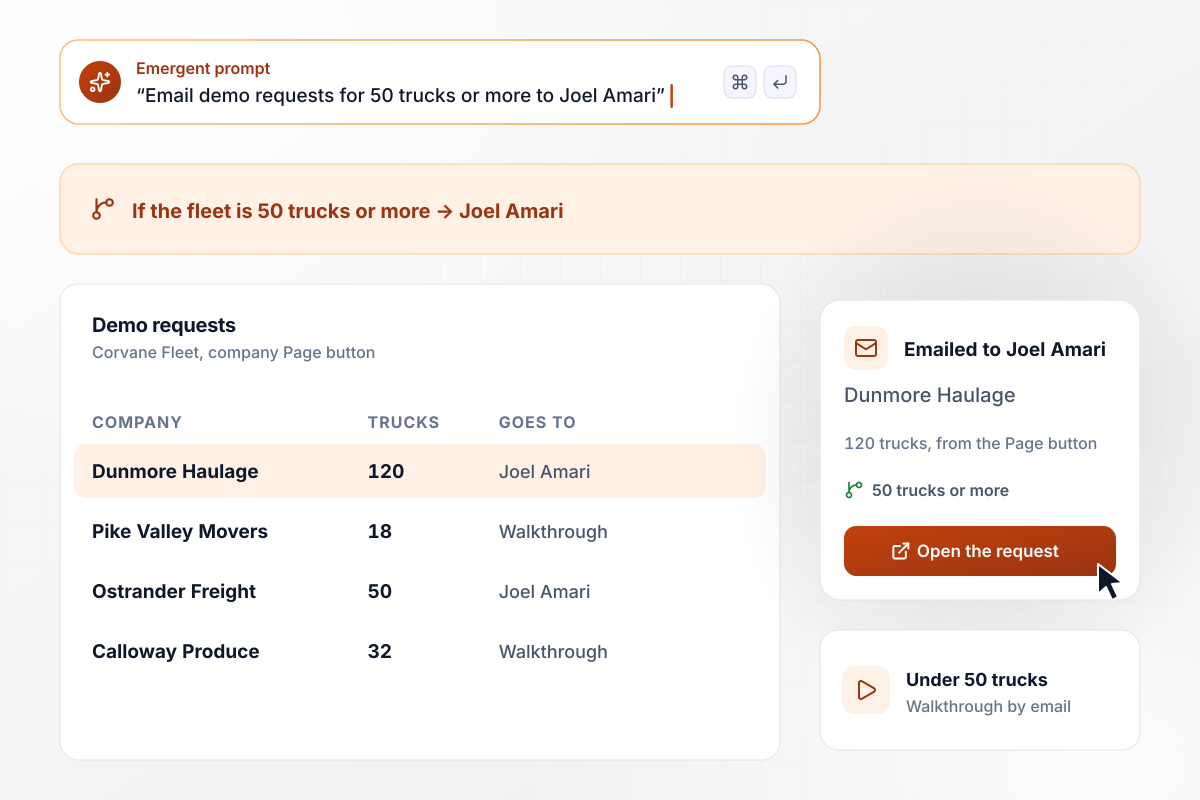
Joel Amari takes every demo for 50 trucks or more
Visitors who click the custom button on Corvane Fleet's company Page land on a demo request page that asks for fleet size. A request for 50 trucks or more, such as Dunmore Haulage with 120, is emailed to account executive Joel Amari. Smaller fleets get a recorded walkthrough by email.
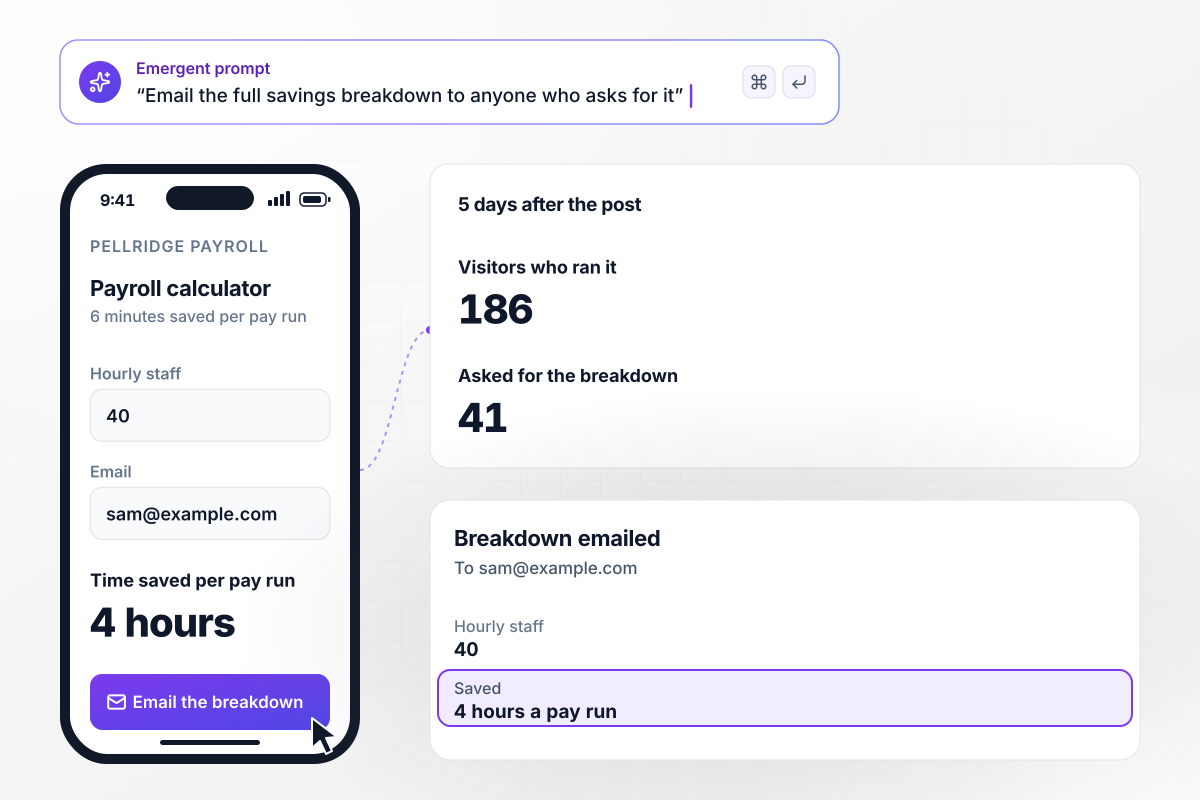
One post sent 186 people to a payroll calculator
Ines Varga, who founded Pellridge Payroll, ended a post with a link to a savings calculator. It multiplies a company's hourly staff by 6 minutes saved per pay run. In the 5 days after the post, 186 visitors ran it and 41 asked for the full breakdown by email.






How to Create a LinkedIn Landing Page
Follow these 7 steps to build a LinkedIn landing page that matches its ad and saves each lead with the link that sent it.
Choose the LinkedIn surface this page serves: a Sponsored Content ad, the Featured section of a profile, a company Page button, or a post. Each one brings a visitor with a different question in mind. Give each its own page instead of one page for all four.
The visitor clicked on one specific promise, such as a freight rate report or a 45-minute call. Put that promise in the headline in the same words where you can, and keep the first screen to that one offer and its form.
List the fields the person who follows up will use, such as company name, annual revenue, or fleet size, and cut the rest. Every extra field is one more thing a visitor types before the page has earned it.
Write one prompt with the offer and the rule for each answer, for example who gets an email when a company passes a size. Emergent turns that prompt into the page and the database it saves to, ready to review before anything goes live.
Add UTM values to the URL in each ad or post, one value per ad, and the app saves them on each lead's row. LinkedIn's dynamic UTM tracking can add tracking parameters to the landing page URLs of your ad creatives for you.
Map each lead's answers and its ad tag to fields in your CRM, and set an email or Slack alert for leads that need a person the same day. Then check that the tag shows up on the CRM record next to the answers.
Open the page from the LinkedIn ad preview or your own profile link before anyone else does. Submit one test lead, check that its row carries the right tag, and confirm the alert reached the right person before the campaign starts.
Why Build LinkedIn Landing Pages With Emergent?
Each page repeats the promise of the ad that sent the click, and the lead lands in a database you own, tagged with that ad.

|
Unbounce | Landingi | Wix | |
|---|---|---|---|---|
| How you build | Prompt for a campaign page | Templates and drag-and-drop, AI copy assist | Templates and drag-and-drop, AI assist | Prompt for a full site |
| Where submissions go | A database table you own, plus integrations | Unbounce lead storage and integrations | Vendor lead storage and integrations | Wix dashboard submissions and Contacts |
| Visitor limits | No per-visitor pricing | Monthly visitor caps by plan | Tiered by traffic on most plans | Site plan bandwidth |
| A/B testing | Generate variants by prompt | A/B testing on higher-tier plans only | Higher plans | Limited or add-on |
| Code ownership | Full code export to GitHub on paid plans | Hosted only | Hosted only | Hosted only |




Pick the Pricing Plan That Works for You
Choose the plan that fits your building ambitions. From weekend projects to enterprise applications, we've got you covered.




Find the right landing page for you















Frequently Asked Questions
Your Questions, Answered
Don't change this element unless you know what you are doing
More things you can build
with Emergent









on Emergent today


