

Build a Mortgage Landing Page That Books the First Call
Build a mortgage landing page that asks four short questions and books each ready buyer onto a loan officer's calendar.
Build a mortgage landing page for first-time buyers that asks a few questions and books a call with a loan officer.
Trusted by Builders Worldwide
Active Builders Worldwide
Apps Successfully Created
Countries Globally Reached



What Each Mortgage Lead Passes Through
Emergent builds six parts into a mortgage landing page: the questions a borrower answers and what happens to the lead next.
A short form, one question per screen
Emergent builds the form as one question per screen, with tap-to-answer choices for loan purpose and credit range. A borrower on a phone finishes it before typing a name.
Leads routed by state and loan type
Write the routing in plain English, such as "refinance leads in Indiana go to the refi team." The page sends each lead where that rule says and records which person received it.
Every lead saved in a database you own
Each lead becomes a row in a database you own, with the answers, the ad that brought the borrower in, and the assigned loan officer. Filter those rows by week or by ad source.
Synced to the CRM you already use
Connect the CRM or loan origination system that holds your pipeline, if it has an API. Each new lead arrives there with the borrower's answers, and nobody retypes a phone number.
Alerts when a ready buyer comes in
Pick the leads that need a person fast, such as a buyer with an accepted offer. The page posts each one to a Slack channel or emails the assigned loan officer with the answers.
Your domain, and the code to take with you
Publish on the lender's own domain; custom domains are included and use credits. On paid plans, export the full code to your GitHub repository for developers to extend.
Mortgage Landing Page Examples
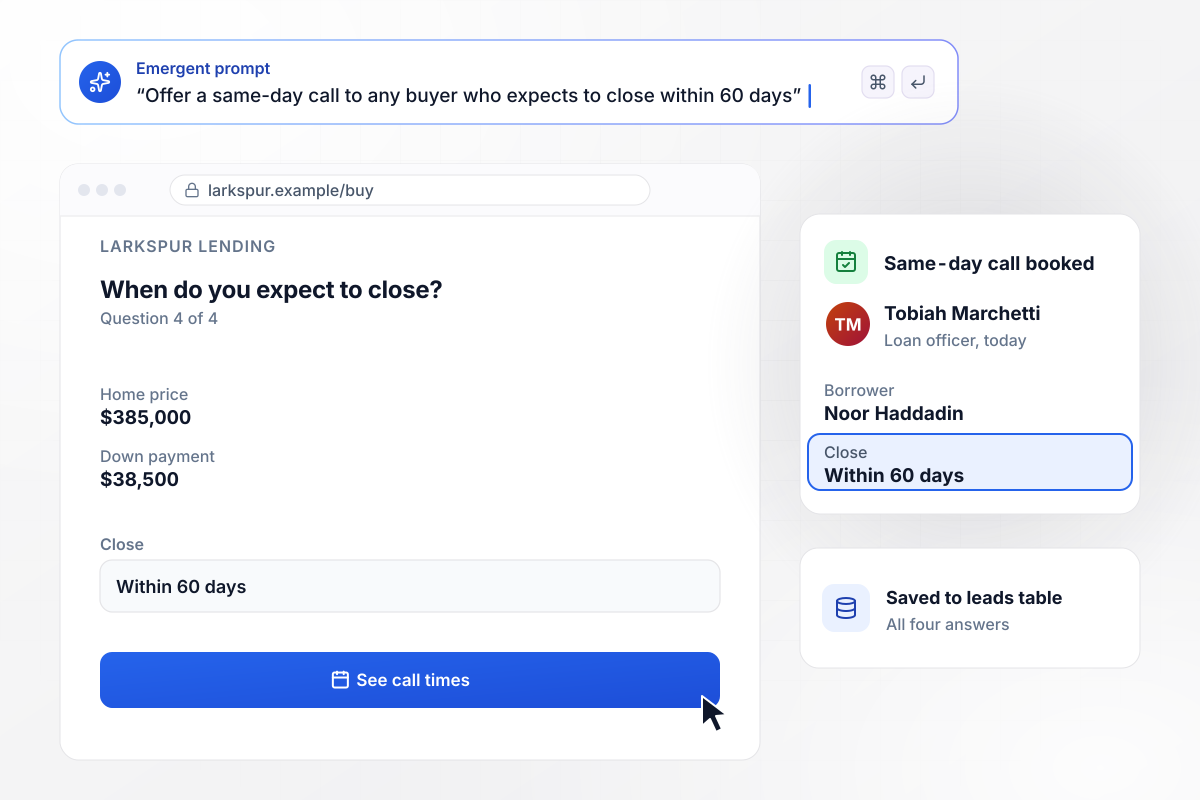
Buyers with 60 days to close book a call today
Larkspur Lending's purchase page asks four questions, ending with when the buyer expects to close. Noor Haddadin entered a $385,000 home price, $38,500 down, and a close within 60 days. That answer offered her a same-day call on loan officer Tobiah Marchetti's calendar, and her answers saved to the leads table.
window.awbMockup = { homePurchase: "Build a purchase page for my lender, Larkspur Lending. Ask four questions, one per screen: home price, down payment, credit range, and when the buyer expects to close. If the buyer will close within 60 days, offer a same-day call on Tobiah Marchetti's calendar. Save every answer to a leads table I own.", refinance: "Make a refinance check for Thornbury Mortgage. The homeowner enters a home value and a loan balance, and the page works out the loan-to-value. Save every check to my leads table. When the loan-to-value is up to 80%, post the lead to our refinance team's Slack channel with the home value and the balance.", loanOfficerPages: "I run Harbor Point Mortgage with 6 loan officers. Build one page per officer from the same layout, each with a photo, the NMLS ID, the states they are licensed in, and a call button. Save every lead with the loan officer's name so I can count leads per officer each month.", rateWatch: "Build a rate watch signup for Wrenfield Home Loans. Each subscriber picks a target rate for a 30-year fixed loan. When my loan officer posts the day's rate and its APR, email every subscriber whose target is at least the posted rate, and show both the rate and the APR in that email." };
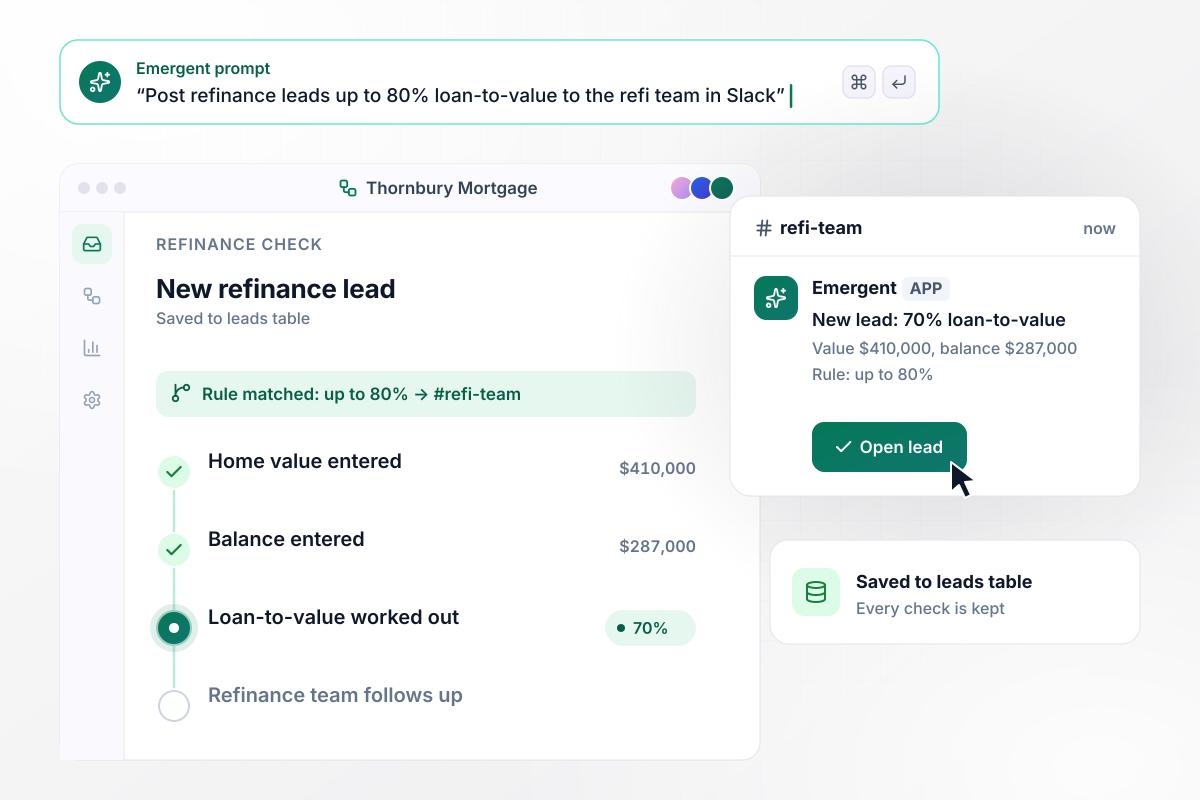
Refinance leads up to 80% loan-to-value reach the team
A homeowner types two numbers into Thornbury Mortgage's refinance check: a home value of $410,000 and a balance of $287,000. The page works out the loan-to-value from those two. Every check saves to the leads table, and a lead with a loan-to-value up to 80% also posts to the refinance team's Slack channel.
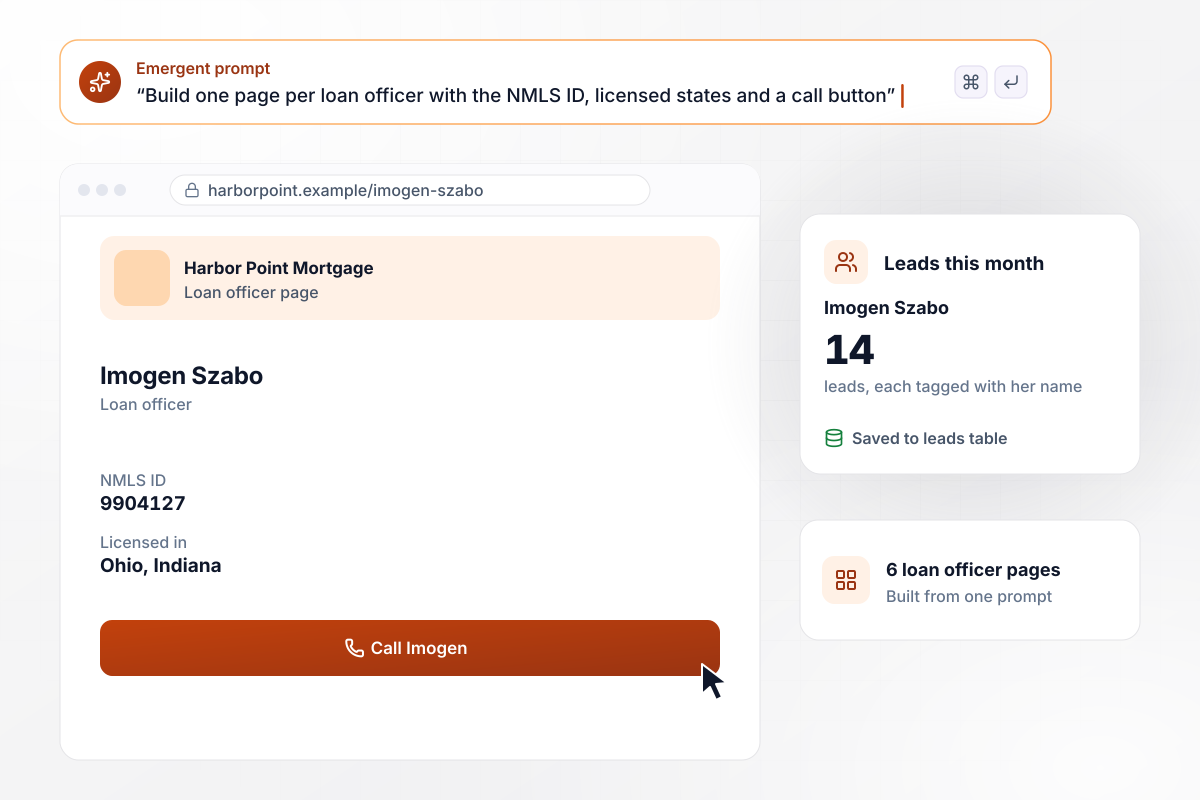
Each loan officer gets a page from the same prompt
Harbor Point Mortgage wrote one prompt and got a page for each of its 6 loan officers, with a photo, the NMLS ID, licensed states, and a call button. Imogen Szabo's page lists Ohio and Indiana. It saved 14 leads this month, and each one carries her name in the leads table.
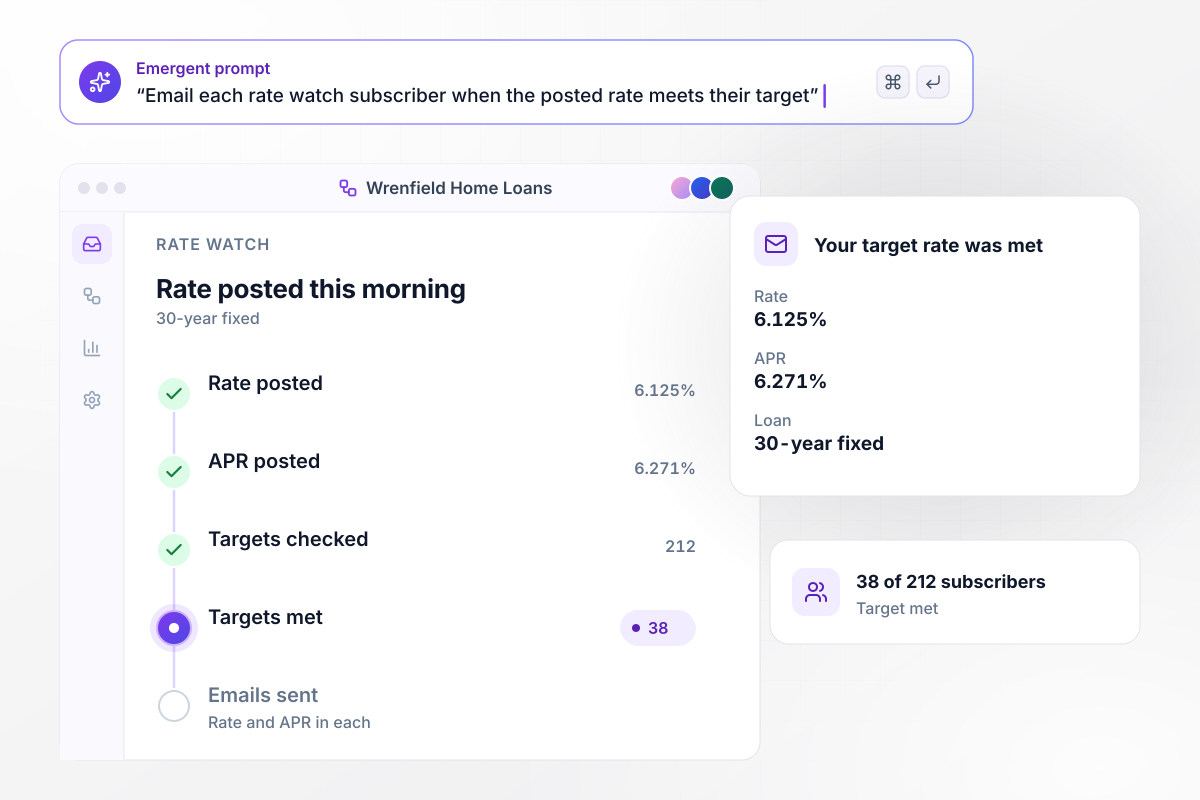
When the rate meets their target, 38 borrowers get an email
Wrenfield Home Loans keeps a rate watch list. Each subscriber picks a target rate for a 30-year fixed loan. This morning the loan officer posted the day's rate with its APR beside it, and the page emailed the 38 of 212 subscribers whose target was at least that rate. Each email shows both numbers.






How to Create a Mortgage Landing Page
Seven steps take a mortgage landing page from one loan type to a published page that routes each lead to a loan officer.
Pick one loan type and one borrower for the page, such as first-time buyers looking for a purchase loan. A homeowner weighing a refinance answers different questions than a buyer does. Give each one its own page, with a headline written for that borrower.
List only what a loan officer needs before the first call: loan purpose, home price or value, down payment or balance, credit range, timeline, and contact details. Leave Social Security numbers and income documents for the full application, after that call.
If the page states a rate of finance charge, Regulation Z says to state it as an annual percentage rate. For credit secured by a dwelling, a simple annual rate may appear only alongside the APR, and not more conspicuously. Have compliance read every rate line.
Paste the fields and the routing into one prompt for Emergent, with the loan type in the first line. It returns a working page with the form and the leads table behind it. Ask for the thank-you screen in the same prompt, including when the borrower will hear back.
Route leads by the state a loan officer is licensed in, by loan type, or by a single answer, such as a VA loan. Then choose which leads post to a Slack channel and which go by email to one loan officer.
Add the company's NMLS ID and each loan officer's to the footer, with the states they are licensed in. NMLS Consumer Access is a free service for consumers to confirm that the company or professional they want to work with is authorized in their state.
Submit a test lead from your phone and follow it through: the row in the leads table, the calendar booking, the Slack post, and the CRM record. Publish once every step works, and give each ad campaign its own source tag.
Why Build Your Mortgage Page With Emergent?
A new loan program gets its own page from one more prompt, and leads from every page sit in one table, ready to route.

|
Unbounce | Landingi | Wix | |
|---|---|---|---|---|
| How you build | Prompt for a campaign page | Templates and drag-and-drop, AI copy assist | Templates and drag-and-drop, AI assist | Prompt for a full site |
| Where submissions go | A database table you own, plus integrations | Unbounce lead storage and integrations | Vendor lead storage and integrations | Wix dashboard submissions and Contacts |
| Visitor limits | No per-visitor pricing | Monthly visitor caps by plan | Tiered by traffic on most plans | Site plan bandwidth |
| A/B testing | Generate variants by prompt | A/B testing on higher-tier plans only | Higher plans | Limited or add-on |
| Code ownership | Full code export to GitHub on paid plans | Hosted only | Hosted only | Hosted only |




Pick the Pricing Plan That Works for You
Choose the plan that fits your building ambitions. From weekend projects to enterprise applications, we've got you covered.




Find the right landing page for you


Frequently Asked Questions
Your Questions, Answered
Don't change this element unless you know what you are doing
More things you can build
with Emergent









on Emergent today


