

Build a 360 Survey Your Managers Can Act On
Create a 360 survey with manager-approved nominations, hidden small rater groups, and a report of self-ratings against others.
Build a 360 survey for my new managers with peer nominations, a minimum of three per rater group, and a report for each person.
Trusted by Builders Worldwide
Active Builders Worldwide
Apps Successfully Created
Countries Globally Reached



What a 360 Survey Needs to Work
A 360 survey rates one person through the eyes of their manager, peers and direct reports, next to their own self-rating.
Rater groups you define
Sorts every rater into a group: manager, peers, direct reports, or customers if you want an outside view. Each group gets its own score, and the self-rating sits beside every one.
Nominations with a manager check
Lets each participant nominate their own raters, then sends that list to their manager to approve or edit. Invites go out only after approval, each one carrying a personal link.
Group minimums that protect raters
Folds any rater group below your minimum, such as three, into an Others line on the report. The manager's rating is the exception and keeps its own label, and raters know it.
Self against others on every item
Plots the self-rating against everyone else's average for each item and ranks the gaps. The widest ones sit at the top of the report, which is where a coach starts the debrief.
Comments stripped of names
Collects open comments under each competency and removes rater names first. Comments from a group under the minimum move to the Others section along with that group's scores.
The whole 360 app in GitHub
Exports the full app to your GitHub on paid plans, from the nomination flow to the rating database. Run next year's cycle from your own code, or keep changing it in Emergent.
Four Parts of a 360 Round
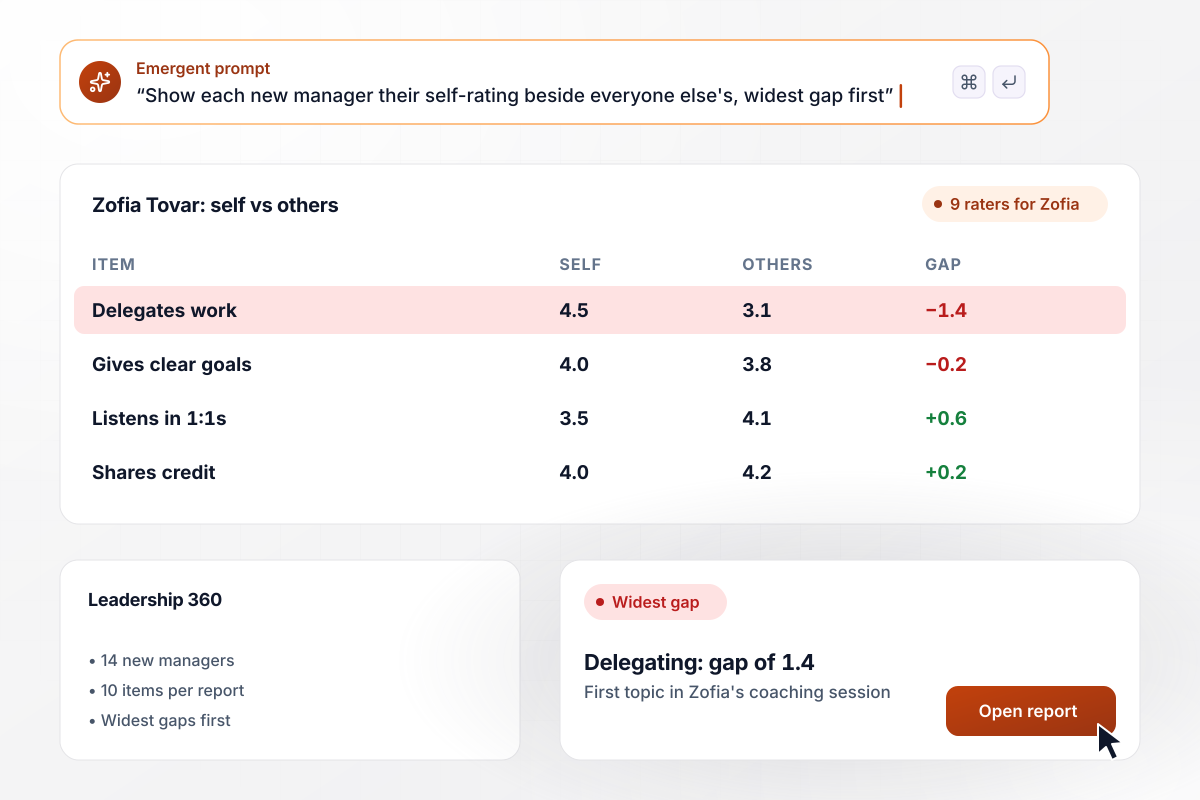
Zofia scores herself a 4.5 on delegating
Each of the 14 new managers in Stelbrook's leadership program gets a report on 10 items, with the self-rating beside the average of everyone else. Zofia Tovar rated herself 4.5 on delegating work. Her nine raters averaged 3.1. That 1.4 gap is the widest on her report and the first topic in her coaching session.
window.awbMockup = { leadershipReport: "Build a 360 survey for the 14 new managers in our leadership program. Each manager gets rated on 10 leadership items, 1 to 5, by their own manager, peers and direct reports, and rates themselves on the same items. Give each person a report that shows their self-rating next to the average of everyone else for every item, with the widest gaps listed first.", raterNominations: "Build a rater nomination flow for our 360. Each participant nominates six peers on Monday, then their manager approves or edits the list. Once approved, email every rater a personal link to the survey. Send one reminder to anyone who has not answered after three days, and close the window on day 10.", confidentialGroups: "Build the report rules for our 360 survey. Group raters as manager, peers, direct reports, and customers. If any group other than the manager has fewer than three answers, fold its ratings and comments into an Others line. Show the manager's rating under its own label, and remove rater names from every comment before the report opens.", sixMonthFollowUp: "Build a follow-up round for our 360 survey six months after the first. Each manager picks the three items they worked on, and the same raters score only those items. Show round one and round two side by side on each person's report, using the ratings already saved from the first round." };
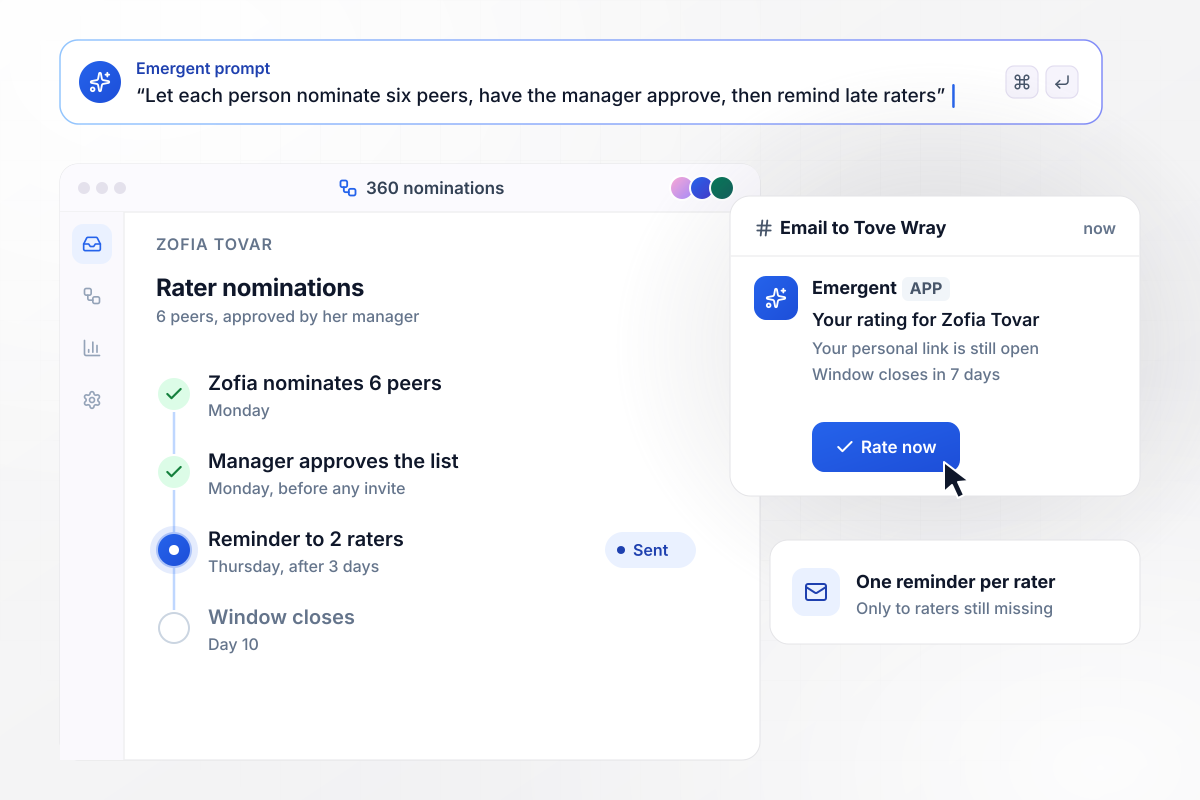
Peers nominated on Monday, reminded by Thursday
Participants pick six peers on Monday, and their manager approves or edits the list before anything is sent. Each approved rater gets an email with a personal link. Anyone who has not answered after three days gets one reminder on Thursday, and the window closes on day 10.
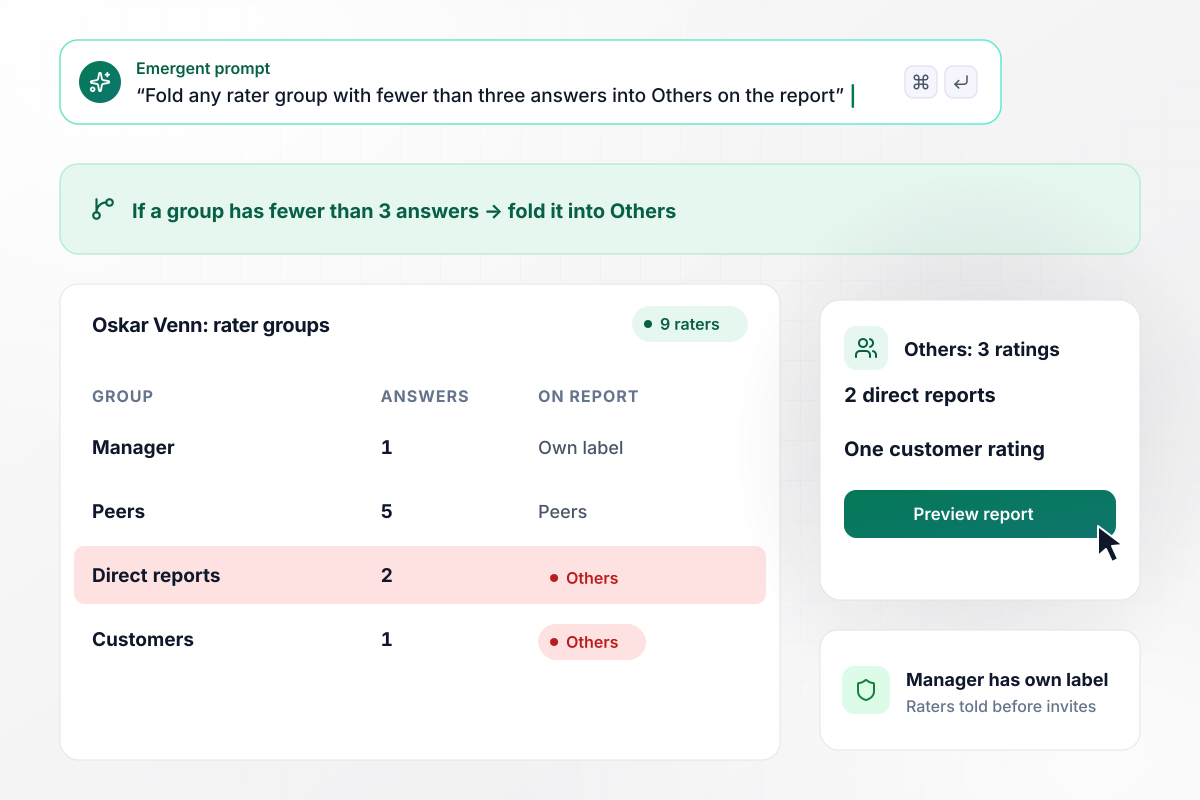
Two direct reports, folded into Others
Two direct reports answered Oskar Venn's survey, one short of the minimum of three. Their ratings join one customer rating in an Others line of three instead of showing on their own. His manager's single rating keeps its own label, and his five peers clear the minimum as a group.
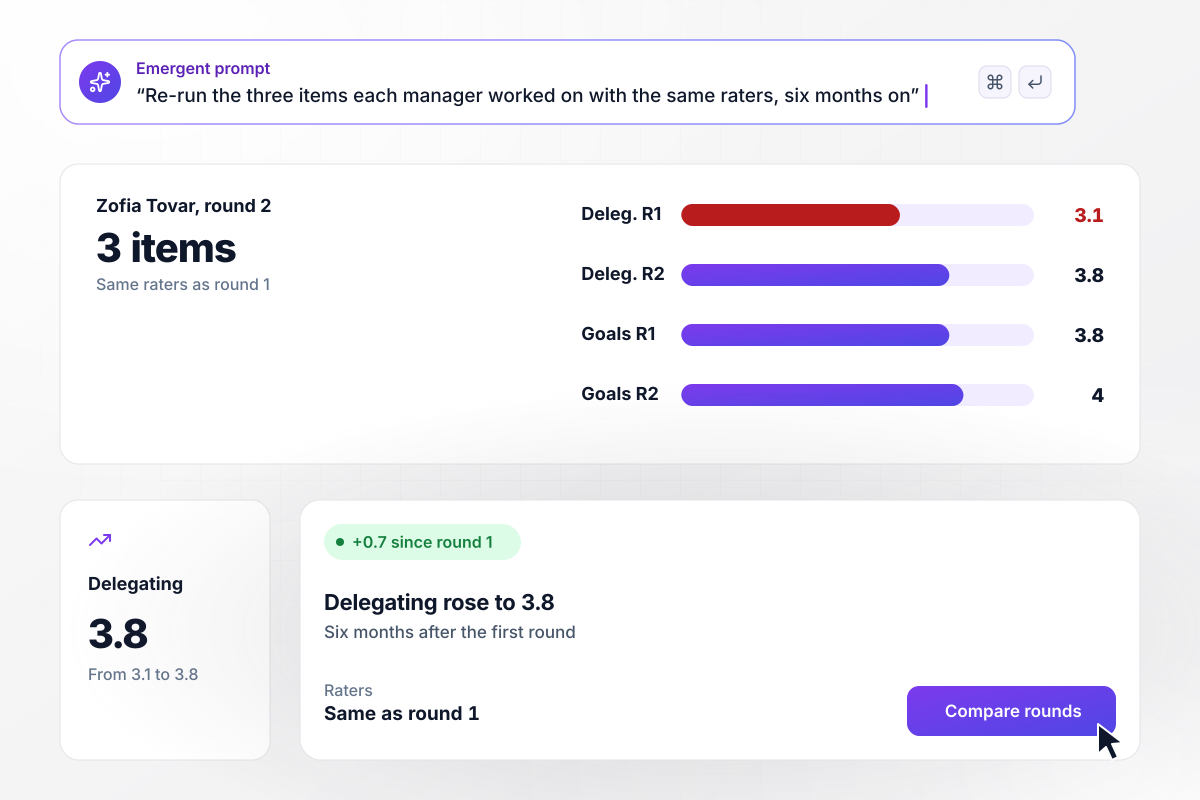
The same raters, six months on
Six months after the first round, each manager picks the three items they worked on, and the same raters score only those. Zofia's delegation score rose from 3.1 to 3.8. Her report shows both rounds side by side, pulled from the same table that holds round one.






How to Run a 360 Survey
Seven steps to plan a 360 survey raters trust, build it in Emergent, and hand each person a report they can act on.
Choose whether the report stays with the person and their coach or also reaches HR for pay and promotion. HR practitioners warn that 360 feedback is often misused as performance management. Put the answer in the first invite, and keep it for every round that follows.
Rate behaviors, not traits. "Gives clear deadlines when handing off work" can be scored by a peer, while "is a strong leader" cannot. Keep the set between 10 and 15 items on a 1-5 scale, with two open comment boxes at the end.
List the groups each person will hear from: manager, peers, direct reports, and any outside raters. Then set the smallest group that may show on its own, commonly three. Ask for enough nominations that each group can clear it.
Write out the participants, the items, the rater groups, the minimum, and the dates in plain English. Emergent builds the whole round, with each rating stored as a row in a table you own. Changing an item later takes one more message.
Before invites go out, tell raters who reads the report and that small groups merge into Others. Name the one exception, the manager's rating, up front. Raters should hear this before they start, not after the report opens.
Nobody should open a 360 report alone for the first time. A coach or HR partner walks through the widest self-versus-others gaps and the comments behind them. The person leaves with two or three behaviors to work on, written down.
About six months later, send the same raters only the items each person chose to work on. A short second round shows whether the change was visible to others, and it costs raters a few minutes instead of a full survey.
Why Build Your 360 Survey With Emergent?
HR platforms price by headcount or seat. Emergent builds your 360 as an app, with every rating in a database you control.

|
Qualtrics EmployeeXM | Culture Amp | SurveyMonkey | |
|---|---|---|---|---|
| What you get | Pulse and annual surveys, confidential reporting, and manager dashboards, as code you own | Employee listening inside the Qualtrics XM platform | Engagement, pulse, onboarding, and exit surveys with analytics | Survey builder with templates, including employee engagement |
| Pricing model | Credits, no response caps or per-response fees | Quote-based, priced by employee count | Quote-based, per employee by module, billed annually | Per-user team plans with a seat minimum, billed annually |
| Where responses live | A database table you own, plus any integration | Qualtrics platform | Culture Amp platform | SurveyMonkey account |
| Code ownership | Full code export to GitHub on paid plans | None | None | None |

Pick the Pricing Plan That Works for You
Choose the plan that fits your building ambitions. From weekend projects to enterprise applications, we've got you covered.




Find the right survey, quiz, or poll
for your team















Frequently Asked Questions
Your Questions, Answered
Don't change this element unless you know what you are doing
More things you can build
with Emergent









on Emergent today


