

Build a Beta Feedback Survey Before Launch Day
Build a beta feedback survey that records the build behind every answer and saves results to a database you own.
Build a beta feedback survey for the 60 testers of my field service app that logs crashes, ratings, and notes.
Trusted by Builders Worldwide
Active Builders Worldwide
Apps Successfully Created
Countries Globally Reached



Every Answer Tied to a Build and a Tester
Emergent builds the beta feedback survey, the rules that act on its answers, and the database that keeps every round.
Questions drafted for your beta
Describe the product, the testers, and what this round has to settle. Emergent drafts the questions, and a follow-up prompt adds or cuts one before the next build goes out.
Each answer filed under its build
Every response is a row in a database you own, saved with the tester, the build number, and the device. Put build 2.3 beside build 2.4 without merging two spreadsheets.
An alert when a crash repeats
Set the line, such as 8 crash reports on one build. The app then posts the build number and the testers' steps to a Slack channel, or emails the engineer who owns the fix.
One question per screen on a phone
Testers answer one question per screen on a phone, with the test device still in hand. Emergent puts no cap on how many testers answer, in an open beta or a closed beta.
Crash reports sent to your tracker
Connect the issue tracker your team works in through its API. The app files each crash report there with the build number and the tester's steps, ready for the next triage.
Code you can take with you
On paid plans, export the full code to your GitHub repository. Reuse the same survey for the next beta, with every earlier round of answers still sitting in your database.
What Four Betas Caught Before Launch
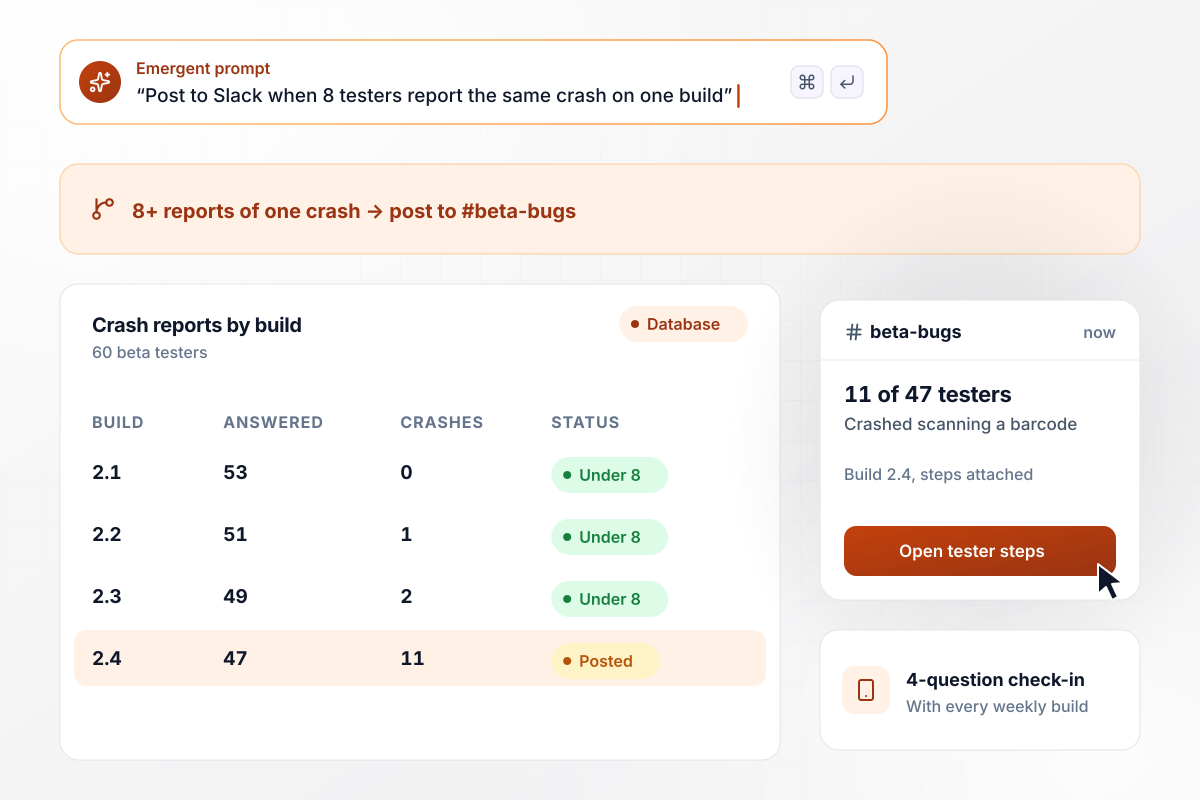
11 barcode crashes, all on build 2.4
Copperwick ships a weekly build of its meal-planning app to 60 beta testers, each build with a 4-question check-in. When 8 or more testers report the same crash on one build, the app posts to #beta-bugs in Slack. On build 2.4, 11 of 47 testers said it crashed while scanning a barcode, and the post carried their steps.
window.awbMockup = { mobileAppBuilds: "Build a check-in for the beta testers of my meal-planning app that goes out with every new build. Ask 4 questions: rate this build from 1 to 5, did it crash, what were you doing when it crashed, and anything confusing. Save each answer with the build number. When 8 or more testers report the same crash on one build, post it to our #beta-bugs Slack channel.", featureUsability: "Create an end-of-beta survey for the shift swap feature in my scheduling software. Use the 10 statements of the System Usability Scale with a 5-point agree scale, and score each tester from 0 to 100. Ask each tester whether they are a manager or staff. Show the average score for the whole beta and for each role side by side.", hardwareFieldTest: "My company has 40 beta thermostats in homes. Build a weekly check-in that each household answers on a phone every Friday, one question per screen. Ask whether the thermostat went offline this week, how many times, and what they noticed. Save the firmware version for each home. When a household says yes, add it to a list and email it to our firmware engineer.", launchReadiness: "Build an exit survey for the 25 design-partner teams in my analytics dashboard beta. Ask whether the team will keep using the dashboard after launch, and what would stop them rolling it out. Group the blockers by topic and count the teams that name each one. Show the share who would keep using it and the top blocker on one screen." };
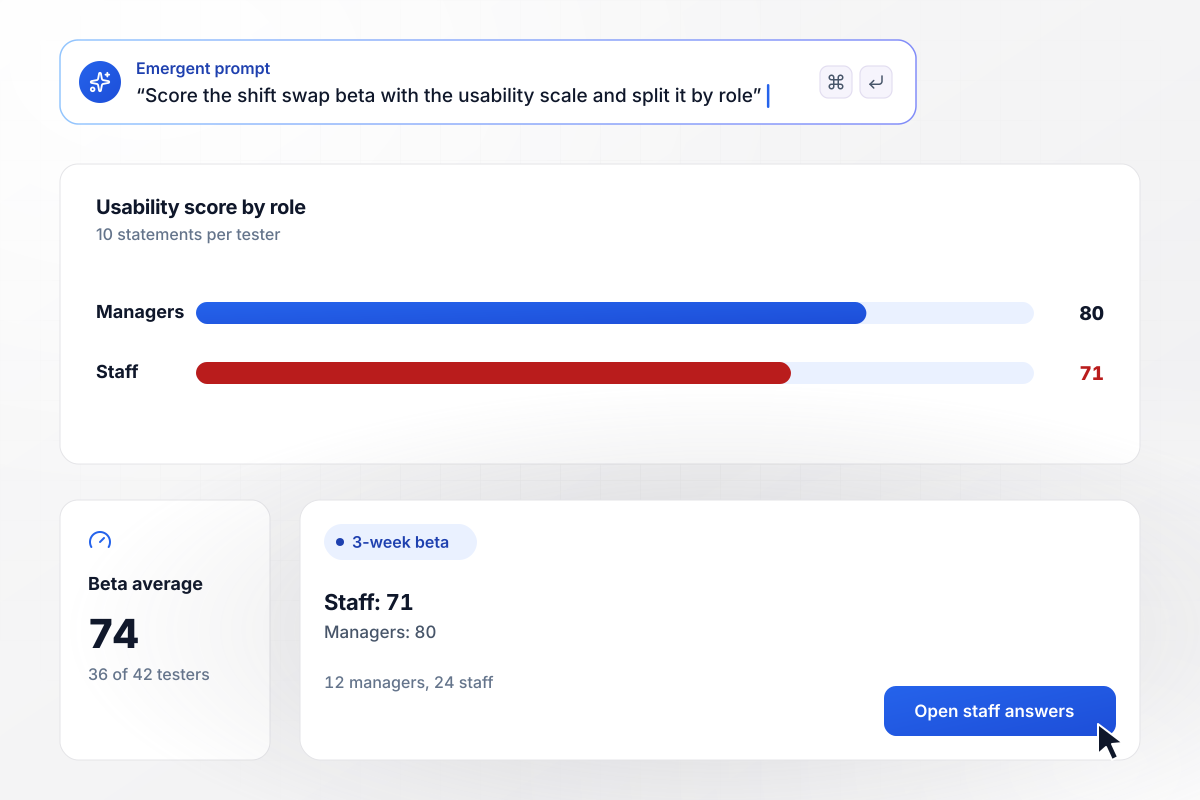
Swaps score 80 from managers, 71 from staff
Lanternby ran shift swaps as a 3-week beta, then closed it with the 10-statement System Usability Scale. Of 42 testers, 36 answered, for an average of 74. The 12 managers scored it 80 and the 24 staff 71. Staff send the swap requests, and the team rewrote the request screen before launch.
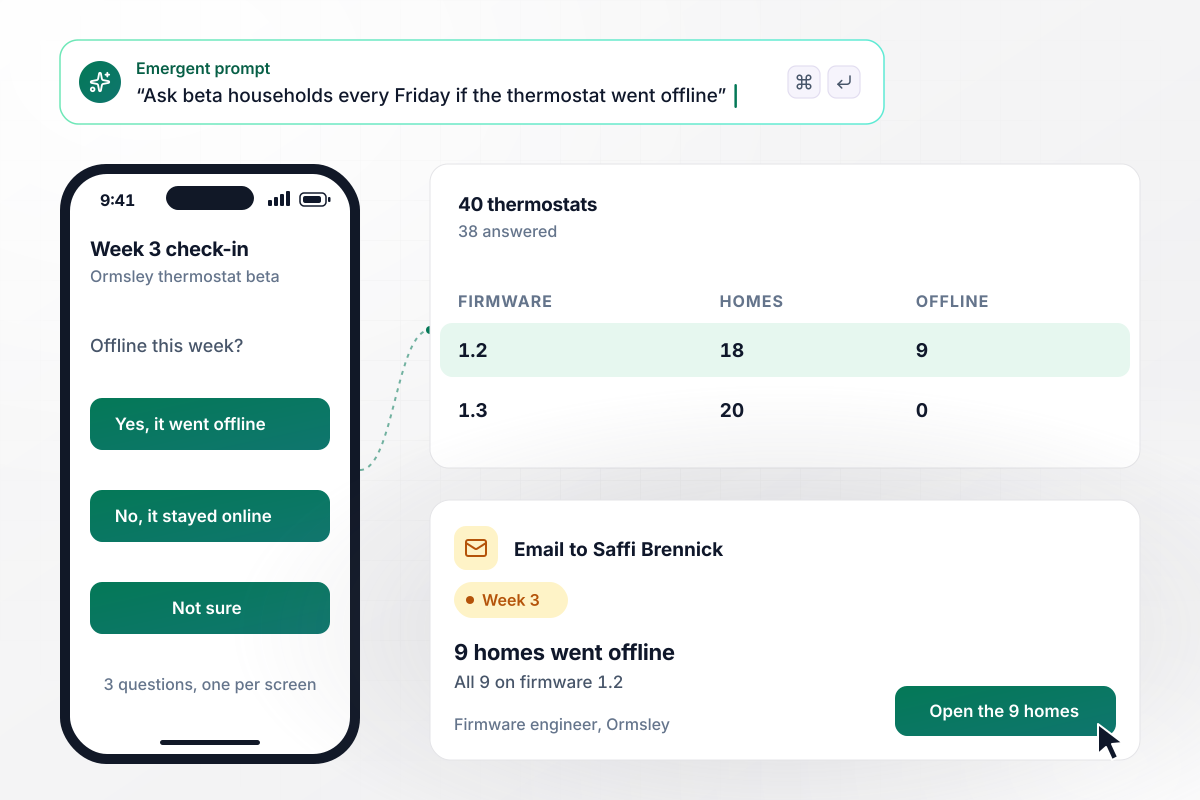
All 9 offline thermostats run firmware 1.2
Ormsley put 40 beta thermostats in homes. Each Friday, households answer a 3-question check-in on a phone, one question per screen, starting with whether the thermostat went offline. In week 3, 38 answered and 9 said yes. All 9 ran firmware 1.2, and the app emailed firmware engineer Saffi Brennick the list.
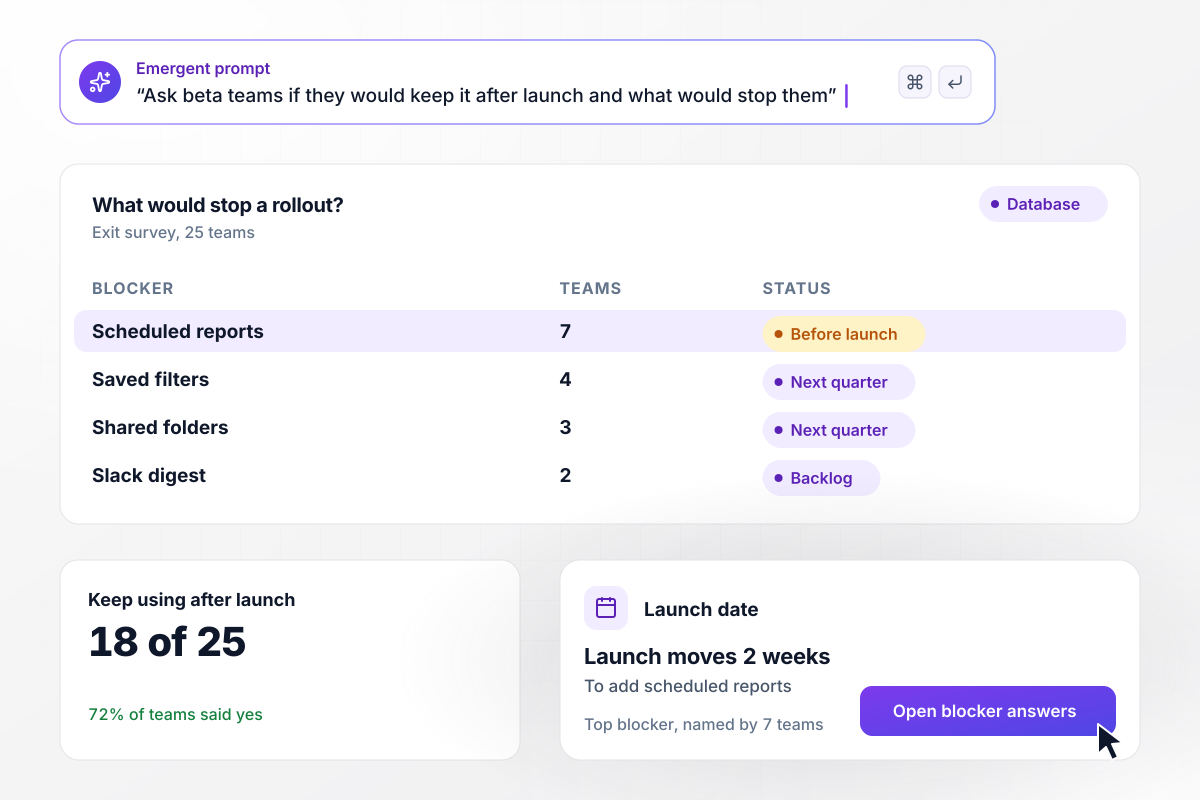
7 teams want scheduled reports before launch
Velloway closed its analytics dashboard beta with an exit survey to 25 design-partner teams. Asked whether they would keep using it after launch, 18 of 25 said yes. Asked what would stop a rollout, 7 teams named scheduled reports, more than any other answer. Launch moved 2 weeks to add them.






How to Run a Beta Feedback Survey
Seven steps to run a beta feedback survey that turns tester answers into fixes before launch, then build it with Emergent.
Write down the 2 or 3 decisions the beta feeds, such as whether a build is stable enough to ship or whether a new screen makes sense. Each question should serve one of them. Cut the rest before a tester ever sees the survey.
Ask testers for nothing they would have to look up. Give the device a short pick list, and save the build number with each answer. A crash report helps only when it points to one build, and a trend needs two builds side by side.
During the beta, send a short check-in with each build: rate this build, did it crash, what were you doing, and what confused you. Save the longer questions for the end, after testers have used every part of the product.
Ask what the tester tapped right before the crash, which gives an engineer a report to repeat. An open question about issues gets answers like it's buggy. Give the steps question its own screen, and show it only to testers who said the app crashed.
At the end of a round, ask the same 10 usability statements every time, so this beta's score compares with the last one. Split the score by role or plan, because one group can pull an average down while another holds it up.
Decide what counts as a pattern, such as 8 testers naming one crash on a single build, and who hears about it. Put the line and the Slack channel or email address in your prompt, and the app sends the alert when a build crosses it.
On the last day, ask each tester whether they would keep using the product after launch and what would stop them. Count the blockers, fix the top one first, and tell testers what changed before you invite them to the next beta.
Why Build Your Beta Survey With Emergent?
Each beta's answers sit beside the last one's in a database you own. Change any question by prompt between builds.

|
SurveyMonkey | Microsoft Forms | SurveyHero | |
|---|---|---|---|---|
| What you get | Survey, logic, and response database, as code you own | Survey builder with templates, including employee engagement | Surveys, quizzes, and polls with response summaries | Survey builder with templates, including employee satisfaction |
| Pricing model | Credits, no response caps or per-response fees | Per-user team plans with a seat minimum, billed annually | Free with a Microsoft account; included in Microsoft work and school subscriptions | Free plan, then per-account plans with unlimited responses |
| Where responses live | A database table you own, plus any integration | SurveyMonkey account | Microsoft Forms, with export to Excel | SurveyHero account, EU data centers |
| Code ownership | Full code export to GitHub on paid plans | None | None | None |




Pick the Pricing Plan That Works for You
Choose the plan that fits your building ambitions. From weekend projects to enterprise applications, we've got you covered.




Find the right survey, quiz, or poll
for your team















Frequently Asked Questions
Your Questions, Answered
Don't change this element unless you know what you are doing
More things you can build
with Emergent









on Emergent today


