

Build a Post-Purchase Survey for the Moment After Checkout
Get a post-purchase survey that ties each answer to its order, from first-order source to fit and delivery problems.
Build a post-purchase survey for my online running shoe store that asks each buyer about their order 10 days after delivery.
Trusted by Builders Worldwide
Active Builders Worldwide
Apps Successfully Created
Countries Globally Reached



What Buyers See and Where Their Answers Go
The first three shape the survey a buyer opens after checkout. The last three decide what happens to each answer once it is in.
Questions written for your store
Describe the store, the product, and the decision each answer should inform. Emergent writes the survey from that prompt, and one more sentence rewords or adds a question.
Follow-ups that branch on the first answer
A buyer who says the pants run small gets one more question about the size they ordered. A buyer who found you through a friend skips it. You describe each branch in plain English.
One question per screen on a phone
Buyers who open the link from a shipping text see one question on each screen. A two-question survey takes two taps, with no long form to scroll through on a small screen.
Each answer saved with its order number
The app connects to your store platform through its API and attaches the order number, the products, and the ship date to each response. Answers can sync to your CRM as well.
Problem answers sent to the right person
As soon as a buyer reports a damaged box or a missing item, the app posts it to a Slack channel, sends an email, or raises an in-app alert, with the order number attached.
Responses kept in a database you own
Every answer lands in a database your team owns, with no cap on the number of responses you collect. On paid plans, the full code exports to your GitHub repository as well.
Four Stores and What Buyers Told Them
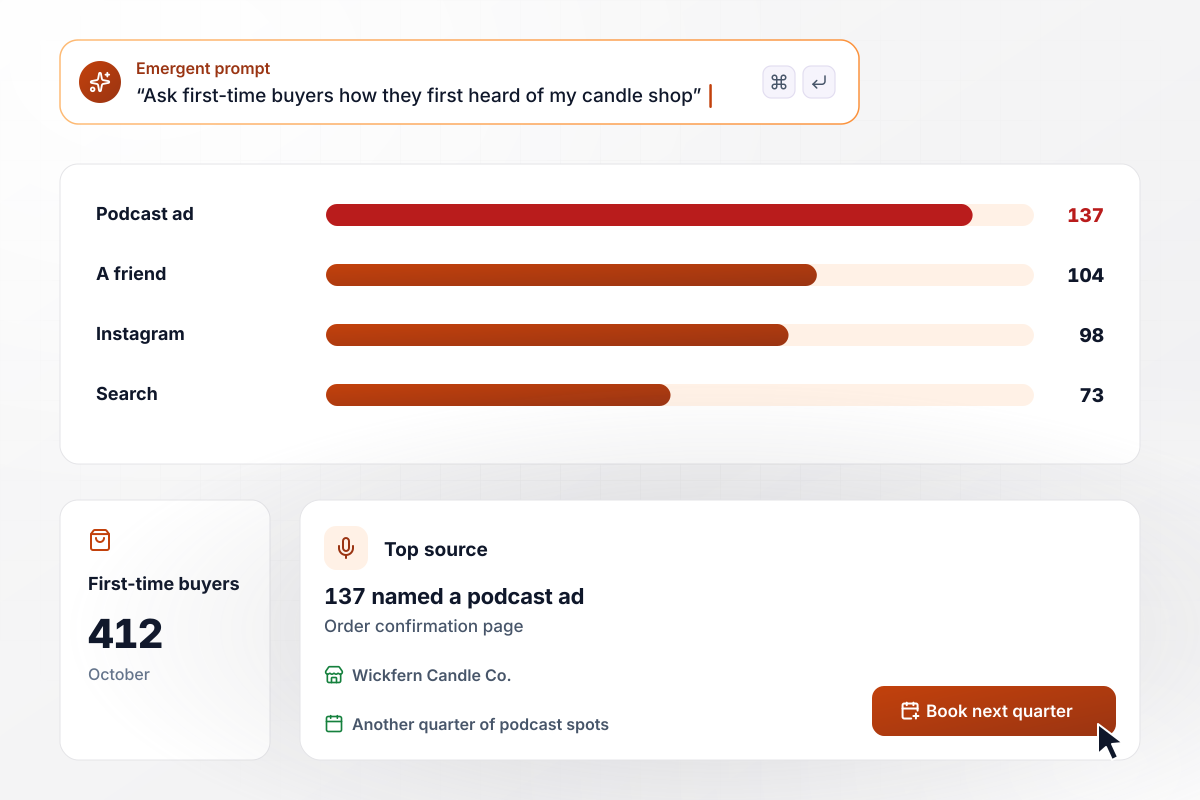
Podcast listeners placed 137 first orders in October
Wickfern Candle Co. asks first-time buyers one question on the order confirmation page: how did you first hear of the shop? In October, 412 answer. A podcast ad leads with 137, ahead of a friend at 104, Instagram at 98, and search at 73. The shop books another quarter of podcast spots.
window.awbMockup = { orderSource: "Build a one-question survey for my candle shop's order confirmation page. Ask first-time buyers how they first heard of the shop: podcast ad, a friend, Instagram, or search. Save each answer with the order number and show me the count for each source by month.", deliveryCheck: "Build a delivery check for my pantry goods store. When an order is marked delivered, text the buyer one question: did it arrive complete and intact? Options: yes, late, damaged, or missing an item. Post every damaged or missing answer to our support channel in Slack with the order number.", fitAndSizing: "Build a fit survey for my outdoor clothing store. Ten days after delivery, ask buyers of each pair of pants whether it runs small, true to size, or large, and which size they ordered. Show the answers by product so I can see which styles run small.", reorderTiming: "Build a survey for one-time buyers of my coffee. Ask how long a bag will last them: 2 weeks, 3 weeks, 4 weeks, or not buying again. Email each buyer a reorder reminder in the week they picked, and ask anyone not buying again one question about why." };
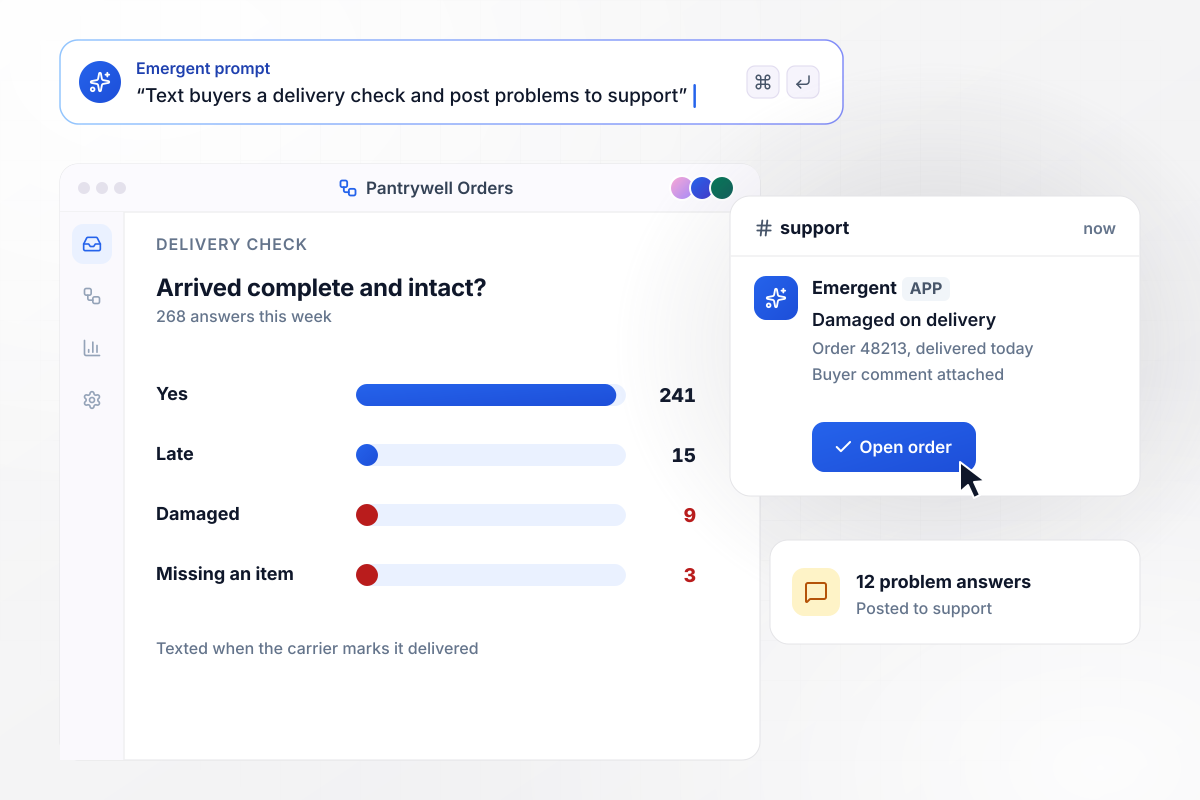
Damaged and missing items reach support the same day
When the carrier marks a Pantrywell box delivered, the buyer gets a text asking whether it arrived complete and intact. Of 268 answers in one week, 241 say yes, 15 say late, 9 say damaged, and 3 report a missing item. Each damaged or missing answer posts to the support channel in Slack with its order number.
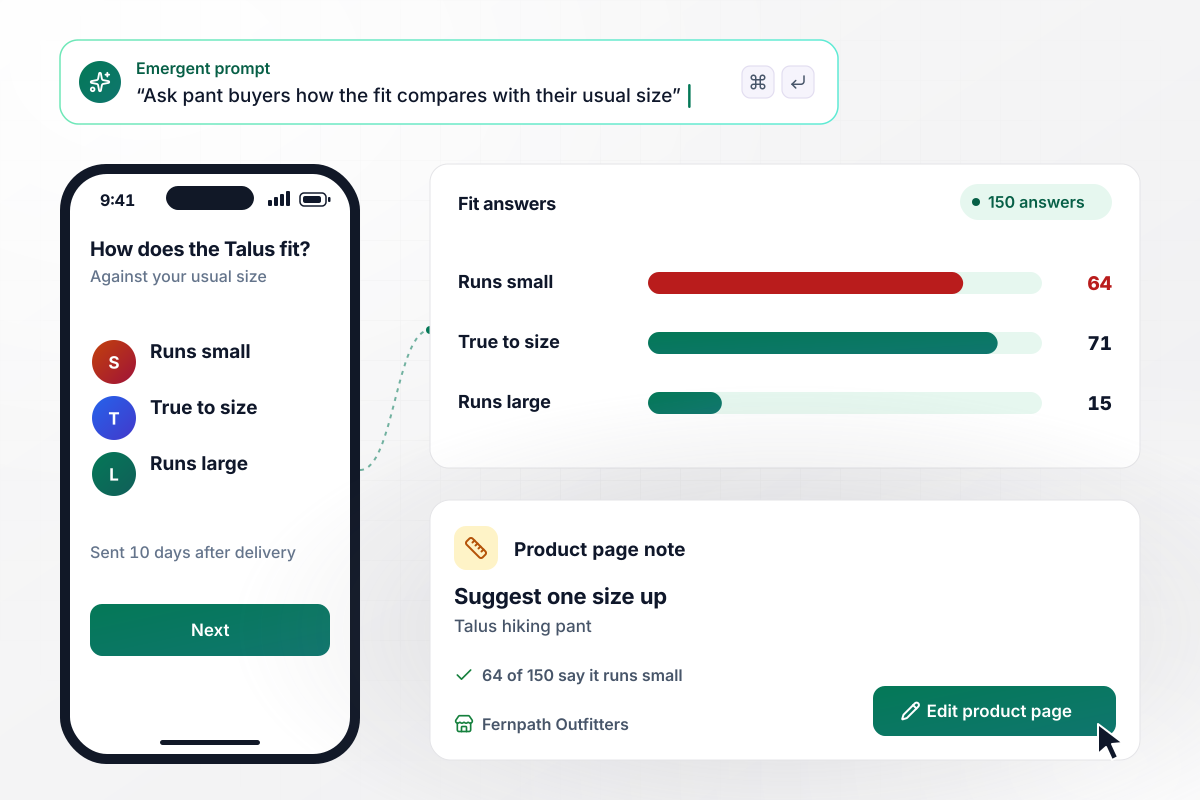
64 of 150 Talus buyers say it runs small
Fernpath Outfitters waits 10 days after delivery, then asks buyers of the Talus hiking pant how it fits against their usual size. Of 150 answers, 64 say it runs small, 71 say true to size, and 15 say it runs large. The team adds a note to the product page suggesting one size up.
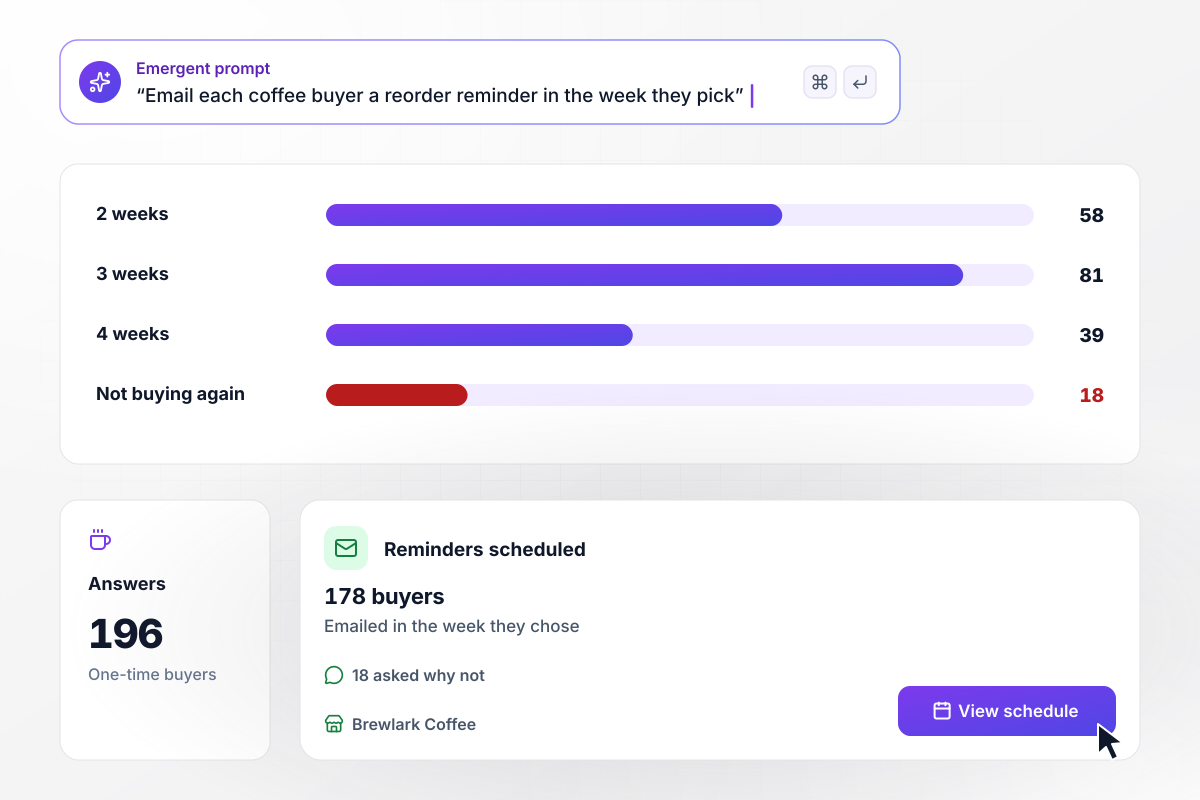
Reorder reminders timed to each buyer's own answer
Brewlark Coffee asks one-time buyers how long a bag will last them. Of 196 answers, 58 pick 2 weeks, 81 pick 3 weeks, and 39 pick 4 weeks, and the app emails each of those 178 buyers a reorder reminder in the week they chose. The other 18 say they will not buy again and get one question about why.






How to Create a Post-Purchase Survey
Seven steps to plan a post-purchase survey, build it with Emergent, and send each answer where it can act.
Pick one decision per question: which channel gets more ad budget, which warehouse needs better packing, which size chart needs a note. Cut any question that changes nothing. Two or three questions are enough for a first version.
Ask about the order source on the confirmation page, while the purchase is fresh. Ask about the delivery once the box is marked delivered, and save fit or reorder questions until the buyer has used the product for a week or two.
Tell Emergent which store the survey is for, then list the questions, the answer options, and any follow-up a given answer should trigger. Emergent builds the survey and a dashboard for its answers from that prompt.
Connect the store through its API so each response arrives with its order. Check one recent order first and confirm the order number and products sit beside the answer before you rely on the data.
Decide which answers need a person, such as a broken jar or a short shipment, and name who handles them. Route each one to that person in Slack or by email.
Place a real order, or reuse a recent one, and answer the survey on a phone. Confirm the answer saved under the right order and that a problem answer reached its owner.
Publish the survey and put its link on the confirmation page, in the shipping email, or in the delivery text. After a week, read the counts and reword any question whose answers are not informing a decision.
Why Build Post-Purchase Surveys With Emergent?
The survey is an app your store owns. It reads each order through your store's API and saves every answer in your own database.

|
SurveyMonkey | Microsoft Forms | SurveyHero | |
|---|---|---|---|---|
| What you get | Survey, logic, and response database, as code you own | Survey builder with templates, including employee engagement | Surveys, quizzes, and polls with response summaries | Survey builder with templates, including employee satisfaction |
| Pricing model | Credits, no response caps or per-response fees | Per-user team plans with a seat minimum, billed annually | Free with a Microsoft account; included in Microsoft work and school subscriptions | Free plan, then per-account plans with unlimited responses |
| Where responses live | A database table you own, plus any integration | SurveyMonkey account | Microsoft Forms, with export to Excel | SurveyHero account, EU data centers |
| Code ownership | Full code export to GitHub on paid plans | None | None | None |

Pick the Pricing Plan That Works for You
Choose the plan that fits your building ambitions. From weekend projects to enterprise applications, we've got you covered.




Find the right survey, quiz, or poll
for your team















Frequently Asked Questions
Your Questions, Answered
Don't change this element unless you know what you are doing
More things you can build
with Emergent









on Emergent today


