

Build a Community Survey for Your Town or Group
Build a community survey residents can answer on their phones, with every response saved to a database you own.
Build a community survey for the 4,000 households in my town that asks which park and road projects to fund next year.
Trusted by Builders Worldwide
Active Builders Worldwide
Apps Successfully Created
Countries Globally Reached



What Residents See and Your Team Reads
Residents meet the first three on a phone. Your team works in the last three, from the first split result to the exported code.
Questions that rank or rate
Emergent writes each question in the type the decision needs. Residents drag park projects into order or rate trash pickup on a 1-5 scale, and each answer gets its own column.
One question per screen on a phone
Anyone who opens the link on a phone sees one question at a time, with a progress bar that counts what is left. On a laptop, the same survey can run as a single scrolling page.
Reminders to households yet to answer
Give each household its own survey link and the app knows who has answered. On the day you pick, it emails a reminder to the rest and skips anyone whose answers are in.
Results split by neighborhood or branch
Add a field for neighborhood or library branch, and the dashboard breaks every result down by it. A project that wins across town but loses on the east side shows at once.
Every answer in a database you own
Each response is a row in your own database, with the area and the date beside every answer. Filter it for a council memo, or connect it by API to the tools you already use.
Code you can move to your own GitHub
On paid plans, Emergent exports the full survey app, with its logic and dashboard, to your GitHub repository. Your IT team can review the code or keep building on it later.
Four Local Teams With a Decision to Make
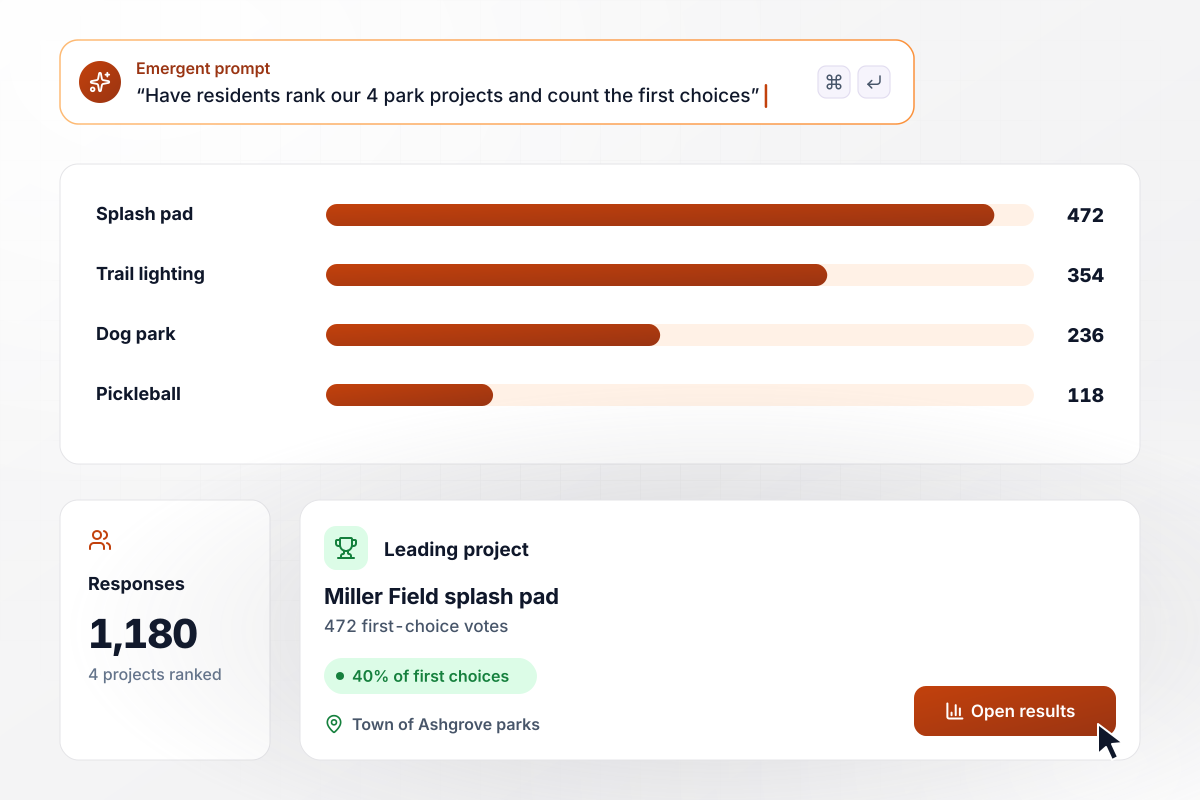
472 first-choice votes go to the Miller Field splash pad
Ashgrove's parks department lists 4 projects it can fund and asks residents to rank them. After 1,180 residents answer, the dashboard counts first choices. The Miller Field splash pad leads with 472, and trail lighting is second at 354.
window.awbMockup = { townParks: "Build a community survey for my town parks department. Residents rank 4 park projects we could fund: a splash pad at Miller Field, trail lighting, a dog park, and pickleball courts. Show a dashboard that counts first choices for each project, with the share of all responses and the total number of residents who answered.", publicLibraries: "My library system has 3 branches and wants to know whether to add Sunday hours. Ask card holders which branch they use and whether they would visit on Sundays, plus one open comment box. Show the yes share for each branch side by side, so each branch manager can see their own row.", neighborhoodGroups: "Build a survey for my neighborhood association about a new crosswalk on Alder Street. Email each of our 340 households its own link, track who has answered, and after 7 days email a reminder to every household that has not. Show me the answers so far and the list of households still waiting.", foodPantries: "My food pantry needs a short client survey that opens from a QR code on a phone. Show one question per screen, let clients pick English or Spanish, and keep it to 6 questions. One question asks which pickup time works best. Show a running count of answers for each pickup time." };
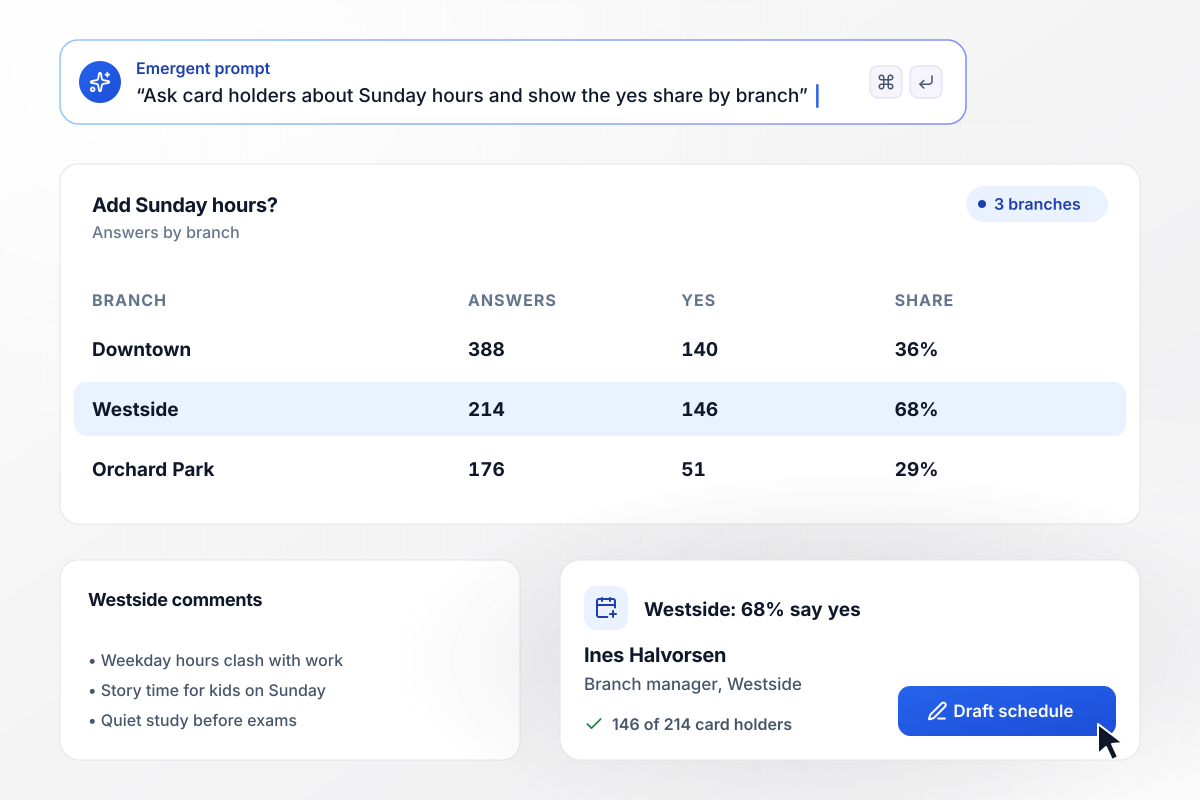
Westside alone says yes to Sunday hours
Cedar Mill Public Library asks card holders at its 3 branches whether to add Sunday hours, and the answers split by branch. Westside says yes 146 of 214 times, while Downtown and Orchard Park both lean no. Branch manager Ines Halvorsen drafts a Sunday schedule for her branch only.
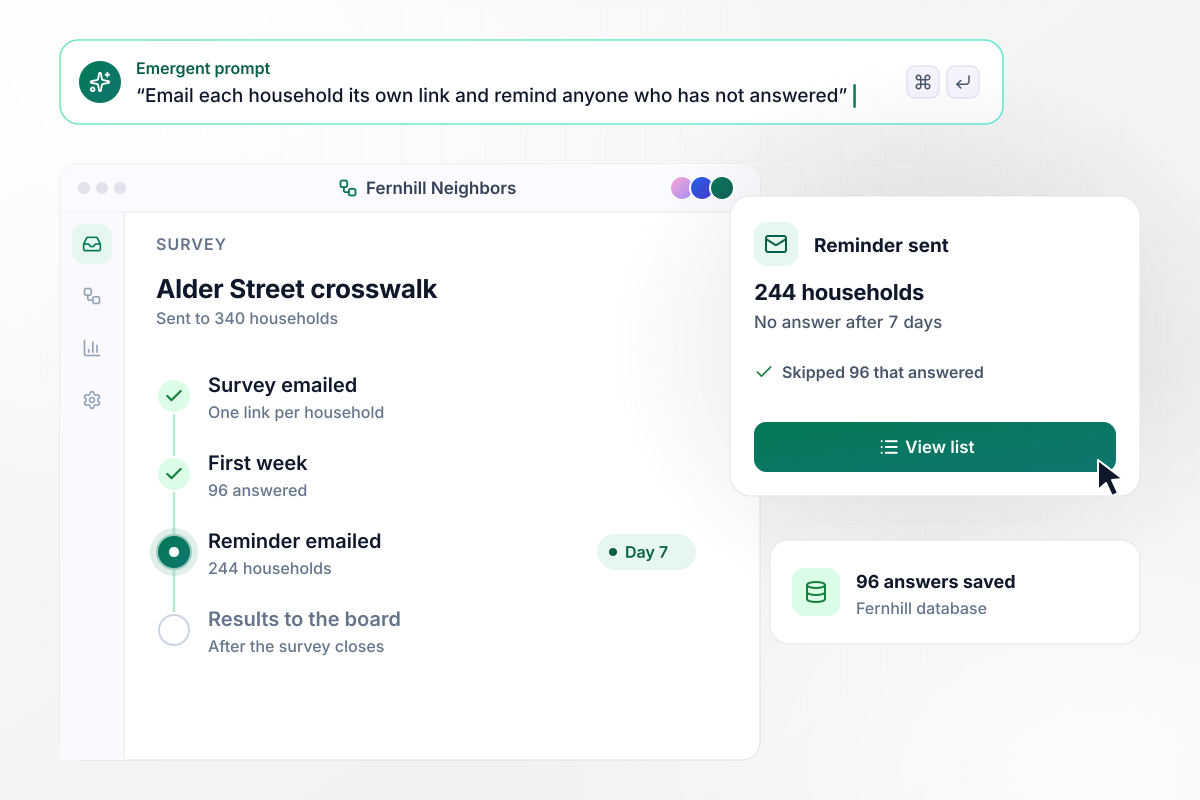
A day-7 reminder goes to 244 quiet households
Fernhill's board sends its survey on a new Alder Street crosswalk to 340 households, each with its own link. In the first week, 96 answer. On day 7, the app emails a reminder to the 244 households that have not answered and leaves the rest alone.
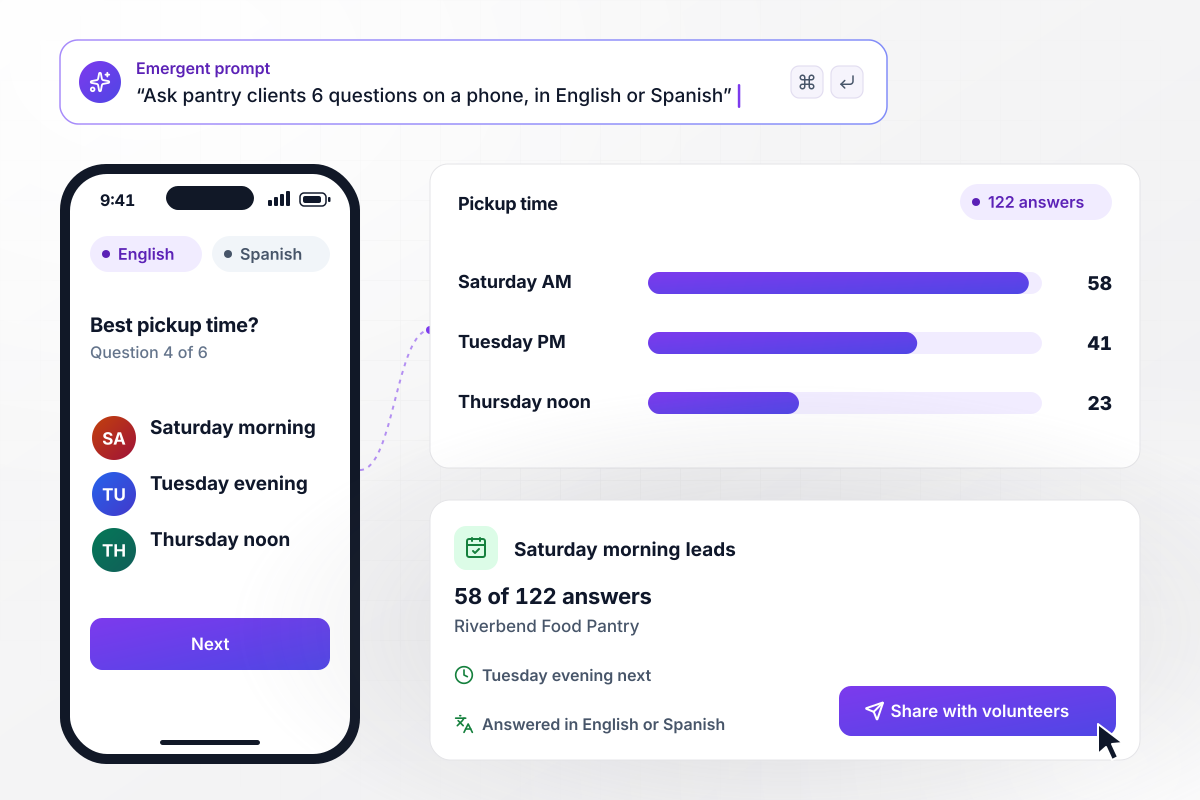
Saturday morning wins, with answers in English or Spanish
Riverbend Food Pantry hands clients a QR code in the pickup line. The survey opens on their phone in English or Spanish, one question per screen. On question 4 of 6, the pickup time, Saturday morning leads with 58 of 122 answers, and Tuesday evening follows at 41.






How to Create a Community Survey
Seven steps to build a community survey with Emergent and read every answer by neighborhood once it closes.
Name the decision the survey feeds before you write a single question: which park project to fund, or whether to open on Sundays. Cut every question that does not move that decision. What is left is the outline for your prompt.
Type the survey in plain English, naming who answers and what the results page should show. Emergent builds the survey and its database from that description, along with the dashboard. To change a question later, ask for the change in a sentence.
Use a ranking when residents choose between projects and a 1-5 scale when they rate a service. A single proposal like Sunday hours needs only a yes or no. Put one open box last, for anything your list missed.
Ask for the neighborhood or branch near the start, as a pick list instead of a typed answer. That one field lets the dashboard split every result by area, which is where a townwide average can hide a split between two sides of town.
Send the link to five people who did not help write it, and ask at least two of them to answer on a phone. Watch for any question they read two ways or skip, and reword it before the real launch.
Publish the survey on its own link or on your town's domain, and print the link as a QR code for flyers at the library desk and the pickup line. Give each household a personal link if you plan to send reminders.
Pick a reminder day about a week in, and the app emails only the households that have not answered. When the survey closes, read the results by area and tell the people who answered what you decided.
Why Build Your Community Survey on Emergent?
A survey sent to every address in town keeps taking answers with no response cap, and each one lands in a database you own.

|
SurveyMonkey | Microsoft Forms | SurveyHero | |
|---|---|---|---|---|
| What you get | Survey, logic, and response database, as code you own | Survey builder with templates, including employee engagement | Surveys, quizzes, and polls with response summaries | Survey builder with templates, including employee satisfaction |
| Pricing model | Credits, no response caps or per-response fees | Per-user team plans with a seat minimum, billed annually | Free with a Microsoft account; included in Microsoft work and school subscriptions | Free plan, then per-account plans with unlimited responses |
| Where responses live | A database table you own, plus any integration | SurveyMonkey account | Microsoft Forms, with export to Excel | SurveyHero account, EU data centers |
| Code ownership | Full code export to GitHub on paid plans | None | None | None |


Pick the Pricing Plan That Works for You
Choose the plan that fits your building ambitions. From weekend projects to enterprise applications, we've got you covered.




Find the right survey, quiz, or poll
for your team















Frequently Asked Questions
Your Questions, Answered
Don't change this element unless you know what you are doing
More things you can build
with Emergent









on Emergent today


