

Build a Concept Testing Survey That Picks the Winner
Build a concept testing survey that shows each person one concept and saves every answer to a database you own.
Build a concept testing survey for my snack brand that shows shoppers new flavor ideas and asks which they would buy.
Trusted by Builders Worldwide
Active Builders Worldwide
Apps Successfully Created
Countries Globally Reached



Cells, Screeners, and Quotas From One Prompt
Emergent builds the concept testing survey, the logic that decides who sees which concept, and the database behind it.
Drafted from your concept boards
Describe each concept in a sentence or paste the copy people see. Emergent drafts a screen for each one and the questions that follow it, and a follow-up prompt edits any of them.
One concept per person, or all of them
Ask for a monadic design and the app shows each person one concept, split evenly across cells. Ask for sequential and it shows every concept, in a new random order each time.
A screener that ends the survey early
Put the qualifying questions first, like a purchase in the past 30 days. Anyone outside the target sees a short thank-you screen, and their row is saved with a screened-out status.
Each answer saved with its concept and cell
Every response is a row in a database you own, tagged with the concept shown, its cell, and its position in the order. Compare the share who would buy across cells from one table.
An alert when a cell reaches its quota
Set a quota for each cell, such as 100 qualified answers. The app emails your insights lead or posts in a Slack channel once a cell fills, and stops sending new people to that cell.
Your code, exported on paid plans
Export the full code to your GitHub repository on paid plans, then run the next round of concepts on the same build, with every earlier round still sitting in your tables.
Four Concept Tests, Four Go or No-Go Calls
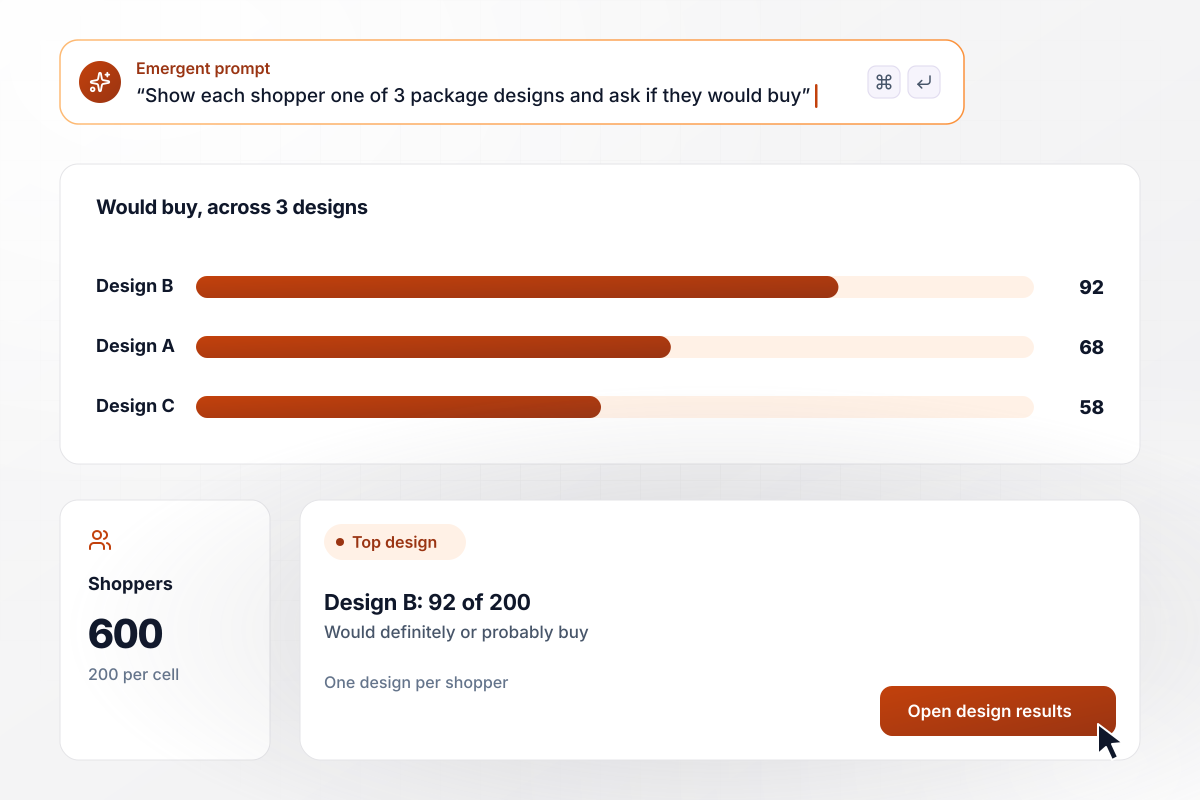
Design B wins its cell with 92 of 200
Brightfield Granola had 3 package designs and one question: which would sell? The survey showed each of 600 shoppers a single design, 200 per cell. No one compared designs side by side. In the Design B cell, 92 of 200 said they would definitely or probably buy. Design A drew 68 of 200 and Design C 58.
window.awbMockup = { packageDesigns: "Build a concept test for 3 granola package designs. Show each shopper one design only, split evenly so each design gets 200 people. After the design, ask how likely they are to buy it on a 5-point scale, from definitely would to definitely would not. Save each answer with the design shown, and chart the share who would definitely or probably buy, per design.", featureConcepts: "Create a survey that shows my 320 customers 4 feature concepts: shared calendars, offline mode, invoice templates, and team chat. Every customer sees all 4 in a random order. After each one, ask for appeal from 1 to 5. Show the average per concept, and mark any concept under 3.5 as off the roadmap shortlist.", screenedAudiences: "Build a dog food concept test with a screener first: only people who bought dog food in the past 30 days continue, and everyone else sees a thank-you screen. Show each qualified person one concept, fresh-frozen or grain-free, with a quota of 100 per concept. When both quotas fill, close the survey and email our insights lead.", inStoreCounters: "My coffee shop has 2 stores and no email list. Build a phone survey with one question per screen, from a link I can post at each counter, about a new oat milk cold brew. Ask which store they are in and whether they would buy it. Show the share who would buy at each store." };
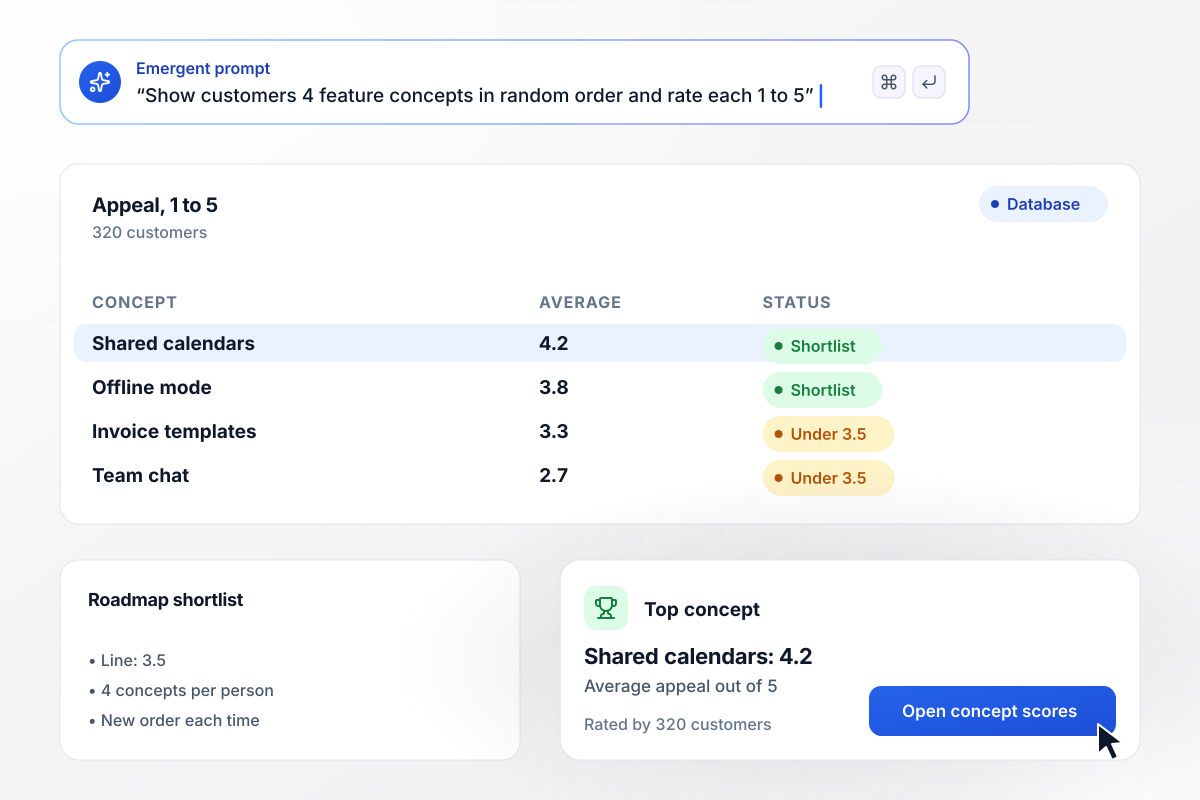
In random order, shared calendars rate 4.2 of 5
Tallyroot asked 320 customers to rate the appeal of 4 feature concepts from 1 to 5. Each customer saw all 4 in a new random order. No concept always came first. Shared calendars averaged 4.2 and offline mode 3.8. Invoice templates (3.3) and team chat (2.7) fell under the 3.5 line for the roadmap shortlist.
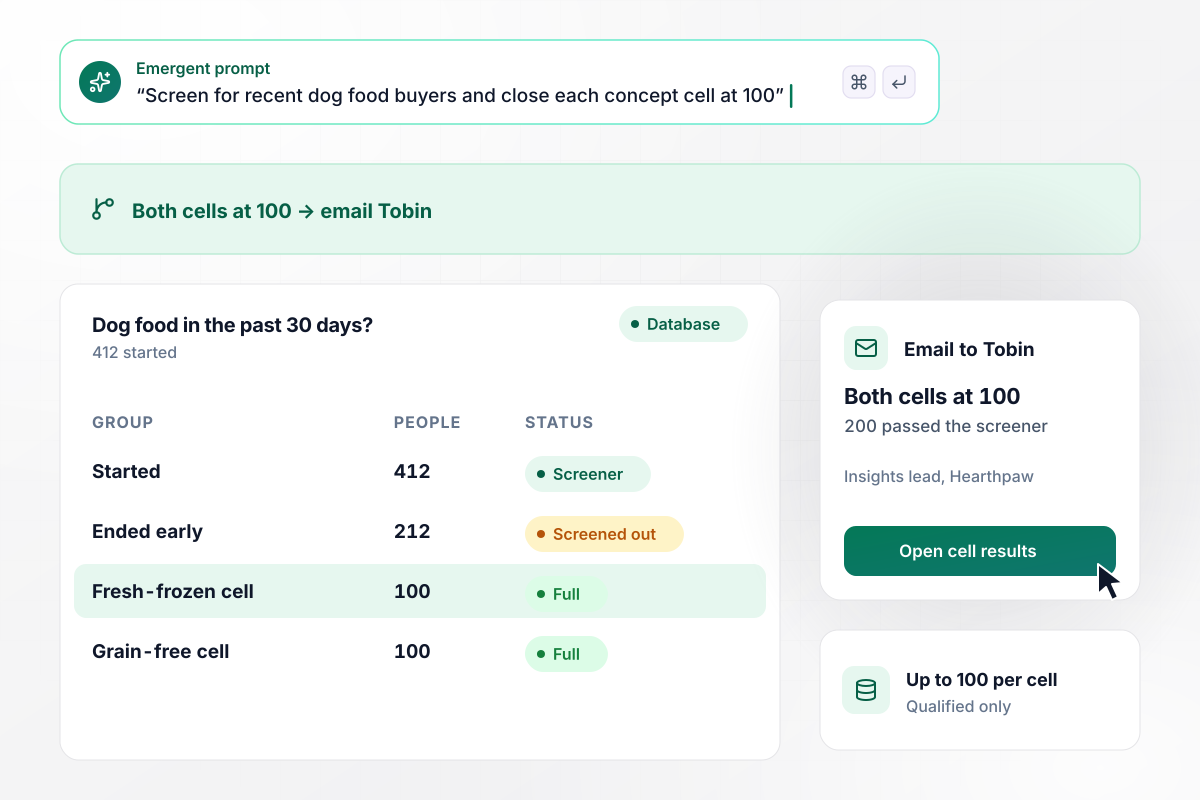
Tobin hears when both cells fill to 100
Hearthpaw Pet Foods wanted only people who bought dog food in the past 30 days. Of 412 who started, 200 passed the screener and 212 ended early. Each qualified person saw one concept, fresh-frozen or grain-free, up to 100 per cell. When both cells reached 100, the app emailed insights lead Tobin Achterberg.
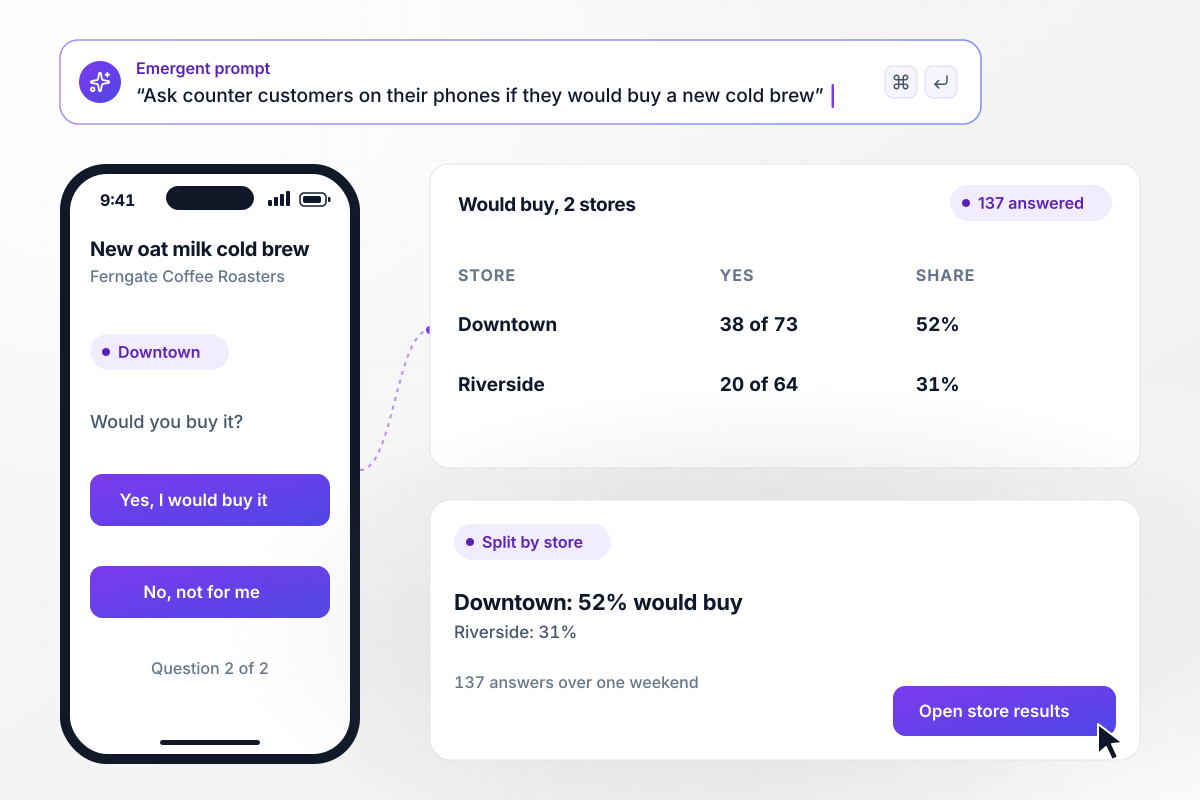
Downtown and Riverside split on the cold brew
Ferngate Coffee Roasters has no customer email list. It put a survey link at the counter of 2 stores instead. Customers answered on their phones, one question per screen, about a new oat milk cold brew. Over one weekend, 137 answered. At Downtown, 38 of 73 said they would buy it. At Riverside, 20 of 64 did.






How to Create a Concept Testing Survey
Seven steps to create a concept testing survey that shows each concept fairly and points to the one worth taking forward.
Give each concept a name, a two-line description, an image if you have one, and a price only when price is part of the idea. Keep every concept the same length. A longer description can win on detail alone.
Show one concept per person when your sample can fill a cell for each, and every answer reads as a first impression. With a smaller sample, show every concept to each person and ask Emergent to shuffle the order per respondent.
Ask the qualifying questions first: whether the person buys the category, how recently, and who they buy for. Set the answer that ends the survey for anyone outside the target, and keep their rows to count how many qualified.
After every concept, ask the same questions in the same order: how likely they are to buy on a 5-point scale, overall appeal, how new it feels, and how believable it is. Close with one open question on what they would change.
Decide how many qualified answers each cell needs before launch, such as 100 or 200, and put the number in your prompt. The app stops sending people to a full cell and emails you when the last cell fills.
Send the draft to 5 people who would pass your screener. Ask which concept screen they read twice and where they stopped. Fix those screens with a follow-up prompt before the link goes to your full panel or customer list.
Compare the share who would definitely or probably buy in each cell, then read the open answers for the top 2 concepts. Pick the one to take forward, and leave the others in the table for the next round.
Why Build Your Concept Test With Emergent?
You own the database, and every round of concepts sits in it side by side. Swap in new concepts for round two with one prompt.

|
SurveyMonkey | Microsoft Forms | SurveyHero | |
|---|---|---|---|---|
| What you get | Survey, logic, and response database, as code you own | Survey builder with templates, including employee engagement | Surveys, quizzes, and polls with response summaries | Survey builder with templates, including employee satisfaction |
| Pricing model | Credits, no response caps or per-response fees | Per-user team plans with a seat minimum, billed annually | Free with a Microsoft account; included in Microsoft work and school subscriptions | Free plan, then per-account plans with unlimited responses |
| Where responses live | A database table you own, plus any integration | SurveyMonkey account | Microsoft Forms, with export to Excel | SurveyHero account, EU data centers |
| Code ownership | Full code export to GitHub on paid plans | None | None | None |




Pick the Pricing Plan That Works for You
Choose the plan that fits your building ambitions. From weekend projects to enterprise applications, we've got you covered.




Find the right survey, quiz, or poll
for your team















Frequently Asked Questions
Your Questions, Answered
Don't change this element unless you know what you are doing
More things you can build
with Emergent









on Emergent today


