

Build a Customer Experience Survey That Scores Every Touchpoint
Create a customer experience survey that rates each stage a customer goes through and saves every answer to their record.
Build a customer experience survey that scores each stage and flags the weakest one.
Trusted by Builders Worldwide
Active Builders Worldwide
Apps Successfully Created
Countries Globally Reached



What a CX Survey Has to Track
Each part of a customer experience survey below works across the stages of a relationship instead of inside one transaction.
Questions for each stage
Name the stages a customer passes through, such as ordering and delivery. Emergent writes a short question set for each one, worded for a customer reading it on a phone screen.
Sends timed to each touchpoint
Trigger every survey from an event in the tools you already run: an order marked picked up, a ticket closed, a first invoice paid. Any tool with an API can start a send.
Every answer on one customer record
Answers from every stage attach to the same customer ID. Open a record to see every rating one buyer has given, starting with the sale, in the order the ratings came in.
Stages compared side by side
Average each stage on its own and line the averages up on one dashboard. The weakest stage shows at once, with comments from the customers who rated it lowest beside the number.
Alerts when ratings slide
Write rules that look across stages: a happy buyer who rates the service poorly, or three falling scores in a row. The owner gets an email or a Slack message quoting each answer.
Responses and code that stay yours
Responses sit in a database you own, with no cap on how many you collect. Custom domains are included and use credits, and the code exports to your GitHub on paid plans.
Four Relationships, Scored Stage by Stage
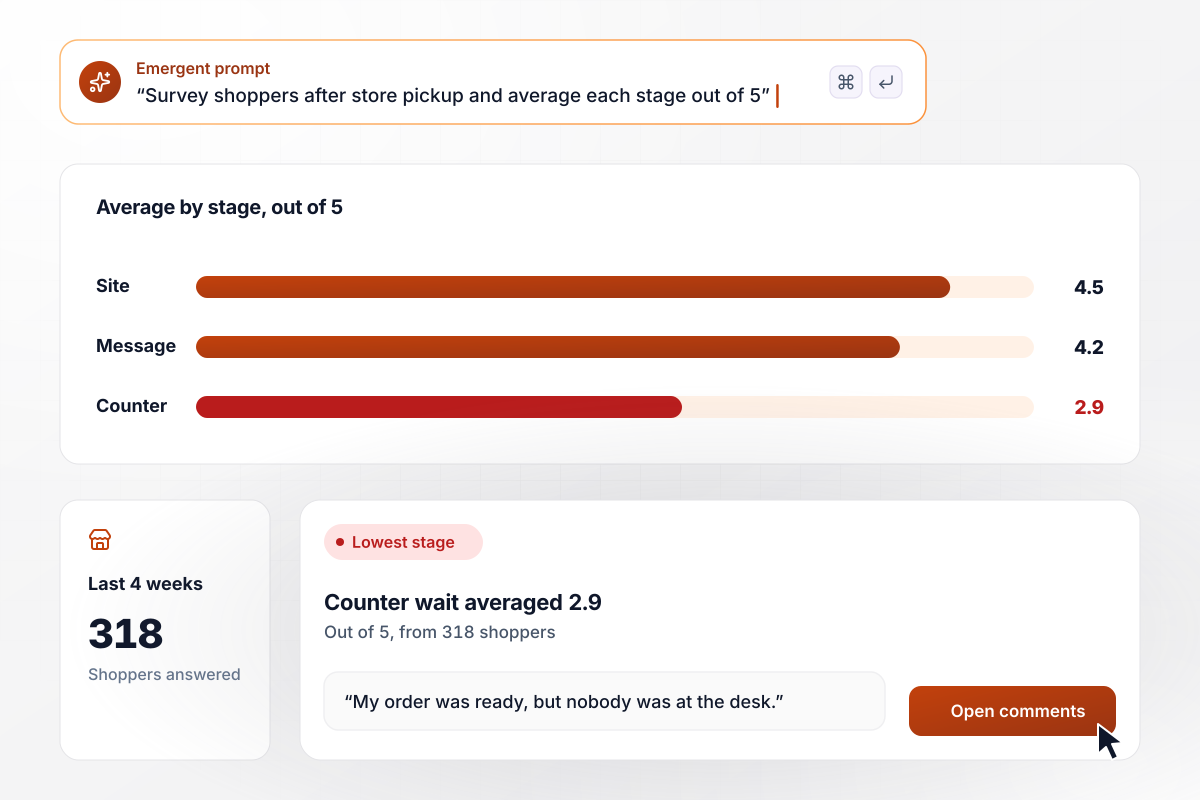
Pickup is the slow part, not the website
Shoppers who order online and collect in store rate three stages out of 5 after pickup: ordering on the site, the pickup message, and the wait at the counter. Over the last 4 weeks, 318 shoppers answered. The counter wait averaged 2.9, against 4.5 for the site and 4.2 for the message.
window.awbMockup = { buyOnlinePickUp: "Build a survey for my store chain's buy online, pick up in store orders. When staff mark an order as picked up, email the shopper three ratings out of 5: ordering on the website, the ready-for-pickup message and the wait at the counter, plus one open question. Show a dashboard with each stage's average over the last 4 weeks and the comments behind the lowest one.", carDealership: "Build a customer experience survey for my car dealership. A week after delivery, ask each buyer to rate the sale out of 5 and note anything the salesperson promised. After their first service visit, ask the same buyer to rate the service. Keep both answers on one buyer record. When the sale is 4 or higher and the service is 2 or lower, email the service manager both answers.", internetProvider: "Build a survey for my internet company. Text new subscribers through Twilio after installation, after their first bill and after any outage ticket closes, asking for a rating out of 5 and a comment. Save each rating to the subscriber's account in order. When every rating is lower than the one before, open a retention task for the account team with the three scores and the last comment.", annualClientReview: "Build an annual client review for my accounting firm. Every spring, email all 140 clients 10 questions covering onboarding, response time, invoices and the quality of the advice, each rated out of 5. Track who has answered. Show each question's average beside last spring's, sorted so the biggest drops come first, with the comments for each question." };
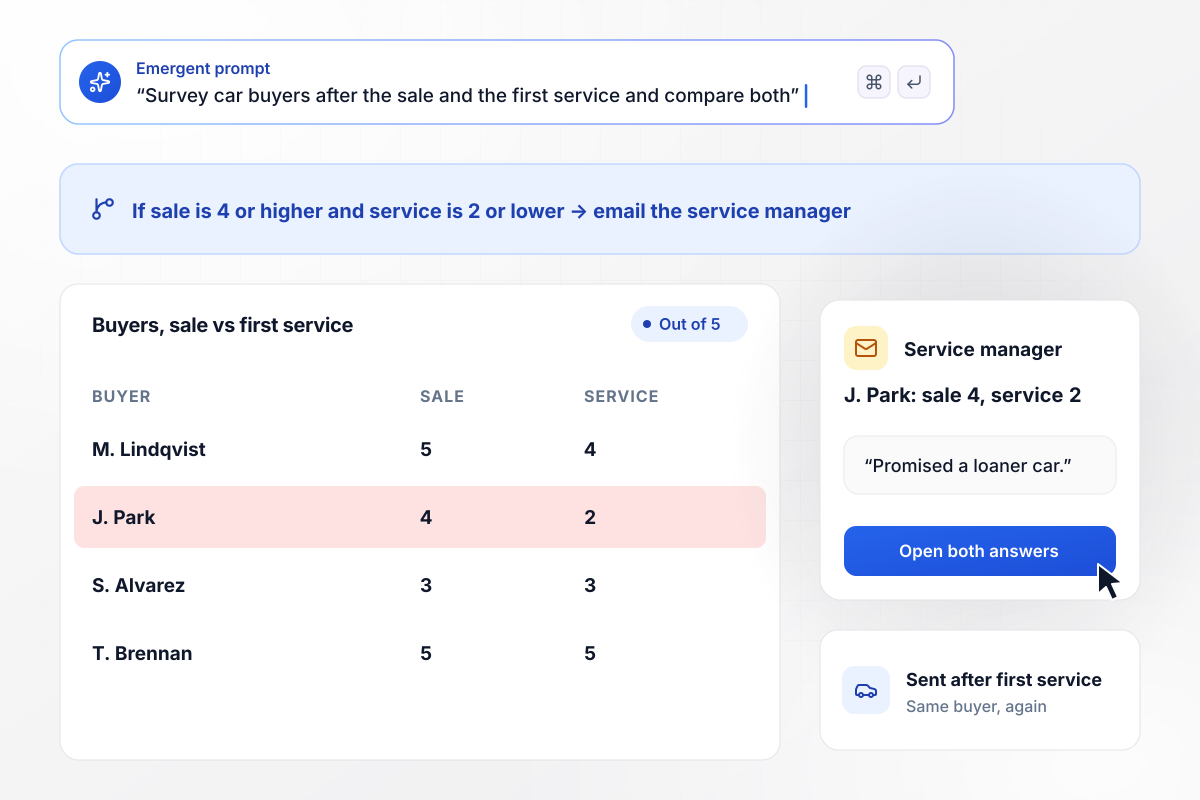
One buyer, scored at the sale and the first service
A week after delivery, each buyer rates the sale out of 5 and notes anything the salesperson promised. After the first service visit, the same buyer rates the service. Both answers sit on one record. When a buyer rates the sale 4 or higher but the service 2 or lower, the service manager gets an email with both answers.
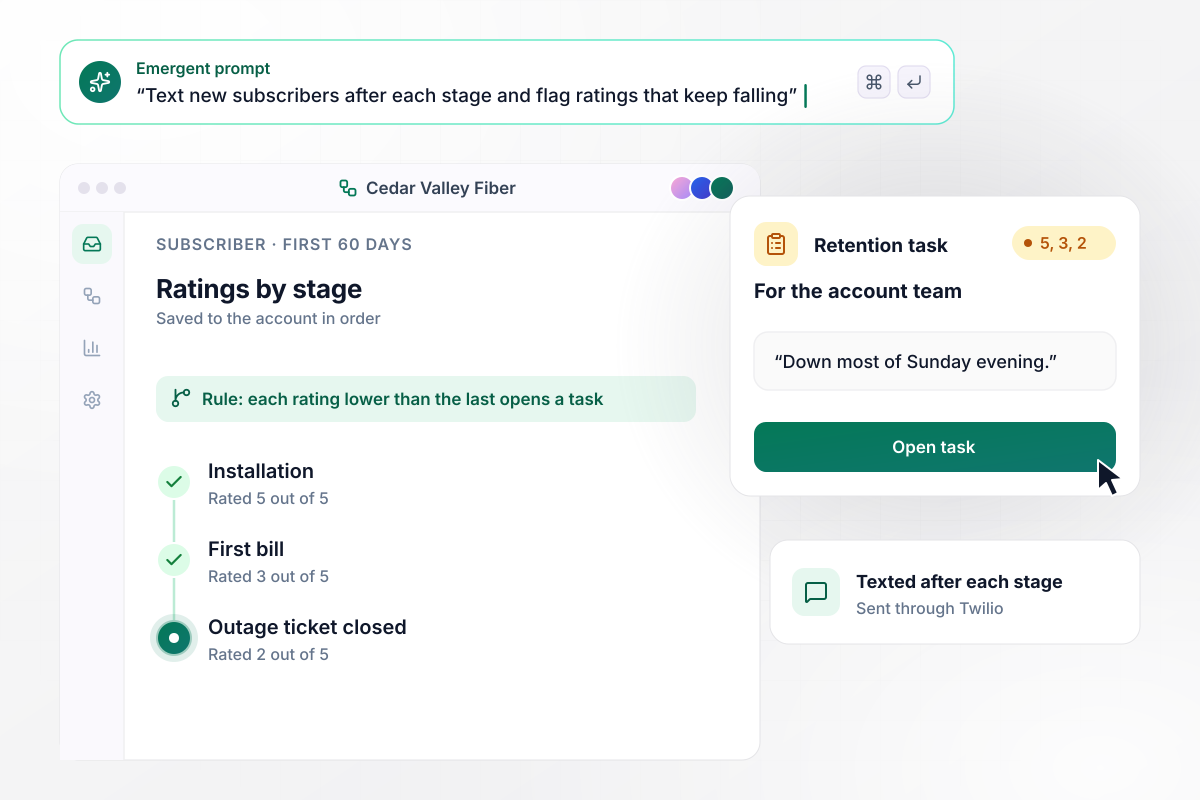
Three texts in 60 days, read as one trend
New subscribers get a text through Twilio after installation, after the first bill and after any outage ticket closes. Each rating is saved to the subscriber's account in order. When every rating comes in lower than the one before, a retention task opens for the account team with the three scores and the last comment.
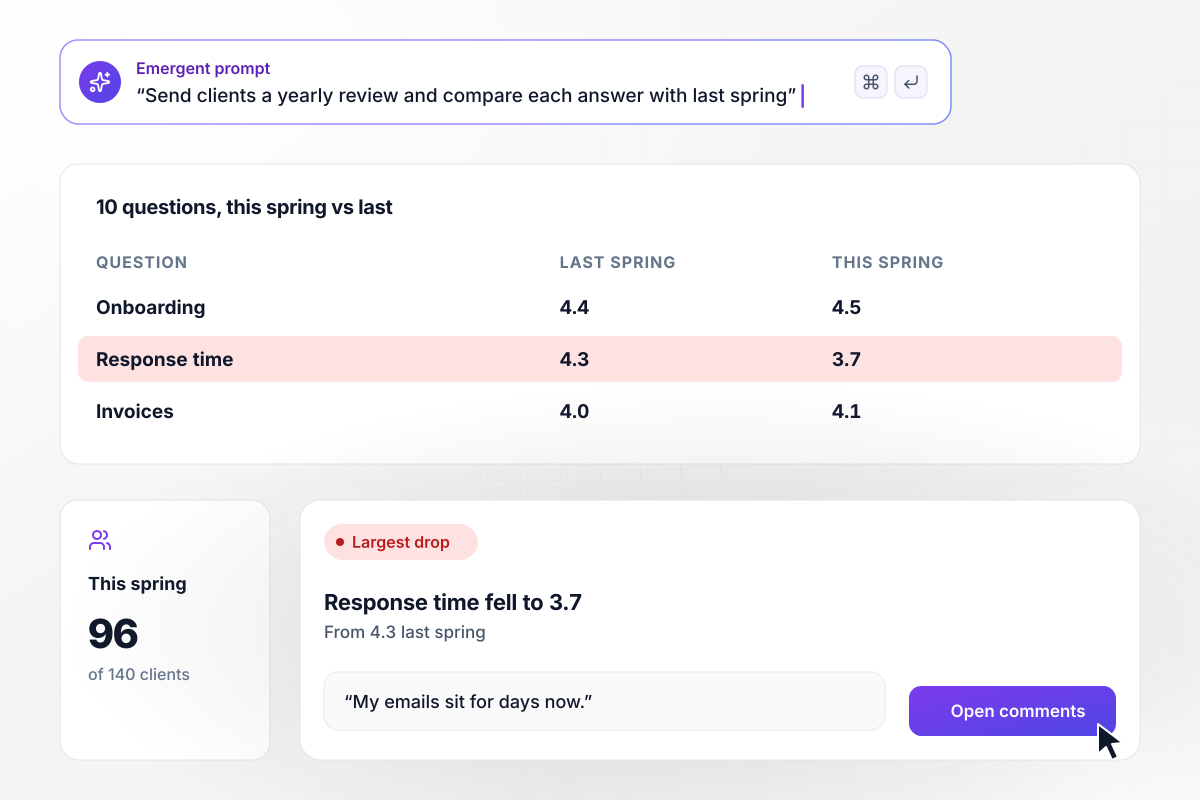
Ten questions compared with last spring
Every spring, all 140 clients of an accounting firm get a 10-question review covering onboarding, response time, invoices and the advice itself. This year 96 of them answered. Each question's average sits beside last spring's, and the partners read the drops first. Response time dropped the most, to 3.7 from 4.3.






How to Run a Customer Experience Survey
Seven steps to plan a customer experience survey whose stage scores compare fairly, then build it with Emergent.
List every point where a customer deals with you, such as the first order, a delivery, a support call and the renewal. Keep the four or five where things go wrong most. Each becomes its own short survey with its own send time.
Averages only compare across stages when every stage uses the same scale. Pick one, such as 1 to 5, and keep it on every survey. A 7 on one scale and a 4 on another tell you nothing side by side.
Rating the delivery and the packaging in one question gives a number nobody can act on. Keep the wording neutral too. Ask how the pickup went, not how much the customer enjoyed it, because loaded words push answers one way.
Put one open box right after each rating, asking what would have made that stage better. The rating tells you which stage hurts. The comment tells you what to change, often in words you can quote to the team that owns it.
Pass the customer ID into every send, whether it goes out by email or as a text. Without it, five stage surveys are five unrelated piles of scores, and nobody can see that the same buyer rated three stages low.
The most useful alerts compare a customer with themselves. A buyer who loved the sale and hated the service visit needs a call this week. Name the owner for each rule and keep thresholds tight enough that every alert gets read.
A yearly review only shows change if the questions stay the same. Rewording one item can move its average on its own. Add new questions at the end, and compare only the items asked identically both years.
Why Build Your CX Survey With Emergent?
Rules that read across stages live in code you own. Add a stage or change a threshold with a prompt.

|
SurveyMonkey | Typeform | Interact (quiz specialist) | |
|---|---|---|---|---|
| How you build | Prompt for the survey, quiz, or poll and the app around it | Templates and editor | Templates and editor, AI assist | Templates and AI quiz maker |
| Response limits | No response caps | Response caps by plan | Monthly response caps by plan; the form stops at the cap | Monthly completion and lead caps by plan |
| Behavior at cap | Keeps collecting, no cap | Overage billed per extra response | Form stops collecting | Free plan quiz pauses; paid plans cap leads |
| Where responses live | A database table you own, plus any integration | SurveyMonkey account | Typeform account | Interact account |
| Code ownership | Full code export to GitHub on paid plans | None | None | None |


Pick the Pricing Plan That Works for You
Choose the plan that fits your building ambitions. From weekend projects to enterprise applications, we've got you covered.




Find the right survey, quiz, or poll
for your team
Frequently Asked Questions
Your Questions, Answered
Don't change this element unless you know what you are doing
More things you can build
with Emergent









on Emergent today


