

Build a Dental Patient Survey Your Office Acts On
Build a dental patient survey patients answer on a phone after each visit, with low scores sent to your office manager.
Build a dental patient survey for my three-office family practice that asks about wait times, staff, and cleanings.
Trusted by Builders Worldwide
Active Builders Worldwide
Apps Successfully Created
Countries Globally Reached



What the Survey Asks and Who Sees Each Answer
Emergent builds the survey, the alerts, and the results page from your prompt, and a follow-up prompt changes any of them.
Questions about the visit, not the chart
List what the practice wants to hear about: booking, the wait, the front desk, and the cost. Emergent drafts a question for each, and you change any of them with a prompt.
Sent the evening of the appointment
Connect your scheduling software through its API, and the app emails each patient the survey link on the evening of the visit, while the wait and the checkout are still fresh.
Low scores reach one named person
Pick the score that needs a reply, such as a 1 or 2 on the wait. The app emails that answer and its comment to the office manager, with the patient's name and phone number.
Results split by office and provider
Ask which office the patient visited and who they saw, and every chart can split on either one. A group with three offices compares them question by question on one page.
One question per screen on a phone
Patients answer one question per screen on their phone, with large buttons for each score. There is no cap on responses, whether 40 patients answer in a month or 4,000 do.
Answers and code the practice keeps
Every answer is a row in a database the practice owns, tagged with the date and the office. On paid plans, export the full code to your GitHub repository and keep changing it.
What Four Practices Learned From Patients
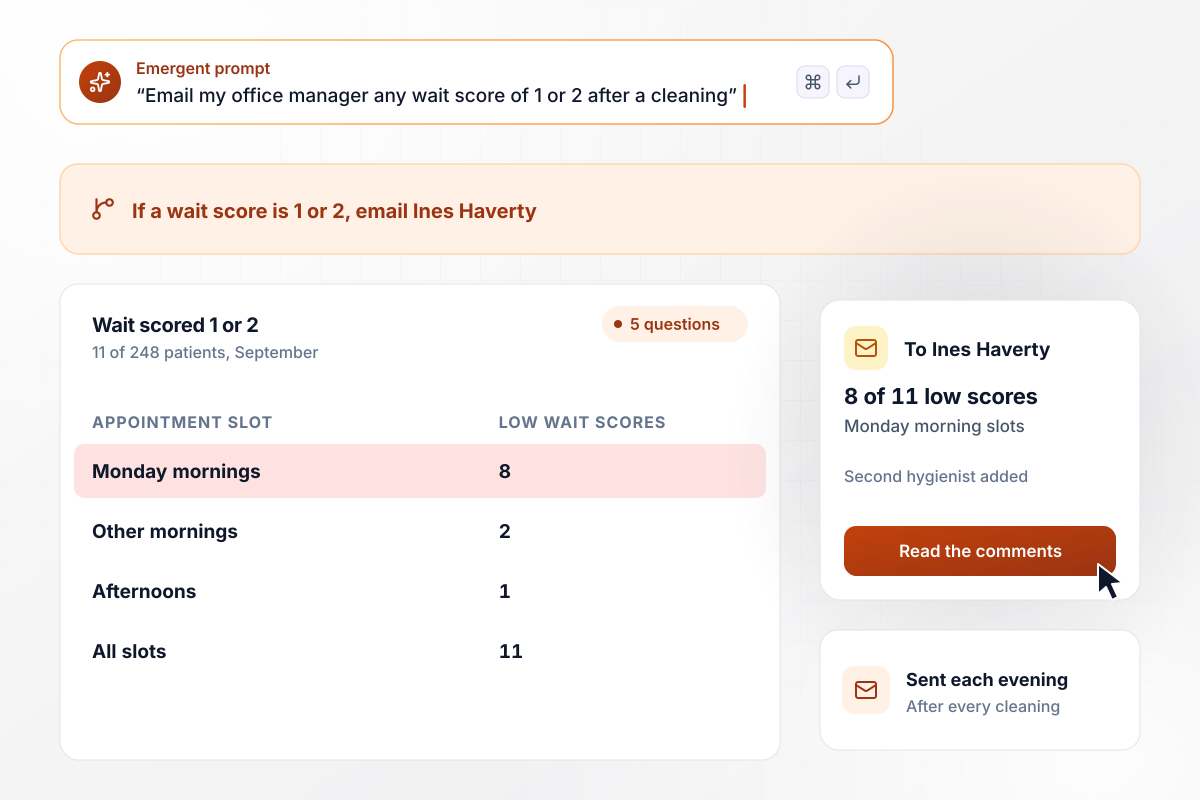
Monday mornings, home to 8 of 11 low wait scores
Winnow Creek Family Dental emails a 5-question survey the evening of every cleaning. Any wait score of 1 or 2 emails office manager Ines Haverty the comment. In September, 11 of 248 patients rated the wait that low, and 8 of those 11 had a Monday morning slot. She added a second hygienist on Monday mornings.
window.awbMockup = { generalPractice: "Build a survey my family dental practice emails to each patient on the evening of their cleaning. Keep it to 5 questions, including how long they waited past their appointment time, rated 1 to 5. Email my office manager any wait score of 1 or 2 with the comment and the patient's phone number, and show me low scores by appointment slot each month.", pediatricOffice: "Create a survey for my pediatric dental office that the parent answers after each visit. Ask the parent 4 short questions, including whether they know what the next visit will involve. End with one screen for the child: three faces to tap, a smile, a straight face, and a frown. Show me each month how many children tapped each face.", orthodontics: "Build a survey my orthodontic practice sends families 6 months into treatment. Ask them to rank 4 changes that would make visits easier: after-school appointment times, shorter waits, text reminders, and parking. Show how many families ranked each change first, and let me add a comment box under the ranking question.", multiOfficeGroup: "Set up one patient survey for my dental group's 3 offices. Ask which office the patient visited, then whether someone went over the cost with them before they paid. Show the share who said yes at each office side by side, and flag any office under 75%." };
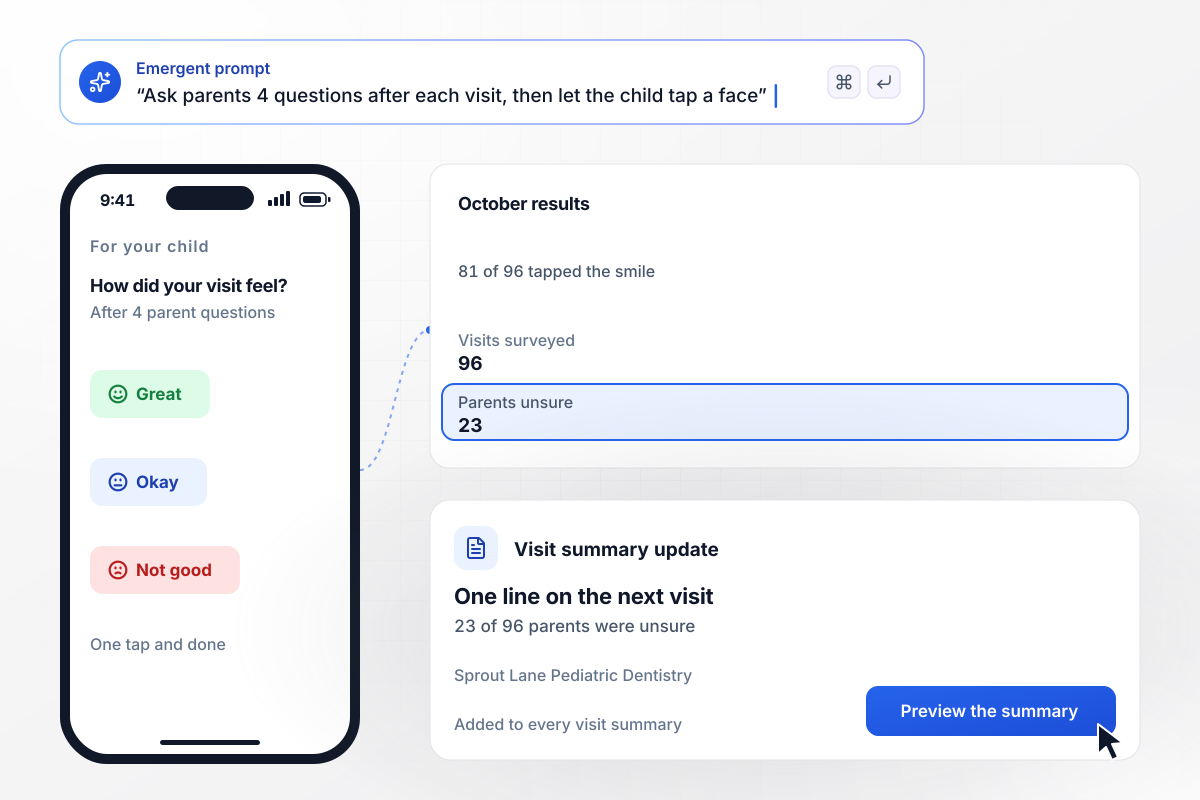
23 of 96 parents unsure of the next visit
Sprout Lane Pediatric Dentistry asks the parent 4 questions after each visit, then hands the phone to the child for a last screen of faces. In October, 81 of 96 children tapped the smile. On the parent side, 23 of 96 said they did not know what the next visit would involve. Every visit summary now ends with one line about it.
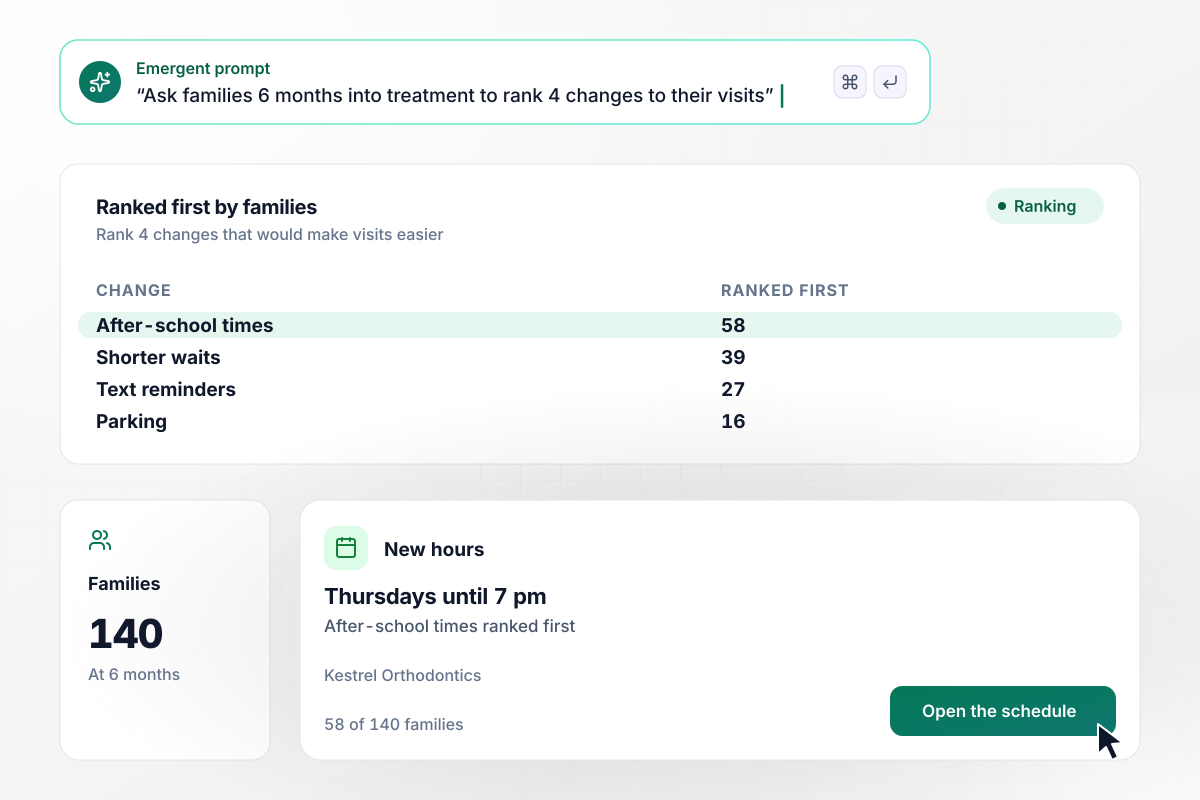
After-school times ranked first by 58 families
Kestrel Orthodontics sends families one survey 6 months into treatment. Its main question asks them to rank 4 changes that would make visits easier: after-school times, shorter waits, text reminders, and parking. Of 140 families, 58 ranked after-school times first. The practice now stays open on Thursdays until 7 pm.
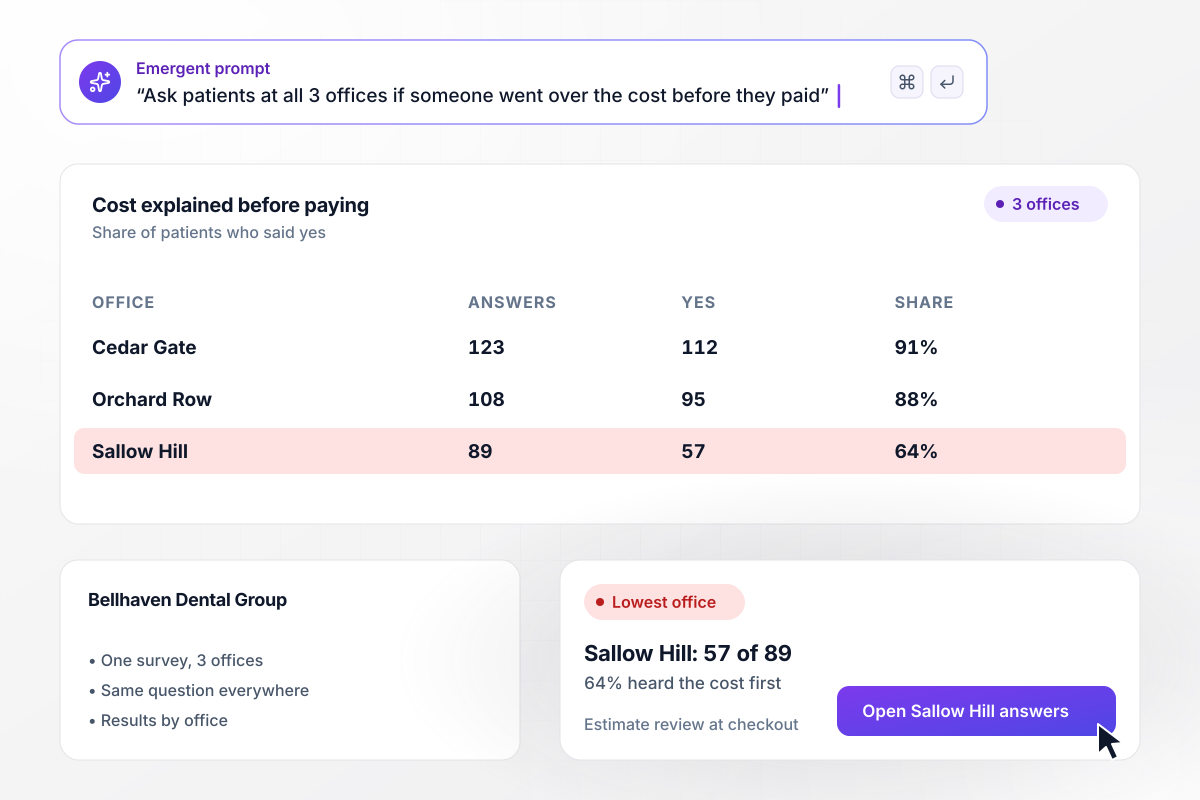
Sallow Hill trails its sister offices on explaining cost
Bellhaven Dental Group runs one survey across its 3 offices and asks every patient whether someone went over the cost before they paid. At Cedar Gate, 112 of 123 patients said yes, and at Orchard Row, 95 of 108. Sallow Hill trailed with 57 of 89. Its front desk now reviews the estimate at checkout.






How to Run a Dental Patient Survey
Seven steps to run a dental patient survey that asks about the visit and puts each low score in front of someone who can fix it.
Before you write a question, list the decisions the answers could change: opening hours, front desk staffing, how costs get explained. A question that cannot change anything comes out. Put that list in your prompt, and Emergent drafts the survey around it.
Keep every question on what the patient saw and heard outside the treatment itself, like the waiting room and checkout. Questions about symptoms or care decisions belong in the chair with the dentist, not in a survey the office manager reads at the end of the week.
Rate each question on the same 1 to 5 scale, with 1 as poor and 5 as excellent. One scale lets you compare questions with each other and this month with last month. End with one open question about the single thing the office could do better.
Choose between a survey after every visit and one per patient each quarter. A family that comes in four times a year should not answer the same questions four times. Put the rule in your prompt, and the app applies it before each email goes out.
Pick one person per kind of low score: the office manager for the wait, the billing coordinator for cost. Set the score that triggers an email to them, 2 or lower for example, and agree that the patient hears back within 2 business days.
Send the survey to two staff members before any patient sees it. Time how long it takes on a phone, check that a test score of 1 reaches the right inbox, and rewrite any question that someone had to read twice.
Once a quarter, name one change the answers led to, in the waiting room and in the next survey email. Say what the patients asked for and the month the change starts, such as a later evening slot or a new step at checkout.
Why Build Dental Patient Surveys With Emergent?
The practice owns the database behind the survey, gets an email for each score that needs a reply, and hits no response cap.

|
SurveyMonkey | Microsoft Forms | SurveyHero | |
|---|---|---|---|---|
| What you get | Survey, logic, and response database, as code you own | Survey builder with templates, including employee engagement | Surveys, quizzes, and polls with response summaries | Survey builder with templates, including employee satisfaction |
| Pricing model | Credits, no response caps or per-response fees | Per-user team plans with a seat minimum, billed annually | Free with a Microsoft account; included in Microsoft work and school subscriptions | Free plan, then per-account plans with unlimited responses |
| Where responses live | A database table you own, plus any integration | SurveyMonkey account | Microsoft Forms, with export to Excel | SurveyHero account, EU data centers |
| Code ownership | Full code export to GitHub on paid plans | None | None | None |




Pick the Pricing Plan That Works for You
Choose the plan that fits your building ambitions. From weekend projects to enterprise applications, we've got you covered.




Find the right survey, quiz, or poll
for your team















Frequently Asked Questions
Your Questions, Answered
Don't change this element unless you know what you are doing
More things you can build
with Emergent









on Emergent today


