

Build a Ranking Survey That Scores Every Item by Points
Build a ranking survey people answer by dragging items into order, with points per item and every ranking in your own database.
Build a ranking survey that collects every answer in a database I own.
Trusted by Builders Worldwide
Active Builders Worldwide
Apps Successfully Created
Countries Globally Reached



What Emergent Builds Into Every Ranking
A ranking survey has two sides: the screen where people put items in order, and the readout that turns their orders into one list.
Every rank used exactly once
Emergent writes the ranking question so each item takes its own place, with no ties. A list of 5 items comes back as 5 distinct ranks, and each rank is saved to its own column.
Drag to reorder on a phone
Respondents press and drag each item into place, one question per screen, so a list of 6 fits a phone without sideways scrolling. Each finished order saves as soon as they tap Next.
Points per item, added up on the dashboard
The dashboard weights each place, 5 points for first down to 1 for last on a 5-item list, and totals each item. Ask for other weights in a prompt and Emergent rebuilds the totals.
Top picks split by customer group
Add a question such as plan type or region, and the dashboard shows first choices for each group side by side. An item that wins overall can still come second with one group.
The final order, sent to the team
When the survey closes, the app posts the ranked list to a Slack channel or sends it by email. Each new ranking can also sync to any tool with an API, such as HubSpot or Stripe.
Code that moves with you
Every survey Emergent builds is code. Export it to your GitHub repository on paid plans and keep the question logic, the scoring, and the dashboard in a repo you control.
Four Teams Putting a List in Order
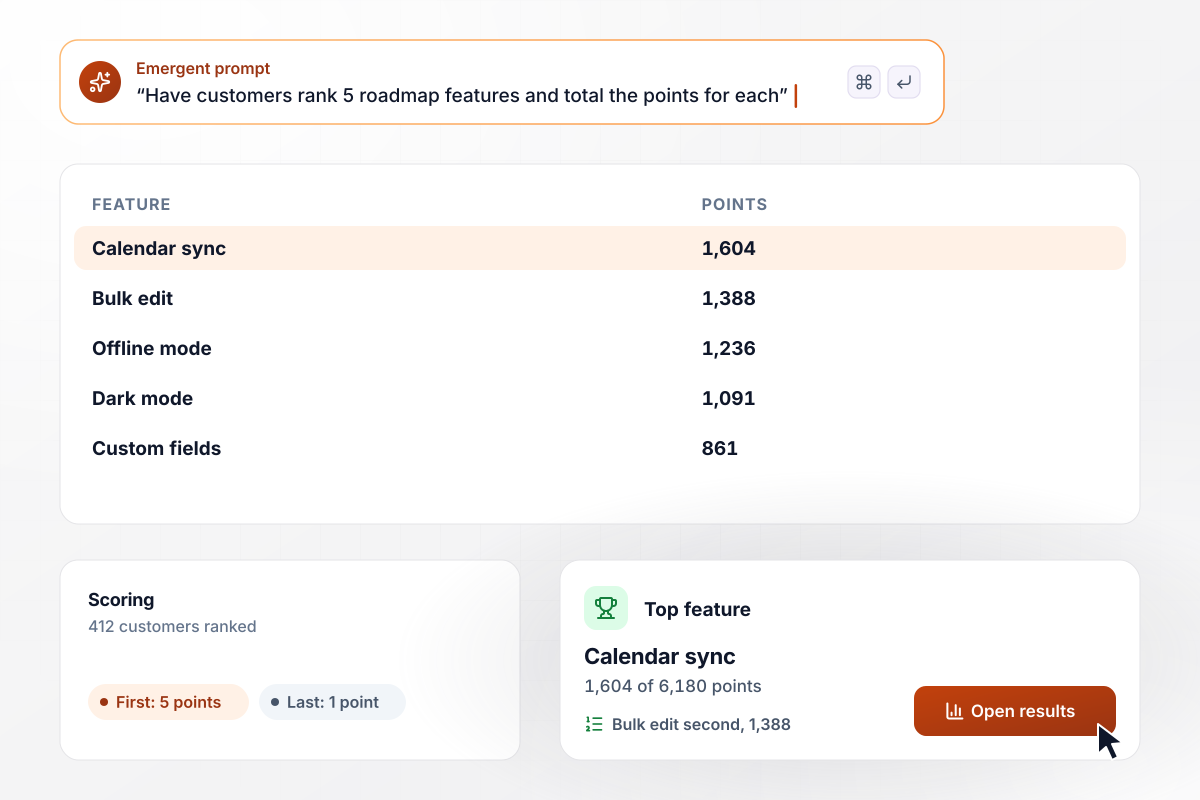
Calendar sync wins on points, 1,604 of 6,180
Glimmerbook asks 412 customers to rank 5 roadmap features. The dashboard gives 5 points for a first place down to 1 for last and totals each feature. Calendar sync leads with 1,604 points, and bulk edit is second at 1,388.
window.awbMockup = { productTeams: "Build a ranking survey for my product team. Customers rank 5 roadmap features: calendar sync, bulk edit, offline mode, dark mode, and custom fields. Score 5 points for first place down to 1 for last, and show a dashboard with total points per feature, sorted from highest to lowest, plus the number of customers who answered.", retailBrands: "My coffee company sells 4 blends: single origin, house blend, dark roast, and decaf. Ask buyers to rank them and ask whether they subscribe or are buying for the first time. Show a table of first choices for each blend, with subscribers and first-time buyers in separate columns, and highlight the top blend in each group.", eventOrganizers: "Build a phone-friendly survey for my design conference. Registered attendees drag 6 session topics into order, one question per screen, then tap Next. Show a running count of first-place votes for each topic and the total number of attendees who have ranked so far, so I can plan the program.", itTeams: "My IT team needs department heads to rank 5 project requests: laptop refresh, VPN upgrade, help desk portal, office Wi-Fi, and backup testing. Give 5 points for first place down to 1 for last. When the survey closes on Friday, post the final order with points to our #it-planning Slack channel." };
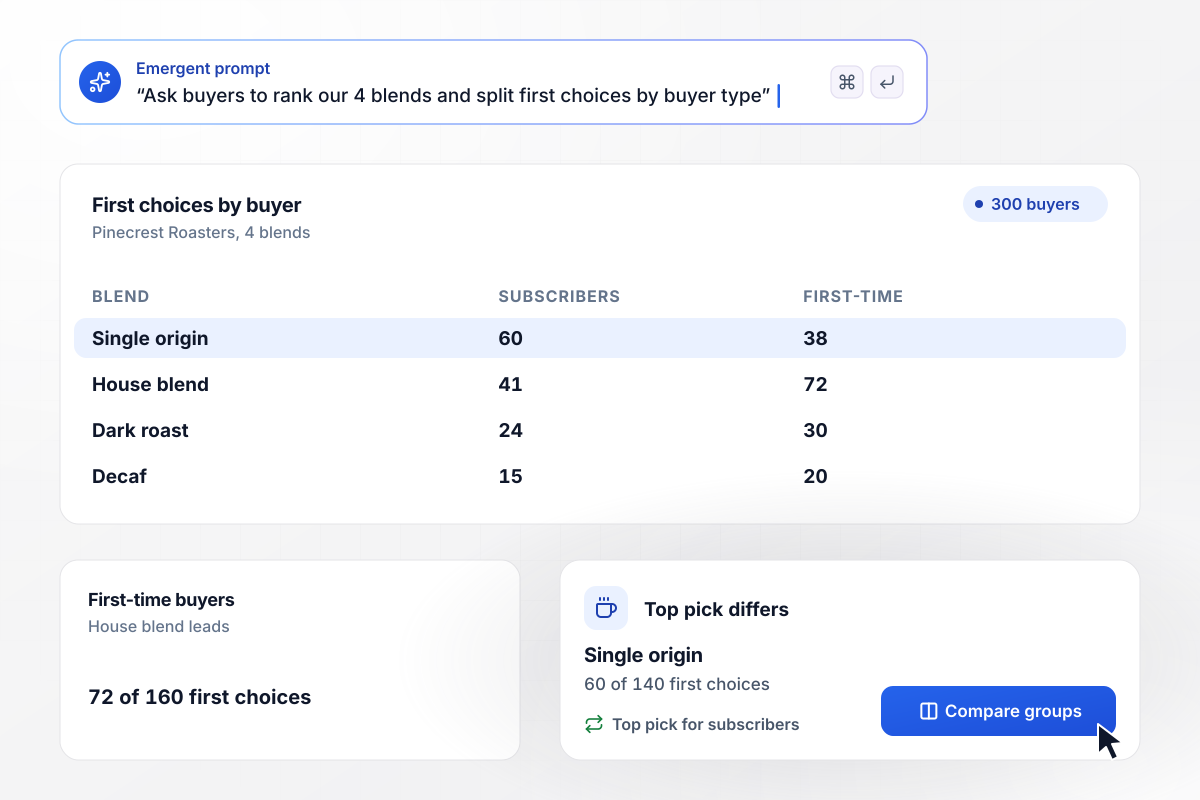
Each buyer group puts a different blend first
Pinecrest Roasters sells 4 blends and asks 300 buyers to rank them, plus one question on how they buy. Among 140 subscribers, 60 put the single origin first. Among 160 first-time buyers, 72 put the house blend first, and the dashboard sets the two groups side by side.
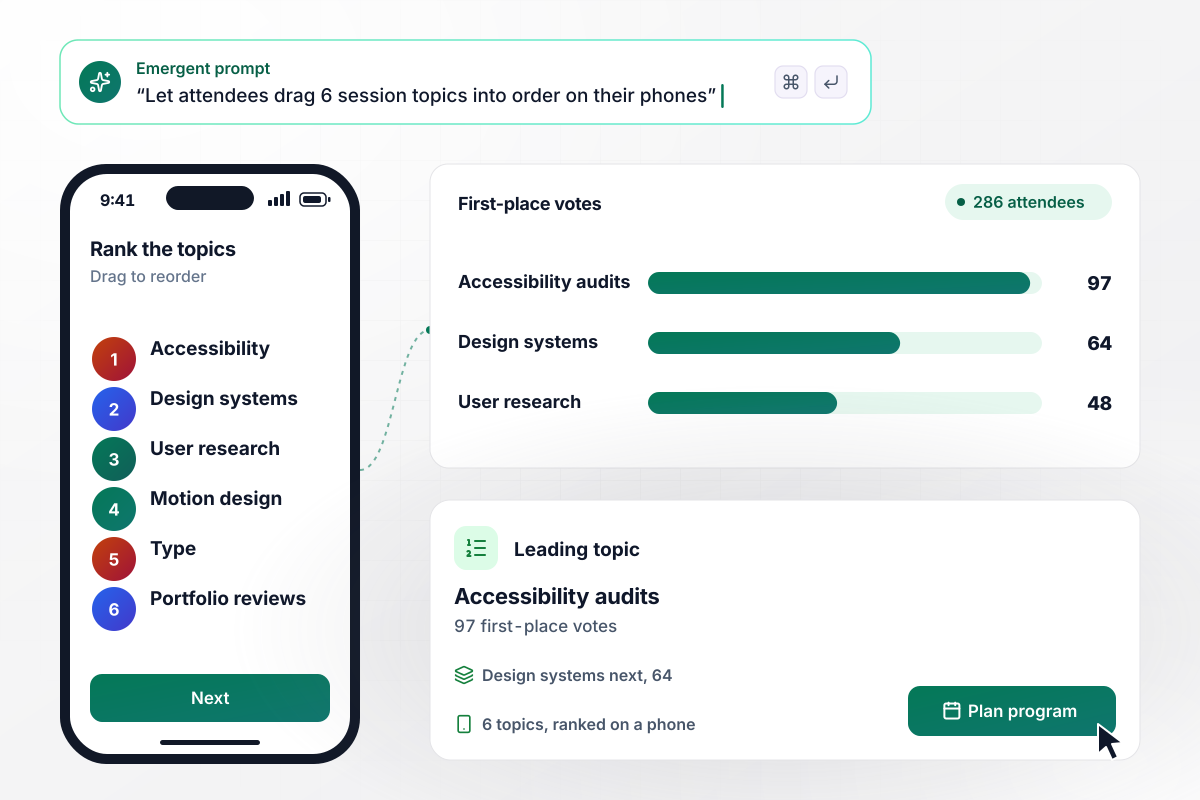
On a phone, 286 attendees drag topics into order
The Mosswood Design Summit asks 286 registered attendees to rank 6 session topics before it sets the program. Each attendee drags the topics into place on a phone, one question per screen. Accessibility audits draws 97 first-place votes, and design systems follows with 64.
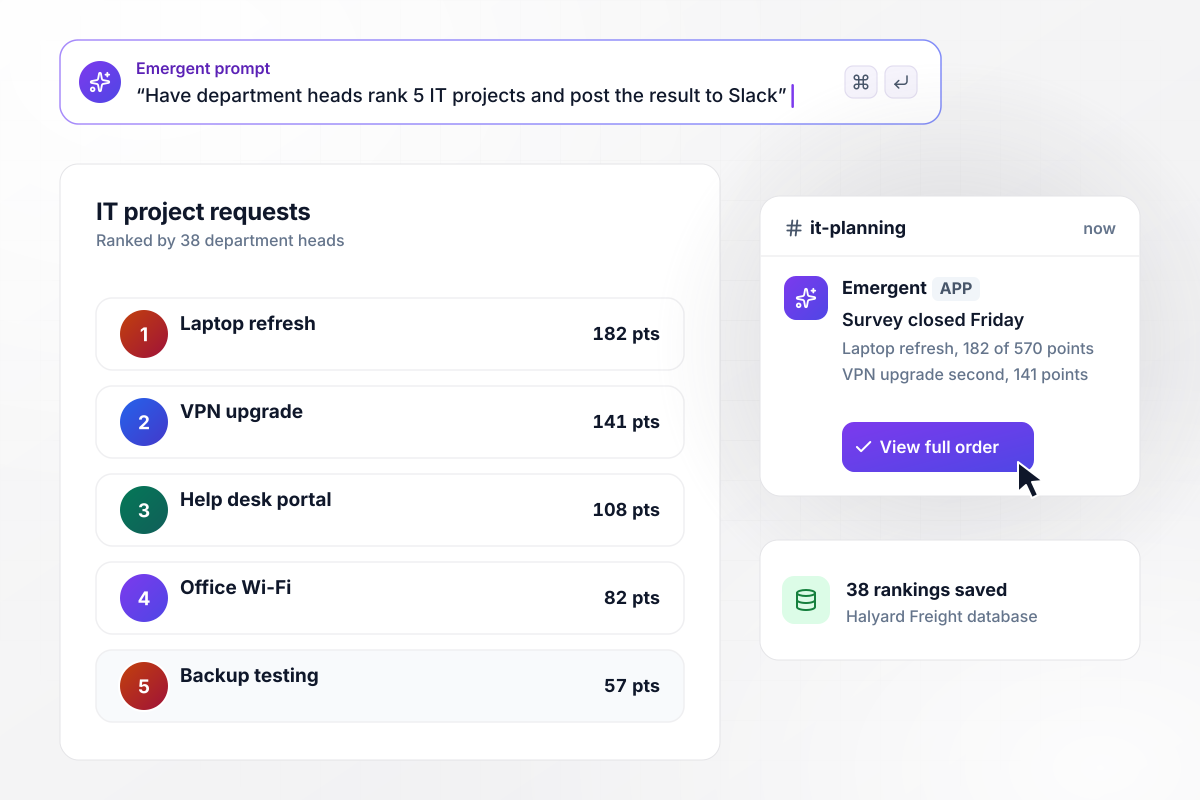
The final order lands in #it-planning on Friday
Halyard Freight's IT team asks 38 department heads to rank 5 project requests. When the survey closes on Friday, the app posts the final order to the #it-planning Slack channel. The laptop refresh comes first with 182 of 570 points, ahead of the VPN upgrade at 141.






How to Create a Ranking Survey
Seven steps to create a ranking survey with Emergent, score each item by points, and see which one people put first.
Pick the decision the ranking feeds before you list a single item: which feature ships next, or which blend goes on the homepage. An item that cannot change that decision does not belong on the list. Write the rest down in plain words.
Keep only the items you could act on. Each item you add is one more that every respondent has to weigh against all the others, and the places in the middle of a long list carry the least signal. Five or six is plenty.
Describe the survey in a prompt: the items, who answers, and how many points each place earns. Emergent builds the ranking question, the respondent screens, and a dashboard that totals the points. Ask for changes the same way, in plain English.
Add a question or two that describe the respondent, such as plan type or how long they have been a customer. Place them after the ranking, so the list is the first thing people see and answer while their attention is fresh.
Send the survey to five colleagues and watch two of them rank on a phone. If anyone asks what an item means, rename it in plain words. Check that each test ranking reaches the dashboard with the points you expect.
Publish the survey and share the link by email or inside your product. Set a closing date before you send it, and ask Emergent to add a reminder email for anyone who has not answered after 3 days.
Read the points total next to the count of first places. An item that leads on both is a clear winner. An item with high points but few first places is broadly liked yet rarely anyone's favorite; weigh it against the leader before you decide.
Why Build Your Ranking Survey With Emergent?
Every ranking lands as a row in a database you own, and no response cap stops the count when a survey goes to every customer.

|
SurveyMonkey | Microsoft Forms | SurveyHero | |
|---|---|---|---|---|
| What you get | Survey, logic, and response database, as code you own | Survey builder with templates, including employee engagement | Surveys, quizzes, and polls with response summaries | Survey builder with templates, including employee satisfaction |
| Pricing model | Credits, no response caps or per-response fees | Per-user team plans with a seat minimum, billed annually | Free with a Microsoft account; included in Microsoft work and school subscriptions | Free plan, then per-account plans with unlimited responses |
| Where responses live | A database table you own, plus any integration | SurveyMonkey account | Microsoft Forms, with export to Excel | SurveyHero account, EU data centers |
| Code ownership | Full code export to GitHub on paid plans | None | None | None |

Pick the Pricing Plan That Works for You
Choose the plan that fits your building ambitions. From weekend projects to enterprise applications, we've got you covered.




Find the right survey, quiz, or poll
for your team















Frequently Asked Questions
Your Questions, Answered
Don't change this element unless you know what you are doing
More things you can build
with Emergent









on Emergent today


