

Build a Pricing Survey and Test Prices Before You Set Them
Build a pricing survey that asks what buyers would pay, lowers the price after a no, and saves each answer to a database you own.
Build a pricing survey for my scheduling app that asks trial users and current customers what they would pay.
Trusted by Builders Worldwide
Active Builders Worldwide
Apps Successfully Created
Countries Globally Reached



What Goes Into a Pricing Survey Build
What Emergent builds behind the price questions, and where each answer goes once a respondent submits it.
Price questions drafted from your product
Describe the product, who buys it, and the price you have in mind. Emergent drafts the survey and its logic, and you change any question later by typing a follow-up prompt.
A lower price after every no
List your price steps, say $59, $49, and $39. The app shows the same buying question at the next step down to anyone who says no, and records the price each one accepts.
One price question per screen
Respondents answer one price question at a time, with the product description kept above it. Nobody sees the next price until they have answered the one in front of them.
Every answer saved with its price
Each answer is a row in a database you own: the respondent, the price shown, the answer, and the date. Sort it by price step or customer group as soon as the survey closes.
No cap on responses
Send the survey to every customer on your list. Emergent sets no response cap, so a 50-person pilot and the full send to 2,000 customers run on the same survey and database.
The full code in your GitHub
On paid plans, export the full code of the survey and its price logic to your GitHub repository, and keep it next to the rest of your own product code from that day on.
How Four Teams Tested a Price
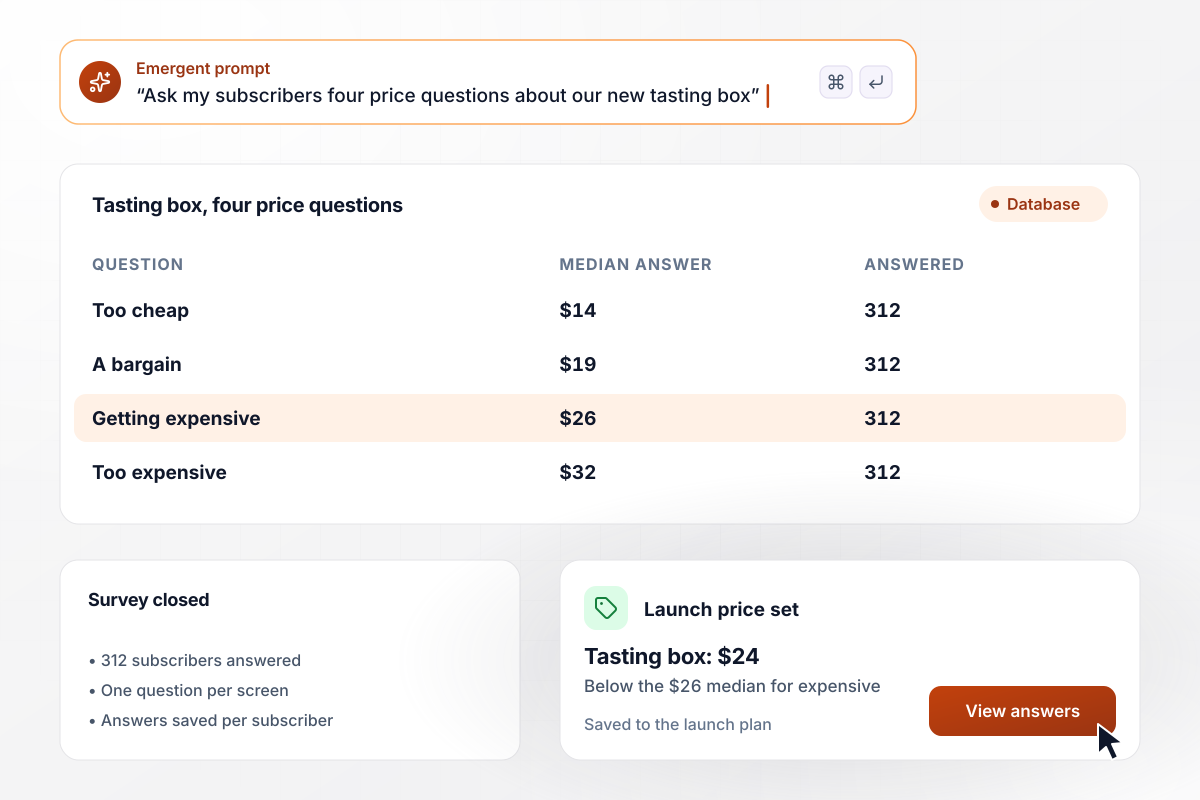
A $24 box from four price questions
Cobbleway Coffee asked 312 subscribers four price questions before launching a tasting box. The median answers came back at $14 for too cheap, $19 for a bargain, $26 for getting expensive, and $32 for too expensive. Cobbleway set the launch price at $24, under the $26 point where the box starts to feel expensive.
window.awbMockup = { coffeeBoxPriceRange: "Build a pricing survey for a new coffee tasting box my roastery is launching. Show a short description of the box, then ask my subscribers four price questions, one per screen: too cheap, a bargain, getting expensive, and too expensive. Save every answer with the subscriber, and show me the median answer for each question.", softwarePriceLadder: "Create a pricing survey for my design app's trial users. Ask how likely they are to buy at $59 a month on a five-point scale. If they pick a not likely answer, ask again at $49, then at $39. Show me how many would buy at each price and the monthly revenue that count brings in.", priceIncreaseCheck: "My pest control company is raising its quarterly plan to $135. Build a survey that tells each customer the new price and asks if they will stay, might stay, or would cancel. Send every would cancel answer to our office manager as a Slack direct message, and save each answer with the customer's account.", planChoiceSurvey: "Build a survey for my bookkeeping app that shows three plan cards: Starter at $15, Team at $35, and Pro at $70, each with its features. Ask each small business owner to pick the plan they would buy. Count the picks for each plan and save every answer to my database." };
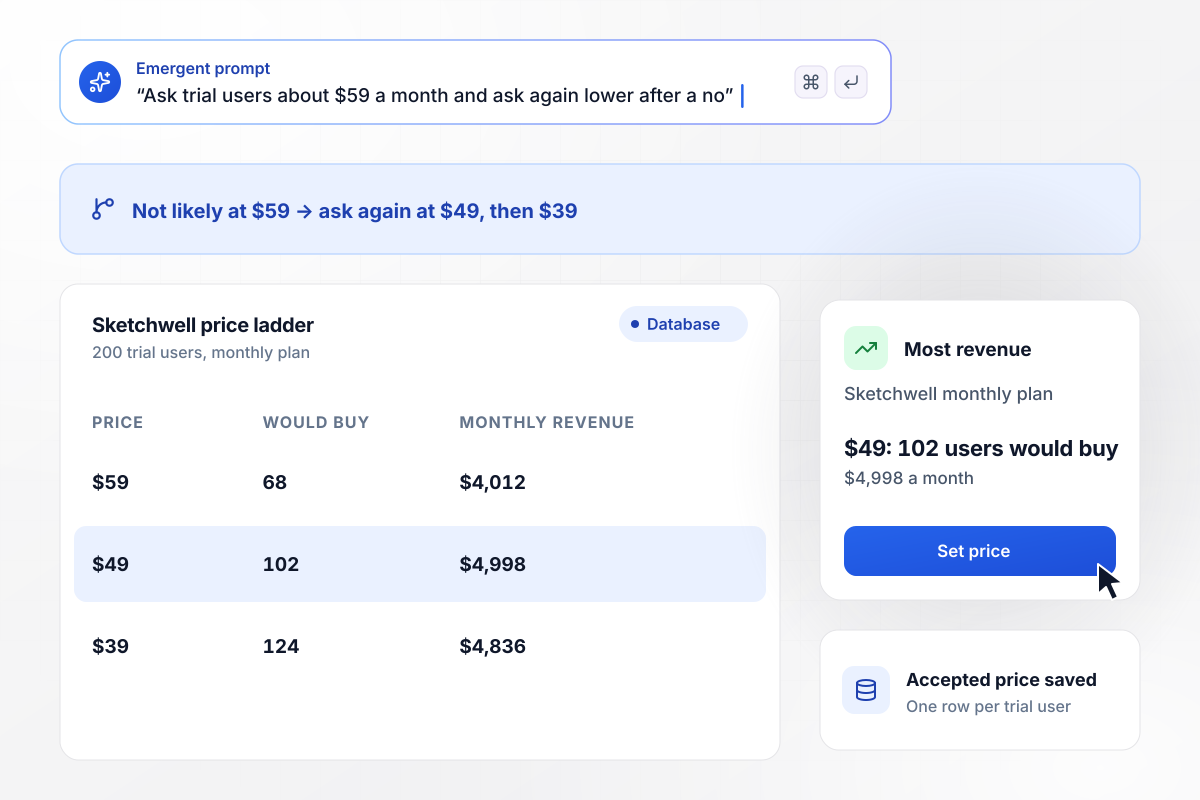
A no at $59 brings the question back at $49
Sketchwell put one question to 200 trial users: how likely are you to buy at $59 a month? Anyone who picked a not likely answer at $59 saw the question again at $49, then at $39. At $49, 102 users would buy, or $4,998 a month, more than either other price brings in. Sketchwell priced the plan at $49.
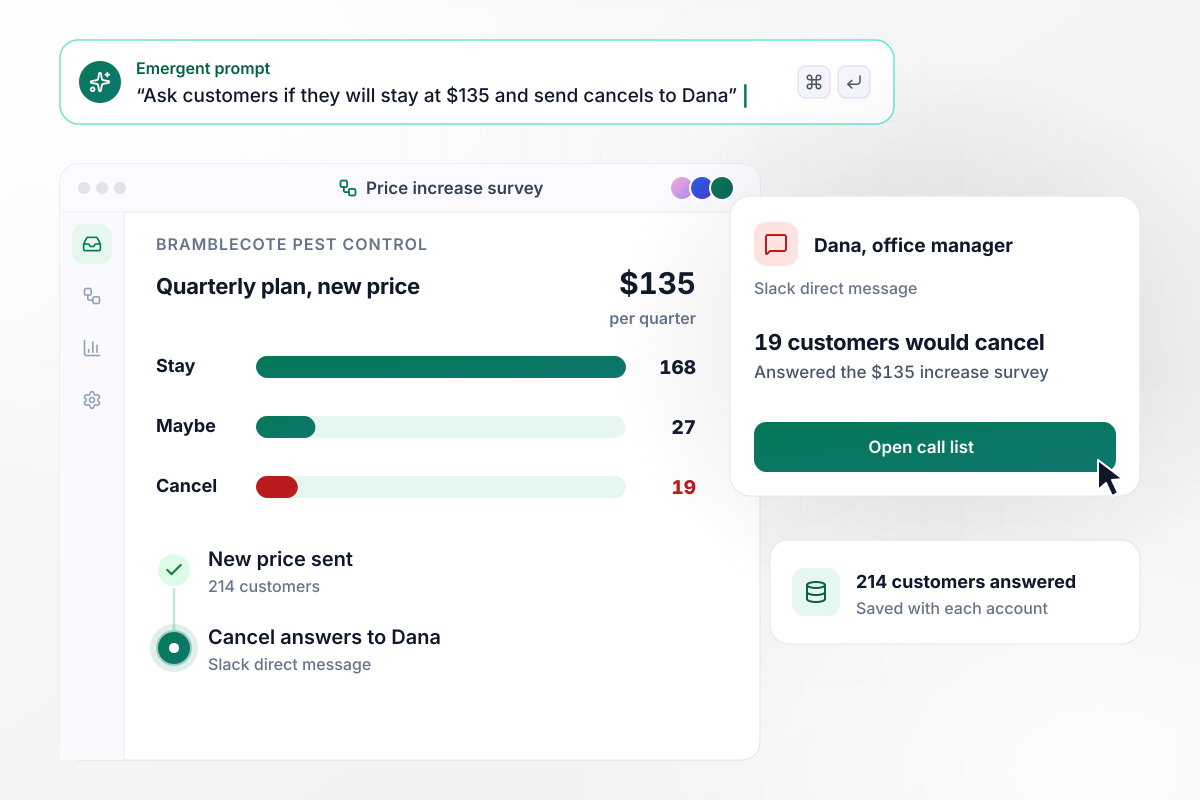
19 customers who would cancel get a call
Bramblecote Pest Control is raising its quarterly plan to $135. The survey told 214 customers the new price and asked whether they would stay. Each of the 19 who said they would cancel went to Dana, the office manager, as a direct message in Slack, and she called them before the new price started.
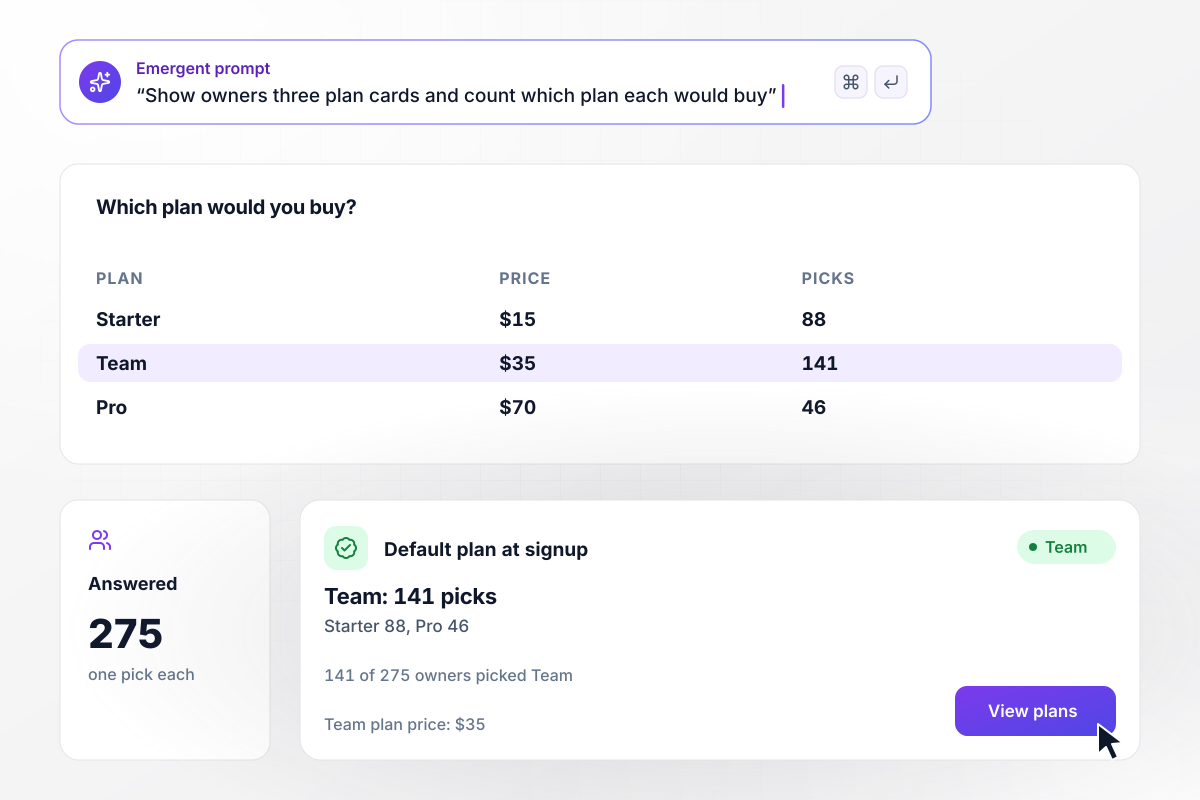
Team at $35 is the pick for 141 of 275
Tallyroom showed 275 small business owners three plan cards and asked each to pick the one they would buy: Starter at $15, Team at $35, or Pro at $70. Team drew 141 picks, Starter 88, and Pro 46. Tallyroom made Team the default plan at signup.






How to Create a Pricing Survey
Seven steps to create a pricing survey that finds the price your buyers accept, then build it with Emergent.
Pick the method by what you already know. Van Westendorp fits when you don't have a target price in mind yet. A price ladder fits when you have a few prices to choose between and want the one that brings in the most revenue.
Send the survey to people who could realistically buy: trial users, current subscribers, or buyers in your category. Leave out staff, friends, and anyone outside your market, since their answers say little about what a real buyer would pay.
Open with a short description of the product: what it does, what is included, and whether it is billed monthly or yearly. Ask about price only after that screen, so every respondent judges the same offer.
If you have a target price, offer closed price options and put the target in the middle of your options. If you have none, use open number fields for the four price questions and let the answers set the range.
For a price ladder, ask how likely the respondent is to buy at your highest price. Anyone who picks one of the bottom three answers sees the same question at the next price down, until they accept or the ladder ends.
Send the survey to five people before the full list. Check that each price shows where it should, that the lower price appears after a no, and that every answer lands in the database next to the price shown.
Once the survey closes, line up the answers for each price and pick the one you will charge. Keep the survey as it is, and run it again before the next price change so you can compare the two sets of answers.
Why Build Your Pricing Survey With Emergent?
Every answer stays tied to the price that person saw, in a database you own. Adding a new price step takes one more prompt.

|
SurveyMonkey | Microsoft Forms | SurveyHero | |
|---|---|---|---|---|
| What you get | Survey, logic, and response database, as code you own | Survey builder with templates, including employee engagement | Surveys, quizzes, and polls with response summaries | Survey builder with templates, including employee satisfaction |
| Pricing model | Credits, no response caps or per-response fees | Per-user team plans with a seat minimum, billed annually | Free with a Microsoft account; included in Microsoft work and school subscriptions | Free plan, then per-account plans with unlimited responses |
| Where responses live | A database table you own, plus any integration | SurveyMonkey account | Microsoft Forms, with export to Excel | SurveyHero account, EU data centers |
| Code ownership | Full code export to GitHub on paid plans | None | None | None |


Pick the Pricing Plan That Works for You
Choose the plan that fits your building ambitions. From weekend projects to enterprise applications, we've got you covered.




Find the right survey, quiz, or poll
for your team















Frequently Asked Questions
Your Questions, Answered
Don't change this element unless you know what you are doing
More things you can build
with Emergent









on Emergent today


