

Build a Restaurant Survey That Reaches the Manager on Shift
Create a restaurant survey diners scan from the check, with each low score sent to the manager while they are still there.
Build a restaurant survey that guests open from a QR code and that alerts the manager to low scores.
Trusted by Builders Worldwide
Active Builders Worldwide
Apps Successfully Created
Countries Globally Reached



What a Restaurant Survey Needs to Do
Each part below follows a shift: the table that paid, the order that left the kitchen, and the menu that changes next season.
Questions written for diners
Describe your restaurant and how you serve. Emergent drafts restaurant survey questions on food, service, and wait times, worded for a guest reading on a phone before leaving.
A link tied to each table or order
Print a QR code on the check or text a link after delivery. Each link carries the table or order number, and every answer arrives already matched to the exact visit it rates.
Alerts while guests are still seated
Set the score that counts as a problem. A rating at or below it sends the manager on duty a Slack message or an email with the check number, the score, and the comment.
Every location on one dashboard
Run one survey at all your locations and compare their averages week by week. Sort the results by any question to find the dining room or kitchen that trails the others.
Menu tests that end in a decision
Ask guests who ordered a new dish whether they would order it again. Set how many answers count and the share of yes votes that keeps a dish, then see which dishes pass.
Answers and code you keep
Store every response in a database you own, with no cap on how many people answer each month. Export the full code to your GitHub repository on paid plans and build on it.
Four Restaurant Surveys Wired Into Service
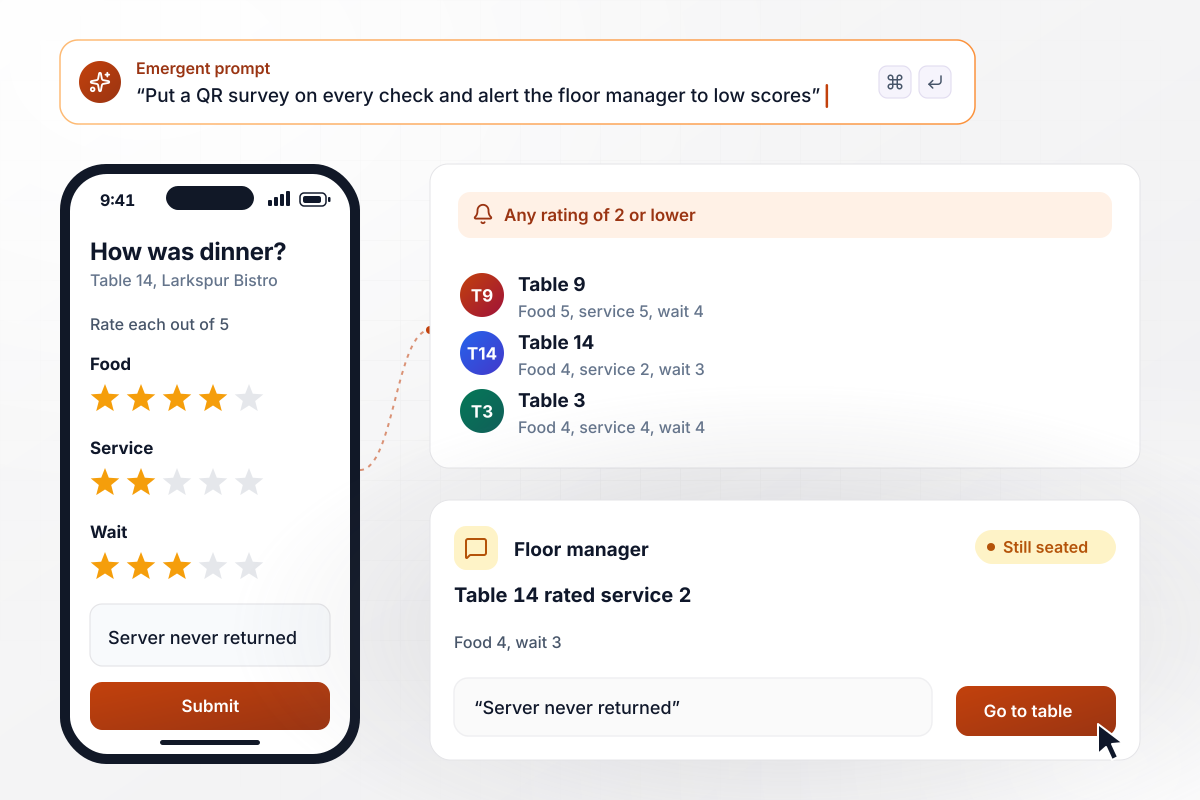
A low score reaches the floor before the table leaves
Every check at the bistro carries a QR code with the table number in the link. Diners rate the food, the service, and the wait out of 5, then add a comment if they like. Any rating of 2 or lower sends the floor manager a Slack message while the party is still seated.
window.awbMockup = { dineInTables: "Build a survey for my bistro. Print a QR code on every check that opens a short survey with the table number filled in. Ask guests to rate the food, the service, and the wait out of 5, with an optional comment. When any rating is 2 or lower, send the floor manager a Slack message with the table number, the scores, and the comment.", deliveryOrders: "Build a delivery survey for my pizza shop. Thirty minutes after the driver marks an order delivered, text the customer through Twilio. Ask whether the food arrived hot, whether anything was missing, and for a rating out of 5. When an answer names a missing item, email the kitchen lead the order number and the item.", multiLocationChain: "Build one restaurant survey for all six locations of my taco chain, with the same questions everywhere. Show a weekly view with each location's answer count and its average for food and for the wait. Highlight any location scoring well below the rest, and let the operations lead open the comments behind that score.", newMenuItems: "Build a menu test for my cafe. Guests who ordered one of our four new spring dishes get one question on their receipt link: would you order it again? Show each dish's count of yes answers. After 50 answers for a dish, mark it for removal if fewer than 30 said yes." };
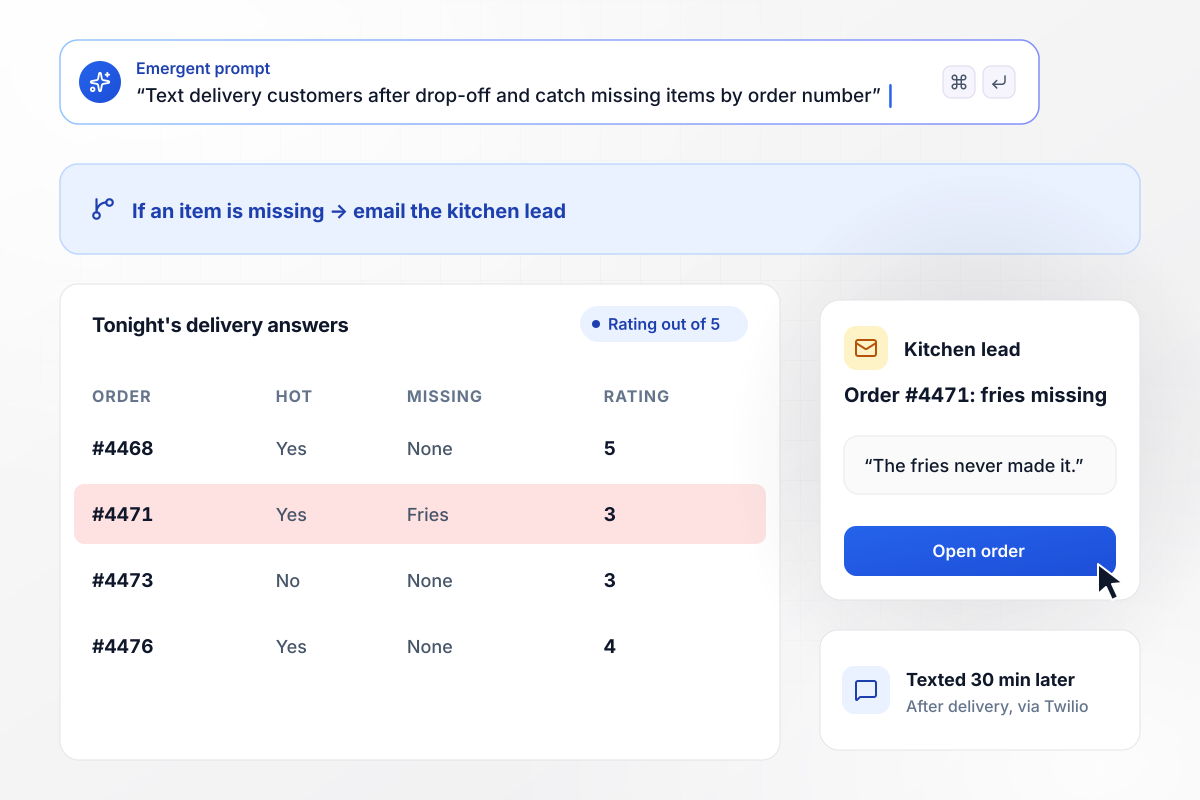
Fries missing from the bag, flagged within the hour
Thirty minutes after the driver marks an order delivered, the pizza shop texts the customer through Twilio. The text asks whether the food arrived hot, whether anything was missing, and for a rating out of 5. When an answer names a missing item, the kitchen lead gets an email with the order number and the item.
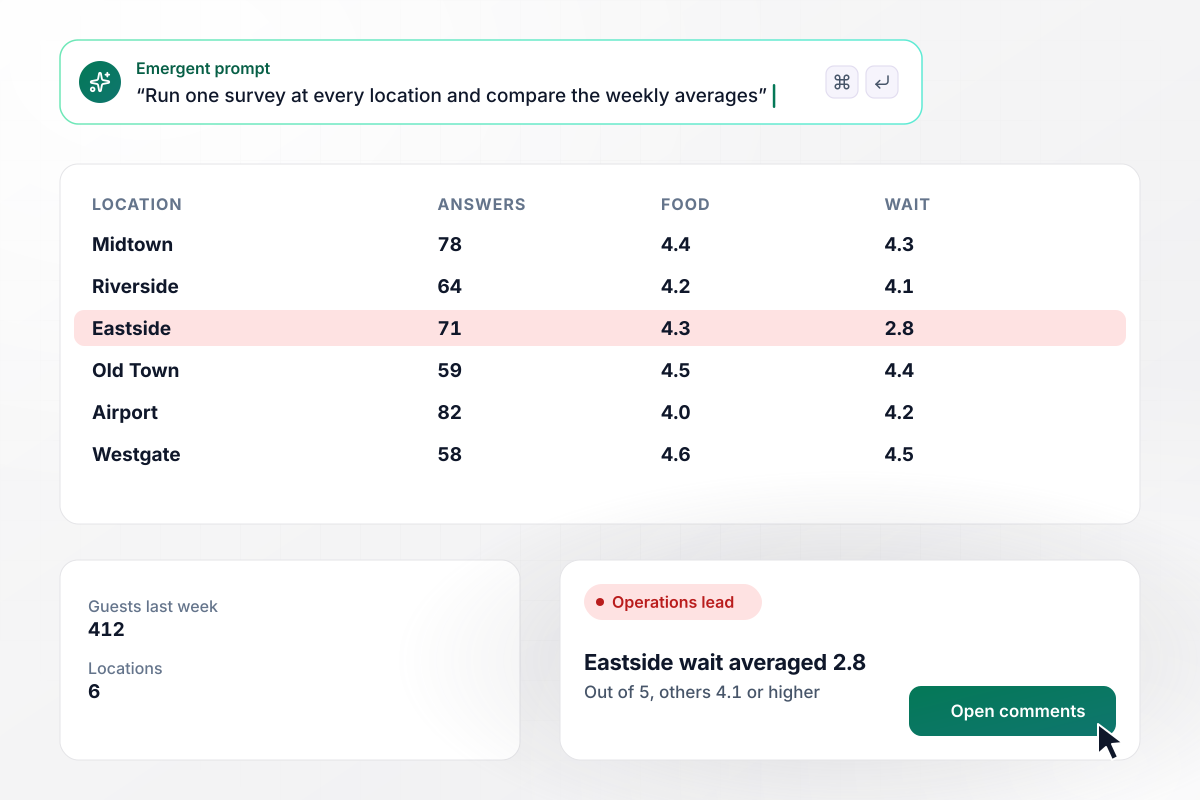
Six kitchens, one wait time out of line
All six locations of a taco chain ask the same questions, and the answers roll into one weekly view. Last week 412 guests replied. The Eastside wait averaged 2.8 out of 5, while every other location scored 4.1 or higher, and the operations lead opened its comments first.
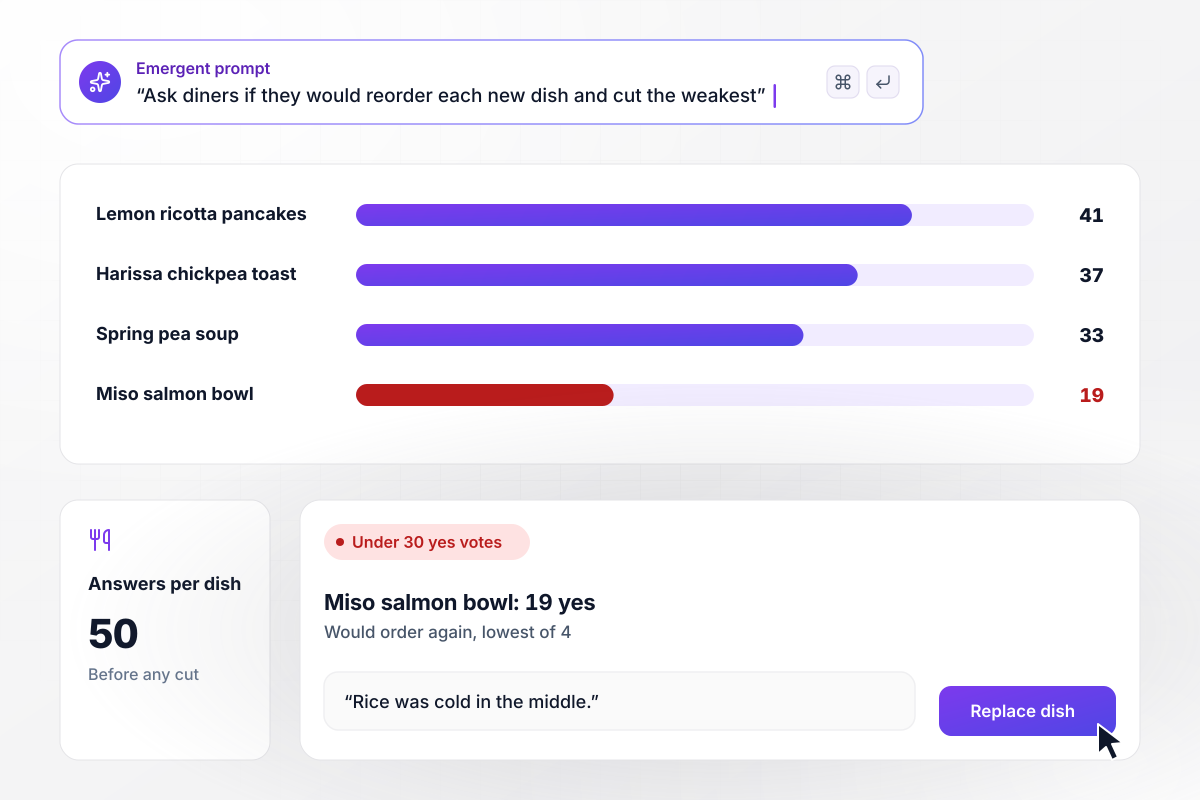
Fifty votes decide each spring dish
Four new dishes went on the spring menu at a neighborhood cafe. Guests who ordered one get a single question on their receipt link: would you order it again? After 50 answers per dish, any dish with fewer than 30 yes votes comes off. The miso salmon bowl stopped at 19 and was replaced.






How to Run a Restaurant Survey
Seven steps to run a restaurant survey that guests finish and managers act on, then build it with Emergent.
Before writing a question, name the person who will act on it. A low service score on a Friday night belongs with the floor manager. A missing item belongs with the kitchen. A question nobody owns ends up as a number in a monthly report.
Guests answer on a phone, often while reaching for a coat. Completion drops as surveys get longer, and customers put up with length less than employees do. Stick to a few ratings and one open box, and cut any question you would not act on.
Rating the food and the service in one question gives a number nobody can use. Split them, and keep the wording neutral as well. Ask how the wait was, not how much the diner enjoyed the quick service, because loaded wording pushes answers one way.
Put the table, check, or order number in the survey link. Each answer then sits next to the visit it describes. A complaint about cold pasta traces back to the night and the station that cooked it.
Pick the score that should pull a manager away mid-shift, such as a service score under 3. Set it too high and managers start ignoring alerts. Set it too low and a bad night passes with nobody hearing about it until the reviews show up.
Restaurant survey examples often mix questions freely, but a chain cannot compare locations that way. Give every location identical questions in the same order. If one site needs its own question, add it after the shared ones so the averages still line up.
An average points to the problem; the comments explain it. Each week, open the lowest-scoring question at each location and read every comment under it before the staff meeting. Quote one or two to the team that owns the fix.
Why Build Your Restaurant Survey With Emergent?
A restaurant survey template stops at the questions. Emergent builds the alerts and dashboards behind them from one prompt.

|
SurveyMonkey | Typeform | Jotform | |
|---|---|---|---|---|
| How you build | Prompt for the survey, quiz, or poll and the app around it | Templates and editor | Templates and editor, AI assist | Templates, editor, AI generator |
| Response limits | No response caps | Response caps by plan | Monthly response caps by plan; the form stops at the cap | Monthly submission caps by plan |
| Behavior at cap | Keeps collecting, no cap | Overage billed per extra response | Form stops collecting | Form is disabled until the reset or an upgrade |
| Where responses live | A database table you own, plus any integration | SurveyMonkey account | Typeform account | Jotform account |
| Code ownership | Full code export to GitHub on paid plans | None | None | None |


Pick the Pricing Plan That Works for You
Choose the plan that fits your building ambitions. From weekend projects to enterprise applications, we've got you covered.




Find the right survey, quiz, or poll
for your team
Frequently Asked Questions
Your Questions, Answered
Don't change this element unless you know what you are doing
More things you can build
with Emergent









on Emergent today


