

Build a Website Feedback Survey That Shows What to Fix
Build a website feedback survey that asks visitors one question per screen and saves every answer to a database you own.
Build a website feedback survey for my software company's site and help center before a spring redesign.
Trusted by Builders Worldwide
Active Builders Worldwide
Apps Successfully Created
Countries Globally Reached



What Emergent Puts in Your Feedback Survey
Describe your site and the pages you want feedback on. Emergent builds each part below, and a second prompt changes any of it.
Questions for each kind of page
Name the pages you want rated, such as help articles, pricing, or checkout. Emergent writes the questions for each one, and a follow-up prompt changes any wording before launch.
Every answer in a database you own
Each answer lands as a row in a database you own, beside the page it rates and the date. Filter by page to see which help article or pricing page draws the most complaints.
Problem reports posted to Slack
Problem reports reach the web team through Slack or email alerts, under a rule you set, such as 3 reports naming one page in a day. Single reports wait in the table for review.
One question per screen on a phone
Visitors on a phone see one question per screen, with a large tap target for each answer. The same survey works on a laptop, and Emergent puts no cap on how many visitors answer.
Answers sent to the tools you use
Send answers on to your help desk, CRM, or analytics tool through its API. A support lead can open a ticket from a complaint without copying text out of the survey by hand.
Your domain and the full code
Host the survey on your own domain, included in Emergent and billed in credits. On paid plans, export the full code to your GitHub repository and keep it with your site.
Four Website Feedback Surveys at Work
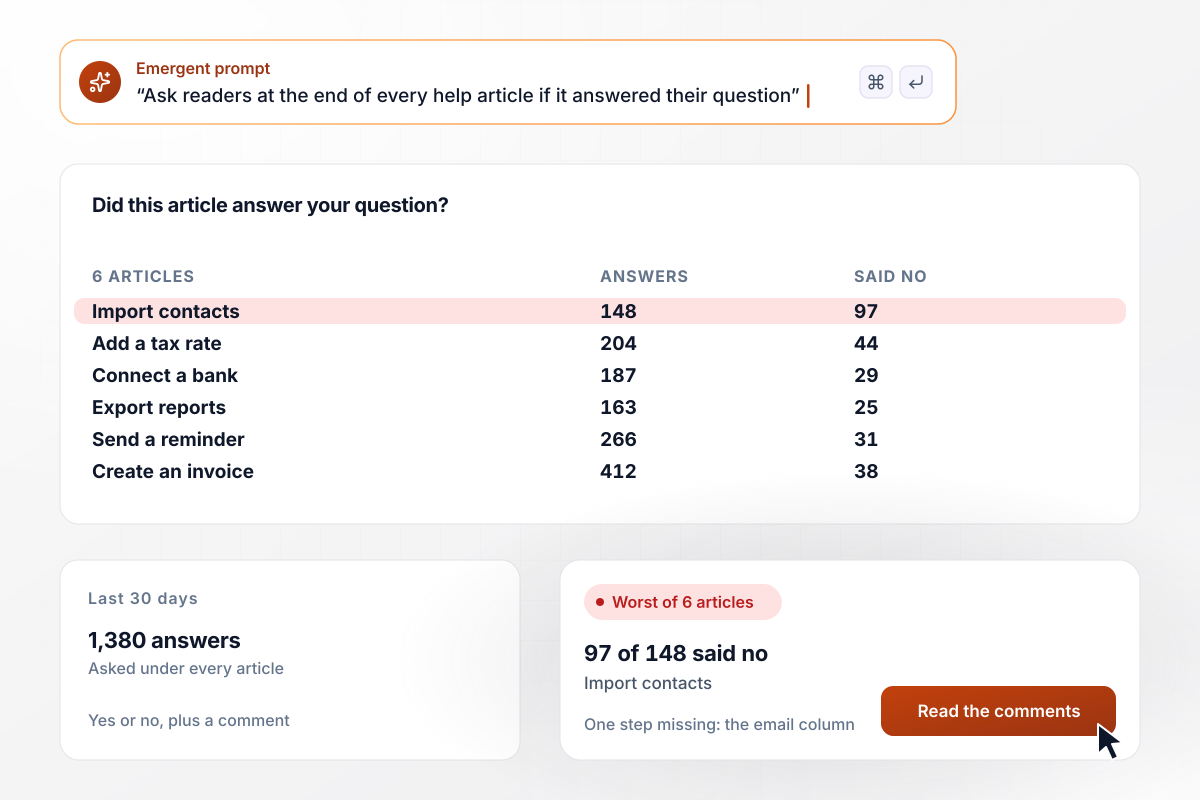
Import contacts fails 97 readers when one step is missing
Ledgerwick ends every help article with a single question: did this article answer your question? Over 30 days, Import contacts draws 148 answers and 97 say no, the worst of 6 articles. The comments describe the same gap: the article never says how to match the email column.
window.awbMockup = { helpCenter: "Add a feedback question to the end of every article in my help center: did this article answer your question, yes or no, with a comment box for anyone who says no. Collect answers for 30 days, then rank the articles by the share of readers who said no and show me their comments.", storeVisits: "Build a 2-question survey for every visitor to my baking supply store for 14 days. Ask what they came to do today, with choices for home baking supplies, wholesale orders, and order tracking, then ask if they did it. Show how many in each group finished, with their comments.", problemReports: "Create a Report a problem form for the footer of my library website. Ask which page the visitor was on and what went wrong. When 3 reports name the same page within 24 hours, post the page, the count, and the latest comment to the #web-fixes channel in Slack.", siteRelaunch: "I need a short survey for phone visitors to my dental practice website, one question per screen. The first question asks if they could find how to book an appointment. Run it before and after our site relaunch and show the yes answers from both rounds side by side." };
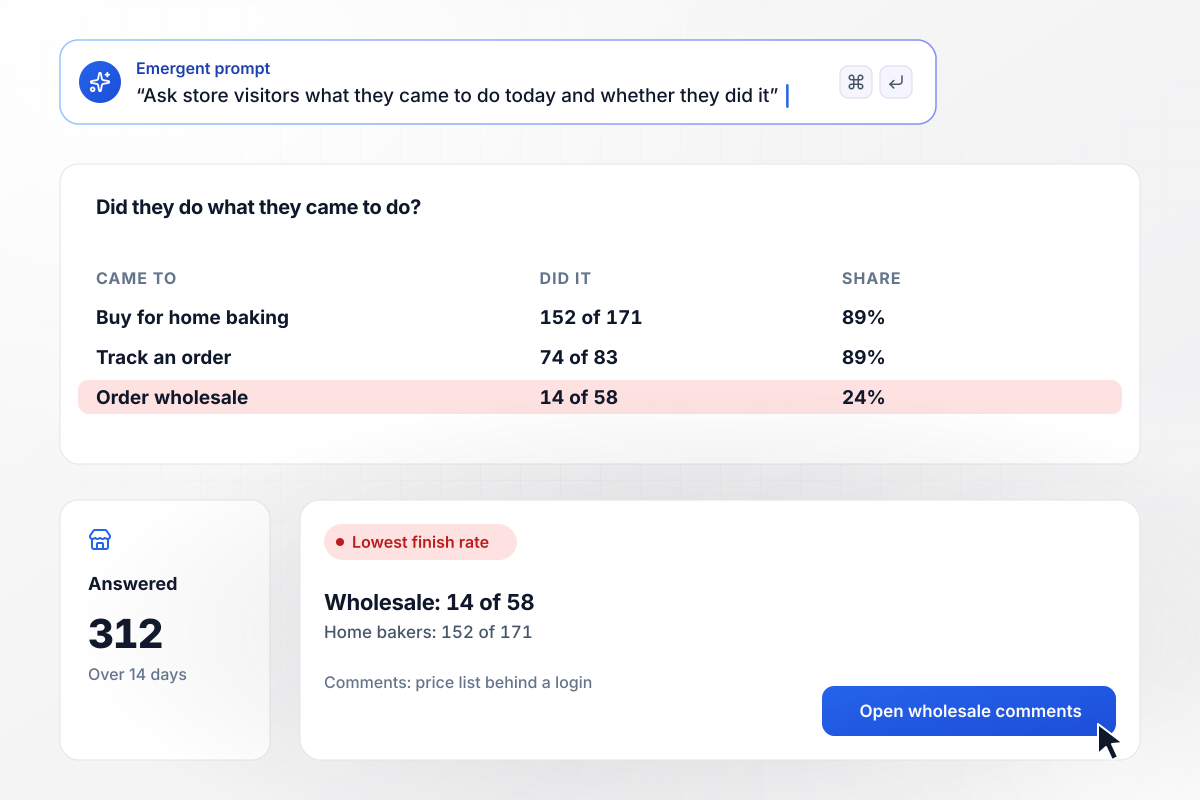
Wholesale buyers quit before reaching the price list
For 14 days, Pinfold Baking Supply asks every visitor what they came to do, and whether they did it. Of 312 who answer, 58 are wholesale buyers, and only 14 of them did. Home bakers finished at 152 of 171. The wholesale comments say the price list sits behind a login.
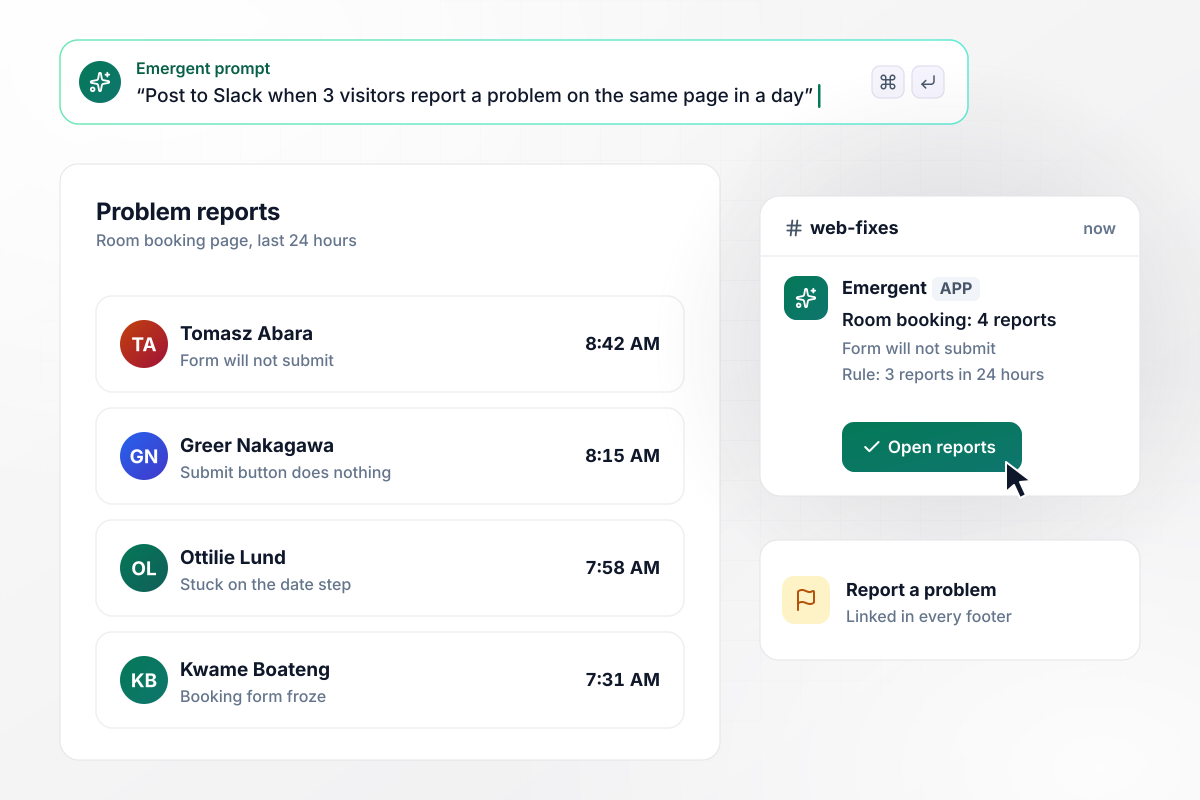
Three reports on one page post to #web-fixes
Oxbury Public Library puts a Report a problem link in the footer of every page. The form asks which page and what went wrong. When 3 reports name the same page within 24 hours, the app posts in the #web-fixes Slack channel. This morning, 4 reports on the room booking page said the form would not submit.
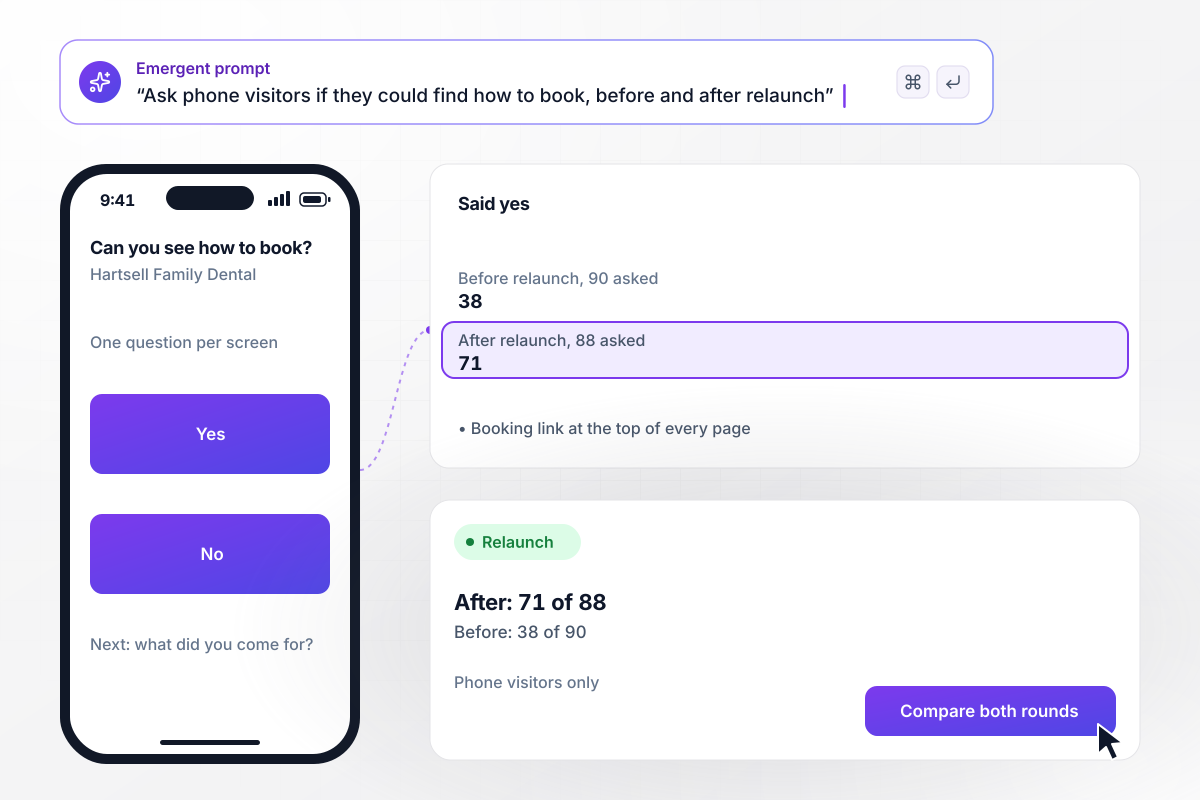
After the relaunch, phone visitors find the booking link
Hartsell Family Dental asks phone visitors one question per screen, starting with: can you see how to book? Before the relaunch, 38 of 90 said yes. The new site puts the booking link at the top of every page, and after the relaunch 71 of 88 said yes.






How to Create a Website Feedback Survey
Seven steps to create a website feedback survey that tells you which page to fix first, then build it with Emergent.
Pick the one page decision this survey should settle, such as which help articles to rewrite or where the booking link goes. Write it at the top of your prompt. A question that cannot change that decision comes out before launch.
Open with a question that takes one tap: did this page give you what you came for? A yes or no draws the most answers. Add one open comment box after a no, where the visitor names what was missing.
Ask why the visitor came before you ask how it went. Offer four or five reasons drawn from your own analytics, plus an Other box. A low score then splits by purpose, and you know which group the page failed.
Place the link where the question makes sense: under each help article, on the order confirmation page, or in the footer as Report a problem. Keep it off the first screen of a landing page, where it competes with the page's own goal.
Set a rule for when a problem reaches a person, such as 3 reports on one page within 24 hours. Then name the Slack channel or the person who gets the alert. Everything below the rule waits in the table.
Test the survey on a phone before any visitor sees it. Answer every question, leave the comment box empty once, and submit a no. Check that each answer lands in the table with the right page beside it.
Read the answers on a fixed schedule, weekly for a busy site and monthly for a small one. Sort pages by the share of no answers, fix the worst one, then compare its next round with the last.
Why Emergent for a Website Feedback Survey?
Emergent builds the survey as an app you keep. Responses stay in your own database, with no response caps on busy pages.

|
SurveyMonkey | Typeform | Jotform | |
|---|---|---|---|---|
| How you build | Prompt for the survey, quiz, or poll and the app around it | Templates and editor | Templates and editor, AI assist | Templates, editor, AI generator |
| Response limits | No response caps | Response caps by plan | Monthly response caps by plan; the form stops at the cap | Monthly submission caps by plan |
| Behavior at cap | Keeps collecting, no cap | Overage billed per extra response | Form stops collecting | Form is disabled until the reset or an upgrade |
| Where responses live | A database table you own, plus any integration | SurveyMonkey account | Typeform account | Jotform account |
| Code ownership | Full code export to GitHub on paid plans | None | None | None |

Pick the Pricing Plan That Works for You
Choose the plan that fits your building ambitions. From weekend projects to enterprise applications, we've got you covered.




Find the right survey, quiz, or poll
for your team















Frequently Asked Questions
Your Questions, Answered
Don't change this element unless you know what you are doing
More things you can build
with Emergent









on Emergent today


