

Build Agency Workflow Automation for Every Client Account
Build agency workflow automation that tracks revision rounds, ad spend, and retainer hours for every client account.
Build agency workflow automation that runs on its own and logs every step.
Trusted by Builders Worldwide
Active Builders Worldwide
Apps Successfully Created
Countries Globally Reached



What Emergent Builds Into an Agency App
Agency workflow automation runs the counting and chasing behind each client account, and leaves the creative calls to your team.
Write each client's rules in a prompt
Describe the rules the way you would brief a new account manager, such as how many revision rounds a contract includes. Emergent builds the app, its database, and its logic.
A count of revision rounds on every proof
Each round of client changes is logged against the job. When a request goes past the rounds in the contract, the app marks it out of scope and tells the account lead.
Connects to ad accounts and time trackers
The app connects to any tool with an API, so spend comes in from the ad accounts and hours from the time tracker. Data syncs in and out, and nobody copies numbers by hand.
Alerts that name the person who acts
Pick who hears about each rule and where: a media buyer in Slack, an account lead by email, a freelancer in the app. Unanswered alerts turn into reminders, then escalations.
One live board across client accounts
The dashboard shows every client's spend, retainer hours, and open revision requests, updated live. The records sit in a database you own, and last year's accounts stay on hand.
The agency app's code, in your GitHub
Export the full code of the app to your GitHub repository on paid plans. A developer on your team can read every pacing rule and hours rule before the account leads rely on them.
Four Places Agency Margins Slip
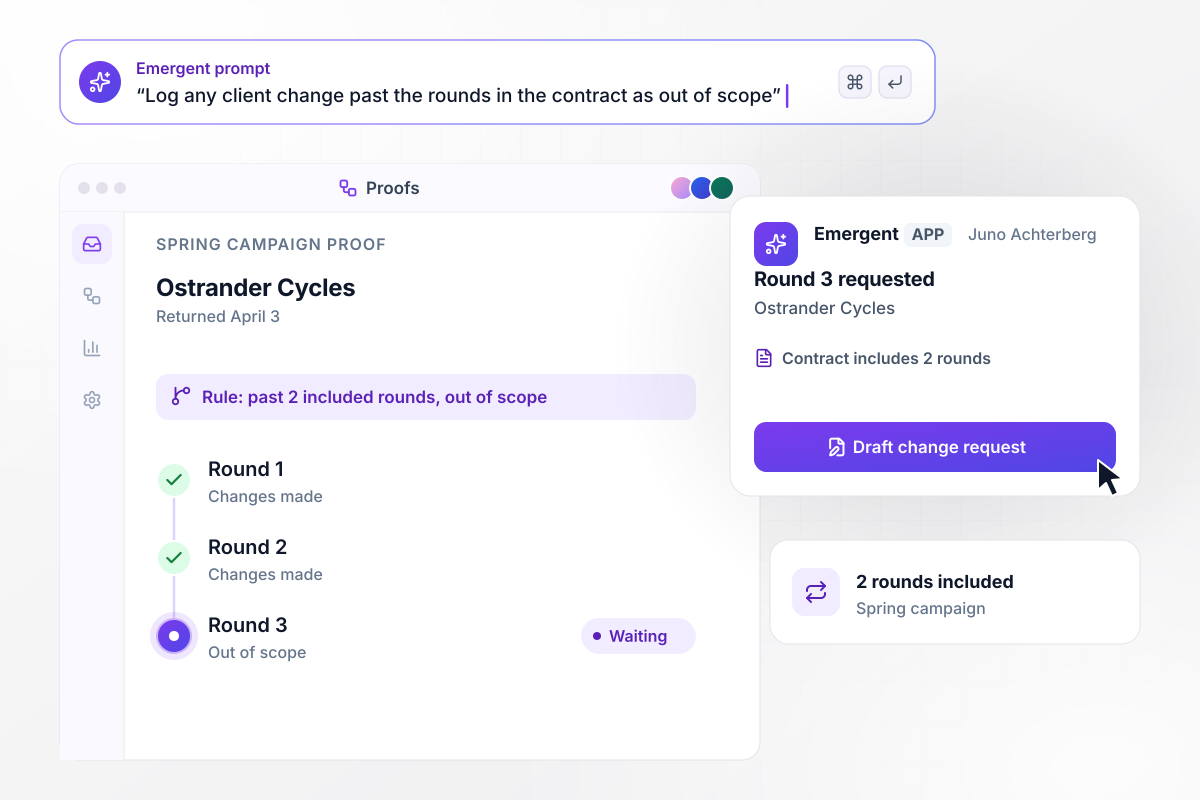
The third proof round goes to the account lead
Ostrander Cycles returns the spring campaign proof on April 3 with a third round of changes. Its contract includes 2 revision rounds. The app logs round 3 as out of scope, and Juno Achterberg, the account lead, gets a Slack direct message with a Draft change request button before anyone edits.
window.awbMockup = { revisionRounds: "Track revision rounds on every client proof my agency sends. Each contract sets how many rounds are included. When a client asks for changes past that number, log the request as out of scope on the job and send the account lead a Slack direct message with a button to draft a change request before anyone edits.", adSpendPacing: "Pull daily spend from each client's ad accounts and compare it with that client's monthly budget. If any client has spent more than half of the month's budget before the 15th, send the media buyer a Slack alert with the spend by campaign and the budget left. Show every client's pacing on one board.", retainerHours: "Read the hours my team logs in our time tracker against each client's monthly retainer. When a client's logged hours come within 10 hours of its retainer, email the account lead the hours used, the hours by person, and the days left in the month.", freelancerJobs: "When a job comes in that my in-house designers have no time for, offer it to the freelancers tagged with the right skill. Give them 2 hours to accept. The first one to accept gets the job, the brief, and the due date in the app, and the others see that it is taken." };
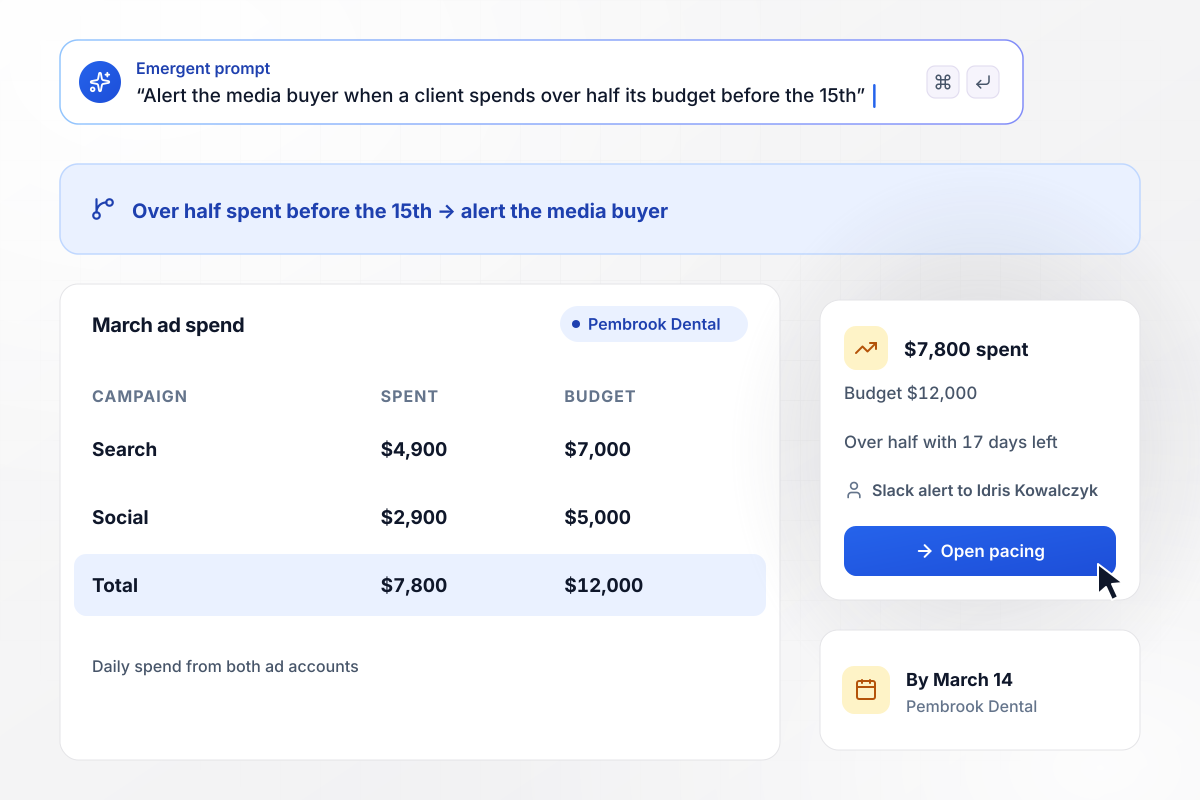
Ad spend for Pembrook passes half by March 14
Pembrook Dental budgets $12,000 for March ads across search and social. By March 14 the connected ad accounts show $7,800 spent. Any client over half its budget before the 15th sets off an alert, and Idris Kowalczyk, the media buyer, gets it in Slack with the spend by campaign.
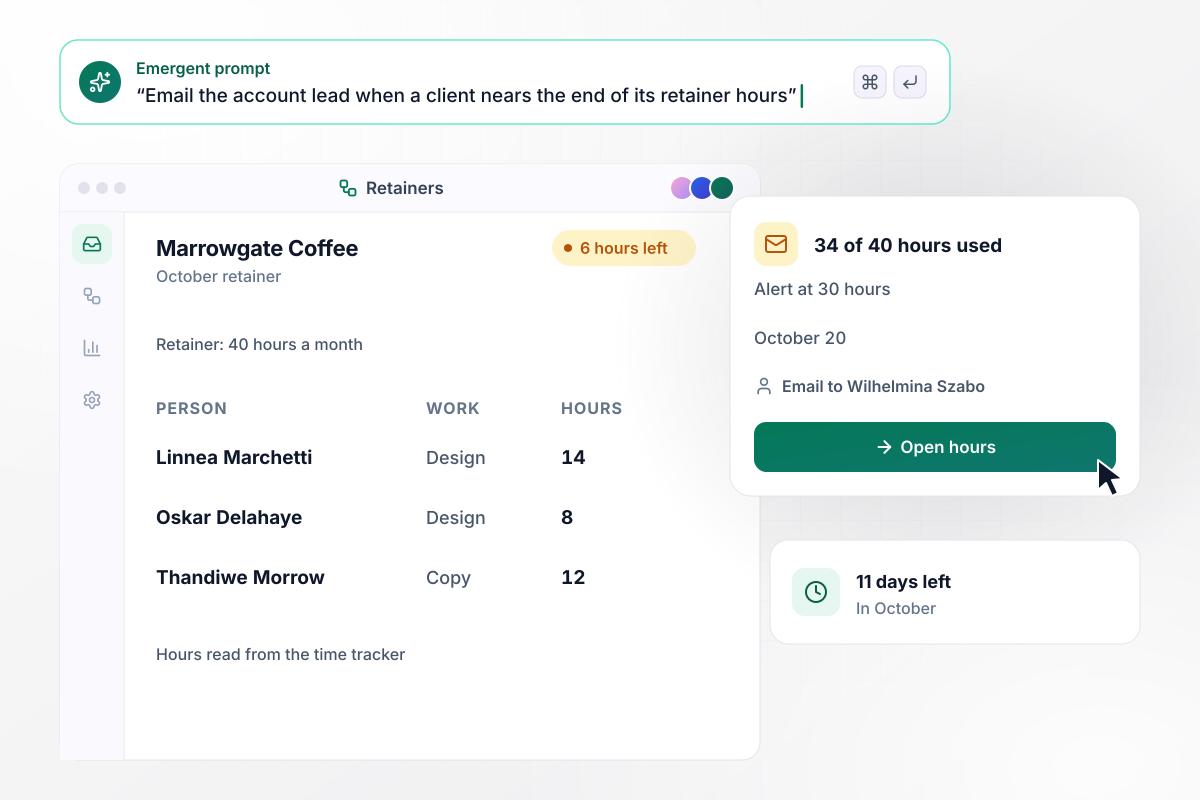
34 of 40 retainer hours gone by October 20
Marrowgate Coffee pays for 40 hours of design and copy work a month. By October 20 the team has logged 34 of them in the time tracker. The alert fires at 30 hours, and Wilhelmina Szabo, the account lead, gets an email with the hours by person before she plans the last 11 days.
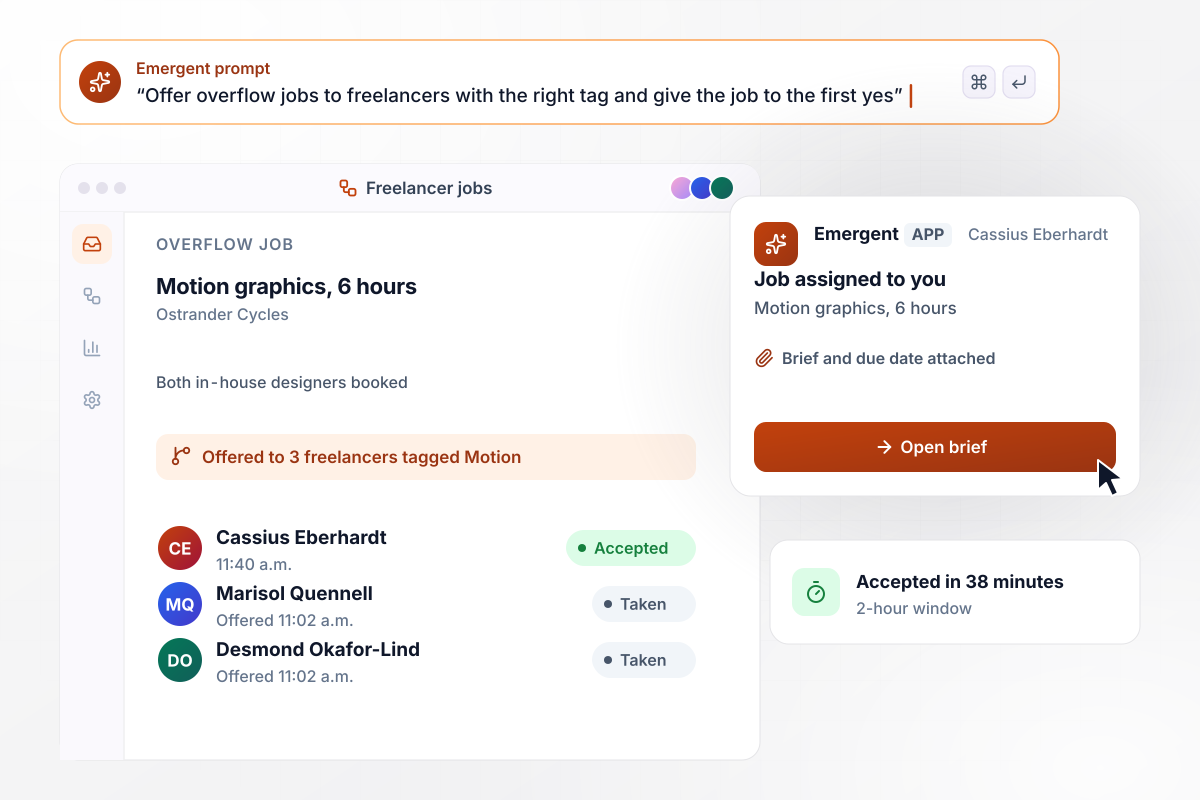
Motion job goes to Cassius in 38 minutes
A 6-hour motion graphics job for Ostrander Cycles arrives at 11:02 a.m. while both in-house designers are booked. The app offers it to the 3 freelancers tagged Motion, with 2 hours to accept. Cassius Eberhardt accepts at 11:40 a.m., and the brief and the due date go to him in the app.






How to Build Agency Workflow Automation
Seven steps that take agency workflow automation from one client account to four rules your account leads run every month.
Choose an account that kept your team busy and list every step someone did by hand: counting revision rounds, checking ad spend, adding up hours, and finding cover when designers were full. Start with the steps that follow a fixed rule.
Open each client contract and note how many revision rounds it includes and what counts as one round. Decide who hears about a request past that limit, and whether the work waits for a signed change request.
Pick the point where spend is too far ahead of the calendar, such as more than half the budget before the 15th. Choose who gets the alert for each client, and whether it goes to Slack or email.
For each retainer, pick the hour count that triggers an alert to the account lead, leaving enough hours to finish the month's planned work. Decide whether a second alert goes out when the retainer is fully used.
List the freelancers you call when the in-house team is full, and tag each with skills such as motion, copy, or illustration. Pick how long an offer stays open and what happens when nobody accepts in time.
Write the rules from the last four steps as plain sentences, with the real numbers from each contract and budget. Emergent builds the app from that prompt, alerts and client board included, and you change any rule later by prompting again.
Run last month's proofs and logged hours through the app before anyone depends on it. Check that each alert would have reached the right person on the right day. Fix any rule that fired too early or too late, then run the month again.
Why Agencies Build With Emergent
Emergent builds the revision log and the client board as one app, with no task cap on how often the rules run.

|
Zapier | Make (Integromat) | n8n | |
|---|---|---|---|---|
| How you build | Prompt for the workflow and the app around it | Templates and editor, AI copilot | Visual canvas | Visual canvas, self-hosted or cloud |
| What you get | Workflow + trigger form + database + dashboard, as code you own | Zaps, plus Tables and Interfaces inside Zapier | Scenarios inside Make | Workflows inside n8n |
| Behavior at cap | Keeps running, no task cap | Overage billed at up to 1.25× the base rate | Runs pause | Cloud workflows stop until the reset or an upgrade |
| AI and agent steps | Native, share the same credit pool | Priced by model tier, drawn from the task pool | AI modules cost variable credits | Bring your own model API key, billed by the provider |
| Code ownership | Full code export to GitHub on paid plans | None | None | Yes on Community Edition |



Pick the Pricing Plan That Works for You
Choose the plan that fits your building ambitions. From weekend projects to enterprise applications, we've got you covered.




Find the right workflow automation
for you and your business




Frequently Asked Questions
Your Questions, Answered
Don't change this element unless you know what you are doing
More things you can build
with Emergent









on Emergent today




