

Build Quote Automation That Prices Every Request by Your Rules
Build quote automation that prices each request from your price book and follows up on every open quote before it expires.
Build quote automation for my pump distribution business that prices each request from my price list and emails the quote to the buyer.
Trusted by Builders Worldwide
Active Builders Worldwide
Apps Successfully Created
Countries Globally Reached



The Quoting Rules Emergent Builds Into the App
Each part settles one question a rep would otherwise answer by hand.
Prices that come from one price book
The app prices each line from your price book, unit tiers included, such as 1,000 or more. Keep the book in the app's database, or sync it from your ERP through its API.
Option rules for configured products
Write down which options require or exclude each other, and the app checks every configuration against that list. A quote that breaks a rule stays unsent until it is fixed.
A margin floor with a named approver
The app compares each quote's price with its cost and works out the margin. Set the floor and the approver, and a quote below it waits for that person's yes in Slack or email.
AI that reads emailed RFQs
An AI step reads a request for quote into part numbers and quantities, from an email, a PDF, or a spreadsheet. A rep checks any value the AI is unsure of before it is priced.
Reminders and an expiry date
Pick the days a reminder email goes to the customer and the day the rep takes over. Each quote carries its expiry date, and the dashboard lists open quotes by days left.
Every quote version, in a database you own
Each revision is saved next to the one it replaced, with the person who made it, in a database you own. Paid plans export the app's full code to your GitHub repository.
Four Quotes and the Rule Each One Meets
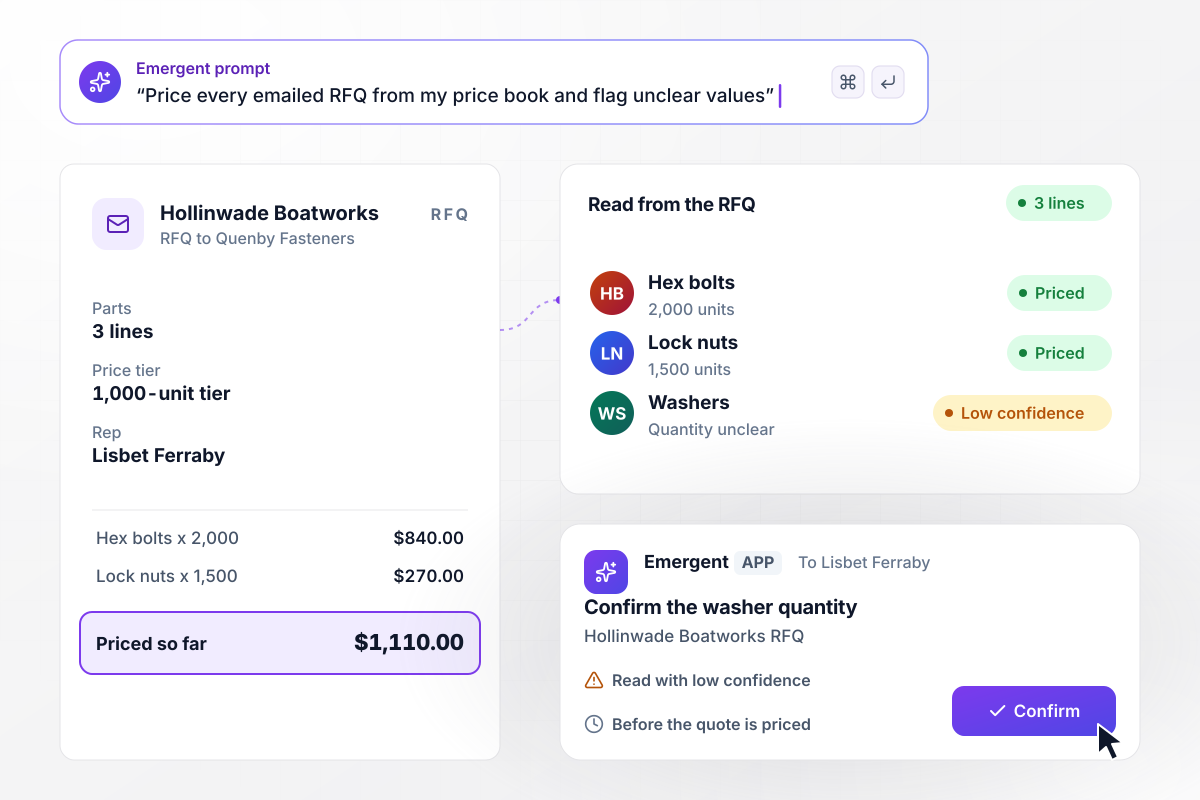
Three RFQ lines, one quantity to confirm
Hollinwade Boatworks emails Quenby Fasteners an RFQ for three parts. The app prices two lines at the 1,000-unit tier: hex bolts x 2,000 come to $840.00 and lock nuts x 1,500 to $270.00, or $1,110.00 so far. The washer quantity was read with low confidence, and the rep, Lisbet Ferraby, confirms it first.
window.awbMockup = { emailedRfqs: "When a customer emails a request for quote, read the part numbers and quantities from the email or its attachment. Price each line from my price book at the right unit tier. If any value was read with low confidence, send it to the rep to confirm before the quote goes out.", configuredEquipment: "Let my reps build quotes for configurable compressors. Check every configuration against my option rules, such as a 15 HP model needing the 480V panel. If a quote breaks a rule, block sending and show the rep which option to switch.", marginChecks: "Work out the margin on every quote from my price and my cost. If the margin is under 18%, hold the quote and send my sales manager a direct message with the price, the cost, and the margin. Unlock sending only after she approves.", quoteFollowUp: "Give every quote an expiry date 30 days after it is sent. Email the customer a reminder on day 3 and day 7 while the quote is open. If there is no reply by day 10, send the rep a direct message to call, with the days left before the quote expires." };
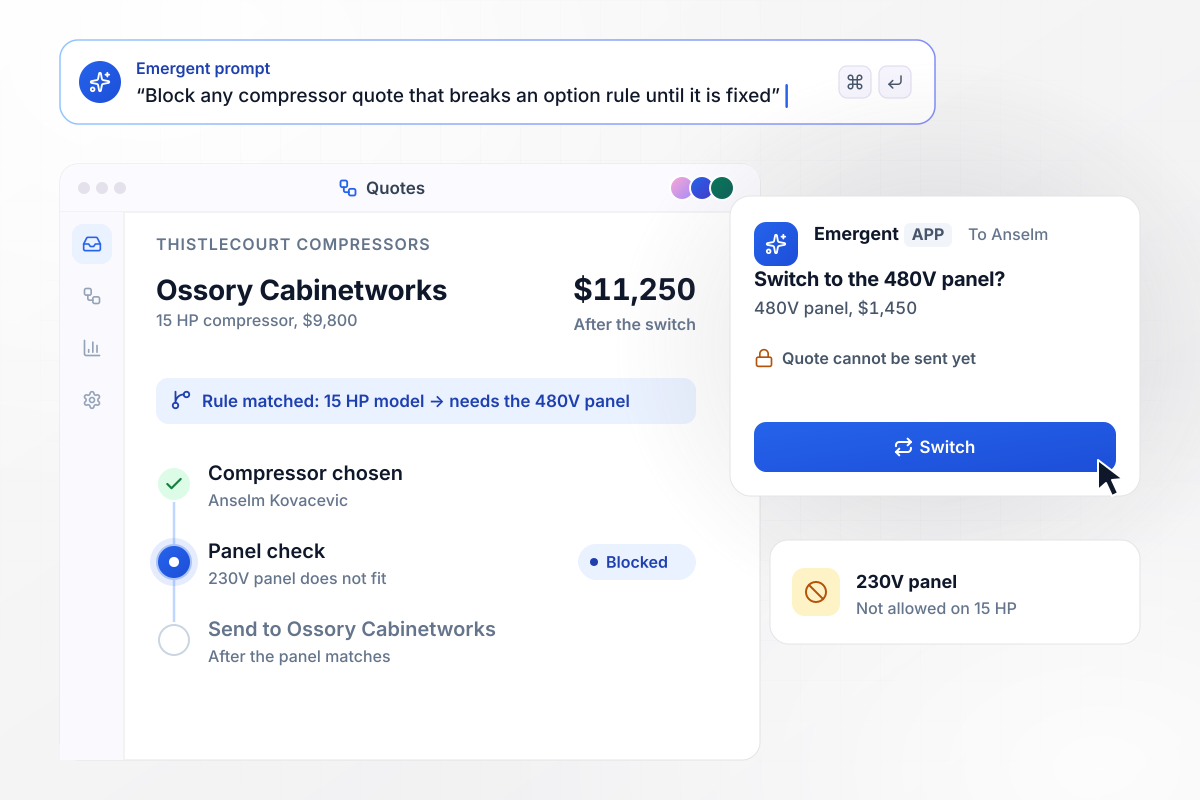
15 HP means the 480V panel, or no quote
Anselm Kovacevic builds a quote at Thistlecourt Compressors for Ossory Cabinetworks: a 15 HP compressor at $9,800 with the 230V panel. The option rule says every 15 HP model needs the 480V panel, and until it does, the quote cannot be sent. Anselm switches to the $1,450 480V panel, and the quote totals $11,250.
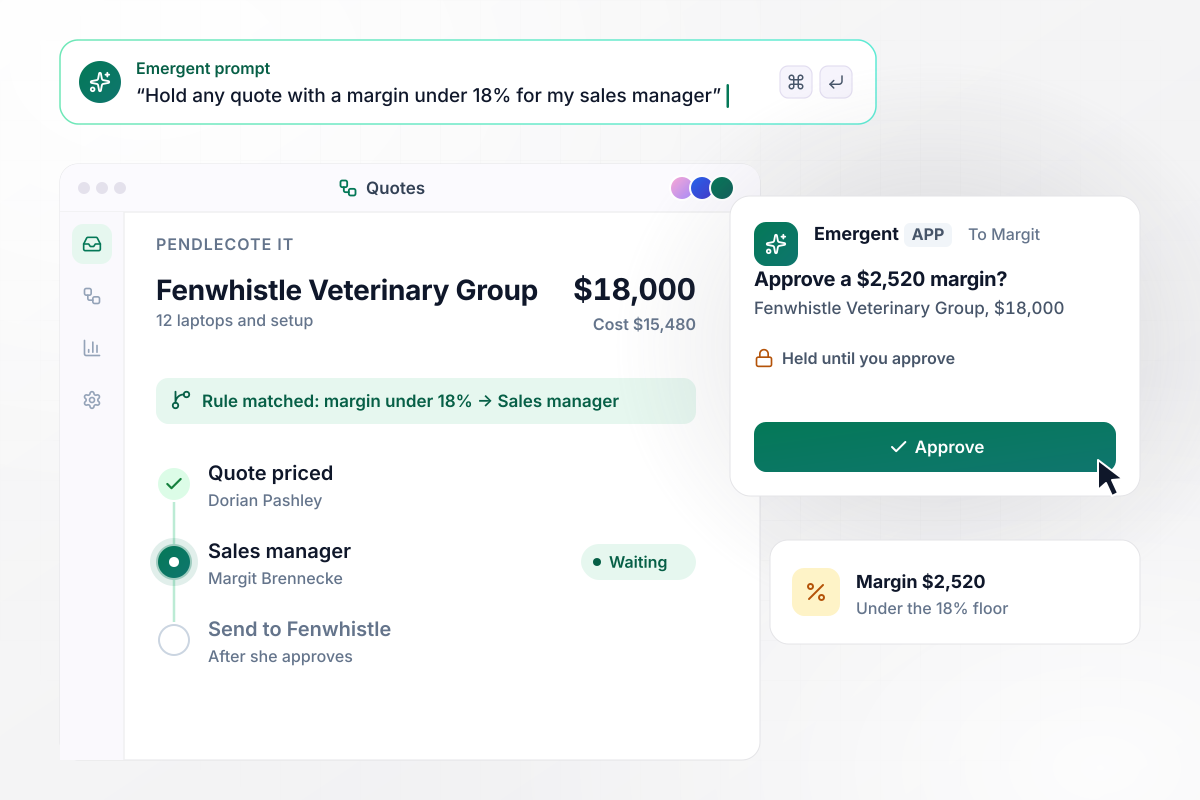
Any margin under 18% goes to Margit
Dorian Pashley at Pendlecote IT prices 12 laptops and setup for Fenwhistle Veterinary Group at $18,000. Against a cost of $15,480, the margin is $2,520. Any quote with a margin under 18% needs the sales manager: the app holds it and sends Margit Brennecke a direct message to approve.
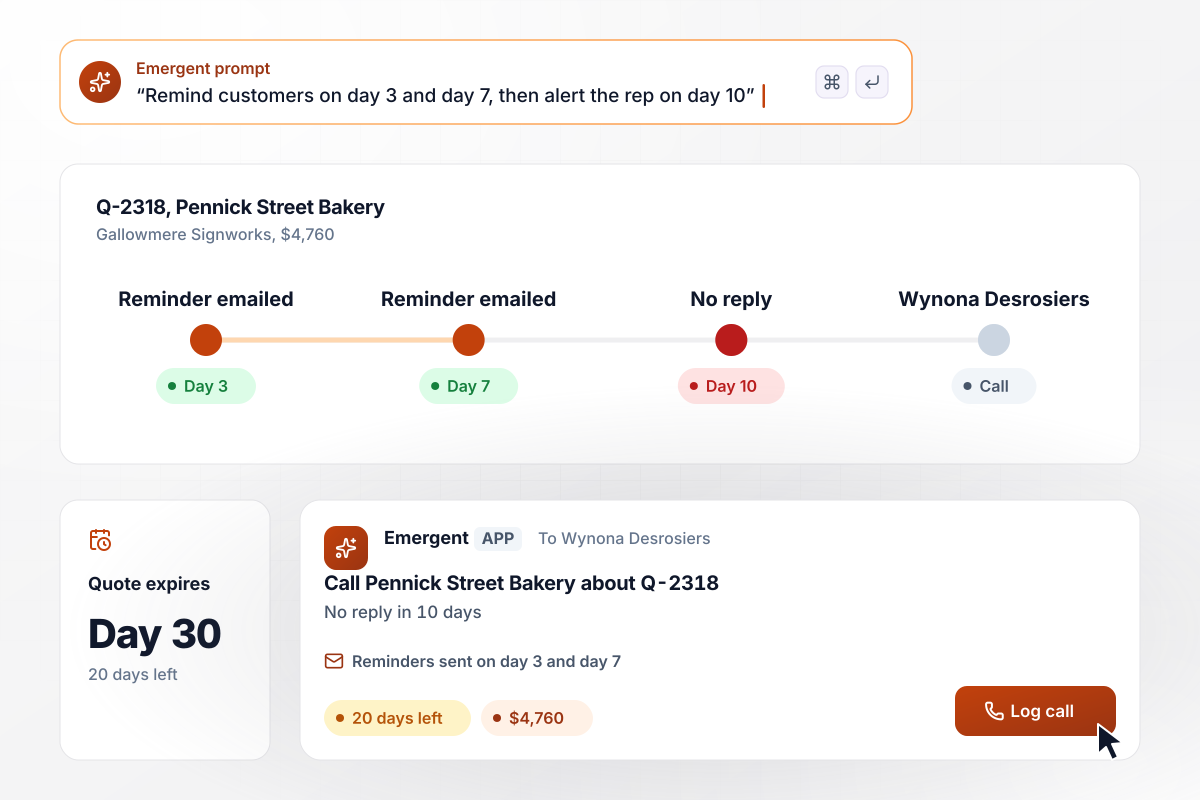
Day 10 with no reply goes to Wynona
Gallowmere Signworks sent quote Q-2318 for $4,760 to Pennick Street Bakery. The app emailed the bakery a reminder on day 3 and again on day 7. On day 10 with no reply, it sends the rep, Wynona Desrosiers, a direct message to call, with 20 days left before the quote expires on day 30.






How to Build Quote Automation
Seven steps to turn your past quotes and price book into quote automation, then test it on real requests before going live.
Gather 20 quotes your team sent last quarter, both won and lost. On each one, mark what the rep typed by hand: the parts, the quantities, the discounts, and the notes. Any field typed the same way twice is one the app can fill.
Clean the price book before you prompt. Give every part one list price, one cost, and the unit tiers that apply, and retire part numbers nobody sells anymore. A quote is only as right as the book it reads from.
List the rules reps apply from memory today: which options go together, the lowest margin a quote may carry, and who approves anything below it. Describe the price book and those rules in a prompt, and Emergent builds the quoting app.
Connect your CRM and accounting system through their APIs, such as HubSpot or QuickBooks. Customer details then come from the CRM and part costs from the accounting records, without anyone retyping them.
Choose how long a quote stays valid and the days the customer gets a reminder email. Pick the day a quiet quote moves to the rep for a call, and write the reminder in your own words.
Requote 10 past requests through the app and compare each total with the quote your team sent. Include one configuration that breaks a rule and one quote under the margin floor, and check both stop where they should. Fix any rule by prompting.
Start with the product line that gets the most requests, and keep the old process for the rest for a month. Watch the first approvals and reminders closely, adjust the days, then move the next line over.
Why Build Quote Automation With Emergent?
Emergent builds the price book, the quote rules, and the follow-up as one app from a prompt, with no task cap on its runs.

|
Zapier | Make (Integromat) | n8n | |
|---|---|---|---|---|
| How you build | Prompt for the workflow and the app around it | Templates and editor, AI copilot | Visual canvas | Visual canvas, self-hosted or cloud |
| What you get | Workflow + trigger form + database + dashboard, as code you own | Zaps, plus Tables and Interfaces inside Zapier | Scenarios inside Make | Workflows inside n8n |
| Behavior at cap | Keeps running, no task cap | Overage billed at up to 1.25× the base rate | Runs pause | Cloud workflows stop until the reset or an upgrade |
| AI and agent steps | Native, share the same credit pool | Priced by model tier, drawn from the task pool | AI modules cost variable credits | Bring your own model API key, billed by the provider |
| Code ownership | Full code export to GitHub on paid plans | None | None | Yes on Community Edition |



Pick the Pricing Plan That Works for You
Choose the plan that fits your building ambitions. From weekend projects to enterprise applications, we've got you covered.




Find the right workflow automation
for you and your business
Frequently Asked Questions
Your Questions, Answered
Don't change this element unless you know what you are doing
More things you can build
with Emergent









on Emergent today


