

Build Social Media Automation for Every Post Your Team Ships
Build social media automation that routes each draft for sign-off, then posts it to Instagram and LinkedIn on time.
Build social media automation that publishes approved posts from my content calendar on schedule.
Trusted by Builders Worldwide
Active Builders Worldwide
Apps Successfully Created
Countries Globally Reached



What Social Media Automation Takes Over
Social media automation runs the repeat work around each post. Deciding what is worth saying stays with your team.
One calendar feeds every network
Instagram and LinkedIn posts sit in one table, one row each with the image, caption, and time slot. The app publishes every row through that network's API and saves the live link.
Captions drafted from your own notes
An AI step turns a product note or a blog link into a first-draft caption in your house style. A writer edits every draft before it enters review. Nothing reaches a feed unread.
Review rules your brand lead writes
Drafts reach the brand lead in Slack. Captions that name a price or a giveaway go to legal as well. Each approval is stored on the post with the approver's name and a timestamp.
Publishing limits counted per account
Instagram allows 100 API-published posts per account in any 24-hour window. The app counts every account's posts against that limit and holds anything past it for the next window.
Evergreen posts back in the queue
Rows tagged Evergreen return to the queue 90 days after they ran, with a fresh caption for review. Rows tagged Seasonal are retired for good once their date has passed.
Your posting rules, exported as code
The calendar, review rules, and weekly report export to your GitHub on paid plans. Adding a network or a new reviewer takes one prompt, and the code behind it stays in your hands.
Where Social Teams Automate First
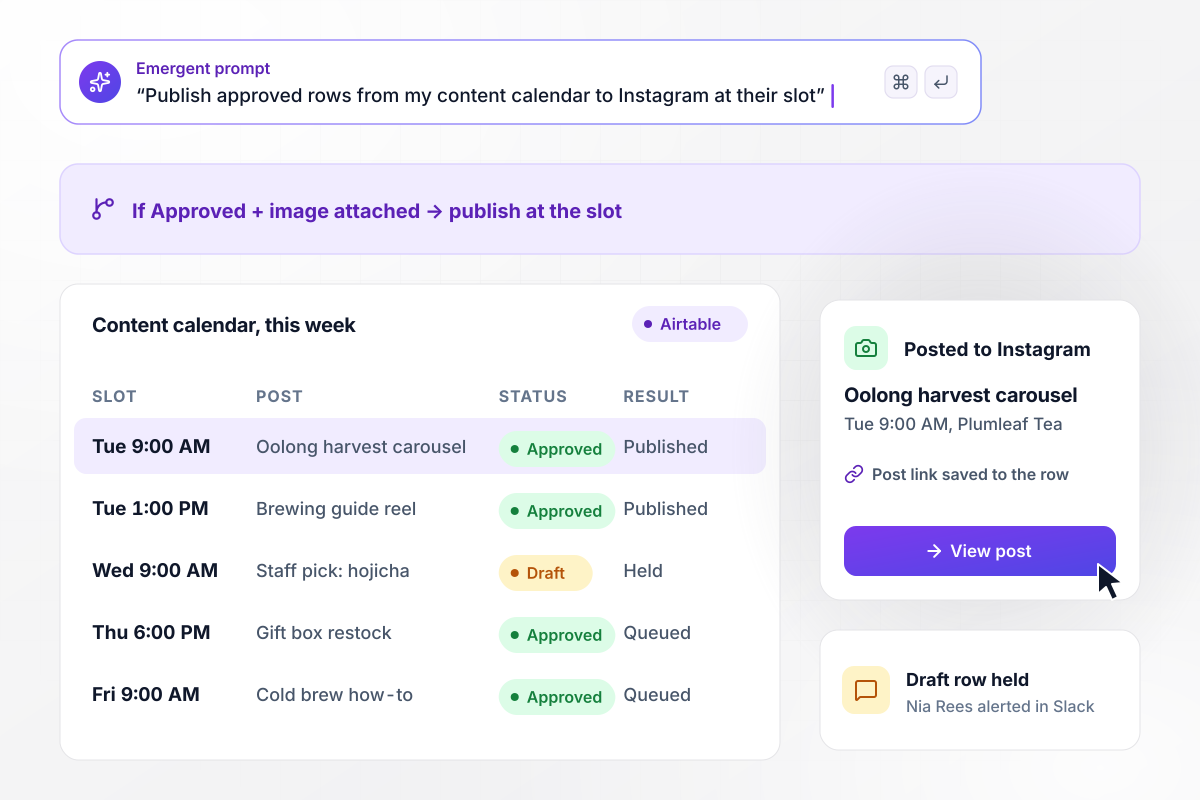
Every approved row in the calendar goes live on time
The content calendar lives in Airtable, one row per post. At each slot, a post marked Approved with an image attached is published to the brand's Instagram professional account, and the post link is saved to the row. A row still in Draft is held, and the social lead gets a Slack message.
window.awbMockup = { instagramPosts: "Build Instagram scheduling for my tea brand. Keep the content calendar in Airtable with one row per post: image, caption, slot, and status. At each slot, publish rows marked Approved that have an image to our Instagram professional account and save the post link to the row. Hold any row still in Draft and send our social lead Nia Rees a Slack message.", postApprovals: "Build post approvals for my social team. Send each draft to our brand lead Pilar Nevin as a Slack direct message with the image, caption and slot. If the caption mentions a price or a discount, send it to Rui Mandel in legal next. Approve moves the post into the publishing queue; Request changes returns it to the writer with the comment. Record who decided and when.", realEstateListings: "Build listing posts for my brokerage. When a listing changes to Active in our database, draft an Instagram carousel from its first 5 photos, the price, and the open house time. Send the draft to the listing agent to approve from their phone, then post it to our Instagram and our LinkedIn company page.", weeklyReports: "Build a weekly social report for my marketing team. Every Monday at 8:00 AM, pull reach and interactions for last week's Instagram and LinkedIn posts into one table and work out engagement rate as interactions divided by reach. Post the ranked list to #marketing in Slack and mark any post under 2% for review." };
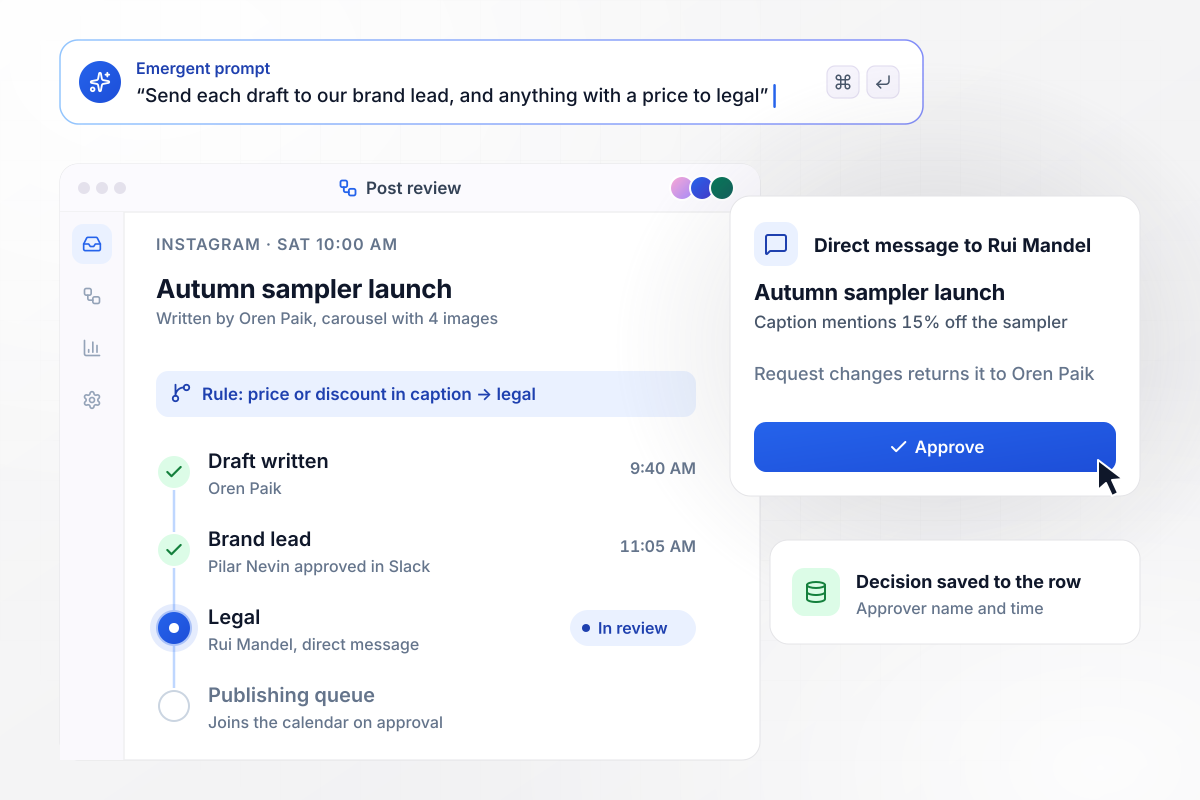
Captions that mention a price wait for a second reviewer
Each draft reaches the brand lead as a Slack direct message. A caption that mentions a price or a discount then goes to legal. Approve moves the post into the publishing queue. Request changes sends it back to the writer with the comment attached, and the row records who decided and when.
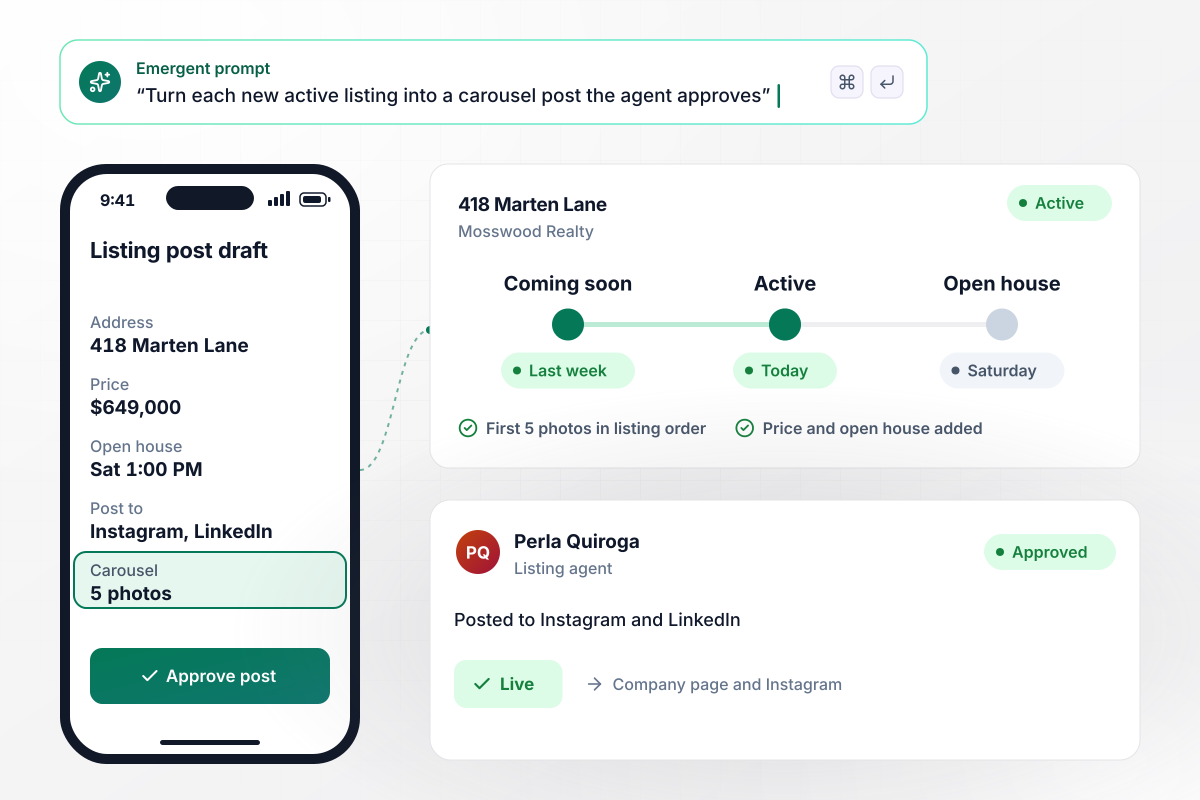
New listings go to Instagram once the agent signs off
When a listing's status changes to Active in the brokerage's database, the app drafts a carousel from its first 5 photos, the price, and the open house time. The listing agent approves the draft from a phone. The post then goes to the brokerage's Instagram and its LinkedIn company page.
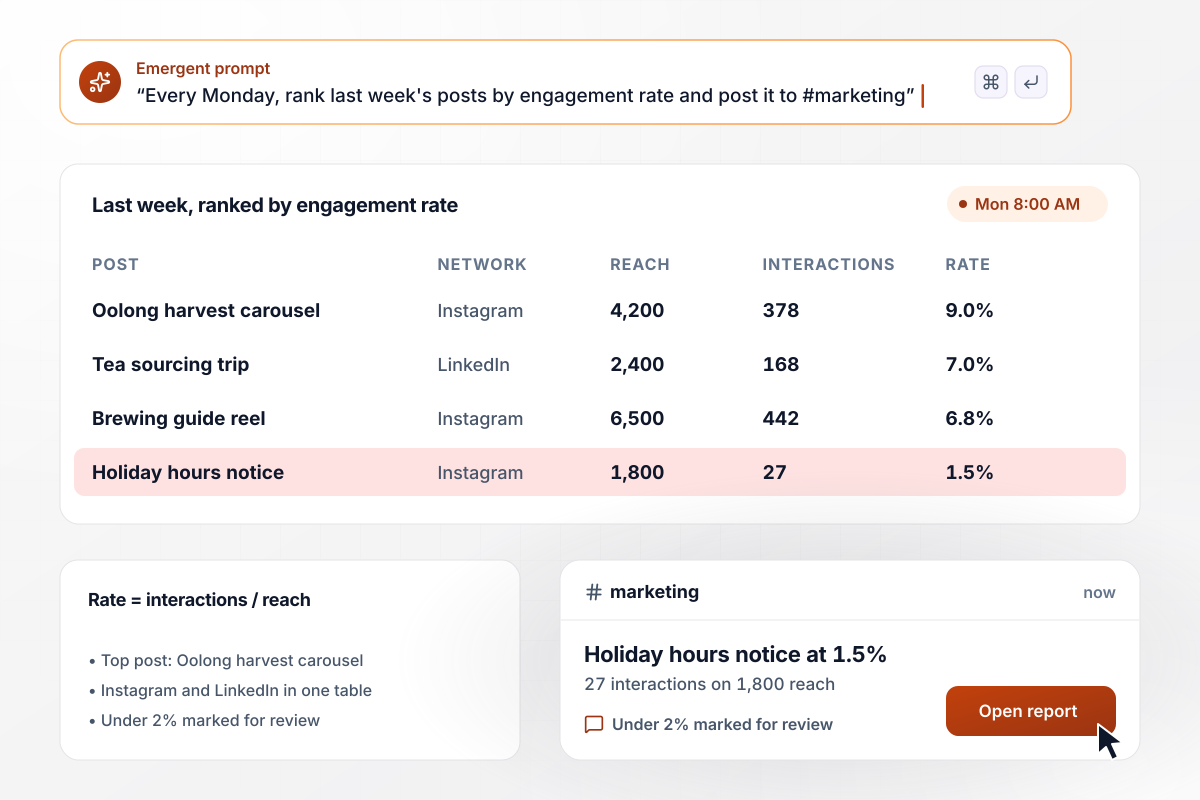
Monday's report flags the weakest post of the week
Every Monday at 8:00 AM, the app pulls reach and interactions for last week's Instagram and LinkedIn posts into one table. Engagement rate is interactions divided by reach. The report lands in #marketing with the posts ranked, and any post under 2% is marked for the team to review.






How to Build Social Media Automation
Seven steps to settle what you post and who approves it, then connect your accounts and test social media automation.
List every network and account you post to, who writes for each, and how many posts go out in a normal week. Note where posts stall today: waiting on an image, a caption or someone's sign-off.
Decide the columns every post needs: network, slot, image, caption, status, and owner. Emergent builds the calendar as a table in your own database. The team can then sort it by week or by writer.
Say who signs off on each kind of post, in plain sentences. Routine posts need the brand lead. Anything with a price, a contest, or a customer's photo also goes to legal. Those sentences become the routing the app follows.
Connect each Instagram professional account and LinkedIn company page through their APIs, plus Slack for reviews. Start with one Instagram account and one week of posts, then add the other networks once that week runs clean.
Set slots for each network from your own analytics, not a generic best-time chart. A tea shop's followers may scroll before work; a brokerage's buyers may browse on Sunday evening. The queue fills those slots in the order rows were approved.
Point the app at a test Instagram account for the first few days. Check that carousels keep their photo order, captions keep their line breaks and every post link lands in the right calendar row before switching to the live account.
Once posts publish on their own, add the weekly report. Watch which formats earn saves and comments, then give those formats more slots. A format that trails the rest for four straight weeks loses its slot.
Why Automate Social Media With Emergent?
Emergent builds your calendar and your approval steps, with the review rules your brand lead wrote. Runs keep going with no task cap.

|
Zapier | Make (Integromat) | n8n | |
|---|---|---|---|---|
| How you build | Prompt for the workflow and the app around it | Templates and editor, AI copilot | Visual canvas | Visual canvas, self-hosted or cloud |
| What you get | Workflow + trigger form + database + dashboard, as code you own | Zaps, plus Tables and Interfaces inside Zapier | Scenarios inside Make | Workflows inside n8n |
| Behavior at cap | Keeps running, no task cap | Overage billed at up to 1.25× the base rate | Runs pause | Cloud workflows stop until the reset or an upgrade |
| AI and agent steps | Native, share the same credit pool | Priced by model tier, drawn from the task pool | AI modules cost variable credits | Bring your own model API key, billed by the provider |
| Code ownership | Full code export to GitHub on paid plans | None | None | Yes on Community Edition |




Pick the Pricing Plan That Works for You
Choose the plan that fits your building ambitions. From weekend projects to enterprise applications, we've got you covered.




Find the right workflow automation
for you and your business
Frequently Asked Questions
Your Questions, Answered
Don't change this element unless you know what you are doing
More things you can build
with Emergent









on Emergent today


