

Build an Approval Workflow Your Team Actually Uses
Build an approval workflow that sends every request to the right approver and keeps each decision in a log you own.
Build an approval workflow for my team's purchase requests.
Trusted by Builders Worldwide
Active Builders Worldwide
Apps Successfully Created
Countries Globally Reached



Everything an Approval Workflow Needs
Purchase orders, invoices, contracts, and expenses. Emergent builds the request form, routing, alerts, and audit database behind them.
Request form generated with the workflow
The intake form is built with the approval workflow, not bolted on after. Every field maps to a routing rule, and a policy change updates the form and the routing together.
Sequential, parallel, or multi-level routing
One approver at a time, several in parallel, tiers by amount, or branches by department. Describe a multi-level approval rule in one sentence and it becomes the routing logic.
Approve from Slack, Teams, or email
Every approver gets the request details and a one-click approve or reject in the channel they already use. The decision writes back to the workflow, with no separate portal.
Escalation timers and fallback approvers
When an approver hasn't acted in the time you set, send a reminder, escalate to their manager, or hand it to a fallback approver. Put the timing in the prompt and every step uses it.
An audit trail in a database you own
Every decision, reminder, and escalation lands in a table with requester, approver, amount, reason, and time to approve. Finance and audit query it directly, with no PDF exports.
Full code export
The whole app, intake form and decision log included, exports to your GitHub repository on paid plans. Nothing stays locked in a per-seat tool or a proprietary workflow canvas.
Approval Workflows Built From One Prompt
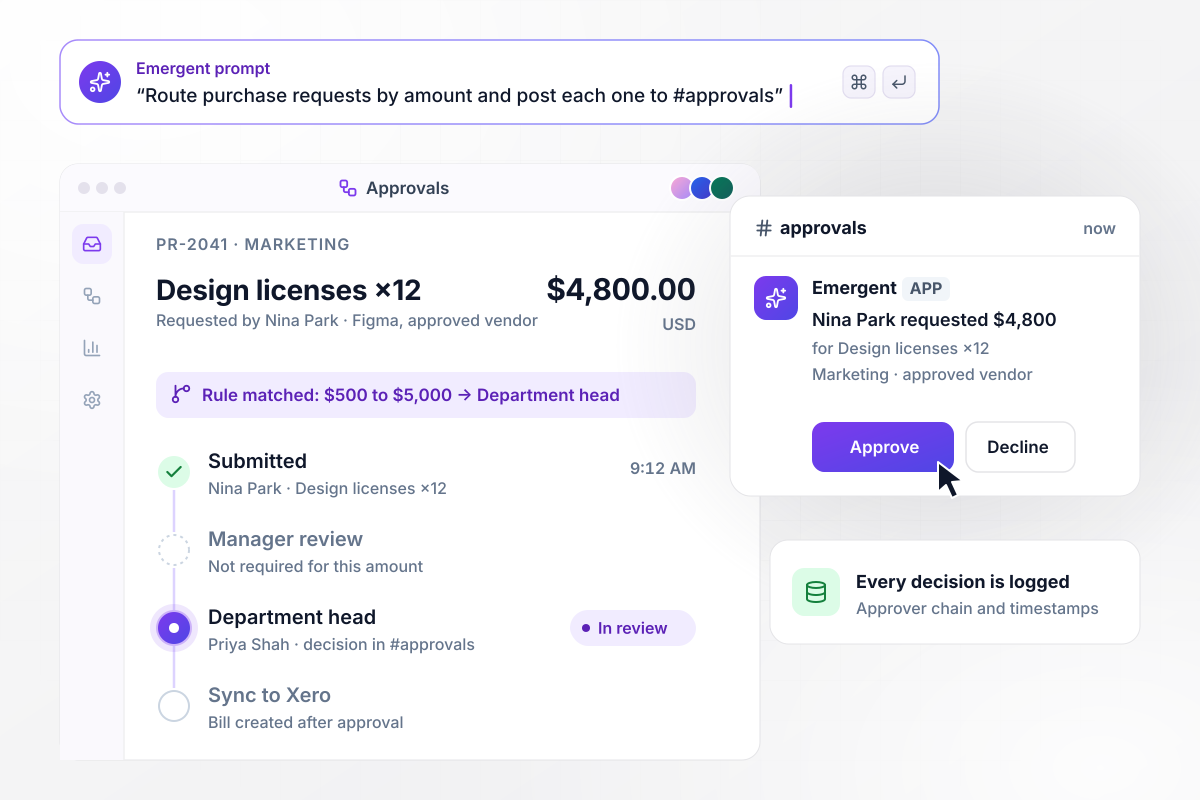
Purchase requests routed by dollar amount
Anything under $500 goes to the requester's manager, requests up to $5,000 go to the department head, and larger ones go to the CFO. Nina Park's $4,800 order for 12 design licenses skips the manager and lands in #approvals for Priya Shah. Once she approves, the bill is created in Xero.
window.awbMockup = { purchaseOrder: "Build a purchase order approval workflow. Request form with amount, vendor, department, and category. Route under $500 to the direct manager, $500 to $5,000 to the department head, and over $5,000 to the CFO. Add procurement when the vendor is not on the approved list. Send a Slack alert per approver with the full context, and save every decision to a database with the requester, approver chain, amount, and timestamp.", invoice: "Build an invoice approval workflow that receives invoices in a shared inbox, extracts the vendor, amount, and line items with an AI step, matches each invoice to a purchase order, routes by amount and cost center, writes approved invoices to Xero, and archives every decision to a database with a link to the original PDF.", contract: "Build a contract approval workflow. Upload the draft and route it in parallel to legal, finance, and the executive sponsor. Send redlines back to the counterparty with a two-day reminder. When all three approve, send it for e-signature, save the signed PDF to Google Drive, and log every approver, timestamp, and version note to a database.", expense: "Build an expense approval workflow with a receipt upload form for amount, category, project, and notes. Check each expense against this month's spend for the project, send anything within policy to the manager, and escalate anything over policy to finance. On approval, add it to the accounting export queue; on decline, return the reason to the requester." };
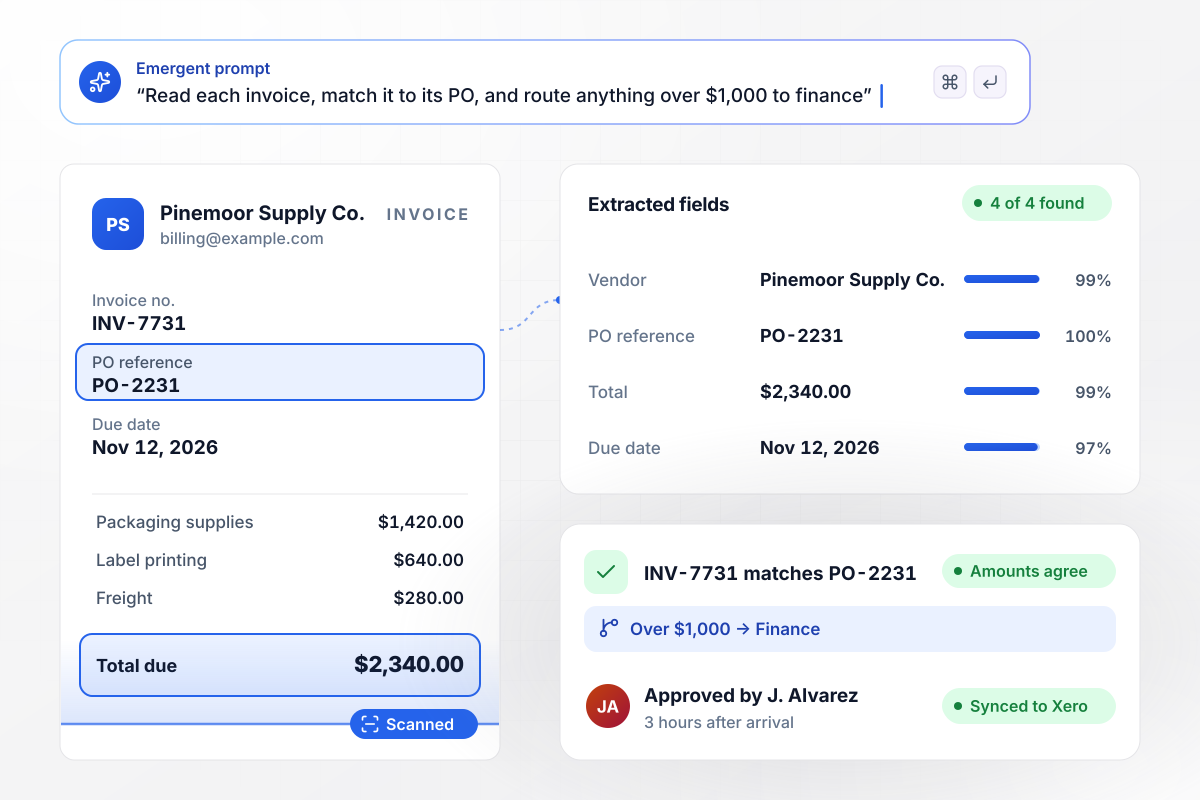
Read the invoice, match the PO, then route it
Each invoice that arrives by email or upload is read by an AI step that pulls out the vendor, PO reference, total, and due date. Pinemoor Supply Co. sends INV-7731 for $2,340.00. It matches PO-2231, and anything over $1,000 goes to finance before the bill syncs to Xero.
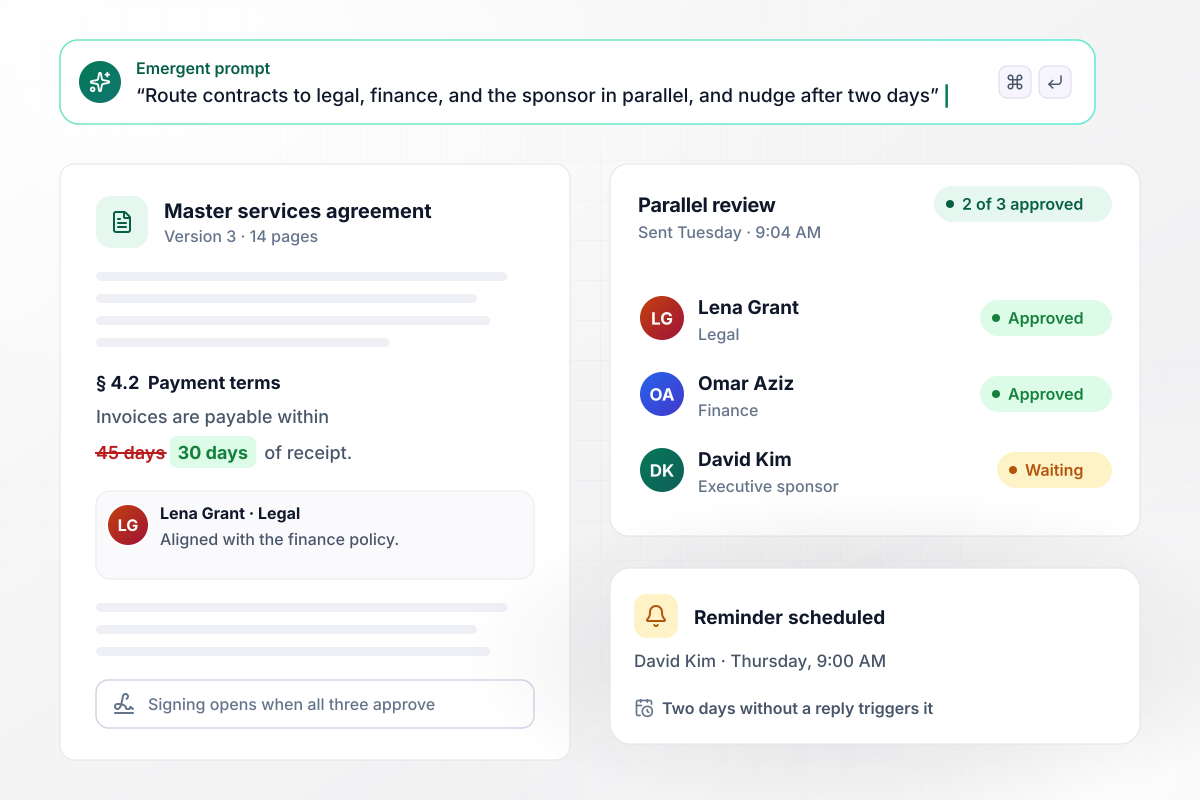
Three reviewers at once, with a nudge after two days
Legal, finance, and the executive sponsor get the master services agreement at once. Lena Grant in legal moves payment terms to 30 days, and finance signs off. David Kim, the sponsor, has gone two days without a reply, and a reminder reaches him Thursday at 9:00 AM. Signing opens once all three approve.
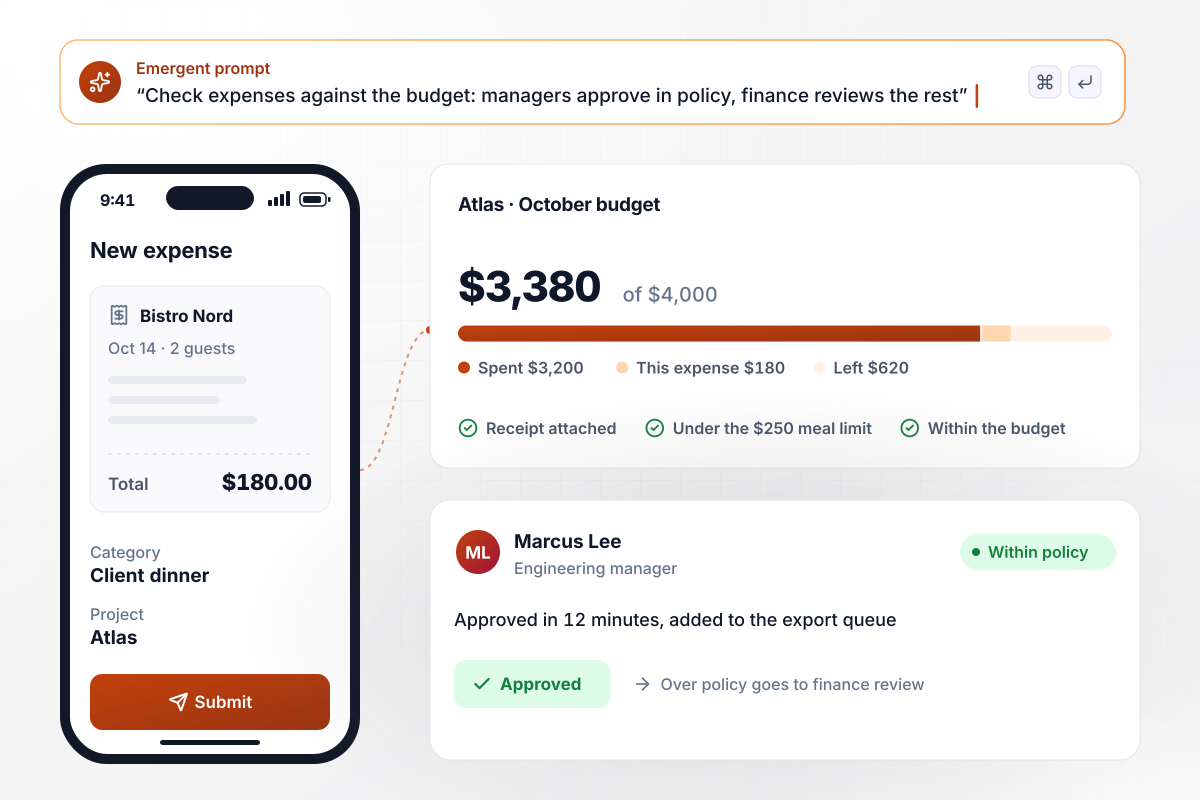
A $180 dinner checked against policy and budget
Snap the receipt on a phone, pick the category and project, and submit. This client dinner for project Atlas sits under the $250 meal limit and inside the $4,000 October budget. Marcus Lee approves it in 12 minutes and it joins the accounting export queue. Anything over policy goes to finance review instead.






How to Build an Approval Workflow
Seven steps to set the rules of an approval workflow and test it on one team, then build it with Emergent.
Decide where your approvals will live before you build anything. In email and spreadsheets, the request and the decision sit in different places, and nothing chases a quiet approver. Emergent generates the form, the routing, and the audit log in one build, with every approver included.
Name what starts the approval: a submitted form, an uploaded invoice, an inbound email, or a deal change in HubSpot. The trigger decides the request fields, such as amount, vendor, department, category, and the documents a reviewer needs to decide without asking.
Write who approves what, and in what order: under $500 to the manager, $500 to $5,000 to the department head, above that to the CFO, with legal in parallel for contracts. Written as plain sentences, the matrix becomes the routing logic.
Decide what happens when an approver goes quiet: a reminder after one business day, escalation to their manager after two, and a fallback approver when someone is out of office. These timings decide your cycle time more than any other rule.
Put approve and reject where approvers already work: Slack, Microsoft Teams, or email, with the full request context in the message. Each click is stored against the request, and nobody has to log in to a separate portal to clear a queue.
Record the requester, approver chain, amount, decision, reason, and time to approve for every request. On Emergent the log is a database table you own. A dashboard on top of it shows cycle time by approver, and auditors read the same rows.
Turn it on for one team, run real requests through it for two weeks, and read time to approve from the audit log. Tighten the rules and timings by prompting, then roll it out to the next department, with every version kept in exportable code.
Why Build Your Approval Workflow With Emergent?
Most approval tools charge per user and keep the audit trail in their app. Emergent includes every approver, and the log is yours.

|
Zapier | Make (Integromat) | n8n | |
|---|---|---|---|---|
| How you build | Prompt for the workflow and the app around it | Templates and editor, AI copilot | Visual canvas | Visual canvas, self-hosted or cloud |
| What you get | Workflow + trigger form + database + dashboard, as code you own | Zaps, plus Tables and Interfaces inside Zapier | Scenarios inside Make | Workflows inside n8n |
| Behavior at cap | Keeps running, no task cap | Overage billed at up to 1.25× the base rate | Runs pause | Cloud workflows stop until the reset or an upgrade |
| AI and agent steps | Native, share the same credit pool | Priced by model tier, drawn from the task pool | AI modules cost variable credits | Bring your own model API key, billed by the provider |
| Code ownership | Full code export to GitHub on paid plans | None | None | Yes on Community Edition |



Pick the Pricing Plan That Works for You
Choose the plan that fits your building ambitions. From weekend projects to enterprise applications, we've got you covered.




Find the right workflow automation
for you and your business
Frequently Asked Questions
Your Questions, Answered
Don't change this element unless you know what you are doing
More things you can build
with Emergent









on Emergent today


