

Build Purchase Order Automation From Request to Receipt
Build purchase order automation that routes spending by dollar limit and checks each delivery against its numbered PO.
Build purchase order automation for my company's requests, approvals, and suppliers.
Trusted by Builders Worldwide
Active Builders Worldwide
Apps Successfully Created
Countries Globally Reached



What Purchase Order Automation Covers
Purchase order automation takes a request past its approvers to the supplier, then checks what arrives, with each sign-off logged.
Purchase requests with a budget check
Staff enter the item, supplier, quantity, and cost center on one form. Each request is checked against what that cost center has left this quarter before it reaches an approver.
Approval limits by amount and category
Requests route by dollar amount and category. IT hardware adds the IT lead, anything over your limit adds finance, and a reminder chases any approver silent for two days.
Numbered POs sent to the supplier
When the last approver signs, the app assigns the next PO number, fills your PO template with terms and the ship-to address, and emails the PDF to the supplier's order contact.
Receiving from a phone at the dock
Whoever unpacks a delivery records what arrived against each PO line. A short shipment keeps the balance on order, and a damaged carton is logged with a photo for the buyer.
Matching when the invoice lands
Supplier invoices are read into fields and compared with the PO and its receipts. Lines that agree go on to payables. A price or quantity gap waits for the buyer who ordered it.
Your purchasing rules, exported to GitHub
Approval limits and numbering rules export to your GitHub on paid plans as readable code. Every requisition and PO, with its receipts, is a row in a database your team owns.
Purchase Order Workflows to Build
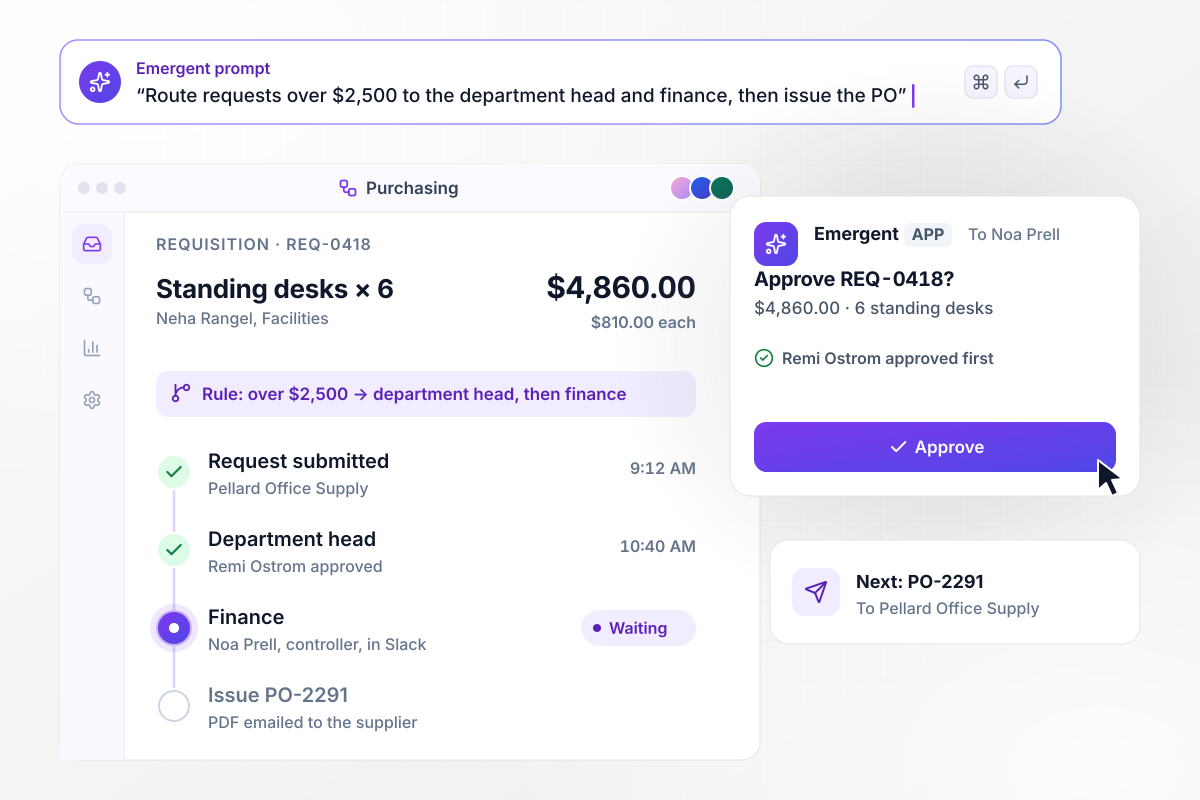
Six desks become PO-2291 after two sign-offs
Neha Rangel in facilities asks for six standing desks at $810 each, $4,860 in all. Any request over $2,500 needs the department head and then finance. Remi Ostrom approves first, and Noa Prell, the controller, approves from Slack. PO-2291 then goes to Pellard Office Supply as a PDF and joins the open PO list.
window.awbMockup = { requisitionToPo: "Build purchase order automation for my company. Staff request items on a form with the supplier, quantity, price, and cost center. Requests over $2,500 go to the department head, then the controller in Slack. Once both approve, create the next PO number, fill my PO template, and email the PDF to the supplier.", reorderPoints: "Build an app that checks my inventory sheet every night. When an item drops below its reorder point, draft a PO for the reorder quantity from the preferred supplier at the agreed price, and send it to our buyer to review and send. Show every draft PO on one list.", partialDeliveries: "Build a receiving app for my dock team. They open a PO on their phone and enter how many units arrived on each line. If a delivery is short, keep the rest of the PO open and tell the buyer. Only let supplier invoices match against what was received.", blanketPos: "Build tracking for my blanket purchase orders. Each supplier invoice draws down its blanket PO. Show how much of each PO is used and left, and message the PO owner directly when one passes 80 percent used, with the amount left." };
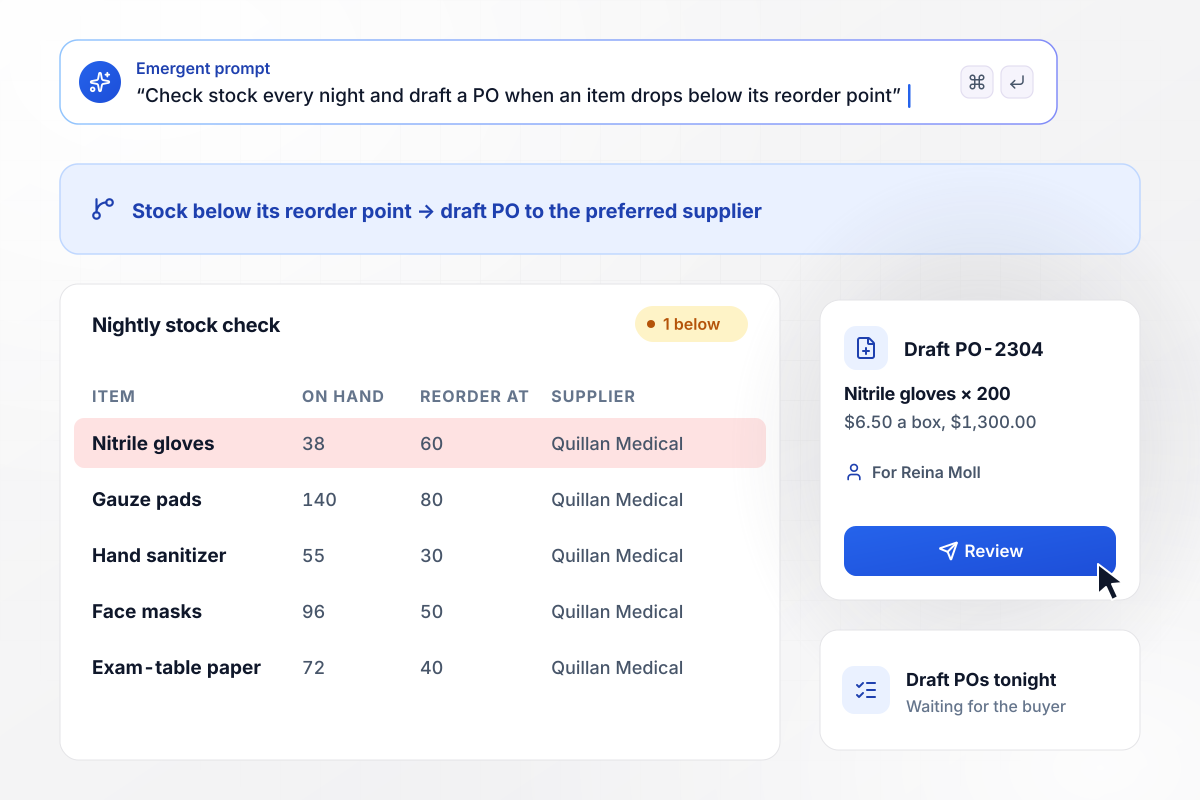
Low stock drafts its own PO for the buyer to send
Each night the app reads stock counts from the inventory sheet and compares every item with its reorder point. Nitrile gloves are down to 38 boxes against a reorder point of 60. A draft PO for 200 boxes from Quillan Medical at $6.50 a box goes to Reina Moll for review before it is sent.
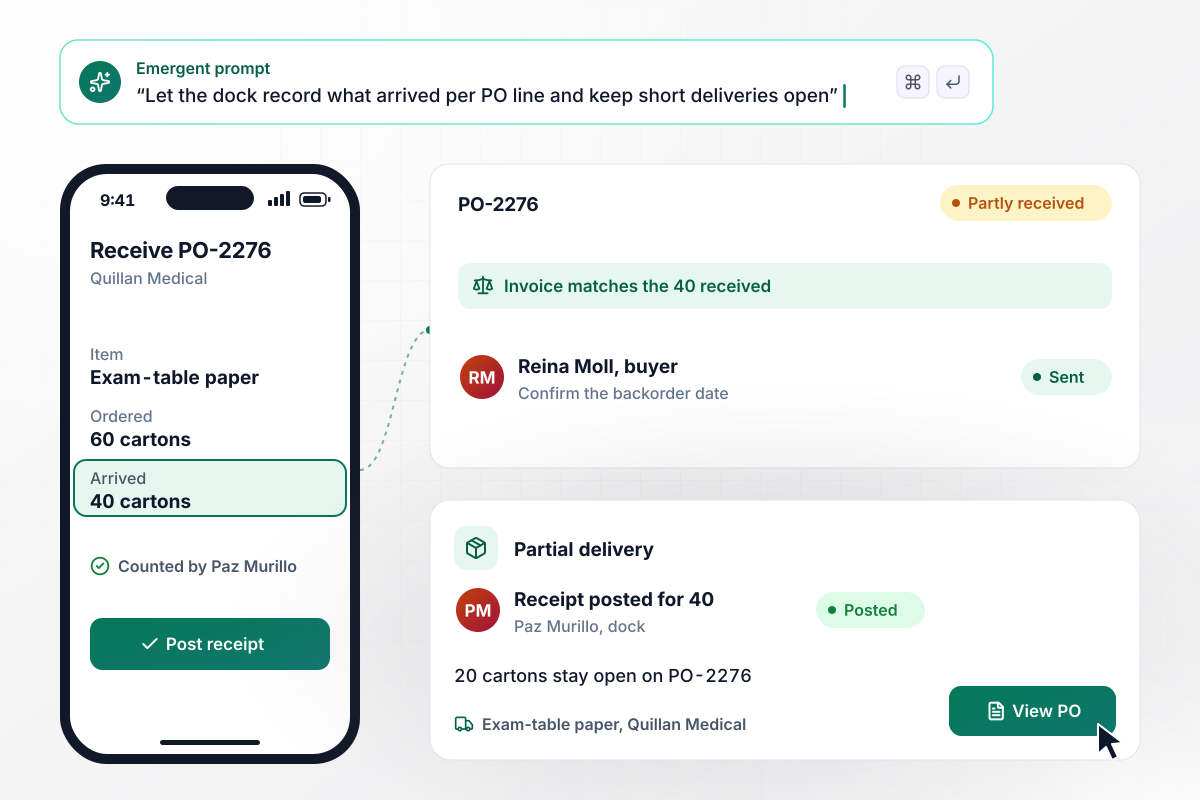
Receiving a short delivery keeps the rest on order
At the dock, Paz Murillo opens PO-2276 on a phone and counts 40 of the 60 cartons of exam-table paper. The receipt posts for 40, and the PO stays open for the other 20. Reina Moll gets a note to confirm the backorder date, and Quillan Medical's invoice is matched against the 40 that arrived.
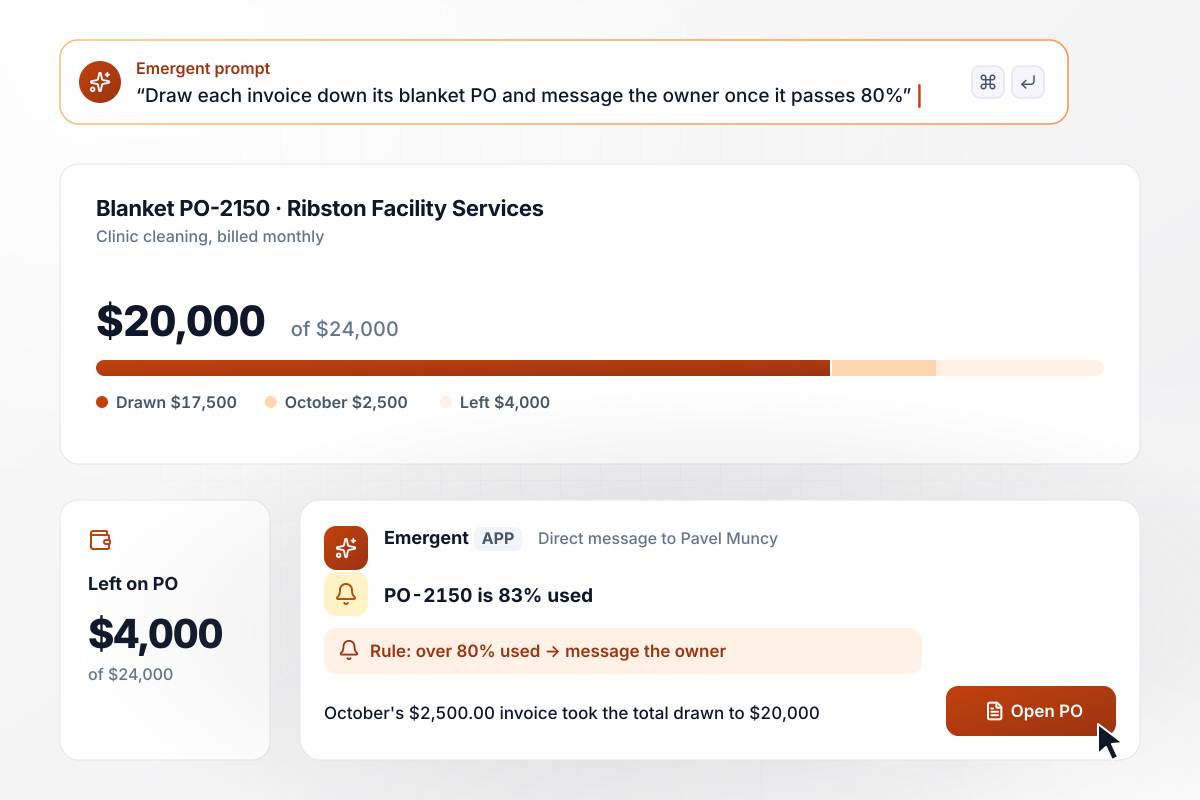
The owner hears once a blanket PO is over 80% used
Northbury Clinics signed a $24,000 blanket PO with Ribston Facility Services for a year of cleaning. Every monthly invoice is drawn against PO-2150. When October's $2,500 invoice takes the total drawn to $20,000, over 80% used, Pavel Muncy, the operations manager, gets a direct message showing $4,000 left.






How to Automate Purchase Orders
Seven steps to turn your purchasing policy into purchase order automation, tested on past requisitions before launch.
Start with your purchasing policy as it is written, then note where people work around it. Who can buy without a PO, which categories need IT or legal, and which suppliers are preferred. Those answers become the first rules Emergent builds.
Give each limit a dollar figure and a named role: department heads up to $2,500, finance above it, the CFO above $25,000. Add the exceptions, such as software that always needs IT whatever it costs. Describe them in plain sentences.
Pick a numbering format before go-live, since suppliers quote it back on every invoice. A prefix and a running number, like PO-2291, is enough for most teams. Decide too which fields print on the PDF: terms, ship-to address, and the buyer's contact.
Connect the accounting system your team closes in, such as QuickBooks or NetSuite. Suppliers and cost centers sync in first. Approved POs then sync back to the ledger, and each budget check reads the spend already recorded there.
Name who confirms each delivery: the dock lead for goods, the requester for services. Receipts entered from a phone keep the count honest. For any invoice to be matched against the PO, a receipt has to exist first.
Run last month's requisitions through the app before launch and compare each approval route with what happened by hand. Where a request went to the wrong approver, correct the rule by prompting and replay the batch until every route agrees.
Turn it on for a single department, such as facilities, for one month. Watch how long requests wait for each approver on the dashboard. Once the limits hold, add the next team and retire the shared purchasing inbox.
Why Build Your PO Automation With Emergent?
Emergent builds your request form, approval limits, and PO numbering around your own policy, as code you keep and change by prompting.

|
Tipalti | BILL | Stampli | |
|---|---|---|---|---|
| How you set it up | Prompt for your AP process and the app around it | Vendor platform, set up through onboarding | Self-serve signup, free trial on most plans | Sales-led setup with a customer success manager |
| What you get | Intake, matching, approvals, payment runs, and ledger, as code you own | AP and global payments platform | AP and AR platform with a vendor payment network | AP platform built around the invoice, with an AI assistant |
| Pricing model | Credits, free to start | Platform fee plus per-invoice and payment fees, no per-user fees | Per user, per month; approver-only seats on higher plans | Quote-based, priced on invoice volume |
| Code ownership | Full code export to GitHub on paid plans | None | None | None |




Pick the Pricing Plan That Works for You
Choose the plan that fits your building ambitions. From weekend projects to enterprise applications, we've got you covered.




Find the right workflow automation
for you and your business
Frequently Asked Questions
Your Questions, Answered
Don't change this element unless you know what you are doing
More things you can build
with Emergent









on Emergent today


