

Build a Candidate Screening Form That Shortlists Applicants
Build a candidate screening form that scores each applicant's answers and saves every one to a database you own.
Build a candidate screening form for my warehouse's forklift operator openings that every applicant fills out before an interview.
Trusted by Builders Worldwide
Active Builders Worldwide
Apps Successfully Created
Countries Globally Reached



What Happens to Each Applicant's Answers
A candidate screening form should leave the recruiter a short list to call. Each part below does one piece of that work.
Must-have questions that sort the pool
Mark the answers a role cannot do without, such as a current forklift certification. Applicants who meet every one join the shortlist, and the rest wait for a recruiter to look.
A point score on every applicant
Give each answer a point value and set the line for an interview, such as 70 out of 100. The app adds up the points when the form is submitted and saves the total on the record.
Questions that change with the role
Ask a driver about license class and a cashier about weekend hours on the same form. Applicants pick the role first and then see only the questions written for that job.
Resumes read into fields
Let applicants attach a resume beside their answers. The app reads the last employer, job title, and dates into fields, and any value it cannot read clearly goes to a person.
An alert to the person who hires
Send each shortlisted applicant to the recruiter or manager for that role or location. Alerts go out by email, Slack, or in the app, with the answers and the score in the message.
Code you can take in-house
Export the full code to your GitHub repository on paid plans. A developer can connect it to your applicant tracking system through its API or host it beside your careers page.
Four Hiring Desks, Four Screening Forms
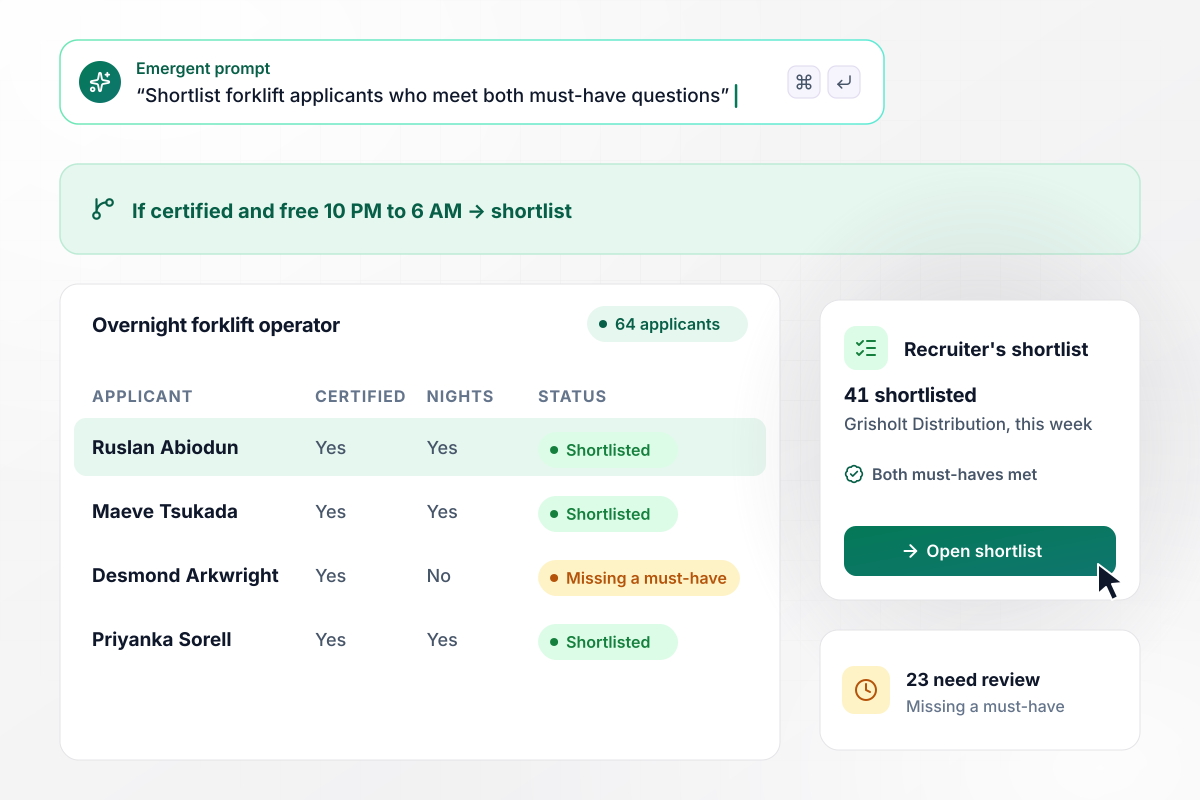
Forklift applicants who miss a must-have wait for review
Grisholt Distribution fills its overnight forklift shifts from a single link. Two questions are must-haves: a current forklift certification and the 10 PM to 6 AM shift. Of 64 applicants this week, 41 meet both and go on the recruiter's shortlist. The other 23 are marked Missing a must-have and wait for a person to review them.
window.awbMockup = { warehouseShifts: "Build a candidate screening form for my warehouse's overnight forklift operator openings. Make two questions must-haves: a current forklift certification and availability for the 10 PM to 6 AM shift. Put anyone who meets both on the recruiter's shortlist, and mark everyone else Missing a must-have so a person can review them. Show the recruiter a weekly count of each group.", salesRoles: "Build a screening form for my solar company's inside sales role with five scored questions worth 20 points each. Add up each applicant's points when they submit. Anyone at 70 or above goes to our hiring manager, Cormac Strandmoor, by email with every answer and the points it earned. Keep everyone below 70 in a list he can open later.", homeCareAides: "Build a screening form for home health aide applicants at my home care agency. Ask whether they hold a current CPR card and the date it expires. If the card expires within 30 days, mark the applicant's record Renewal due so the recruiter asks for the renewed card before making an offer.", restaurantGroups: "Build a screening form for my restaurant group, which hires for 3 locations: Quay Street, Elm Market, and Millrace Road. Each applicant picks one location. Every morning at 7:00 AM, email each general manager a list of the new applicants who chose their restaurant, with their answers. Ilsabet Danvik runs Quay Street." };
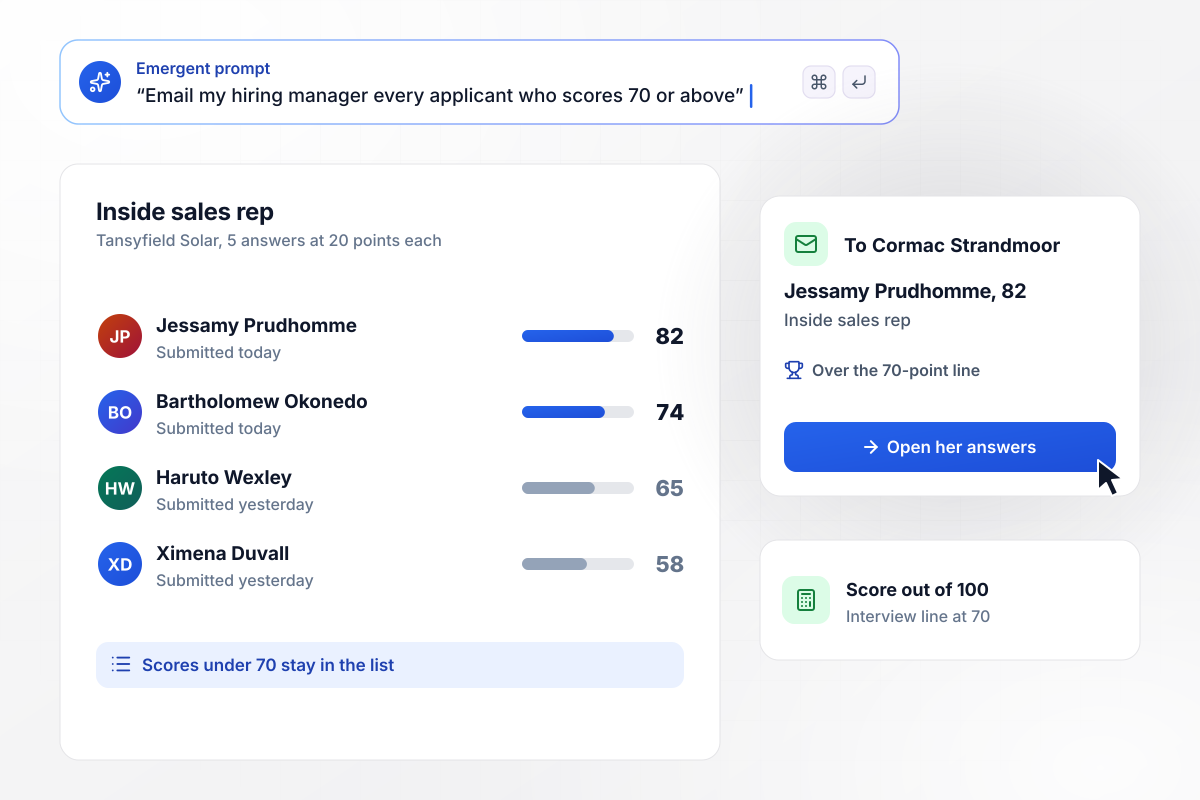
Jessamy scores 82 and lands with the hiring manager
Five answers carry the score for the inside sales role at Tansyfield Solar, and each is worth 20 points. Anyone at 70 or above goes to the hiring manager, Cormac Strandmoor. Jessamy Prudhomme scores 82. Cormac gets an email with each of her answers and the points it earned, and he books the first call from there.
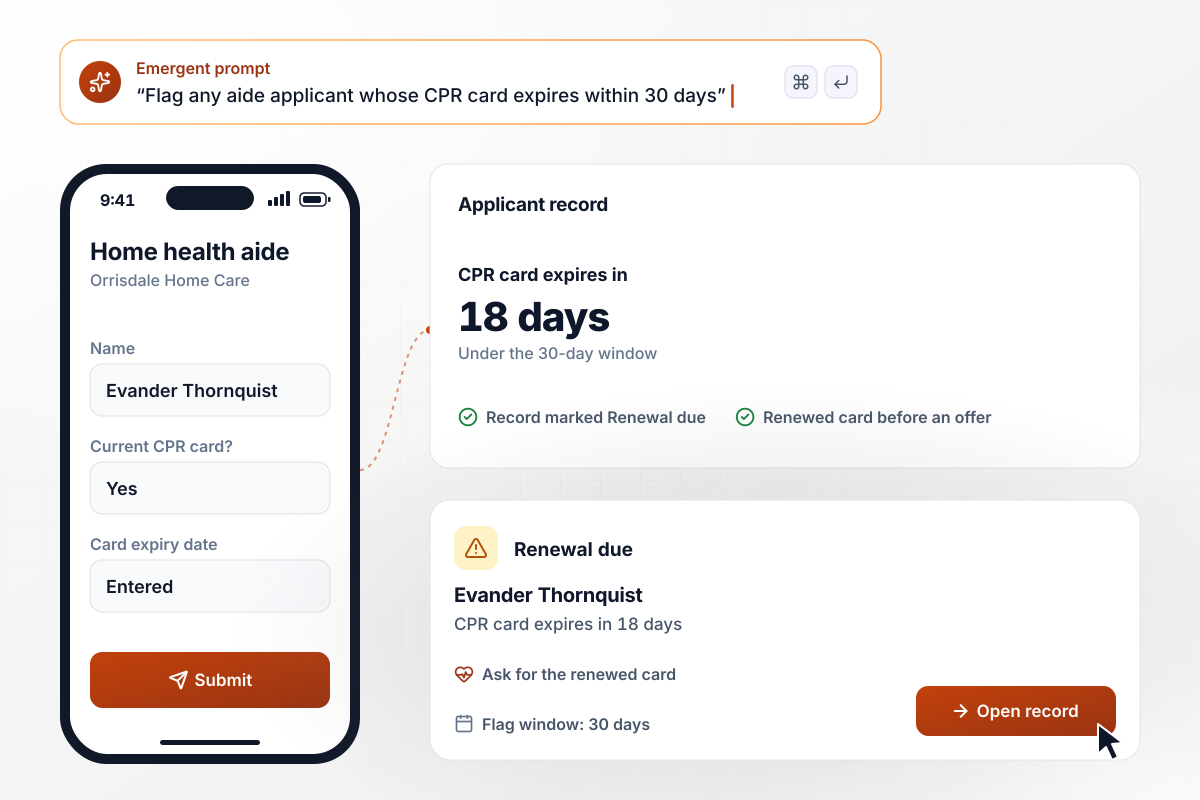
With a CPR card due in 18 days, Evander is flagged
Orrisdale Home Care requires a current CPR card for every home health aide, so the form asks when the card expires. A card that expires within 30 days marks the record Renewal due. Evander Thornquist's card expires in 18 days. The recruiter sees the flag and asks for the renewed card before an offer goes out.
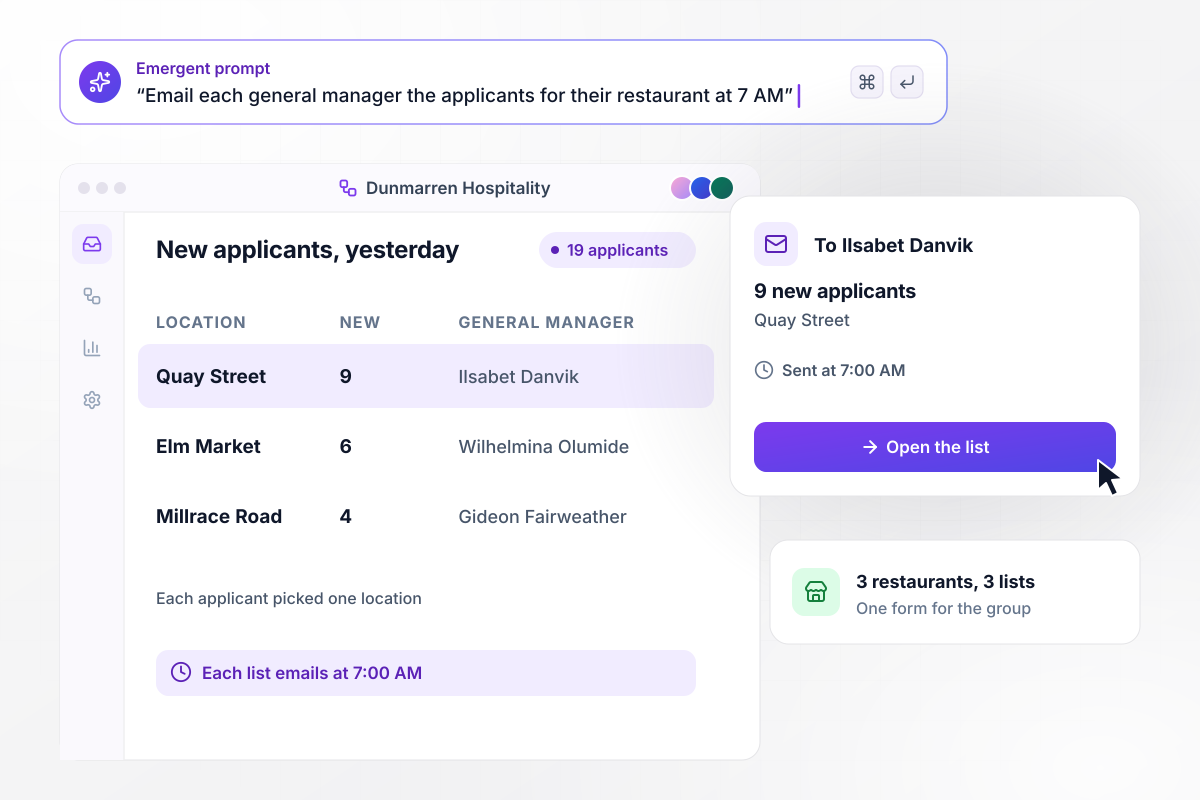
By 7:00 AM, Ilsabet has the 9 who chose Quay Street
Dunmarren Hospitality hires for 3 restaurants from one form, and each applicant picks a location. Yesterday brought 19 applicants across the group. At 7:00 AM, Ilsabet Danvik, who manages Quay Street, gets an email with the 9 who chose her restaurant. The other two managers get their own lists.






How to Create a Candidate Screening Form
Follow seven steps to build a candidate screening form that shortlists applicants on the answers each role needs.
Write down the two or three things a person cannot do the job without, such as a forklift certification or a night shift. Those become must-have questions. Everything else is a preference, and preferences belong in the score instead.
EEOC guidance says what you ask before hiring should be limited to those essential for determining if a person is qualified for the job. Read each question and name the hiring decision its answer changes. Cut any question where you cannot.
List the questions that rank applicants rather than rule them out, such as years in outside sales or weekend availability. Assign points to each possible answer and pick the total that earns a first call. Five questions at 20 points each make a 100-point scale.
Name the person who gets each shortlisted applicant: the recruiter for the role, or the manager for the location. Choose email, Slack, or an in-app alert. A busy role can send one list each morning instead of a message per applicant.
Put the must-haves and point values into one prompt, along with who hears about each applicant. Emergent builds the form, the database behind it, and a dashboard for the recruiter. Change a question or a point value later by asking for it in plain English.
Submit once as a strong applicant, once as someone who misses a must-have, and once just under the score line. Check that each lands with the right status and that only the first one reaches the hiring manager's inbox.
Put the link in each job post and on your careers page, and send it to anyone who applies another way. Read through the applicants waiting for review every week, because one skipped answer should not cost you a good hire.
Why Build Screening Forms With Emergent?
Every applicant's answers and score land in a database you own, and a busy hiring week never runs into a response cap.

|
Jotform | Google Forms | Typeform | |
|---|---|---|---|---|
| How you build | Describe it in plain English | Templates, editor, AI generator | Editor, with Gemini drafting on some Workspace plans | Templates, editor, AI assist |
| Where responses live | A database table you own, plus any integration | Jotform account | Google Sheets | Typeform account |
| Response limits | No response caps | Monthly submission caps by plan; the form stops at the cap | No limit | Monthly response caps by plan; the form closes at the cap |
| Code ownership | Full code export to GitHub on paid plans | None | None | None |

Pick the Pricing Plan That Works for You
Choose the plan that fits your building ambitions. From weekend projects to enterprise applications, we've got you covered.




Find the right form
for whatever you're collecting
Frequently Asked Questions
Your Questions, Answered
Don't change this element unless you know what you are doing
More things you can build
with Emergent









on Emergent today


