

Build a New Employee Form That Tracks Every Deadline
Create a new employee form that sends each hire one link, adds the right state tax form, and tracks each due date.
Build a new employee form that collects every hire's paperwork from one link.
Trusted by Builders Worldwide
Active Builders Worldwide
Apps Successfully Created
Countries Globally Reached



What a New Hire Packet Should Handle
A printed packet gets signed and filed. Emergent's version knows which forms each hire owes and when each one is due.
One link for the whole packet
Sends each hire a single link holding the information sheet, the W-4, Section 1 of the I-9 and your policy acknowledgments, with a progress bar showing the hire what remains.
Personal details typed once
Asks for each personal detail a single time, then reuses the answer wherever a later form in the packet needs it again. The W-4 and the state certificate both draw on one record.
State forms picked by work location
Adds the right state withholding certificate after the hire names a work location: NC-4 for a Charlotte hire, DE 4 for San Diego. Nobody sees a form their state does not use.
Due dates counted from the start date
Puts two clocks on every record: the I-9 document review HR owes after day one, and the report to the state directory. Anything close to its deadline turns red for HR.
Signatures filed with a date
Captures the hire's signature on every form and policy acknowledgment with a timestamp, then files the signed copy against the matching employee record in a database you own.
Onboarding code you keep
Exports the full codebase to GitHub on paid plans. An engineer can wire the employee record into your payroll provider or HRIS, or you describe the change and Emergent writes it.
Onboarding Paperwork by Team and State
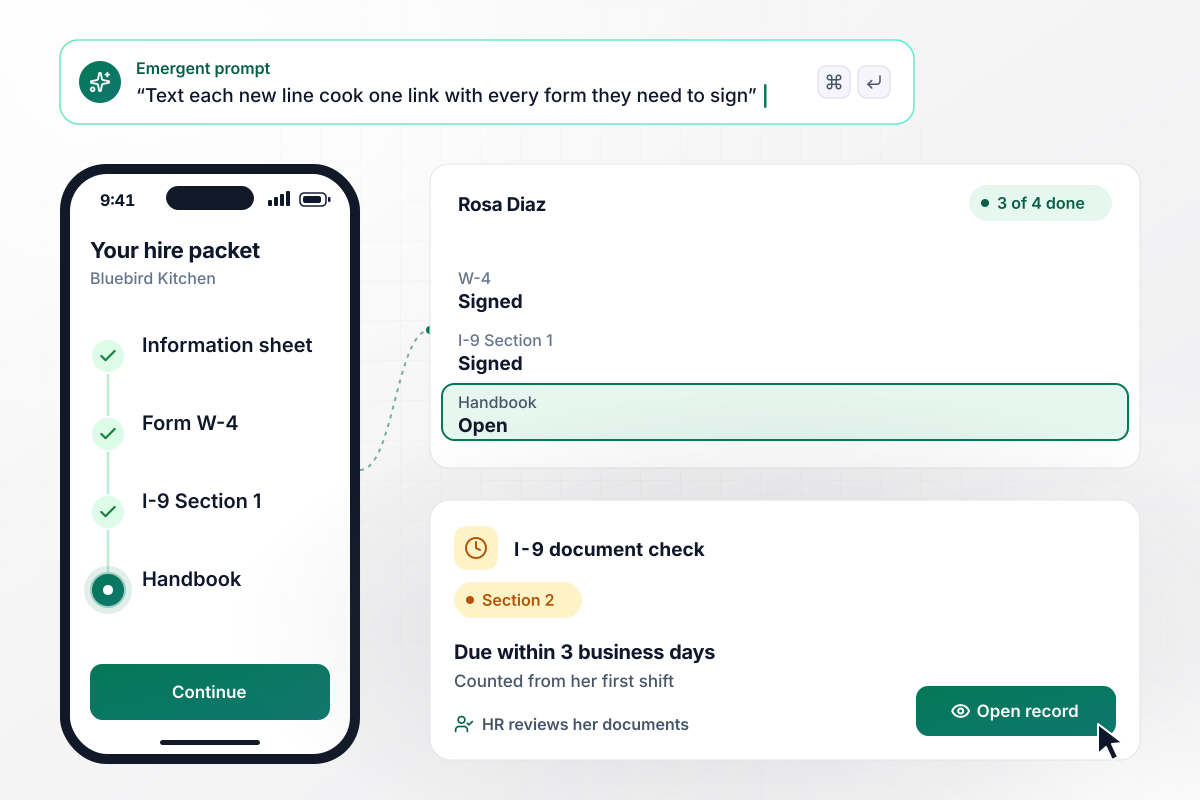
Section 1 signed from her phone at home
Bluebird Kitchen texts every line cook one link after they accept the offer. Rosa Diaz opens it the night before her first shift and finishes 3 of 4 items, Section 1 of the I-9 among them. HR sees the handbook acknowledgment still open. Her I-9 document check is due within 3 business days after she starts.
window.awbMockup = { hourlyHires: "Build a new employee form for the line cooks my restaurant hires. Text each hire one link after they accept the offer. The link holds an information sheet, a W-4, Section 1 of the I-9 and a handbook acknowledgment, with a progress bar. Show HR which items each hire still has open, and count down the 3 business days we have to check I-9 documents after their first shift.", multiStateTeams: "My company hires in Phoenix and Detroit. Start the new hire form by asking where the person will work. For Arizona, add the A-4 and mark it due within 5 days of the start date. For Michigan, add the MI-W4 and mark it due by the first day. Everyone gets the federal W-4. Show HR a table of hires with their work state, state form and status.", dayOneSetup: "When a new hire signs the last form in their onboarding packet, open a ticket in our IT queue for a laptop and logins, with the hire's name, role, and start date. Then send the hiring manager a Slack direct message with the start date and a link to the employee record. Keep a log of each step on the record.", newHireReporting: "Give my HR coordinator a list of every new hire we have not reported to the state new hire directory yet. Sort it by days since hire and show each one as day X of 20. Turn anyone past day 15 red. Let HR mark a hire as reported once they file it on the state website, and drop them from the list." };
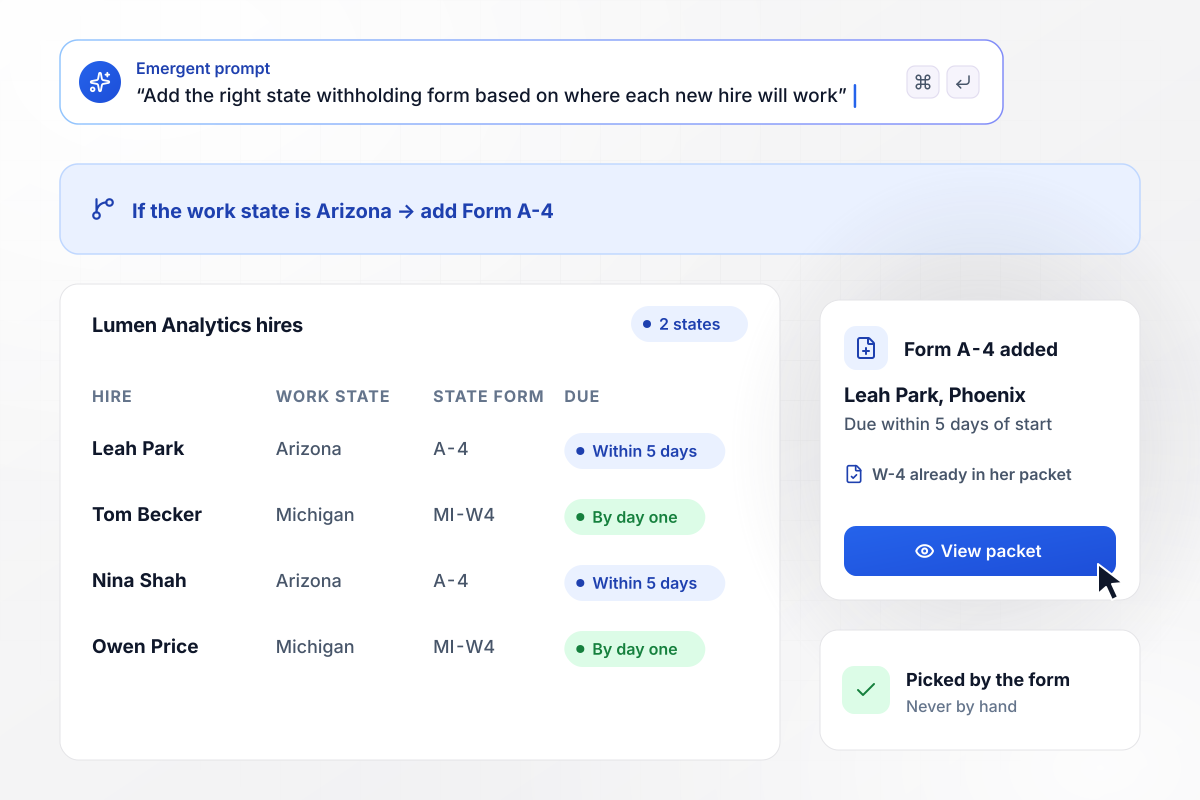
Phoenix gets the A-4, Detroit gets the MI-W4
Lumen Analytics hires in two states. Its form opens by asking where the hire will work, and the packet changes with the answer. A Phoenix hire gets Arizona's A-4, which the state wants within 5 days of starting. A Detroit hire gets Michigan's MI-W4, due by the first day. HR never picks state paperwork by hand.
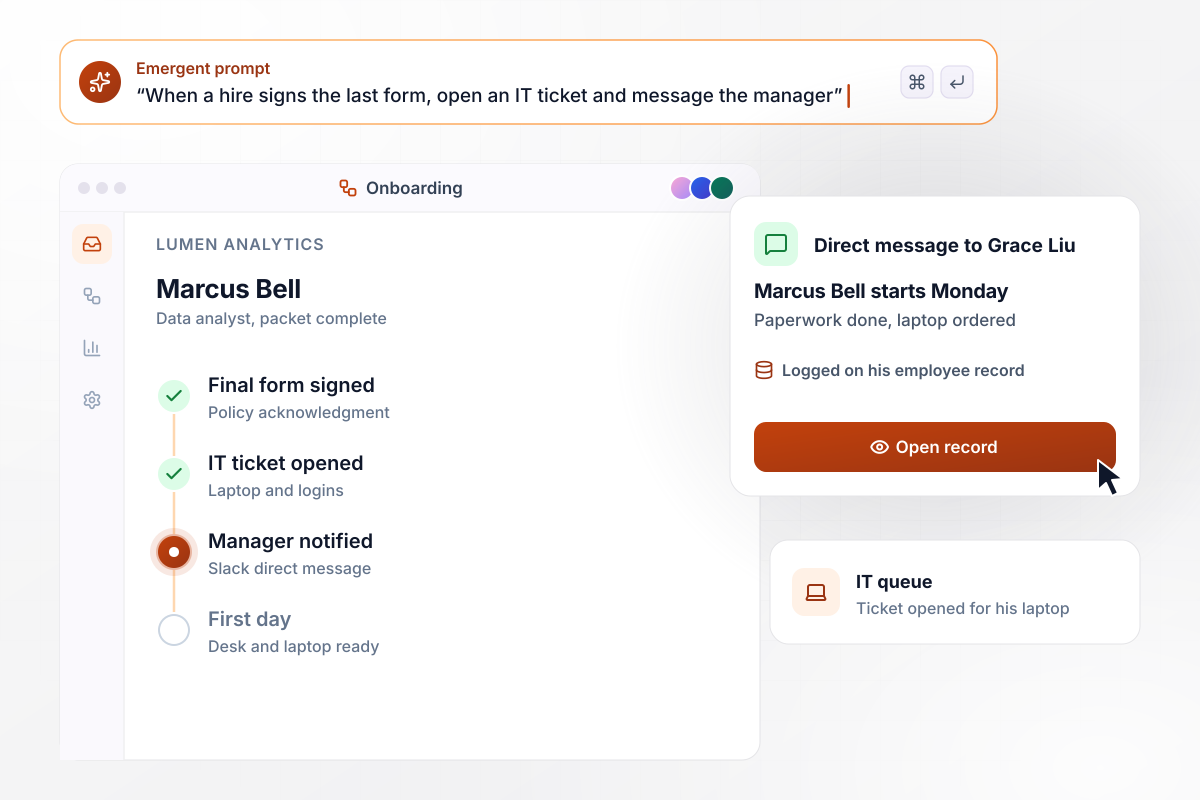
IT gets a laptop request with the last signature
At Lumen Analytics, a finished packet is the trigger. When Marcus Bell signs his final form, Emergent opens a ticket for his laptop and logins in the IT queue. His manager, Grace Liu, gets a Slack direct message with his start date. Nobody has to ask HR whether the paperwork is done.
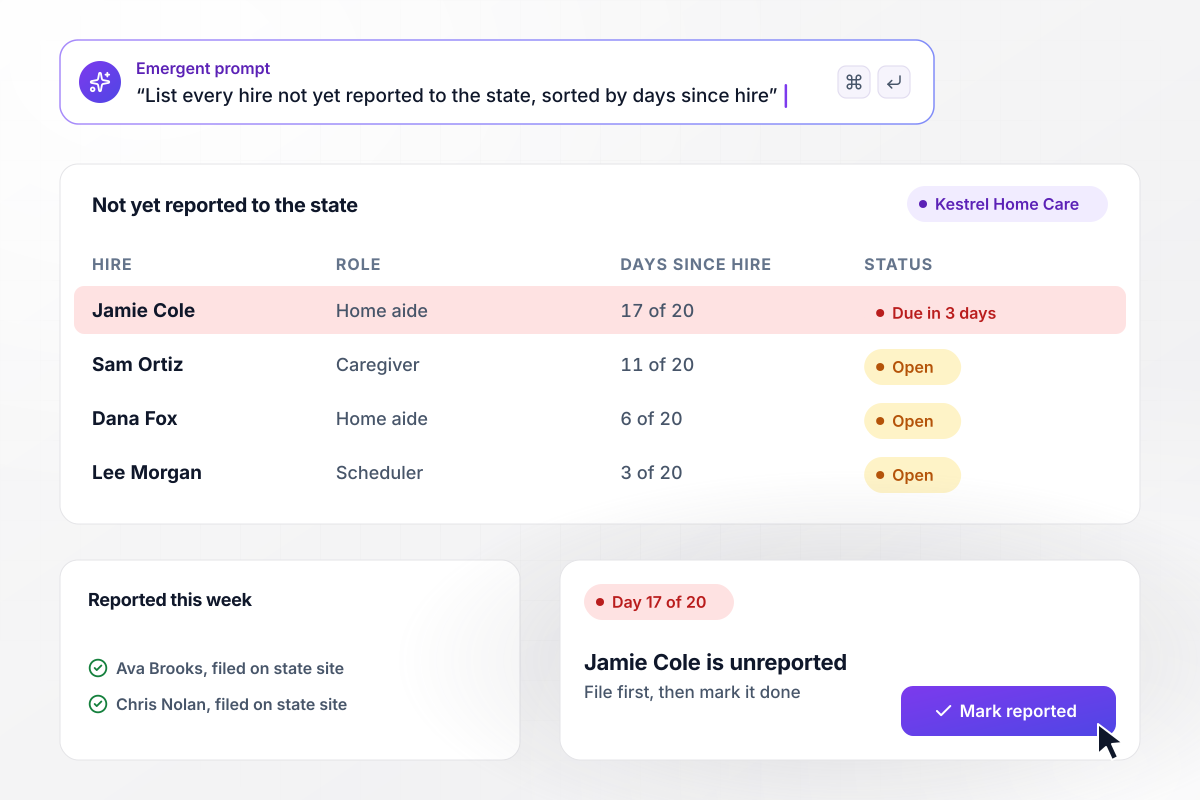
Day 17 of 20 and still unreported
Federal law gives employers 20 days to report a hire to the state. Kestrel Home Care adds aides every week, and its HR coordinator works from one list of hires not yet reported, sorted by days since hire. Jamie Cole sits at day 17 of 20 and stays red until HR files the report and marks it done.






How to Create a New Employee Form
Seven steps to build a new employee form that gets the packet signed by day one and keeps the I-9 and state report on schedule.
Pull the packet HR uses now and sort it. Federal forms come first: the W-4 and the I-9. Then add your state withholding certificate and the direct deposit authorization. Policies a hire must acknowledge in writing go last.
Ask for legal name, preferred name, home address, phone, personal email, date of birth, and Social Security number. Job title, department, manager and start date are fields HR completes, which keeps the hire's view to questions about themselves.
A hire may complete Section 1 of the I-9 any time after accepting the offer, and no later than the first day of work. Sending the packet link with the acceptance email lets them finish it at home instead of on a clipboard at orientation.
Ask where the hire will work before any tax form appears. Arizona uses the A-4, Michigan the MI-W4, North Carolina the NC-4, and California the DE 4. Show the federal W-4 to everyone and only the state form that applies.
Once the hire starts, HR has 3 business days to examine identity and work documents and complete Section 2. The state report is due within 20 days of hire, and earlier in some states. Store both due dates with the employee.
Collect a signature on each form and acknowledgment, record when it was signed, and attach a copy to the employee record. Send the W-4 and state certificate to whoever runs payroll, and keep I-9s in a separate HR file.
Treat the last signature as the signal for everything that follows. IT orders equipment and creates accounts, the manager learns the start date, and the new hire arrives to a desk that is ready instead of a stack of paper.
Why Build New Employee Forms With Emergent?
Every sheet, certificate and signed policy ends up on one employee record, stored in a database you own.

|
Jotform | Google Forms | Typeform | |
|---|---|---|---|---|
| How you build | Describe it in plain English | Templates, editor, AI generator | Editor, with Gemini drafting on some Workspace plans | Templates, editor, AI assist |
| Where responses live | A database table you own, plus any integration | Jotform account | Google Sheets | Typeform account |
| File uploads | Files saved to storage you own, no sign-in | Included; files count toward plan storage | Respondents must sign in to Google; files fill your Drive | Paid plans only |
| Response limits | No response caps | Monthly submission caps by plan; the form stops at the cap | No limit | Monthly response caps by plan; the form closes at the cap |
| Code ownership | Full code export to GitHub on paid plans | None | None | None |




Pick the Pricing Plan That Works for You
Choose the plan that fits your building ambitions. From weekend projects to enterprise applications, we've got you covered.




Find the right form
for whatever you're collecting















Frequently Asked Questions
Your Questions, Answered
Don't change this element unless you know what you are doing
More things you can build
with Emergent









on Emergent today


