

Build a Calculator Form That Shows the Result Before Submit
Build a calculator form that turns each answer into a price or a quantity, and keeps the inputs with the result.
Build a calculator form for my dog boarding lodge that multiplies nights by the nightly rate and shows the total before booking.
Trusted by Builders Worldwide
Active Builders Worldwide
Apps Successfully Created
Countries Globally Reached



What a Calculator Form Does With Each Answer
Each answer feeds a formula you describe in plain words, and the result shows on screen before anyone presses submit.
Formulas described in plain English
Write the math as you would explain it to a new hire: nights times the rate, less $10 a night for a second dog. Emergent builds that formula into the form from your prompt.
A result that follows every answer
Change a quantity or pick another option, and the total on screen changes with it. People see the exact number they are agreeing to before they press submit on the form.
Rounding and minimums you choose
Round mulch up to whole yards, cartons up to whole pallets, or prices to the dollar. Set a minimum order, such as $50, and the form shows it when a total comes in lower.
Inputs saved beside the result
Every submission is a row in a database you own, holding each answer and the number the form worked out. Sort by total to find the largest, or open one row to check the math.
Results sent to the right person
Email each respondent a copy of their result, and post large ones to a Slack channel. You set the line, such as any quote over $2,000 also going to the owner by email.
Source code your developer can extend
On paid plans, export the full codebase to your GitHub repository when the calculator belongs inside an existing site. Host it where you like and keep editing the formulas.
Where a Calculator Form Does the Math
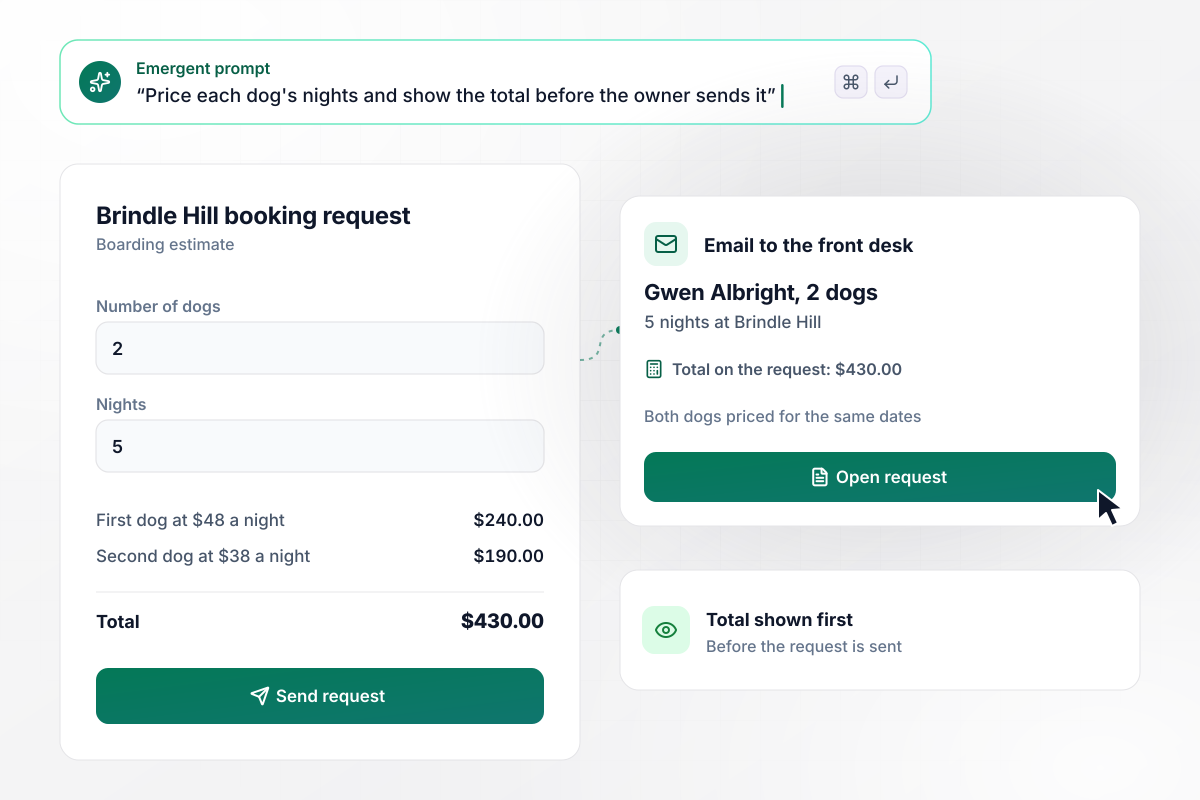
With 2 dogs for 5 nights, the total is $430.00
Gwen Albright enters 2 dogs and 5 nights on Brindle Hill Pet Lodge's booking form. It charges $48 a night for the first dog and $38 for the second, and shows $430.00 under the dates before she sends the request. The front desk gets the request by email with that total on it.
window.awbMockup = { boardingQuotes: "I run Brindle Hill Pet Lodge. Build a calculator form for boarding requests that asks for the number of dogs and the number of nights. Charge $48 a night for the first dog and $38 a night for each dog after it, show the total before the owner sends the request, and email the request with its total to my front desk.", mulchOrders: "My landscape supply yard sells mulch at $38 a cubic yard. Build a form where a customer enters the bed size in square feet and the depth in inches. Work out the cubic yards, round up to the next whole yard, add my $45 delivery fee, and show the order total before they place the order.", roiForSalesLeads: "My company sells scheduling software. Build an ROI calculator form for my pricing page that asks for a work email, how many managers build schedules, the hours each spends a week, and their hourly cost. Show the weekly total right away, save every result, and email my account executive when a result is over $1,000 a week.", palletCounts: "Build a pallet calculator form for my warehouse staff. The shift lead enters the order number and the carton count, and the form divides by 48 cartons per pallet and rounds any partial pallet up. Save each count on its order, and show me a table of the night shift's orders with their pallet totals." };
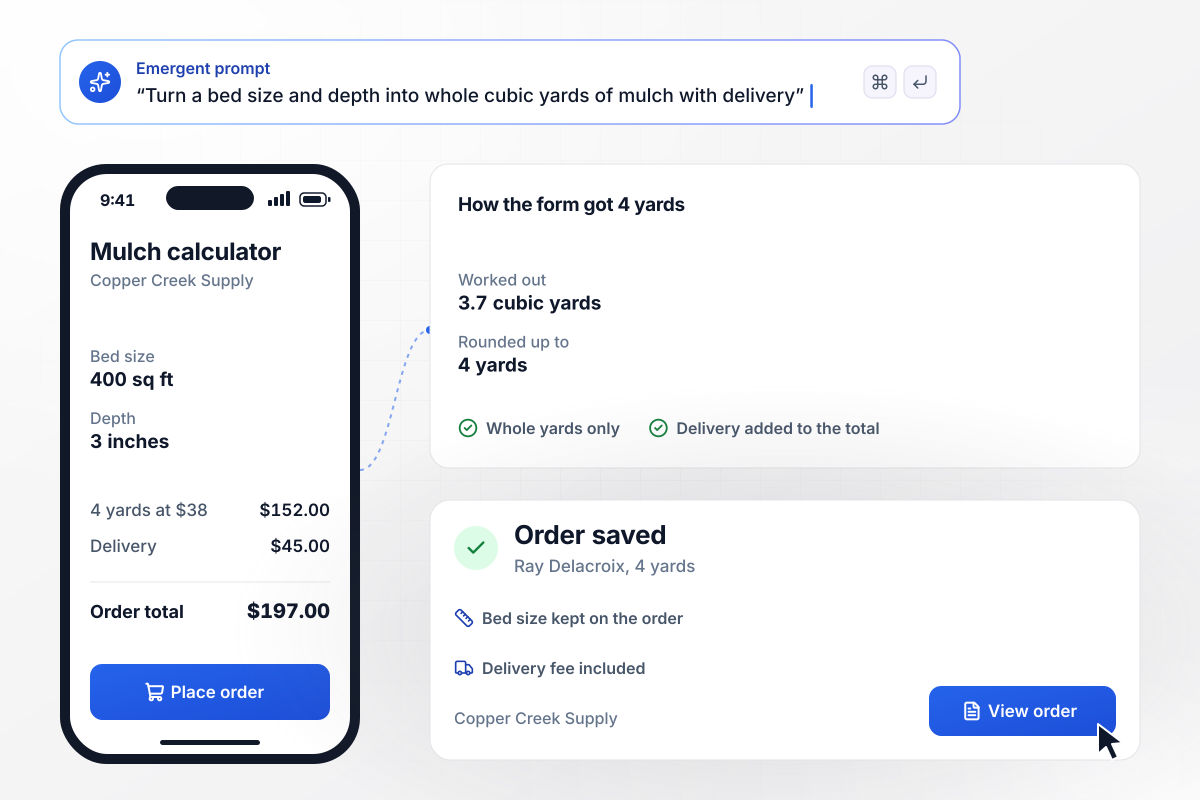
From a 400 square foot bed to 4 yards of mulch
Copper Creek Landscape Supply sells mulch by the cubic yard. Ray Delacroix enters a 400 square foot bed at 3 inches deep, and the form works out 3.7 yards, then rounds up to 4 yards at $38 each. With $45 delivery the order comes to $197.00, saved with the bed size beside it.
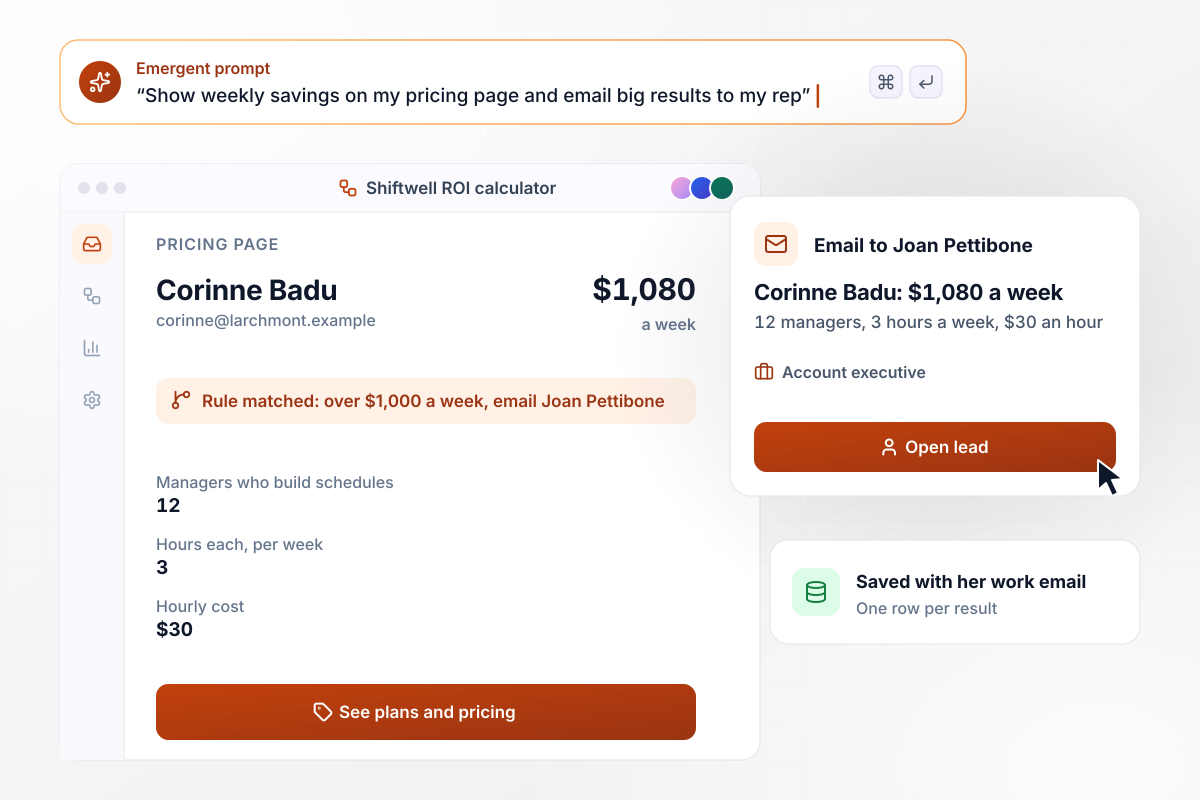
When savings pass $1,000 a week, Joan gets the lead
Shiftwell sells scheduling software and puts an ROI calculator form on its pricing page. Corinne Badu gives her work email and enters 12 managers who each spend 3 hours a week on schedules at $30 an hour. She sees $1,080 a week, and any result over $1,000 a week emails account executive Joan Pettibone.
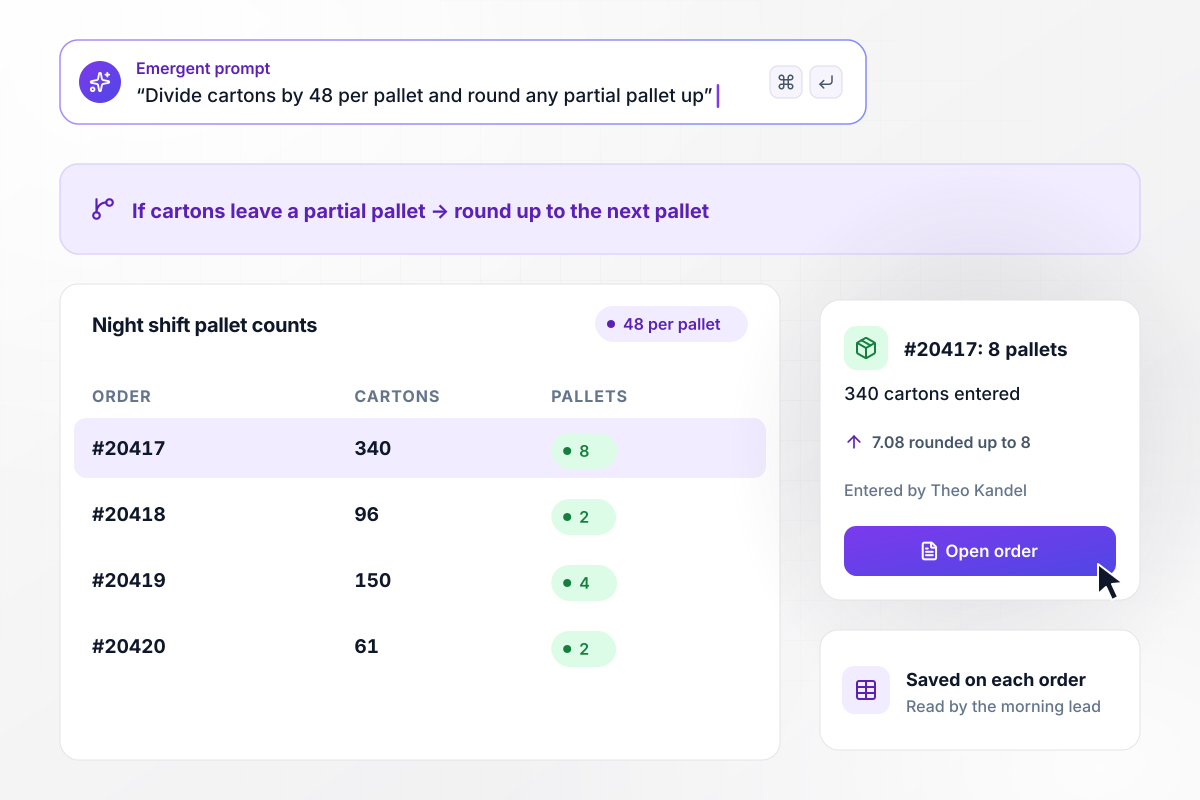
All 340 cartons on order #20417 fit 8 pallets
Theo Kandel runs the night shift at Harbor Pine Distribution, where each pallet takes 48 cartons and any partial pallet rounds up. For order #20417 he enters 340 cartons, and the form turns 7.08 pallets into 8. Each count is saved on its order, and the morning lead reads the whole shift's counts in one table.






How to Build a Calculator Form
Seven steps to build a calculator form that shows the right result before submit and saves every answer behind it.
Write the math the way you would say it out loud, such as bed area times depth, turned into cubic yards. If it takes more than two sentences, split it into smaller results that add up to one total at the end.
List every number the formula uses, then decide which ones the person types and which stay fixed, such as a $25 bath fee. Ask only for numbers a visitor knows without looking anything up, and keep fixed rates in your prompt.
Choose a rounding rule for each result: up to the next whole unit for anything sold by the unit, or to the cent for a price. Write down any minimum order too, and what the form shows when a total falls below it.
Show the result as each answer changes, or hold it for a final step when you want an email first, as an ROI calculator might. For an order or a booking, keep the price on screen from the first answer to the last.
Put the inputs, the formula, the rounding rule, and where results go into one prompt. Emergent builds the calculator form and the database table that holds every result. To change a rate or add an input later, describe the change in plain English.
Name the person who gets results above a line you set, such as orders over 10 yards. Emergent connects to any tool with an API, so the app can also add each order to your order system as it comes in.
Enter 5 cases you have already worked out in a spreadsheet, including one that needs rounding and one under your minimum. Compare each result with your numbers, then open the table and check that every input was saved with it.
Why Build Your Calculator Form With Emergent?
Describe the inputs and the formula in a sentence. Emergent builds the calculator form and the table its answers land in.

|
Jotform | Google Forms | Typeform | |
|---|---|---|---|---|
| How you build | Describe it in plain English | Templates, editor, AI generator | Editor, with Gemini drafting on some Workspace plans | Templates, editor, AI assist |
| Where responses live | A database table you own, plus any integration | Jotform account | Google Sheets | Typeform account |
| Response limits | No response caps | Monthly submission caps by plan; the form stops at the cap | No limit | Monthly response caps by plan; the form closes at the cap |
| Code ownership | Full code export to GitHub on paid plans | None | None | None |




Pick the Pricing Plan That Works for You
Choose the plan that fits your building ambitions. From weekend projects to enterprise applications, we've got you covered.




Find the right form
for whatever you're collecting












Frequently Asked Questions
Your Questions, Answered
Don't change this element unless you know what you are doing
More things you can build
with Emergent









on Emergent today


