

Build a Daycare Registration Form That Runs Enrollment
Build a daycare registration form that places children by birth date and keeps every family in a database you own.
Build a daycare registration form that saves every response to a database I own.
Trusted by Builders Worldwide
Active Builders Worldwide
Apps Successfully Created
Countries Globally Reached



What the Form Collects, and What It Does Next
Each section answers something staff need on a child's first morning, such as who may take them home and what they cannot eat.
Every guardian on the child's record
Collect the child's legal name and birth date, plus the name they go by. Add each parent or guardian with a phone and email, and upload any custody order staff must follow.
An authorized pickup list at the door
Parents name each adult who may collect their child, with that person's relationship and phone number. Teachers open the list on a tablet at pickup and check each adult against it.
Allergies and medicines staff can find
Ask about allergies, daily medicines, dietary limits, and the child's doctor. Each answer sits on the child's card, so a substitute teacher sees a peanut allergy before snack time.
Full-time care or the days a family picks
Offer full-time care or chosen weekdays, such as Tuesdays and Thursdays. Each choice saves to the family's row, so the director can count which children are due in on any morning.
Policies signed on the parent's phone
Show the program's sick-child and late-pickup policies, then ask for a signature. The app captures the e-signature with the date, and each signed copy stays on the child's record.
Source code you can host elsewhere
On paid plans, export the registration app's source code to your GitHub repository. A developer can then host it on other servers or connect it to tools the program already uses.
How Four Programs Register Families
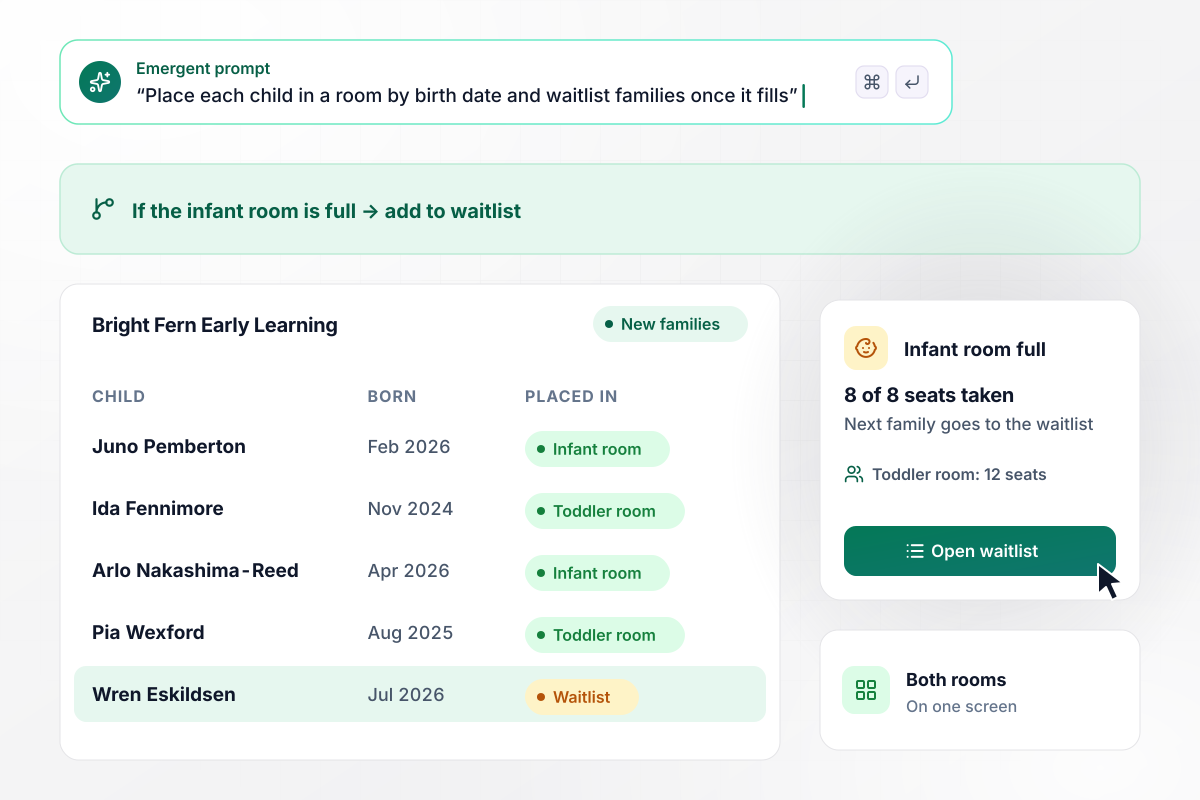
Each child placed in a room by birth date
Bright Fern Early Learning has 8 seats in its infant room and 12 in its toddler room. The form reads each child's birth date and places them in the right room. When the infant room fills, the next family goes to its waitlist, and the director sees both rooms on one screen.
window.awbMockup = { infantAndToddlerRooms: "My child care center has 8 seats in the infant room and 12 in the toddler room. Build a registration form that reads each child's birth date and places them in the right room. When the infant room is full, put the next family on a waitlist, and show me both rooms' seat counts on one screen.", homeDaycareFees: "I run a daycare from my home and care for 6 children. Build a registration form parents fill in on a phone, with a $75 registration fee paid through my Stripe account before the form submits. The payment should hold the child's spot, and each family's row should show the fee as paid and the date.", immunizationRecords: "My preschool needs each new family to upload the child's immunization record with the registration form. If a record is still missing 14 days before a child's first day, email the parent a link to upload it, and add the file to the child's record when it comes in. Show me which children are still missing one.", returningFamilies: "Every March our 40 families re-register for the next school year. Build a re-registration form that opens with last year's answers filled in, so a parent only confirms or changes them. Give me a list of who has finished, and email every family that has not a reminder each Monday until they do." };
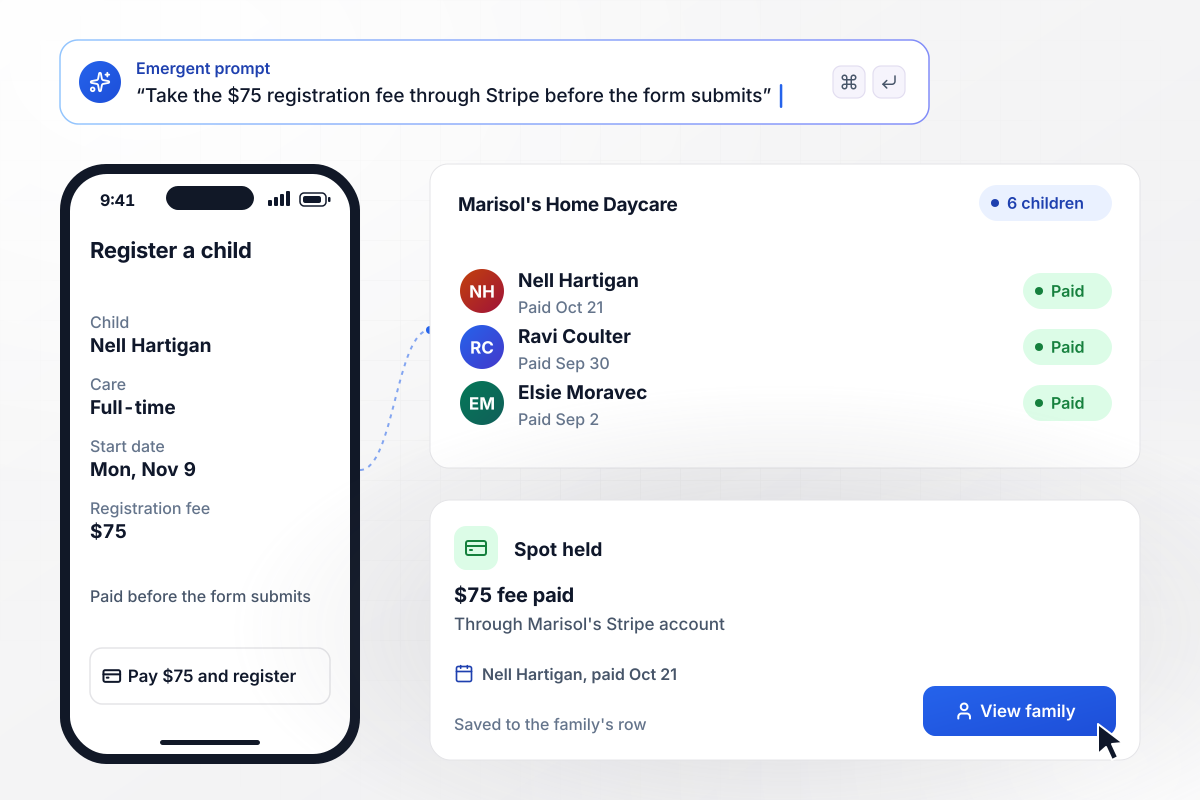
With $75 paid, the spot is held
Marisol Ferreira-Holt cares for 6 children in her home. A parent registers on a phone and pays her $75 registration fee through her Stripe account before the form submits. The payment holds the child's spot, and each family's row shows the fee as paid, with the date.
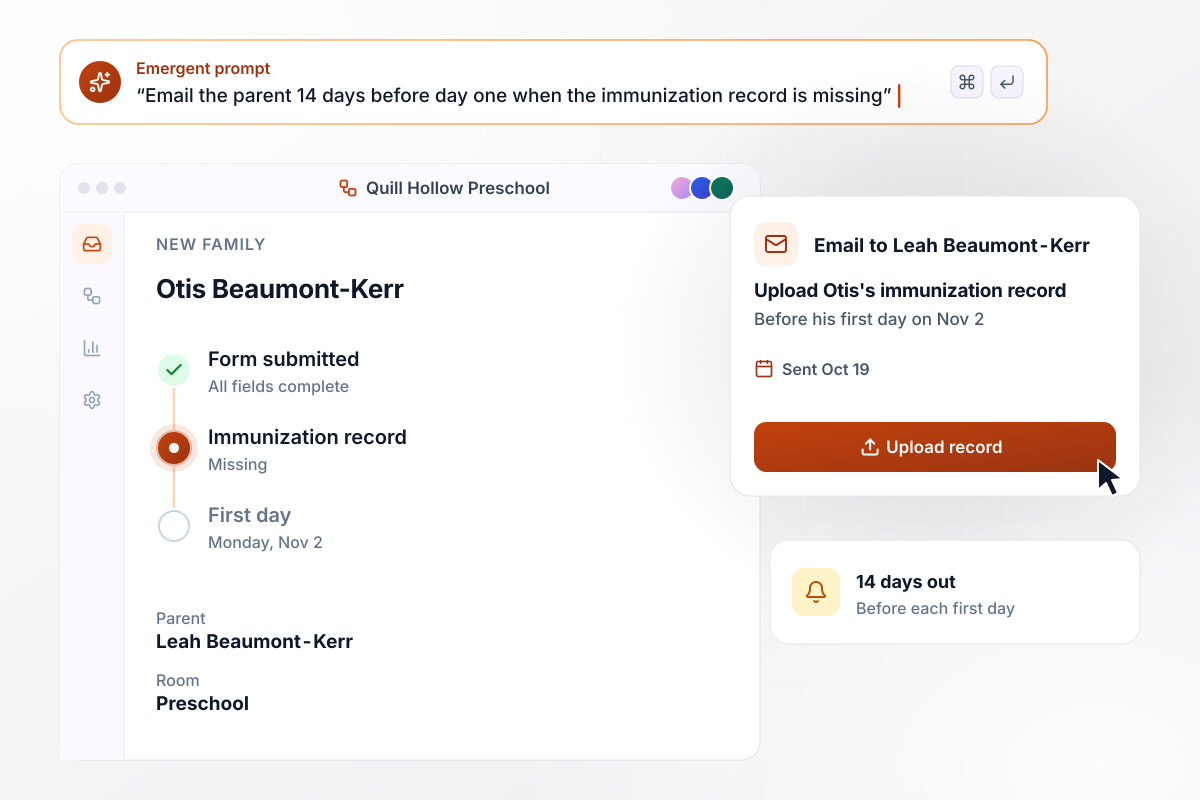
Before day one, the missing record is requested
Otis Beaumont-Kerr starts at Quill Hollow Preschool on Monday, Nov 2. His form came in complete except for the immunization record. On Oct 19, 14 days before his first day, the app emails his mother, Leah Beaumont-Kerr, a link to upload it to his file.
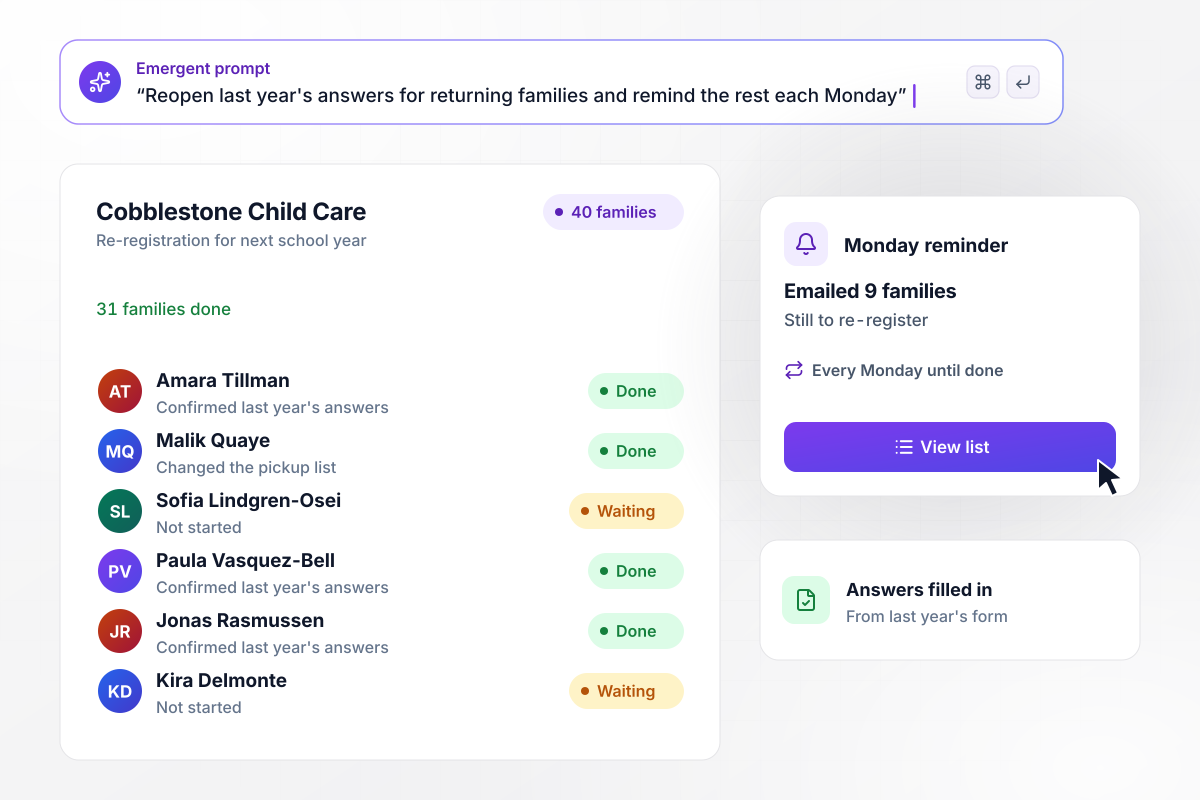
For returning families, last year's answers come back
Every March, the 40 families at Cobblestone Child Care re-register for the next school year. Each form opens with last year's answers filled in, and a parent confirms them or changes what is new. The director's list shows 31 families done, and the other 9 get an email reminder every Monday until they finish.






How to Create a Daycare Registration Form
Seven steps to plan a daycare registration form around your rooms and records, then build it with Emergent.
List each room with the ages it takes and the number of seats it has. Decide what a family sees when its room is full, such as a waitlist place or a later start date. The form uses those numbers for every placement.
Ask for the child's details first, then each parent or guardian. Mark one guardian as the first call when a child gets sick at noon, and collect a work phone as well as a mobile number for every guardian on the form.
Add an upload field for each record your program keeps on file, such as the immunization record and a doctor's note. Ask for the date on each one. The app can then show which records are missing or out of date before a child starts.
Keep emergency contacts and the pickup list as two separate questions. A neighbor who can be called when a parent is unreachable is not always someone the parent allows to take the child home, and staff need to see that difference.
Offer the schedules you run, full-time or set weekdays, and show the price of each. If you charge a registration fee, connect the payment tool you already use through its API and take the fee before the form submits.
Before you publish, check your state's licensing requirements and compare your fields with any registration form your licensing agency issues. Add the questions it asks that yours does not, and keep the agency's wording for those questions.
Describe the form to Emergent in plain English, with your rooms, fee, and records. Emergent builds the form and its database. Register a test child with a missing record into a full room, then check the waitlist and the reminder.
Why Build Your Daycare Form With Emergent?
A printed form still has to be typed into a roster. Emergent builds the form and the roster together, stored in a database you own.

|
Jotform | Google Forms | Typeform | |
|---|---|---|---|---|
| How you build | Describe it in plain English | Templates, editor, AI generator | Editor, with Gemini drafting on some Workspace plans | Templates, editor, AI assist |
| Where responses live | A database table you own, plus any integration | Jotform account | Google Sheets | Typeform account |
| Response limits | No response caps | Monthly submission caps by plan; the form stops at the cap | No limit | Monthly response caps by plan; the form closes at the cap |
| Code ownership | Full code export to GitHub on paid plans | None | None | None |



Pick the Pricing Plan That Works for You
Choose the plan that fits your building ambitions. From weekend projects to enterprise applications, we've got you covered.




Find the right form
for whatever you're collecting















Frequently Asked Questions
Your Questions, Answered
Don't change this element unless you know what you are doing
More things you can build
with Emergent









on Emergent today


