

Build an RFQ Form That Works for Buyers and Suppliers
Create an RFQ form that asks for quantity and unit on each line and lines up supplier quotes in one table.
Build an RFQ form that saves every response to a database I own.
Trusted by Builders Worldwide
Active Builders Worldwide
Apps Successfully Created
Countries Globally Reached



What a Supplier Needs to Quote Without a Call
An RFQ form defines the item so every supplier prices the same thing. These six parts cover the lines and the answers that come back.
A unit of measure on every line
Each line carries a part number, a quantity, and a unit picked from a list: each, foot, box, or case. A line with no unit will not submit. That leaves 300 meaning one thing.
Drawings filed on the line they describe
Attach a drawing or a data sheet to the line it belongs to. The supplier opens the RFQ and finds each file beside its part number instead of in a separate email thread.
One response sheet for every supplier
Each invited supplier gets its own link to the same fields: unit price, freight, lead time in days, and the date the quote expires. Answers arrive as rows you can sort.
Reminders before the RFQ closes
Set a closing date and time. Two days before it, suppliers who have not answered get an email reminder, and the buyer sees which suppliers have replied and which have gone quiet.
Each request routed to whoever prices it
Send each incoming RFQ by order size or product line. Large orders can reach a senior estimator in Slack, while the small ones join the inside sales queue by email instead.
Code you can take with you
On paid plans, export the full codebase to your GitHub repository, then connect the form to your ERP or host it on your own servers. Keep building on the app from there.
Who Sends an RFQ, and Who Answers It
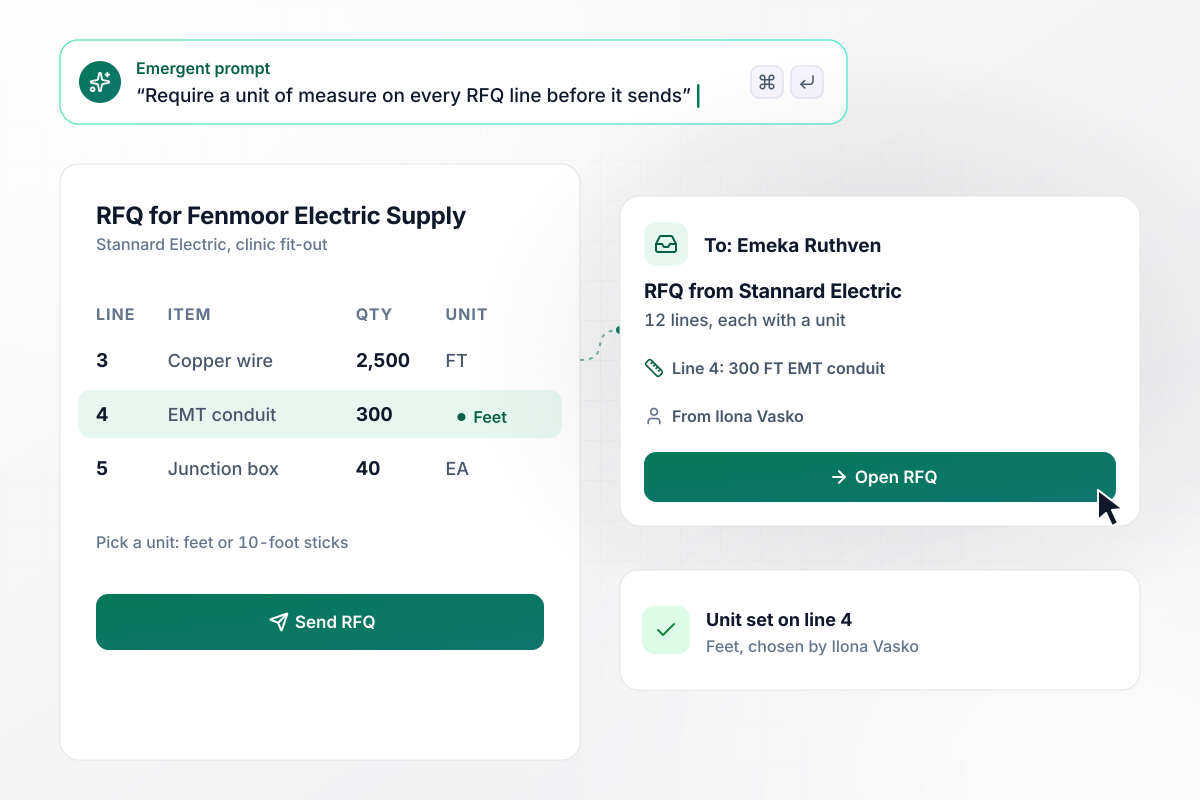
All 12 lines arrive with a unit attached
Ilona Vasko buys for Stannard Electric, and a clinic fit-out needs 12 lines quoted by Fenmoor Electric Supply. Line 4 asked for 300 of EMT conduit with no unit. The form held it until she picked feet over 10-foot sticks. Emeka Ruthven in inside sales got the RFQ with a unit on every line.
window.awbMockup = { electricalSupply: "I run inside sales at Fenmoor Electric Supply. Build an RFQ form for contractors: project name, then line items with item, quantity, and a required unit picked from each, feet, box, or case. If a line has no unit, ask which one before it sends. Number each RFQ and email it to the inside sales rep for that account.", packagingBuyers: "I buy packaging for Pipewell Cider. Build an RFQ for 120,000 cans that I can send to three suppliers. Each supplier gets a link to the same sheet: price per can, freight as its own line, lead time, and how long the quote is valid. Show me a table with each supplier's delivered total, lowest first.", freightBrokers: "My company is Sorrel Line Logistics, a freight broker. Build a freight RFQ form for our website: pickup city, delivery city, pallet count, total weight, ready date, and whether a liftgate is needed. Send anything over 6 pallets to our truckload desk by email and everything else to the LTL queue.", hospitalPurchasing: "I am a buyer at Linden Valley Health. Build an RFQ for janitorial supplies with six lines that three suppliers answer with a price per line. Let me award each line to a different supplier, total the award for each one, and email every supplier its result, including the ones that were not picked." };
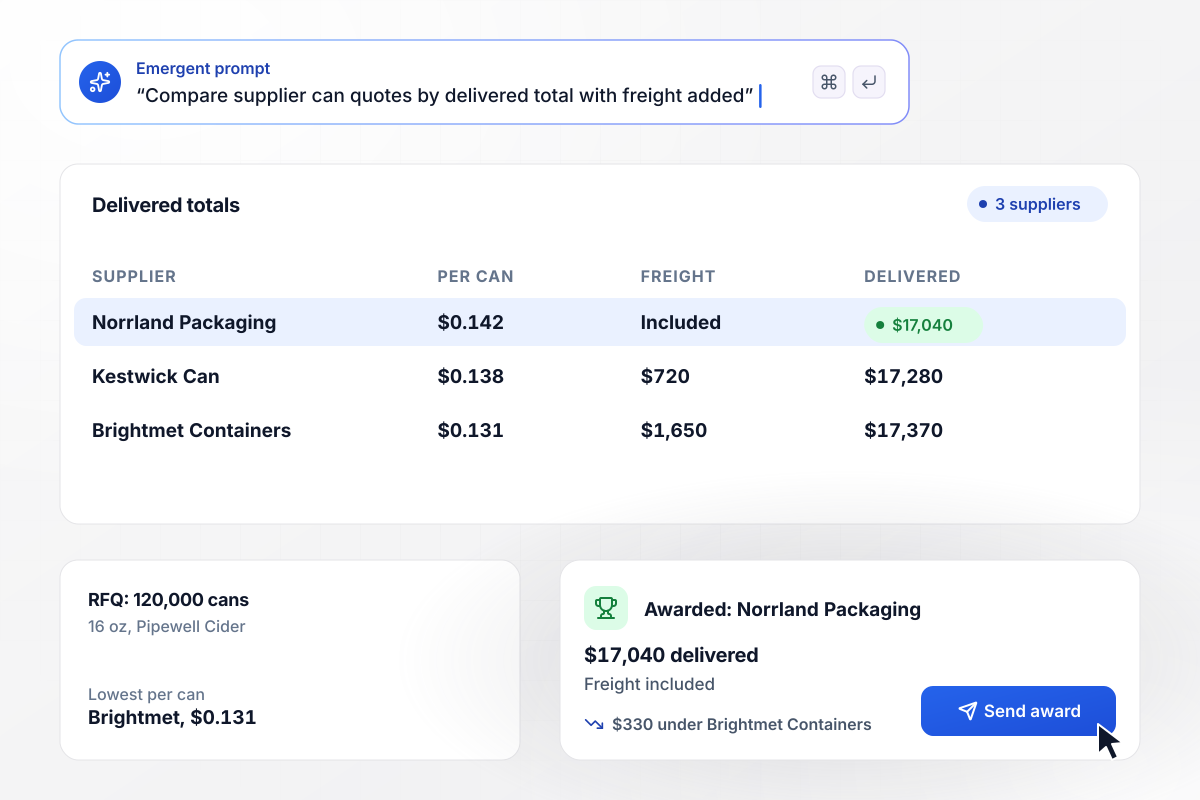
The cheapest can loses by $330 once freight is in
Pipewell Cider needs 120,000 16-ounce cans and sent one RFQ to three suppliers. Each answered the same sheet, with freight on its own line. Brightmet Containers had the lowest can at $0.131, but $1,650 in freight brought it to $17,370 delivered. Norrland Packaging won at $17,040, freight included.
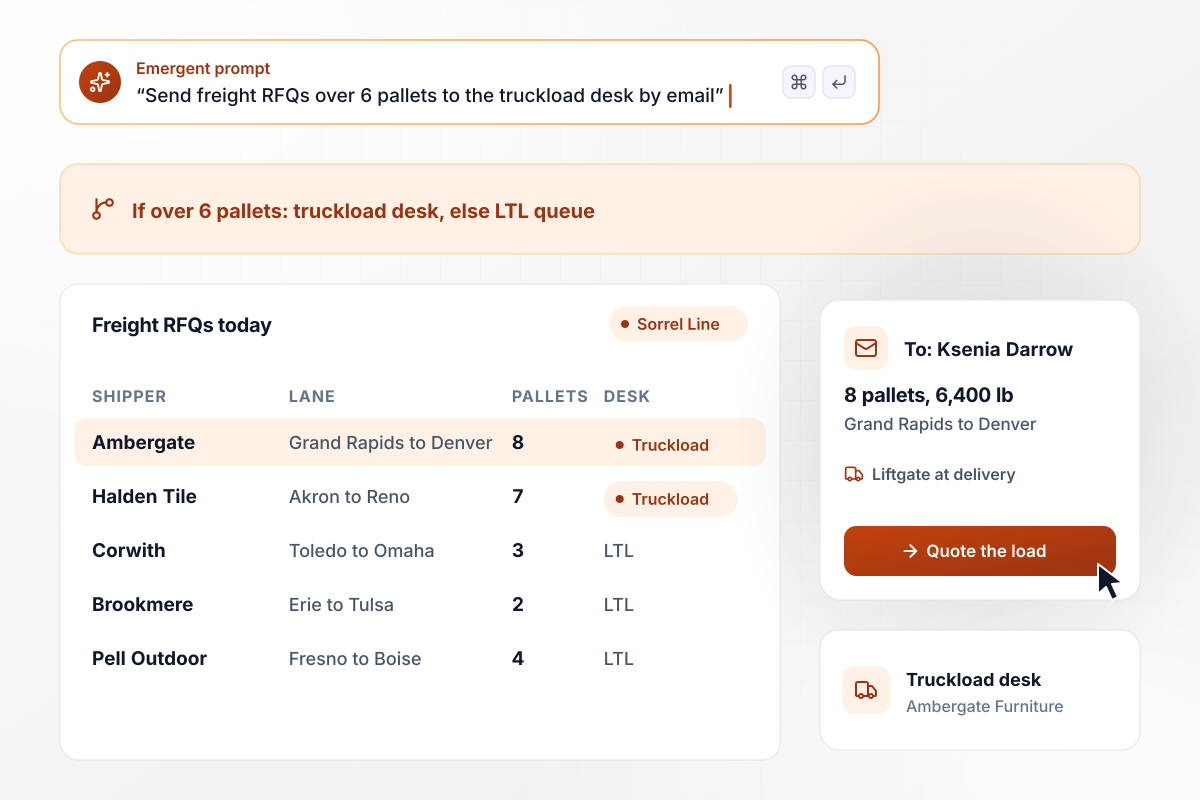
Over 6 pallets, it goes to Ksenia on truckload
Ambergate Furniture asked Sorrel Line Logistics to quote 8 pallets weighing 6,400 lb from Grand Rapids to Denver, with a liftgate at delivery. Requests over 6 pallets skip the less-than-truckload (LTL) queue. This one reached Ksenia Darrow on the truckload desk by email, with the lane and the liftgate note at the top.
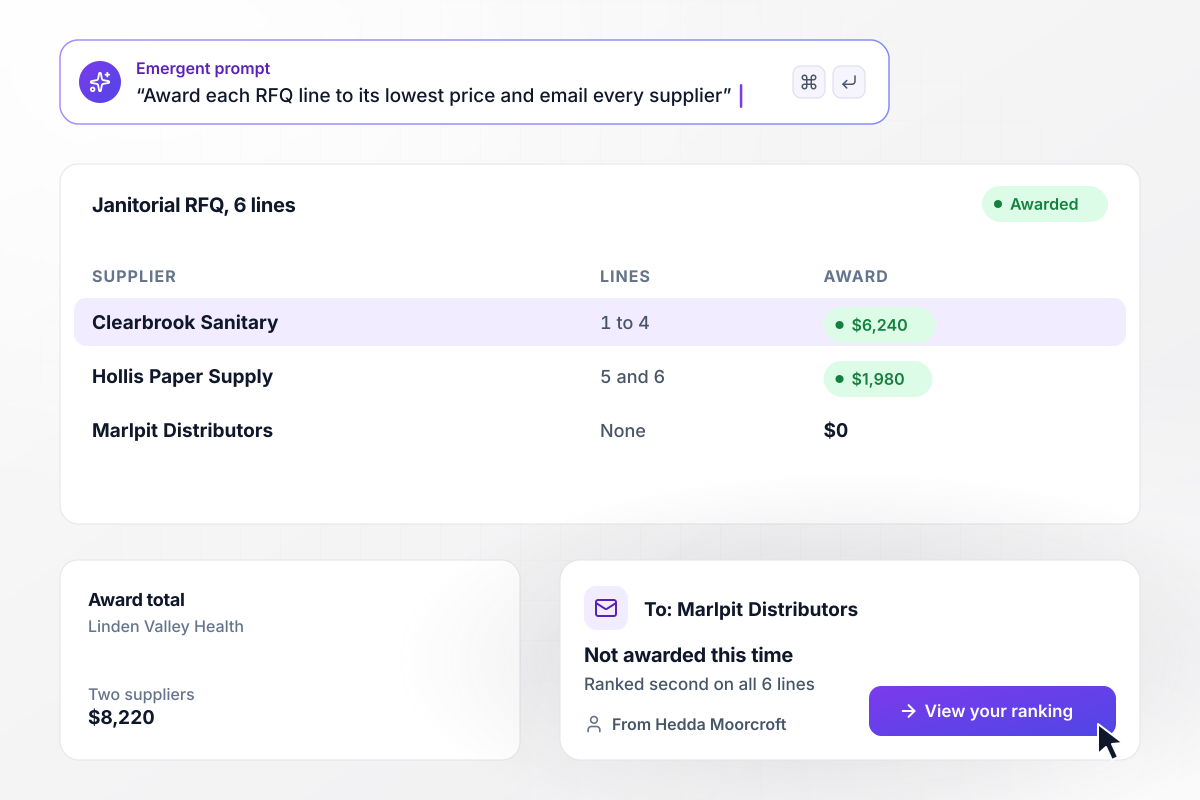
Two suppliers split six lines, and the third hears why
Six lines went out in one janitorial RFQ from Linden Valley Health. Hedda Moorcroft gave each line to its lowest price: lines 1 to 4 to Clearbrook Sanitary for $6,240, and lines 5 and 6 to Hollis Paper Supply for $1,980. Marlpit Distributors got an email saying it ranked second on all 6 lines.






How to Make an RFQ Form
Seven steps to build an RFQ form that gets every supplier pricing the same items on the same terms.
Pull every line from the drawing or the last order, with a part number and a quantity for each. Where a substitute is acceptable, add "or equal" to the line. A supplier then knows it may quote an alternative instead of guessing.
Pick the unit you count and pay in for each line, such as feet for wire and each for boxes. If a supplier sells by the case of 12, ask for its pack size on the response sheet and convert before you compare prices.
Beyond price, choose the terms you will weigh, such as payment terms or a warranty period. Make each one a required answer. No quote comes back missing the one term that decides the award.
Say how you will choose before anyone prices: lowest delivered total, or each line to its own lowest bid. Put the rule in the RFQ itself. Every supplier reads the same terms, and a losing bidder can see why.
Collect a contact name and email for every invited supplier rather than a general sales inbox. Reminders and award emails then reach someone who can answer, and a late reply has a name attached to chase.
Choose the column that ranks the quotes: unit price, delivered total with freight, or lead time in days. Set it now. The table is ready to read the morning the RFQ closes.
Paste your lines, answer fields and closing date into a prompt, and Emergent builds the form and its database. Send a test RFQ to a colleague with one line missing its unit, and check that it stops before it sends.
Why Build Your RFQ Form With Emergent?
Email a blank RFQ template and each supplier may answer in its own layout. A form fixes the fields, and the quotes line up.

|
Jotform | Google Forms | Typeform | |
|---|---|---|---|---|
| How you build | Describe it in plain English | Templates, editor, AI generator | Editor, with Gemini drafting on some Workspace plans | Templates, editor, AI assist |
| Where responses live | A database table you own, plus any integration | Jotform account | Google Sheets | Typeform account |
| Response limits | No response caps | Monthly submission caps by plan; the form stops at the cap | No limit | Monthly response caps by plan; the form closes at the cap |
| Code ownership | Full code export to GitHub on paid plans | None | None | None |



Pick the Pricing Plan That Works for You
Choose the plan that fits your building ambitions. From weekend projects to enterprise applications, we've got you covered.




Find the right form
for whatever you're collecting


Frequently Asked Questions
Your Questions, Answered
Don't change this element unless you know what you are doing
More things you can build
with Emergent









on Emergent today


