

Build Accounting Automation for Your Month-End Close
Get accounting automation that matches bank lines overnight and holds recurring entries for the controller.
Build accounting automation that runs on its own and logs every step.
Trusted by Builders Worldwide
Active Builders Worldwide
Apps Successfully Created
Countries Globally Reached



Where a Finance Team Loses Hours Each Month
Accounting automation is software and AI taking over the manual steps of the books. Your team reviews exceptions, not every entry.
Close rules you write as sentences
Describe each rule the way you would brief a new hire: match on amount and date. Emergent builds the app and its logic from those words, and you change a rule by prompting.
A two-way link to your ledger
The app reads accounts and balances from QuickBooks or NetSuite through their APIs and writes approved entries back. Nobody retypes a number from one system into another.
Receipts and bills read into fields
Upload a receipt or a vendor bill and AI reads the vendor, date, and amount into structured fields. A value it is unsure of goes to a person to confirm before it is used.
Reminders that reach the task owner
Each close task has one owner and a due day. When a task slips, its owner hears about it in Slack or by email, and a task still open a day later goes to the controller.
One live board for the whole close
Matched lines and entries awaiting approval update on one dashboard as they change. Every record sits in a database you own, ready when the auditors ask for last quarter.
The code behind your close, exported
Paid plans export the full code of the app, matching rules included, to your GitHub repository. An engineer can read how a line was matched and review each change to it.
Four Automations Inside One Close
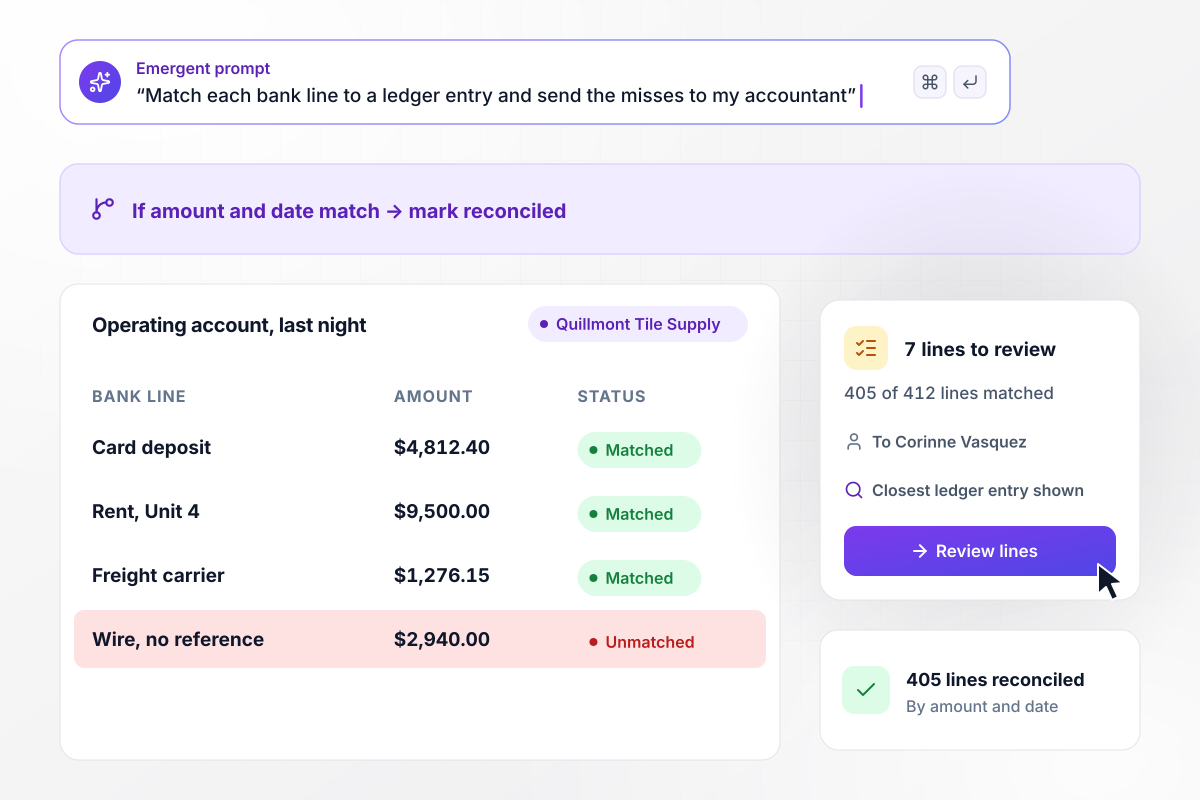
Bank lines match overnight, and 7 go to a person
Every night the app pulls the bank lines from Quillmont Tile Supply's operating account and matches each one to a ledger entry by amount and date. Last night 405 of 412 lines matched. The 7 that did not went to Corinne Vasquez, the staff accountant, each beside the closest entry in the ledger.
window.awbMockup = { bankMatching: "Every night, pull the bank lines from my operating account and match each one to a ledger entry by amount and date. Mark the matched lines as reconciled. Send the lines that do not match to my staff accountant, each shown beside the closest entry in the ledger, and show a count of matched and unmatched lines.", closeTracking: "Build a close board for my 5-day month-end close. Give every task one owner and a due day. Show how many tasks are done and how many are on schedule. When a task passes its due day, turn it red on the board and send its owner a direct message with the task and its due day.", recurringEntries: "We prepaid a 12-month liability policy. On the last day of each month, draft the entry that moves one month of the policy from prepaid insurance to insurance expense. Hold each draft for the controller to approve, then post it to QuickBooks and log who approved it.", varianceNotes: "Compare every expense account with the prior month at close. If an account moves more than 10%, ask the account's owner for a note explaining why, and keep the account open on the close board until the note is written. Show each account's change as a percentage." };
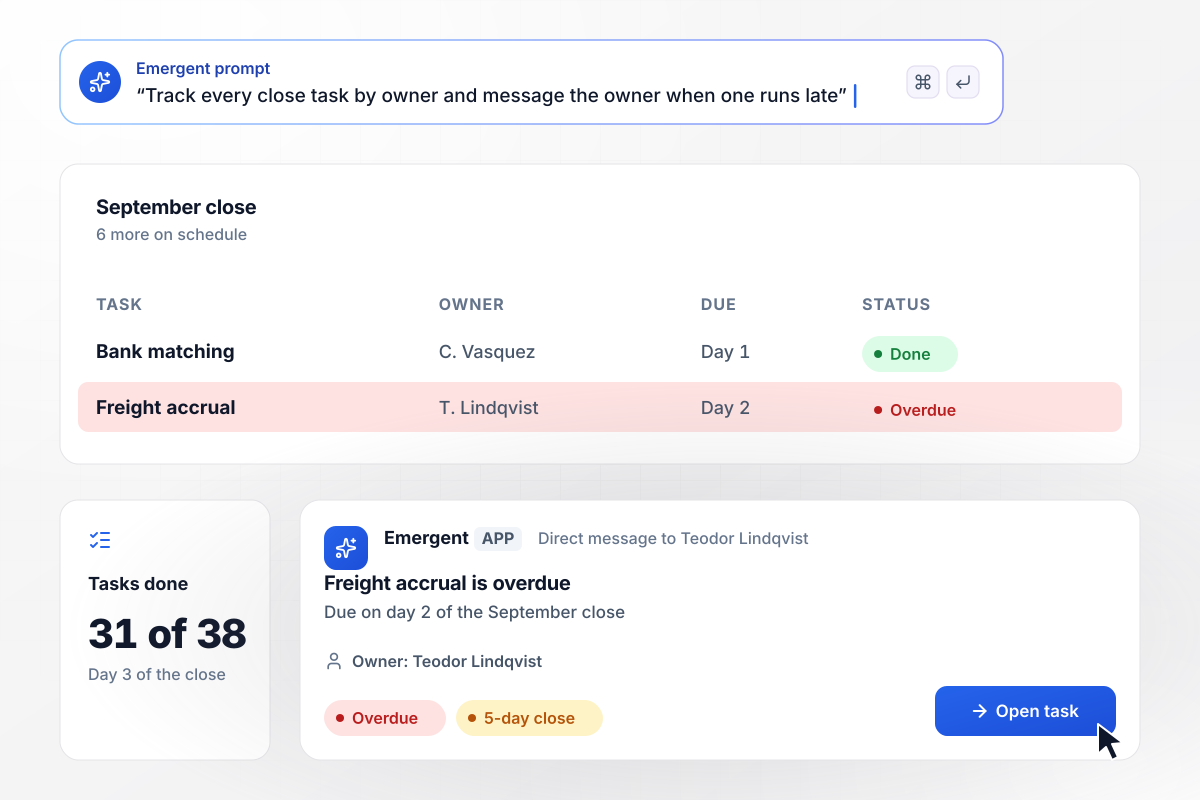
Day 3 of the close, and one accrual is late
Quillmont runs a 5-day close. On day 3 of the September close, the board shows 31 of 38 tasks done and 6 more on schedule. The freight accrual, owned by Teodor Lindqvist, was due on day 2. It turns red on the board, and Teodor gets a direct message with the task and its due day.
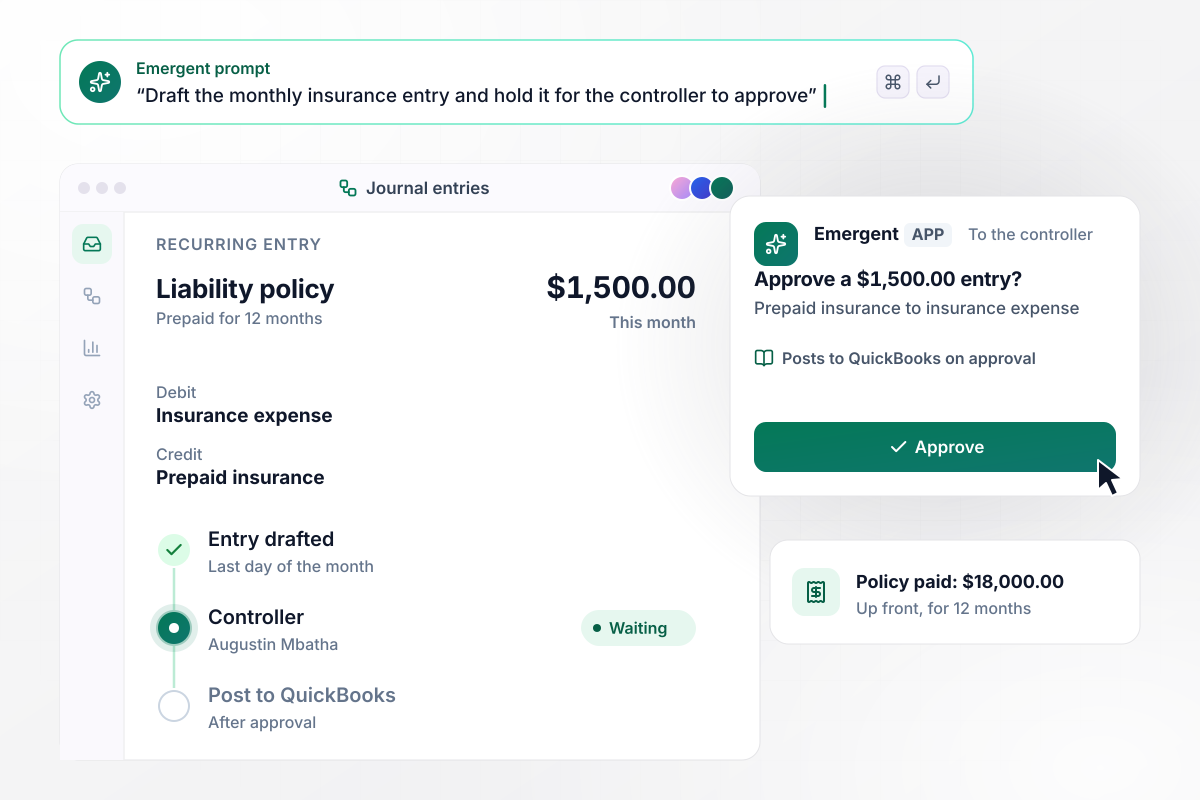
Each $1,500 insurance entry waits for the controller
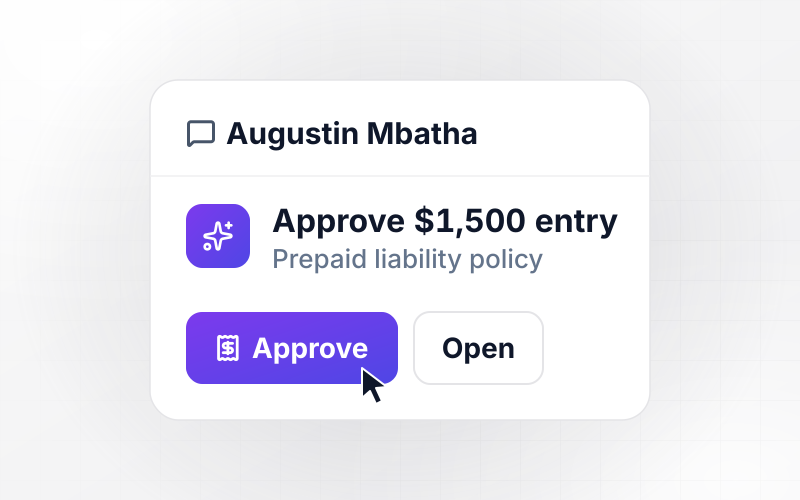
Quillmont paid $18,000 up front for a 12-month liability policy. On the last day of each month, the app drafts a $1,500 entry that moves one month of the policy from prepaid insurance to insurance expense. The draft waits for the controller, Augustin Mbatha. It posts to QuickBooks once he approves it.
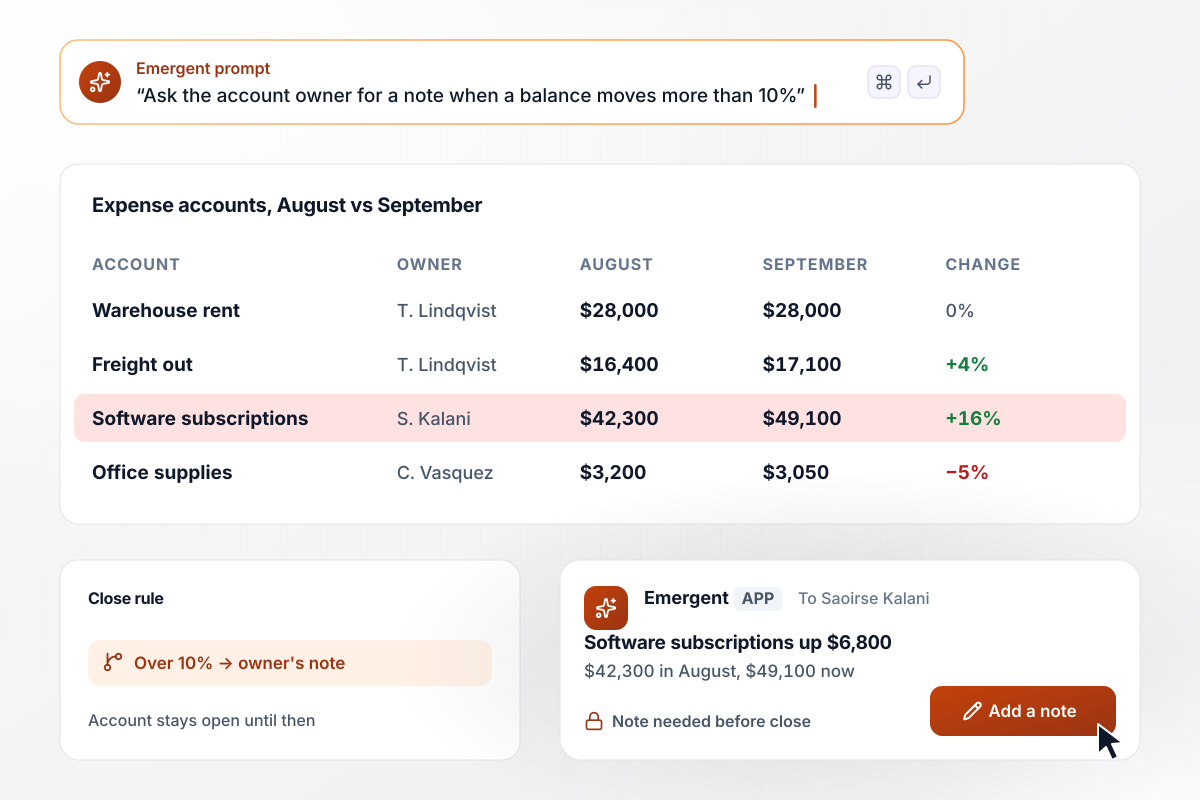
A $6,800 jump in software spend needs a note
Any account that moves more than 10% from the prior month needs a note from its owner. Software subscriptions rose $6,800, from $42,300 in August to $49,100 in September. Saoirse Kalani owns the account. The app asks her for the reason, and the account stays open on the close board until she writes it.






How to Automate Accounting
Seven steps to plan accounting automation around your close calendar, then build and test it with Emergent.
List every task in last month's close with its owner and the hours it took. Sort the list by hours. The tasks at the top that follow a fixed rule, such as matching or a recurring entry, are where to start.
Choose one task to automate first, not the whole close. Bank matching makes a good first pick for a small team: the rule is plain, every line has an amount and a date, and a miss is easy to spot.
Connect your ledger through its API so the app can read accounts and write entries back. Bring in bank lines from your bank's export or a connected feed, and keep one record per line so each match can be traced.
Prompt the rules the way you would explain them to a new staff accountant: match on amount and date, allow a 2-day gap for card deposits, send anything else to a named person. Emergent turns those sentences into the app and its database.
Decide which entries post on their own and which wait for a person. Put the controller on anything that moves a balance by judgment, such as accruals and write-offs, and log every approval with a name and a time.
Load last month's bank lines and entries, which your team has already closed by hand. Compare what the app matched and drafted with what your team booked, line by line. Fix a rule by prompting, then run the month again.
For the next close, let the app run next to your current process. Compare the two results at the end, then switch the manual task off. Add the next automation only after a clean close.
Why Build Accounting Automation With Emergent?
Emergent builds your matching rules and approvals as one app on your own database, with no task cap at quarter end.

|
Zapier | Make (Integromat) | n8n | |
|---|---|---|---|---|
| How you build | Prompt for the workflow and the app around it | Templates and editor, AI copilot | Visual canvas | Visual canvas, self-hosted or cloud |
| What you get | Workflow + trigger form + database + dashboard, as code you own | Zaps, plus Tables and Interfaces inside Zapier | Scenarios inside Make | Workflows inside n8n |
| Behavior at cap | Keeps running, no task cap | Overage billed at up to 1.25× the base rate | Runs pause | Cloud workflows stop until the reset or an upgrade |
| AI and agent steps | Native, share the same credit pool | Priced by model tier, drawn from the task pool | AI modules cost variable credits | Bring your own model API key, billed by the provider |
| Code ownership | Full code export to GitHub on paid plans | None | None | Yes on Community Edition |

Pick the Pricing Plan That Works for You
Choose the plan that fits your building ambitions. From weekend projects to enterprise applications, we've got you covered.




Find the right workflow automation
for you and your business
Frequently Asked Questions
Your Questions, Answered
Don't change this element unless you know what you are doing
More things you can build
with Emergent









on Emergent today




