

Build Incident Response Automation Around Your Playbooks
Build incident response automation that groups alerts, pages on-call, and waits for approval before any containment step.
Build incident response automation for my security team's phishing reports, suspicious sign-ins, and on-call paging.
Trusted by Builders Worldwide
Active Builders Worldwide
Apps Successfully Created
Countries Globally Reached



What Runs the Moment an Alert Fires
Routine checks and paging run on their own, and every step that changes a system waits for a person to approve it.
Related alerts grouped into one incident
Groups alerts from your monitoring and security tools by host, user, or service. The on-call engineer opens one incident with every related alert attached, not forty pages.
Severity set by rules you write
Assigns severity from rules your team writes, such as Sev 1 for a customer-facing outage and Sev 3 for one failed backup. Each level carries its own paging path and response target.
Pages that escalate on a timer
Pages the primary on-call engineer in Slack and by email, then starts a timer. If nobody acknowledges inside your window, the page moves to the secondary, then the team lead.
Indicators checked before anyone looks
Looks up each indicator as the alert arrives, including the sender domain's age and the link's reputation in your threat feed. The analyst opens the case with answers ready.
Containment held for a person's yes
Prepares the containment step, such as revoking sessions or purging an email, and sends it to the analyst with an approve button. Nothing on a live system changes before then.
Playbooks you keep as code
Exports your rules and integrations as readable code to your GitHub repository on paid plans. Every incident, with its timeline and approvals, sits in a database your team owns.
Playbooks Security and IT Teams Run First
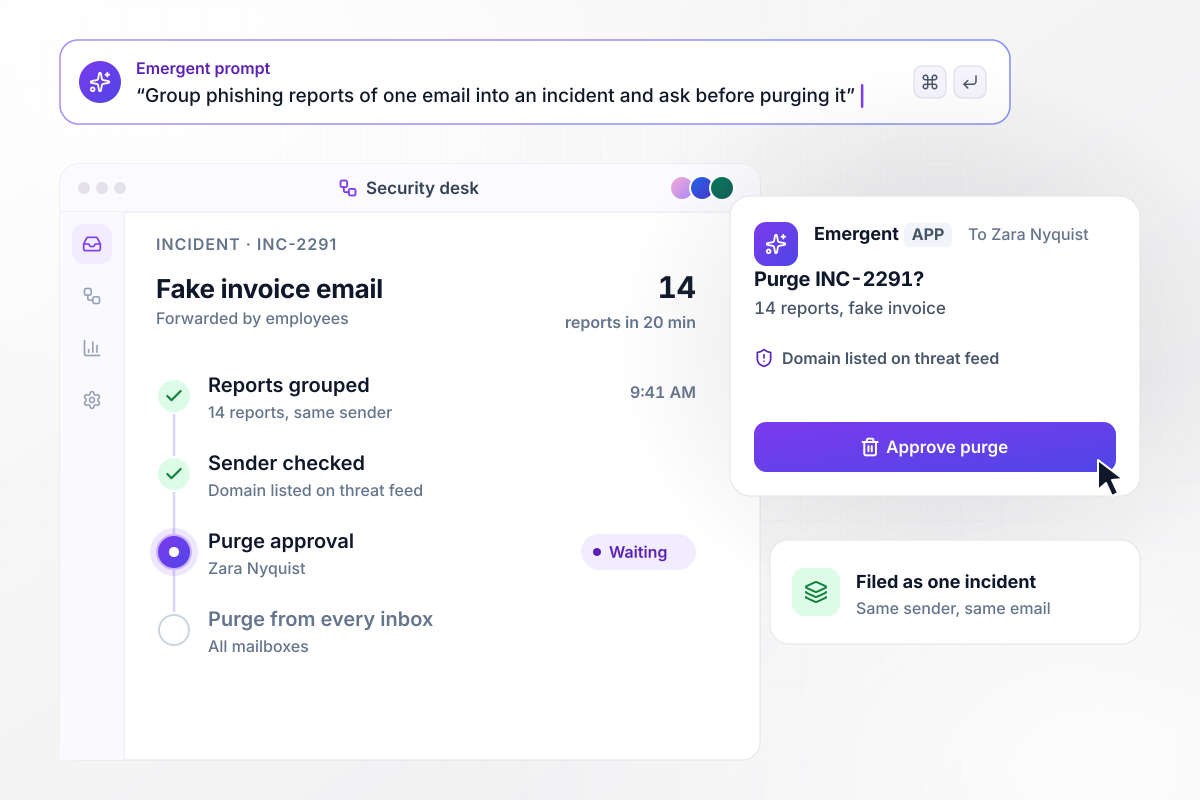
Fourteen phishing reports collapse into one incident
Employees forward suspicious mail to a report address. When 14 reports of the same fake invoice land within 20 minutes, the app files them under INC-2291 and checks the sender domain against your threat feed. Zara Nyquist on the security desk gets one request: purge the message from every inbox.
window.awbMockup = { phishingTriage: "Build a phishing triage app for my security team. Employees forward suspicious emails to a report address. Group reports of the same message into one incident, check the sender domain against our threat feed, and ask the analyst on duty in Slack to approve purging it from every inbox. Log each report, check, and decision on the incident.", suspiciousSignIn: "When our identity provider flags a sign-in from a new country soon after one from somewhere else, pull the user's 10 most recent sign-ins and registered devices. Send the on-call analyst a direct message with a button to revoke the user's sessions and require a new password. Change nothing until the analyst approves, and record who clicked.", outageEscalation: "Build on-call paging for my IT team. When failed checkouts stay above 40 a minute for 3 minutes, open a Sev 1 incident with its own Slack channel and page the primary on-call engineer. If nobody acknowledges within 5 minutes, page the secondary with the error graph attached. Show every open incident and who holds it.", incidentReview: "After an incident closes, build the review for my team from the alert events and the incident channel. Show a timeline with detection, acknowledgment, mitigation, and close times, and the minutes from detection to mitigation. Let us add action items with an owner and a due date, and keep each one open on a review board until it is done." };
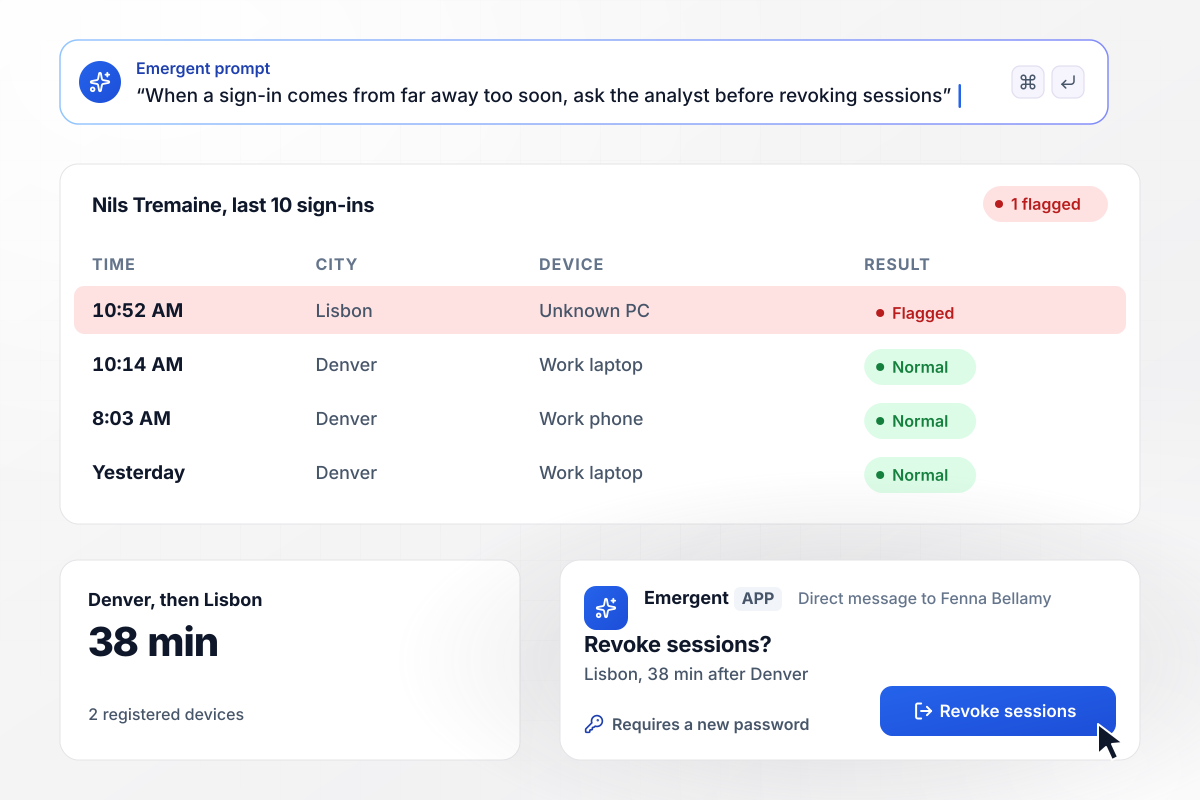
Sessions stay open until an analyst approves
Your identity provider flags a sign-in for Nils Tremaine from Lisbon, 38 minutes after his last one from Denver. The app pulls his 10 most recent sign-ins. Fenna Bellamy, the analyst on call, gets a direct message with one button: revoke his sessions and require a new password. Nothing changes until she clicks.
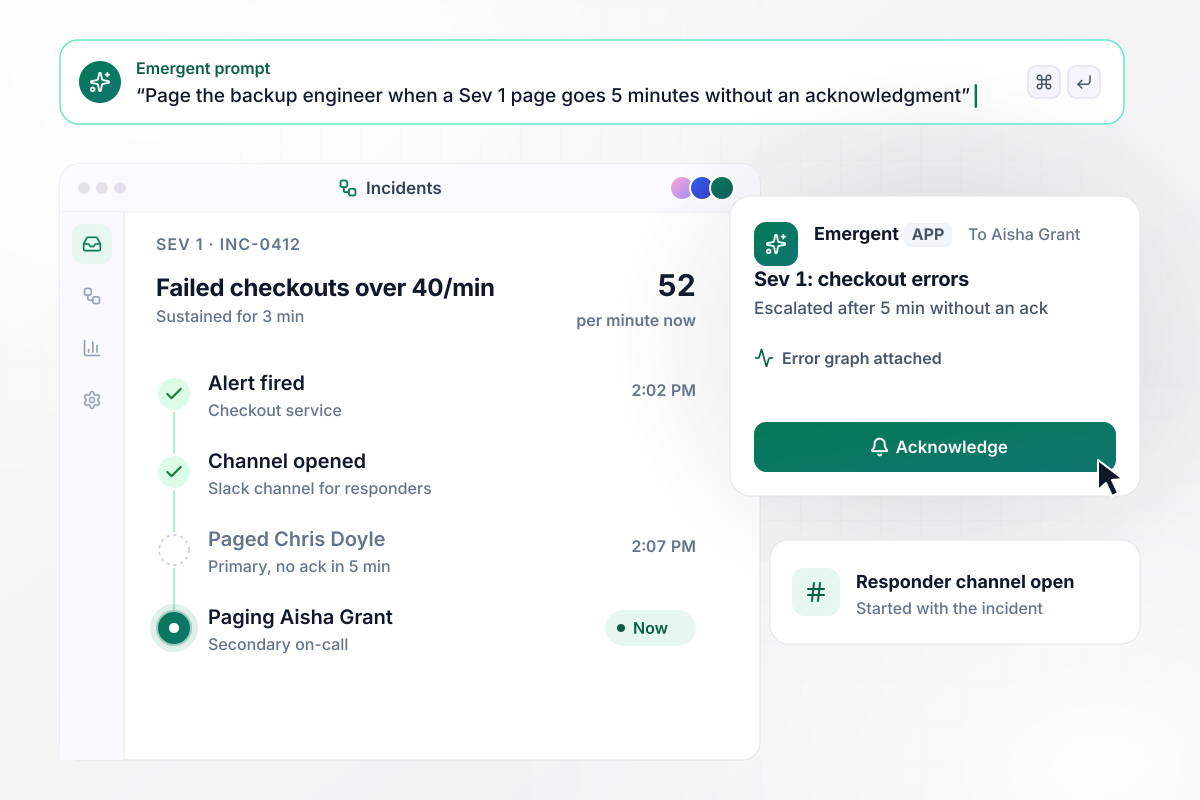
No acknowledgment in 5 minutes pages the backup
Failed checkouts climb past 40 a minute and stay there for 3 minutes. The app opens INC-0412 as Sev 1, starts a Slack channel for it, and pages Chris Doyle, the primary on-call engineer. Five minutes pass without an acknowledgment, and the page moves to Aisha Grant, the secondary, with the error graph attached.
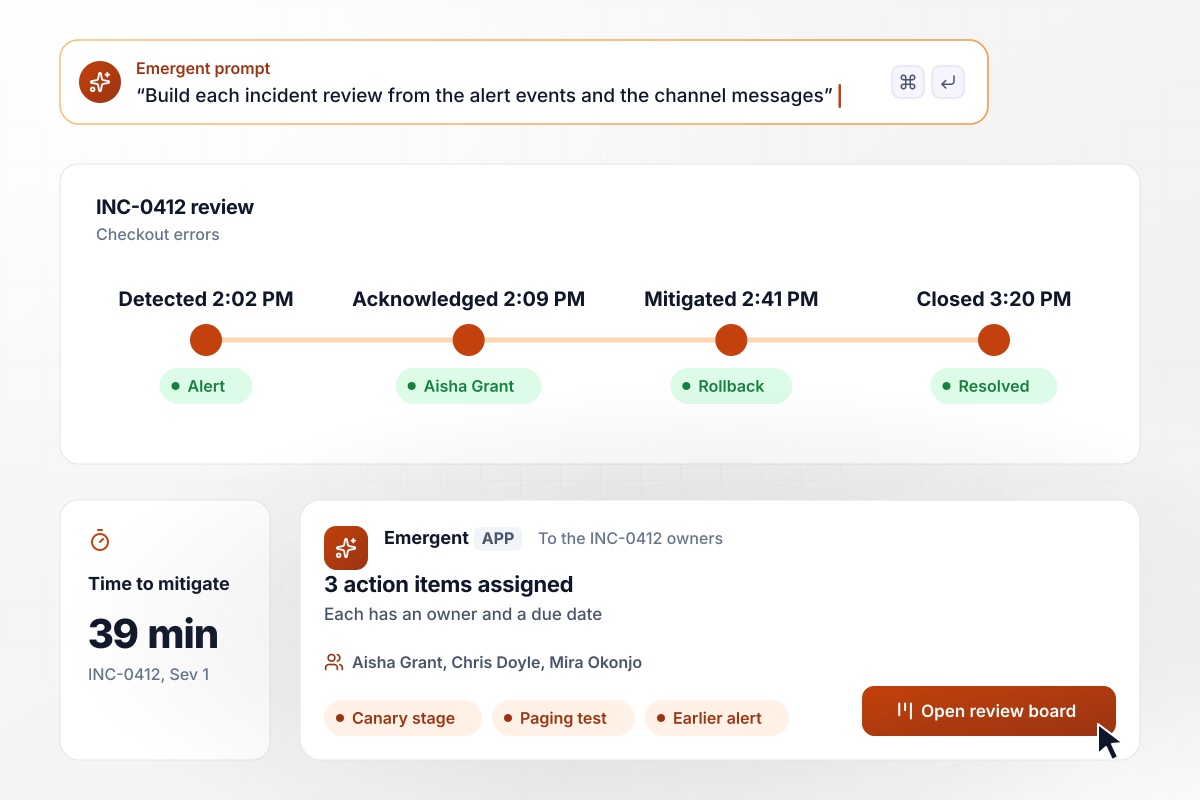
The review opens with its timeline already built
INC-0412 closes at 3:20 PM, and the app builds the review from alert events and channel messages. The timeline shows detection at 2:02 PM, acknowledgment at 2:09 PM, and mitigation at 2:41 PM, 39 minutes after the first alert. Three action items go to named owners, each open on the review board until it is done.






How to Automate Incident Response
Seven steps to set up incident response automation that pages the right person and holds risky actions for an analyst's approval.
Pull the last 90 days of alerts and tickets and sort them by type. Choose the type that comes up most often and follows the same steps every time. That becomes the first playbook, and the others wait until it works.
Brief the playbook the way you would brief a new analyst. Say what sets it off and who decides at each step. Emergent builds the automation from those sentences. Spell out every point where a person has to choose before anything changes.
Define what separates a Sev 1 from a Sev 2, and who gets paged at each level. Set how long a page can go unacknowledged before it escalates, and name a secondary for every rotation to cover nights and holidays.
Connect your monitoring service and identity provider through their APIs, along with the email security tool. Each alert should carry the fields the playbook reads, such as the host and the user. Add your chat tool so incident channels and approvals sit where responders work.
Mark which steps run unattended and which wait for approval. Lookups and grouping can run on their own. Disabling an account or isolating a laptop should wait for an analyst's click, with the evidence shown beside the button.
Feed last quarter's alerts through the automation before it touches live systems. Check that every one grouped correctly, reached the right person, and stopped at the approval step. Adjust the playbook by prompting wherever one went wrong, and replay until the set comes back clean.
Go live with the playbook you tested most and watch a month of real incidents. Compare time to acknowledge and time to mitigate with the numbers from your replay, then switch on the next one.
Why Build Incident Playbooks With Emergent?
Emergent turns your playbooks into an app with its own database, runs through alert floods with no task cap, and exports the code.

|
PagerDuty | Swimlane | Exabeam | |
|---|---|---|---|---|
| How you set it up | Prompt for your incident playbook and the app around it | Self-serve signup; set up schedules and escalations | Low-code canvas, implementation by Swimlane services | SOAR authoring with prebuilt playbooks |
| What you get | Alert grouping, on-call paging, approval gates, and reviews, as code you own | On-call paging, incident workflows, and reviews | Security playbooks, case management, and dashboards | Cases and investigation timelines in a security platform |
| Behavior at cap | Keeps running, no task cap | Extra seats, events, or AI actions bought as credits | Playbooks keep running; steady overuse means a larger license | Licensed by daily data volume; overuse can degrade service |
| AI and agent steps | Native, share the same credit pool | Included on platform tiers, metered in AI actions | Hero AI credits included; extra packs sold | Nova AI agents, no separate license |
| Code ownership | Full code export to GitHub on paid plans | None | Self-hosted option, no source code | None; a separate self-hosted SIEM is offered |




Pick the Pricing Plan That Works for You
Choose the plan that fits your building ambitions. From weekend projects to enterprise applications, we've got you covered.




Find the right workflow automation
for you and your business
Frequently Asked Questions
Your Questions, Answered
Don't change this element unless you know what you are doing
More things you can build
with Emergent









on Emergent today


