

Build a Food Order Form Your Kitchen Can Cook From
Build a food order form that puts allergies on the kitchen ticket, closes at your cutoff, and saves orders to a database you own.
Build a food order form for a noodle bar with a pickup time, a spice level for each dish, and a note for the kitchen.
Trusted by Builders Worldwide
Active Builders Worldwide
Apps Successfully Created
Countries Globally Reached



What Happens After the Customer Orders
A food order form puts the dish and pickup time in one record, next to any allergy. These six parts carry that record to the cooks.
Built from the menu you already use
Emergent builds the form from a plain-English description of your menu, with a price on every size and add-on. Ask for a Friday special later, and Emergent adds it to the form.
Choices that follow the dish picked
Customers choose a dish, then its options one screen at a time, such as spice level or rice or noodles. The form shows only the add-ons that belong to the dish chosen.
Every order saved as a row you own
Each order lands in a database you own, with the items and pickup time beside the phone number. When a regular calls for the usual, look up their last order and read it back.
A kitchen screen that updates live
The app shows a live kitchen view sorted by pickup time. A new order appears on the screen the moment it is sent, and nobody at the stove has to check an inbox for it.
Alerts where the owner already looks
The app sends a Slack message or an email when a catering order arrives or when the cutoff passes. Customers can get a reminder with their pickup time the day before.
The code is yours to keep
Export the complete code of the form and its kitchen view to your GitHub repository on paid plans. A developer can take it over later, and the orders stay in your database.
One Form, Four Kinds of Food Orders
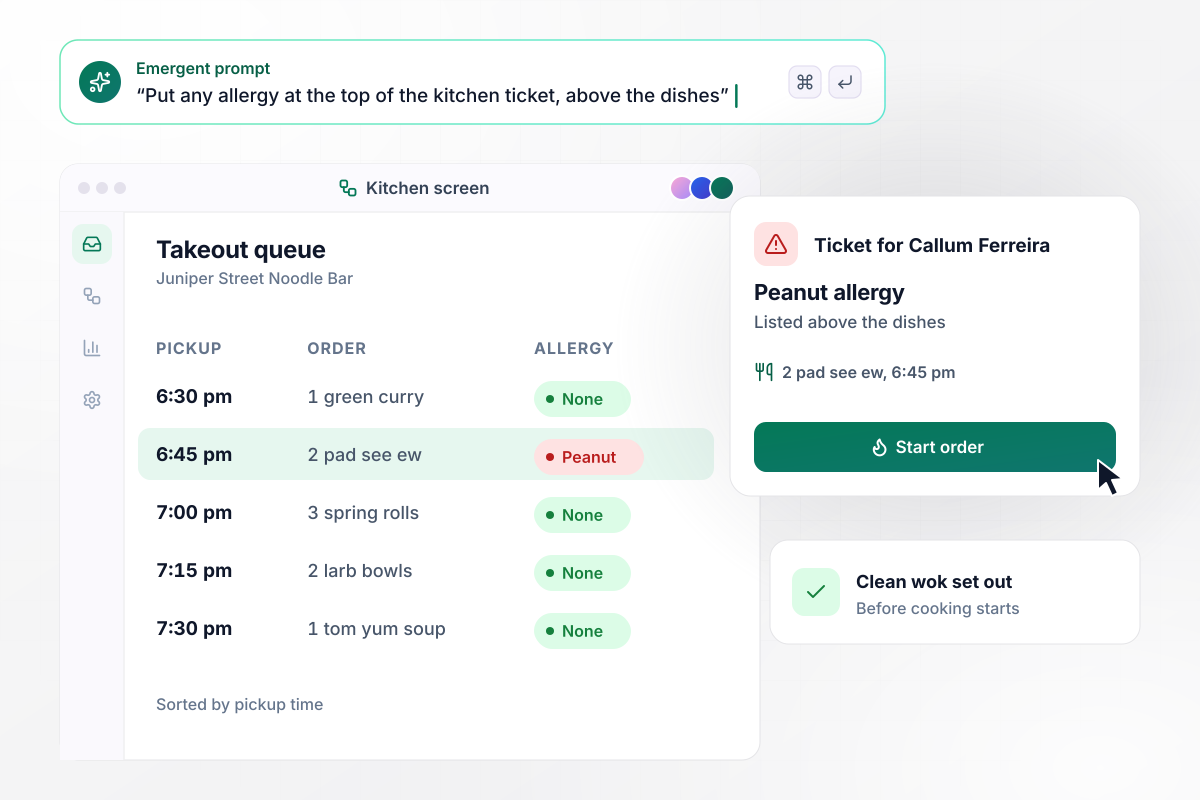
The kitchen ticket leads with the peanut allergy
Juniper Street Noodle Bar sends every takeout order to a screen above the wok station. Callum Ferreira ordered 2 pad see ew for 6:45 pm pickup and ticked peanut on the allergy list. His ticket came up with the peanut allergy above the dishes, and the cook set out a clean wok before starting it.
window.awbMockup = { takeoutOrders: "Build a takeout food order form for my noodle bar. Customers pick dishes, add-ons, and a pickup time, and tick any allergies from a list. Show every order on a kitchen screen sorted by pickup time, with any allergy at the top of the ticket above the dishes.", mealPrep: "Build a weekly meal prep order form. Customers choose meals from this week's menu for Sunday delivery. Close the form at 8 pm Thursday, then email my chef a prep list with the count of each dish and the number of meals in all.", officeLunch: "Build a lunch order form for my office. Staff pick one item from the deli menu by 10:30 am. At 10:30, close the form and send me one Slack direct message with every order and the count of each item, and I will call the deli once.", catering: "Build a catering order form for my taco bar. Charge $14 a guest with a 20-guest minimum. Ask for the event and the guest count, then show the total and the trays of each filling, one tray per 10 guests, before the customer sends the order." };
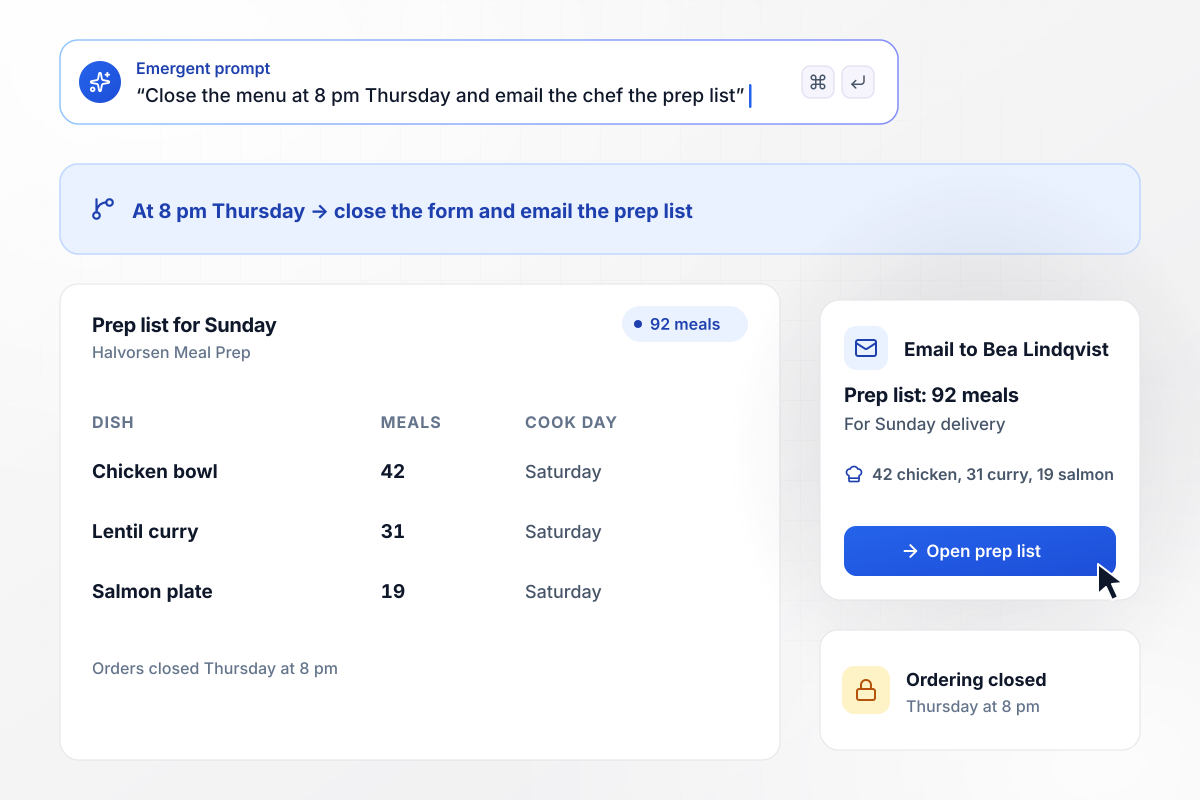
At 8 pm Thursday, ordering stops and the prep list goes out
Halvorsen Meal Prep plans the week around one number: meals to cook on Saturday for Sunday delivery. The menu takes orders until 8 pm Thursday, then closes. At 8 pm, chef Bea Lindqvist got the prep list by email: 42 chicken bowls, 31 lentil curries, and 19 salmon plates, 92 meals in all.
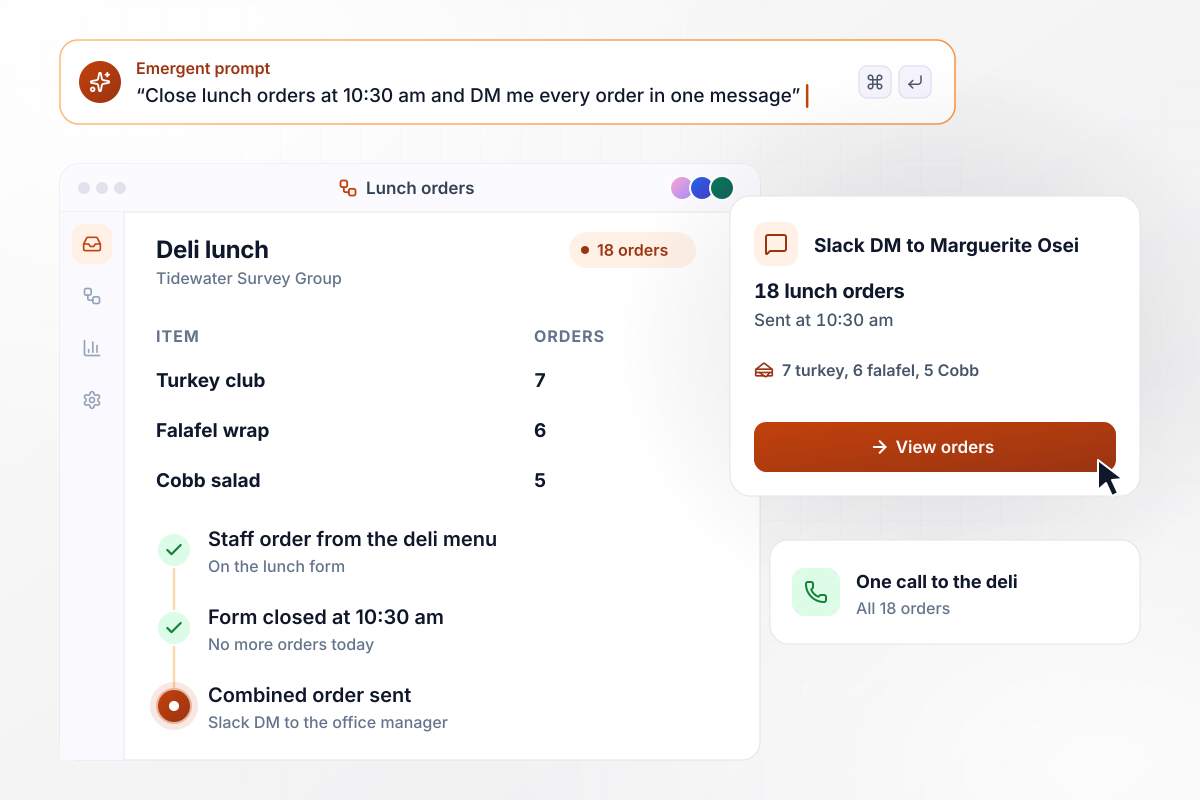
One Slack message carries all 18 lunches
Lunch at Tidewater Survey Group used to arrive as texts to the office manager. Now staff pick from the deli menu on the form until 10:30 am. At 10:30, Marguerite Osei got one Slack direct message with all 18 orders: 7 turkey clubs, 6 falafel wraps, and 5 Cobb salads. She called the deli once.
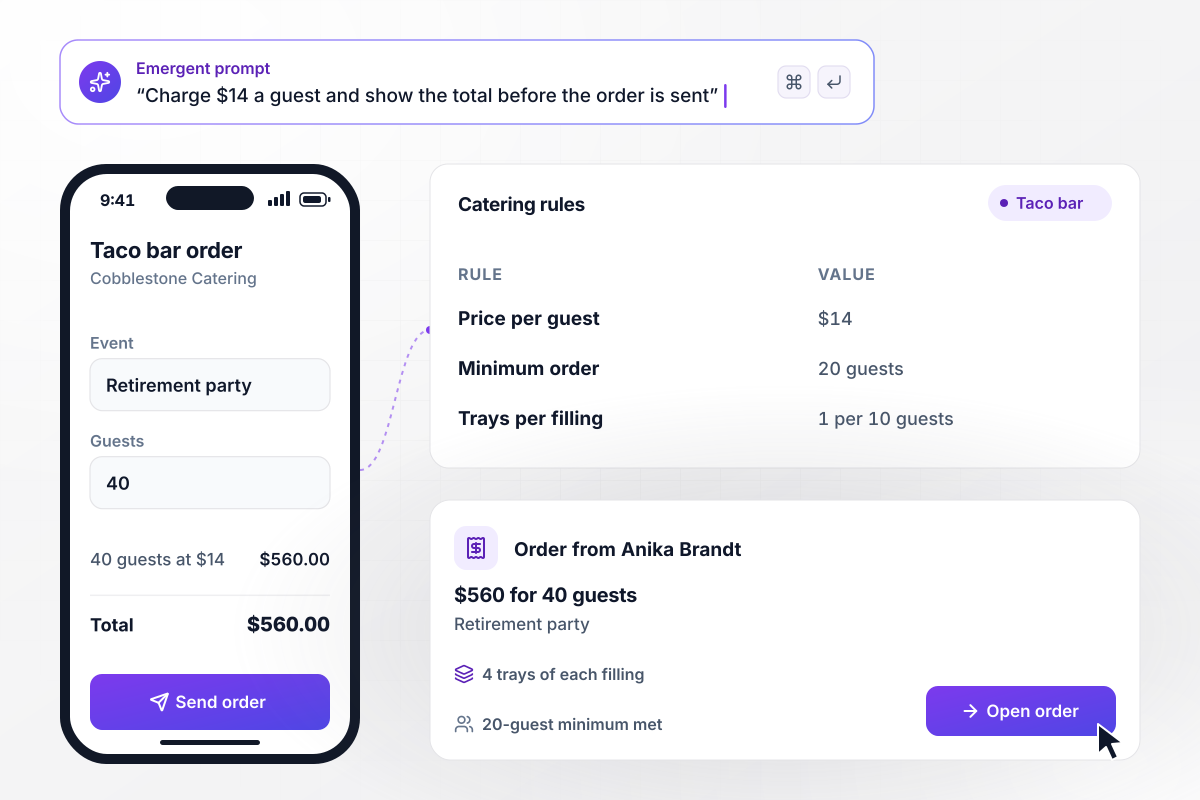
40 guests at $14 each come to $560 on the form
Cobblestone Catering quotes by the guest: $14 a guest for its taco bar, with a 20-guest minimum. Anika Brandt entered 40 guests for a retirement party. Before she sent the order, the form showed $560 and 4 trays of each filling, at 1 tray per 10 guests.






How to Create a Food Order Form
Seven steps to create a food order form that gets complete orders to the kitchen before the cutoff.
Write the menu the way customers order from it: each dish with its sizes and add-ons, and a price beside every one. Group the add-ons under the dish they belong to, and leave out anything you make only on request.
Pick a cutoff you can shop and prep against. A takeout counter might stop taking orders 20 minutes before closing, and a weekly menu might close 2 days before the cooking starts. Write the time down with its weekday.
Make the allergy question part of the order itself, not a notes box at the end. A checklist with an Other line reads faster at the stove than free text. Decide where the answer sits on the kitchen ticket before you build.
Each person who handles an order needs a different signal. The line cooks may need only the live screen. The owner may want a Slack message for each catering order, and the chef one email with the totals once the cutoff passes.
Paste your notes from the first four steps into one prompt. Emergent builds the screens customers and cooks see, with the database behind them. Ask for changes the same way, such as a new special or a later Friday cutoff.
Put the form's link where customers already look for you: the menu page of your website and a printed QR code by the register. For an office lunch, post it in the staff chat at the same time each morning.
Run a test rush with three orders: one plain, one with an allergy ticked, and one sent a minute after the cutoff. Check that the allergy shows at the top of the ticket and that the late order cannot go through.
Why Build Your Food Order Form With Emergent?
Emergent builds the form and its live kitchen view from one description of your menu, and you own the database the orders are saved in.

|
Jotform | Google Forms | Typeform | |
|---|---|---|---|---|
| How you build | Describe it in plain English | Templates, editor, AI generator | Editor, with Gemini drafting on some Workspace plans | Templates, editor, AI assist |
| Where responses live | A database table you own, plus any integration | Jotform account | Google Sheets | Typeform account |
| Response limits | No response caps | Monthly submission caps by plan; the form stops at the cap | No limit | Monthly response caps by plan; the form closes at the cap |
| Code ownership | Full code export to GitHub on paid plans | None | None | None |

Pick the Pricing Plan That Works for You
Choose the plan that fits your building ambitions. From weekend projects to enterprise applications, we've got you covered.




Find the right form
for whatever you're collecting















Frequently Asked Questions
Your Questions, Answered
Don't change this element unless you know what you are doing
More things you can build
with Emergent









on Emergent today


